Responsive news theme built with Tailwind CSS and Alpine.js
HugoStarter
hugo-news — Hugo Starter Template
By professionalaf
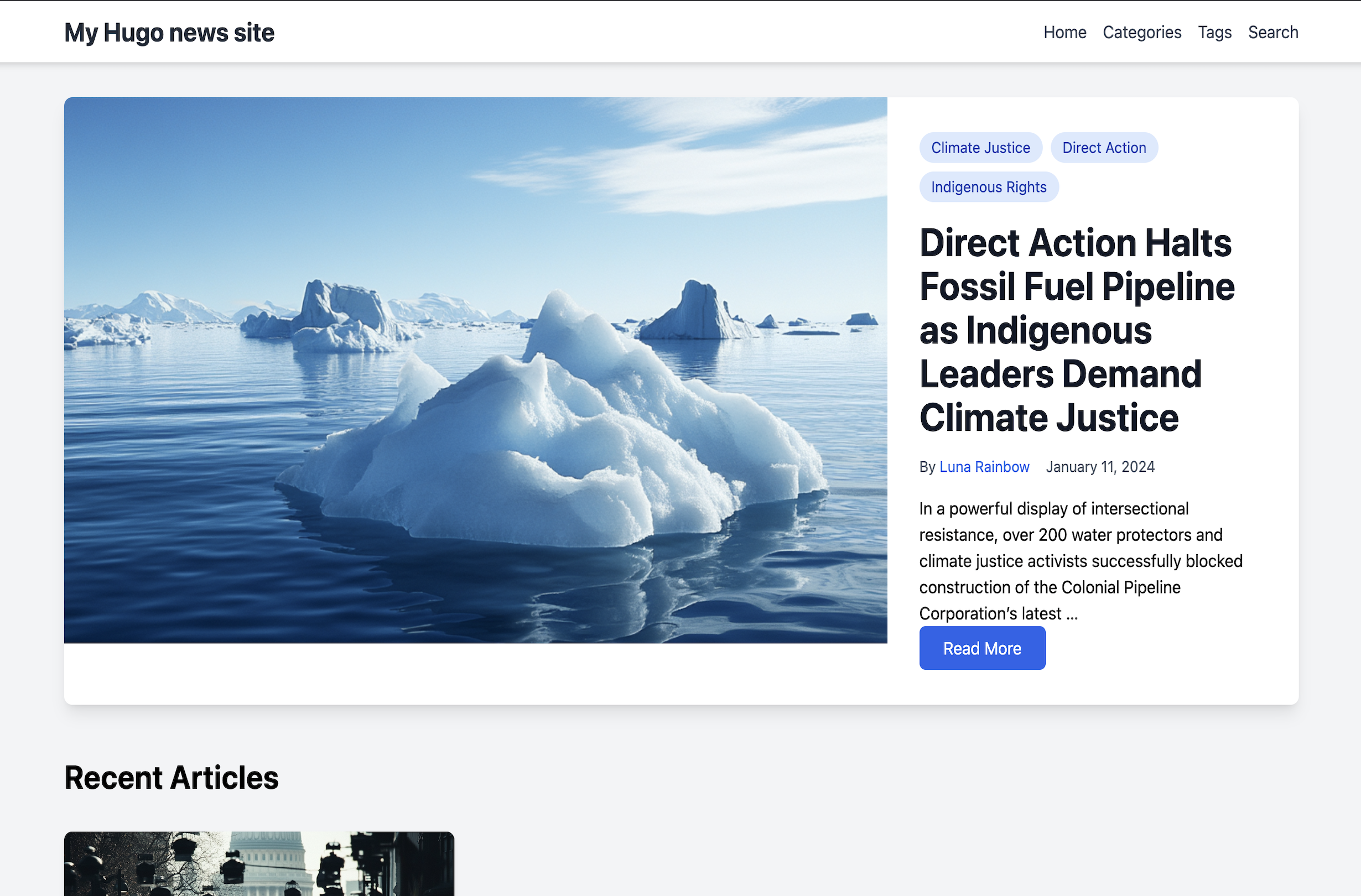
Hugo News is a Hugo-based theme for news and media websites, built with Tailwind CSS and Alpine.js, offering categories, tags, authors, search, and comments modules.
Explore the design
Compare the page layouts and mobile experience. Open any screenshot for a closer look.
Author preview
Author-provided previewTop of page
Preview provided in the project README.
One original preview is available. Open the full image to inspect the design.
Screenshots show visual appearance; interactive behavior may differ.
Recorded 2026-10-03View source
What stands out
A quick read of the recorded project description.
Supports three taxonomies—categories, tags, and authors—with author bios and avatars
Built-in on-site search powered by Fuse.js
Supports featured_image for large featured article displays
Offers both static comments (comments.json) and localStorage-based dynamic comments
Optional Google Analytics 4 integration, loaded only when a measurement ID is configured
Template Details
Hugo News is a Hugo theme for news and media sites, with the repository under the MIT license. The theme uses Tailwind CSS for styling, Alpine.js for interactivity, and integrates Fuse.js for on-site search. At the content level, it supports three taxonomies: categories, tags, and authors. Articles can set featured_image for a large featured display, and authors can configure a bio, avatar, and social links. The theme includes Google Analytics 4 support, loaded only when a valid measurement ID is configured. Comments are of two types: static comments stored in comments.json in the same directory as the article, visible to all visitors; and dynamic comments saved in the browser's localStorage, visible only on the creator's device and lost when browser data is cleared. Installation requires the Hugo Extended version to support PostCSS, and a Node.js environment to run npm install for processing CSS/JS assets. The theme includes an exampleSite and a GitHub Actions test workflow for local development and build verification.
HugoLauncher
Is it right for your project?
Use Cases
- Building news and information sites focused on article lists and category browsing
- Adding author profiles and tag aggregation pages to media-oriented Hugo sites
- Displaying reader comments via static comment files in a backend-free environment
- Hugo projects that need on-site search without introducing an external search service
Suitable For
- Developers using Hugo who want a ready-made news-style layout
- Front-end developers comfortable with a Tailwind CSS and PostCSS build process
- Sites needing basic content organization such as categories, tags, authors, and search
- Users who can handle third-party asset licensing and external service costs themselves
Getting started & customization
Use these recorded setup notes alongside the repository instructions for your chosen version.
- 1
Requires the Hugo Extended version to support PostCSS integration
- 2
Requires a Node.js environment; after installing the theme, run npm install in the theme directory to process CSS/JS
- 3
Set theme = "hugo-news" in the site configuration, and configure taxonomies, menus, and output formats as needed
- 4
To enable Google Analytics 4, enter the googleAnalytics measurement ID in the configuration; leave it commented out if not needed
- 5
Static comments require creating comments.json in the article directory; dynamic comments are handled automatically by the theme's JavaScript
License & source material
Usage conditions & limitations
Free to use · keep license noticeThis entry covers the free version of a public repository under the MIT license; the free scope applies to that version's code and does not imply that external services or third-party assets are free.
Must comply with when using
- Free use, modification, commercial use, and distribution of this version's code are permitted.
- When distributing copies or substantial portions of the code, retain the original author's copyright notice and the full MIT license notice.
- The code is provided as is; warranties and limitations of liability are governed by the original license and applicable law.
Additional costs & items to verify
- Using this theme requires installing the Hugo Extended version (0.128.0 or higher); standard Hugo cannot perform PostCSS processing and the theme will not build properly.
- Building styles and scripts requires Node.js 18.0.0 or higher and running npm install in the theme directory to install dependencies; otherwise CSS/JS assets cannot be generated.
- Enabling analytics requires registering a Google Analytics account and obtaining a GA4 measurement ID; this is an external service that may involve third-party terms and costs. If not configured, no analytics code is loaded.
- Dynamic comments are stored only in the visitor's browser localStorage, visible only to the creator, not synced to other visitors, and lost when browser data is cleared; they cannot be used as a public comment system.
- Demo images, fonts, icons, and other third-party assets must be checked against their respective licenses; the code's MIT license alone is not sufficient to determine this.
- External services such as domains, hosting, databases, payments, or AI may incur additional charges.
View Original Text Basis
Permission is hereby granted, free of charge
Original License Text
This theme requires Hugo Extended version 0.128.0 or higher for PostCSS support.
Original README
Node.js (>= 18.0.0) - Required for Tailwind CSS and PostCSS processing
Original README
Get your GA4 Measurement ID from your Google Analytics account
Original README
https://github.com/professionalaf/hugo-news/blob/main/LICENSEhttps://github.com/professionalaf/hugo-news/blob/main/README.mdDynamic comments are stored in the user's browser localStorage.
Original README
Compiled by DeepSeek based on repository license and README ·2026-10-03. Results only cover the materials read; dependencies, images, fonts, and subsequent term changes are subject to their respective original texts.
Project checks & description sources
Template Information
- Source platforms
- Hugo Themes
- Documentation and maintenance reference score
- Partly documented · 67 / 100
- Technologies
- Hugo
- Website type
- Starter
How this score is calculated
Our heuristic uses license records (up to 30), a demo link (12), a preview (10), stars (15), recorded maintenance (15), description completeness (8), feature records (5) and classification data (5). It is not a code, security or performance test, or a Google score. A link does not establish tested functionality.
What to verify for this project
- Repository update recorded
- 2026-02-01
- Screenshot last checked
- 2026-10-03
No demo link is recorded. Use the repository instructions to evaluate the project locally; the screenshot alone cannot establish interactive behavior.
The catalog identifies Hugo as the primary stack. Check the actual dependency manifest and lockfile for versions and hosting requirements. These notes use recorded metadata, not a code audit or a deployment test.
Use a selection guide →How this description was prepared
AI-assisted description based on catalog records and repository material. Repository authors are not automatically the reviewers of this description.
Review declaration: [email protected] · 2026-10-04
Inspect the recorded source material
SHA-256: 5e3029be3a97f7018bd86718d28603724177b12743d3d97788b8e4a89f43b103
2026-10-03T23:06:21.747Z
Source file / repository# Hugo News Theme
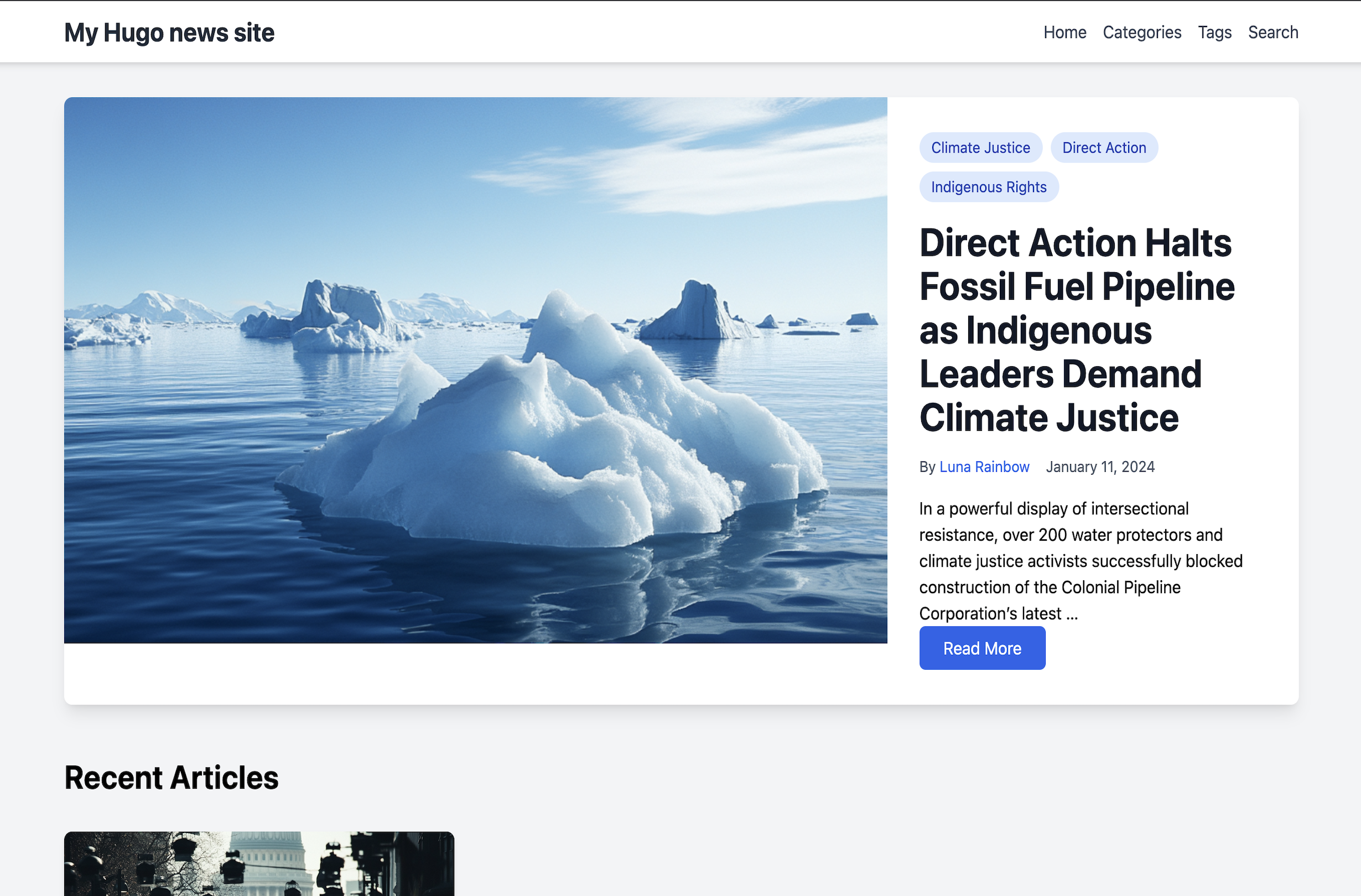
A modern, responsive Hugo theme designed for news and media websites. Built with Tailwind CSS and Alpine.js.
## Features
- 🎨 Modern design with Tailwind CSS
- 🔍 Built-in search functionality
- 📱 Fully responsive
- 🏷️ Support for categories, tags, and authors
- 🖼️ Featured articles with large images
- 🔄 Dynamic category browsing
- 👥 Author profiles
- 🔍 Search functionality with Fuse.js
- ⚡ Fast loading with minimal JavaScript
- 🎨 Clean typography and spacing
- 📊 Google Analytics 4 integration
## Installation
### For Hugo Site Users
1. In your Hugo site directory, run:
```bash
git submodule add https://github.com/professionalaf/hugo-news themes/hugo-news
```
2. Install theme dependencies (required for CSS/JS processing):
```bash
cd themes/hugo-news
npm install
```
3. Update your `hugo.toml` configuration:
```toml
theme = "hugo-news"
```
**Note**: This theme requires Hugo Extended version 0.128.0 or higher for PostCSS support.
## Configuration
### Google Analytics
The theme includes built-in support for Google Analytics 4 (GA4). To enable tracking:
1. Get your GA4 Measurement ID from your Google Analytics account (format: G-XXXXXXXXXX)
2. Add it to your site's config file:
```toml
googleAnalytics = "G-XXXXXXXXXX" # Replace with your GA4 measurement ID
```
The analytics code will:
- Only load when a valid measurement ID is provided
- Respect user privacy settings and cookie consent
- Load asynchronously to not impact page performance
- Track page views and basic user interactions
If you don't want analytics, simply leave the googleAnalytics parameter commented out:
```toml
# googleAnalytics = "G-MEASUREMENT_ID"
```
### Basic Configuration
Example `hugo.toml` configuration:
```toml
baseURL = 'https://example.org/'
languageCode = 'en-US'
title = 'My Hugo News Site'
[taxonomies]
category = "categories"
tag = "tags"
author = "authors"
[outputs]
home = ["HTML", "RSS", "JSON"]
[[menus.main]]
name = "Home"
url = "/"
weight = 10
[[menus.main]]
name = "Categories"
url = "/categories"
weight = 20
[[menus.main]]
name = "Tags"
url = "/tags"
weight = 30
```
## Content Structure
```
content/
├── _index.md
├── articles/
│ ├── first-post.md
│ └── second-post.md
├── authors/
│ ├── _index.md
│ └── john-doe/
│ ├── _index.md
│ └── avatar.jpg
└── categories/
└── _index.md
```
### Article Front Matter
```yaml
---
title: "Article Title"
date: 2024-01-01
author: "Author Name"
categories: ["Category1", "Category2"]
tags: ["tag1", "tag2"]
featured_image: "path/to/image.jpg"
description: "Article description"
---
```
### Author Front Matter
```yaml
---
title: "Author Name"
bio: "Author biography"
avatar: "author-image.jpg"
social:
twitter: "twitterhandle"
linkedin: "linkedinprofile"
---
```
## Comments System
The theme includes two types of comment systems:
### Static Comments
Static comments are stored alongside the article content in a `comments.json` file. They are visible to all users and persist across sessions. To add static comments:
1. Create a `comments.json` file in your article's directory (next to your article's markdown file)
2. Use this structure:
```json
{
"comments": [
{
"name": "Author Name",
"content": "Comment text",
"date": "2024-01-11T15:30:00Z",
"isStatic": true
}
]
}
```
Example directory structure:
```
content/
└── articles/
└── my-article/
├── index.md
├── featured-image.jpg
└── comments.json
```
### Dynamic Comments
Dynamic comments are stored in the user's browser localStorage. These comments:
- Only visible to the user who created them
- Persist across page refreshes but only in the same browser
- Are not shared with other users
- Will be cleared if the user clears their browser data
Dynamic comments are automatically handled by the theme's JavaScript and don't require any setup.
## Development
### Requirements
- Hugo Extended Version (>= 0.128.0) - Required for PostCSS integration
- Node.js (>= 18.0.0) - Required for Tailwind CSS and PostCSS processing
### Setup
1. Clone the repository:
```bash
git clone https://github.com/professionalaf/hugo-news.git
cd hugo-news
```
2. Install dependencies:
```bash
npm install
```
### Development Workflow
1. **Start development server** (runs from exampleSite):
```bash
npm run dev
```
This will start Hugo's development server with hot reload. The server will automatically process CSS through PostCSS and Tailwind CSS.
2. **Build for production**:
```bash
npm run build
```
3. **Test the theme** (builds exampleSite):
```bash
npm test
```
### Build Process
The theme uses Hugo's built-in asset pipeline:
- **CSS**: Processed through PostCSS with Tailwind CSS and Autoprefixer
- Source: `assets/css/main.css`
- Automatically minified and fingerprinted in production
- Tailwind CSS classes are purged based on usage in templates
- **JavaScript**: Alpine.js is bundled via Hugo's asset pipeline
- Source: `assets/js/alpine.js`
- Automatically minified and fingerprinted in production
- **Configuration**:
- `tailwind.config.js` - Tailwind CSS configuration
- `postcss.config.js` - PostCSS plugins (Tailwind, Autoprefixer)
- `hugo.toml` - Hugo build configuration with cache busters
### Testing
The theme includes automated testing via GitHub Actions:
- Builds with multiple Hugo versions (0.128.0 minimum, latest)
- Validates HTML output
- Checks CSS and JS asset generation
- Runs on every push and pull request
To test locally:
```bash
npm test
```
## Contributing
1. Fork the repository
2. Create your feature branch (`git checkout -b feature/amazing-feature`)
3. Commit your changes (`git commit -m 'Add amazing feature'`)
4. Push to the branch (`git push origin feature/amazing-feature`)
5. Open a Pull Request
## License
Released under the [MIT License](LICENSE).
## Credits
- Built with [Tailwind CSS](https://tailwindcss.com/)
- Interactive components powered by [Alpine.js](https://alpinejs.dev/)
- Search functionality using [Fuse.js](https://fusejs.io/)
Explore similar templates
Compare previews and descriptions within the same stack and category.

hugo-xmin
hugo-xmin is an extremely minimal Hugo theme written by Yihui Xie for template beginners. HTML and CSS total about 140 lines, with no external dependencies, and it uses the MIT license.
Hugo · Starter

hugo-theme-gallery
A Hugo Extended photo gallery theme that organizes images with Page Bundles, automatically generating album lists and gallery pages with a Justified layout and PhotoSwipe lightbox.
Hugo · Starter

reveal-hugo
reveal-hugo is a Hugo theme that converts Markdown content into Reveal.js-based HTML presentations. It supports slide separation with `---`, shortcodes for fragments, slides, sections, notes, Markdown, and MathJax, and organizes content as root or section presentations with order controlled by weight.
Hugo · Starter

anatole
Anatole is a minimalistic two-column Hugo theme ported from farbox-theme-Anatole, featuring dark mode, multilingual and RTL support, and optional portfolio, comments, analytics, KaTeX, and Mermaid integrations. It suits personal blogs, portfolios, or documentation sites built with Hugo.
Hugo · Starter

hugo-theme-diary
A Hugo diary-style theme ported from the Hexo theme Journal, with a grid homepage for essays and daily notes. It supports six languages, dark mode, table-of-contents scroll positioning, reading time, code highlighting, and configurable sidebar, fonts, and colors.
Hugo · Starter

risotto
risotto is a minimalist, responsive Hugo theme inspired by terminal ricing aesthetics. It uses semantic HTML and pure CSS with no JavaScript, and its layout relies on CSS Grid for native responsiveness without manual breakpoints.
Hugo · Starter