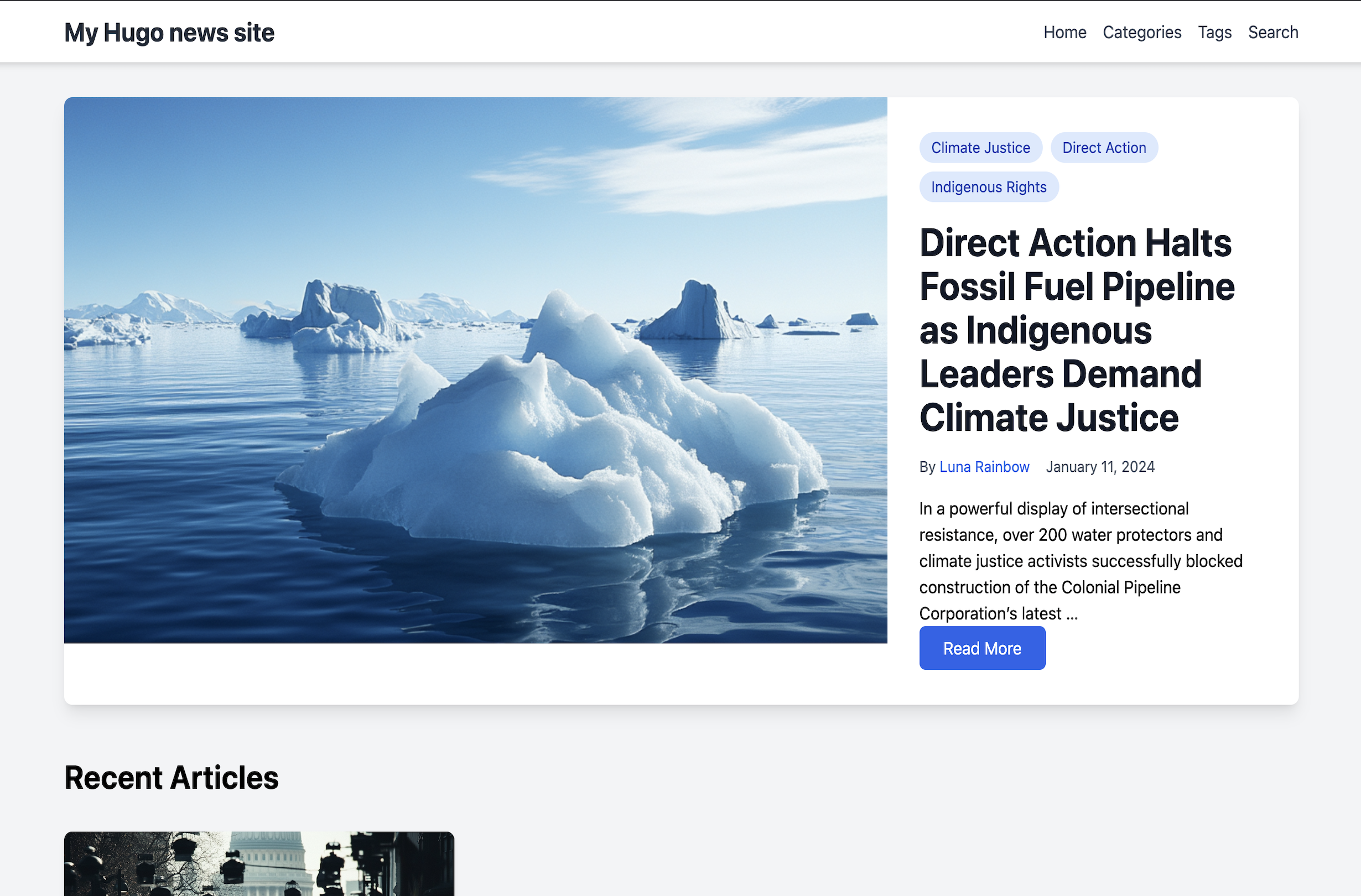
使用 Tailwind CSS 与 Alpine.js 构建的响应式新闻主题
Hugo启动器
hugo-news — Hugo 启动器模板
作者 professionalaf
Hugo News 是一个基于 Hugo 的新闻媒体网站主题,使用 Tailwind CSS 与 Alpine.js 构建,提供分类、标签、作者、搜索与评论等模块。
看看你的网站会是什么样
浏览真实页面截图,比较内容排版与手机效果。点击下方缩略图切换,放大查看整页细节。
目前有 1 张原始预览,可打开完整图片查看设计细节。
截图用于了解视觉与布局,交互效果请以实际项目为准。
采集于 2026-10-03查看来源
值得关注的模板亮点
从已有项目资料中,快速了解它的特点。
支持分类、标签、作者三种分类法及作者简介与头像
内置基于 Fuse.js 的站内搜索
支持文章 featured_image 大图推荐展示
提供静态评论(comments.json)与 localStorage 动态评论两种方式
可选 Google Analytics 4 集成,仅在配置测量 ID 时加载
模板详细介绍
Hugo News 是面向新闻与媒体站点的 Hugo 主题,仓库采用 MIT 许可。主题使用 Tailwind CSS 处理样式、Alpine.js 提供交互,并集成 Fuse.js 实现站内搜索。内容层面支持分类、标签与作者三种分类法,文章可设置 featured_image 作为大图推荐,作者可配置简介、头像与社交链接。主题内置 Google Analytics 4 支持,仅在配置有效测量 ID 时加载。评论分为两类:静态评论以 comments.json 与文章放在同一目录,所有访客可见;动态评论保存在浏览器 localStorage,仅创建者本机可见,清除浏览器数据后会丢失。安装需使用 Hugo Extended 版本以支持 PostCSS,并需 Node.js 环境执行 npm install 处理 CSS/JS 资源。主题附带 exampleSite 与 GitHub Actions 测试流程,可用于本地开发与构建验证。
Hugo启动器
适合你的项目吗?
适用场景
- 搭建以文章列表与分类浏览为主的新闻资讯站点
- 为媒体类 Hugo 站点添加作者档案与标签聚合页面
- 在无后端环境下使用静态评论文件展示读者留言
- 需要站内搜索但不想引入外部搜索服务的 Hugo 项目
适合人群
- 使用 Hugo 并希望快速获得新闻类版式的开发者
- 接受 Tailwind CSS 与 PostCSS 构建流程的前端人员
- 需要分类、标签、作者与搜索等基础内容组织的站点
- 可自行处理第三方素材许可与外部服务费用的使用者
上手与定制指南
结合仓库当前版本的说明,按下面的资料检查内容、配置与运行要求。
- 1
需使用 Hugo Extended 版本以支持 PostCSS 集成
- 2
需 Node.js 环境,安装主题后进入主题目录执行 npm install 处理 CSS/JS
- 3
在站点配置中设置 theme = "hugo-news",并按需配置分类法、菜单与输出格式
- 4
启用 Google Analytics 4 时在配置中填写 googleAnalytics 测量 ID,不需要则保持注释
- 5
静态评论需在文章目录下创建 comments.json,动态评论由主题 JavaScript 自动处理
授权与来源资料
使用条件与限制
免费使用 · 保留许可声明本次收录的是公开仓库中采用 MIT 许可的免费版本;免费范围为该版本代码,不代表外部服务或第三方素材免费。
使用时需要遵守
- 允许免费使用、修改、商用和分发该版本代码。
- 分发代码副本或实质性部分时,保留原作者版权声明和完整 MIT 许可声明。
- 代码按现状提供;担保与责任限制以原许可证及适用法律为准。
额外费用与待核对事项
- 使用该主题必须安装 Hugo Extended 版本(0.128.0 或更高),普通版 Hugo 无法完成 PostCSS 处理,主题将无法正常构建。
- 构建样式与脚本需要 Node.js 18.0.0 及以上环境,并需在主题目录执行 npm install 安装依赖,否则 CSS/JS 资源无法生成。
- 启用访问统计需自行注册 Google Analytics 账号并获取 GA4 测量 ID,属于外部服务,可能涉及第三方条款与费用;不配置则不会加载统计代码。
- 动态评论仅保存在访问者本机浏览器的 localStorage 中,只有创建者本人可见,不会同步给其他访客,清除浏览器数据后即丢失,不能作为公开留言系统使用。
- 演示图片、字体、图标及其他第三方素材需按各自许可核对,不能仅凭代码的 MIT 许可判断。
- 域名、托管、数据库、支付或 AI 等外部服务可能另外收费。
查看原文依据
Permission is hereby granted, free of charge
许可证原文
This theme requires Hugo Extended version 0.128.0 or higher for PostCSS support.
README 原文
Node.js (>= 18.0.0) - Required for Tailwind CSS and PostCSS processing
README 原文
Get your GA4 Measurement ID from your Google Analytics account
README 原文
https://github.com/professionalaf/hugo-news/blob/main/LICENSEhttps://github.com/professionalaf/hugo-news/blob/main/README.mdDynamic comments are stored in the user's browser localStorage.
README 原文
DeepSeek 根据仓库许可证和 README 整理 ·2026-10-03。结果仅覆盖已读取资料,依赖、图片、字体及后续条款变更以各自原文为准。
项目核对记录与介绍依据
模板资料
- 来源平台
- Hugo Themes
- 资料与维护参考分
- 资料一般 · 67 / 100
- 技术栈
- Hugo
- 网站类型
- 启动器
这个分数如何计算
本站按许可资料(最高30分)、演示链接(12分)、预览图(10分)、Star数(15分)、记录的维护时间(15分)、描述完整度(8分)、功能记录(5分)和分类资料(5分)计算。它不是代码、安全或性能测试,也不是 Google 评分;有链接不代表已实测可用。
这个项目需要核对什么
- 记录的仓库更新时间
- 2026-02-01
- 截图检查日期
- 2026-10-03
目前没有记录演示链接。请依据仓库说明在本地评估;仅凭截图无法确认交互行为。
目录记录的主要技术栈是 Hugo。请通过依赖清单和锁文件核对实际版本与托管要求。这些说明基于收录资料,不代表代码审计或部署实测。
查看具体选型方法 →介绍的制作与核对状态
介绍由 AI 辅助整理目录与仓库资料。仓库作者不等于这篇介绍的审核者。
审核声明: [email protected] · 2026-10-04
查看当时使用的来源资料
SHA-256: 5e3029be3a97f7018bd86718d28603724177b12743d3d97788b8e4a89f43b103
2026-10-03T23:06:21.747Z
来源文件 / 仓库# Hugo News Theme
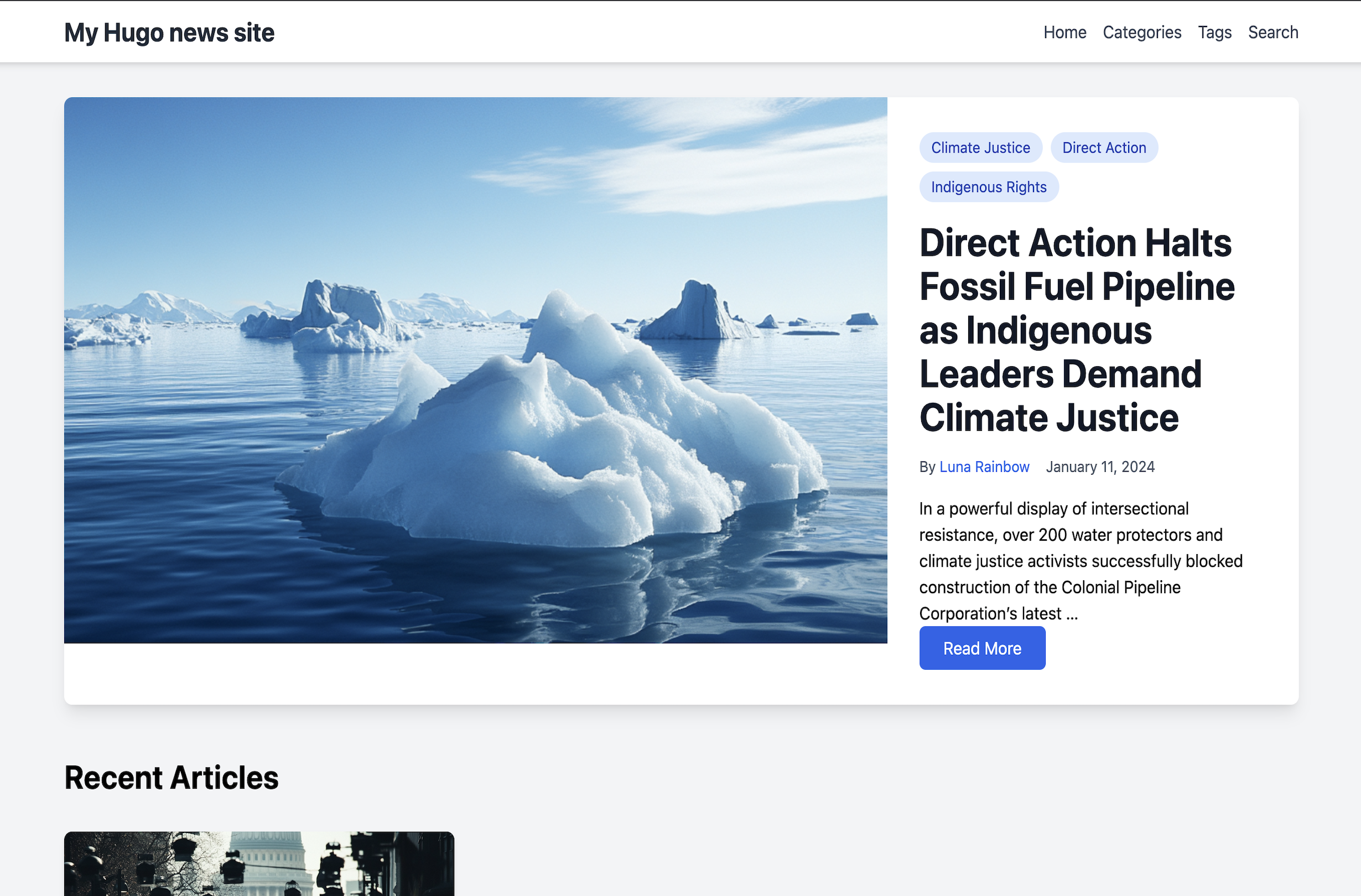
A modern, responsive Hugo theme designed for news and media websites. Built with Tailwind CSS and Alpine.js.
## Features
- 🎨 Modern design with Tailwind CSS
- 🔍 Built-in search functionality
- 📱 Fully responsive
- 🏷️ Support for categories, tags, and authors
- 🖼️ Featured articles with large images
- 🔄 Dynamic category browsing
- 👥 Author profiles
- 🔍 Search functionality with Fuse.js
- ⚡ Fast loading with minimal JavaScript
- 🎨 Clean typography and spacing
- 📊 Google Analytics 4 integration
## Installation
### For Hugo Site Users
1. In your Hugo site directory, run:
```bash
git submodule add https://github.com/professionalaf/hugo-news themes/hugo-news
```
2. Install theme dependencies (required for CSS/JS processing):
```bash
cd themes/hugo-news
npm install
```
3. Update your `hugo.toml` configuration:
```toml
theme = "hugo-news"
```
**Note**: This theme requires Hugo Extended version 0.128.0 or higher for PostCSS support.
## Configuration
### Google Analytics
The theme includes built-in support for Google Analytics 4 (GA4). To enable tracking:
1. Get your GA4 Measurement ID from your Google Analytics account (format: G-XXXXXXXXXX)
2. Add it to your site's config file:
```toml
googleAnalytics = "G-XXXXXXXXXX" # Replace with your GA4 measurement ID
```
The analytics code will:
- Only load when a valid measurement ID is provided
- Respect user privacy settings and cookie consent
- Load asynchronously to not impact page performance
- Track page views and basic user interactions
If you don't want analytics, simply leave the googleAnalytics parameter commented out:
```toml
# googleAnalytics = "G-MEASUREMENT_ID"
```
### Basic Configuration
Example `hugo.toml` configuration:
```toml
baseURL = 'https://example.org/'
languageCode = 'en-US'
title = 'My Hugo News Site'
[taxonomies]
category = "categories"
tag = "tags"
author = "authors"
[outputs]
home = ["HTML", "RSS", "JSON"]
[[menus.main]]
name = "Home"
url = "/"
weight = 10
[[menus.main]]
name = "Categories"
url = "/categories"
weight = 20
[[menus.main]]
name = "Tags"
url = "/tags"
weight = 30
```
## Content Structure
```
content/
├── _index.md
├── articles/
│ ├── first-post.md
│ └── second-post.md
├── authors/
│ ├── _index.md
│ └── john-doe/
│ ├── _index.md
│ └── avatar.jpg
└── categories/
└── _index.md
```
### Article Front Matter
```yaml
---
title: "Article Title"
date: 2024-01-01
author: "Author Name"
categories: ["Category1", "Category2"]
tags: ["tag1", "tag2"]
featured_image: "path/to/image.jpg"
description: "Article description"
---
```
### Author Front Matter
```yaml
---
title: "Author Name"
bio: "Author biography"
avatar: "author-image.jpg"
social:
twitter: "twitterhandle"
linkedin: "linkedinprofile"
---
```
## Comments System
The theme includes two types of comment systems:
### Static Comments
Static comments are stored alongside the article content in a `comments.json` file. They are visible to all users and persist across sessions. To add static comments:
1. Create a `comments.json` file in your article's directory (next to your article's markdown file)
2. Use this structure:
```json
{
"comments": [
{
"name": "Author Name",
"content": "Comment text",
"date": "2024-01-11T15:30:00Z",
"isStatic": true
}
]
}
```
Example directory structure:
```
content/
└── articles/
└── my-article/
├── index.md
├── featured-image.jpg
└── comments.json
```
### Dynamic Comments
Dynamic comments are stored in the user's browser localStorage. These comments:
- Only visible to the user who created them
- Persist across page refreshes but only in the same browser
- Are not shared with other users
- Will be cleared if the user clears their browser data
Dynamic comments are automatically handled by the theme's JavaScript and don't require any setup.
## Development
### Requirements
- Hugo Extended Version (>= 0.128.0) - Required for PostCSS integration
- Node.js (>= 18.0.0) - Required for Tailwind CSS and PostCSS processing
### Setup
1. Clone the repository:
```bash
git clone https://github.com/professionalaf/hugo-news.git
cd hugo-news
```
2. Install dependencies:
```bash
npm install
```
### Development Workflow
1. **Start development server** (runs from exampleSite):
```bash
npm run dev
```
This will start Hugo's development server with hot reload. The server will automatically process CSS through PostCSS and Tailwind CSS.
2. **Build for production**:
```bash
npm run build
```
3. **Test the theme** (builds exampleSite):
```bash
npm test
```
### Build Process
The theme uses Hugo's built-in asset pipeline:
- **CSS**: Processed through PostCSS with Tailwind CSS and Autoprefixer
- Source: `assets/css/main.css`
- Automatically minified and fingerprinted in production
- Tailwind CSS classes are purged based on usage in templates
- **JavaScript**: Alpine.js is bundled via Hugo's asset pipeline
- Source: `assets/js/alpine.js`
- Automatically minified and fingerprinted in production
- **Configuration**:
- `tailwind.config.js` - Tailwind CSS configuration
- `postcss.config.js` - PostCSS plugins (Tailwind, Autoprefixer)
- `hugo.toml` - Hugo build configuration with cache busters
### Testing
The theme includes automated testing via GitHub Actions:
- Builds with multiple Hugo versions (0.128.0 minimum, latest)
- Validates HTML output
- Checks CSS and JS asset generation
- Runs on every push and pull request
To test locally:
```bash
npm test
```
## Contributing
1. Fork the repository
2. Create your feature branch (`git checkout -b feature/amazing-feature`)
3. Commit your changes (`git commit -m 'Add amazing feature'`)
4. Push to the branch (`git push origin feature/amazing-feature`)
5. Open a Pull Request
## License
Released under the [MIT License](LICENSE).
## Credits
- Built with [Tailwind CSS](https://tailwindcss.com/)
- Interactive components powered by [Alpine.js](https://alpinejs.dev/)
- Search functionality using [Fuse.js](https://fusejs.io/)
看看同类模板
对比同技术栈与用途的模板,找到更适合的视觉与内容结构。

hugo-xmin
eXtremely Minimal Hugo theme: about 140 lines of code in total, including HTML and CSS (with no dependencies)
Hugo · 启动器

hugo-theme-gallery
Gallery Theme for Hugo
Hugo · 启动器

reveal-hugo
📽️ Create rich HTML-based presentations with Hugo and Reveal.js
Hugo · 启动器

anatole
Anatole is a minimalistic two-column theme for Hugo.
Hugo · 启动器

hugo-theme-diary
Moments piled up. A Hugo theme ported from SumiMakito/hexo-theme-Journal.
Hugo · 启动器

risotto
A minimalist, responsive hugo theme inspired by terminal ricing aesthetics.
Hugo · 启动器