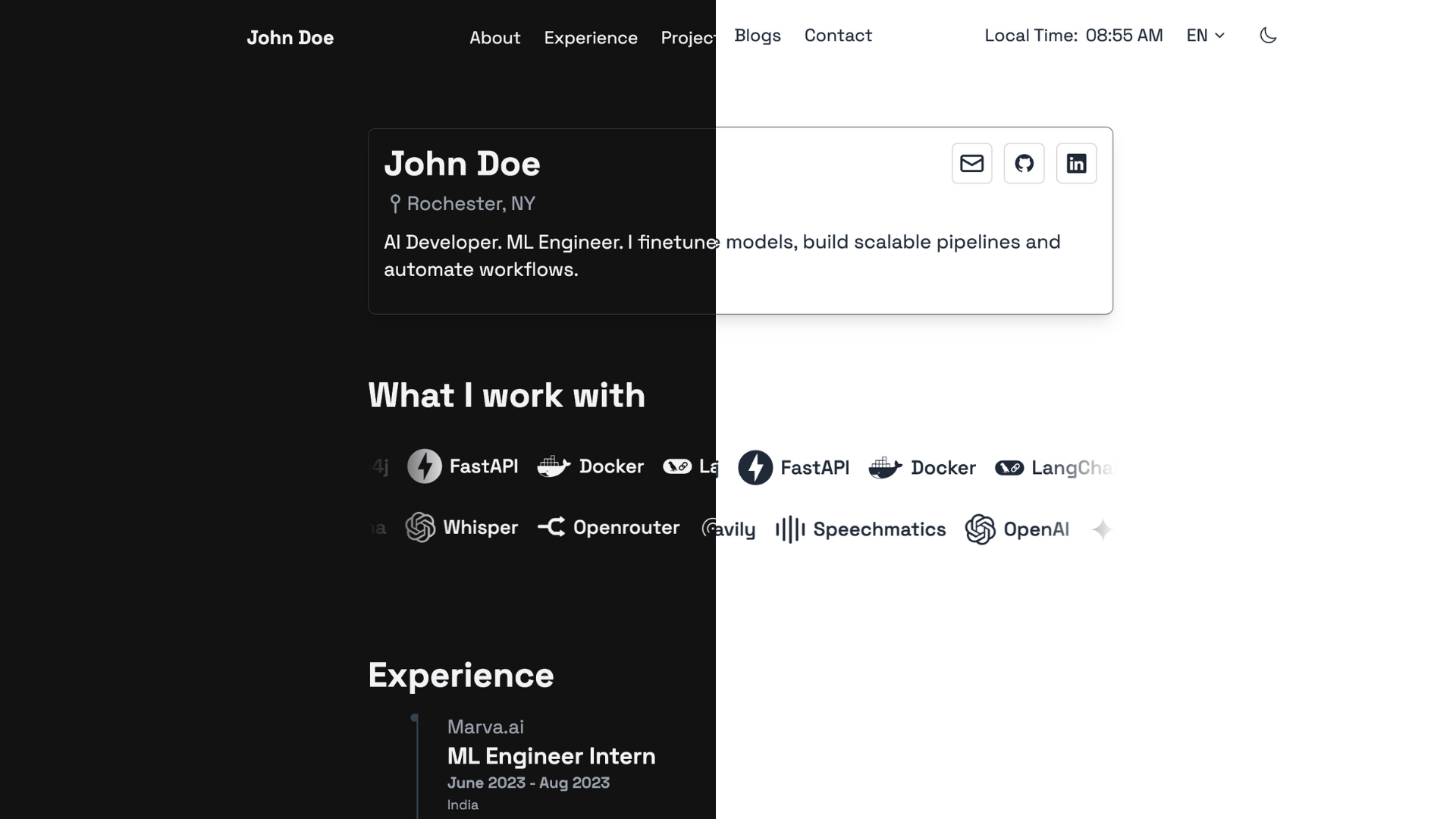
Responsive layout with breakpoint adaptations and a mobile full-screen menu overlay
HugoStarter
hugo-noir — Hugo Starter Template
By prxshetty
Hugo Noir is a minimal theme for Hugo that emphasizes readability and simplicity, with built-in blog layouts, light and dark modes, multilingual support, and Tailwind CSS styling.
Explore the design
Compare the page layouts and mobile experience. Open any screenshot for a closer look.
Author preview
Author-provided preview
Preview provided in the project README.
One original preview is available. Open the full image to inspect the design.
Screenshots show visual appearance; interactive behavior may differ.
Recorded 2026-10-02View source
What stands out
A quick read of the recorded project description.
Based on Tailwind CSS, the theme includes a precompiled stylesheet, so users do not need Node.js or npm
Light and dark modes, supporting manual toggle and operating system preference awareness
Built-in blog layouts, tag and post templates
Multilingual support, with the i18n directory containing en, es, fr, and zh-tw translation strings and example configurations
The homepage includes a Devicon tech stack carousel and experience display sections, with experience entries supporting country fields and company links
Template Details
Hugo Noir is a Hugo theme positioned as clean and minimal, focusing on readability and simplicity, with multilingual support. It is suitable for building personal portfolio or blog static sites: the theme provides blog layouts, tag and post templates, and the homepage includes sections such as a tech stack carousel and experience display. Styling is based on Tailwind CSS, and the theme includes a precompiled stylesheet, so regular users can install and use it without Node.js or npm; rebuilding CSS is only required when modifying the Tailwind configuration, assets/css/main.css, or new class names in templates. The theme supports light and dark modes (manual toggle and system preference awareness), and on mobile it offers a hamburger menu and full-screen overlay navigation. For multilingual support, the i18n directory includes built-in translation strings for en, es, fr, and zh-tw, along with example configurations; site data such as author information, tech stack carousel, and experience are provided through language-specific data files in the data directory. Before use, note: Hugo Extended is required, with a minimum version of 0.158.0; when upgrading from older versions, the theme replaces the Tailwind CDN with a committed compiled stylesheet and removes several color alias classes. If custom template overrides reference these classes, they must be replaced with primary equivalent classes according to the CHANGELOG.
HugoLauncher
Is it right for your project?
Use Cases
- Building a personal portfolio or resume-style static site to showcase experience, tech stack, and social links
- Creating a personal blog that supports multiple languages (English, Spanish, French, Traditional Chinese)
- Hugo sites that require light/dark mode toggling and mobile-friendly navigation
- Projects that want to use Tailwind CSS styling but avoid introducing a Node.js build process
Suitable For
- Developers using Hugo Extended 0.158.0 or later
- Blog or portfolio authors who prefer minimalism and prioritize readability
- Site maintainers who need multilingual content and language-organized data files
- Users who want to use precompiled Tailwind styles directly and avoid a front-end build chain
Getting started & customization
Use these recorded setup notes alongside the repository instructions for your chosen version.
- 1
Requires Hugo Extended, with a minimum version of 0.158.0.
- 2
Can be installed by git clone into themes/hugo-noir, or added as a git submodule.
- 3
Set theme = "hugo-noir" in the site configuration, and refer to hugo.example.toml in the theme root for configuration.
- 4
The theme includes static/css/tailwind.css, so regular use does not require Node.js or npm; rebuilding is only needed when modifying the Tailwind configuration, assets/css/main.css, or template class names.
- 5
Data such as author information, tech stack carousel, and experience are placed in language-specific files under the site's data directory (e.g., data/en/author.toml, data/en/tech.toml, data/en/experience.toml).
License & source material
Usage conditions & limitations
Free to use · keep license noticeThis entry covers the free version under the MIT license in the public repository; the free scope is the code of this version and does not imply that external services or third-party assets are free.
Must comply with when using
- Free use, modification, commercial use, and distribution of this version's code are permitted.
- When distributing copies or substantial portions of the code, retain the original author's copyright notice and the full MIT license notice.
- The code is provided as is; warranties and limitations of liability are governed by the original license and applicable law.
Additional costs & items to verify
- Using this theme requires Hugo Extended version 0.158.0 or higher; standard Hugo or lower versions will not work properly.
- Regular use does not require Node.js/npm; however, if modifying the Tailwind configuration, assets/css/main.css, or adding new Tailwind class names in templates, npm must be installed and CSS rebuilt.
- The tech stack carousel icons rely on Devicon icon classes, which must be loaded via the Devicon CDN, constituting an external resource dependency.
- When upgrading from older versions, if custom template overrides reference removed color alias classes, they must be replaced with primary equivalent classes according to the CHANGELOG; otherwise, styles may break.
- Demo images, fonts, icons, and other third-party assets must be checked against their respective licenses; they cannot be judged solely by the code's MIT license.
- External services such as domains, hosting, databases, payments, or AI may incur additional charges.
View Original Text Basis
Permission is hereby granted, free of charge
Original License Text
Ensure you have Hugo installed (Extended version, v0.158.0 or newer).
Original README
only rebuild the CSS when you change the theme's Tailwind configuration, `assets/css/main.css`, or add new Tailwind classes in templates
Original README
The icon class pulls from [Devicon](https://devicon.dev/).
Original README
https://github.com/prxshetty/hugo-noir/blob/main/LICENSEhttps://github.com/prxshetty/hugo-noir/blob/main/README.mdIf your own template overrides reference the removed classes, swap them to the `primary` equivalents listed in `CHANGELOG.md`.
Original README
Compiled by DeepSeek based on repository license and README ·2026-10-02. Results only cover the materials read; dependencies, images, fonts, and subsequent term changes are subject to their respective original texts.
Project checks & description sources
Template Information
- Source platforms
- Hugo Themes
- Documentation and maintenance reference score
- More documented · 75 / 100
- Technologies
- Hugo
- Website type
- Starter
How this score is calculated
Our heuristic uses license records (up to 30), a demo link (12), a preview (10), stars (15), recorded maintenance (15), description completeness (8), feature records (5) and classification data (5). It is not a code, security or performance test, or a Google score. A link does not establish tested functionality.
What to verify for this project
- Repository update recorded
- 2026-09-06
- Screenshot last checked
- 2026-10-02
No demo link is recorded. Use the repository instructions to evaluate the project locally; the screenshot alone cannot establish interactive behavior.
The catalog identifies Hugo as the primary stack. Check the actual dependency manifest and lockfile for versions and hosting requirements. These notes use recorded metadata, not a code audit or a deployment test.
Use a selection guide →How this description was prepared
AI-assisted description based on catalog records and repository material. Repository authors are not automatically the reviewers of this description.
Automatically checked against source and license rules; no manual editorial review.
Inspect the recorded source material
SHA-256: f6c9a525dc8c156a7d24d3e65667cfed476d5bde72ac8b3a839063d12916e717
2026-10-02T22:21:36.472Z
Source file / repository<h1 align="center">Hugo Noir | <a href="https://prxshetty.github.io/hugo-portfolio/" rel="nofollow">Demo</a></h1>
<p align="center">
<a href="https://github.com/prxshetty/hugo-noir/releases/latest"><img src="https://img.shields.io/github/v/release/prxshetty/hugo-noir" alt="GitHub release"></a>
<a href="CHANGELOG.md"><img src="https://img.shields.io/badge/changelog-view-blue" alt="Changelog"></a>
<a href="https://github.com/gohugoio/hugo/releases/tag/v0.158.0"><img src="https://img.shields.io/static/v1?label=min-HUGO-version&message=%3E%3Dv0.158.0&color=blue&logo=hugo" alt="Minimum Hugo Version"></a>
<a href="https://github.com/prxshetty/hugo-noir/stargazers"><img src="https://img.shields.io/github/stars/prxshetty/hugo-noir?style=social" alt="GitHub stars"></a>
<a href="https://themes.gohugo.io/themes/hugo-noir/"><img src="https://img.shields.io/badge/Hugo--Themes-@Hugo_Noir-blue" alt="Hugo Themes"></a>
</p>
<p align="center">A clean, minimalistic theme for Hugo with a focus on readability, simplicity, and multilingual support.</p>
## Features
- Responsive design (breakpoints + mobile menu overlay throughout)
- Built with Tailwind CSS
- Light & Dark mode (manual toggle + OS-aware)
- Blog-ready (blogs layouts, tags, post template)
- Multilingual support (i18n/ has en/es/fr/zh-tw + example config)
- Enhanced mobile navigation (hamburger + fullscreen overlay)
- Devicon tech-stack display (devicon CDN + carousel)
- Configurable region display (country field in experience entries)
- Hyperlink indicators (external-link SVGs)
- Criss-cross carousel animations (two counter-scrolling tech rows)
- Clean and minimalist aesthetic (subjective, but harmless)
## Preview
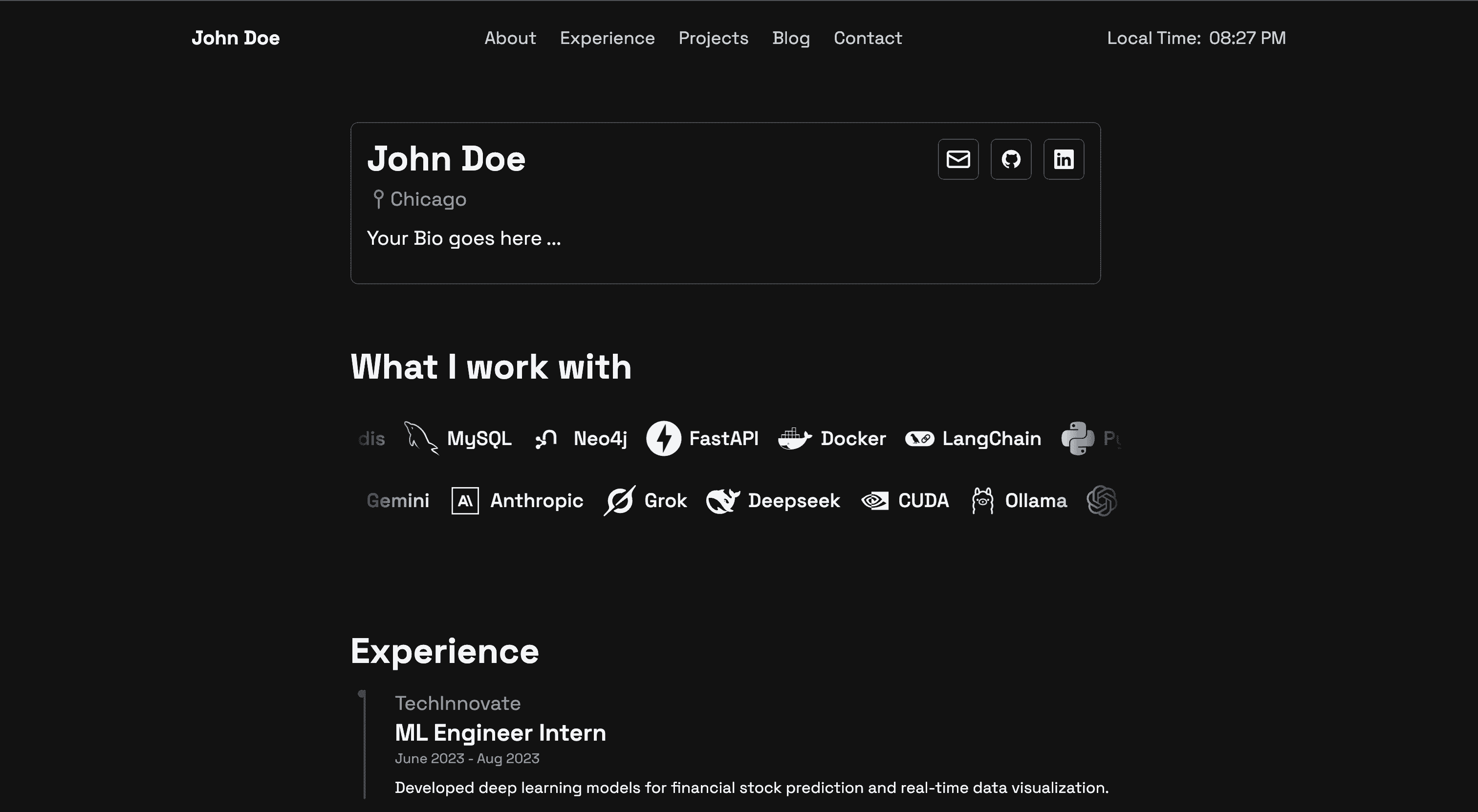
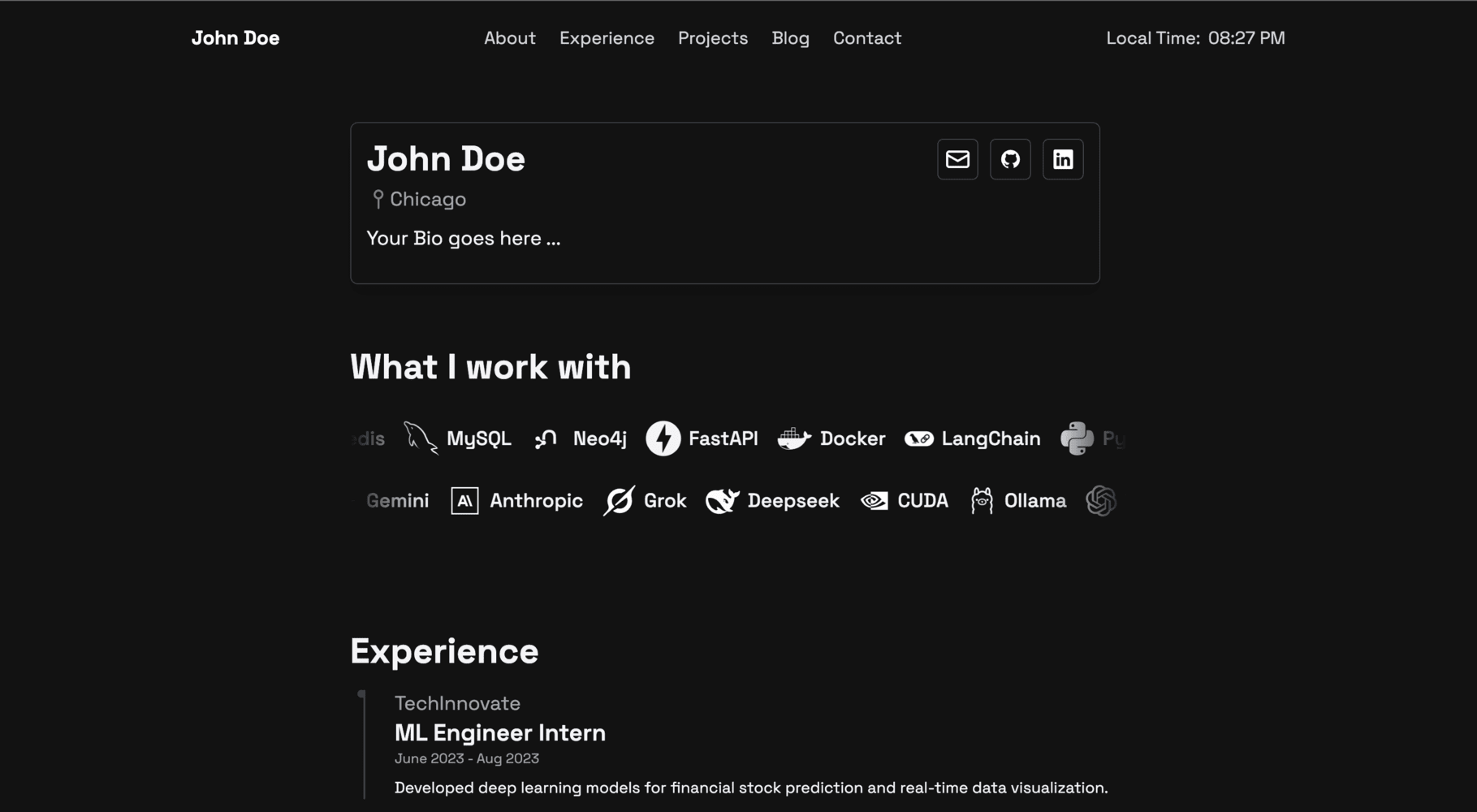
**Homepage (Dark Mode):**
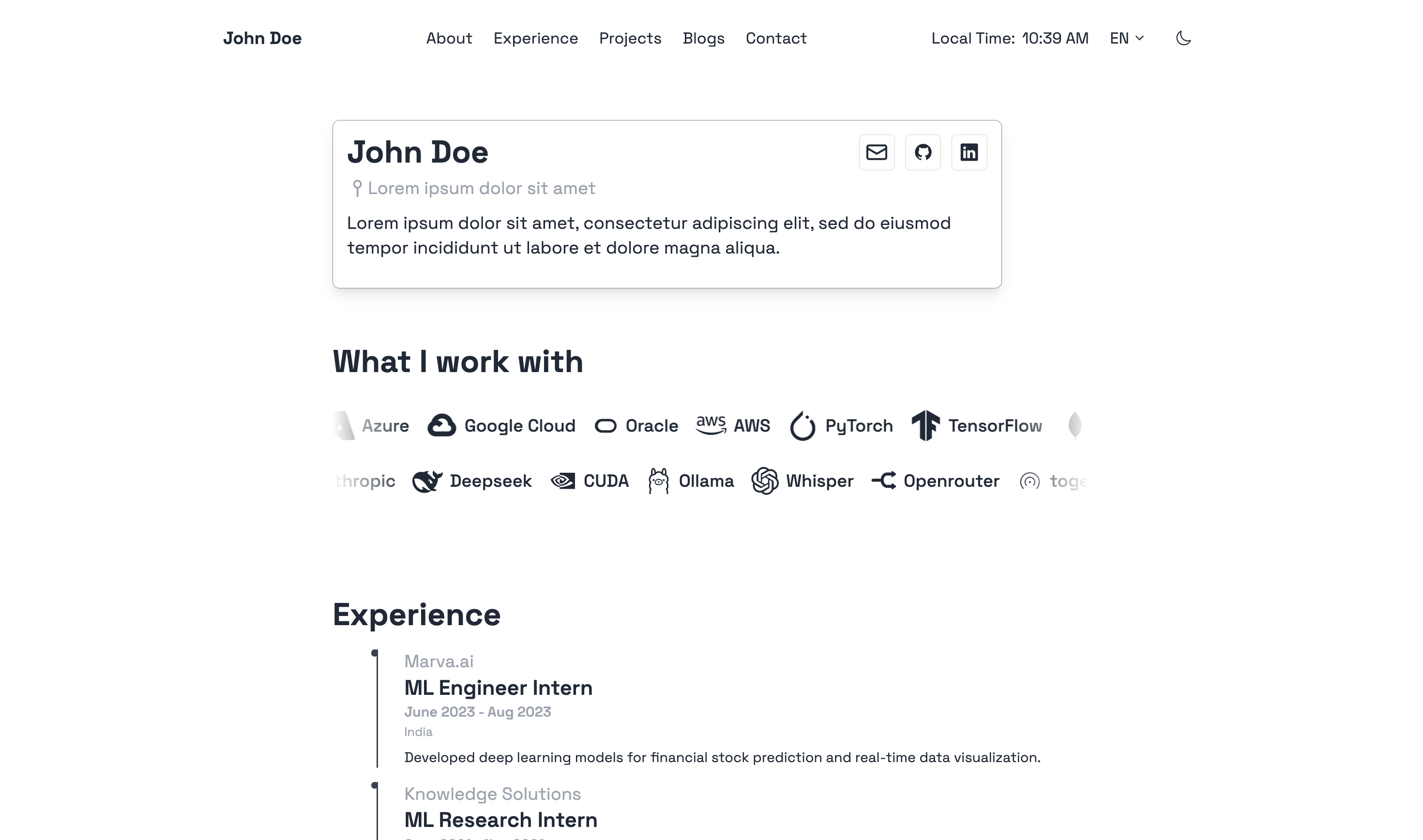
**Homepage (Light Mode):**
## Installation
Ensure you have Hugo installed (Extended version, v0.158.0 or newer).
For a quick start and to see a full configuration example, you can refer to the `hugo.example.toml` file included in the theme's root directory. You can copy this file to your site's root as `hugo.toml` (or `config.toml`) and customize it.
### Option 1: Clone Repository (Recommended for theme development)
```bash
# From your Hugo site's root directory
git clone https://github.com/prxshetty/hugo-noir.git themes/hugo-noir
```
### Option 2: Add as a Git Submodule (Recommended for using the theme in your project)
```bash
# From your Hugo site's root directory
git submodule add https://github.com/prxshetty/hugo-noir.git themes/hugo-noir
```
Then, update your submodules:
```bash
git submodule update --init --recursive
```
### CSS Build
**Theme users:** no action needed. The theme ships a prebuilt stylesheet at `static/css/tailwind.css` (Tailwind + Typography plugin, used for Markdown rendering in blog posts) that works out of the box. You do **not** need Node.js or npm to install and use the theme.
**Theme developers/customizers:** only rebuild the CSS when you change the theme's Tailwind configuration, `assets/css/main.css`, or add new Tailwind classes in templates:
```bash
# From the theme directory (themes/hugo-noir)
npm install
npx tailwindcss -i assets/css/main.css -o static/css/tailwind.css --minify
```
> **Upgrading from earlier versions:** this release raises the minimum Hugo version to **v0.158.0 (Extended)**, replaces the Tailwind CDN with a committed compiled stylesheet, and removes the redundant color aliases `bg-secondary-light`, `bg-tertiary-light`, `bg-tertiary-dark`, `border-secondary-light`, and `border-secondary-dark` (templates now use the `primary` equivalents — same rendered values). If your own template overrides reference the removed classes, swap them to the `primary` equivalents listed in `CHANGELOG.md`. Homepage blog links and the post card colors were also aligned with the heading/card palette (see CHANGELOG).
## Configuration
1. **Set the theme in your site's `hugo.toml` (or `config.toml`):**
```toml
theme = "hugo-noir"
```
2. **Hugo Version Compatibility:**
This theme requires:
* Hugo **Extended** version.
* Minimum version: **0.158.0**.
To ensure compatibility, especially if you plan to submit this theme to the Hugo Themes showcase, you can specify Hugo version requirements within the theme's own `hugo.toml` or `config.toml` (create one at `themes/hugo-noir/hugo.toml` if it doesn't exist) or more commonly in a `theme.toml` file at the root of the theme.
Example for `themes/hugo-noir/theme.toml` (see "Theme Metadata" section below):
```toml
[module]
[module.hugoVersion]
extended = true
min = "0.158.0"
# max = "0.1xx.x" # Optionally specify a max version
```
3. **Multilingual Setup (Optional):**
This theme is pre-configured for English (en), Spanish (es), and French (fr). To enable multilingual mode in your site, configure your main `hugo.toml` like this:
```toml
defaultContentLanguage = "en"
defaultContentLanguageInSubdir = true # Recommended for clearer URLs like /en/blog, /es/blog
[languages]
[languages.en]
label = "English"
title = "Your Site Title (English)"
weight = 1
contentDir = "content/en" # Ensure you have this directory
[languages.en.menu]
[[languages.en.menu.main]]
name = "About"
pageRef = "/about"
weight = 1
# ... other English menu items
[languages.es]
label = "Español"
title = "Your Site Title (Spanish)"
weight = 2
contentDir = "content/es" # Ensure you have this directory
[languages.es.menu]
[[languages.es.menu.main]]
name = "Sobre Mí" # Translated name
pageRef = "/about" # pageRef should ideally point to the same logical page
weight = 1
# ... other Spanish menu items
[languages.fr]
label = "Français"
title = "Your Site Title (French)"
weight = 3
contentDir = "content/fr" # Ensure you have this directory
[languages.fr.menu]
[[languages.fr.menu.main]]
name = "À Propos" # Translated name
pageRef = "/about"
weight = 1
# ... other French menu items
# Remember to create content in the respective contentDir folders (e.g., content/en/about.md, content/es/about.md)
```
The theme's `i18n` folder (`themes/hugo-noir/i18n/`) contains the translation strings.
4. **Params for `hugo.toml` (and Data Files):**
The theme uses parameters from your site's `hugo.toml` under `[params]` for common information like your name and social links. Ensure these are set. Example:
```toml
[params]
name = "Your Name"
location = "Your Location"
description = "Description ..."
# Social links
github = "https://github.com/yourusername"
twitter = "https://twitter.com/yourusername"
linkedin = "https://linkedin.com/in/yourusername"
email = "[email protected]"
# ... other params ...
```
**Site-Specific Data (Author, Experience, etc.):**
For language-specific information like author details and your professional experience, this theme utilizes Hugo's data files. You should create these in your site's `data` directory, typically organized by language.
* **Author Information:** Create files like `data/en/author.toml`, `data/es/author.toml`. Example for `data/en/author.toml`:
```toml
[author]
name = "Your Name"
location = "Your Location"
description = "Description ..."
# Social links
github = "https://github.com/yourusername"
twitter = "https://twitter.com/yourusername"
linkedin = "https://linkedin.com/in/yourusername"
email = "[email protected]"
# ... other social links ...
```
* **Tech Carousel:** Create a file like `data/en/tech.toml` to customize items on the tech stack carousel. The icon class pulls from [Devicon](https://devicon.dev/). Example `data/en/tech.toml`:
```toml
# The 'row1' array populates the top carousel
row1 = [
{ icon = "devicon-python-plain", name = "Python" },
{ icon = "devicon-go-plain", name = "Go" },
{ icon = "devicon-javascript-plain", name = "JavaScript" },
# ... other tech stack items...
{ icon = "devicon-ruby-plain", name = "Ruby" }
]
# The 'row2' array populates the bottom carousel
row2 = [
{ icon = "devicon-docker-plain", name = "Docker" },
{ icon = "devicon-postgresql-plain", name = "PostgreSQL" },
{ icon = "devicon-nginx-original", name = "Nginx" },
# ... other tech stack items...
{ icon = "devicon-nodejs-plain", name = "Node.js" }
]
```
* **Experience Data:** The "Experience" section on your site (using the `experience.html` layout) is populated from a data file. Create a file such as `data/en/experience.toml` (or `.yaml`/`.json`). Each entry should detail a role or position.
Example structure for an entry in `data/en/experience.toml`:
```toml
[[experience]]
role = "Senior Developer"
company = "Tech Solutions Inc."
company_link = "https://www.techsolutions.com" # Add company URL here
period = "Jan 2020 - Present"
country = "USA" # New field for region/country
# description = "Longer description of the role..." # Optional detailed description
responsibilities = [
"Developed and maintained web applications.",
"Collaborated with cross-functional teams.",
"Led junior developers."
]
technologies = ["Go", "Docker", "Kubernetes", "React"]
[[experience]]
role = "Software Engineer"
company = "Innovate LLC"
# company_link = "" # Omit or leave blank if no link
period = "Jun 2018 - Dec 2019"
country = "Canada"
responsibilities = [
"Contributed to full-stack development projects.",
"Participated in code reviews and agile sprints."
]
technologies = ["Python", "Django", "PostgreSQL"]
```
Ensure you have a similar file for each language you support (e.g., `data/es/experience.toml`). The `experience.html` layout in the theme will automatically pick up the data for the current language.
**Adding Company Links:**
This site supports displaying clickable links for companies in the "Experience" section.
- To add a link, include the `company_link` field with the URL in the respective experience entry within your `data/<language_code>/experience.yaml` (or `.json`/`.toml`) file. For example, you would update `data/en/experience.yaml`, `data/es/experience.yaml`, and `data/fr/experience.yaml` if you support English, Spanish, and French respectively.
- If a `company_link` is provided, the company name will be a hyperlink. Otherwise, it will be plain text.
- Styling: Links match the site's theme (grey, turning blue on hover). An external link icon is automatically added.
- No template changes are needed; the layouts already support this.
Remember to replace `<language_code>` with the actual language code (e.g., `en`, `es`, `fr`).
## Content Structure
The theme generally expects a standard Hugo content structure. For multilingual sites, organize content into language-specific subdirectories as defined in your `hugo.toml`'s `contentDir` for each language.
Example:
```
content/
├── en/ # English content
│ ├── _index.md # Homepage content for English
│ ├── about.md
│ ├── blogs/
│ │ ├── _index.md
│ │ └── my-first-blog.md
│ └── projects/
│ ├── _index.md
│ └── project-a.md
├── es/ # Spanish content
│ ├── _index.md # Homepage content for Spanish
│ ├── about.md
│ └── blogs/
│ ├── _index.md
│ └── mi-primer-blog.md
└── fr/ # French content
├── _index.md # Homepage content for French
├── about.md
└── blogs/
├── _index.md
└── mon-premier-blog.md
```
## Front Matter Examples
### Blog Post
```yaml
---
title: "My First Post"
date: 2023-03-15T10:30:00+05:30 # Or your local timezone
draft: false
tags: ["hugo", "web development"]
categories: ["tutorials"]
description: "A brief description of your post for SEO and previews."
# For multilingual posts, ensure the filename is the same across languages
# e.g., content/en/blogs/my-post.md and content/es/blogs/my-post.md
# Hugo will link them as translations.
---
Your post content here...
```
### Static Page (e.g., About, Contact)
```yaml
---
title: "About Me"
date: 2023-03-15T10:30:00+05:30
draft: false
menu: "main" # Optional: if you want it to appear in the main menu configured in hugo.toml
layout: "single" # Or specific layout if defined
description: "A brief description of the page."
---
Page content here...
```
## Customization
You can customize the theme:
- **Override Templates:** Copy any template file from `themes/hugo-noir/layouts/` into your site's `layouts/` directory (maintaining the same subdirectory structure) and modify it.
- **Custom CSS:**
- For minor CSS overrides, you can create `assets/css/custom.css` in your site's root. The theme will attempt to load this.
- For more extensive changes, you might want to fork the theme or modify its Tailwind CSS configuration (`themes/hugo-noir/tailwind.config.js`) and rebuild the theme's CSS.
- **Static Assets:** Place your own static assets (images, fonts) in your site's `static/` directory.
- **Partials:** Override or extend partials found in `themes/hugo-noir/layouts/partials/` by creating files with the same name in your site's `layouts/partials/` directory.
## Theme Metadata (`theme.toml`) (for Hugo Themes Showcase)
For submission to themes.gohugo.io, your theme needs a `theme.toml` file in its root directory (`themes/hugo-noir/theme.toml`).
Example `themes/hugo-noir/theme.toml`:
```toml
name = "Hugo Noir"
license = "MIT" # Or your chosen license
licenselink = "https://github.com/prxshetty/hugo-noir/blob/main/LICENSE" # Link to the theme's license file
description = "A clean, minimalistic, and multilingual theme for Hugo, focusing on readability and simplicity. Built with Tailwind CSS and offering dark mode."
version = "2.0.0" # Theme version
homepage = "https://github.com/prxshetty/hugo-noir/" # Theme's source repository
demosite = "" # URL to a live demo of your theme
tags = ["blog", "minimal", "responsive", "dark mode", "tailwind", "multilingual", "personal", "portfolio"]
features = ["dark mode", "multilingual", "tailwind css", "responsive", "contact form", "devicons"] # Key features
[author]
name = "John Doe" # Your name
homepage = "https://johndoe.com" # Your website
# If porting from another theme, add [original] section
# [original]
# author = "Original Author Name"
# homepage = "Link to original theme's homepage"
# repo = "Link to original theme's repository"
[module]
[module.hugoVersion]
extended = true
min = "0.158.0"
```
## Contributing
Contributions are welcome! Please feel free to open an issue or submit a pull request.
## License
This theme is released under the MIT License. See the [LICENSE](https://github.com/prxshetty/hugo-noir/blob/main/LICENSE) file for details.
## Credits
- [Hugo](https://gohugo.io/)
- [Tailwind CSS](https://tailwindcss.com/)
- Devicons used in the theme are from [devicons/devicon](https://github.com/devicons/devicon).
Explore similar templates
Compare previews and descriptions within the same stack and category.

hugo-xmin
hugo-xmin is an extremely minimal Hugo theme written by Yihui Xie for template beginners. HTML and CSS total about 140 lines, with no external dependencies, and it uses the MIT license.
Hugo · Starter

hugo-theme-gallery
A Hugo Extended photo gallery theme that organizes images with Page Bundles, automatically generating album lists and gallery pages with a Justified layout and PhotoSwipe lightbox.
Hugo · Starter

reveal-hugo
reveal-hugo is a Hugo theme that converts Markdown content into Reveal.js-based HTML presentations. It supports slide separation with `---`, shortcodes for fragments, slides, sections, notes, Markdown, and MathJax, and organizes content as root or section presentations with order controlled by weight.
Hugo · Starter

anatole
Anatole is a minimalistic two-column Hugo theme ported from farbox-theme-Anatole, featuring dark mode, multilingual and RTL support, and optional portfolio, comments, analytics, KaTeX, and Mermaid integrations. It suits personal blogs, portfolios, or documentation sites built with Hugo.
Hugo · Starter

hugo-theme-diary
A Hugo diary-style theme ported from the Hexo theme Journal, with a grid homepage for essays and daily notes. It supports six languages, dark mode, table-of-contents scroll positioning, reading time, code highlighting, and configurable sidebar, fonts, and colors.
Hugo · Starter

risotto
risotto is a minimalist, responsive Hugo theme inspired by terminal ricing aesthetics. It uses semantic HTML and pure CSS with no JavaScript, and its layout relies on CSS Grid for native responsiveness without manual breakpoints.
Hugo · Starter