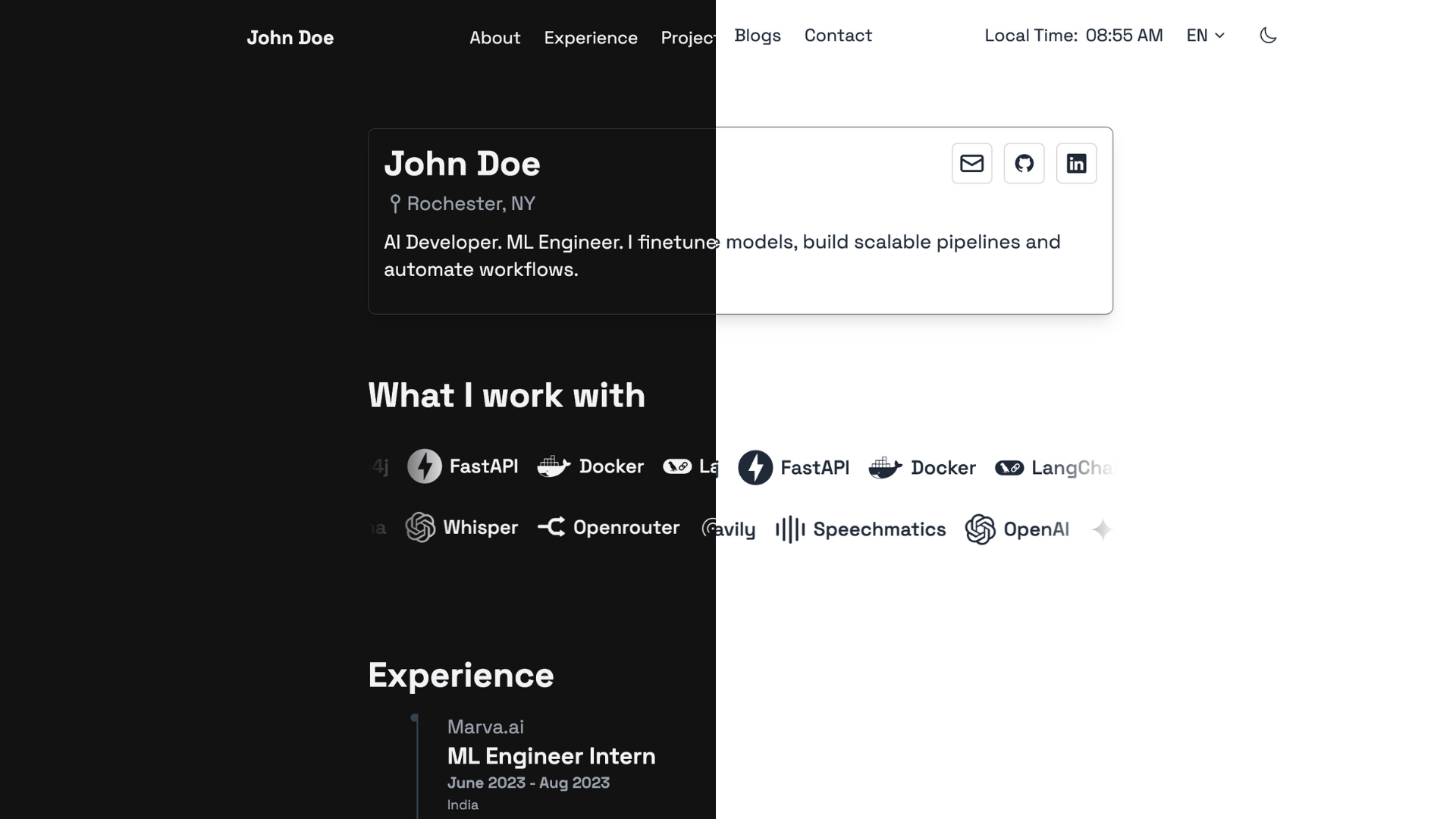
响应式布局,包含断点适配与移动端全屏菜单遮罩
Hugo启动器
hugo-noir — Hugo 启动器模板
作者 prxshetty
Hugo Noir 是一个面向 Hugo 的极简主题,强调可读性与简洁,内置博客布局、明暗模式、多语言与 Tailwind CSS 样式。
看看你的网站会是什么样
浏览真实页面截图,比较内容排版与手机效果。点击下方缩略图切换,放大查看整页细节。
目前有 1 张原始预览,可打开完整图片查看设计细节。
截图用于了解视觉与布局,交互效果请以实际项目为准。
采集于 2026-10-02查看来源
值得关注的模板亮点
从已有项目资料中,快速了解它的特点。
基于 Tailwind CSS,主题自带已编译样式表,使用者无需 Node.js 或 npm
浅色与深色模式,支持手动切换并感知操作系统偏好
内置博客布局、标签与文章模板
多语言支持,i18n 目录包含 en、es、fr、zh-tw 翻译字符串及示例配置
首页包含 Devicon 技术栈轮播与经历展示区块,经历条目支持国家字段与公司链接
模板详细介绍
Hugo Noir 是一个 Hugo 主题,定位为干净、极简,重点放在可读性与简洁上,并支持多语言。它适合用来搭建个人作品集或博客类静态站点:主题提供博客布局、标签与文章模板,首页包含技术栈轮播与经历展示等区块。样式基于 Tailwind CSS,主题自带已编译的样式表,普通使用者无需 Node.js 或 npm 即可安装使用;只有修改 Tailwind 配置、assets/css/main.css 或模板中的新类名时,才需要重新构建 CSS。主题支持浅色与深色模式(手动切换并感知系统偏好),移动端提供汉堡菜单与全屏遮罩导航。多语言方面,i18n 目录内置 en、es、fr、zh-tw 的翻译字符串,并给出示例配置;作者信息、技术栈轮播与经历等站点数据通过 data 目录下按语言划分的数据文件提供。使用前需注意:需要 Hugo Extended 版本,且最低版本为 0.158.0;从旧版本升级时,主题将 Tailwind CDN 替换为已提交的编译样式表,并移除了若干颜色别名类,若自定义模板覆盖中引用了这些类,需要按 CHANGELOG 替换为 primary 等价类。
Hugo启动器
适合你的项目吗?
适用场景
- 搭建个人作品集或简历型静态站点,展示经历、技术栈与社交链接
- 建立支持多语言(英语、西班牙语、法语、繁体中文)的个人博客
- 需要浅色/深色模式切换与移动端友好导航的 Hugo 站点
- 希望使用 Tailwind CSS 样式但不想引入 Node.js 构建流程的项目
适合人群
- 使用 Hugo Extended 0.158.0 及以上版本的开发者
- 偏好极简、以可读性优先的博客或作品集作者
- 需要多语言内容与按语言组织数据文件的站点维护者
- 希望直接使用预编译 Tailwind 样式、避免前端构建链的用户
上手与定制指南
结合仓库当前版本的说明,按下面的资料检查内容、配置与运行要求。
- 1
需要 Hugo Extended 版本,最低版本为 0.158.0。
- 2
可通过 git clone 到 themes/hugo-noir,或作为 git submodule 添加。
- 3
在站点配置中设置 theme = "hugo-noir",并参考主题根目录的 hugo.example.toml 进行配置。
- 4
主题自带 static/css/tailwind.css,普通使用无需 Node.js 或 npm;仅在修改 Tailwind 配置、assets/css/main.css 或模板类名时才需重新构建。
- 5
作者信息、技术栈轮播与经历等数据放在站点 data 目录下按语言划分的文件中(如 data/en/author.toml、data/en/tech.toml、data/en/experience.toml)。
授权与来源资料
使用条件与限制
免费使用 · 保留许可声明本次收录的是公开仓库中采用 MIT 许可的免费版本;免费范围为该版本代码,不代表外部服务或第三方素材免费。
使用时需要遵守
- 允许免费使用、修改、商用和分发该版本代码。
- 分发代码副本或实质性部分时,保留原作者版权声明和完整 MIT 许可声明。
- 代码按现状提供;担保与责任限制以原许可证及适用法律为准。
额外费用与待核对事项
- 使用该主题必须安装 Hugo Extended 版本,且版本不低于 0.158.0;普通版 Hugo 或更低版本无法正常使用。
- 普通使用无需 Node.js/npm;但若修改 Tailwind 配置、assets/css/main.css 或模板中新增 Tailwind 类名,则必须安装 npm 并重新构建 CSS。
- 技术栈轮播图标依赖 Devicon 图标类,需通过 Devicon CDN 加载,属于外部资源依赖。
- 从旧版本升级时,若自定义模板覆盖中引用了已移除的颜色别名类,必须按 CHANGELOG 替换为 primary 等价类,否则样式可能失效。
- 演示图片、字体、图标及其他第三方素材需按各自许可核对,不能仅凭代码的 MIT 许可判断。
- 域名、托管、数据库、支付或 AI 等外部服务可能另外收费。
查看原文依据
Permission is hereby granted, free of charge
许可证原文
Ensure you have Hugo installed (Extended version, v0.158.0 or newer).
README 原文
only rebuild the CSS when you change the theme's Tailwind configuration, `assets/css/main.css`, or add new Tailwind classes in templates
README 原文
The icon class pulls from [Devicon](https://devicon.dev/).
README 原文
https://github.com/prxshetty/hugo-noir/blob/main/LICENSEhttps://github.com/prxshetty/hugo-noir/blob/main/README.mdIf your own template overrides reference the removed classes, swap them to the `primary` equivalents listed in `CHANGELOG.md`.
README 原文
DeepSeek 根据仓库许可证和 README 整理 ·2026-10-02。结果仅覆盖已读取资料,依赖、图片、字体及后续条款变更以各自原文为准。
项目核对记录与介绍依据
模板资料
- 来源平台
- Hugo Themes
- 资料与维护参考分
- 资料较完整 · 75 / 100
- 技术栈
- Hugo
- 网站类型
- 启动器
这个分数如何计算
本站按许可资料(最高30分)、演示链接(12分)、预览图(10分)、Star数(15分)、记录的维护时间(15分)、描述完整度(8分)、功能记录(5分)和分类资料(5分)计算。它不是代码、安全或性能测试,也不是 Google 评分;有链接不代表已实测可用。
这个项目需要核对什么
- 记录的仓库更新时间
- 2026-09-06
- 截图检查日期
- 2026-10-02
目前没有记录演示链接。请依据仓库说明在本地评估;仅凭截图无法确认交互行为。
目录记录的主要技术栈是 Hugo。请通过依赖清单和锁文件核对实际版本与托管要求。这些说明基于收录资料,不代表代码审计或部署实测。
查看具体选型方法 →介绍的制作与核对状态
介绍由 AI 辅助整理目录与仓库资料。仓库作者不等于这篇介绍的审核者。
已完成服务器许可规则与 AI 来源核对;未经过人工编辑审核。
查看当时使用的来源资料
SHA-256: f6c9a525dc8c156a7d24d3e65667cfed476d5bde72ac8b3a839063d12916e717
2026-10-02T22:21:36.472Z
来源文件 / 仓库<h1 align="center">Hugo Noir | <a href="https://prxshetty.github.io/hugo-portfolio/" rel="nofollow">Demo</a></h1>
<p align="center">
<a href="https://github.com/prxshetty/hugo-noir/releases/latest"><img src="https://img.shields.io/github/v/release/prxshetty/hugo-noir" alt="GitHub release"></a>
<a href="CHANGELOG.md"><img src="https://img.shields.io/badge/changelog-view-blue" alt="Changelog"></a>
<a href="https://github.com/gohugoio/hugo/releases/tag/v0.158.0"><img src="https://img.shields.io/static/v1?label=min-HUGO-version&message=%3E%3Dv0.158.0&color=blue&logo=hugo" alt="Minimum Hugo Version"></a>
<a href="https://github.com/prxshetty/hugo-noir/stargazers"><img src="https://img.shields.io/github/stars/prxshetty/hugo-noir?style=social" alt="GitHub stars"></a>
<a href="https://themes.gohugo.io/themes/hugo-noir/"><img src="https://img.shields.io/badge/Hugo--Themes-@Hugo_Noir-blue" alt="Hugo Themes"></a>
</p>
<p align="center">A clean, minimalistic theme for Hugo with a focus on readability, simplicity, and multilingual support.</p>
## Features
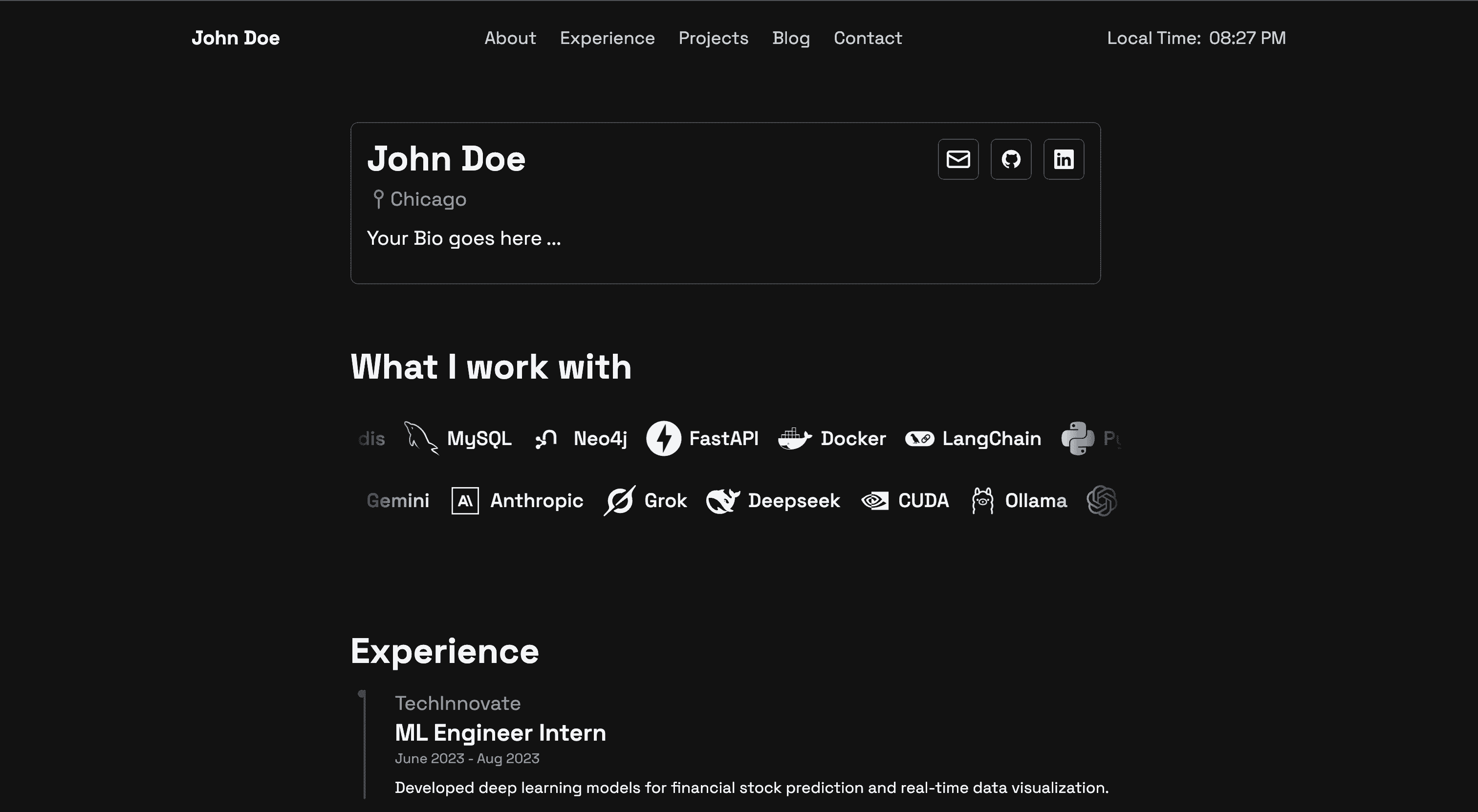
- Responsive design (breakpoints + mobile menu overlay throughout)
- Built with Tailwind CSS
- Light & Dark mode (manual toggle + OS-aware)
- Blog-ready (blogs layouts, tags, post template)
- Multilingual support (i18n/ has en/es/fr/zh-tw + example config)
- Enhanced mobile navigation (hamburger + fullscreen overlay)
- Devicon tech-stack display (devicon CDN + carousel)
- Configurable region display (country field in experience entries)
- Hyperlink indicators (external-link SVGs)
- Criss-cross carousel animations (two counter-scrolling tech rows)
- Clean and minimalist aesthetic (subjective, but harmless)
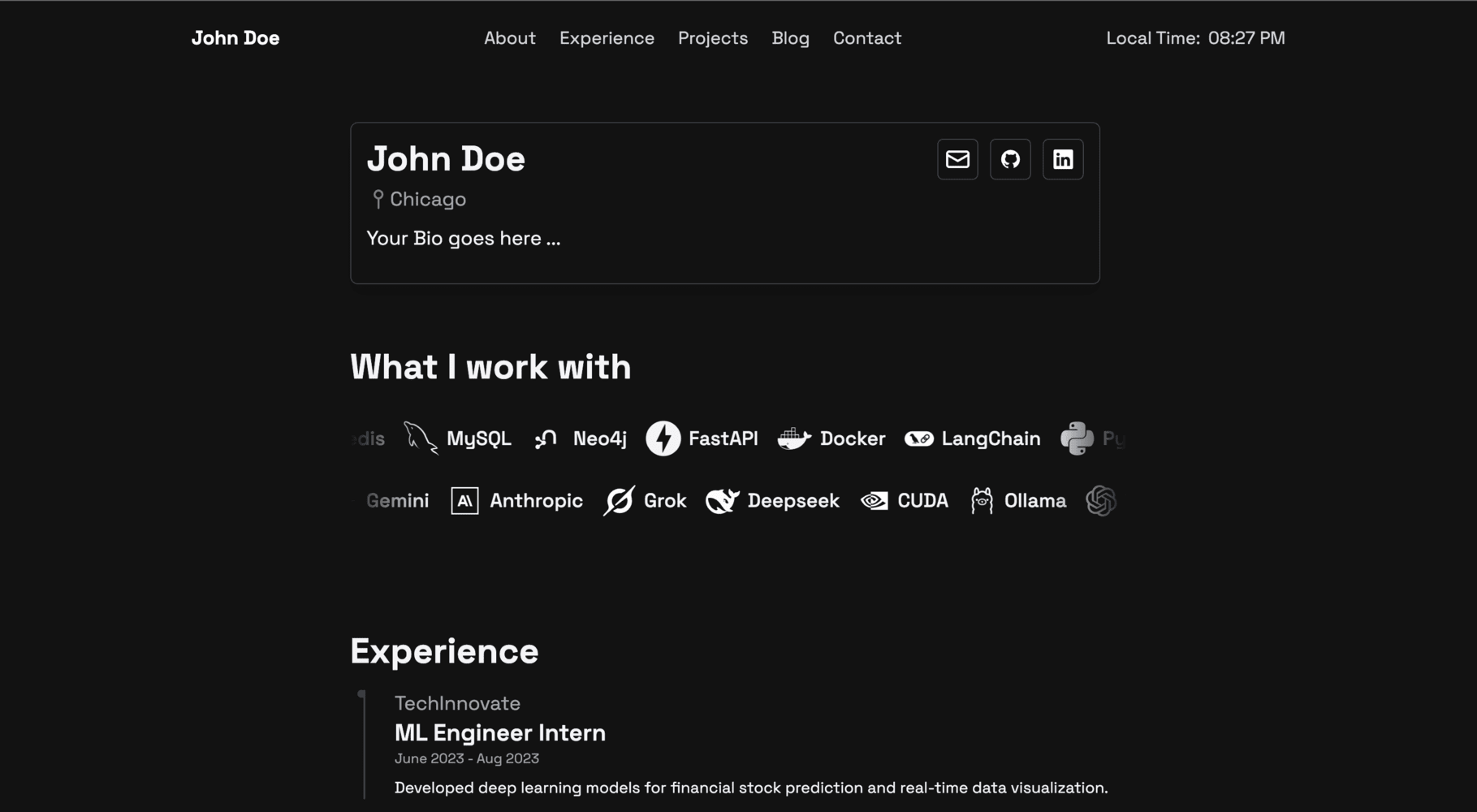
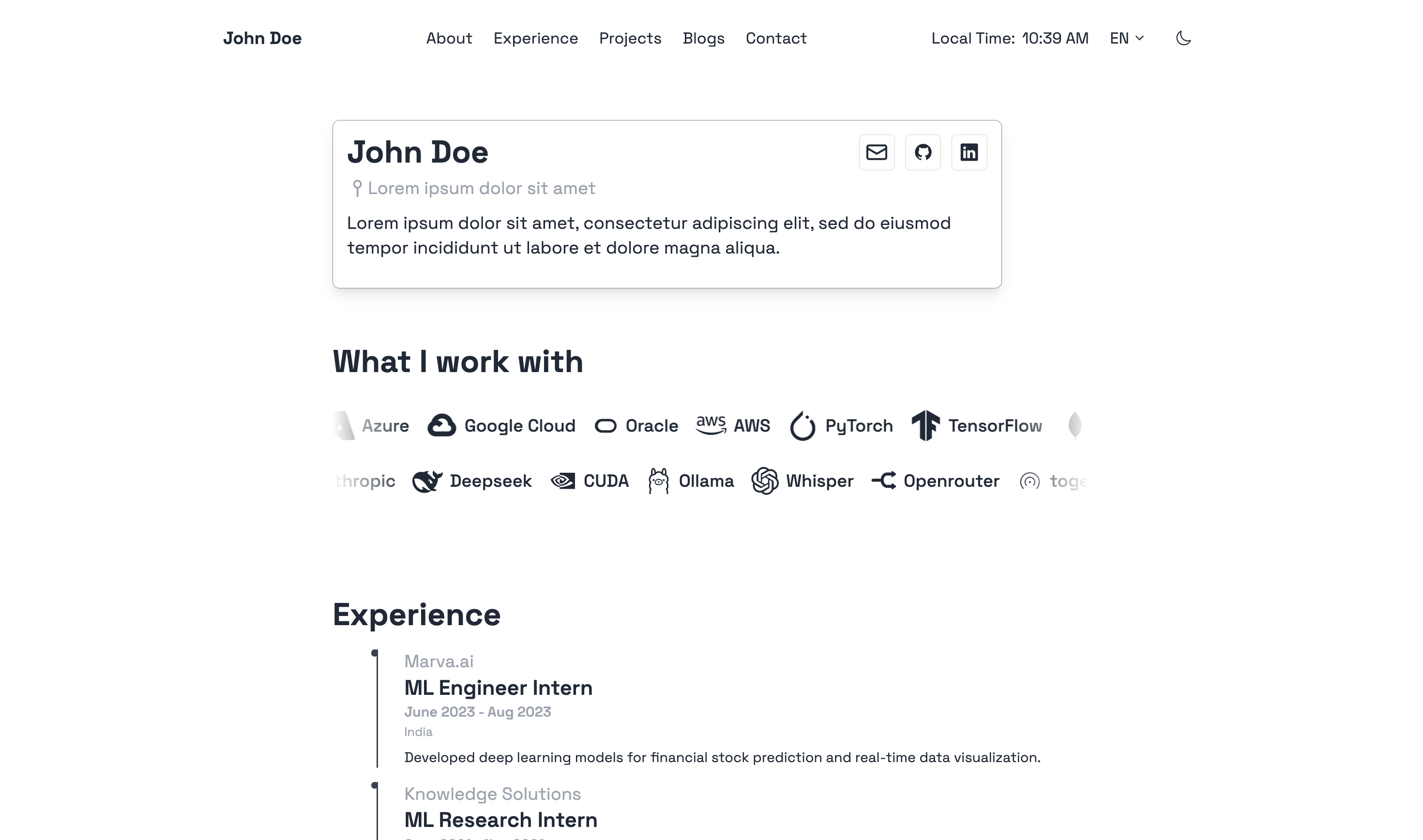
## Preview
**Homepage (Dark Mode):**
**Homepage (Light Mode):**
## Installation
Ensure you have Hugo installed (Extended version, v0.158.0 or newer).
For a quick start and to see a full configuration example, you can refer to the `hugo.example.toml` file included in the theme's root directory. You can copy this file to your site's root as `hugo.toml` (or `config.toml`) and customize it.
### Option 1: Clone Repository (Recommended for theme development)
```bash
# From your Hugo site's root directory
git clone https://github.com/prxshetty/hugo-noir.git themes/hugo-noir
```
### Option 2: Add as a Git Submodule (Recommended for using the theme in your project)
```bash
# From your Hugo site's root directory
git submodule add https://github.com/prxshetty/hugo-noir.git themes/hugo-noir
```
Then, update your submodules:
```bash
git submodule update --init --recursive
```
### CSS Build
**Theme users:** no action needed. The theme ships a prebuilt stylesheet at `static/css/tailwind.css` (Tailwind + Typography plugin, used for Markdown rendering in blog posts) that works out of the box. You do **not** need Node.js or npm to install and use the theme.
**Theme developers/customizers:** only rebuild the CSS when you change the theme's Tailwind configuration, `assets/css/main.css`, or add new Tailwind classes in templates:
```bash
# From the theme directory (themes/hugo-noir)
npm install
npx tailwindcss -i assets/css/main.css -o static/css/tailwind.css --minify
```
> **Upgrading from earlier versions:** this release raises the minimum Hugo version to **v0.158.0 (Extended)**, replaces the Tailwind CDN with a committed compiled stylesheet, and removes the redundant color aliases `bg-secondary-light`, `bg-tertiary-light`, `bg-tertiary-dark`, `border-secondary-light`, and `border-secondary-dark` (templates now use the `primary` equivalents — same rendered values). If your own template overrides reference the removed classes, swap them to the `primary` equivalents listed in `CHANGELOG.md`. Homepage blog links and the post card colors were also aligned with the heading/card palette (see CHANGELOG).
## Configuration
1. **Set the theme in your site's `hugo.toml` (or `config.toml`):**
```toml
theme = "hugo-noir"
```
2. **Hugo Version Compatibility:**
This theme requires:
* Hugo **Extended** version.
* Minimum version: **0.158.0**.
To ensure compatibility, especially if you plan to submit this theme to the Hugo Themes showcase, you can specify Hugo version requirements within the theme's own `hugo.toml` or `config.toml` (create one at `themes/hugo-noir/hugo.toml` if it doesn't exist) or more commonly in a `theme.toml` file at the root of the theme.
Example for `themes/hugo-noir/theme.toml` (see "Theme Metadata" section below):
```toml
[module]
[module.hugoVersion]
extended = true
min = "0.158.0"
# max = "0.1xx.x" # Optionally specify a max version
```
3. **Multilingual Setup (Optional):**
This theme is pre-configured for English (en), Spanish (es), and French (fr). To enable multilingual mode in your site, configure your main `hugo.toml` like this:
```toml
defaultContentLanguage = "en"
defaultContentLanguageInSubdir = true # Recommended for clearer URLs like /en/blog, /es/blog
[languages]
[languages.en]
label = "English"
title = "Your Site Title (English)"
weight = 1
contentDir = "content/en" # Ensure you have this directory
[languages.en.menu]
[[languages.en.menu.main]]
name = "About"
pageRef = "/about"
weight = 1
# ... other English menu items
[languages.es]
label = "Español"
title = "Your Site Title (Spanish)"
weight = 2
contentDir = "content/es" # Ensure you have this directory
[languages.es.menu]
[[languages.es.menu.main]]
name = "Sobre Mí" # Translated name
pageRef = "/about" # pageRef should ideally point to the same logical page
weight = 1
# ... other Spanish menu items
[languages.fr]
label = "Français"
title = "Your Site Title (French)"
weight = 3
contentDir = "content/fr" # Ensure you have this directory
[languages.fr.menu]
[[languages.fr.menu.main]]
name = "À Propos" # Translated name
pageRef = "/about"
weight = 1
# ... other French menu items
# Remember to create content in the respective contentDir folders (e.g., content/en/about.md, content/es/about.md)
```
The theme's `i18n` folder (`themes/hugo-noir/i18n/`) contains the translation strings.
4. **Params for `hugo.toml` (and Data Files):**
The theme uses parameters from your site's `hugo.toml` under `[params]` for common information like your name and social links. Ensure these are set. Example:
```toml
[params]
name = "Your Name"
location = "Your Location"
description = "Description ..."
# Social links
github = "https://github.com/yourusername"
twitter = "https://twitter.com/yourusername"
linkedin = "https://linkedin.com/in/yourusername"
email = "[email protected]"
# ... other params ...
```
**Site-Specific Data (Author, Experience, etc.):**
For language-specific information like author details and your professional experience, this theme utilizes Hugo's data files. You should create these in your site's `data` directory, typically organized by language.
* **Author Information:** Create files like `data/en/author.toml`, `data/es/author.toml`. Example for `data/en/author.toml`:
```toml
[author]
name = "Your Name"
location = "Your Location"
description = "Description ..."
# Social links
github = "https://github.com/yourusername"
twitter = "https://twitter.com/yourusername"
linkedin = "https://linkedin.com/in/yourusername"
email = "[email protected]"
# ... other social links ...
```
* **Tech Carousel:** Create a file like `data/en/tech.toml` to customize items on the tech stack carousel. The icon class pulls from [Devicon](https://devicon.dev/). Example `data/en/tech.toml`:
```toml
# The 'row1' array populates the top carousel
row1 = [
{ icon = "devicon-python-plain", name = "Python" },
{ icon = "devicon-go-plain", name = "Go" },
{ icon = "devicon-javascript-plain", name = "JavaScript" },
# ... other tech stack items...
{ icon = "devicon-ruby-plain", name = "Ruby" }
]
# The 'row2' array populates the bottom carousel
row2 = [
{ icon = "devicon-docker-plain", name = "Docker" },
{ icon = "devicon-postgresql-plain", name = "PostgreSQL" },
{ icon = "devicon-nginx-original", name = "Nginx" },
# ... other tech stack items...
{ icon = "devicon-nodejs-plain", name = "Node.js" }
]
```
* **Experience Data:** The "Experience" section on your site (using the `experience.html` layout) is populated from a data file. Create a file such as `data/en/experience.toml` (or `.yaml`/`.json`). Each entry should detail a role or position.
Example structure for an entry in `data/en/experience.toml`:
```toml
[[experience]]
role = "Senior Developer"
company = "Tech Solutions Inc."
company_link = "https://www.techsolutions.com" # Add company URL here
period = "Jan 2020 - Present"
country = "USA" # New field for region/country
# description = "Longer description of the role..." # Optional detailed description
responsibilities = [
"Developed and maintained web applications.",
"Collaborated with cross-functional teams.",
"Led junior developers."
]
technologies = ["Go", "Docker", "Kubernetes", "React"]
[[experience]]
role = "Software Engineer"
company = "Innovate LLC"
# company_link = "" # Omit or leave blank if no link
period = "Jun 2018 - Dec 2019"
country = "Canada"
responsibilities = [
"Contributed to full-stack development projects.",
"Participated in code reviews and agile sprints."
]
technologies = ["Python", "Django", "PostgreSQL"]
```
Ensure you have a similar file for each language you support (e.g., `data/es/experience.toml`). The `experience.html` layout in the theme will automatically pick up the data for the current language.
**Adding Company Links:**
This site supports displaying clickable links for companies in the "Experience" section.
- To add a link, include the `company_link` field with the URL in the respective experience entry within your `data/<language_code>/experience.yaml` (or `.json`/`.toml`) file. For example, you would update `data/en/experience.yaml`, `data/es/experience.yaml`, and `data/fr/experience.yaml` if you support English, Spanish, and French respectively.
- If a `company_link` is provided, the company name will be a hyperlink. Otherwise, it will be plain text.
- Styling: Links match the site's theme (grey, turning blue on hover). An external link icon is automatically added.
- No template changes are needed; the layouts already support this.
Remember to replace `<language_code>` with the actual language code (e.g., `en`, `es`, `fr`).
## Content Structure
The theme generally expects a standard Hugo content structure. For multilingual sites, organize content into language-specific subdirectories as defined in your `hugo.toml`'s `contentDir` for each language.
Example:
```
content/
├── en/ # English content
│ ├── _index.md # Homepage content for English
│ ├── about.md
│ ├── blogs/
│ │ ├── _index.md
│ │ └── my-first-blog.md
│ └── projects/
│ ├── _index.md
│ └── project-a.md
├── es/ # Spanish content
│ ├── _index.md # Homepage content for Spanish
│ ├── about.md
│ └── blogs/
│ ├── _index.md
│ └── mi-primer-blog.md
└── fr/ # French content
├── _index.md # Homepage content for French
├── about.md
└── blogs/
├── _index.md
└── mon-premier-blog.md
```
## Front Matter Examples
### Blog Post
```yaml
---
title: "My First Post"
date: 2023-03-15T10:30:00+05:30 # Or your local timezone
draft: false
tags: ["hugo", "web development"]
categories: ["tutorials"]
description: "A brief description of your post for SEO and previews."
# For multilingual posts, ensure the filename is the same across languages
# e.g., content/en/blogs/my-post.md and content/es/blogs/my-post.md
# Hugo will link them as translations.
---
Your post content here...
```
### Static Page (e.g., About, Contact)
```yaml
---
title: "About Me"
date: 2023-03-15T10:30:00+05:30
draft: false
menu: "main" # Optional: if you want it to appear in the main menu configured in hugo.toml
layout: "single" # Or specific layout if defined
description: "A brief description of the page."
---
Page content here...
```
## Customization
You can customize the theme:
- **Override Templates:** Copy any template file from `themes/hugo-noir/layouts/` into your site's `layouts/` directory (maintaining the same subdirectory structure) and modify it.
- **Custom CSS:**
- For minor CSS overrides, you can create `assets/css/custom.css` in your site's root. The theme will attempt to load this.
- For more extensive changes, you might want to fork the theme or modify its Tailwind CSS configuration (`themes/hugo-noir/tailwind.config.js`) and rebuild the theme's CSS.
- **Static Assets:** Place your own static assets (images, fonts) in your site's `static/` directory.
- **Partials:** Override or extend partials found in `themes/hugo-noir/layouts/partials/` by creating files with the same name in your site's `layouts/partials/` directory.
## Theme Metadata (`theme.toml`) (for Hugo Themes Showcase)
For submission to themes.gohugo.io, your theme needs a `theme.toml` file in its root directory (`themes/hugo-noir/theme.toml`).
Example `themes/hugo-noir/theme.toml`:
```toml
name = "Hugo Noir"
license = "MIT" # Or your chosen license
licenselink = "https://github.com/prxshetty/hugo-noir/blob/main/LICENSE" # Link to the theme's license file
description = "A clean, minimalistic, and multilingual theme for Hugo, focusing on readability and simplicity. Built with Tailwind CSS and offering dark mode."
version = "2.0.0" # Theme version
homepage = "https://github.com/prxshetty/hugo-noir/" # Theme's source repository
demosite = "" # URL to a live demo of your theme
tags = ["blog", "minimal", "responsive", "dark mode", "tailwind", "multilingual", "personal", "portfolio"]
features = ["dark mode", "multilingual", "tailwind css", "responsive", "contact form", "devicons"] # Key features
[author]
name = "John Doe" # Your name
homepage = "https://johndoe.com" # Your website
# If porting from another theme, add [original] section
# [original]
# author = "Original Author Name"
# homepage = "Link to original theme's homepage"
# repo = "Link to original theme's repository"
[module]
[module.hugoVersion]
extended = true
min = "0.158.0"
```
## Contributing
Contributions are welcome! Please feel free to open an issue or submit a pull request.
## License
This theme is released under the MIT License. See the [LICENSE](https://github.com/prxshetty/hugo-noir/blob/main/LICENSE) file for details.
## Credits
- [Hugo](https://gohugo.io/)
- [Tailwind CSS](https://tailwindcss.com/)
- Devicons used in the theme are from [devicons/devicon](https://github.com/devicons/devicon).
看看同类模板
对比同技术栈与用途的模板,找到更适合的视觉与内容结构。

hugo-xmin
eXtremely Minimal Hugo theme: about 140 lines of code in total, including HTML and CSS (with no dependencies)
Hugo · 启动器

hugo-theme-gallery
Gallery Theme for Hugo
Hugo · 启动器

reveal-hugo
📽️ Create rich HTML-based presentations with Hugo and Reveal.js
Hugo · 启动器

anatole
Anatole is a minimalistic two-column theme for Hugo.
Hugo · 启动器

hugo-theme-diary
Moments piled up. A Hugo theme ported from SumiMakito/hexo-theme-Journal.
Hugo · 启动器

risotto
A minimalist, responsive hugo theme inspired by terminal ricing aesthetics.
Hugo · 启动器