Hugo-based static site theme, with the repository released under the MIT license
HugoStarter
sans — Hugo Starter Template
By psugam
sans is a Hugo blog theme developed by psugam, released under the MIT license and aimed at bloggers and content creators, offering a minimalist layout, color customization, search, comments, categories and tags, and shortcodes.
Explore the design
Compare the page layouts and mobile experience. Open any screenshot for a closer look.
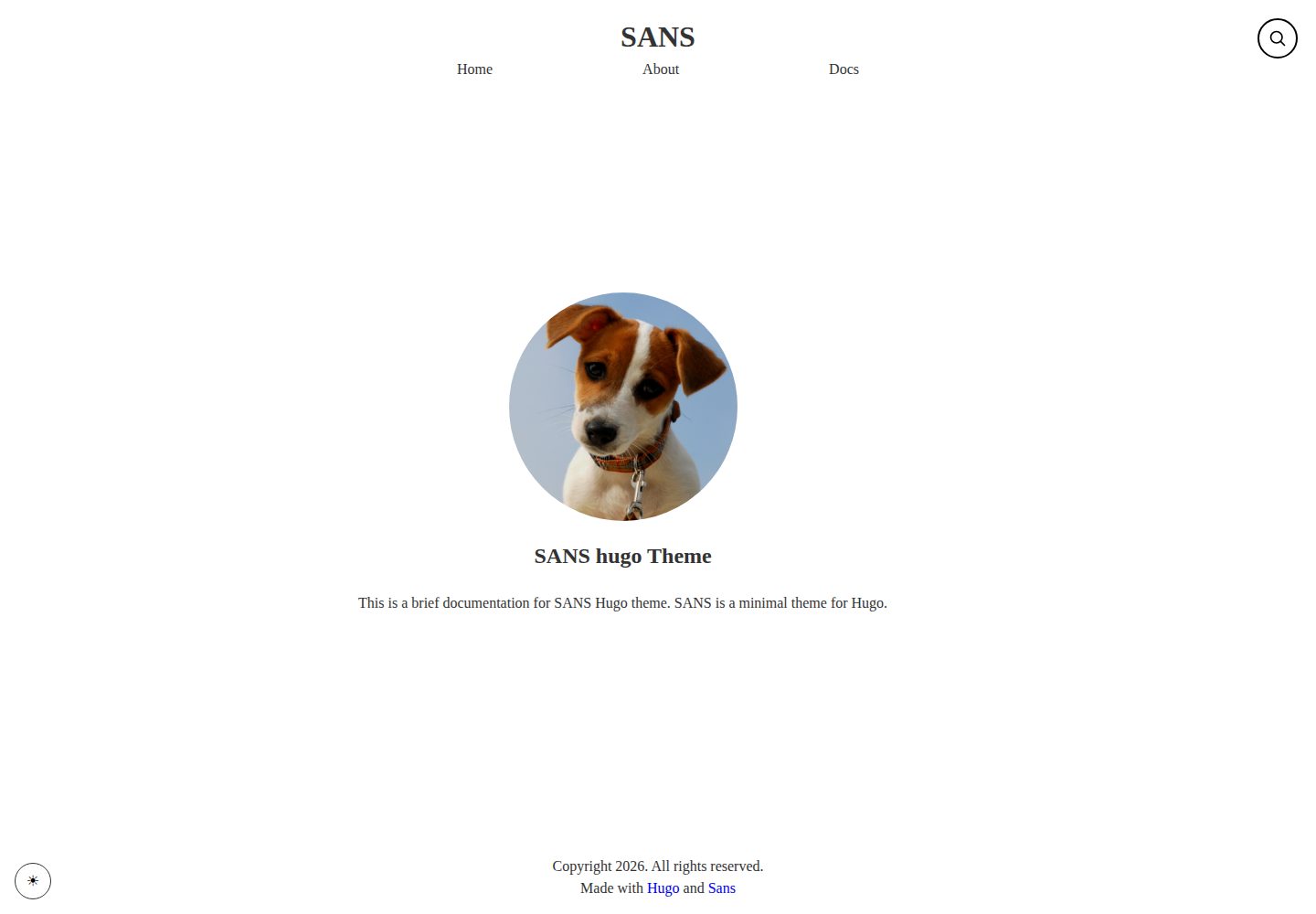
Desktop homepage1 / 3
Desktop captureTop of page
Actual screenshot captured by the server browser.
All pages & views 3
Screenshots show visual appearance; interactive behavior may differ.
Recorded 2026-10-03View source
What stands out
A quick read of the recorded project description.
Provides color scheme customization and responsive layout
Built-in search and support for integrating comment systems
Supports taxonomies such as tags and categories, with configurable article front matter
Provides custom shortcodes and parameterized customization entry points
Comes with an exampleSite and online documentation covering installation, configuration, hosting, and more
Template Details
sans is a static site theme based on Hugo, with the repository at github.com/psugam/sans, released under the MIT license. The README positions it as a clean, minimalist theme for bloggers and content creators, with a demo site at sans-theme.pages.dev that includes a fairly complete documentation site (/doc/) covering installation, homepage configuration, taxonomies, menus, colors, front matter, parameter customization, shortcodes, search, comments, and hosting.
In terms of features, the theme provides color scheme customization, responsive layout, built-in search, comment support, taxonomy support for tags and categories, custom shortcodes, and configurable front matter fields. For content organization, articles are created with hugo new, front matter supports fields such as title, date, draft, tags, categories, and description, and menus are defined in config/menu.toml sorted by weight.
Installation offers three methods: git submodule, cloning directly into the themes directory, or importing via Hugo Modules; to enable it, set theme = "sans" in hugo.toml. The quick start suggests copying the config, content, and assets under themes/sans/exampleSite/ to the site root and adjusting them, then previewing locally with hugo server -D. Build output goes to the public/ directory, and the README lists hosting options such as GitHub Pages, Netlify, Vercel, GitLab Pages, and AWS S3.
Limitations: the theme's specific version number, dependency list, and performance are not given in the materials and cannot be judged from them; third-party assets such as demo images, fonts, and icons must be checked separately under their respective licenses, and the MIT license covers only the code of this version; external services such as domains and hosting may incur separate charges.
HugoStarter
Is it right for your project?
Use Cases
- Building a personal blog and publishing text and image articles
- Organizing content by tags and categories and generating corresponding archive pages
- Adjusting the theme's appearance through colors and parameters to match a personal style
- Deploying the generated static site to hosting platforms such as GitHub Pages and Netlify
Suitable For
- Bloggers and content creators who build static sites with Hugo
- Users who need a minimalist blog theme and want to adjust colors themselves
- Developers who prefer to manage content through front matter and configuration files
Getting started & customization
Use these recorded setup notes alongside the repository instructions for your chosen version.
- 1
The theme can be installed in three ways: git submodule, cloning into the themes directory, or Hugo Modules
- 2
Enable the theme by setting theme = "sans" in hugo.toml
- 3
It is recommended to copy the config, content, and assets under themes/sans/exampleSite/ to the site root as a starting point
- 4
Preview locally with hugo server -D, and run hugo to generate the public/ directory
- 5
Third-party assets such as demo images, fonts, and icons must be checked separately under their respective licenses
License & source material
Usage conditions & limitations
Free to use · keep license noticeThis entry covers the free version in the public repository under the MIT license; the free scope is the code of this version and does not mean that external services or third-party assets are free.
Must comply with when using
- Free use, modification, commercial use, and distribution of this version's code are permitted.
- When distributing copies or substantial portions of the code, retain the original author's copyright notice and the full MIT license notice.
- The code is provided as is; warranties and limitations of liability are governed by the original license and applicable law.
Additional costs & items to verify
- Demo images, fonts, icons, and other third-party assets must be checked under their respective licenses and cannot be judged solely by the code's MIT license.
- External services such as domains, hosting, databases, payments, or AI may incur additional charges.
View Original Text Basis
https://github.com/psugam/sans/blob/master/LICENSEhttps://github.com/psugam/sans/blob/master/README.mdPermission is hereby granted, free of charge
Original License Text
Compiled by DeepSeek based on repository license and README ·2026-10-03. Results only cover the materials read; dependencies, images, fonts, and subsequent term changes are subject to their respective original texts.
Project checks & description sources
Template Information
- Source platforms
- Hugo Themes
- Documentation and maintenance reference score
- More documented · 75 / 100
- Technologies
- Hugo
- Website type
- Starter
How this score is calculated
Our heuristic uses license records (up to 30), a demo link (12), a preview (10), stars (15), recorded maintenance (15), description completeness (8), feature records (5) and classification data (5). It is not a code, security or performance test, or a Google score. A link does not establish tested functionality.
What to verify for this project
- Repository update recorded
- 2026-01-11
- Screenshot last checked
- 2026-10-03
A demo link is listed. Check it with your own content and viewport sizes; its presence does not confirm that forms, authentication or payments work.
The catalog identifies Hugo as the primary stack. Check the actual dependency manifest and lockfile for versions and hosting requirements. These notes use recorded metadata, not a code audit or a deployment test.
Use a selection guide →How this description was prepared
AI-assisted description based on catalog records and repository material. Repository authors are not automatically the reviewers of this description.
Automatically checked against source and license rules; no manual editorial review.
Inspect the recorded source material
SHA-256: 0c709972a64a726c781af7c48018dea8702a0999290511e480640b012d43e66e
2026-10-03T08:07:30.757Z
Source file / repository# Sans Theme
A clean and minimal Hugo theme for bloggers and content creators.
## Features
- 🎨 Clean, minimalist design
- 🌙 Color scheme customization
- 📱 Fully responsive
- 🔍 Built-in search functionality
- 💬 Comments support
- 📑 Taxonomy support (tags, categories)
- ⚡ Fast and lightweight
- 🎯 SEO optimized
- 📝 Custom shortcodes
- 🎨 Customizable front matter
## Demo
Visit the [documentation site](https://sans-theme.pages.dev/doc/) to see the theme in action.
## Installation
### Method 1: Git Submodule
Add the theme as a git submodule to your Hugo project:
```bash
git submodule add https://github.com/psugam/sans.git themes/sans
```
### Method 2: Clone
Clone the theme directly into your themes directory:
```bash
cd themes
git clone https://github.com/psugam/sans.git
```
### Method 3: Hugo Modules
Initialize your Hugo site as a module and import the theme:
```bash
hugo mod init github.com/psugam/sans
```
Then add to your` hugo.toml`:
```toml
[module]
[[module.imports]]
path = "github.com/psugam/sans"
```
### Activate the Theme
Update your site's configuration file (`hugo.toml`):
```toml
theme = "sans"
```
## Quick Start
1. Install the theme using one of the methods above
2. Copy the config, content and assets folder from from `themes/sans/exampleSite/` to the root of your site.
3. Customize the configuration to your needs
4. Run `hugo server -D` to start the development server
5. Visit `http://localhost:1313` to see your site
## Configuration
### Basic Configuration
```toml
baseURL = "https://example.com/"
languageCode = "en-us"
title = "My Site"
theme = "sans"
[params]
description = "A minimal blog"
author = "Your Name"
```
### Menu Configuration
Define your site navigation in `config/menu.toml`:
```toml
[[menu.main]]
name = "Home"
url = "/"
weight = 1
[[menu.main]]
name = "Blog"
url = "/posts/"
weight = 2
[[menu.main]]
name = "About"
url = "/about/"
weight = 3
```
### Color Scheme
Customize the theme colors to match your brand. See the [Color Scheme documentation](https://sans-theme.pages.dev/doc/color-scheme) for details.
## Content
### Creating Posts
Create a new post:
```bash
hugo new posts/my-first-post.md
```
### Front Matter
Available front matter options:
```yaml
---
title: "My Post Title"
date: 2024-01-01
draft: false
tags: ["tag1", "tag2"]
categories: ["category1"]
description: "Post description for SEO"
---
```
For more front matter options, see the [Front Matter documentation](https://sans-theme.pages.dev/doc/front-matter).
### Taxonomies
The theme supports tags and categories out of the box. Configure additional taxonomies in your `config.toml`.
Learn more in the [Taxonomy documentation](https://sans-theme.pages.dev/doc/taxonomy/).
## Features-List
### Search
Built-in search functionality to help users find content quickly. See the [Search documentation](https://sans-theme.pages.dev/doc/search) for setup instructions.
### Comments
Add comments to your blog posts. The theme supports various comment systems. Check the [Comments documentation](https://sans-theme.pages.dev/doc/comments) for configuration.
### Shortcodes
The theme includes several useful shortcodes for enhanced content formatting. See the [Shortcodes documentation](https://sans-theme.pages.dev/doc/shortcodes) for available shortcodes.
## Customization
The theme is highly customizable through parameters. For detailed customization options, refer to the [Params and Customization documentation](https://sans-theme.pages.dev/doc/params-and-customization).
## Deployment
### Build Your Site
```bash
hugo
```
This generates your static site in the `public/` directory.
### Hosting Options
The theme works with all popular hosting platforms:
- GitHub Pages
- Netlify
- Vercel
- GitLab Pages
- AWS S3
For detailed hosting instructions, see the [Hosting documentation](https://sans-theme.pages.dev/doc/hosting-your-site).
## Documentation
Full documentation is available at: [https://sans-theme.pages.dev/doc/](https://sans-theme.pages.dev/doc/)
Topics covered:
- [Installation](https://sans-theme.pages.dev/doc/installation)
- [Homepage Configuration](https://sans-theme.pages.dev/doc/homepage)
- [Taxonomy](https://sans-theme.pages.dev/doc/taxonomy/)
- [Menu](https://sans-theme.pages.dev/doc/menu)
- [Color Scheme](https://sans-theme.pages.dev/doc/color-scheme)
- [Front Matter](https://sans-theme.pages.dev/doc/front-matter)
- [Params and Customization](https://sans-theme.pages.dev/doc/params-and-customization)
- [Shortcodes](https://sans-theme.pages.dev/doc/shortcodes)
- [Search](https://sans-theme.pages.dev/doc/search)
- [Comments](https://sans-theme.pages.dev/doc/comments)
- [Hosting](https://sans-theme.pages.dev/doc/hosting-your-site)
## Support
If you encounter any issues or have questions:
- Check the [documentation](https://sans-theme.pages.dev/doc/)
- Open an issue on [GitHub](https://github.com/psugam/sans/issues)
## License
This theme is released under the MIT License. See the [LICENSE](LICENSE) file for details.
## Credits
Created by [Sugam](https://www.sugam-pokharel.com.np/)
---
⭐ If you like this theme, please give it a star on GitHub!
Explore similar templates
Compare previews and descriptions within the same stack and category.

hugo-xmin
hugo-xmin is an extremely minimal Hugo theme written by Yihui Xie for template beginners. HTML and CSS total about 140 lines, with no external dependencies, and it uses the MIT license.
Hugo · Starter

hugo-theme-gallery
A Hugo Extended photo gallery theme that organizes images with Page Bundles, automatically generating album lists and gallery pages with a Justified layout and PhotoSwipe lightbox.
Hugo · Starter

reveal-hugo
reveal-hugo is a Hugo theme that converts Markdown content into Reveal.js-based HTML presentations. It supports slide separation with `---`, shortcodes for fragments, slides, sections, notes, Markdown, and MathJax, and organizes content as root or section presentations with order controlled by weight.
Hugo · Starter

anatole
Anatole is a minimalistic two-column Hugo theme ported from farbox-theme-Anatole, featuring dark mode, multilingual and RTL support, and optional portfolio, comments, analytics, KaTeX, and Mermaid integrations. It suits personal blogs, portfolios, or documentation sites built with Hugo.
Hugo · Starter

hugo-theme-diary
A Hugo diary-style theme ported from the Hexo theme Journal, with a grid homepage for essays and daily notes. It supports six languages, dark mode, table-of-contents scroll positioning, reading time, code highlighting, and configurable sidebar, fonts, and colors.
Hugo · Starter

risotto
risotto is a minimalist, responsive Hugo theme inspired by terminal ricing aesthetics. It uses semantic HTML and pure CSS with no JavaScript, and its layout relies on CSS Grid for native responsiveness without manual breakpoints.
Hugo · Starter