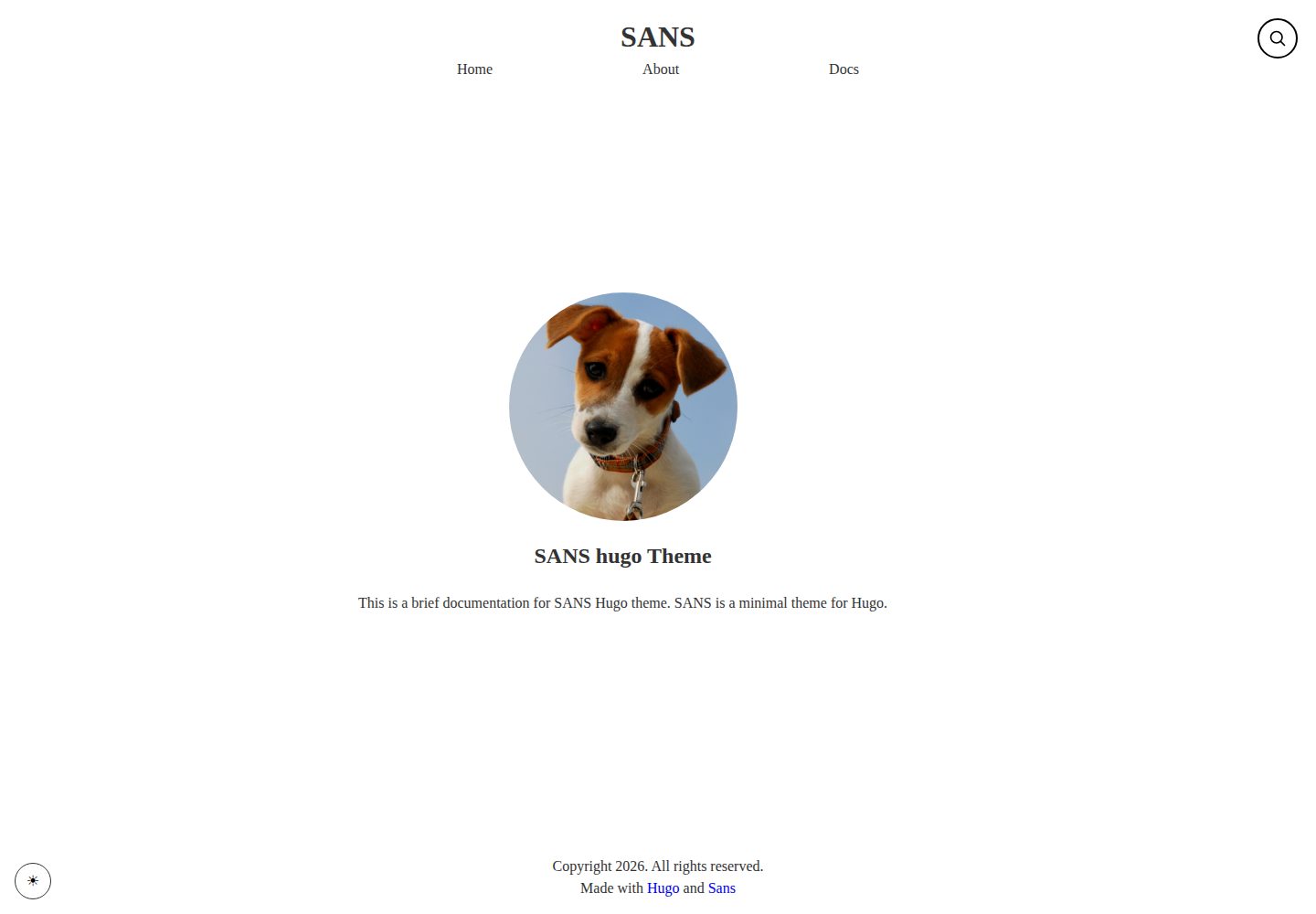
基于 Hugo 的静态站点主题,仓库采用 MIT 许可证发布
Hugo启动器
sans — Hugo 启动器模板
作者 psugam
sans 是 psugam 开发的 Hugo 博客主题,采用 MIT 许可,面向博主与内容创作者,提供极简布局、配色定制、搜索、评论、分类标签与短代码等能力。
看看你的网站会是什么样
浏览真实页面截图,比较内容排版与手机效果。点击下方缩略图切换,放大查看整页细节。
全部页面与视图 3
截图用于了解视觉与布局,交互效果请以实际项目为准。
采集于 2026-10-03查看来源
值得关注的模板亮点
从已有项目资料中,快速了解它的特点。
提供配色方案自定义与响应式布局
内置搜索功能,并支持接入评论系统
支持标签、分类等分类法,文章 front matter 可配置
提供自定义短代码与参数化定制入口
附带 exampleSite 与覆盖安装、配置、托管等主题的在线文档
模板详细介绍
sans 是一个基于 Hugo 的静态站点主题,仓库位于 github.com/psugam/sans,采用 MIT 许可证发布。README 将其定位为面向博主和内容创作者的简洁极简主题,演示站点为 sans-theme.pages.dev,其中包含一份较完整的文档站(/doc/),覆盖安装、首页配置、分类法、菜单、配色、front matter、参数定制、短代码、搜索、评论与托管等主题。
功能方面,主题提供配色方案自定义、响应式布局、内置搜索、评论支持、标签与分类等分类法支持、自定义短代码以及可配置的 front matter 字段。内容组织上,文章通过 hugo new 创建,front matter 支持 title、date、draft、tags、categories、description 等字段,菜单在 config/menu.toml 中按 weight 排序定义。
安装提供三种方式:git submodule、直接 clone 到 themes 目录,或通过 Hugo Modules 导入;启用时在 hugo.toml 中设置 theme = "sans"。快速开始建议把 themes/sans/exampleSite/ 下的 config、content 与 assets 复制到站点根目录后自行调整,再用 hugo server -D 本地预览。构建产物输出到 public/ 目录,README 列出 GitHub Pages、Netlify、Vercel、GitLab Pages 与 AWS S3 等托管选项。
限制方面:主题的具体版本号、依赖清单与性能表现未在资料中给出,无法据此判断;演示图片、字体、图标等第三方素材需按各自许可单独核对,MIT 许可仅覆盖该版本代码;域名、托管等外部服务可能另行收费。
Hugo启动器
适合你的项目吗?
适用场景
- 搭建个人博客并发布图文文章
- 按标签与分类组织内容并生成对应归档页面
- 通过配色与参数调整主题外观以匹配个人风格
- 将生成的静态站点部署到 GitHub Pages、Netlify 等托管平台
适合人群
- 使用 Hugo 构建静态站点的博主与内容创作者
- 需要极简风格博客主题并希望自行调整配色的用户
- 倾向通过 front matter 与配置文件管理内容的开发者
上手与定制指南
结合仓库当前版本的说明,按下面的资料检查内容、配置与运行要求。
- 1
可通过 git submodule、clone 到 themes 目录或 Hugo Modules 三种方式安装主题
- 2
在 hugo.toml 中设置 theme = "sans" 启用主题
- 3
建议将 themes/sans/exampleSite/ 下的 config、content、assets 复制到站点根目录作为起点
- 4
使用 hugo server -D 本地预览,执行 hugo 生成 public/ 目录
- 5
演示图片、字体、图标等第三方素材需按各自许可单独核对
授权与来源资料
使用条件与限制
免费使用 · 保留许可声明本次收录的是公开仓库中采用 MIT 许可的免费版本;免费范围为该版本代码,不代表外部服务或第三方素材免费。
使用时需要遵守
- 允许免费使用、修改、商用和分发该版本代码。
- 分发代码副本或实质性部分时,保留原作者版权声明和完整 MIT 许可声明。
- 代码按现状提供;担保与责任限制以原许可证及适用法律为准。
额外费用与待核对事项
- 演示图片、字体、图标及其他第三方素材需按各自许可核对,不能仅凭代码的 MIT 许可判断。
- 域名、托管、数据库、支付或 AI 等外部服务可能另外收费。
查看原文依据
https://github.com/psugam/sans/blob/master/LICENSEhttps://github.com/psugam/sans/blob/master/README.mdPermission is hereby granted, free of charge
许可证原文
DeepSeek 根据仓库许可证和 README 整理 ·2026-10-03。结果仅覆盖已读取资料,依赖、图片、字体及后续条款变更以各自原文为准。
项目核对记录与介绍依据
模板资料
- 来源平台
- Hugo Themes
- 资料与维护参考分
- 资料较完整 · 75 / 100
- 技术栈
- Hugo
- 网站类型
- 启动器
这个分数如何计算
本站按许可资料(最高30分)、演示链接(12分)、预览图(10分)、Star数(15分)、记录的维护时间(15分)、描述完整度(8分)、功能记录(5分)和分类资料(5分)计算。它不是代码、安全或性能测试,也不是 Google 评分;有链接不代表已实测可用。
这个项目需要核对什么
- 记录的仓库更新时间
- 2026-01-11
- 截图检查日期
- 2026-10-03
已收录演示链接。请用你的内容与屏幕尺寸检查;有演示不代表表单、认证或支付已经可用。
目录记录的主要技术栈是 Hugo。请通过依赖清单和锁文件核对实际版本与托管要求。这些说明基于收录资料,不代表代码审计或部署实测。
查看具体选型方法 →介绍的制作与核对状态
介绍由 AI 辅助整理目录与仓库资料。仓库作者不等于这篇介绍的审核者。
已完成服务器许可规则与 AI 来源核对;未经过人工编辑审核。
查看当时使用的来源资料
SHA-256: 0c709972a64a726c781af7c48018dea8702a0999290511e480640b012d43e66e
2026-10-03T08:07:30.757Z
来源文件 / 仓库# Sans Theme
A clean and minimal Hugo theme for bloggers and content creators.
## Features
- 🎨 Clean, minimalist design
- 🌙 Color scheme customization
- 📱 Fully responsive
- 🔍 Built-in search functionality
- 💬 Comments support
- 📑 Taxonomy support (tags, categories)
- ⚡ Fast and lightweight
- 🎯 SEO optimized
- 📝 Custom shortcodes
- 🎨 Customizable front matter
## Demo
Visit the [documentation site](https://sans-theme.pages.dev/doc/) to see the theme in action.
## Installation
### Method 1: Git Submodule
Add the theme as a git submodule to your Hugo project:
```bash
git submodule add https://github.com/psugam/sans.git themes/sans
```
### Method 2: Clone
Clone the theme directly into your themes directory:
```bash
cd themes
git clone https://github.com/psugam/sans.git
```
### Method 3: Hugo Modules
Initialize your Hugo site as a module and import the theme:
```bash
hugo mod init github.com/psugam/sans
```
Then add to your` hugo.toml`:
```toml
[module]
[[module.imports]]
path = "github.com/psugam/sans"
```
### Activate the Theme
Update your site's configuration file (`hugo.toml`):
```toml
theme = "sans"
```
## Quick Start
1. Install the theme using one of the methods above
2. Copy the config, content and assets folder from from `themes/sans/exampleSite/` to the root of your site.
3. Customize the configuration to your needs
4. Run `hugo server -D` to start the development server
5. Visit `http://localhost:1313` to see your site
## Configuration
### Basic Configuration
```toml
baseURL = "https://example.com/"
languageCode = "en-us"
title = "My Site"
theme = "sans"
[params]
description = "A minimal blog"
author = "Your Name"
```
### Menu Configuration
Define your site navigation in `config/menu.toml`:
```toml
[[menu.main]]
name = "Home"
url = "/"
weight = 1
[[menu.main]]
name = "Blog"
url = "/posts/"
weight = 2
[[menu.main]]
name = "About"
url = "/about/"
weight = 3
```
### Color Scheme
Customize the theme colors to match your brand. See the [Color Scheme documentation](https://sans-theme.pages.dev/doc/color-scheme) for details.
## Content
### Creating Posts
Create a new post:
```bash
hugo new posts/my-first-post.md
```
### Front Matter
Available front matter options:
```yaml
---
title: "My Post Title"
date: 2024-01-01
draft: false
tags: ["tag1", "tag2"]
categories: ["category1"]
description: "Post description for SEO"
---
```
For more front matter options, see the [Front Matter documentation](https://sans-theme.pages.dev/doc/front-matter).
### Taxonomies
The theme supports tags and categories out of the box. Configure additional taxonomies in your `config.toml`.
Learn more in the [Taxonomy documentation](https://sans-theme.pages.dev/doc/taxonomy/).
## Features-List
### Search
Built-in search functionality to help users find content quickly. See the [Search documentation](https://sans-theme.pages.dev/doc/search) for setup instructions.
### Comments
Add comments to your blog posts. The theme supports various comment systems. Check the [Comments documentation](https://sans-theme.pages.dev/doc/comments) for configuration.
### Shortcodes
The theme includes several useful shortcodes for enhanced content formatting. See the [Shortcodes documentation](https://sans-theme.pages.dev/doc/shortcodes) for available shortcodes.
## Customization
The theme is highly customizable through parameters. For detailed customization options, refer to the [Params and Customization documentation](https://sans-theme.pages.dev/doc/params-and-customization).
## Deployment
### Build Your Site
```bash
hugo
```
This generates your static site in the `public/` directory.
### Hosting Options
The theme works with all popular hosting platforms:
- GitHub Pages
- Netlify
- Vercel
- GitLab Pages
- AWS S3
For detailed hosting instructions, see the [Hosting documentation](https://sans-theme.pages.dev/doc/hosting-your-site).
## Documentation
Full documentation is available at: [https://sans-theme.pages.dev/doc/](https://sans-theme.pages.dev/doc/)
Topics covered:
- [Installation](https://sans-theme.pages.dev/doc/installation)
- [Homepage Configuration](https://sans-theme.pages.dev/doc/homepage)
- [Taxonomy](https://sans-theme.pages.dev/doc/taxonomy/)
- [Menu](https://sans-theme.pages.dev/doc/menu)
- [Color Scheme](https://sans-theme.pages.dev/doc/color-scheme)
- [Front Matter](https://sans-theme.pages.dev/doc/front-matter)
- [Params and Customization](https://sans-theme.pages.dev/doc/params-and-customization)
- [Shortcodes](https://sans-theme.pages.dev/doc/shortcodes)
- [Search](https://sans-theme.pages.dev/doc/search)
- [Comments](https://sans-theme.pages.dev/doc/comments)
- [Hosting](https://sans-theme.pages.dev/doc/hosting-your-site)
## Support
If you encounter any issues or have questions:
- Check the [documentation](https://sans-theme.pages.dev/doc/)
- Open an issue on [GitHub](https://github.com/psugam/sans/issues)
## License
This theme is released under the MIT License. See the [LICENSE](LICENSE) file for details.
## Credits
Created by [Sugam](https://www.sugam-pokharel.com.np/)
---
⭐ If you like this theme, please give it a star on GitHub!
看看同类模板
对比同技术栈与用途的模板,找到更适合的视觉与内容结构。

hugo-xmin
eXtremely Minimal Hugo theme: about 140 lines of code in total, including HTML and CSS (with no dependencies)
Hugo · 启动器

hugo-theme-gallery
Gallery Theme for Hugo
Hugo · 启动器

reveal-hugo
📽️ Create rich HTML-based presentations with Hugo and Reveal.js
Hugo · 启动器

anatole
Anatole is a minimalistic two-column theme for Hugo.
Hugo · 启动器

hugo-theme-diary
Moments piled up. A Hugo theme ported from SumiMakito/hexo-theme-Journal.
Hugo · 启动器

risotto
A minimalist, responsive hugo theme inspired by terminal ricing aesthetics.
Hugo · 启动器