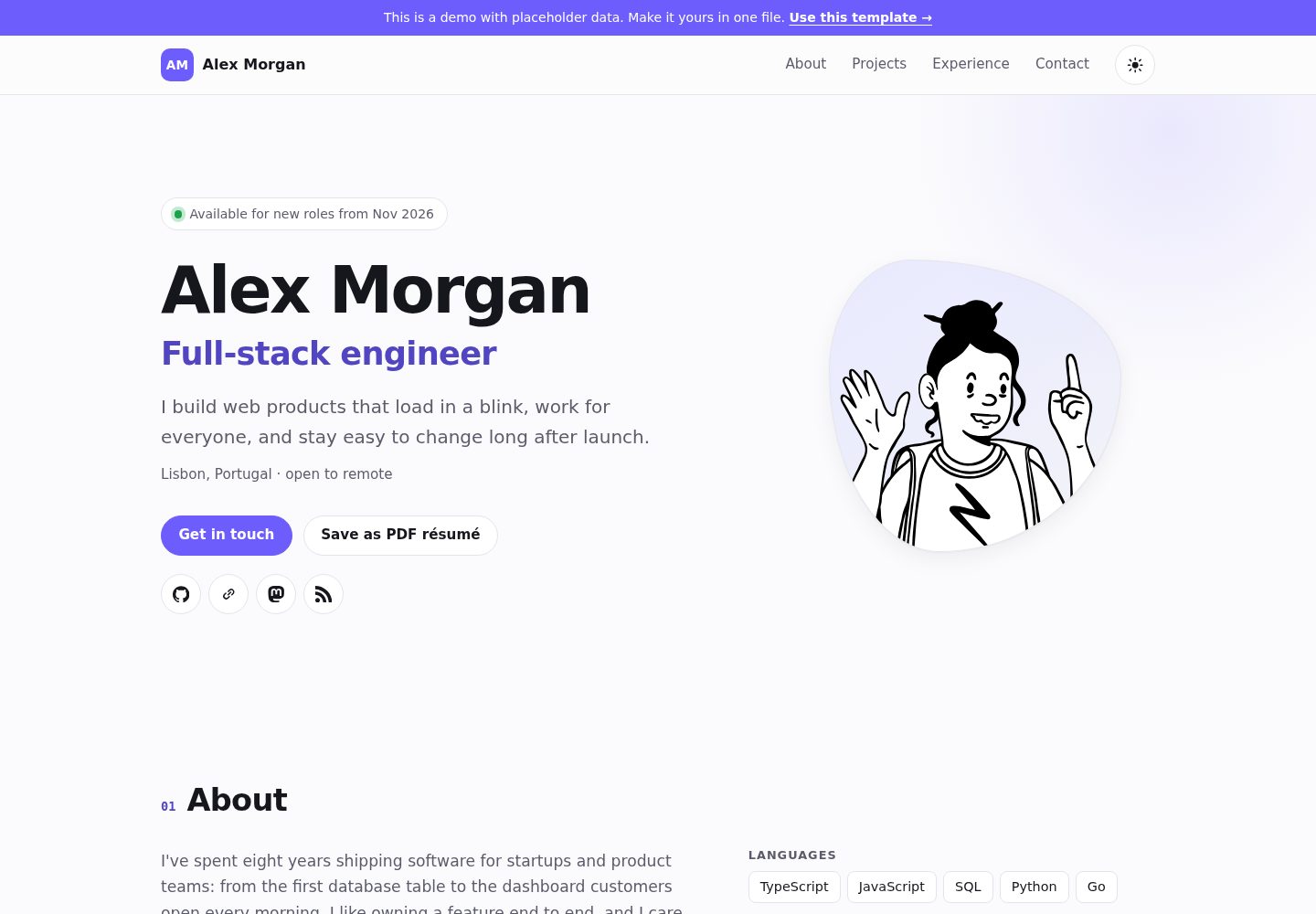
All personal content is edited in a single file, src/config.ts, with no need to dig through components
AstroPortfolio
dev-portfolio — Astro Portfolio Template
By qaweem321
An Astro-based developer portfolio template where all personal content is configured in a single file, src/config.ts, with dark/light themes, print-as-résumé support, and deployment to GitHub Pages.
Explore the design
Compare the page layouts and mobile experience. Open any screenshot for a closer look.
Desktop homepage1 / 2
Desktop captureTop of page
Actual screenshot captured by the server browser.
All pages & views 2
Screenshots show visual appearance; interactive behavior may differ.
Recorded 2026-10-13View source
What stands out
A quick read of the recorded project description.
Configuration is validated at build time; invalid URLs, emails, dates, or an empty name will halt the build and point to the field
Built-in dark and light themes, plus a print function that produces a clean two-page black-and-white résumé, including in dark mode
The avatar can be generated from arbitrary text or replaced with a photo in the public/ directory
No web fonts or tracking scripts; the page remains accessible when JavaScript is disabled
Includes page descriptions, link preview tags, and schema.org Person structured data
Template Details
dev-portfolio is a developer portfolio template built with Astro, released under the MIT license. Its core design centralizes everything you need to change—name, job title, projects, work experience, social links, skills, education, and theme accent color—into a single file, src/config.ts, so you don't have to search across multiple components. Configuration is validated at build time: for example, a malformed URL, an invalid email address, reversed date order, or an empty name will fail the build and point to the specific field, preventing a broken page from being published.
The template includes both dark and light themes and provides a "Save as PDF résumé" print function. The printed output is a two-page black-and-white résumé with no navigation or buttons, and it prints the same way in dark mode. The avatar is generated by default from arbitrary text using DiceBear's Notionists style, but you can replace it with a photo in the public/ directory. The pages use plain HTML and a small amount of inline script, with no web fonts or tracking scripts loaded. Keyboard navigation, skip links, visible focus, icon button labels, WCAG AA contrast in both themes, and reduced motion preferences are all handled, and the site remains accessible when JavaScript is disabled. The template also includes page descriptions, link preview tags, and schema.org Person structured data.
To use it, you can create a repository via GitHub's Use this template, set Source to GitHub Actions in Settings → Pages, and publish after committing and pushing. If the repository name is <you>.github.io, the site is served from the root path; otherwise it is served from a subpath. Local preview requires Node.js 22.12 or newer; run npm install and npm run dev. The build output is a purely static site in dist/, which can also be deployed to Netlify, Cloudflare Pages, Vercel, or any other web server, with the SITE environment variable set to produce correct canonical links.
Important limitations: Alex Morgan in the demo data is a fictional person; the template's MIT license covers only the code itself, and third-party assets such as demo images, fonts, and icons require separate license checks; external services such as domains and hosting may incur costs.
AstroPortfolio
Is it right for your project?
Use Cases
- A developer needs a personal portfolio page they can fill in and publish quickly
- You want to print or save your online portfolio directly as a PDF résumé for applications
- You use GitHub Pages to host your personal site for free and need subpath deployment support
- You need a personal homepage with dark/light theme switching, keyboard operability, and compliant contrast
- You want to upload the build output to static hosting platforms such as Netlify, Cloudflare Pages, or Vercel
Suitable For
- Developers familiar with or willing to use Astro and Node.js
- Individuals who want to maintain portfolio content in a single configuration file
- People who need a portfolio that serves both as a website and as a printable résumé
- Users planning to deploy to GitHub Pages using GitHub Actions
Getting started & customization
Use these recorded setup notes alongside the repository instructions for your chosen version.
- 1
Create a repository via GitHub's Use this template; if the repository name is <you>.github.io, the site is at the root path, otherwise at https://<you>.github.io/<repo-name>/
- 2
Edit src/config.ts to replace the example person's information; set templateNotice to null to remove the demo notice bar
- 3
In the repository's Settings → Pages, set Source to GitHub Actions; the site publishes after you commit and push
- 4
Local preview requires Node.js 22.12 or newer; run npm install and npm run dev
- 5
When deploying to other platforms, use npm run build to generate the static files in dist/, and set the SITE environment variable for correct canonical links
License & source material
Usage conditions & limitations
Free to use · keep license noticeThis entry covers the free version under the MIT license in the public repository; the free scope is the code of this version and does not imply that external services or third-party assets are free.
Must comply with when using
- You may use, modify, commercialize, and distribute the code of this version for free.
- When distributing copies or substantial portions of the code, retain the original author's copyright notice and the full MIT license notice.
- The code is provided as is; warranties and limitations of liability are governed by the original license and applicable law.
Additional costs & items to verify
- Demo images, fonts, icons, and other third-party assets must be checked against their respective licenses; the code's MIT license alone is not sufficient to determine this.
- External services such as domains, hosting, databases, payments, or AI may incur additional charges.
- Deployment to GitHub Pages is free, but other hosting platforms or custom domains may incur costs.
- Local preview requires Node.js 22.12 or newer.
- Third-party assets such as avatars and brand icons are under CC0 and require separate verification; brand names and logos belong to their respective owners.
- The MIT license permits use, modification, and distribution; a backlink is recommended but not required, and the "Built with dev-portfolio" footer can be kept or removed.
View Original Text Basis
Permission is hereby granted, free of charge
Original License Text
**A fast, accessible developer portfolio you fill in from one file.** Dark and light themes, prints as a clean résumé, deploys to GitHub Pages for free.
Original README
To preview on your computer first (Node.js 22.12 or newer):
Original README
Avatar artwork: "Notionists" by Zoish (CC0), rendered by [DiceBear](https://www.dicebear.com). Brand icons: [Simple Icons](https://simpleicons.org) (CC0).
Original README
https://github.com/qaweem321/dev-portfolio/blob/main/LICENSEhttps://github.com/qaweem321/dev-portfolio/blob/main/README.mdMIT: use it, change it, ship it. A link back is appreciated, not required (the footer's "Built with dev-portfolio" line is yours to keep or delete).
Original README
Compiled by DeepSeek based on repository license and README ·2026-10-13. Results only cover the materials read; dependencies, images, fonts, and subsequent term changes are subject to their respective original texts.
Project checks & description sources
Template Information
- Source platforms
- GitHub
- Documentation and maintenance reference score
- More documented · 80 / 100
- Technologies
- Astro
- Website type
- Portfolio
How this score is calculated
Our heuristic uses license records (up to 30), a demo link (12), a preview (10), stars (15), recorded maintenance (15), description completeness (8), feature records (5) and classification data (5). It is not a code, security or performance test, or a Google score. A link does not establish tested functionality.
What to verify for this project
- Repository update recorded
- 2026-10-13
- Screenshot last checked
- 2026-10-13
A demo link is listed. Check it with your own content and viewport sizes; its presence does not confirm that forms, authentication or payments work.
The catalog identifies Astro as the primary stack. Check the actual dependency manifest and lockfile for versions and hosting requirements. These notes use recorded metadata, not a code audit or a deployment test.
Use a selection guide →How this description was prepared
AI-assisted description based on catalog records and repository material. Repository authors are not automatically the reviewers of this description.
Review declaration: [email protected] · 2026-10-13
Inspect the recorded source material
SHA-256: d7b3d402e758cb51236c1493e4d47df5cb5ca0e40966e7f6b97f0a0d4d9ddc01
2026-10-13T09:06:23.152Z
Source file / repository# dev-portfolio
**A fast, accessible developer portfolio you fill in from one file.** Dark and light themes,
prints as a clean résumé, deploys to GitHub Pages for free.
**[▶ See the live demo](https://qaweem321.github.io/dev-portfolio/)** (placeholder data: Alex
Morgan isn't a real person).

## Why this one
- **One file to edit.** Everything you'd change is in [`src/config.ts`](src/config.ts): name,
projects, jobs, links, accent color. No components to dig through.
- **Mistakes are caught before they ship.** The config is checked when the site builds. A typo
stops the build with a message like `projects.2.url: must be a full http(s):// address`
instead of publishing a broken page.
- **No photo needed.** You get an illustrated avatar generated from any text (change the seed until
you like it). Prefer a photo? Point it at an image.
- **Prints as a résumé.** Visitors (and you) can click **Save as PDF résumé** and get a tidy
two-page résumé: no navigation, no buttons, black on white, even from dark mode.
- **Fast.** Plain HTML and CSS with a few tiny inline scripts: about 21 KB gzipped in three
requests (page, stylesheet, avatar), no web fonts, no trackers.
- **Accessible.** Keyboard navigation with a skip link, visible focus, labelled icon buttons,
WCAG AA contrast in both themes, reduced-motion support, and it works without JavaScript.
- **Search-friendly.** Page description, link-preview tags and schema.org `Person` data so search
engines show your name, role and profiles.

## Make it yours (5 minutes)
1. Click **Use this template** at the top of this page and create your repository. To use
`https://<you>.github.io/` as the address, name it `<you>.github.io`; any other name gives
`https://<you>.github.io/<repo-name>/`.
2. Edit **`src/config.ts`**: replace Alex with yourself. Set `templateNotice` to `null` to remove
the "this is a demo" bar.
3. In your repository: **Settings → Pages → Source: GitHub Actions**.
4. Commit and push. The site is live a minute later.
To preview on your computer first (Node.js 22.12 or newer):
```bash
npm install
npm run dev
```
## What you can set
| Section | Fields |
| --- | --- |
| `site` | `title`, `description` (search results), `lang`, `templateNotice` |
| `person` | `name`, `role`, `tagline`, `location`, `about` (paragraphs), `availability`, `avatar`, `email`, `resumeUrl` |
| `socials` | `label`, `url`, `icon` (any [Simple Icons](https://simpleicons.org) slug, such as `github` or `mastodon`) |
| `skills` | groups of items |
| `projects` | `title`, `description`, `tags`, `url`, `repo`, `year`, `featured` |
| `experience` | `company`, `role`, `start` and `end` as `"2024-03"` (no `end` = current), `location`, `highlights` |
| `education` | `school`, `degree`, `start`, `end` |
| `theme` | `accent`: any CSS color |
Good to know:
- **Featured projects come first**, then the newest. The filter buttons are built from your tags.
- **Empty sections disappear** from the page and the menu, and the rest are renumbered.
- **A photo instead of the avatar:** put `me.jpg` in `public/` and set
`avatar: { src: "/me.jpg", alt: "Your Name" }`.
- **Already have a PDF résumé?** Set `resumeUrl` and the button links to it instead of printing.
- **Dates** show as `Mar 2023`, the same in every browser and time zone.
## Commands
| Command | |
| --- | --- |
| `npm run dev` | Local preview with live reload |
| `npm run build` | Build the site into `dist/` |
| `npm run preview` | Serve the built site |
| `npm run check` | Type check, tests and build (what CI runs) |
## How it's tested
- **The config rules:** valid and minimal configs pass; bad emails, URLs, dates, empty names,
`javascript:` links and jobs that end before they start are rejected with the field's name.
- **The real build:** the tests run `astro build` under a GitHub Pages path and check the HTML:
every project and job is on the page, every `#link` has a target, ids are unique, images have
alt text, icon links have names, nothing prints `undefined`, and files load from the right path.
- **In a browser:** both themes, phone and desktop widths, the menu, filters, keyboard focus,
print output and color contrast were checked by hand before release.
## Hosting somewhere else
`npm run build` makes a plain static site in `dist/`: upload it to Netlify, Cloudflare Pages,
Vercel or any web server. Set the `SITE` environment variable (for example
`https://alexmorgan.dev`) for correct canonical links.
## Credits
Built with [Astro](https://astro.build). Avatar artwork: "Notionists" by Zoish (CC0), rendered by
[DiceBear](https://www.dicebear.com). Brand icons: [Simple Icons](https://simpleicons.org) (CC0).
Brand names and logos belong to their owners.
## License
MIT: use it, change it, ship it. A link back is appreciated, not required (the footer's
"Built with dev-portfolio" line is yours to keep or delete).
Explore similar templates
Compare previews and descriptions within the same stack and category.

astro-theme-cactus
Astro Cactus is an Astro-based blog and portfolio theme that uses Markdown/MDX content collections to manage posts, notes, and tags, with frontmatter type-checked by a schema.
Astro · Portfolio

astrofy
Astrofy is a free and open-source personal portfolio website template built with Astro and TailwindCSS, with built-in blog, CV timeline, project showcase, store, and RSS feed modules.
Astro · Portfolio

astro-nano
Astro Nano is a static, minimalist portfolio and blog template built with Astro, Tailwind, and TypeScript without frontend frameworks. It includes light/dark themes, animated UI, automatic sitemap and RSS feed generation, and Markdown/MDX support with component imports.
Astro · Portfolio

astro-erudite
astro-erudite is an opinionated, unstyled static blog template built with Astro and native CSS, with no UI or CSS framework and minimal dependencies.
Astro · Portfolio

astro-sphere
Astro Sphere is a static, minimalist portfolio and blog theme maintained by markhorn-dev, built mainly with Astro, Tailwind, and TypeScript, with a small amount of SolidJS for stateful components.
Astro · Portfolio

astro-micro
Astro Micro is a framework-free blog and portfolio theme for Astro, forked from Astro Nano. It adds Pagefind search and Giscus comments while retaining type safety, sitemap, RSS, Markdown and MDX support, and TailwindCSS with system, light, and dark themes.
Astro · Portfolio