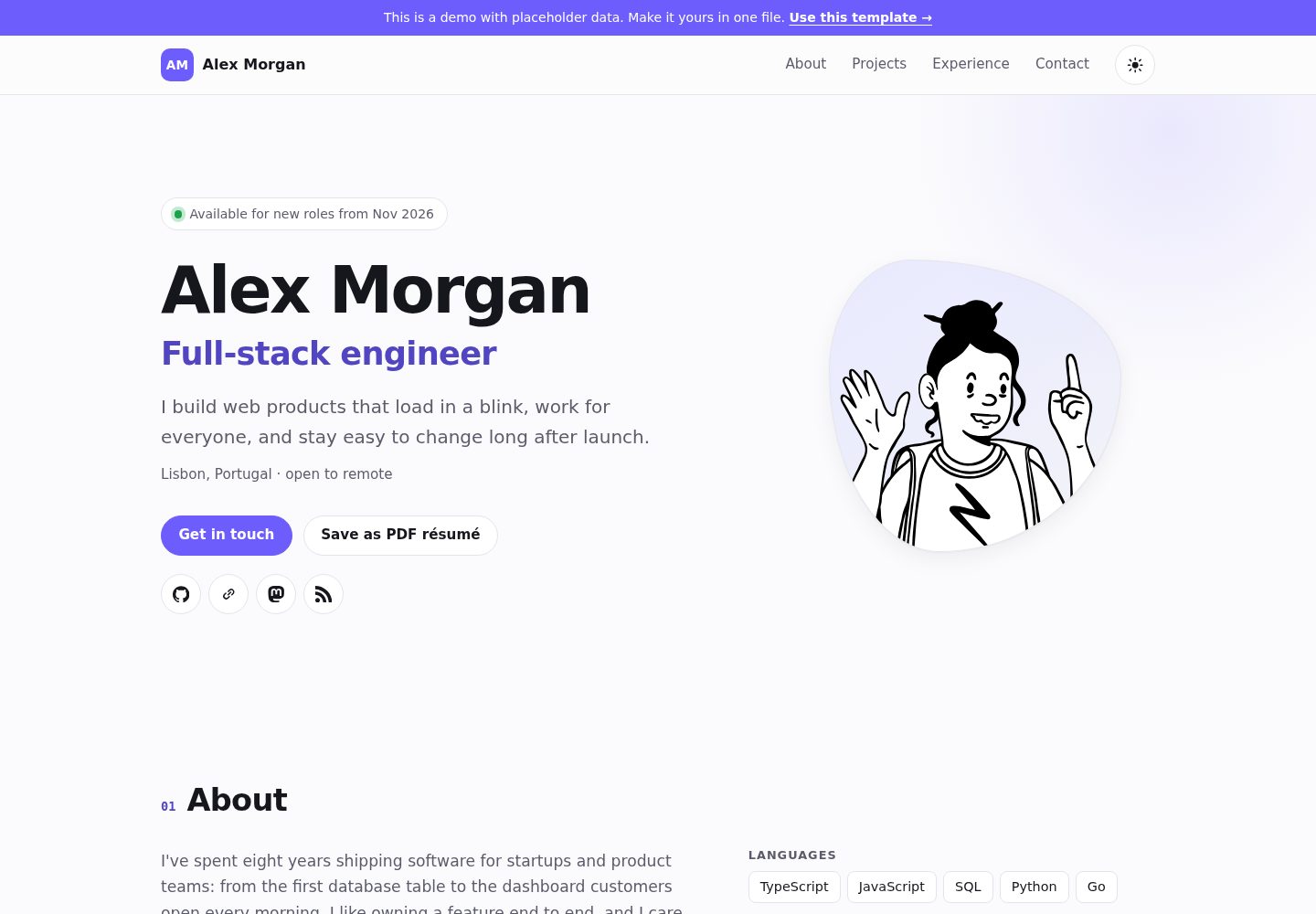
所有个人内容集中在 src/config.ts 一个文件中修改,无需翻找组件
Astro作品集
dev-portfolio — Astro 作品集模板
作者 qaweem321
基于 Astro 的开发者作品集模板,所有个人内容集中在 src/config.ts 一个文件里配置,支持深浅色主题、打印为简历,并可部署到 GitHub Pages。
看看你的网站会是什么样
浏览真实页面截图,比较内容排版与手机效果。点击下方缩略图切换,放大查看整页细节。
全部页面与视图 2
截图用于了解视觉与布局,交互效果请以实际项目为准。
采集于 2026-10-13查看来源
值得关注的模板亮点
从已有项目资料中,快速了解它的特点。
构建时校验配置,错误的 URL、邮箱、日期或空姓名会直接中断构建并指出字段
内置深浅色主题,并提供打印为黑白两页简历的功能,深色模式下打印同样干净
头像可由任意文本生成,也可替换为 public/ 目录下的照片
无 Web 字体与跟踪脚本,禁用 JavaScript 时页面仍可访问
包含页面描述、链接预览标签和 schema.org Person 结构化数据
模板详细介绍
dev-portfolio 是一个用 Astro 构建的开发者作品集模板,仓库采用 MIT 许可。它的核心设计是把姓名、职位、项目、工作经历、社交链接、技能、教育背景和主题强调色等所有需要修改的内容集中到 src/config.ts 一个文件中,不需要在多个组件之间查找。配置在构建时会被校验,例如 URL 格式错误、邮箱格式错误、日期顺序颠倒或空姓名会直接让构建失败并指出具体字段,避免发布出有问题的页面。
模板内置深浅两套主题,并提供“Save as PDF résumé”打印功能,打印输出为无导航、无按钮的黑白两页简历,深色模式下打印同样如此。头像默认由任意文本经 DiceBear 的 Notionists 风格生成,也可以改为 public/ 目录下的照片。页面使用普通 HTML 与少量内联脚本,不加载 Web 字体和跟踪脚本;键盘导航、跳转链接、可见焦点、图标按钮标签、两套主题下的 WCAG AA 对比度以及减少动态效果偏好都有处理,并且在禁用 JavaScript 时仍可访问。模板还包含页面描述、链接预览标签和 schema.org Person 结构化数据。
使用方式上,可以通过 GitHub 的 Use this template 创建仓库,在 Settings → Pages 中把 Source 设为 GitHub Actions,提交推送后即可发布;仓库名若为 <you>.github.io 则地址为根路径,否则为子路径。本地预览需要 Node.js 22.12 或更新版本,运行 npm install 与 npm run dev。构建产物是 dist/ 下的纯静态站点,也可以部署到 Netlify、Cloudflare Pages、Vercel 或其他 Web 服务器,并通过 SITE 环境变量设置正确的 canonical 链接。
需要注意的限制:演示数据中的 Alex Morgan 是虚构人物;模板的 MIT 许可只覆盖代码本身,演示图片、字体、图标等第三方素材需要单独核对其许可;域名、托管等外部服务可能产生费用。
Astro作品集
适合你的项目吗?
适用场景
- 开发者需要一个能快速填写并发布的个人作品集页面
- 希望把在线作品集直接打印或另存为 PDF 简历投递
- 使用 GitHub Pages 免费托管个人站点,并需要子路径部署支持
- 需要深浅色主题切换、键盘可操作且对比度达标的个人主页
- 想把构建产物上传到 Netlify、Cloudflare Pages 或 Vercel 等静态托管平台
适合人群
- 熟悉或愿意使用 Astro 与 Node.js 的开发者
- 希望用单个配置文件维护作品集内容的个人
- 需要作品集同时具备网页浏览与打印简历两种用途的人
- 计划使用 GitHub Actions 部署到 GitHub Pages 的用户
上手与定制指南
结合仓库当前版本的说明,按下面的资料检查内容、配置与运行要求。
- 1
通过 GitHub 的 Use this template 创建仓库;仓库名为 <you>.github.io 时地址为根路径,否则为 https://<you>.github.io/<repo-name>/
- 2
编辑 src/config.ts 替换示例人物信息,将 templateNotice 设为 null 可移除演示提示条
- 3
在仓库 Settings → Pages 中把 Source 设为 GitHub Actions,提交推送后站点即发布
- 4
本地预览需要 Node.js 22.12 或更新版本,运行 npm install 与 npm run dev
- 5
部署到其他平台时使用 npm run build 生成 dist/ 静态文件,并设置 SITE 环境变量以获得正确的 canonical 链接
授权与来源资料
使用条件与限制
免费使用 · 保留许可声明本次收录的是公开仓库中采用 MIT 许可的免费版本;免费范围为该版本代码,不代表外部服务或第三方素材免费。
使用时需要遵守
- 允许免费使用、修改、商用和分发该版本代码。
- 分发代码副本或实质性部分时,保留原作者版权声明和完整 MIT 许可声明。
- 代码按现状提供;担保与责任限制以原许可证及适用法律为准。
额外费用与待核对事项
- 演示图片、字体、图标及其他第三方素材需按各自许可核对,不能仅凭代码的 MIT 许可判断。
- 域名、托管、数据库、支付或 AI 等外部服务可能另外收费。
- 部署到 GitHub Pages 是免费的,但其他托管平台或自定义域名可能产生费用。
- 本地预览需要 Node.js 22.12 或更新版本。
- 头像与品牌图标等第三方素材采用 CC0 许可,需单独核对;品牌名称和徽标归其所有者所有。
- MIT 许可允许使用、修改和发布;回链是建议而非强制,页脚的 "Built with dev-portfolio" 可保留或删除。
查看原文依据
Permission is hereby granted, free of charge
许可证原文
**A fast, accessible developer portfolio you fill in from one file.** Dark and light themes, prints as a clean résumé, deploys to GitHub Pages for free.
README 原文
To preview on your computer first (Node.js 22.12 or newer):
README 原文
Avatar artwork: "Notionists" by Zoish (CC0), rendered by [DiceBear](https://www.dicebear.com). Brand icons: [Simple Icons](https://simpleicons.org) (CC0).
README 原文
https://github.com/qaweem321/dev-portfolio/blob/main/LICENSEhttps://github.com/qaweem321/dev-portfolio/blob/main/README.mdMIT: use it, change it, ship it. A link back is appreciated, not required (the footer's "Built with dev-portfolio" line is yours to keep or delete).
README 原文
DeepSeek 根据仓库许可证和 README 整理 ·2026-10-13。结果仅覆盖已读取资料,依赖、图片、字体及后续条款变更以各自原文为准。
项目核对记录与介绍依据
模板资料
- 来源平台
- GitHub
- 资料与维护参考分
- 资料较完整 · 80 / 100
- 技术栈
- Astro
- 网站类型
- 作品集
这个分数如何计算
本站按许可资料(最高30分)、演示链接(12分)、预览图(10分)、Star数(15分)、记录的维护时间(15分)、描述完整度(8分)、功能记录(5分)和分类资料(5分)计算。它不是代码、安全或性能测试,也不是 Google 评分;有链接不代表已实测可用。
这个项目需要核对什么
- 记录的仓库更新时间
- 2026-10-13
- 截图检查日期
- 2026-10-13
已收录演示链接。请用你的内容与屏幕尺寸检查;有演示不代表表单、认证或支付已经可用。
目录记录的主要技术栈是 Astro。请通过依赖清单和锁文件核对实际版本与托管要求。这些说明基于收录资料,不代表代码审计或部署实测。
查看具体选型方法 →介绍的制作与核对状态
介绍由 AI 辅助整理目录与仓库资料。仓库作者不等于这篇介绍的审核者。
审核声明: [email protected] · 2026-10-13
查看当时使用的来源资料
SHA-256: d7b3d402e758cb51236c1493e4d47df5cb5ca0e40966e7f6b97f0a0d4d9ddc01
2026-10-13T09:06:23.152Z
来源文件 / 仓库# dev-portfolio
**A fast, accessible developer portfolio you fill in from one file.** Dark and light themes,
prints as a clean résumé, deploys to GitHub Pages for free.
**[▶ See the live demo](https://qaweem321.github.io/dev-portfolio/)** (placeholder data: Alex
Morgan isn't a real person).

## Why this one
- **One file to edit.** Everything you'd change is in [`src/config.ts`](src/config.ts): name,
projects, jobs, links, accent color. No components to dig through.
- **Mistakes are caught before they ship.** The config is checked when the site builds. A typo
stops the build with a message like `projects.2.url: must be a full http(s):// address`
instead of publishing a broken page.
- **No photo needed.** You get an illustrated avatar generated from any text (change the seed until
you like it). Prefer a photo? Point it at an image.
- **Prints as a résumé.** Visitors (and you) can click **Save as PDF résumé** and get a tidy
two-page résumé: no navigation, no buttons, black on white, even from dark mode.
- **Fast.** Plain HTML and CSS with a few tiny inline scripts: about 21 KB gzipped in three
requests (page, stylesheet, avatar), no web fonts, no trackers.
- **Accessible.** Keyboard navigation with a skip link, visible focus, labelled icon buttons,
WCAG AA contrast in both themes, reduced-motion support, and it works without JavaScript.
- **Search-friendly.** Page description, link-preview tags and schema.org `Person` data so search
engines show your name, role and profiles.

## Make it yours (5 minutes)
1. Click **Use this template** at the top of this page and create your repository. To use
`https://<you>.github.io/` as the address, name it `<you>.github.io`; any other name gives
`https://<you>.github.io/<repo-name>/`.
2. Edit **`src/config.ts`**: replace Alex with yourself. Set `templateNotice` to `null` to remove
the "this is a demo" bar.
3. In your repository: **Settings → Pages → Source: GitHub Actions**.
4. Commit and push. The site is live a minute later.
To preview on your computer first (Node.js 22.12 or newer):
```bash
npm install
npm run dev
```
## What you can set
| Section | Fields |
| --- | --- |
| `site` | `title`, `description` (search results), `lang`, `templateNotice` |
| `person` | `name`, `role`, `tagline`, `location`, `about` (paragraphs), `availability`, `avatar`, `email`, `resumeUrl` |
| `socials` | `label`, `url`, `icon` (any [Simple Icons](https://simpleicons.org) slug, such as `github` or `mastodon`) |
| `skills` | groups of items |
| `projects` | `title`, `description`, `tags`, `url`, `repo`, `year`, `featured` |
| `experience` | `company`, `role`, `start` and `end` as `"2024-03"` (no `end` = current), `location`, `highlights` |
| `education` | `school`, `degree`, `start`, `end` |
| `theme` | `accent`: any CSS color |
Good to know:
- **Featured projects come first**, then the newest. The filter buttons are built from your tags.
- **Empty sections disappear** from the page and the menu, and the rest are renumbered.
- **A photo instead of the avatar:** put `me.jpg` in `public/` and set
`avatar: { src: "/me.jpg", alt: "Your Name" }`.
- **Already have a PDF résumé?** Set `resumeUrl` and the button links to it instead of printing.
- **Dates** show as `Mar 2023`, the same in every browser and time zone.
## Commands
| Command | |
| --- | --- |
| `npm run dev` | Local preview with live reload |
| `npm run build` | Build the site into `dist/` |
| `npm run preview` | Serve the built site |
| `npm run check` | Type check, tests and build (what CI runs) |
## How it's tested
- **The config rules:** valid and minimal configs pass; bad emails, URLs, dates, empty names,
`javascript:` links and jobs that end before they start are rejected with the field's name.
- **The real build:** the tests run `astro build` under a GitHub Pages path and check the HTML:
every project and job is on the page, every `#link` has a target, ids are unique, images have
alt text, icon links have names, nothing prints `undefined`, and files load from the right path.
- **In a browser:** both themes, phone and desktop widths, the menu, filters, keyboard focus,
print output and color contrast were checked by hand before release.
## Hosting somewhere else
`npm run build` makes a plain static site in `dist/`: upload it to Netlify, Cloudflare Pages,
Vercel or any web server. Set the `SITE` environment variable (for example
`https://alexmorgan.dev`) for correct canonical links.
## Credits
Built with [Astro](https://astro.build). Avatar artwork: "Notionists" by Zoish (CC0), rendered by
[DiceBear](https://www.dicebear.com). Brand icons: [Simple Icons](https://simpleicons.org) (CC0).
Brand names and logos belong to their owners.
## License
MIT: use it, change it, ship it. A link back is appreciated, not required (the footer's
"Built with dev-portfolio" line is yours to keep or delete).
看看同类模板
对比同技术栈与用途的模板,找到更适合的视觉与内容结构。

astro-theme-cactus
A simple Astro theme. Use it to create your blog or website.
Astro · 作品集

astrofy
Astrofy is a free and open-source template for your Personal Portfolio Website built with Astro and TailwindCS…
Astro · 作品集

astro-nano
Astro Nano is a static, minimalist, lightweight, lightning fast portfolio and blog.
Astro · 作品集

astro-erudite
An opinionated, unstyled static blogging template built with Astro and native CSS.
Astro · 作品集

astro-sphere
Astro Sphere is a static, minimalist, lightweight, lightning fast portfolio and blog.
Astro · 作品集

astro-micro
Blog theme for Astro with search and comments built-in. Zero frameworks.
Astro · 作品集