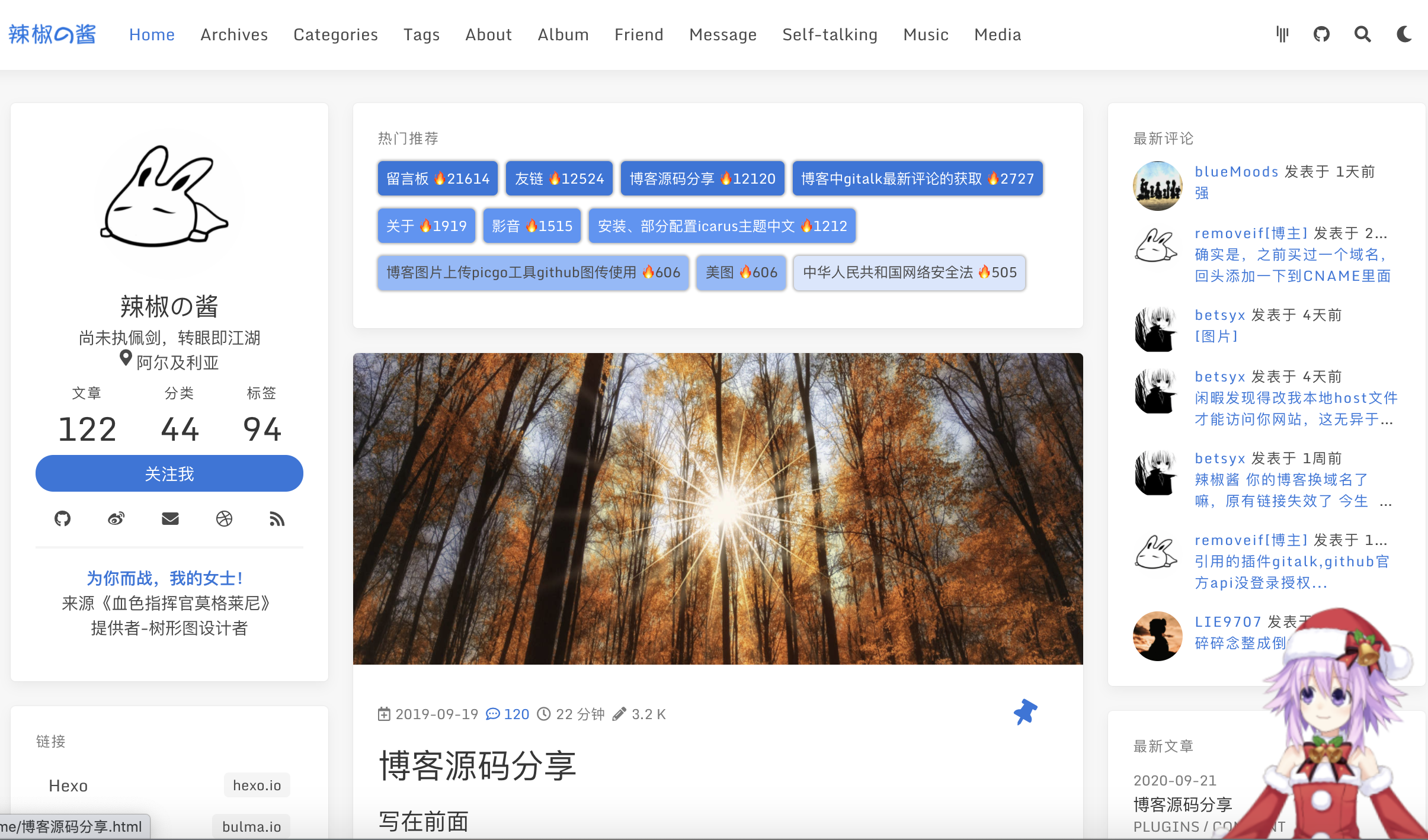
Modified from the icarus theme, adding modules such as hot recommendations, latest comments, audio and video, and friend links
HexoBlog
hexo-theme-amazing — Hexo Blog Template
By removeif
hexo-theme-amazing is a Hexo-based blog theme modified from the icarus theme, adding features such as comments, audio and video, friend links, and encrypted posts.
Explore the design
Compare the page layouts and mobile experience. Open any screenshot for a closer look.
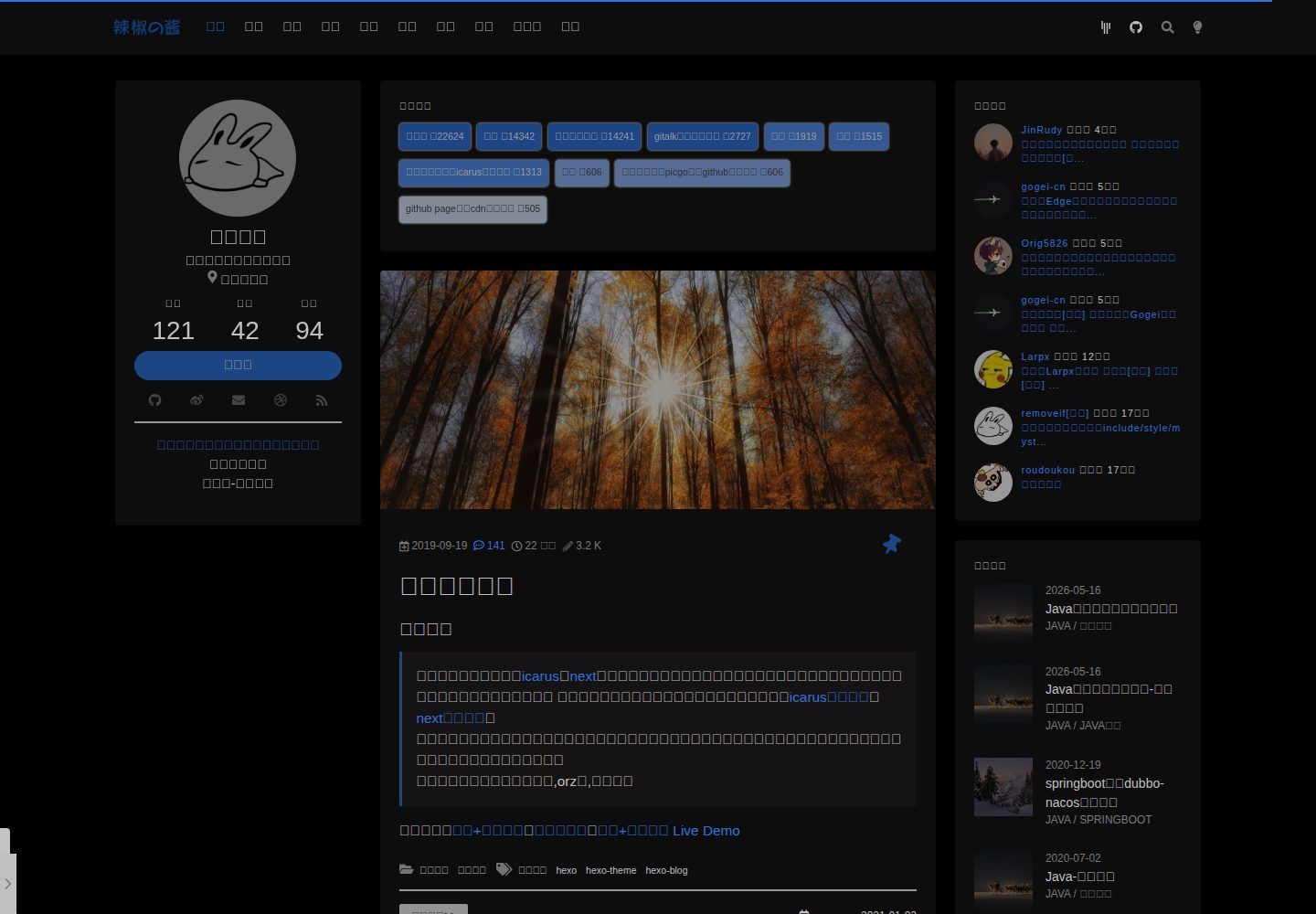
Desktop homepage1 / 3
Desktop captureTop of page
Actual screenshot captured by the server browser.
All pages & views 3
Screenshots show visual appearance; interactive behavior may differ.
Recorded 2026-10-01View source
What stands out
A quick read of the recorded project description.
Supports gitalk and valine comments; hot recommendations only support gitalk
Provides pinned posts, encrypted posts, related post recommendations, dark theme switching, and other features
Configurable kanban musume (live2d character), sidebar NetEase Cloud Music playlist, and pjax partial refresh
Includes page templates such as random thoughts, photo album, and message board, which can be used selectively
Licensed under MIT, allowing free use, modification, commercial use, and distribution
Template Details
hexo-theme-amazing is a Hexo blog theme developed by removeif. The source code is modified from the icarus theme and adds several new elements inspired by other blogs. The theme repository is a pure theme repository; the full blog source code is no longer maintained, but demo source code is available in the site branch.
The theme adds to icarus: a gitalk latest comments widget, homepage hot recommendations, an audio and video module, a friend links module, an about page timeline, a kanban musume (live2d character), an archive page post contribution overview, pinned posts, comment counts in post lists, related post recommendations, dark theme switching, encrypted posts, random thoughts (suisuinian), a transparent borderless style, pjax, a sidebar NetEase Cloud Music playlist, and a banner. Comments support gitalk and valine; hot recommendations only support gitalk.
Before use, you need to read the theme configuration file _config.yml in detail and configure global and theme parameters according to the documentation. The theme provides page templates in the ex_pages folder, which can be selectively copied to the blog directory. Some features, such as pinning, require modifying the hexo-generator-index dependency file. Encrypted posts will not appear in the latest posts list or recommendation list. The theme is licensed under MIT, allowing free use, modification, commercial use, and distribution, but third-party assets require checking their own licenses.
HexoBlog
Is it right for your project?
Use Cases
- Building a personal tech blog that needs extended features such as comments, recommendations, and audio/video
- Wanting to customize based on the icarus theme, adding features such as pinning, encryption, and dark mode
- Needing to quickly generate standalone pages such as about, friend links, photo album, and random thoughts
- Wanting to integrate gitalk or valine comment systems and display latest comments and hot posts
Suitable For
- Users familiar with the Hexo static blog generator
- Developers who need a Chinese blog theme and are willing to read the configuration documentation
- Individuals or teams who want to use an MIT-licensed theme for secondary modification or commercial use
- Content creators with customization needs for modules such as comments, audio/video, and friend links
Getting started & customization
Use these recorded setup notes alongside the repository instructions for your chosen version.
- 1
Install the theme via git clone or npm, and configure the blog _config.yml and the theme _config.amazing.yml
- 2
Copy the page templates from the theme's ex_pages folder to the blog source directory, and adjust the menu configuration as needed
- 3
Using gitalk comments requires configuring parameters such as owner, repo, client_id, and client_secret, and manually initializing issues
- 4
The pinning feature requires modifying the file node_modules/hexo-generator-index/lib/generator.js
- 5
Encrypted posts require adding fields such as encrypt and password in the post front matter, and they will not appear in the latest posts and recommendation lists
License & source material
Usage conditions & limitations
Free to use · keep license noticeThis entry covers the free version under the MIT license in the public repository; the free scope is the code of this version and does not mean that external services or third-party assets are free.
Must comply with when using
- Allows free use, modification, commercial use, and distribution of this version's code.
- When distributing copies or substantial portions of the code, retain the original author's copyright notice and the full MIT license notice.
- The code is provided as is; warranties and limitations of liability are governed by the original license and applicable law.
Additional costs & items to verify
- The hot recommendations feature only supports the gitalk comment system; the latest comments feature supports gitalk and valine; if other comment systems are used, these features cannot be used.
- Using gitalk comments requires manually clicking to initialize the issue at each post's comment section after deployment; otherwise, comments will not display properly.
- The pinned posts feature requires manually modifying the generator.js file of hexo-generator-index in node_modules; modifications may be lost after upgrading the dependency.
- Encrypted posts will not appear in the latest posts list or post recommendation list; set top: -1 to place them at the end of the homepage.
- The sidebar background music relies on NetEase Cloud Music playlists and requires configuring a NetEase Cloud Music playlist id, which is an external service dependency.
- gitalk comments require configuring the client_id and client_secret of a GitHub OAuth application, which you must apply for yourself and bear the corresponding account configuration.
- This repository is only a pure theme repository; the full blog theme repository is no longer maintained, and the full blog source code must be found in the site branch demo.
- Demo images, fonts, icons, and other third-party assets must be checked against their respective licenses; they cannot be judged solely by the code's MIT license.
- External services such as domain names, hosting, databases, payments, or AI may incur additional charges.
View Original Text Basis
Permission is hereby granted, free of charge
Original License Text
热门推荐仅支持gitalk,最新评论支持gitalk & valine
Original README
对于gitalk部署博客后需要到相应文章评论处点击初始化issue评论,完成评论的初始化。
Original README
修改依赖包中文件removeif/node_modules/hexo-generator-index/lib/generator.js如下
Original README
加密文章不会出现在最新文章列表widget中,也不会出现在文章中推荐列表中
Original README
side_music_netease_id: 2364053447 #侧边栏网易云歌单id
Original README
client_id: xxx # (required) OAuth application client id
Original README
https://github.com/removeif/hexo-theme-amazing/blob/master/LICENSEhttps://github.com/removeif/hexo-theme-amazing/blob/master/README.md本仓库为纯主题仓库,博客主题完整仓库(已不维护)请移步为[hexo-theme-icarus-removeif]
Original README
Compiled by DeepSeek based on repository license and README ·2026-10-01. Results only cover the materials read; dependencies, images, fonts, and subsequent term changes are subject to their respective original texts.
Project checks & description sources
Template Information
- Source platforms
- GitHub
- Documentation and maintenance reference score
- More documented · 85 / 100
- Technologies
- Hexo
- Website type
- Blog
How this score is calculated
Our heuristic uses license records (up to 30), a demo link (12), a preview (10), stars (15), recorded maintenance (15), description completeness (8), feature records (5) and classification data (5). It is not a code, security or performance test, or a Google score. A link does not establish tested functionality.
What to verify for this project
- Repository update recorded
- 2025-01-14
- Screenshot last checked
- 2026-10-01
A demo link is listed. Check it with your own content and viewport sizes; its presence does not confirm that forms, authentication or payments work.
The catalog identifies Hexo as the primary stack. Check the actual dependency manifest and lockfile for versions and hosting requirements. These notes use recorded metadata, not a code audit or a deployment test.
Use a selection guide →How this description was prepared
AI-assisted description based on catalog records and repository material. Repository authors are not automatically the reviewers of this description.
Automatically checked against source and license rules; no manual editorial review.
Inspect the recorded source material
SHA-256: a5f4047fdb02fac91a65469193b89999479f2d3ef965dd3554976030ff9d0a2c
2026-10-01T03:19:59.185Z
Source file / repository<p align="center" class="mb-2">
AMAZING
<br> A simple, delicate, and modern theme for the static site generator Hexo.
<br>
<a href="https://removeif.github.io/">Preview</a> |
<a href="https://github.com/removeif/hexo-theme-amazing/discussions">Discuss on GitHub</a>
<br>
</p>
### 写在前面
博客源码在主题[icarus](http://github.com/ppoffice/hexo-theme-icarus)基础之上参照各网友博客,以及自己的一些想法做出的一些修改以及增加部分新元素。除了以下配置,其余配置请到[icarus官网查看](http://github.com/ppoffice/hexo-theme-icarus)。
因为修改了原作者源码,有什么问题请先联系我,不要去麻烦原作者了,能自己解决的问题就不要麻烦别人了,每个人的时间都很宝贵。
膜拜和感谢所有模块的原作者,orz👻,辛苦了。
**使用之前请详细阅读此文档,以及主题配置文件_config.yml**
**使用之前请详细阅读此文档,以及主题配置文件_config.yml**
**使用之前请详细阅读此文档,以及主题配置文件_config.yml**
**相关使用问题也在此[issue](https://github.com/removeif/hexo-theme-amazing/issues/16)有说明,请先查看**
**本仓库为纯主题仓库,博客主题完整仓库(已不维护)请移步为[hexo-theme-icarus-removeif](https://github.com/removeif/hexo-theme-icarus-removeif)**
**master分支已在信息流中加入adsense广告配置**
**提供site分支博客demo源码**
线上博客:[欢迎围观](https://removeif.github.io/),[博客源码Live Demo](https://removeif.github.io/removeif-demo/)
### 一、icarus主题之上主要改动
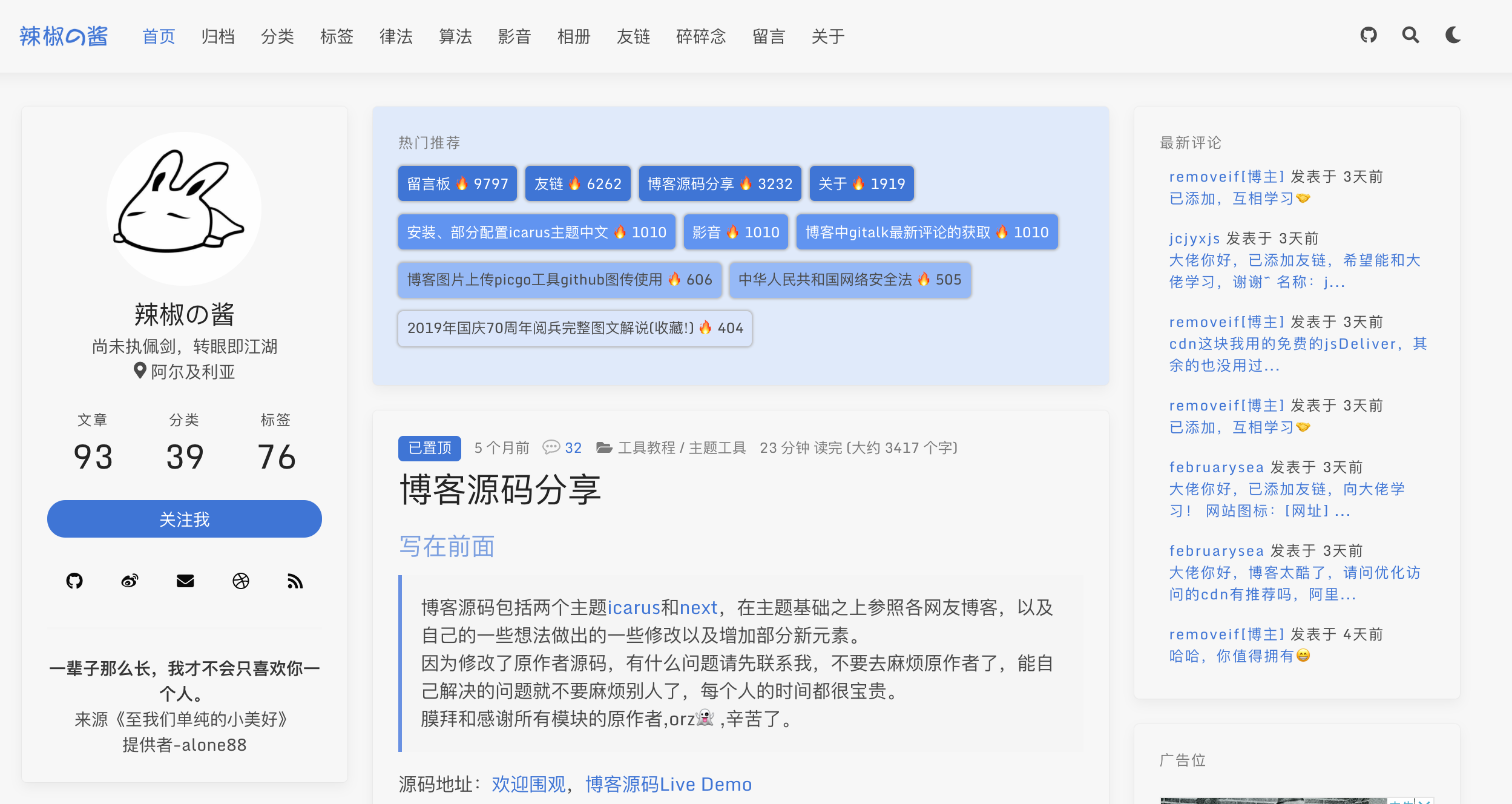
+ 新增gitalk最新评论widget
+ 首页增加热门推荐
+ 增加弹性配置影音(可加音乐、视频)模块
+ 丰富弹性配置about页面
+ 新增弹性配置友链模块
+ 整体布局左右拉伸了一点,紧凑一些
+ 文章页双栏模式、固定导航栏
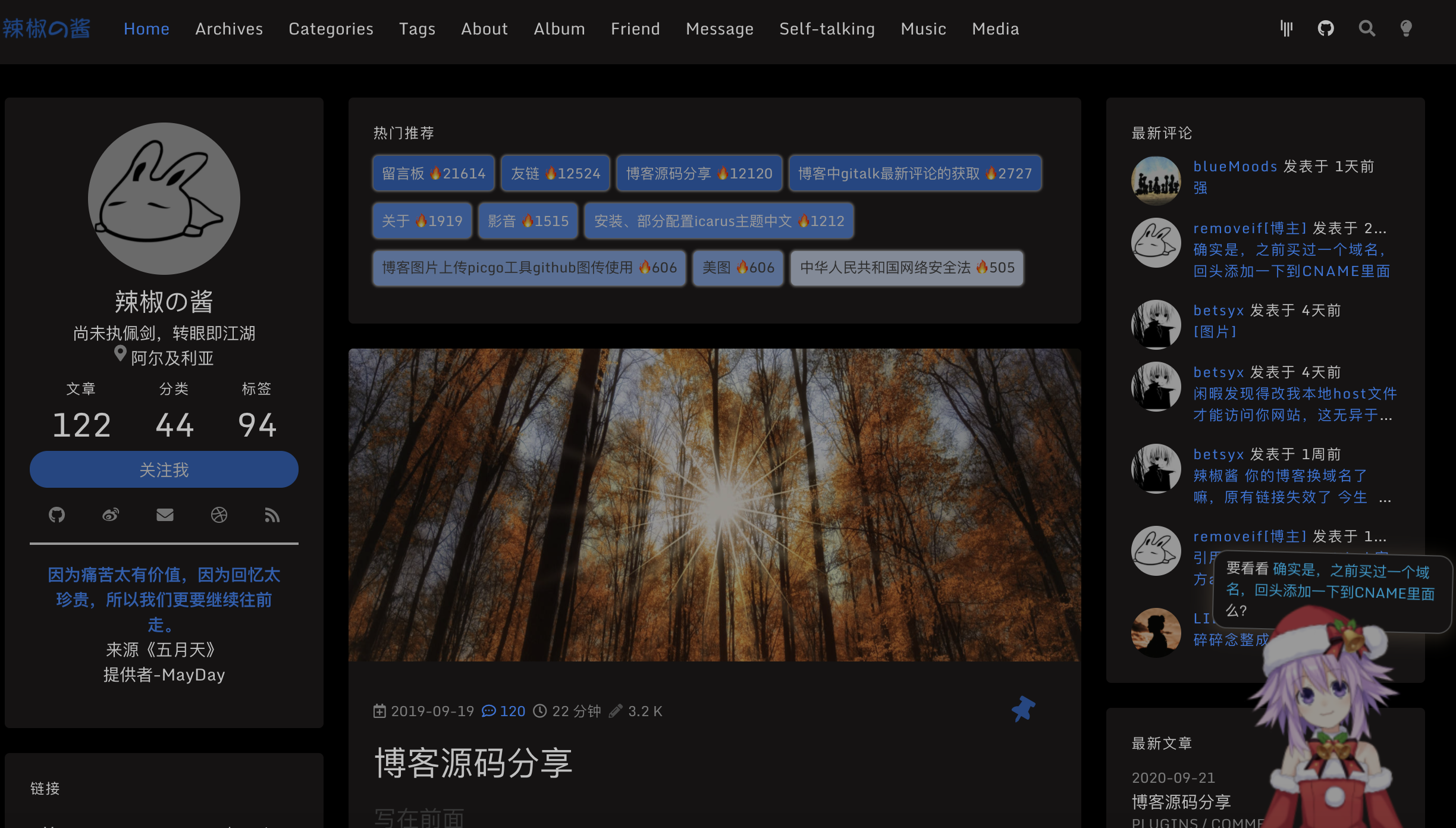
+ 引入可配置看板娘
+ 归档页加入了一个文章贡献概览
+ 置顶文章的设置
+ 文章列表评论数显示
+ 文章中推荐文章模块配置
+ 增加深色主题切换
+ 加入加密文章
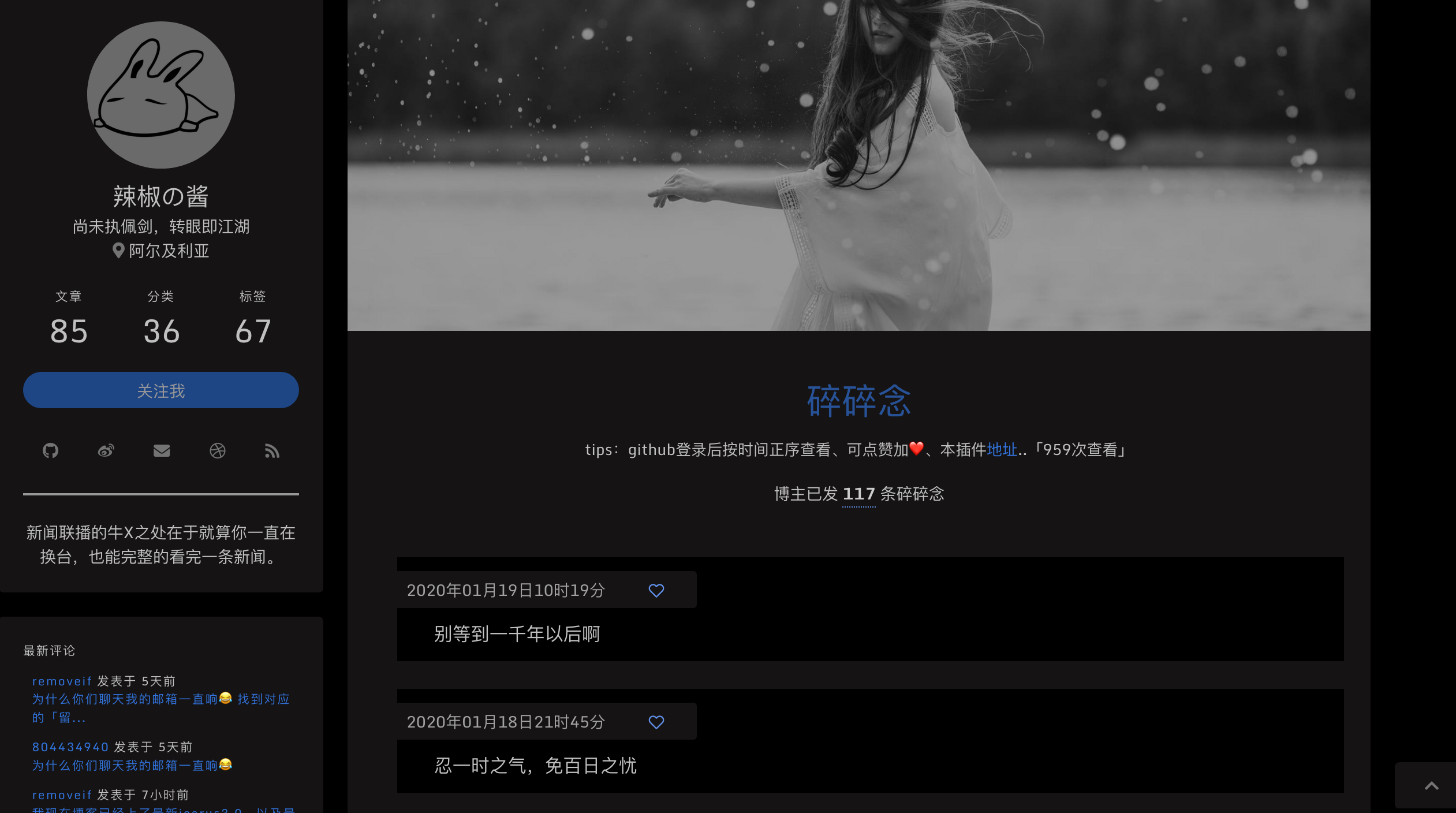
+ 碎碎念功能
+ 透明无界样式
+ 简化部分widget数据,加入`查看全部`按钮
+ gitalk评论增加评论开关,评论列表中标记博主
+ 加入pjax提升页面访问体验,配置文件中可开启关闭
+ 侧边栏加入可配置网易云歌单音乐插件,配合pjax可以实现页面间切换背景音乐不间断
+ 文章中加入相关文章模块,取分类相同的最新的5条文章
+ 支持valine最新评论以及文章评论数显示
+ utteranc评论随博客主题切换自动切换深色主题
+ 首页增加可配置banner
+ 有问题可以在线询问[gitter.im](https://gitter.im/hexo-theme-amazing/community)
+ `还有什么新的,好的feature欢迎大家随时提出来,有能力有时间就做出来`
### 二、部分配置说明:
#### 安装方法
博客下 直接clone
```jshelllanguage
git clone https://github.com/removeif/hexo-theme-amazing.git themes/amazing
```
或者通过 npm 安装
```jshelllanguage
npm i hexo-theme-amazing
hexo config theme amazing // 提示缺少依赖就按提示的安装相应依赖即可
// 博客目录下增加 博客配置文件_config.yml,以及主题配置文件_config.amazing.yml进行配置即可
```
#### 开始部分配置:
**敲黑板!!!!首先全局以及主题中的`_config.yml`配置成自己的对应参数。**
把主题中ex_pages文件夹中的文件复制到博客主目录相应目录下面。包含了文章模板、关于页、相册页、友链、留言板、音乐、影音、碎碎念页面(各个页面的.md文件可自定义修改内容),可以自己选择性需要哪些页面复制哪些过去,同时对应配置主题中`_config.yml`需要删除以及保留相应的menu,如下配置
```yaml
navbar:
# Naviagtion menu items
menu:
首页: /
归档: /archives
分类: /categories
标签: /tags
影音: /media
相册: /album
友链: /friend
碎碎念: /self-talking
留言: /message
关于: /about
```
#### 1.热门推荐,最新评论:
**热门推荐仅支持gitalk,最新评论支持gitalk & valine**
对应主题中的`_config.yml`要开启如下配置(此为gitalk,valine配置文件中也有示例),xxx换成自己的,否则无效。**对于gitalk部署博客后需要到相应文章评论处点击初始化issue评论,完成评论的初始化。**
```yaml
comment:
type: gitalk
owner: xxx # (required) GitHub user name
repo: xxx # (required) GitHub repository name
client_id: xxx # (required) OAuth application client id
client_secret: xxx # (required) OAuth application client secret
admin: xxx #此账户一般为用户名 GitHub user name 文章中能创建issue需要此用户登录才可以,点了创建issue后刷新一遍才能看到!!!!
create_issue_manually: true
distraction_free_mode: true
has_hot_recommend: true # 是否有热门推荐
has_latest_comment: true #是否有最新评论
```
说明:
+ `has_hot_recommend: true` 是否开启首页热评,false-不开启,true-开启
+ `has_latest_comment: true` 是否开启最新评论,false-不开启,true-开启
+ 热门推荐数据为评论数最多的文章,🔥后面的数字:根据文章的评论数*101 。
+ 最新评论:为该仓库下,所有issue中的最新评论。
+ 目前的最新评论有1分钟的本地缓存,评论后可能1分钟后才能看见最新评论,出于性能优化,每次请求接口处理还是挺耗时,comment-issue-data.js中可以自己去掉。
#### 2.友链数据文件:
文件路径:themes/amazing/source/js/friend.js
相应格式增加自己需要的数据。
友链数据中,"valid": 0 代表异常网站,"valid": 1或者不填此字段代表正常网站,可以自己配置;"stopTime": "2019.09.09"代表异常时访问的时间
```text
{
"date": "2019.09.09",
"stopTime": "2019.09.09",
"src": "https://cdn.jsdelivr.net/gh/removeif/removeif.github.io/images/tuzi.jpg",
"name": "@辣椒の酱",
"desc": "后端开发,技术分享。",
"url": "https://removeif.github.io/",
"valid": 0
}
```
#### 3.影音数据文件:
文件路径:
音乐:themes/amazing/source/json_data/music.json
视频:themes/amazing/source/json_data/video.json
相应格式增加自己需要的数据。
#### 4.关于页面时间轴记录数据文件:
文件路径:themes/amazing/source/json_data/record.json
相应格式增加自己需要的数据。
#### 5.看板娘配置
主题中的`_config.yml`配置如下设置
```text
has_live_2D_switch: true #live2D开关 true为打开,false为关闭
```
#### 6.置顶设置:
.md文章头部数据中加入top值,top值越大越靠前,大于0显示置顶图标。
修改依赖包中文件removeif/node_modules/hexo-generator-index/lib/generator.js如下:
```js
'use strict';
const pagination = require('hexo-pagination');
module.exports = function(locals){
var config = this.config;
var posts = locals.posts;
posts.data = posts.data.sort(function(a, b) {
if(a.top == undefined){
a.top = 0;
}
if(b.top == undefined){
b.top = 0;
}
if(a.top == b.top){
return b.date - a.date;
}else{
return b.top - a.top;
}
});
var paginationDir = config.pagination_dir || 'page';
return pagination('', posts, {
perPage: config.index_generator.per_page,
layout: ['index', 'archive'],
format: paginationDir + '/%d/',
data: {
__index: true
}
});
};
```
#### 7.配置文章中推荐文章模块
根据配置的recommend值(必须大于0),值越大越靠前,相等取最新的,最多取5条。recommend(6.中top值也在下面示例)配置在.md文章头中,如下
```yaml
title: 博客源码分享
top: 1
toc: true
recommend: 1
keywords: categories-github
date: 2019-09-19 22:10:43
thumbnail: https://cdn.jsdelivr.net/gh/removeif/blog_image/img/2019/20190919221611.png
tags: 工具教程
categories: [工具教程,主题工具]
```
#### 8.文章中某个代码块折叠的方法
代码块头部加入标记 `>folded`,如下代码块中使用。
```java main.java >folded
// 使用示例,.md 文件中头行标记">folded"
// ```java main.java >folded
// import main.java
// private static void main(){
// // test
// int i = 0;
// return i;
// }
// \\```
```
#### 9.加入加密文章
如下需要加密的文章头部加入以下代码
```text
---
title: 2019成长记01
top: -1
toc: true
keywords: categories-java
encrypt: true
password: 123456 #此处为文章密码
abstract: 咦,这是一篇加密文章,好像需要输入密码才能查看呢!
message: 嗨,请准确无误地输入密码查看哟!
wrong_pass_message: 不好意思,密码没对哦,在检查检查呢!
wrong_hash_message: 不好意思,信息无法验证!
---
```
注:**加密文章不会出现在最新文章列表widget中,也不会出现在文章中推荐列表中,首页列表中需要设置top: -1 让它排在最后比较合理一些。**
#### 10.碎碎念的使用
在github中,创建碎碎念issue,并且打上对应的label(`eg:Gitalk,666666`)如下图,此处666666对应下面配置代码中的id,填写到:博客目录/source/self-talking/index.md文件中如下对应位置,其余配置也要改成自己的,如clientID等。

```js
<script>
$.getScript("/js/gitalk_self.min.js", function () {
var gitalk = new Gitalk({
clientID: '46a9f3481b46ea0129d8',
clientSecret: '79c7c9cb847e141757d7864453bcbf89f0655b24',
id: '666666',
repo: 'issue_database',
owner: 'removeif',
admin: "removeif",
createIssueManually: true,
distractionFreeMode: false
});
gitalk.render('comment-container1');
});
</script>
```
如下:
#### 11.本博客样式(透明无界)
只需要放开themes/amazing/source/css/base.styl文件中以下样式代码注释即可,默认是注释的没启用
```css
//=================本博客使用样式 start
// 首页去图
.body_hot_comment .comment-content .card-comment-item .ava, .media-left, .is-6-widescreen .card-image {
display: none;
}
hover-color = #deeafb;
// 去card
.card {
background-color: unset;
box-shadow: unset;
}
.navbar, footer.footer {
background-color: unset;
}
body:not(.night) .navbar:hover,
body:not(.night) .footer:hover,
body:not(.night) .card:hover,
body:not(.night) .pagination:hover,
body:not(.night) .post-navigation:hover{
background-color: hover-color;
box-shadow: 0 4px 10px rgba(0,0,0,0.05),0 0 1px rgba(0,0,0,0.1);
}
.pagination, .post-navigation{
padding: 10px;
}
.pagination .pagination-link:not(.is-current), .pagination .pagination-previous, .pagination .pagination-next {
background-color:rgba(255,255,255,0);
}
.timeline .media:last-child:after {
background: unset;
}
.content .gt-container .gt-comment-admin .gt-comment-content {
border: 2px solid #deeafb;
}
//=================本博客使用样式 end
```
如下:
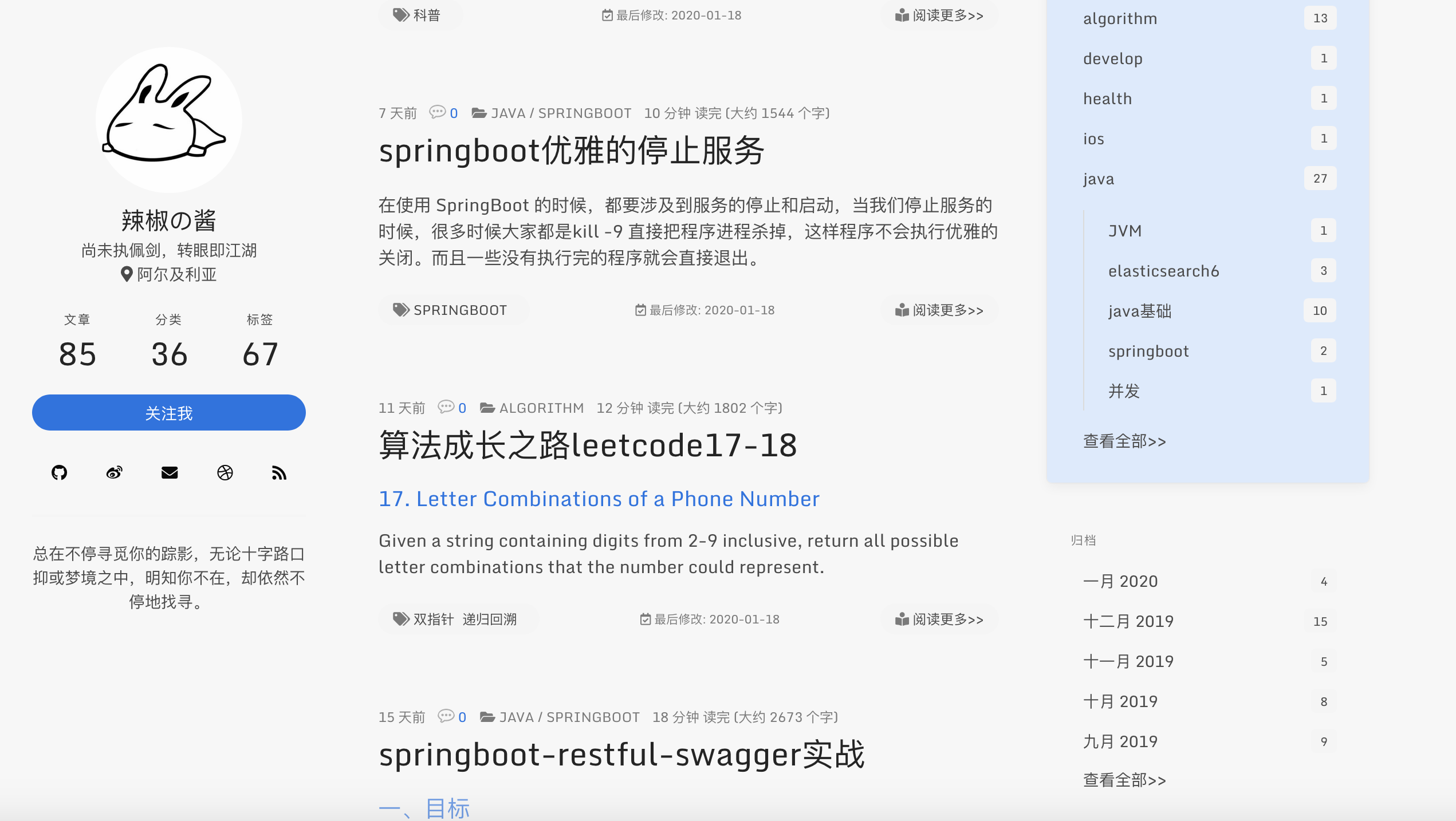
#### 精简部分widget数据
widget中的归档和分类和标签精简了,数据多时不太协调,改为了分别展示5条和10条和20条,增加了查看全部。
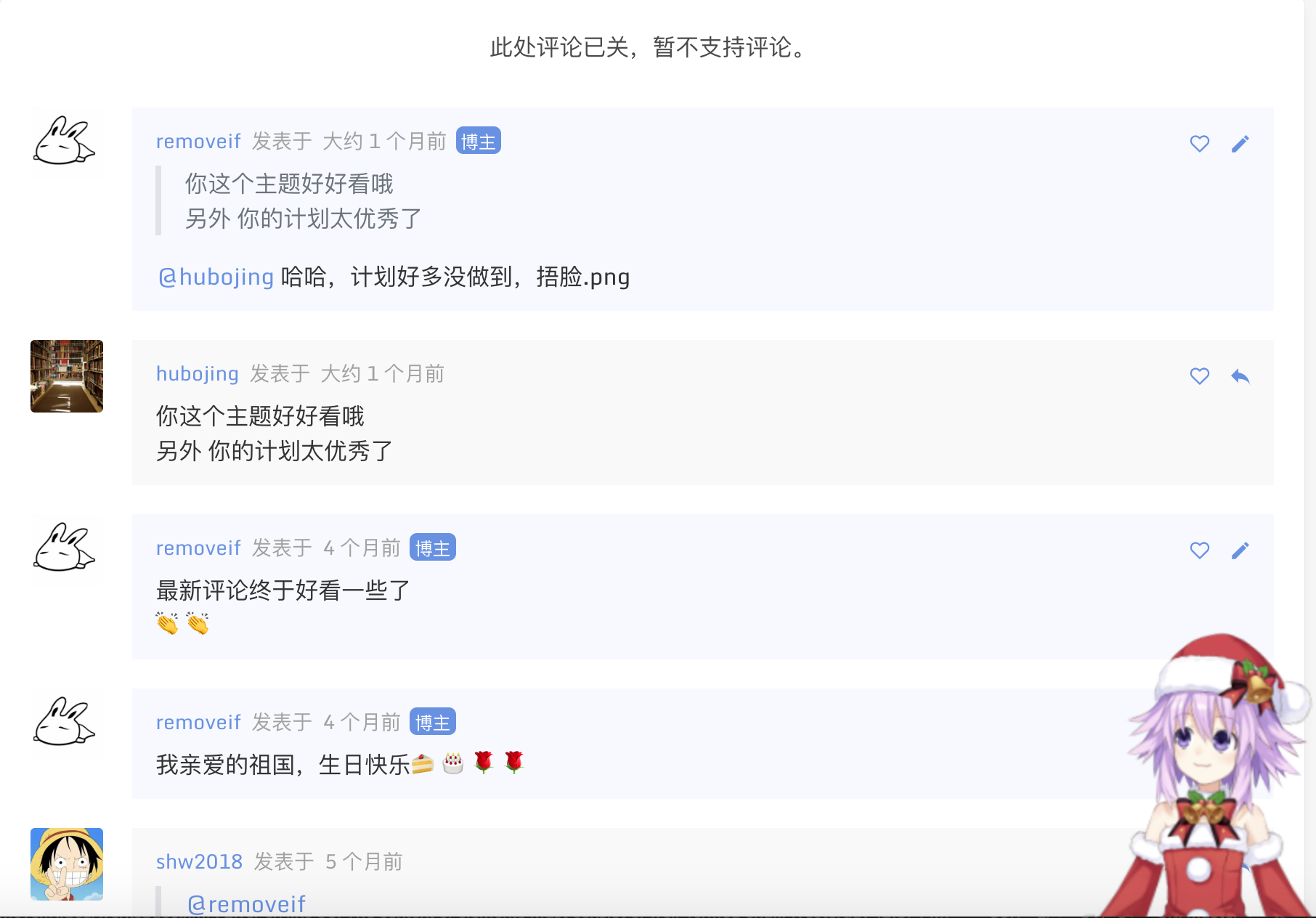
#### gitalk评论增加评论开关,评论列表中标记博主
需要关闭评论的在文章头部加入 `comments: false`,原来已经评论的依然会显示,如下
原来已有博客文章的迁移,只需要把原来对应的文章放到source/_posts里即可。然后去对应文章下面创建评论issue。
#### 其余配置
完整配置,请仔细阅读主题中**_config.yml**
```yaml
has_hitokoto: true #左边一言开关,true-开,false-关
has_latest_modify_time: true #是否显示最后修改时间 true开启,false-关闭
busuanzi_only_count: false #当上面plugins中busuanzi: true时,此配置busuanzi_only_count为true时,网站不显示不蒜子统计数据,但是会每次统计。false时显示统计数据。
has_copyright: true # 文中是否显示copyright true开启,false-关闭
# http://sachinchoolur.github.io/lightGallery/docs/api.html
lightgallery_is_full: true #图片灯箱是否显示完整的插件(包括放大,分享等),true-显示,false-显示简洁版
website_start_time: 2018/11/11 00:00:00 #网站运行开始时间,不填不显示
footer_registered_no: 测试-川ICP备20001070号-1 #备案号
footer_copyright_dsec: true #footer 版权说明 true-开 false-关
has_live_2D_switch: true #live2D开关 true-开 false-关
side_music_netease_id: 2364053447 #侧边栏网易云歌单id
use_pjax: false #是否开启pjax,false-不开启,true-开启,开启后局部更新网页信息,切换页面背景音乐不间断等特性
```
#### 以上配置好后
```yaml
$ npm install #安装依赖包(只需要执行一次)可直接把本文最后的json文件内容复制到博客下面的依赖文件package.json后在执行此命令,如果原来已有node_modules文件夹,请先删除在执行此命令
$ hexo clean #清除缓存
$ hexo g #编译
$ hexo s #启动服务
$ hexo d #推到远程
```
安装依赖包(只需要执行一次),以后修改了代码 只需要执行后面几条就好。
### 写在后面
如果你有问题请反馈: [issues](https://github.com/removeif/hexo-theme-amazing/issues) (请务必先于issues中寻找答案)
如果你喜欢该主题: [star](https://github.com/removeif/hexo-theme-amazing)
如果你想定制主题: [fork](https://github.com/removeif/hexo-theme-amazing)
### License
This project is licensed under the MIT License - see the [LICENSE](https://github.com/removeif/hexo-theme-amazing/blob/master/LICENSE) file for details.
### 其余主题彩蛋
**文章中横竖图demo;对于横竖图推荐分开使用,且长宽一致的,如统一手机拍照、电脑截图**
使用方法:md文章中放入以下代码
```html
+ 横竖图
<div class="justified-gallery">
    </div>
+ 横图4
<div class="img-x">
   </div>
+ 竖图5
<div class="img-y">
    </div>
```
#### 效果如下(多图左右拉查看)
[查看效果](https://removeif.github.io/theme/%E5%8D%9A%E5%AE%A2%E6%BA%90%E7%A0%81%E5%88%86%E4%BA%AB.html#效果如下(多图左右拉查看))
Explore similar templates
Compare previews and descriptions within the same stack and category.

hexo-theme-matery
hexo-theme-matery is a Material Design, responsive Hexo blog theme with homepage carousel, waterfall post list, timeline archive, word cloud tags, radar chart categories, and an about page.
Hexo · Blog

hexo-theme-cactus
Cactus is a responsive Hexo theme for personal websites and blogs, maintained by probberechts. It offers four color schemes (dark, light, white, classic), configurable navigation, homepage post lists, project lists, social links, and copyright year ranges.
Hexo · Blog

hexo-theme-volantis
Volantis is a blog theme for Hexo, distributed as the npm package hexo-theme-volantis and enabled by setting theme to volantis in the Hexo site's _config.yml. It requires Hexo 7.3+, hexo-cli 4.3+, Node.js 22.x LTS+, and npm 10.x LTS+.
Hexo · Blog

hexo-theme-aurora
Hexo Theme Aurora is a futuristic Hexo blog theme built around aurora gradients and a magazine-style grid layout.
Hexo · Blog

hexo-theme-Claudia
Claudia is a Hexo blog theme focused on a clean look and easy configuration. It automatically follows the device's dark mode and claims a 90+ Lighthouse score.
Hexo · Blog

hexo-theme-A4
hexo-theme-A4 is a minimalist Hexo blog theme that mimics the texture of A4 paper, emphasizing simplicity, small size, and minimal configuration.
Hexo · Blog