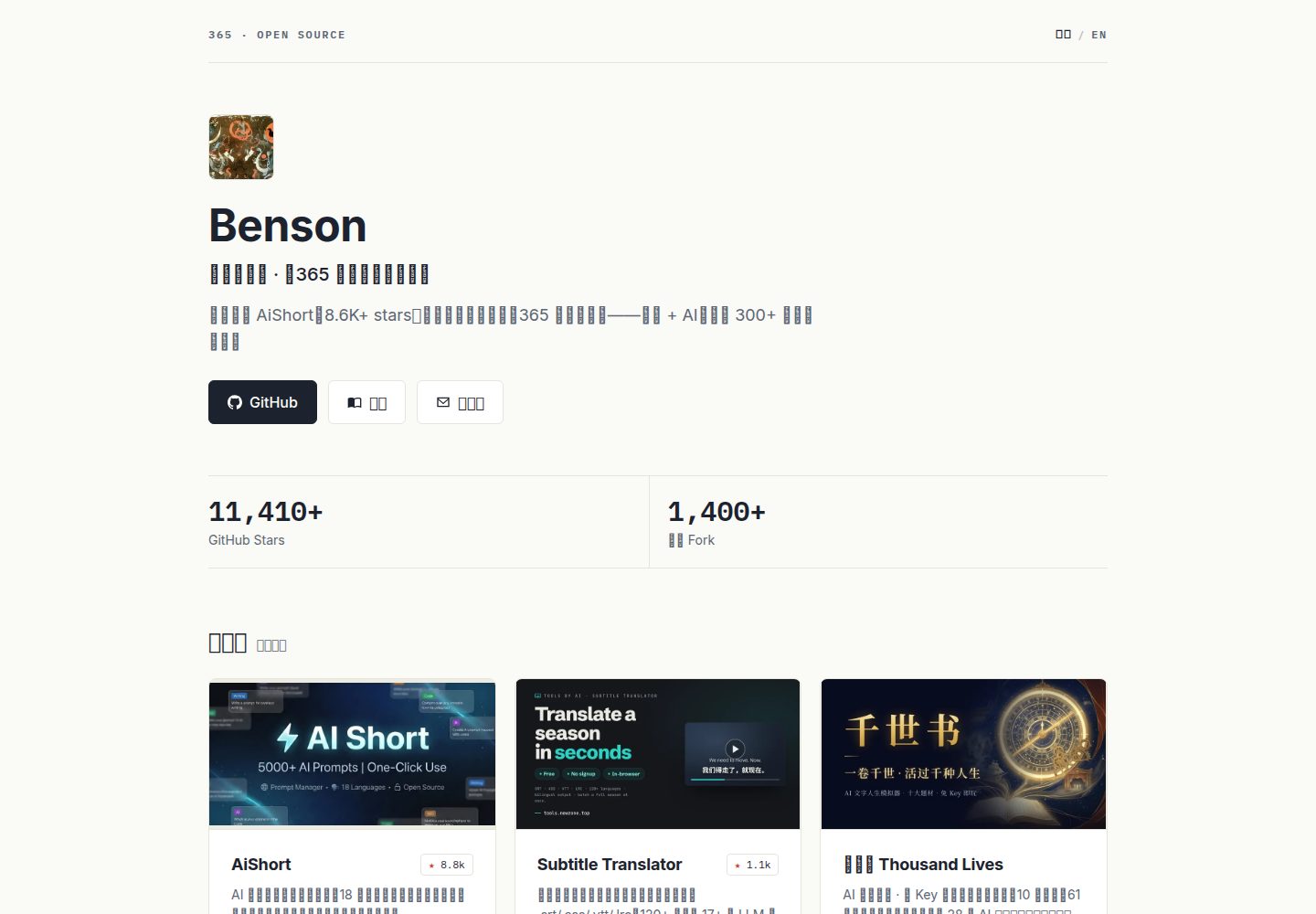
A single flat YAML file holds all content; the only required field is "name", and a complete page can be generated from as few as 6 lines
AstroPortfolio
onepage — Astro Portfolio Template
By rockbenben
An Astro static site template that generates a personal portfolio from a single YAML file, with support for multiple themes, multiple languages, and automatic fetching of GitHub open-source projects.
Explore the design
Compare the page layouts and mobile experience. Open any screenshot for a closer look.
Desktop homepage1 / 2
Desktop captureTop of page
Actual screenshot captured by the server browser.
All pages & views 2
Screenshots show visual appearance; interactive behavior may differ.
Recorded 2026-09-30View source
What stands out
A quick read of the recorded project description.
Fields accept both Chinese and English aliases, such as "名字/name", "作品/works", "重点/star"
The renderer lays out automatically: highlighted works become large cards with images, categories are grouped automatically, and data is arranged into a data bar
5 built-in themes and light/dark/auto appearance modes; interface text supports 10 languages
Optionally auto-fetches GitHub repositories to generate an open-source project wall, with support for star threshold, start date, exclusions, and naming mapping
Thumbnails, avatars, and star counts can be specified manually or automatically fetched at build time and compressed to WebP cached locally
Template Details
onepage is an Astro-based portfolio template whose core is a single flat YAML file (src/data/projects.yaml) that holds all content; at build time a renderer lays it out automatically and outputs pure static pages. The only required field is "name"; other fields such as title, introduction, avatar, links, works, data, and footer are all optional. Work entries support introduction, link, source, image, date, source attribution, category, and highlight marking. The page order is fixed: avatar, name, title, introduction, link buttons, data bar, highlighted large cards, category list, and footer.
The template includes 5 built-in themes (cinnabar, indigo, forest green, warm brown, ink black) and three appearance modes (light, dark, auto). Theme and light/dark are fixed in the configuration; the page does not provide switching. Interface text supports 10 languages, switched via the "language" field. Optionally, placing a src/data/projects.<language-code>.yaml translation file publishes a second language version; deleting the file takes it offline.
Open-source project display is an optional feature: after configuring the "open source projects" threshold, at build time it automatically fetches GitHub repositories that meet the star count and generates an "Open Source Projects" section, with controls such as start date, star threshold, open-source limit, excluded repositories, naming mapping, and description overrides. Thumbnails, avatars, and star counts can be specified manually or automatically fetched at build time and compressed to WebP cached locally.
Limitations: the template outputs purely static files and includes no backend or database; automatic fetching depends on the GitHub API and the og:image of linked pages, and may be affected by the availability of external services; third-party assets such as demo images, fonts, and icons require separate license verification; external services such as domains and hosting may incur costs.
AstroPortfolio
Is it right for your project?
Use Cases
- Personal portfolio: write projects, articles, apps, and other entries into YAML to generate a homepage with highlighted large cards and a category list
- Open-source project display: after configuring a star threshold, automatically list GitHub repositories and show source and demo links
- Work experience or timeline: use "category" to group and "date" to show time ranges, without adding new fields
- Photography or design image wall: mark each work as "highlight" to display it in a grid of large cards with images; pure image works can omit links
- Multilingual personal homepage: place a projects.<language-code>.yaml translation file to automatically generate the corresponding language version and a top switcher
Suitable For
- Developers or creators who want to maintain a personal homepage with minimal YAML configuration and do not want to write front-end code
- Users who need to showcase GitHub open-source projects and automatically sync star counts and avatars
- Individuals who need a Chinese-English or multilingual portfolio page
- Users who prefer static sites and want to host content on GitHub Pages or Cloudflare Pages
Getting started & customization
Use these recorded setup notes alongside the repository instructions for your chosen version.
- 1
Option 1: Create a repository from the template on GitHub, name the repository "username.github.io", edit src/data/projects.yaml and commit, then in Settings → Pages set Source to Deploy from a branch, select the gh-pages branch, and choose / (root) as the directory
- 2
Option 2: Locally, Node is required; run npm install, npm run fetch (optional), npm run dev to preview, and npm run build to build into dist/
- 3
When editing YAML, only change the text after the colon and keep the indentation at the start of each line unchanged; color values must be quoted, otherwise content after # will be treated as a comment
- 4
The repository's built-in src/data/projects.en.yaml is an English translation mapping; if you do not need an English version you can delete it directly, or replace it with the corresponding translation if needed
- 5
When deploying to Cloudflare Pages, the build command is npm run build and the output directory is dist; you can optionally set the GITHUB_TOKEN environment variable
License & source material
Usage conditions & limitations
Free to use · keep license noticeThis listing covers the free version under the MIT license in the public repository; the free scope is the code of this version and does not mean that external services or third-party assets are free.
Must comply with when using
- You may use, modify, commercially use, and distribute the code of this version for free.
- When distributing copies or substantial portions of the code, retain the original author's copyright notice and the full MIT license notice.
- The code is provided as is; warranties and limitations of liability are governed by the original license and applicable law.
Additional costs & items to verify
- Automatic fetching of star counts, avatars, and og thumbnails depends on the GitHub API and the og:image of external linked pages, and requires network access to these external services; this step can be skipped, but if skipped these data will not be fetched automatically.
- When deploying to Cloudflare Pages, you can optionally set the GITHUB_TOKEN environment variable for accessing the GitHub API; without it, you may be affected by rate limits for unauthenticated requests.
- The public/shots/ and public/avatar-auto.* assets generated at build time are ignored by .gitignore and should not be committed to the repository.
- The social share image public/og.png must be replaced by yourself: you can modify scripts/og-template.html and take a 1200×630 screenshot, or directly place your own designed image.
- When using the template, you need to change the copyright attribution in LICENSE to your own name to comply with the MIT license attribution requirement.
- Demo images, fonts, icons, and other third-party assets must be checked against their respective licenses and cannot be judged solely by the code's MIT license.
- External services such as domains, hosting, databases, payments, or AI may incur additional charges.
View Original Text Basis
Permission is hereby granted, free of charge
Original License Text
npm run fetch # 抓取 star 数 / 头像 / og 缩略图(可跳过)
Original README
环境变量可选 `GITHUB_TOKEN`
Original README
`public/shots/` 与 `public/avatar-auto.*` 为构建时生成的资源,已被 `.gitignore` 忽略,无需(也不应)提交。
Original README
`public/og.png` 是社交分享卡片图。改 `scripts/og-template.html` 后用浏览器以 1200×630 截图替换,或直接放一张自己设计的图。
Original README
https://github.com/rockbenben/onepage/blob/main/LICENSEhttps://github.com/rockbenben/onepage/blob/main/README.md`LICENSE` — MIT,改成你的名字
Original README
Compiled by DeepSeek based on repository license and README ·2026-10-01. Results only cover the materials read; dependencies, images, fonts, and subsequent term changes are subject to their respective original texts.
Project checks & description sources
Template Information
- Source platforms
- GitHub
- Documentation and maintenance reference score
- More documented · 83 / 100
- Technologies
- Astro
- Website type
- Portfolio
How this score is calculated
Our heuristic uses license records (up to 30), a demo link (12), a preview (10), stars (15), recorded maintenance (15), description completeness (8), feature records (5) and classification data (5). It is not a code, security or performance test, or a Google score. A link does not establish tested functionality.
What to verify for this project
- Repository update recorded
- 2026-09-28
- Screenshot last checked
- 2026-10-01
A demo link is listed. Check it with your own content and viewport sizes; its presence does not confirm that forms, authentication or payments work.
The catalog identifies Astro as the primary stack. Check the actual dependency manifest and lockfile for versions and hosting requirements. These notes use recorded metadata, not a code audit or a deployment test.
Use a selection guide →How this description was prepared
AI-assisted description based on catalog records and repository material. Repository authors are not automatically the reviewers of this description.
Automatically checked against source and license rules; no manual editorial review.
Inspect the recorded source material
SHA-256: df05e3f0cd249e8ab5b0bb3af69299468d2e0102a592e5ae63519edcc58d0a4e
2026-10-01T14:29:58.092Z
Source file / repository# onepage · 一个文件,就是你的主页
> 改一个 YAML 文件,就有一个托管在自己地址上的个人主页
[English](README.en.md) · **简体中文**
[](LICENSE) [](https://github.com/rockbenben/365opensource)
**[▶ 看看成品长什么样](https://me.newzone.top/)** · **[⬆ Use this template](https://github.com/rockbenben/onepage/generate)** —— 浏览器里点几下就有自己的主页
Read.cv 关了,Bento 也关了——托管在别人平台上的个人主页随时可能消失。onepage 的答案:**一个 YAML 文件 + 静态站 + 自己的地址**,全部资产归你所有。
**挑一种用法:**
- **完全不懂技术** → 看「方式一」,全程在浏览器点几下,不装任何软件、不碰命令行、连域名都不用买。
- **是开发者 / 想本地预览** → 看「方式二」。
## 方式一 · 零终端,全程浏览器(推荐给非开发者)
1. **复制模板**:点本页右上角绿色的 **「Use this template」→「Create a new repository」**。仓库名(Repository name)填 **`你的GitHub用户名.github.io`**——例如用户名是 `lisa`,就填 `lisa.github.io`。这样你的网址就是 `https://lisa.github.io`,免费、好记,也不用买域名。
2. **填你自己的内容并保存**:进新仓库,点开 **`src/data/projects.yaml`**,点右上角 ✏️ 铅笔图标编辑,把里面的名字、简介、作品换成你的。改完拉到页面底部点绿色的 **「Commit changes」**。
> 诀窍:**只改冒号 `:` 后面的文字,每行开头的空格(缩进)一个都别动。** YAML 靠缩进对齐,删错一个空格页面就会白屏。拿不准就先只改文字、不加新行。唯一必填的是「名字」,其余不想要就整行删掉。
> 如果你的英文页(`/en/`)还显示着别人的头衔和简介:仓库自带了一份英文翻译文件 `src/data/projects.en.yaml`,改法见下方「换成你自己的」一节。
> **不想手动改 YAML?** 部署好后打开 `你的用户名.github.io/edit`,填表就能生成配置,点「下载 projects.yaml」或「复制」,再回到第 2 步把内容替换进去。填表不会删错缩进,也就不会白屏。
> 编辑器界面支持中 / 英切换(右上角),首次按主文件的「语言」默认,之后记住你的选择。
3. **开启网页显示**:第一次保存后等 1–2 分钟(仓库在后台自动构建,会生成一个 `gh-pages` 分支)。然后进 **Settings → Pages**,把 **Source** 选成 **「Deploy from a branch」**,分支选 **`gh-pages`**、目录选 **`/ (root)`**,点 Save。(只需设一次)
4. **打开你的主页**:再等 1–2 分钟,访问 `你的用户名.github.io` 就是你的主页了。
5. **以后想改**:随时回来编辑同一个文件,保存即自动重新上线。
> 想让别人转发你链接时预览图和标题也正确?把 `src/data/projects.yaml` 里的 `网址` 改成你的网址(`https://你的用户名.github.io`)即可,其余会自动跟着走。只给自己看、不在乎分享预览的话,跳过也行。
## 方式二 · 本地预览 / 进阶(需 Node + 命令行)
```bash
npm install
npm run fetch # 抓取 star 数 / 头像 / og 缩略图(可跳过)
npm run dev # http://localhost:4321,改 projects.yaml 保存即热更新
npm run build # fetch + 构建 → dist/
```
## 特性
- **唯一必填是「名字」**:最小 6 行就出一个完整页面,其余字段不写就不存在,复杂度也只在需要时才出现
- **字段中英双认、全部人话**:`名字/name`、`作品/works`、`重点/star`… 中文英文写哪个都认
- **排版自动**:标了 `重点` 的作品自动变带图大卡、写了 `分类` 自动分组出小标题、`数据` 自动排成数据条——版式决策全在渲染器,配置里不用管
- **手动优先,自动兜底**:缩略图、头像、star 数都可手动指定;不指定则构建时自动抓取(链接页的 og:image、GitHub API),并**压缩优化**(缩放到卡片尺寸 + 转 WebP,图片重量约 -80%)后缓存到本地
- **零 JS、零外部请求**:Astro 5 + Tailwind 4 纯静态输出,字体图片全自托管(`/edit` 编辑器页除外)
- **GitHub 能力可选**:链接里放了 GitHub 地址就自动更新 star 数与头像;不放也照常构建
- **第二语言可选**:多放一个 `src/data/projects.<语言码>.yaml` 翻译文件,站点自动多出对应语言版本和顶部切换器;删掉文件就下线
## YAML 参考
一个文件拍平成一层,没有嵌套分区。唯一必填是「名字」,其余全部可选。
### 最小示例(6 行即可上线)
```yaml
名字: 张三
介绍: 一句话说清你是谁、在做什么。
作品:
- 名字: 我的第一个作品
介绍: 它是做什么的。
链接: https://example.com
```
### 顶层字段
| 中文键 | 英文别名 | 必填 | 说明 |
| --- | --- | --- | --- |
| 名字 | name | **是** | 你的名字,唯一必填项 |
| 头衔 | title | | 一行头衔,建议写可验证的事实 |
| 介绍 | intro | | 一句话简介 |
| 头像 | avatar | | 本地路径(图片放 `public/` 下,如 `/avatar.jpg`)或网址;不填且链接里有 GitHub 时自动抓 GitHub 头像 |
| 链接 | links | | 列表,每条 `- 标签: 网址`;图标按网址、或「博客/blog」这类标签自动识别(GitHub / X / 邮箱 / RSS / 博客…) |
| 作品 | works | | 列表,每条见下表 |
| 数据 | stats | | 列表,每条 `- 标签: 值`;自动值:`自动`=总星数、`项目数`=非 fork/归档的公开仓库数、`forks`=累计 Fork 数(都需「链接」里有一条 GitHub,否则该条跳过);构建时取整到十位加「+」 |
| 网址 | url | | 站点对外地址,用于分享预览(og)和 canonical;不填则整体略过 |
| 颜色 | color | | 全站强调色,如 `"#c8402e"`——**引号必须加**:不加引号时 `#` 后面会被 YAML 当注释吃掉(hover 深色自动派生) |
| 主题 | theme | | 整套配色,可选 `朱砂`(默认)/`靛蓝`/`森绿`/`暖褐`/`墨黑`;不写=朱砂 |
| 外观 | appearance | | 明暗,`亮`(默认)/`暗`/`自动`(跟随访客系统深色,纯 CSS) |
| 开源项目 | opensource | | 可选,数字=自动列出 star ≥ 此数的 GitHub 仓库并显示「开源项目」节;`true` =默认 10;不写=不显示 |
| 开源项目起始 | opensource_since | | 可选,日期(如 `2026-03`);此日期后创建的仓库全列(绕过 star 阈值) |
| 星标线 | star_line | | 可选,开源节排序分界(默认 30):star 超过此数的置顶、按 star 降序;其余按最近更新降序。它同时是「开源上限」的分界——线上永远全显 |
| 开源上限 | opensource_max | | 可选,**只限制星标线以下的尾巴**最多再列几个(如 `15`;写 `0` =只列高星组);总数会向上补到 3 的倍数(凑满 3 列网格的末行);线上的高星项目永远全显;不写=全部列出 |
| 开源排除 | opensource_exclude | | 可选,仓库名列表(`- 仓库名`),把不想进开源节的仓库排除掉(如本模板仓自身);大小写不敏感 |
| 开源命名 | opensource_names | | 可选,`仓库名: 展示名` 映射(如 `md-translator: MD Translator`),只改开源节里的显示名;缩略图/链接仍按原仓库;不写就用 GitHub 原名 |
| 开源描述 | opensource_descriptions | | 可选,`仓库名: 描述` 映射,覆盖开源节里从 GitHub 抓来的原描述;**可翻译**——英文写在 `projects.en.yaml` 的同名字段,按语言各显其文;不写就用 GitHub 原描述 |
| 页脚 | footer | | 页脚落款,支持 `<a>` 链接 |
| 标记 | mark | | 顶栏左上的小标记(如 `365 · Open Source`),带朱砂印章点;不写=不显示 |
| 语言 | lang | | 界面文案语言,默认中文;见「多语言」 |
### 作品条目字段
| 中文键 | 英文别名 | 必填 | 说明 |
| --- | --- | --- | --- |
| 名字 | name | **是** | 作品名 |
| 介绍 | intro | | 一句话说明 |
| 链接 | link | | 任意网址:GitHub / 文章 / B站 / arXiv / App Store…(不写也合法,纯图作品不可点) |
| 源码 | source | | 第二链接(演示站另配仓库、论文另配代码时用) |
| 图 | image | | 手动缩略图(本地路径或网址);不填则自动抓:本人仓库的**自定义 Social preview** 优先,其次「链接」页的 og:image,最后 GitHub 自动卡片图 |
| 日期 | date | | 原样显示的字符串,如 `2020–2024` |
| 出处 | via | | 发表在哪,如《少数派》/ B站 / arXiv |
| 分类 | group | | 同分类的作品自动归为一组、出小标题;不写就归入默认的「作品」组 |
| 重点 | star | | `true` → 带图大卡展示,且不在下方清单里重复出现 |
> 页面顺序是固定的、自动排的:**头像 · 名字 · 头衔 · 介绍 → 链接按钮 → 数据条 → 重点大卡 → 分类清单 → 页脚**。你只管填内容,版式交给渲染器。
>
> 零配置纠错:链接值写成裸邮箱(`[email protected]`)自动补 `mailto:`、裸域名(`example.com`)自动补 `https://`。
### 开源项目(自动)
写 `开源项目: 10`,构建时会把你 GitHub 上 star ≥ 10 的仓库自动列成「开源项目」一节(star 超过 `星标线` 的按 star 降序置顶、其余按最近更新降序;排除 fork/归档、与重点/手列去重、无需手抄)。每行带**源码**链接,仓库设了 homepage 的还带 **demo/商店**链接。
再加 `开源项目起始: 2026-03`,这个日期之后新建的仓库会**全部**列出(不看 star)——适合「持续高产、想展示体量」的场景。
> **展示条数怎么算**:高星组(star 超过 `星标线`)永远全显——那是你的代表作,不该被截断;`开源上限` 只削星标线以下的长尾(按最近更新取前 N 个)。比如线上 8 个 + 上限 15 = 23,再向上补到 **24** 张卡——网格是 3 列,补足后末行不留残缺(候选不够就按实际数量)。这样配一次就不用再管:以后高星组变大,也不会把最该露脸的项目挤出去;被截掉的部分由末尾「在 GitHub 看更多」兜底。
> 自动列出的仓库**名字与描述直接取自 GitHub、不随语言翻译**(英文页也显示 GitHub 上的原文)。想手动改名/译文,就把该作品手写进 `作品`(会与自动去重)。
>
> 只想把仓库名显示得漂亮些(`md-translator` → `MD Translator`、`scrcpy-helper` → `scrcpy 投屏助手`),用 `开源命名` 映射即可,不必手抄整条作品:
>
> ```yaml
> 开源命名:
> md-translator: MD Translator
> scrcpy-helper: scrcpy 投屏助手
> ```
>
> 想给开源节的描述换成自己的话、并且**分语言**(GitHub 原描述往往中英混排),用 `开源描述`——主文件写中文,`projects.en.yaml` 写英文:
>
> ```yaml
> # projects.yaml
> 开源描述:
> md-translator: 翻译 Markdown 不破坏格式,代码块、LaTeX、链接全保留。
> # projects.en.yaml
> 开源描述:
> md-translator: Translate Markdown without breaking format — code, LaTeX, links preserved.
> ```
### 三个用法范例
**1 · 工作经历 / 时间线**——不加任何新字段,用 `分类` 归组、`日期` 显示时间段:
```yaml
作品:
- 名字: 高级工程师 · 某公司
介绍: 带队做了 XXX,从 0 到 1。
日期: 2022–至今
分类: 经历
- 名字: 工程师 · 另一家公司
介绍: 负责 YYY 模块。
日期: 2020–2022
分类: 经历
```
**2 · ICP 备案号放页脚**——`页脚` 支持 `<a>`,备案信息放这里最合适(一行):
```yaml
页脚: '<a href="https://beian.miit.gov.cn/" target="_blank" rel="noopener">京ICP备00000000号</a>'
```
**3 · 摄影 / 设计师图墙**——每条作品都标 `重点`,全变带图大卡排成网格;纯图作品可以不写 `链接`:
```yaml
名字: 某某
头衔: 摄影师
作品:
- 名字: 晨雾
图: /photos/1.jpg
重点: true
- 名字: 街角
图: /photos/2.jpg
重点: true
```
### 不想写代码?
写作者、研究者、摄影师的完整可用配置见 `tests/fixtures/writer.yaml`——没有任何 GitHub 字段,靠 `重点`(大卡)+ `分类`(分组清单)+ `数据` 就能成站。
## 主题
改一行 `主题:` 就换整套配色,5 套可选:
| 主题 | 性格 |
| --- | --- |
| 朱砂(默认) | 纸白·墨·朱砂,暖红编辑感 |
| 靛蓝 | 冷静专业,开发者/研究者 |
| 森绿 | 自然沉稳 |
| 暖褐 | 纸感温暖,写作者 |
| 墨黑 | 近黑白极简,设计师 |
每套都含明/暗两版。**默认 `外观: 亮`**;写 `外观: 暗` 定死深色,或 `外观: 自动` 跟随访客系统深色(纯 CSS,仍零 JS)。主题与明暗都在配置里定死,页面上不提供切换(想调就改这两行 / 用 `/edit`)。写了 `颜色:` 会覆盖当前主题的强调色。
```yaml
主题: 靛蓝
外观: 暗
```
## 换成你自己的
- `src/data/projects.yaml` — 你的全部内容(仓库自带的是作者本人的作品集示例,直接改)
- **域名只改一处**:`projects.yaml` 的 `网址` 填你自己的网址即可,`astro.config.mjs` 会自动跟着它走(方式一用 `用户名.github.io` 的填这个)
- `src/data/projects.en.yaml` — 仓库自带的英文翻译(作者本人的头衔、简介、落款),用于演示双语站。它是一张「原文 → 译文」映射、直接覆盖对应文本,所以哪怕你把 `projects.yaml` 换成了自己的内容,英文页仍会显示这份英文。**不需要英文版就直接删掉这个文件**;需要的话把里面的内容换成你自己的译文
- `public/favicon.svg` — 站点图标(默认是朱砂章)
- `public/og.png` — 社交分享图(见下)
- `LICENSE` — MIT,改成你的名字
## 部署到其他平台
方式一的 GitHub Pages 已是零配置首选。也可换:
- **Cloudflare Pages**:后台连仓库,构建命令 `npm run build`,输出目录 `dist`,环境变量可选 `GITHUB_TOKEN`。
> `public/shots/` 与 `public/avatar-auto.*` 为构建时生成的资源,已被 `.gitignore` 忽略,无需(也不应)提交。
## 多语言
### 界面文案(10 种语言)
模板自带的固定文案——「代表作」「作品」「在线体验」「源码」「回到首页」、404 页等——跟着 `语言` 走:
```yaml
语言: en # 界面切英文;也认「中文」「英文」「日语」这类写法
```
内置 **10 种语言**:`en` `zh-CN` `zh-TW` `ja` `ko` `es` `fr` `de` `pt` `ru`。写 `zh-Hans` / `zh-Hant` 这类也认,未收录的语言回退到英文。要加一种界面语言:打开 `src/i18n/ui.ts`,照抄一份译好即可。
### 让站点支持第二种语言(可选)
**放一个 `src/data/projects.<语言码>.yaml` 就发布该语言、删文件即下线。** 页面顶部自动出现语言切换(纯链接,不引入 JS)。仓库**已自带** `src/data/projects.en.yaml`(作者本人的英文翻译)——换成你自己的译文即可用,不需要就删掉。
翻译文件不是完整配置,而是一张「原文 → 译文」映射,**键是主文件里的原文**,不看顺序、不必写全,没写的自动回退主文件:
```yaml
# projects.en.yaml
头衔: Independent developer
介绍: Building AiShort and a 30+ project OSS matrix.
页脚: Project #022 of 365 Open Source
作品: # 键 = 主文件里作品的「名字」
AiShort:
介绍: AI prompt community with 18 UI languages.
千世书 Thousand Lives:
名字: Thousand Lives
介绍: An AI text game, fully client-side.
文字: # 零散原文 → 译文:分类名、数据标签、链接标签
开源项目: Open-source projects
联系我: Contact
```
规则:
- **可翻译**:顶层的 `头衔` `介绍` `页脚`;作品的 `名字` `介绍` `出处`;`文字` 字典覆盖分类名、数据标签、链接标签。
- **不可翻译**(永远取主文件):`链接` `源码` `图` `日期` `重点` 等结构性字段——结构只有一份,两边不会跑偏。
- 文件名里的码就是语言:`projects.ja.yaml` → `/ja/`。想要三种语言就放三个文件。
- 键写错了(比如改了中文名字却忘了改翻译文件)构建时会打一条 warning 指出是哪个键,页面照常出,不会挂。
- 主文件里两条作品同名时会告警,翻译只作用于第一条。
## OG 分享图
`public/og.png` 是社交分享卡片图。改 `scripts/og-template.html` 后用浏览器以 1200×630 截图替换,或直接放一张自己设计的图。
## 关于 365 开源计划
[365 开源计划](https://github.com/rockbenben/365opensource) 的第 **#022** 个项目——一个人 + AI,一年 300+ 个开源项目。[提交你的需求 →](https://365.aishort.top/) · [Discord](https://discord.gg/PZTQfJ4GjX) · [Telegram](https://t.me/aishort_top)
Explore similar templates
Compare previews and descriptions within the same stack and category.

astro-theme-cactus
Astro Cactus is an Astro-based blog and portfolio theme that uses Markdown/MDX content collections to manage posts, notes, and tags, with frontmatter type-checked by a schema.
Astro · Portfolio

astrofy
Astrofy is a free and open-source personal portfolio website template built with Astro and TailwindCSS, with built-in blog, CV timeline, project showcase, store, and RSS feed modules.
Astro · Portfolio

astro-nano
Astro Nano is a static, minimalist portfolio and blog template built with Astro, Tailwind, and TypeScript without frontend frameworks. It includes light/dark themes, animated UI, automatic sitemap and RSS feed generation, and Markdown/MDX support with component imports.
Astro · Portfolio

astro-erudite
astro-erudite is an opinionated, unstyled static blog template built with Astro and native CSS, with no UI or CSS framework and minimal dependencies.
Astro · Portfolio

astro-sphere
Astro Sphere is a static, minimalist portfolio and blog theme maintained by markhorn-dev, built mainly with Astro, Tailwind, and TypeScript, with a small amount of SolidJS for stateful components.
Astro · Portfolio

astro-micro
Astro Micro is a framework-free blog and portfolio theme for Astro, forked from Astro Nano. It adds Pagefind search and Giscus comments while retaining type safety, sitemap, RSS, Markdown and MDX support, and TailwindCSS with system, light, and dark themes.
Astro · Portfolio