Uses Next.js App Router to organize routes, including (landing) and (dashboard) route group examples
Next.jsReactStarter
Next.js-TypeScript-Starter-Template — Next.js Starter Template
By Salman-Ahamed
A starter template based on Next.js App Router, TypeScript, and Tailwind CSS, created via CLI or GitHub template, with built-in ESLint, Prettier, and optional Husky code quality hooks.
Explore the design
Compare the page layouts and mobile experience. Open any screenshot for a closer look.
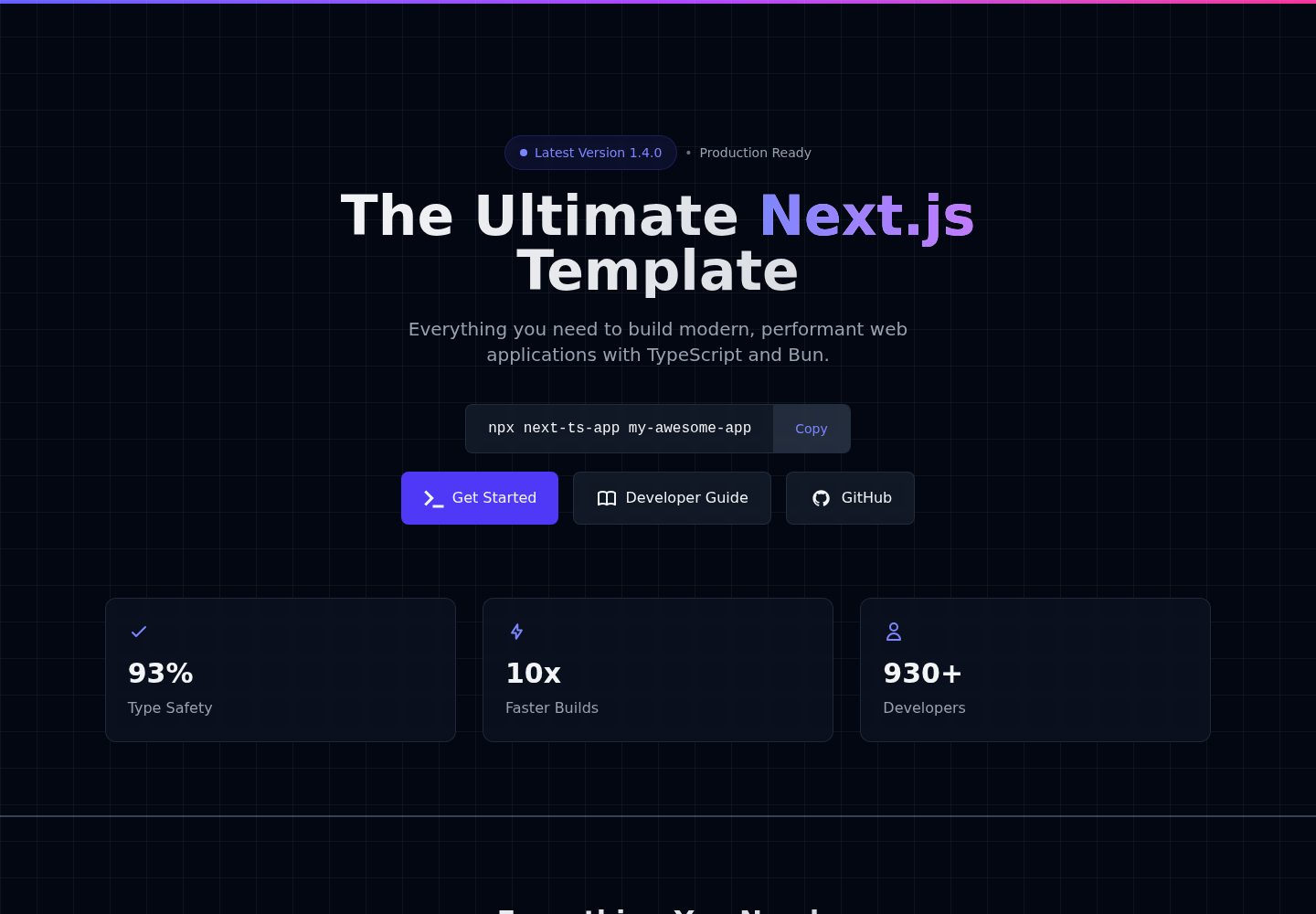
Desktop homepage1 / 2
Desktop captureTop of page
Actual screenshot captured by the server browser.
All pages & views 2
Screenshots show visual appearance; interactive behavior may differ.
Recorded 2026-10-14View source
What stands out
A quick read of the recorded project description.
TypeScript configuration and a custom types directory, providing a type definition entry point
Tailwind CSS v4 preconfigured, with global styles and a theme directory
ESLint and Prettier integration, including rule examples such as import/order
During CLI creation, you can choose bun, pnpm, yarn, or npm, and choose whether to enable Husky
Provides npm scripts such as dev, build, start, lint, format, and clear-cache
Template Details
This template is used to set up Next.js + TypeScript + Tailwind CSS projects. The README states that it provides an App Router directory structure, TypeScript configuration, Tailwind CSS v4 preconfiguration, ESLint and Prettier, and optional Husky Git hooks. There are two ways to create a project: use the npx next-ts-app command-line tool, or click Use this template on GitHub and clone it locally. The CLI asks in sequence for the project name, package manager (bun, pnpm, yarn, npm), and whether to enable Husky; when Husky is selected, the main branch template is used, and when not enabled, the without-husky branch template is used. The README lists scripts for dev, build, start, lint, format, and clear-cache, and explains that Next.js 16 has removed next lint, so ESLint is run directly instead. The project structure includes app route groups, components, config, hooks, lib, styles, types, services, contexts, and __tests__ directories. For deployment, the README only lists Vercel, Netlify, AWS, and Docker, and notes to copy .env.example to .env. The README does not provide specific page features, test framework configuration, or detailed steps for each deployment platform.
Next.jsStarter
Is it right for your project?
Use Cases
- Need to quickly start a Next.js + TypeScript + Tailwind CSS project skeleton
- Want to choose a package manager via CLI interaction and decide whether to enable Husky Git hooks
- Create a new project on GitHub as a template repository and clone it for local development
- Pre-plan directory structures such as app, components, hooks, lib, and services for a project
Suitable For
- Front-end developers using Next.js App Router and TypeScript
- Teams that want the project to include ESLint, Prettier, and optional Husky configuration
- Individual or collaborative projects that need a scalable directory structure as a starting point
- Next.js projects preparing to deploy to Vercel, Netlify, AWS, or Docker
Getting started & customization
Use these recorded setup notes alongside the repository instructions for your chosen version.
- 1
Requires Node.js 20.9.0 or higher, which is a requirement of Next.js 16
- 2
Recommended to create a project with npx next-ts-app my-awesome-app, then follow the prompts to choose the package manager and whether to enable Husky
- 3
You can also click Use this template on GitHub to create a repository, then clone it and run bun install and bun run dev
- 4
If you choose bun, pnpm, or yarn, you need to install the corresponding package manager globally first
- 5
Before deployment, follow the README instructions to copy .env.example to .env
License & source material
Usage conditions & limitations
Free to use · keep license noticeThis entry covers the free version under the MIT license in a public repository; the free scope is the code of that version and does not mean external services or third-party assets are free.
Must comply with when using
- Allows free use, modification, commercial use, and distribution of that version's code.
- When distributing copies or substantial portions of the code, retain the original author's copyright notice and the complete MIT license notice.
- The code is provided as is; warranties and limitations of liability are governed by the original license and applicable law.
Additional costs & items to verify
- Demo images, fonts, icons, and other third-party assets must be checked against their respective licenses and cannot be judged solely by the code's MIT license.
- External services such as domains, hosting, databases, payments, or AI may incur additional charges.
- Requires Node.js 20.9.0 or higher (a requirement of Next.js 16); versions below that cannot run.
- If you choose bun, pnpm, or yarn as the package manager, you need to install the corresponding tool globally first (for example, npm install -g bun).
- Before deploying to production, copy .env.example to .env and fill in the production configuration.
View Original Text Basis
Permission is hereby granted, free of charge
Original License Text
- **Node.js**: Version 20.9.0 or higher (required for Next.js 16)
Original README
**Note**: If you pick `bun`, make sure Bun is installed (`npm install -g bun` or visit [bun.sh](https://bun.sh)). For `pnpm` or `yarn`, install them first if needed.
Original README
https://github.com/Salman-Ahamed/Next.js-TypeScript-Starter-Template/blob/main/LICENSEhttps://github.com/Salman-Ahamed/Next.js-TypeScript-Starter-Template/blob/main/README.mdCopy `.env.example` to `.env` for production settings.
Original README
Compiled by DeepSeek based on repository license and README ·2026-10-14. Results only cover the materials read; dependencies, images, fonts, and subsequent term changes are subject to their respective original texts.
Project checks & description sources
Template Information
- Source platforms
- GitHub
- Documentation and maintenance reference score
- More documented · 83 / 100
- Technologies
- Next.js · React
- Website type
- Starter
How this score is calculated
Our heuristic uses license records (up to 30), a demo link (12), a preview (10), stars (15), recorded maintenance (15), description completeness (8), feature records (5) and classification data (5). It is not a code, security or performance test, or a Google score. A link does not establish tested functionality.
What to verify for this project
- Repository update recorded
- 2026-01-08
- Screenshot last checked
- 2026-10-14
A demo link is listed. Check it with your own content and viewport sizes; its presence does not confirm that forms, authentication or payments work.
The catalog identifies Next.js as the primary stack. Check the actual dependency manifest and lockfile for versions and hosting requirements. These notes use recorded metadata, not a code audit or a deployment test.
Use a selection guide →How this description was prepared
AI-assisted description based on catalog records and repository material. Repository authors are not automatically the reviewers of this description.
Review declaration: codex-user-requested-batch-review-20261015 · 2026-10-15
Inspect the recorded source material
SHA-256: 525a4a79ba752ed62dbc7ba33fdd53b5ab62e6b355a5f2f1efe8a5f0c2bec9f6
2026-10-14T08:40:42.131Z
Source file / repository# Next.js TypeScript Starter Template
A **production-ready**, **scalable**, and **actively maintained** starter template for building high-quality web apps with **Next.js**, **TypeScript**, and **Tailwind CSS**.
<br/>
<p align="center">
<img
src="https://img.shields.io/npm/v/next-ts-app?style=for-the-badge&label=next-ts-app&labelColor=black&logo=npm&color=success"
alt="next-ts-app version"
/>
<img
src="https://img.shields.io/static/v1?label=License&message=MIT&labelColor=000000&color=007ACC&style=for-the-badge&logo=open-source-initiative&logoColor=white"
alt="License MIT"
/>
</p>
<p align="center">
<img src="https://img.shields.io/badge/Next.js-16.0.10-black?logo=next.js" alt="Nextjs">
<img src="https://img.shields.io/badge/TypeScript-3178C6?logo=typescript&logoColor=white" alt="TypeScript">
<img src="https://img.shields.io/badge/Tailwind%20CSS-06B6D4?logo=tailwind-css&logoColor=white" alt="Tailwind CSS">
<img src="https://img.shields.io/badge/ESLint-4B32C3?logo=eslint&logoColor=white" alt="ESLint">
<img src="https://img.shields.io/badge/Prettier-F7B93E?logo=prettier&logoColor=black" alt="Prettier">
</p>
<br/>
## 🚀 Why Use This Template?
This starter template is designed for **developers of all levels** — from beginners starting their journey to advanced engineers building scalable applications.
### Key Features
- ⚡️ **Next.js 16+** with App Router
- ✅ **TypeScript** – full type safety and custom config
- 🎨 **Tailwind CSS v4** – preconfigured and responsive
- 🧹 **ESLint + Prettier** – clean, consistent code
- 🌿 **Scalable folder structure** – production standard
- 📦 **Alias support** – easy path management
- 🧪 Ready for unit & integration testing
- ☁️ Vercel ready – just push and deploy
## How to Start
### Option 1: Create with CLI **`(Recommended)`**
Quickly set up your Next.js + TypeScript + TailwindCSS project using the CLI tool:
- **📦 using npm**
```bash
npx next-ts-app my-awesome-app
```
- Replace my-awesome-app with your desired project name.
- The CLI will scaffold a fully configured Next.js + TypeScript + TailwindCSS starter for you.
### ✅ Fast | 🔧 Pre-configured | 🧪 Ready for development
---
#### CLI Options
During project creation, you'll be prompted to:
1. **Project Name**: What's your project name? (e.g., `my-awesome-app`)
2. **Package Manager**: Choose your preferred package manager:
- `⚡ bun` (Recommended - Fastest)
- `🚀 pnpm` (Fast & Efficient)
- `🧶 yarn` (Reliable)
- `📦 npm` (Standard)
3. **Husky Integration**: Set up Git hooks with Husky for automatic code quality checks:
- `No` (Default - Simpler setup) - Uses the `without-husky` branch template
- `Yes` (Recommended for code quality) - Uses the `main` branch template
### Husky Integration
**Without Husky (Default):**
- ⚠️ Git hooks are disabled
- ✅ Cleaner setup for simpler projects
- ✅ Uses the `without-husky` branch of the template
- 🔧 You can manually add Git hooks later if needed
**With Husky (Recommended):**
- ✅ Git hooks are automatically configured
- ✅ ESLint and Prettier run on commit
- ✅ Pre-commit hooks ensure code quality
- ✅ Uses the `main` branch of the template
3. Follow the steps shown:
For example, if you choose `bun`:
```bash
cd my-awesome-project
bun install
bun run dev
```
**Note**: If you pick `bun`, make sure Bun is installed (`npm install -g bun` or visit [bun.sh](https://bun.sh)). For `pnpm` or `yarn`, install them first if needed.
### Available Scripts
The project includes several useful scripts:
```bash
# Development
bun run dev # Start development server with Turbopack
bun run build # Create production build
bun run start # Start production server
bun run lint # Run ESLint directly
bun run lint:fix # Fix ESLint errors
bun run format # Format code with Prettier
bun run format:check # Check code formatting
bun run clear-cache # Clear Next.js cache, reinstall dependencies, and restart dev server
```
**Note**: Next.js 16 has removed the `next lint` command. The template now uses ESLint directly.
The `clear-cache` script is particularly useful when you encounter build issues or need to reset your development environment. It:
1. Removes the `.next` directory
2. Reinstalls dependencies without using cache
3. Restarts the development server
#### Prerequisites
- **Node.js**: Version 20.9.0 or higher (required for Next.js 16)
- For **Bun**: Install via `npm install -g bun`
- For **pnpm**: Install via `npm install -g pnpm`
- For **Yarn**: Install via `npm install -g yarn`
- For **npm**: Comes with Node.js
#### What's Included
After installation, you'll get:
**Without Husky (Default - without-husky branch):**
- ✅ Next.js 16 with App Router
- ✅ TypeScript configuration
- ✅ Tailwind CSS v4 setup
- ✅ ESLint & Prettier
- ✅ Project structure ready to go
### Option 2: Use GitHub Template
1. Click **[Use this template](https://github.com/Salman-Ahamed/Next.js-TypeScript-Starter-Template)** on GitHub.
2. Name your new repository.
3. Click `Create repository`.
4. Set up locally:
```bash
git clone https://github.com/[your-username]/[your-repo].git
cd [your-repo]
bun install
bun run dev
```
## Project Structure
```
public/ # Public static assets that are served directly
├── assets/ # Static assets directory
│ ├── images/ # Image files (png, jpg, svg, etc.)
│ └── data/ # Static JSON data files
│
src/ # Source code directory
├── app/ # Next.js 13+ App Router directory
│ ├── (landing)/ # Landing page route group (optional)
│ │ ├── _components/ # Page-specific components
│ │ ├── error.tsx # Error boundary for landing page
│ │ ├── loading.tsx # Loading state for landing page
│ │ └── page.tsx # Landing page entry point
│ │
│ ├── (dashboard)/ # Dashboard route group
│ │ ├── _components/ # Dashboard-specific components
│ │ ├── error.tsx # Error boundary for dashboard
│ │ ├── loading.tsx # Loading state for dashboard
│ │ └── page.tsx # Dashboard page entry
│ │
│ ├── layout.tsx # Root layout (shared across all pages)
│ ├── template.tsx # Template for per-page layouts
│ └── providers.tsx # Global context providers (Theme, Auth, etc.)
│
├── components/ # Reusable components directory
│ ├── ui/ # UI primitives (buttons, inputs, cards)
│ │ ├── button.tsx # Button component
│ │ ├── input.tsx # Input component
│ │ └── card.tsx # Card component
│ │
│ ├── layout/ # Layout components
│ │ ├── header.tsx # Header component
│ │ ├── footer.tsx # Footer component
│ │ └── sidebar.tsx # Sidebar component
│ │
│ ├── shared/ # Shared components across features
│ │ ├── ThemeToggle.tsx # Theme toggle component
│ │ └── Analytics.tsx # Analytics component
│ │
│ ├── forms/ # Form-related components
│ │ ├── FormInput.tsx # Form input component
│ │ └── FormSelect.tsx # Form select component
│ │
│ └── icons/ # SVG icon components
│ ├── index.tsx # Icon exports
│ └── SocialIcons/ # Social media icons
│
├── config/ # Application configuration
│ ├── site.ts # Site metadata and configuration
│ ├── routes.ts # Route definitions and constants
│ └── theme.ts # Theme configuration and tokens
│
├── hooks/ # Custom React hooks
│ ├── useAuth.ts # Authentication hook
│ ├── useAnalytics.ts # Analytics hook
│ ├── useDebounce.ts # Debounce utility hook
│ └── useLocalStorage.ts # Local storage hook
│
├── lib/ # Utility libraries and helpers
│ ├── api/ # API client configurations
│ │ ├── axios.ts # Axios instance and interceptors
│ │ └── trpc/ # tRPC client setup
│ │
│ ├── utils/ # Utility functions
│ │ ├── formatter.ts # Data formatting utilities
│ │ └── validators.ts # Validation utilities
│ │
│ └── constants.ts # Application constants
│
├── styles/ # Global styles and CSS
│ ├── globals.css # Global CSS styles
│ ├── theme/ # Theme variables and tokens
│ └── components/ # Component-specific styles
│
├── types/ # TypeScript type definitions
│ ├── index.d.ts # Global type declarations
│ ├── next.d.ts # Next.js type extensions
│ └── custom-types.ts # Custom type definitions
│
├── services/ # Business logic and services
│ ├── auth.service.ts # Authentication service
│ └── analytics.service.ts # Analytics service
│
├── contexts/ # React Context providers
│ ├── ThemeContext.tsx # Theme context
│ └── AuthContext.tsx # Authentication context
│
└── __tests__/ # Test files directory
├── components/ # Component tests
├── hooks/ # Hook tests
├── services/ # Service tests
└── utils/ # Utility function tests
```
## Code Quality Tools
These tools keep your code neat:
- **ESLint**: Finds code mistakes.
- **Prettier**: Formats code nicely.
- **Tailwind CSS**: Organizes styles.
Example rule for imports:
```javascript
"import/order": [
"error",
{
"groups": ["builtin", "external", "internal"],
"alphabetize": { "order": "asc" }
}
]
```
## Deployment
This template works with:
- Vercel
- Netlify
- AWS
- Docker
Copy `.env.example` to `.env` for production settings.
## Developer & Contributor
<div align="center"> <table> <tr> <td align="center">
<img src="https://github.com/Salman-Ahamed.png" width="80" height="80" alt="Salman Ahamed" /><br /> <b>Salman Ahamed</b><br/> <a href="https://github.com/Salman-Ahamed">GitHub</a> | <a href="https://www.linkedin.com/in/salman-ahamad-as/">LinkedIn</a> | <a href="mailto:[email protected]">Email</a> </td> <td align="center">
<img src="https://github.com/eyachirarafat.png" width="80" height="80" alt="Eyachir Arafat" /><br /> <b>Eyachir Arafat</b><br/> <a href="https://github.com/eyachirarafat">GitHub</a> | <a href="https://www.linkedin.com/in/eyachirarafat/">LinkedIn</a> | <a href="https://eyachirarafat.vercel.app/">Portfolio</a> </td> <td align="center">
<img src="https://github.com/mdamzadhossainomor.png" width="80" height="80" alt="Md Amzad Hossain Omor" /><br /> <b>Md Amzad Hossain</b><br/> <a href="https://github.com/mdamzadhossainomor">GitHub</a> | <a href="https://www.linkedin.com/in/md-amzad-hossain-omor/">LinkedIn</a> | <a href="mailto:[email protected]">Email</a> </td> <td align="center">
<img src="https://github.com/Hashibul-Alam.png" width="80" height="80" alt="Hasibul Alam" /><br /> <b>Hasibul Alam</b><br/> <a href="https://github.com/Hashibul-Alam">GitHub</a> | <a href="https://www.linkedin.com/in/hasibul231/">LinkedIn</a> | <a href="mailto:[email protected]">Email</a> </td> </tr> </table> </div>
---
## Changelog
### v1.4.0 (Latest)
- **Major Update**: Upgraded to Next.js 16.0.10
- **React 19**: Full support for React 19 features
- **Tailwind CSS v4**: Using the latest Tailwind CSS version
- **TypeScript**: Updated to ES2022 target for better performance
- **ESLint**: Updated to latest Next.js 16 compatible version
- **Prettier**: Updated to v3.4.2
- **Performance**: Improved build times and runtime performance
- **Breaking Changes**:
- Removed `next lint` command (use `eslint .` directly)
- Node.js 20.9.0+ now required
- **Dependencies**: Added missing ESLint plugins (@typescript-eslint/eslint-plugin, @typescript-eslint/parser, eslint-plugin-import)
- **Configuration**: Improved .gitignore with IDE and OS entries
### v1.3.0
- **New Feature**: Interactive Husky selection during project creation
- **Template Branches**: Support for both `main` and `without-husky` branches
- **Enhanced CLI**: Better argument handling and help documentation
- **Improved UX**: Clear feedback about which template is being used
- **Better Progress**: Enhanced progress indicators and user feedback
- **Professional Prompts**: Beautiful emojis and improved messaging throughout
- **Default Behavior**: Husky disabled by default for simpler setup
### v1.2.40
- **Initial Release**: Basic CLI functionality
- **Package Manager Selection**: Support for bun, pnpm, yarn, npm
- **Beautiful UI**: Progress indicators and colorful output
- **Fast Setup**: Quick project initialization with degit
## Want to Help?
Check our [CONTRIBUTING GUIDE](CONTRIBUTING.md) to contribute.
## License
Free to use under [MIT License](LICENSE). See the LICENSE file for details.
Explore similar templates
Compare previews and descriptions within the same stack and category.

Next.js SaaS Starter
The official Next.js SaaS starter template, integrating email/password authentication, Stripe Checkout subscriptions, a dashboard with user/team CRUD, basic Owner/Member RBAC, and activity logging.
Next.js · SaaS

Next.js Commerce
Vercel's officially maintained Next.js App Router ecommerce starter with deep Shopify integration, offering a complete product catalog, cart, and checkout flow. Core logic is modular for swapping backends, and community provider versions exist for BigCommerce, Medusa, and Saleor.
Next.js · E-commerce

Next-js-Boilerplate
A developer-first Next.js 16 starter with Tailwind CSS 4 and TypeScript, supporting both App Router and Page Router.
Next.js · Starter

tailwind-nextjs-starter-blog
A Next.js and Tailwind CSS blog starter template using Contentlayer for Markdown/MDX, with built-in SEO, code highlighting, and tags. It targets personal technical blogs and migration from Jekyll/Hugo to React, and supports one-click Vercel deployment.
Next.js · Blog

next-forge
next-forge is a Turborepo-based Next.js template maintained by Vercel, positioned as a starting point for SaaS products.
Next.js · Starter

SaaS-Boilerplate
SaaS-Boilerplate is an open-source SaaS starter template built with Next.js App Router, React 19, TypeScript, Tailwind CSS, and Shadcn UI.
Next.js · SaaS