Hugo theme styled with Tailwind CSS
HugoStarter
tailwind-developer-website — Hugo Starter Template
By samrobbins85
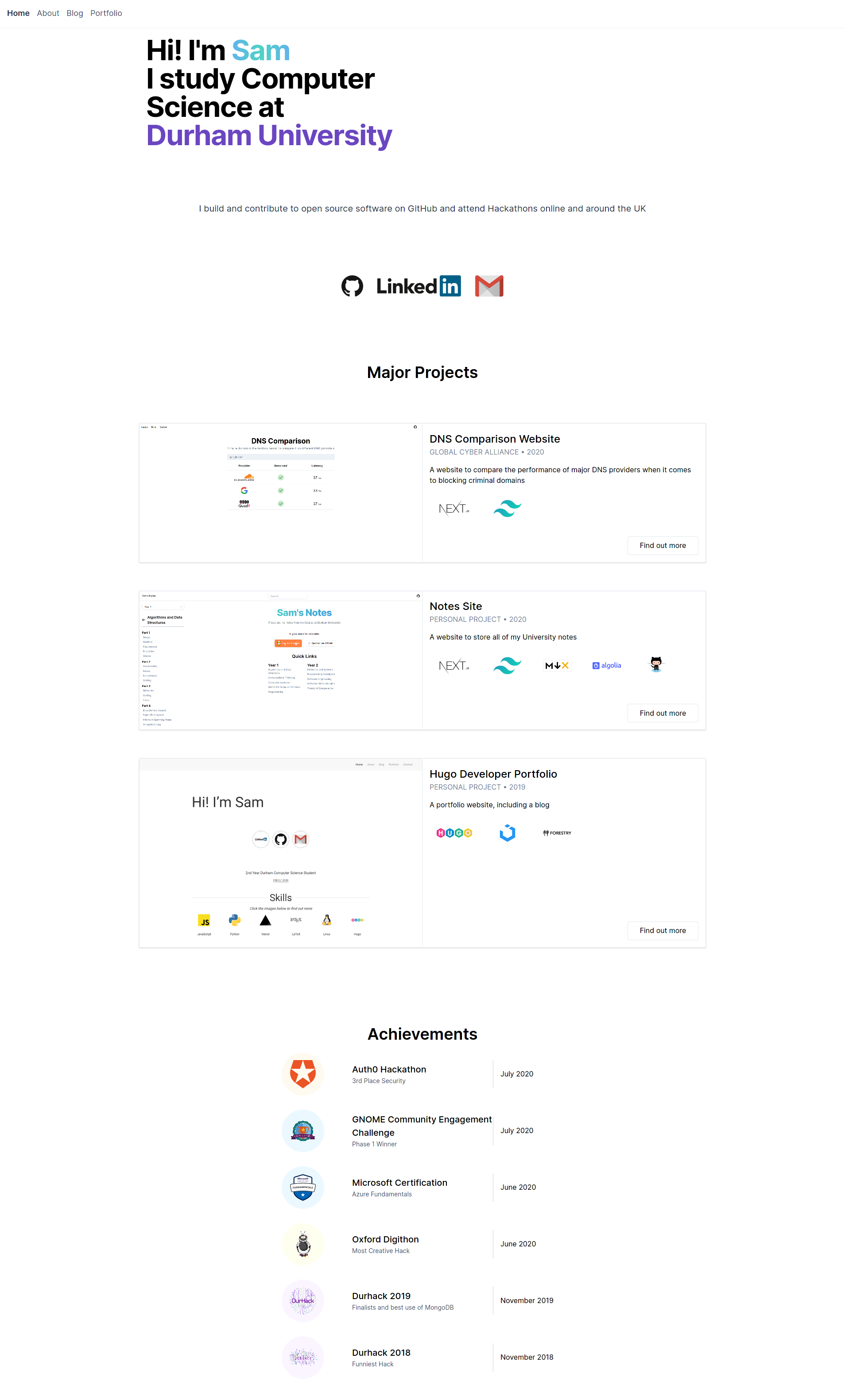
A Hugo and Tailwind CSS theme for a developer personal website, with homepage, about page, and portfolio content configured through YAML files in the data directory.
Explore the design
Compare the page layouts and mobile experience. Open any screenshot for a closer look.
Author preview
Author-provided previewTop of page
Preview provided in the project README.
One original preview is available. Open the full image to inspect the design.
Screenshots show visual appearance; interactive behavior may differ.
Recorded 2026-10-03View source
What stands out
A quick read of the recorded project description.
Homepage, about page, and portfolio page are each driven by YAML files in the data directory
Social links cover fields such as Twitter, LinkedIn, GitHub, GitLab, Facebook, Instagram, and Gmail
Entries such as achievements, experience, and education can specify Tailwind color classes as backgrounds
The portfolio page supports custom filter tags, and entries can indicate the technologies used
Blog and portfolio share front matter, with the portfolio additionally supporting coders, github, and repeatable tech entries
Template Details
This is a Hugo theme for building a developer portfolio website, styled with Tailwind CSS. It is not a general-purpose theme: the README explicitly states that it is highly configurable, so it is unlikely to be dropped directly into an existing site; it is better suited to starting from the exampleSite or adapting it to your own needs.
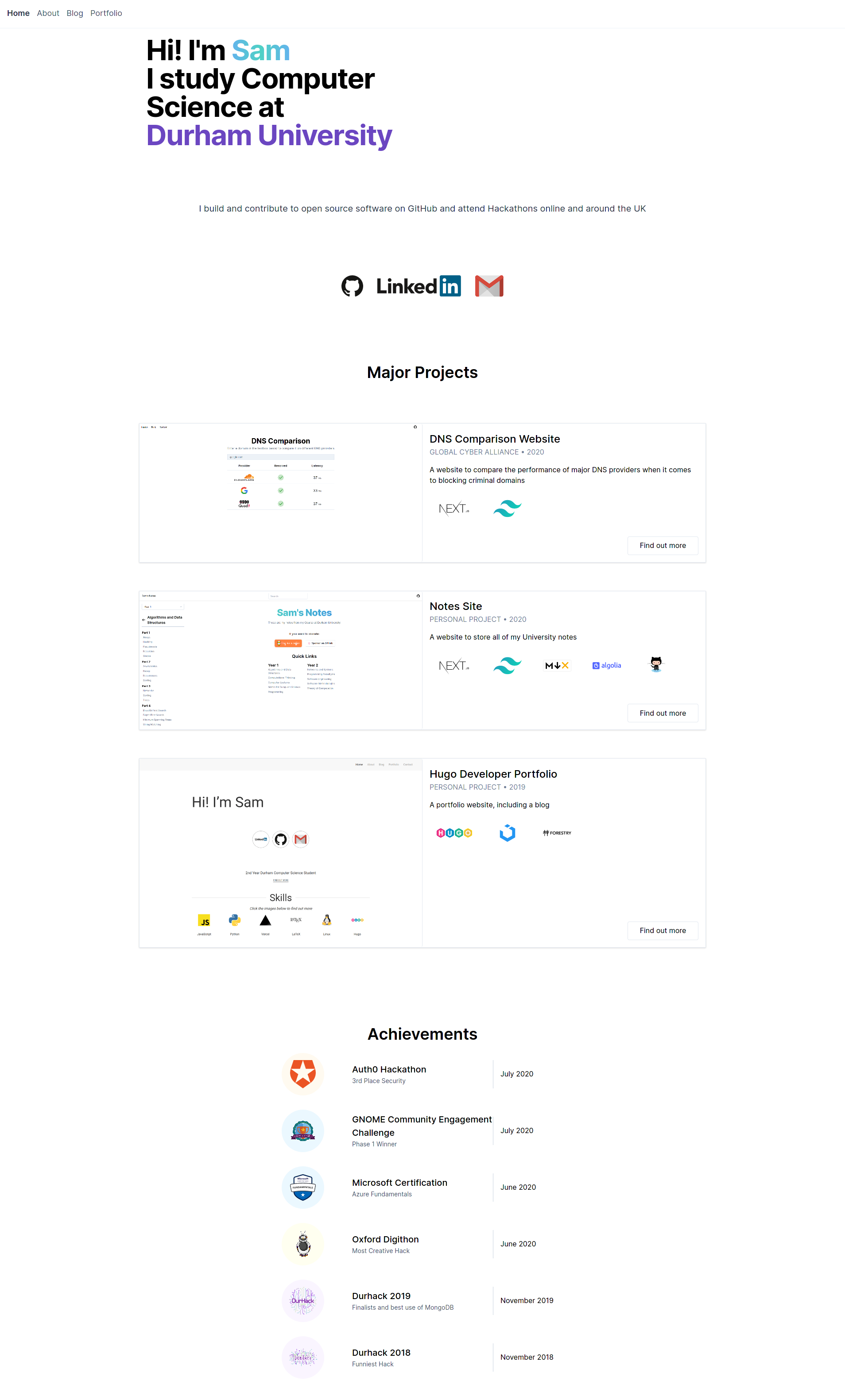
In terms of content organization, homepage content is controlled by data/homepage.yml, including social links, portfolio entries, and an achievements list; the about page is controlled by data/about.yml, including experience, hackathons, education, and skills; the portfolio page is configured by data/portfolio.yml for filter tags. Blog and portfolio pages share the same front matter structure, with the portfolio additionally supporting categories, coders, github, and repeatable [[tech]] entries.
There are two installation methods: clone the repository or add it as a submodule into the site's themes directory and set the theme in config.toml; or copy the exampleSite directory directly as a new site, though this method depends on Go being installed because it uses Hugo Modules.
HugoStarter
Is it right for your project?
Use Cases
- Build a personal developer portfolio and resume-style website
- Show work experience, education background, skills, and hackathon records
- Publish blog posts while maintaining portfolio project pages
- Use exampleSite as a starting point to quickly generate a runnable site
Suitable For
- Developers building static sites with Hugo
- People who want to maintain personal homepage content through YAML data files rather than template code
- Job seekers or freelancers who need a portfolio filterable by tags and annotated with tech stacks
- People who accept adapting an existing theme themselves rather than applying it directly
Getting started & customization
Use these recorded setup notes alongside the repository instructions for your chosen version.
- 1
Create a themes folder in the site directory, then clone the repository into it or add it as a submodule
- 2
Set theme="tailwind-developer-website" in the site's config.toml
- 3
If using exampleSite directly as a new site, Go must be installed in advance because it relies on Hugo Modules
- 4
Homepage, about page, and portfolio page content must be edited in data/homepage.yml, data/about.yml, and data/portfolio.yml respectively
- 5
The README notes that the theme is highly configurable, and applying it to an existing site usually requires considerable adjustment
License & source material
Usage conditions & limitations
Free to use · keep license noticeThis entry covers the free version under the MIT license in the public repository; the free scope is the code of that version and does not mean external services or third-party assets are free.
Must comply with when using
- The code of this version may be used, modified, used commercially, and distributed for free.
- When distributing copies or substantial portions of the code, retain the original author's copyright notice and the full MIT license notice.
- The code is provided as is; warranties and limitations of liability are governed by the original license and applicable law.
Additional costs & items to verify
- When copying exampleSite directly as a new site, the Go language environment must be installed in advance because this method relies on Hugo Modules to fetch dependencies.
- The theme is highly configurable, and the README explicitly states that it is unlikely to be applied directly to an existing site; it usually needs to be adapted to your own needs.
- Demo images, fonts, icons, and other third-party assets must be checked against their respective licenses and cannot be judged solely by the code's MIT license.
- External services such as domains, hosting, databases, payments, or AI may incur separate charges.
View Original Text Basis
Permission is hereby granted, free of charge
Original License Text
You need to have golang installed as it uses [hugo modules](https://gohugo.io/hugo-modules/use-modules/).
Original README
https://github.com/samrobbins85/tailwind-developer-website/blob/main/LICENSEhttps://github.com/samrobbins85/tailwind-developer-website/blob/main/README.mdThis is a highly configurable site, and as such, it will be unlikely that it will work with your existing site.
Original README
Compiled by DeepSeek based on repository license and README ·2026-10-03. Results only cover the materials read; dependencies, images, fonts, and subsequent term changes are subject to their respective original texts.
Project checks & description sources
Template Information
- Source platforms
- GitHub
- Documentation and maintenance reference score
- Partly documented · 56 / 100
- Technologies
- Hugo
- Website type
- Starter
How this score is calculated
Our heuristic uses license records (up to 30), a demo link (12), a preview (10), stars (15), recorded maintenance (15), description completeness (8), feature records (5) and classification data (5). It is not a code, security or performance test, or a Google score. A link does not establish tested functionality.
What to verify for this project
- Repository update recorded
- 2020-12-09
- Screenshot last checked
- 2026-10-03
No demo link is recorded. Use the repository instructions to evaluate the project locally; the screenshot alone cannot establish interactive behavior.
The catalog identifies Hugo as the primary stack. Check the actual dependency manifest and lockfile for versions and hosting requirements. These notes use recorded metadata, not a code audit or a deployment test.
Use a selection guide →How this description was prepared
AI-assisted description based on catalog records and repository material. Repository authors are not automatically the reviewers of this description.
Automatically checked against source and license rules; no manual editorial review.
Inspect the recorded source material
SHA-256: b63d4398937fa2d7646bec34139e2bd2818be360a4a7afdc20a1f3ec52b55e09
2026-10-03T00:17:22.915Z
Source file / repository
# Developer Portfolio
## Installation
### Integrating into your site
To install this theme, first create a themes folder in your site with
```bash
mkdir themes
```
Then move into this directory with
```bash
cd themes
```
The repository can then be added either by cloning or adding as a submodule
```bash
# Cloning
git clone https://github.com/samrobbins85/tailwind-developer-website
tailwind-developer-website
# Submodule
git submodule add https://github.com/samrobbins85/tailwind-developer-website tailwind-developer-website
```
In the `config.toml` file in your site directory add
```toml
theme="tailwind-developer-website"
```
### Creating a new site
The exampleSite folder is all set up to work as a site, just copy it out of the Git repo and it will work. You need to have golang installed as it uses [hugo modules](https://gohugo.io/hugo-modules/use-modules/).
## Configuration
This is a highly configurable site, and as such, it will be unlikely that it will work with your existing site.
### `Config.toml`
`Config.toml` provides the basic structure of the site, it contains a range of sections
#### Base information
In the example site, the base information looks as follows
```toml
baseURL = "http://example.com" # The URL of your site
languageCode = "en-gb" # The language you want to display the site in
title = "Sam Robbins" # The title you want to appear in the address bar
theme = "tailwind-developer-website" # The theme, don't change this
```
#### Params
This contains the other configuration information
```toml
[params]
home = "Home" # What you want the homepage to show up as in the menu bar
# Meta data
description = "The website of Sam Robbins, 2nd Year Computer Science Student at Durham University"
author = "Sam Robbins"
```
### `homepage.yml`
This file is stored in `data/homepage.yml`. It determines the content of the homepage and contains many sections
#### social
Put all of your social links here and they will appear in the social section
```yml
social:
twitter: ""
linkedin: sam-robbins-gb
github: samrobbins85
gitlab: ""
facebook: ""
instagram: ""
gmail: samrobbinsgb
```
#### portfolio
This is used to highlight specific portfolio projects you want to show
- `enable` can be used to hide this section
- `title` is the text at the top each item
- `company` to show who you did the work for
- `date` displays under the title
- `image` is the image for each item
- `description` for a short description of the project
- `link` directs to the main portfolio page
- `tools` indicates what technologies you used
```yml
portfolio:
enable: true
item:
- title: DNS Comparison Website
company: Global Cyber Alliance
date: 2020
image: https://res.cloudinary.com/samrobbins/image/upload/q_auto/v1599472461/homepage_urjka3.png
description: A website to compare the performance of major DNS providers when it comes to blocking criminal domains
link: "/portfolio/dns-comparison-website/"
tools:
- https://cdn.svgporn.com/logos/nextjs.svg
- https://cdn.svgporn.com/logos/tailwindcss-icon.svg
```
#### Achievements
This allows you to list your achievements in the following format
The colour for `background` is based on the [Tailwind CSS](https://tailwindcss.com/) colours, you can read more about them [here](https://tailwindcss.com/docs/customizing-colors)
```yml
achievements:
enable: true
item:
- title: Auth0 Hackathon
description: 3rd Place Security
date: July 2020
image: https://res.cloudinary.com/samrobbins/image/upload/q_auto/v1591793268/logos/logos_auth0_ruvdmp.svg
background: bg-orange-100
```
### `about.yml`
#### experience
- `enable` can be used to hide this section
- `logo` determines the image that shows up
- `title` is the main text
- `company` is the secondary text
- `duration` is the tertiary text
- `background` follows the same format as the Achievements section
```yml
experience:
enable: true
item:
- logo: https://res.cloudinary.com/samrobbins/image/upload/q_auto/v1597050679/icon_fjhqxr.png
title: Student Intern
company: Global Cyber Alliance
duration: July 2020 - September 2020
background: bg-blue-100
```
#### hackathons
By placing none in the URL field, the image will be rendered without any links
```yml
hackathons:
enable: true
item:
- title: Hack Cambridge 2019
description: Climate change simulator
image: https://res.cloudinary.com/samrobbins/image/upload/f_auto,q_auto/v1591793405/stickers/Hack_Cambridge_101_ozoq5d.png
url: none
```
#### education
This section allows you to showcase your education history, the fields are self explanatory, apart from `background` which follows the same format as the other sections that take a background property
```yml
education:
enable: true
item:
- title: BSc Computer Science
duration: 2018 - Present
institution: Durham University
image: https://res.cloudinary.com/samrobbins/image/upload/f_auto,q_auto/v1591793268/logos/logos_Durham_fc2sae.svg
background: bg-purple-100
```
#### skills
These fields are self explanatory, enable can be used to hide this section
```yml
skills:
enable: true
item:
- name: Next.js
image: https://cdn.svgporn.com/logos/nextjs.svg
url: https://nextjs.org
- name: Tailwind CSS
```
### `porfolio.yml`
This file configures the portfolio page, allowing you to specify the filters you want to use.
```yml
filter:
- label: Web Dev
value: web-dev
```
### Blogs
When submitting a blog, you can supply the following fields in the front matter
```yml
title: "Making a new Website"
date: 2019-12-31T12:14:34+06:00
image: "https://d33wubrfki0l68.cloudfront.net/c38c7334cc3f23585738e40334284fddcaf03d5e/2e17c/images/hugo-logo-wide.svg"
description: "My first blog, introducing my new website"
author: "Sam Robbins"
```
### Portfolio pages
The portfolio page and blog page use the same configuration, so you can use these new fields if you want, but they are more suited to portfolio pages
```toml
categories = ["hackathon", "web-dev"]
coders = ["samrobbins85", "karina-talibzhanova"]
date = 2020-05-30T23:00:00Z
description = "A Firefox Browser Extension"
github = ["https://github.com/karina-talibzhanova/oxfordhack2020"]
image = "https://res.cloudinary.com/samrobbins/image/upload/q_auto/v1593352345/twoo-home_k7molq.png"
title = "Oxford Digithon"
[[tech]]
logo = "https://res.cloudinary.com/samrobbins/image/upload/q_auto/v1591793272/logos/logos_javascript_adj1dx.svg"
name = "JavaScript"
url = "https://www.ecma-international.org/memento/tc39.htm"
[[tech]]
logo = "https://res.cloudinary.com/samrobbins/image/upload/q_auto/v1593368547/firefox-ar21_cps6me.svg"
name = "Firefox WebExtensions"
url = "https://www.mozilla.org/en-GB/firefox/"
```
The [[tech]] item can be repeated as many times as you desire.
Explore similar templates
Compare previews and descriptions within the same stack and category.

hugo-xmin
hugo-xmin is an extremely minimal Hugo theme written by Yihui Xie for template beginners. HTML and CSS total about 140 lines, with no external dependencies, and it uses the MIT license.
Hugo · Starter

hugo-theme-gallery
A Hugo Extended photo gallery theme that organizes images with Page Bundles, automatically generating album lists and gallery pages with a Justified layout and PhotoSwipe lightbox.
Hugo · Starter

reveal-hugo
reveal-hugo is a Hugo theme that converts Markdown content into Reveal.js-based HTML presentations. It supports slide separation with `---`, shortcodes for fragments, slides, sections, notes, Markdown, and MathJax, and organizes content as root or section presentations with order controlled by weight.
Hugo · Starter

anatole
Anatole is a minimalistic two-column Hugo theme ported from farbox-theme-Anatole, featuring dark mode, multilingual and RTL support, and optional portfolio, comments, analytics, KaTeX, and Mermaid integrations. It suits personal blogs, portfolios, or documentation sites built with Hugo.
Hugo · Starter

hugo-theme-diary
A Hugo diary-style theme ported from the Hexo theme Journal, with a grid homepage for essays and daily notes. It supports six languages, dark mode, table-of-contents scroll positioning, reading time, code highlighting, and configurable sidebar, fonts, and colors.
Hugo · Starter

risotto
risotto is a minimalist, responsive Hugo theme inspired by terminal ricing aesthetics. It uses semantic HTML and pure CSS with no JavaScript, and its layout relies on CSS Grid for native responsiveness without manual breakpoints.
Hugo · Starter