Hugo 主题,样式基于 Tailwind CSS
Hugo启动器
tailwind-developer-website — Hugo 启动器模板
作者 samrobbins85
一个基于 Hugo 与 Tailwind CSS 的开发者个人网站主题,通过 data 目录下的 YAML 文件配置首页、关于页与作品集内容。
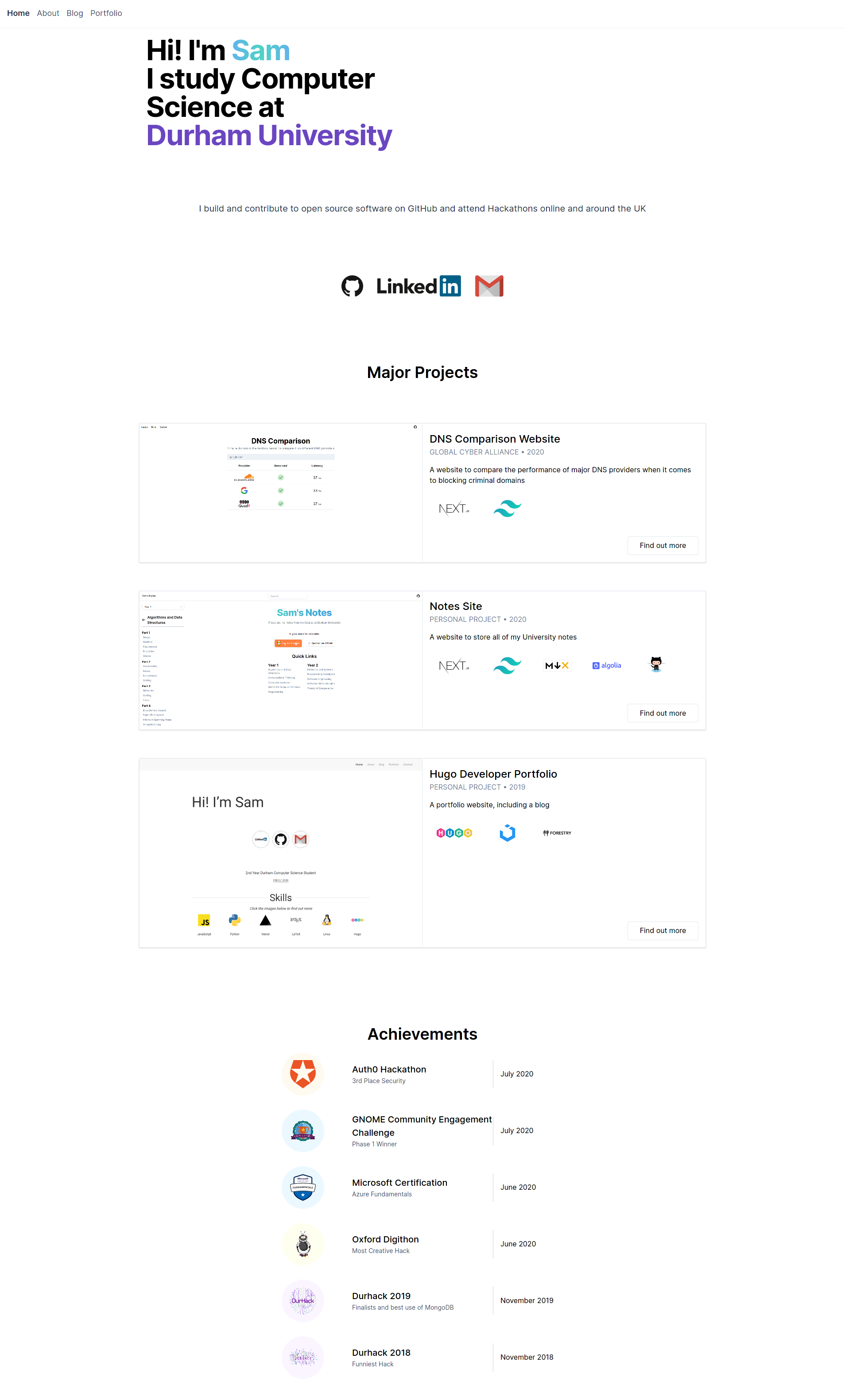
看看你的网站会是什么样
浏览真实页面截图,比较内容排版与手机效果。点击下方缩略图切换,放大查看整页细节。
目前有 1 张原始预览,可打开完整图片查看设计细节。
截图用于了解视觉与布局,交互效果请以实际项目为准。
采集于 2026-10-03查看来源
值得关注的模板亮点
从已有项目资料中,快速了解它的特点。
首页、关于页、作品集页分别由 data 目录下的 YAML 文件驱动
社交链接覆盖 Twitter、LinkedIn、GitHub、GitLab、Facebook、Instagram、Gmail 等字段
成就、经历、教育等条目可指定 Tailwind 颜色类作为背景
作品集页面支持自定义筛选标签,条目可标注使用的技术
博客与作品集共用 front matter,作品集额外支持 coders、github 与可重复的 tech 条目
模板详细介绍
这是一个 Hugo 主题,用于搭建开发者个人作品集网站,样式使用 Tailwind CSS。它并非通用型主题:README 明确说明其可配置程度很高,因此不太可能直接套用到已有站点上,更适合从 exampleSite 起步或按自身需求改造。
内容组织方式上,首页内容由 data/homepage.yml 控制,包含社交链接、作品集条目与成就列表;关于页由 data/about.yml 控制,包含经历、黑客松、教育与技能;作品集页由 data/portfolio.yml 配置筛选标签。博客与作品集页面共用同一套 front matter 结构,作品集额外支持 categories、coders、github 以及可重复的 [[tech]] 条目。
安装方式有两种:把仓库克隆或作为 submodule 放入站点的 themes 目录,并在 config.toml 中设置 theme;或者直接复制 exampleSite 目录作为新站点,但该方式依赖已安装 Go,因为使用了 Hugo Modules。
Hugo启动器
适合你的项目吗?
适用场景
- 搭建个人开发者作品集与简历型网站
- 展示工作经历、教育背景、技能与黑客松记录
- 发布博客文章并同时维护作品集项目页
- 以 exampleSite 为起点快速生成一个可运行站点
适合人群
- 使用 Hugo 构建静态站点的开发者
- 希望用 YAML 数据文件而非模板代码维护个人主页内容的人
- 需要作品集按标签筛选并标注技术栈的求职者或自由职业者
- 接受在现有主题基础上自行改造、而非直接套用的人
上手与定制指南
结合仓库当前版本的说明,按下面的资料检查内容、配置与运行要求。
- 1
在站点目录创建 themes 文件夹,将仓库克隆或作为 submodule 加入其中
- 2
在站点 config.toml 中设置 theme="tailwind-developer-website"
- 3
若直接使用 exampleSite 作为新站点,需要预先安装 Go,因为其依赖 Hugo Modules
- 4
首页、关于页与作品集页内容需分别编辑 data/homepage.yml、data/about.yml 与 data/portfolio.yml
- 5
README 指出该主题可配置程度高,套用到已有站点时通常需要较多调整
授权与来源资料
使用条件与限制
免费使用 · 保留许可声明本次收录的是公开仓库中采用 MIT 许可的免费版本;免费范围为该版本代码,不代表外部服务或第三方素材免费。
使用时需要遵守
- 允许免费使用、修改、商用和分发该版本代码。
- 分发代码副本或实质性部分时,保留原作者版权声明和完整 MIT 许可声明。
- 代码按现状提供;担保与责任限制以原许可证及适用法律为准。
额外费用与待核对事项
- 直接复制 exampleSite 作为新站点时,需要预先安装 Go 语言环境,因为该方式依赖 Hugo Modules 拉取依赖。
- 该主题可配置程度高,README 明确说明它不太可能直接套用到已有站点上,通常需要按自身需求改造。
- 演示图片、字体、图标及其他第三方素材需按各自许可核对,不能仅凭代码的 MIT 许可判断。
- 域名、托管、数据库、支付或 AI 等外部服务可能另外收费。
查看原文依据
Permission is hereby granted, free of charge
许可证原文
You need to have golang installed as it uses [hugo modules](https://gohugo.io/hugo-modules/use-modules/).
README 原文
https://github.com/samrobbins85/tailwind-developer-website/blob/main/LICENSEhttps://github.com/samrobbins85/tailwind-developer-website/blob/main/README.mdThis is a highly configurable site, and as such, it will be unlikely that it will work with your existing site.
README 原文
DeepSeek 根据仓库许可证和 README 整理 ·2026-10-03。结果仅覆盖已读取资料,依赖、图片、字体及后续条款变更以各自原文为准。
项目核对记录与介绍依据
模板资料
- 来源平台
- GitHub
- 资料与维护参考分
- 资料一般 · 56 / 100
- 技术栈
- Hugo
- 网站类型
- 启动器
这个分数如何计算
本站按许可资料(最高30分)、演示链接(12分)、预览图(10分)、Star数(15分)、记录的维护时间(15分)、描述完整度(8分)、功能记录(5分)和分类资料(5分)计算。它不是代码、安全或性能测试,也不是 Google 评分;有链接不代表已实测可用。
这个项目需要核对什么
- 记录的仓库更新时间
- 2020-12-09
- 截图检查日期
- 2026-10-03
目前没有记录演示链接。请依据仓库说明在本地评估;仅凭截图无法确认交互行为。
目录记录的主要技术栈是 Hugo。请通过依赖清单和锁文件核对实际版本与托管要求。这些说明基于收录资料,不代表代码审计或部署实测。
查看具体选型方法 →介绍的制作与核对状态
介绍由 AI 辅助整理目录与仓库资料。仓库作者不等于这篇介绍的审核者。
已完成服务器许可规则与 AI 来源核对;未经过人工编辑审核。
查看当时使用的来源资料
SHA-256: b63d4398937fa2d7646bec34139e2bd2818be360a4a7afdc20a1f3ec52b55e09
2026-10-03T00:17:22.915Z
来源文件 / 仓库
# Developer Portfolio
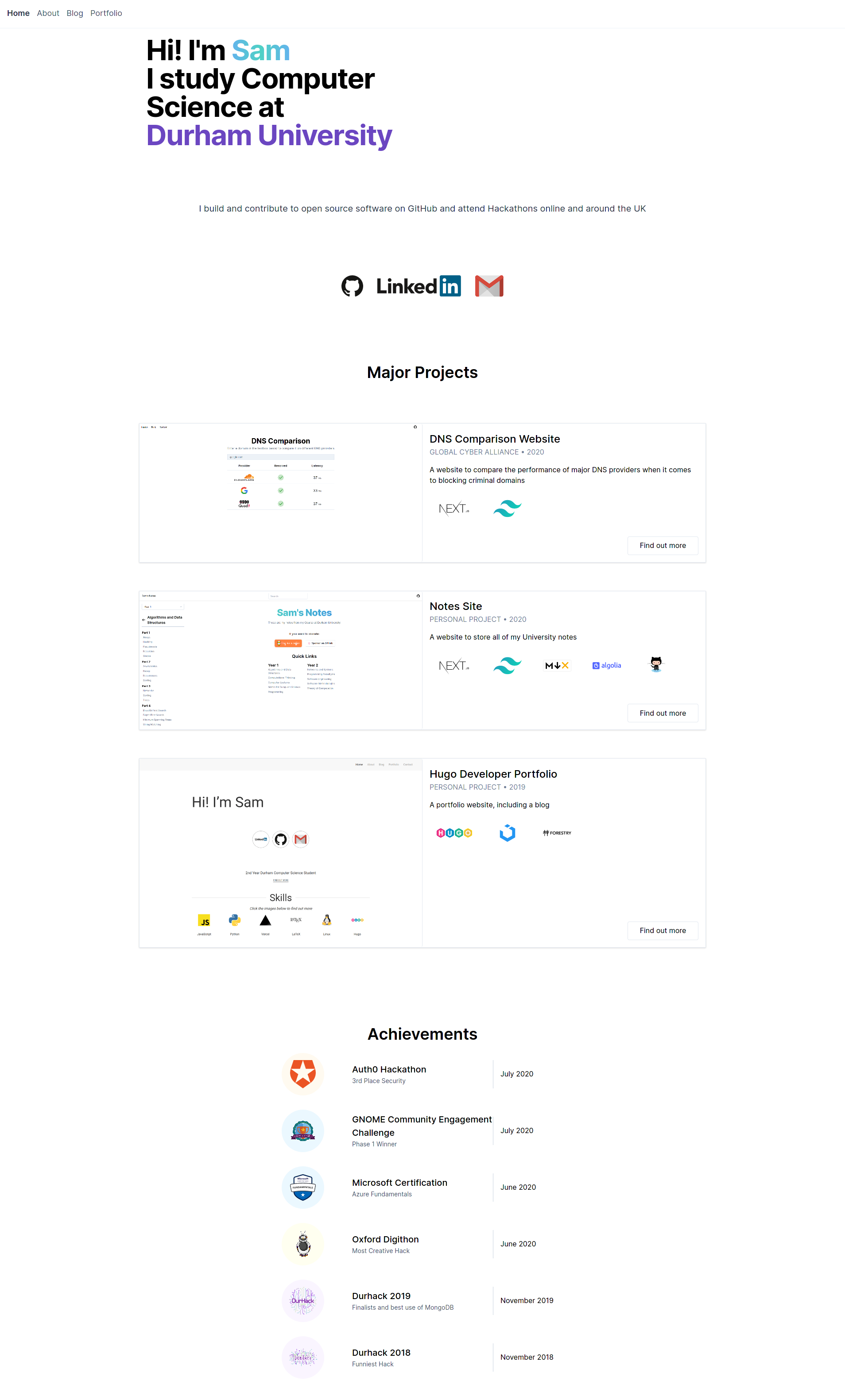
## Installation
### Integrating into your site
To install this theme, first create a themes folder in your site with
```bash
mkdir themes
```
Then move into this directory with
```bash
cd themes
```
The repository can then be added either by cloning or adding as a submodule
```bash
# Cloning
git clone https://github.com/samrobbins85/tailwind-developer-website
tailwind-developer-website
# Submodule
git submodule add https://github.com/samrobbins85/tailwind-developer-website tailwind-developer-website
```
In the `config.toml` file in your site directory add
```toml
theme="tailwind-developer-website"
```
### Creating a new site
The exampleSite folder is all set up to work as a site, just copy it out of the Git repo and it will work. You need to have golang installed as it uses [hugo modules](https://gohugo.io/hugo-modules/use-modules/).
## Configuration
This is a highly configurable site, and as such, it will be unlikely that it will work with your existing site.
### `Config.toml`
`Config.toml` provides the basic structure of the site, it contains a range of sections
#### Base information
In the example site, the base information looks as follows
```toml
baseURL = "http://example.com" # The URL of your site
languageCode = "en-gb" # The language you want to display the site in
title = "Sam Robbins" # The title you want to appear in the address bar
theme = "tailwind-developer-website" # The theme, don't change this
```
#### Params
This contains the other configuration information
```toml
[params]
home = "Home" # What you want the homepage to show up as in the menu bar
# Meta data
description = "The website of Sam Robbins, 2nd Year Computer Science Student at Durham University"
author = "Sam Robbins"
```
### `homepage.yml`
This file is stored in `data/homepage.yml`. It determines the content of the homepage and contains many sections
#### social
Put all of your social links here and they will appear in the social section
```yml
social:
twitter: ""
linkedin: sam-robbins-gb
github: samrobbins85
gitlab: ""
facebook: ""
instagram: ""
gmail: samrobbinsgb
```
#### portfolio
This is used to highlight specific portfolio projects you want to show
- `enable` can be used to hide this section
- `title` is the text at the top each item
- `company` to show who you did the work for
- `date` displays under the title
- `image` is the image for each item
- `description` for a short description of the project
- `link` directs to the main portfolio page
- `tools` indicates what technologies you used
```yml
portfolio:
enable: true
item:
- title: DNS Comparison Website
company: Global Cyber Alliance
date: 2020
image: https://res.cloudinary.com/samrobbins/image/upload/q_auto/v1599472461/homepage_urjka3.png
description: A website to compare the performance of major DNS providers when it comes to blocking criminal domains
link: "/portfolio/dns-comparison-website/"
tools:
- https://cdn.svgporn.com/logos/nextjs.svg
- https://cdn.svgporn.com/logos/tailwindcss-icon.svg
```
#### Achievements
This allows you to list your achievements in the following format
The colour for `background` is based on the [Tailwind CSS](https://tailwindcss.com/) colours, you can read more about them [here](https://tailwindcss.com/docs/customizing-colors)
```yml
achievements:
enable: true
item:
- title: Auth0 Hackathon
description: 3rd Place Security
date: July 2020
image: https://res.cloudinary.com/samrobbins/image/upload/q_auto/v1591793268/logos/logos_auth0_ruvdmp.svg
background: bg-orange-100
```
### `about.yml`
#### experience
- `enable` can be used to hide this section
- `logo` determines the image that shows up
- `title` is the main text
- `company` is the secondary text
- `duration` is the tertiary text
- `background` follows the same format as the Achievements section
```yml
experience:
enable: true
item:
- logo: https://res.cloudinary.com/samrobbins/image/upload/q_auto/v1597050679/icon_fjhqxr.png
title: Student Intern
company: Global Cyber Alliance
duration: July 2020 - September 2020
background: bg-blue-100
```
#### hackathons
By placing none in the URL field, the image will be rendered without any links
```yml
hackathons:
enable: true
item:
- title: Hack Cambridge 2019
description: Climate change simulator
image: https://res.cloudinary.com/samrobbins/image/upload/f_auto,q_auto/v1591793405/stickers/Hack_Cambridge_101_ozoq5d.png
url: none
```
#### education
This section allows you to showcase your education history, the fields are self explanatory, apart from `background` which follows the same format as the other sections that take a background property
```yml
education:
enable: true
item:
- title: BSc Computer Science
duration: 2018 - Present
institution: Durham University
image: https://res.cloudinary.com/samrobbins/image/upload/f_auto,q_auto/v1591793268/logos/logos_Durham_fc2sae.svg
background: bg-purple-100
```
#### skills
These fields are self explanatory, enable can be used to hide this section
```yml
skills:
enable: true
item:
- name: Next.js
image: https://cdn.svgporn.com/logos/nextjs.svg
url: https://nextjs.org
- name: Tailwind CSS
```
### `porfolio.yml`
This file configures the portfolio page, allowing you to specify the filters you want to use.
```yml
filter:
- label: Web Dev
value: web-dev
```
### Blogs
When submitting a blog, you can supply the following fields in the front matter
```yml
title: "Making a new Website"
date: 2019-12-31T12:14:34+06:00
image: "https://d33wubrfki0l68.cloudfront.net/c38c7334cc3f23585738e40334284fddcaf03d5e/2e17c/images/hugo-logo-wide.svg"
description: "My first blog, introducing my new website"
author: "Sam Robbins"
```
### Portfolio pages
The portfolio page and blog page use the same configuration, so you can use these new fields if you want, but they are more suited to portfolio pages
```toml
categories = ["hackathon", "web-dev"]
coders = ["samrobbins85", "karina-talibzhanova"]
date = 2020-05-30T23:00:00Z
description = "A Firefox Browser Extension"
github = ["https://github.com/karina-talibzhanova/oxfordhack2020"]
image = "https://res.cloudinary.com/samrobbins/image/upload/q_auto/v1593352345/twoo-home_k7molq.png"
title = "Oxford Digithon"
[[tech]]
logo = "https://res.cloudinary.com/samrobbins/image/upload/q_auto/v1591793272/logos/logos_javascript_adj1dx.svg"
name = "JavaScript"
url = "https://www.ecma-international.org/memento/tc39.htm"
[[tech]]
logo = "https://res.cloudinary.com/samrobbins/image/upload/q_auto/v1593368547/firefox-ar21_cps6me.svg"
name = "Firefox WebExtensions"
url = "https://www.mozilla.org/en-GB/firefox/"
```
The [[tech]] item can be repeated as many times as you desire.
看看同类模板
对比同技术栈与用途的模板,找到更适合的视觉与内容结构。

hugo-xmin
eXtremely Minimal Hugo theme: about 140 lines of code in total, including HTML and CSS (with no dependencies)
Hugo · 启动器

hugo-theme-gallery
Gallery Theme for Hugo
Hugo · 启动器

reveal-hugo
📽️ Create rich HTML-based presentations with Hugo and Reveal.js
Hugo · 启动器

anatole
Anatole is a minimalistic two-column theme for Hugo.
Hugo · 启动器

hugo-theme-diary
Moments piled up. A Hugo theme ported from SumiMakito/hexo-theme-Journal.
Hugo · 启动器

risotto
A minimalist, responsive hugo theme inspired by terminal ricing aesthetics.
Hugo · 启动器