A minimal blog and personal website theme for Hugo
HugoStarter
hugo-goa — Hugo Starter Template
By shenoydotme
A minimal blog and personal website theme for Hugo, configuring author information, social accounts, and page metadata via hugo.toml.
Explore the design
Compare the page layouts and mobile experience. Open any screenshot for a closer look.
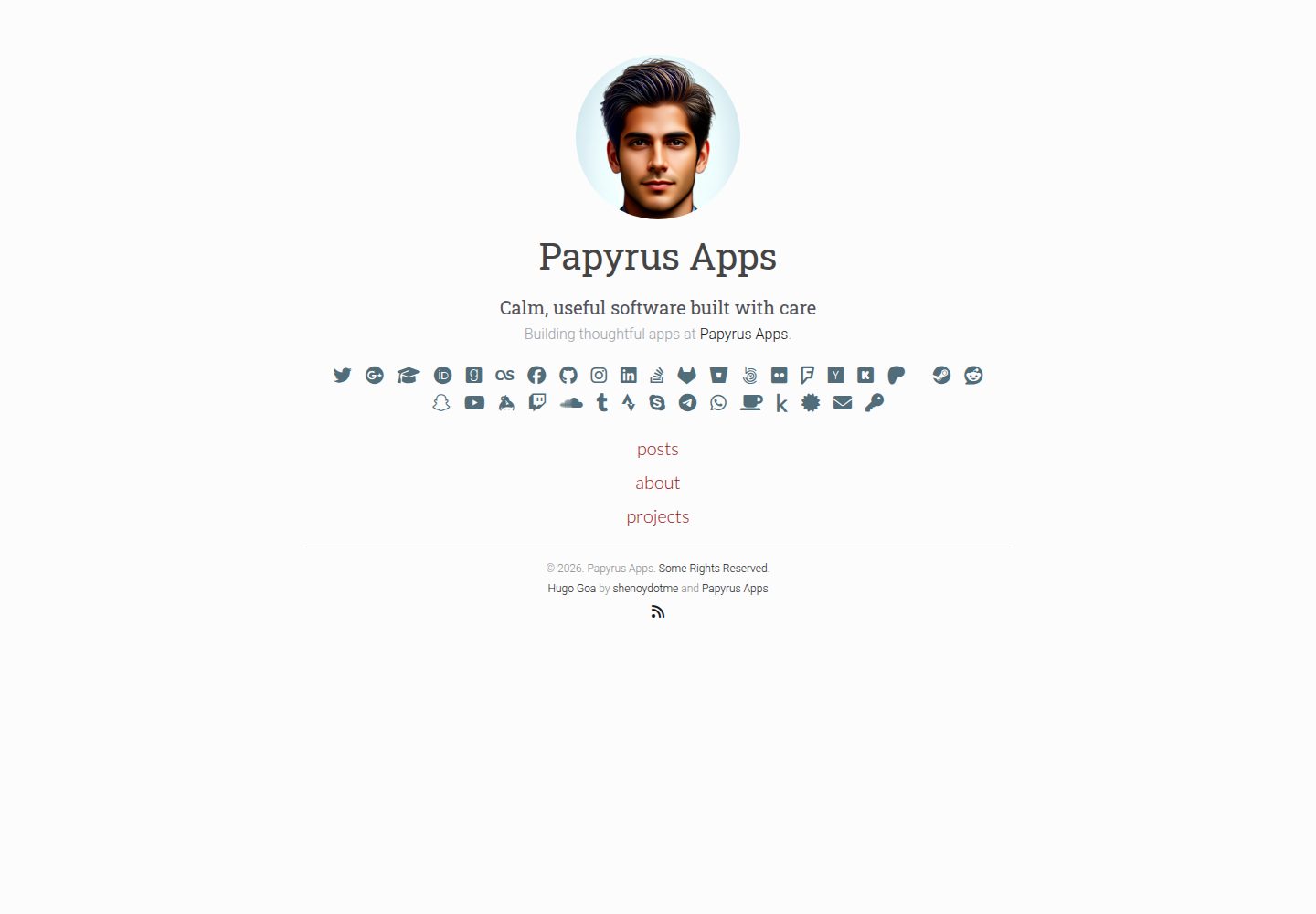
Desktop homepage1 / 3
Desktop captureTop of page
Actual screenshot captured by the server browser.
All pages & views 3
Screenshots show visual appearance; interactive behavior may differ.
Recorded 2026-10-02View source
What stands out
A quick read of the recorded project description.
Installed via git submodule and enabled in hugo.toml
Posts and standalone pages organized using the posts directory and index.md respectively
Page-level toggles for metadata display and comments
hugo.toml provides author information, site meta, and numerous social account fields
MIT licensed, allowing free use, modification, commercial use, and distribution
Template Details
Goa is a clean, minimal theme for Hugo, positioned for blogs and personal websites. Installation is done by adding the repository to themes/hugo-goa via git submodule in a Hugo site, and setting theme = 'hugo-goa' in hugo.toml.
For content organization, posts go under content/posts, created with hugo new content posts/my-first-post.md; drafts are controlled via draft = false or the -D/--buildDrafts flag at build time. Standalone pages (such as About, Projects) can be created by placing an index.md in the corresponding content directory to override the default list behavior, and custom layouts can be added in layouts if needed.
Configuration is centralized in exampleSite/hugo.toml: site-level parameters include baseURL, title, author, languageCode, publishDir, etc.; under [params] you can set author name, bio, description, avatar, and date format; [params.meta] provides search-engine-oriented description and keywords; [params.social] supports a large number of social platform username or ID fields, and the README gives a warning about public exposure for privacy fields such as WhatsApp and email. At the page level, showpagemeta and showcomments can be toggled. Comments and analytics rely on Hugo's built-in disqusShortname, googleAnalytics, and other configuration items.
In terms of limitations, the README does not describe features beyond the above configuration and content workflow, nor does it explain performance or production deployment approaches; publishing only generates static files in the public directory, and deployment must be handled separately.
HugoStarter
Is it right for your project?
Use Cases
- Building a personal blog with Hugo and publishing Markdown posts
- Creating standalone static pages such as About and Projects
- Displaying author bio, avatar, and social account links on pages
- Configuring comments and analytics via Disqus and Google Analytics
Suitable For
- Individual bloggers using Hugo who prefer minimal typography
- Personal websites that need to display social accounts and author information
- Developers who want to maintain content with Markdown and configuration files
Getting started & customization
Use these recorded setup notes alongside the repository instructions for your chosen version.
- 1
In a Hugo site, run git submodule add to add the repository to themes/hugo-goa, and set theme = 'hugo-goa' in hugo.toml
- 2
Refer to exampleSite/hugo.toml to configure baseURL, title, author, [params], [params.meta], and [params.social]
- 3
Create posts with hugo new content posts/xxx.md, and set draft to false in front matter before publishing
- 4
Create index.md in the corresponding content directory for standalone pages, and add custom layouts in layouts if needed
- 5
Build with hugo --cleanDestinationDir to generate the public directory; deployment must be handled separately
License & source material
Usage conditions & limitations
Free to use · keep license noticeThis entry covers the free version under the MIT license in the public repository; the free scope is the code of this version and does not imply that external services or third-party assets are free.
Must comply with when using
- Free use, modification, commercial use, and distribution of this version's code are permitted.
- When distributing copies or substantial portions of the code, retain the original author's copyright notice and the full MIT license notice.
- The code is provided as is; warranties and limitations of liability are governed by the original license and applicable law.
Additional costs & items to verify
- Enabling comments requires configuring a Disqus third-party service account (disqusShortname); the comment feature depends on an external service.
- Enabling analytics requires providing a Google Analytics tracking ID, depending on Google's external service.
- README warning: entering private information such as phone numbers or email addresses into public social configuration will expose it to the public irreversibly; exercise caution.
- The build only generates static files in the public directory and does not include deployment; going live requires choosing and configuring a hosting service yourself.
- Demo images, fonts, icons, and other third-party assets must be checked against their respective licenses; they cannot be judged solely by the code's MIT license.
- External services such as domains, hosting, databases, payments, or AI may incur additional charges.
View Original Text Basis
Permission is hereby granted, free of charge
Original License Text
disqusShortname`: Your discusShortname if you want to enable comments on your posts.
Original README
googleAnalytics`: Your google analytics id for tracking.
Original README
It is recommended to keep your private data (phone number/ email) private.
Original README
https://github.com/shenoydotme/hugo-goa/blob/master/LICENSEhttps://github.com/shenoydotme/hugo-goa/blob/master/README.mdFor deployment, you would need to follow additional steps depending on your hosting solution.
Original README
Compiled by DeepSeek based on repository license and README ·2026-10-02. Results only cover the materials read; dependencies, images, fonts, and subsequent term changes are subject to their respective original texts.
Project checks & description sources
Template Information
- Source platforms
- Hugo Themes
- Documentation and maintenance reference score
- More documented · 91 / 100
- Technologies
- Hugo
- Website type
- Starter
How this score is calculated
Our heuristic uses license records (up to 30), a demo link (12), a preview (10), stars (15), recorded maintenance (15), description completeness (8), feature records (5) and classification data (5). It is not a code, security or performance test, or a Google score. A link does not establish tested functionality.
What to verify for this project
- Repository update recorded
- 2026-01-18
- Screenshot last checked
- 2026-10-02
A demo link is listed. Check it with your own content and viewport sizes; its presence does not confirm that forms, authentication or payments work.
The catalog identifies Hugo as the primary stack. Check the actual dependency manifest and lockfile for versions and hosting requirements. These notes use recorded metadata, not a code audit or a deployment test.
Use a selection guide →How this description was prepared
AI-assisted description based on catalog records and repository material. Repository authors are not automatically the reviewers of this description.
Automatically checked against source and license rules; no manual editorial review.
Inspect the recorded source material
SHA-256: dc540cd2cd9c213061f5367c6b0fe162ed841e0d0e0147ae5df329c2467824ec
2026-10-02T16:56:50.283Z
Source file / repository# Goa
Goa is a clean, simple and minimalist theme for blogs and personal websites.
<img src="https://raw.githubusercontent.com/shenoydotme/hugo-goa/master/images/desktop-home.png" alt="Screenshot Desktop" width="600">
<img src="https://raw.githubusercontent.com/shenoydotme/hugo-goa/master/images/mobile-home.png" alt="Screenshot Mobile" width="200">
[](https://raw.githubusercontent.com/shenoydotme/hugo-goa/master/LICENSE)
[](https://github.com/shenoydotme/hugo-goa/stargazers)
[](https://github.com/shenoydotme/hugo-goa/network)
[](https://www.emergencykitten.com/)
[](https://www.emergencykitten.com/)
## Demo
You can find the demo site in action [here](https://shenoydotme.github.io/hugo-goa-demo) and the source [here](https://github.com/shenoydotme/hugo-goa-demo).
## Installation
```
hugo new site quickstart
cd quickstart
git init
git submodule add https://github.com/shenoydotme/hugo-goa.git themes/hugo-goa
echo "theme = 'hugo-goa'" >> hugo.toml
hugo server
```
## Content creation
### Creating a Post
To create a new page or post in Hugo, follow these steps:
#### Create a New Post
Use the following Hugo command to create a new post. This will create a Markdown file for your post in the specified directory.
```bash
hugo new content posts/my-first-post.md
```
#### Edit the Post
After creating the post, you can go ahead and edit the newly created file. You'll find it under the `content/posts` directory in your Hugo site's content folder.
#### Preview Your Edits
To preview your edits in real-time, you can run the Hugo server with draft posts included. You can use either of these commands:
```bash
hugo server --buildDrafts
```
or
```bash
hugo server -D
```
#### Publishing Your Post
Once you have finished editing and are ready to publish your post, set `draft = false` in the article's front matter. This step is crucial to ensure that Hugo includes your post in the generated site.
Remember, until you set `draft = false`, Hugo will treat the post as a draft, and it won't appear in your published site unless you use the `-D` or `--buildDrafts` flags with `hugo server`.
### Organizing pages
To create standalone pages in Hugo, such as an "About" page or a "Projects" page, you can indeed override the default list behavior by adding an index.md file in the corresponding content directory. This approach allows for more control over the content and presentation of these specific pages, setting them apart from regular blog posts or list pages.
#### Create the Directory and index.md File:
To create a new standalone page, like a "Projects" page, you need to first create an index.md file in the appropriate directory. Use the Hugo command to do this:
```bash
hugo new projects/index.md
```
This command will create a new directory named projects inside the content folder of your Hugo site and then create an index.md file inside this projects directory.
#### Edit the index.md File:
Open the newly created index.md file in your text editor. This file will act as the main content file for your standalone page. Here, you can add the content for your "Projects" page.
#### Customize the Front Matter:
At the top of the index.md file, you will find the front matter, which is used by Hugo to store metadata about the page. You can customize this front matter as needed for your page.
#### Apply Custom Layouts (Optional):
If you want to apply a custom layout to this page, you can create a new layout file in the layouts directory of your Hugo site. For example, you might create a layout specifically for the projects page. Then, reference this custom layout in the front matter of your index.md file.
#### Build Your Site:
After setting up your index.md file and any custom layouts, run the Hugo command to build your site:
```
hugo --cleanDestinationDir
```
This will generate the static files for your site, including your new standalone page, in the public directory.
Remember, the index.md file in a directory allows you to create a standalone page with its own content and layout, different from the auto-generated list pages for blog posts or other content types. This method provides flexibility in organizing and presenting different types of content on your Hugo site.
### Publish the site
To publish your site using Hugo without deploying it, you need to run a specific command that tells Hugo to generate the static site in the public directory. This command will create all the necessary files like HTML, CSS, JavaScript, and images. To ensure that draft, future, or expired content is not included, you will use a particular flag with the command.
Here is the command you need to run in your terminal or command prompt where your Hugo site project is located:
```bash
hugo --cleanDestinationDir
```
This command does the following:
- **hugo**: This is the basic command to build your site.
- **--cleanDestinationDir**: This flag cleans out the public directory before building. It ensures that only current content is published, and no old or unwanted files are left in the directory.
Remember, this process only generates the static files in the public directory of your Hugo project. It does not deploy these files to a web server or hosting service. For deployment, you would need to follow additional steps depending on your hosting solution.
### Page settings
These settings are at the page level.
- `showpagemeta`: default=`true`. This allows you to disable page meta information from being displayed. For example, this setting is disabled [here](https://shenoydotme.github.io/hugo-goa-demo/about/) and enabled [here](https://shenoydotme.github.io/hugo-goa-demo/coderag/).
- `showcomments`: default=`true`. Enables or disable comments. For example, this setting is disabled [here](https://shenoydotme.github.io/hugo-goa-demo/blog/third/) and enabled [here](https://shenoydotme.github.io/hugo-goa-demo/blog/first/).
## Configuration
The provided [hugo.toml](https://github.com/shenoydotme/hugo-goa/blob/master/exampleSite/hugo.toml) describes all options and features that are supported. Configure it your way!
### Basic Configuration
These are site wide configuration parameters that are used by this template.
- `baseURL`: This is the root of your site.
- `buildDrafts`: default=`false`. Enables or Disable building drafts when hugo is run.
- `canonifyURLs`: default=`false`. Prefix all relative URLs with your base URL. [More Information](https://gohugo.io/extras/urls#canonicalization).
- `languageCode`: Used to set site localization preferences. eg. `en-US`.
- `contentDir`: Where hugo can find your content. eg. `content`.
- `layoutDir`: Where hugo can find your templates. eg. `layouts`.
- `publishDir`: Where hugo generates the static site. eg. `public`.
- `author`: Site author name. eg. `Papyrus Apps`.
- `title`: Site title name. eg. `Papyrus Apps`.
- `theme`: Your theme name should be set to `hugo-goa` if using this theme.
## Hugo Built-in Features
These are features that hugo provides and are used by this template.
- `disqusShortname`: Your discusShortname if you want to enable comments on your posts.
- `googleAnalytics`: Your google analytics id for tracking.
- `enableRobotsTXT`: Enable or disable search engines from crawling your site.
## Site Settings `[params]`
These are settings that are specific to this theme.
- `author`: Main author name. eg. `Papyrus Apps`.
- `intro`: Author introduction. This field supports markdown. eg. `Innovative Tech Guru`.
- `description`: Author description. This field supports markdown. eg. `Leading the charge at [Papyrus Apps](https://papyrusapps.com)`.
- `authorimage`: Location of author image under static/img or assets/images directory. eg. `headshot.jpg`
- `dateformat`: Golang date format to be used on this site. eg. `Jan 2, 2006`
### Site Meta Settings `[params.meta]`
These settings are included in the site's meta section.
- `description`: User this field to describe your site to search engines. eg. `Simple minimalist theme`.
- `keywords`: Keywords that desribe your site. eg. `minimalist,blog,goa,hugo,developer`.
### Social Accounts `[params.social]`
These settings to display your social accounts.
- `github`: Your [Github](https://github.com) username.
- `instagram`: Your [Instagram](https://www.instagram.com) username.
- `xing`: Your [Xing](https://www.xing.com) username.
- `linkedin`: Your [Linkedin](https://www.linkedin.com) username.
- `twitter`: Your [Twitter](https://twitter.com) username.
- `facebook`: Your [Facebook](https://www.facebook.com) username.
- `google`: Your [Google](https://www.google.com) username.
- `googlescholar`: Your [Google Scholar](https://scholar.google.com) account ID. [How to get this ID](#google-scholar)
- `medium`: Your [Medium](https://medium.com) username.
- `devto`: Your [dev.to](https://dev.to) username.
- `stackoverflow`: Your [StackOverflow](https://stackoverflow.com) username.
- `angellist`: Your [AngelList](https://angel.co) username.
- `lastfm`: Your [Last.fm](https://www.last.fm) username.
- `goodreads`: Your [Goodreads](https://www.goodreads.com) username.
- `gitlab`: Your [Gitlab](https://gitlab.com) username.
- `bitbucket`: Your [BitBucket](https://bitbucket.org) username.
- `fivehundredpx`: Your [500px](https://500px.com) username.
- `flickr`: Your [Flickr](https://flickr.com) username.
- `foursquare`: Your [Foursquare](https://foursquare.com) username.
- `hackernews`: Your [Y Combinator Hackernews](https://news.ycombinator.com) username.
- `kickstarter`: Your [Kickstarter](https://kickstarter.com) username.
- `patreon`: Your [Patreon](https://patreon.com) username.
- `pintrest`: Your [Pintrest](https://pintrest.com) username.
- `steam`: Your [Steam](https://steamcommunity.com) username.
- `reddit`: Your [Reddit](https://www.reddit.com) username.
- `snapchat`: Your [Snapchat](https://snapchat.com) username.
- `keybase`: Your [Keybase](https://keybase.io) username.
- `twitch`: Your [Twitch](https://twitch.tv) username.
- `youtube`: Your [YouTube](https://youtube.com) channel ID.
- `soundcloud`: Your [Soundcloud](https://soundcloud.com) username.
- `tumblr`: Your [Tumblr](https://tumblr.com) username.
- `strava`: Your [Strava](https://strava.com) username.
- `skype`: Your [skype](https://skype.com) username.
- `telegram`: Your [Telegram](https://telegram.com) username.
- `holopin`: Your [Holopin](https://www.holopin.io) username.
- `bluesky`: Your [Bluesky](https://bsky.app/) username.
- `whatsapp`: Your phone number. Follow the steps [here](https://faq.whatsapp.com/en/26000030/). [Privacy Warning](#privacy-warning)
- `email`: Your email. [Privacy Warning](#privacy-warning)
- `pgp`: Your PGP key. The value should be set to the key fingerprint, and the public key should pe placed in static/key_fingerprint.txt
#### Privacy Warning
It is recommended to keep your private data (phone number/ email) private. Especially if you don't use them for business. Adding it to your public will expose your data to the public. This is irreversible.
#### Account Details
##### Google Scholar
To get this ID, go to Google Scholar, press the "My Profile" tab at the top, then copy the text after the `user=` till the first subsequent `&` (e.g. the `ACCOUNT_ID` part in `https://scholar.google.com/citations?user=ACCOUNT_ID&hl=en`).
### Extras `[params.extra]`
These settings for extra features that this site uses.
- `copyright`: Add a copyright statement to the bottom of the theme. eg. `© 2026. Papyrus Apps. [Some Rights Reserved](https://creativecommons.org/licenses/by/3.0/)."`
- `rss`: Enable rss icon next to social accounts.
- `poweredby`: Help promote this theme and give the authors credit. eg. `true` or `false`.
- `highlightjs`: Use highlightJS to highlight code on your site. eg. `true` or `false`.
- `socialmarkup`: Adds links that conform to the [Schema.org](schema.org) markup. See this [link](https://developers.google.com/search/docs/data-types/social-profile) for more.
### Main Menu `[[menu.main]]`
These settings for the main menu that is displayed on the home page.
- `name`: Name of menu item. eg. `blog`
- `weight`: Weight of this menu item. Higher items go to the bottom. eg. `100`
- `url`: Root URL for this section/page. eg. `/blog/`.
Example:
```toml
[[menu.main]]
name = "blog"
weight = 100
url = "blog/"
[[menu.main]]
name = "about"
weight = 200
url = "about/"
[[menu.main]]
name = "projects"
weight = 300
url = "projects/"
```
## Features
- Responsive
- Minimalist
- Bootstrap 5
- Font Awesome 6
- HighlightJS
- Disqus support for commenting
- Built-in support for 404 pages, Disqus comments and Google Analytics.
## Screenshots
### Mobile
<img src="https://raw.githubusercontent.com/shenoydotme/hugo-goa/master/images/mobile-home.png" alt="Mobile Home" width="200">
<img src="https://raw.githubusercontent.com/shenoydotme/hugo-goa/master/images/mobile-page.png" alt="Mobile Page" width="200">
<img src="https://raw.githubusercontent.com/shenoydotme/hugo-goa/master/images/mobile-posts.png" alt="Mobile Posts" width="200">
<img src="https://raw.githubusercontent.com/shenoydotme/hugo-goa/master/images/mobile-post.png" alt="Mobile Post" width="200">
### Desktop
<img src="https://raw.githubusercontent.com/shenoydotme/hugo-goa/master/images/desktop-home.png" alt="Desktop Home" width="600">
<img src="https://raw.githubusercontent.com/shenoydotme/hugo-goa/master/images/desktop-page.png" alt="Desktop Page" width="600">
<img src="https://raw.githubusercontent.com/shenoydotme/hugo-goa/master/images/desktop-posts.png" alt="Desktop Posts" width="600">
<img src="https://raw.githubusercontent.com/shenoydotme/hugo-goa/master/images/desktop-post.png" alt="Desktop Post" width="600">
## Contributing
### Bug Reports
1. Search Github Issues to see if the bug has been previously filed.
2. If it has been filed, +1 the post. This helps us in assessing impact and priortitizing the bug.
3. If not previously filed, open a new Github Issue and describe in detail. Attach error traces and provide relavant details to help us solve it.
4. For Hugo issues, search the Hugo [Forum](https://discuss.gohugo.io/)
### Feature Requests
1. Search Github Issues to see if the feature has been previously requested.
2. If it has been filed, +1 the post. This helps us in assessing popularity and priortitizing the feature.
3. If not previously filed, open a new Github Issue and describe it in detail.
### Pull Requests
1. Clone the repository, create the feature/bug branch.
2. Code.
3. Make sure your code follows the style of the project.
4. Test it thoroughly.
5. Open a PR requesting for it to be merged.
6. Describe the feature or issue your are solving in detail.
7. Wait for its approval.
8. Merge and Rejoice.
## Attribution
The theme's design was inspired by many blogs and themes:
1. [Hugo Cocoa](https://themes.gohugo.io/cocoa/).
2. [Hugo Vec](https://themes.gohugo.io/hugo-theme-vec/).
3. [Hugo Agency](https://themes.gohugo.io/agency/).
## License
Licensed under the [MIT](https://opensource.org/licenses/MIT) License. See the [LICENSE](https://raw.githubusercontent.com/shenoydotme/hugo-goa/master/LICENSE) file for more details.
## Authors
- Raj Shenoy
- web: [shenoydotme](https://shenoy.me)
- twitter: [@shenoydotme](https://twitter.com/shenoydotme)
- Papyrus Apps
- web: [Papyrus Apps](https://papyrusapps.com)
- twitter: [@papyrusapps](https://twitter.com/papyrusapps)
Explore similar templates
Compare previews and descriptions within the same stack and category.

hugo-xmin
hugo-xmin is an extremely minimal Hugo theme written by Yihui Xie for template beginners. HTML and CSS total about 140 lines, with no external dependencies, and it uses the MIT license.
Hugo · Starter

hugo-theme-gallery
A Hugo Extended photo gallery theme that organizes images with Page Bundles, automatically generating album lists and gallery pages with a Justified layout and PhotoSwipe lightbox.
Hugo · Starter

reveal-hugo
reveal-hugo is a Hugo theme that converts Markdown content into Reveal.js-based HTML presentations. It supports slide separation with `---`, shortcodes for fragments, slides, sections, notes, Markdown, and MathJax, and organizes content as root or section presentations with order controlled by weight.
Hugo · Starter

anatole
Anatole is a minimalistic two-column Hugo theme ported from farbox-theme-Anatole, featuring dark mode, multilingual and RTL support, and optional portfolio, comments, analytics, KaTeX, and Mermaid integrations. It suits personal blogs, portfolios, or documentation sites built with Hugo.
Hugo · Starter

hugo-theme-diary
A Hugo diary-style theme ported from the Hexo theme Journal, with a grid homepage for essays and daily notes. It supports six languages, dark mode, table-of-contents scroll positioning, reading time, code highlighting, and configurable sidebar, fonts, and colors.
Hugo · Starter

risotto
risotto is a minimalist, responsive Hugo theme inspired by terminal ricing aesthetics. It uses semantic HTML and pure CSS with no JavaScript, and its layout relies on CSS Grid for native responsiveness without manual breakpoints.
Hugo · Starter