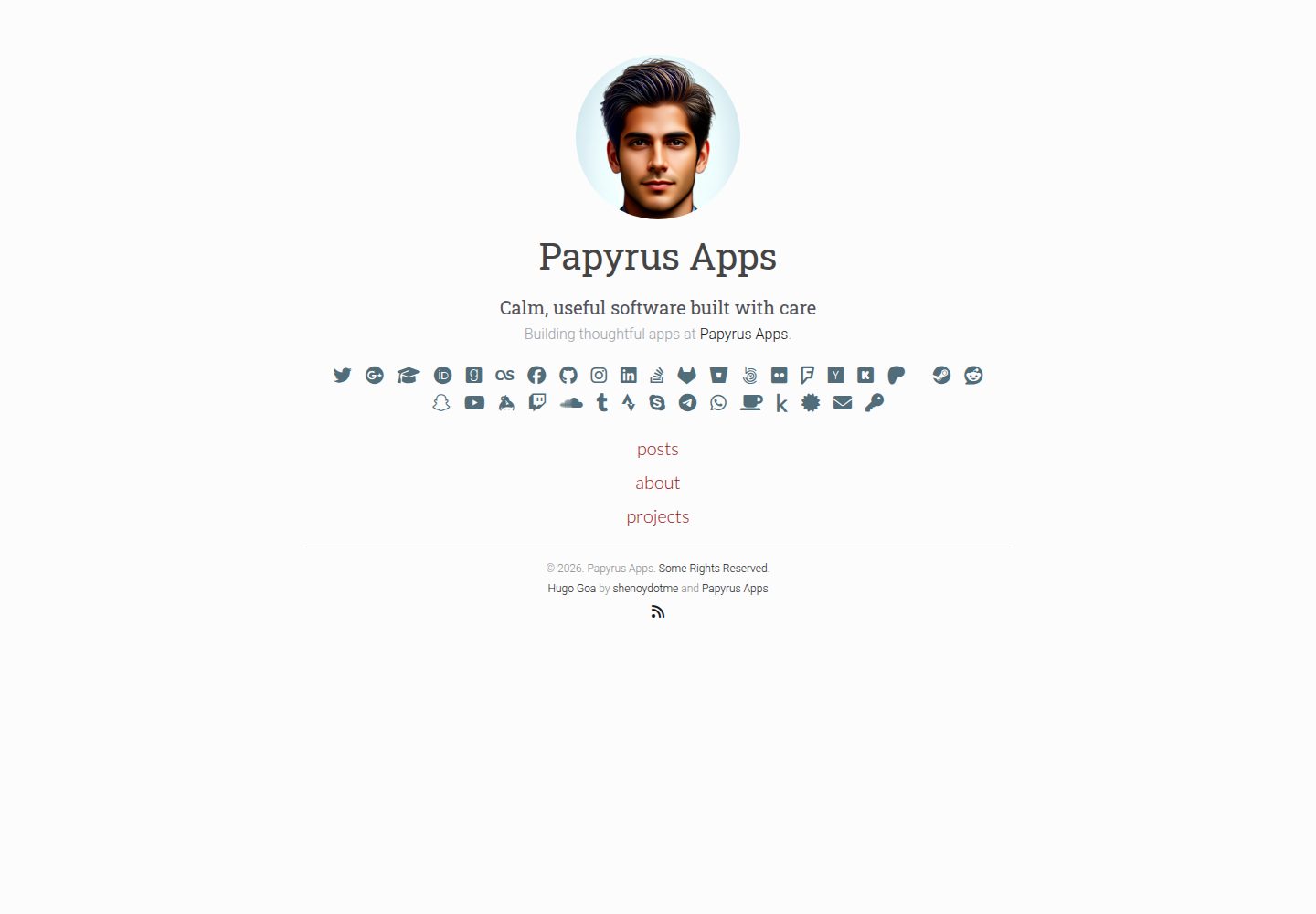
面向 Hugo 的极简博客与个人网站主题
Hugo启动器
hugo-goa — Hugo 启动器模板
作者 shenoydotme
Hugo 的极简博客与个人网站主题,通过 hugo.toml 配置作者信息、社交账号与页面元数据。
看看你的网站会是什么样
浏览真实页面截图,比较内容排版与手机效果。点击下方缩略图切换,放大查看整页细节。
全部页面与视图 3
截图用于了解视觉与布局,交互效果请以实际项目为准。
采集于 2026-10-02查看来源
值得关注的模板亮点
从已有项目资料中,快速了解它的特点。
通过 git submodule 安装并在 hugo.toml 中启用
文章与独立页面分别用 posts 目录和 index.md 组织
页面级可开关元信息显示与评论
hugo.toml 提供作者信息、站点 meta 与大量社交账号字段
MIT 许可,允许免费使用、修改、商用与分发
模板详细介绍
Goa 是面向 Hugo 的简洁极简主题,定位为博客与个人网站。安装方式为在 Hugo 站点中通过 git submodule 将仓库加入 themes/hugo-goa,并在 hugo.toml 中设置 theme = 'hugo-goa'。
内容组织上,文章放在 content/posts 下,用 hugo new content posts/my-first-post.md 创建,草稿通过 draft = false 或构建时的 -D/--buildDrafts 控制;独立页面(如 About、Projects)可在对应内容目录中放置 index.md 覆盖默认列表行为,必要时再在 layouts 中自定义布局。
配置集中在 exampleSite/hugo.toml:站点级参数包括 baseURL、title、author、languageCode、publishDir 等;[params] 下可设置作者名、简介、描述、头像与日期格式;[params.meta] 提供面向搜索引擎的 description 与 keywords;[params.social] 支持大量社交平台用户名或 ID 字段,README 对 WhatsApp、email 等隐私字段给出了公开暴露的提醒。页面级可开关 showpagemeta 与 showcomments。评论与统计依赖 Hugo 内置的 disqusShortname、googleAnalytics 等配置项。
限制方面,README 未描述除上述配置与内容流程之外的功能,也未说明性能或生产部署方案;发布仅生成 public 目录静态文件,部署需自行处理。
Hugo启动器
适合你的项目吗?
适用场景
- 用 Hugo 搭建个人博客并发布 Markdown 文章
- 创建 About、Projects 等独立静态页面
- 在页面上展示作者简介、头像与社交账号链接
- 通过 Disqus 与 Google Analytics 配置评论和统计
适合人群
- 使用 Hugo 并偏好极简排版的个人博主
- 需要展示社交账号与作者信息的个人网站
- 希望以 Markdown 和配置文件维护内容的开发者
上手与定制指南
结合仓库当前版本的说明,按下面的资料检查内容、配置与运行要求。
- 1
在 Hugo 站点中执行 git submodule add 将仓库加入 themes/hugo-goa,并在 hugo.toml 设置 theme = 'hugo-goa'
- 2
参考 exampleSite/hugo.toml 配置 baseURL、title、author、[params]、[params.meta] 与 [params.social]
- 3
文章用 hugo new content posts/xxx.md 创建,发布前将 front matter 中 draft 设为 false
- 4
独立页面在对应内容目录创建 index.md,必要时在 layouts 中添加自定义布局
- 5
构建使用 hugo --cleanDestinationDir 生成 public 目录,部署需自行处理
授权与来源资料
使用条件与限制
免费使用 · 保留许可声明本次收录的是公开仓库中采用 MIT 许可的免费版本;免费范围为该版本代码,不代表外部服务或第三方素材免费。
使用时需要遵守
- 允许免费使用、修改、商用和分发该版本代码。
- 分发代码副本或实质性部分时,保留原作者版权声明和完整 MIT 许可声明。
- 代码按现状提供;担保与责任限制以原许可证及适用法律为准。
额外费用与待核对事项
- 启用评论需配置 Disqus 第三方服务账号(disqusShortname),评论功能依赖外部服务。
- 启用访问统计需提供 Google Analytics 跟踪 ID,依赖 Google 外部服务。
- README 提醒:将电话号码或邮箱等隐私信息填入公开社交配置会向公众暴露且不可逆,建议谨慎。
- 构建仅生成 public 静态文件,不包含部署;上线需自行选择并配置托管服务。
- 演示图片、字体、图标及其他第三方素材需按各自许可核对,不能仅凭代码的 MIT 许可判断。
- 域名、托管、数据库、支付或 AI 等外部服务可能另外收费。
查看原文依据
Permission is hereby granted, free of charge
许可证原文
disqusShortname`: Your discusShortname if you want to enable comments on your posts.
README 原文
googleAnalytics`: Your google analytics id for tracking.
README 原文
It is recommended to keep your private data (phone number/ email) private.
README 原文
https://github.com/shenoydotme/hugo-goa/blob/master/LICENSEhttps://github.com/shenoydotme/hugo-goa/blob/master/README.mdFor deployment, you would need to follow additional steps depending on your hosting solution.
README 原文
DeepSeek 根据仓库许可证和 README 整理 ·2026-10-02。结果仅覆盖已读取资料,依赖、图片、字体及后续条款变更以各自原文为准。
项目核对记录与介绍依据
模板资料
- 来源平台
- Hugo Themes
- 资料与维护参考分
- 资料较完整 · 91 / 100
- 技术栈
- Hugo
- 网站类型
- 启动器
这个分数如何计算
本站按许可资料(最高30分)、演示链接(12分)、预览图(10分)、Star数(15分)、记录的维护时间(15分)、描述完整度(8分)、功能记录(5分)和分类资料(5分)计算。它不是代码、安全或性能测试,也不是 Google 评分;有链接不代表已实测可用。
这个项目需要核对什么
- 记录的仓库更新时间
- 2026-01-18
- 截图检查日期
- 2026-10-02
已收录演示链接。请用你的内容与屏幕尺寸检查;有演示不代表表单、认证或支付已经可用。
目录记录的主要技术栈是 Hugo。请通过依赖清单和锁文件核对实际版本与托管要求。这些说明基于收录资料,不代表代码审计或部署实测。
查看具体选型方法 →介绍的制作与核对状态
介绍由 AI 辅助整理目录与仓库资料。仓库作者不等于这篇介绍的审核者。
已完成服务器许可规则与 AI 来源核对;未经过人工编辑审核。
查看当时使用的来源资料
SHA-256: dc540cd2cd9c213061f5367c6b0fe162ed841e0d0e0147ae5df329c2467824ec
2026-10-02T16:56:50.283Z
来源文件 / 仓库# Goa
Goa is a clean, simple and minimalist theme for blogs and personal websites.
<img src="https://raw.githubusercontent.com/shenoydotme/hugo-goa/master/images/desktop-home.png" alt="Screenshot Desktop" width="600">
<img src="https://raw.githubusercontent.com/shenoydotme/hugo-goa/master/images/mobile-home.png" alt="Screenshot Mobile" width="200">
[](https://raw.githubusercontent.com/shenoydotme/hugo-goa/master/LICENSE)
[](https://github.com/shenoydotme/hugo-goa/stargazers)
[](https://github.com/shenoydotme/hugo-goa/network)
[](https://www.emergencykitten.com/)
[](https://www.emergencykitten.com/)
## Demo
You can find the demo site in action [here](https://shenoydotme.github.io/hugo-goa-demo) and the source [here](https://github.com/shenoydotme/hugo-goa-demo).
## Installation
```
hugo new site quickstart
cd quickstart
git init
git submodule add https://github.com/shenoydotme/hugo-goa.git themes/hugo-goa
echo "theme = 'hugo-goa'" >> hugo.toml
hugo server
```
## Content creation
### Creating a Post
To create a new page or post in Hugo, follow these steps:
#### Create a New Post
Use the following Hugo command to create a new post. This will create a Markdown file for your post in the specified directory.
```bash
hugo new content posts/my-first-post.md
```
#### Edit the Post
After creating the post, you can go ahead and edit the newly created file. You'll find it under the `content/posts` directory in your Hugo site's content folder.
#### Preview Your Edits
To preview your edits in real-time, you can run the Hugo server with draft posts included. You can use either of these commands:
```bash
hugo server --buildDrafts
```
or
```bash
hugo server -D
```
#### Publishing Your Post
Once you have finished editing and are ready to publish your post, set `draft = false` in the article's front matter. This step is crucial to ensure that Hugo includes your post in the generated site.
Remember, until you set `draft = false`, Hugo will treat the post as a draft, and it won't appear in your published site unless you use the `-D` or `--buildDrafts` flags with `hugo server`.
### Organizing pages
To create standalone pages in Hugo, such as an "About" page or a "Projects" page, you can indeed override the default list behavior by adding an index.md file in the corresponding content directory. This approach allows for more control over the content and presentation of these specific pages, setting them apart from regular blog posts or list pages.
#### Create the Directory and index.md File:
To create a new standalone page, like a "Projects" page, you need to first create an index.md file in the appropriate directory. Use the Hugo command to do this:
```bash
hugo new projects/index.md
```
This command will create a new directory named projects inside the content folder of your Hugo site and then create an index.md file inside this projects directory.
#### Edit the index.md File:
Open the newly created index.md file in your text editor. This file will act as the main content file for your standalone page. Here, you can add the content for your "Projects" page.
#### Customize the Front Matter:
At the top of the index.md file, you will find the front matter, which is used by Hugo to store metadata about the page. You can customize this front matter as needed for your page.
#### Apply Custom Layouts (Optional):
If you want to apply a custom layout to this page, you can create a new layout file in the layouts directory of your Hugo site. For example, you might create a layout specifically for the projects page. Then, reference this custom layout in the front matter of your index.md file.
#### Build Your Site:
After setting up your index.md file and any custom layouts, run the Hugo command to build your site:
```
hugo --cleanDestinationDir
```
This will generate the static files for your site, including your new standalone page, in the public directory.
Remember, the index.md file in a directory allows you to create a standalone page with its own content and layout, different from the auto-generated list pages for blog posts or other content types. This method provides flexibility in organizing and presenting different types of content on your Hugo site.
### Publish the site
To publish your site using Hugo without deploying it, you need to run a specific command that tells Hugo to generate the static site in the public directory. This command will create all the necessary files like HTML, CSS, JavaScript, and images. To ensure that draft, future, or expired content is not included, you will use a particular flag with the command.
Here is the command you need to run in your terminal or command prompt where your Hugo site project is located:
```bash
hugo --cleanDestinationDir
```
This command does the following:
- **hugo**: This is the basic command to build your site.
- **--cleanDestinationDir**: This flag cleans out the public directory before building. It ensures that only current content is published, and no old or unwanted files are left in the directory.
Remember, this process only generates the static files in the public directory of your Hugo project. It does not deploy these files to a web server or hosting service. For deployment, you would need to follow additional steps depending on your hosting solution.
### Page settings
These settings are at the page level.
- `showpagemeta`: default=`true`. This allows you to disable page meta information from being displayed. For example, this setting is disabled [here](https://shenoydotme.github.io/hugo-goa-demo/about/) and enabled [here](https://shenoydotme.github.io/hugo-goa-demo/coderag/).
- `showcomments`: default=`true`. Enables or disable comments. For example, this setting is disabled [here](https://shenoydotme.github.io/hugo-goa-demo/blog/third/) and enabled [here](https://shenoydotme.github.io/hugo-goa-demo/blog/first/).
## Configuration
The provided [hugo.toml](https://github.com/shenoydotme/hugo-goa/blob/master/exampleSite/hugo.toml) describes all options and features that are supported. Configure it your way!
### Basic Configuration
These are site wide configuration parameters that are used by this template.
- `baseURL`: This is the root of your site.
- `buildDrafts`: default=`false`. Enables or Disable building drafts when hugo is run.
- `canonifyURLs`: default=`false`. Prefix all relative URLs with your base URL. [More Information](https://gohugo.io/extras/urls#canonicalization).
- `languageCode`: Used to set site localization preferences. eg. `en-US`.
- `contentDir`: Where hugo can find your content. eg. `content`.
- `layoutDir`: Where hugo can find your templates. eg. `layouts`.
- `publishDir`: Where hugo generates the static site. eg. `public`.
- `author`: Site author name. eg. `Papyrus Apps`.
- `title`: Site title name. eg. `Papyrus Apps`.
- `theme`: Your theme name should be set to `hugo-goa` if using this theme.
## Hugo Built-in Features
These are features that hugo provides and are used by this template.
- `disqusShortname`: Your discusShortname if you want to enable comments on your posts.
- `googleAnalytics`: Your google analytics id for tracking.
- `enableRobotsTXT`: Enable or disable search engines from crawling your site.
## Site Settings `[params]`
These are settings that are specific to this theme.
- `author`: Main author name. eg. `Papyrus Apps`.
- `intro`: Author introduction. This field supports markdown. eg. `Innovative Tech Guru`.
- `description`: Author description. This field supports markdown. eg. `Leading the charge at [Papyrus Apps](https://papyrusapps.com)`.
- `authorimage`: Location of author image under static/img or assets/images directory. eg. `headshot.jpg`
- `dateformat`: Golang date format to be used on this site. eg. `Jan 2, 2006`
### Site Meta Settings `[params.meta]`
These settings are included in the site's meta section.
- `description`: User this field to describe your site to search engines. eg. `Simple minimalist theme`.
- `keywords`: Keywords that desribe your site. eg. `minimalist,blog,goa,hugo,developer`.
### Social Accounts `[params.social]`
These settings to display your social accounts.
- `github`: Your [Github](https://github.com) username.
- `instagram`: Your [Instagram](https://www.instagram.com) username.
- `xing`: Your [Xing](https://www.xing.com) username.
- `linkedin`: Your [Linkedin](https://www.linkedin.com) username.
- `twitter`: Your [Twitter](https://twitter.com) username.
- `facebook`: Your [Facebook](https://www.facebook.com) username.
- `google`: Your [Google](https://www.google.com) username.
- `googlescholar`: Your [Google Scholar](https://scholar.google.com) account ID. [How to get this ID](#google-scholar)
- `medium`: Your [Medium](https://medium.com) username.
- `devto`: Your [dev.to](https://dev.to) username.
- `stackoverflow`: Your [StackOverflow](https://stackoverflow.com) username.
- `angellist`: Your [AngelList](https://angel.co) username.
- `lastfm`: Your [Last.fm](https://www.last.fm) username.
- `goodreads`: Your [Goodreads](https://www.goodreads.com) username.
- `gitlab`: Your [Gitlab](https://gitlab.com) username.
- `bitbucket`: Your [BitBucket](https://bitbucket.org) username.
- `fivehundredpx`: Your [500px](https://500px.com) username.
- `flickr`: Your [Flickr](https://flickr.com) username.
- `foursquare`: Your [Foursquare](https://foursquare.com) username.
- `hackernews`: Your [Y Combinator Hackernews](https://news.ycombinator.com) username.
- `kickstarter`: Your [Kickstarter](https://kickstarter.com) username.
- `patreon`: Your [Patreon](https://patreon.com) username.
- `pintrest`: Your [Pintrest](https://pintrest.com) username.
- `steam`: Your [Steam](https://steamcommunity.com) username.
- `reddit`: Your [Reddit](https://www.reddit.com) username.
- `snapchat`: Your [Snapchat](https://snapchat.com) username.
- `keybase`: Your [Keybase](https://keybase.io) username.
- `twitch`: Your [Twitch](https://twitch.tv) username.
- `youtube`: Your [YouTube](https://youtube.com) channel ID.
- `soundcloud`: Your [Soundcloud](https://soundcloud.com) username.
- `tumblr`: Your [Tumblr](https://tumblr.com) username.
- `strava`: Your [Strava](https://strava.com) username.
- `skype`: Your [skype](https://skype.com) username.
- `telegram`: Your [Telegram](https://telegram.com) username.
- `holopin`: Your [Holopin](https://www.holopin.io) username.
- `bluesky`: Your [Bluesky](https://bsky.app/) username.
- `whatsapp`: Your phone number. Follow the steps [here](https://faq.whatsapp.com/en/26000030/). [Privacy Warning](#privacy-warning)
- `email`: Your email. [Privacy Warning](#privacy-warning)
- `pgp`: Your PGP key. The value should be set to the key fingerprint, and the public key should pe placed in static/key_fingerprint.txt
#### Privacy Warning
It is recommended to keep your private data (phone number/ email) private. Especially if you don't use them for business. Adding it to your public will expose your data to the public. This is irreversible.
#### Account Details
##### Google Scholar
To get this ID, go to Google Scholar, press the "My Profile" tab at the top, then copy the text after the `user=` till the first subsequent `&` (e.g. the `ACCOUNT_ID` part in `https://scholar.google.com/citations?user=ACCOUNT_ID&hl=en`).
### Extras `[params.extra]`
These settings for extra features that this site uses.
- `copyright`: Add a copyright statement to the bottom of the theme. eg. `© 2026. Papyrus Apps. [Some Rights Reserved](https://creativecommons.org/licenses/by/3.0/)."`
- `rss`: Enable rss icon next to social accounts.
- `poweredby`: Help promote this theme and give the authors credit. eg. `true` or `false`.
- `highlightjs`: Use highlightJS to highlight code on your site. eg. `true` or `false`.
- `socialmarkup`: Adds links that conform to the [Schema.org](schema.org) markup. See this [link](https://developers.google.com/search/docs/data-types/social-profile) for more.
### Main Menu `[[menu.main]]`
These settings for the main menu that is displayed on the home page.
- `name`: Name of menu item. eg. `blog`
- `weight`: Weight of this menu item. Higher items go to the bottom. eg. `100`
- `url`: Root URL for this section/page. eg. `/blog/`.
Example:
```toml
[[menu.main]]
name = "blog"
weight = 100
url = "blog/"
[[menu.main]]
name = "about"
weight = 200
url = "about/"
[[menu.main]]
name = "projects"
weight = 300
url = "projects/"
```
## Features
- Responsive
- Minimalist
- Bootstrap 5
- Font Awesome 6
- HighlightJS
- Disqus support for commenting
- Built-in support for 404 pages, Disqus comments and Google Analytics.
## Screenshots
### Mobile
<img src="https://raw.githubusercontent.com/shenoydotme/hugo-goa/master/images/mobile-home.png" alt="Mobile Home" width="200">
<img src="https://raw.githubusercontent.com/shenoydotme/hugo-goa/master/images/mobile-page.png" alt="Mobile Page" width="200">
<img src="https://raw.githubusercontent.com/shenoydotme/hugo-goa/master/images/mobile-posts.png" alt="Mobile Posts" width="200">
<img src="https://raw.githubusercontent.com/shenoydotme/hugo-goa/master/images/mobile-post.png" alt="Mobile Post" width="200">
### Desktop
<img src="https://raw.githubusercontent.com/shenoydotme/hugo-goa/master/images/desktop-home.png" alt="Desktop Home" width="600">
<img src="https://raw.githubusercontent.com/shenoydotme/hugo-goa/master/images/desktop-page.png" alt="Desktop Page" width="600">
<img src="https://raw.githubusercontent.com/shenoydotme/hugo-goa/master/images/desktop-posts.png" alt="Desktop Posts" width="600">
<img src="https://raw.githubusercontent.com/shenoydotme/hugo-goa/master/images/desktop-post.png" alt="Desktop Post" width="600">
## Contributing
### Bug Reports
1. Search Github Issues to see if the bug has been previously filed.
2. If it has been filed, +1 the post. This helps us in assessing impact and priortitizing the bug.
3. If not previously filed, open a new Github Issue and describe in detail. Attach error traces and provide relavant details to help us solve it.
4. For Hugo issues, search the Hugo [Forum](https://discuss.gohugo.io/)
### Feature Requests
1. Search Github Issues to see if the feature has been previously requested.
2. If it has been filed, +1 the post. This helps us in assessing popularity and priortitizing the feature.
3. If not previously filed, open a new Github Issue and describe it in detail.
### Pull Requests
1. Clone the repository, create the feature/bug branch.
2. Code.
3. Make sure your code follows the style of the project.
4. Test it thoroughly.
5. Open a PR requesting for it to be merged.
6. Describe the feature or issue your are solving in detail.
7. Wait for its approval.
8. Merge and Rejoice.
## Attribution
The theme's design was inspired by many blogs and themes:
1. [Hugo Cocoa](https://themes.gohugo.io/cocoa/).
2. [Hugo Vec](https://themes.gohugo.io/hugo-theme-vec/).
3. [Hugo Agency](https://themes.gohugo.io/agency/).
## License
Licensed under the [MIT](https://opensource.org/licenses/MIT) License. See the [LICENSE](https://raw.githubusercontent.com/shenoydotme/hugo-goa/master/LICENSE) file for more details.
## Authors
- Raj Shenoy
- web: [shenoydotme](https://shenoy.me)
- twitter: [@shenoydotme](https://twitter.com/shenoydotme)
- Papyrus Apps
- web: [Papyrus Apps](https://papyrusapps.com)
- twitter: [@papyrusapps](https://twitter.com/papyrusapps)
看看同类模板
对比同技术栈与用途的模板,找到更适合的视觉与内容结构。

hugo-xmin
eXtremely Minimal Hugo theme: about 140 lines of code in total, including HTML and CSS (with no dependencies)
Hugo · 启动器

hugo-theme-gallery
Gallery Theme for Hugo
Hugo · 启动器

reveal-hugo
📽️ Create rich HTML-based presentations with Hugo and Reveal.js
Hugo · 启动器

anatole
Anatole is a minimalistic two-column theme for Hugo.
Hugo · 启动器

hugo-theme-diary
Moments piled up. A Hugo theme ported from SumiMakito/hexo-theme-Journal.
Hugo · 启动器

risotto
A minimalist, responsive hugo theme inspired by terminal ricing aesthetics.
Hugo · 启动器