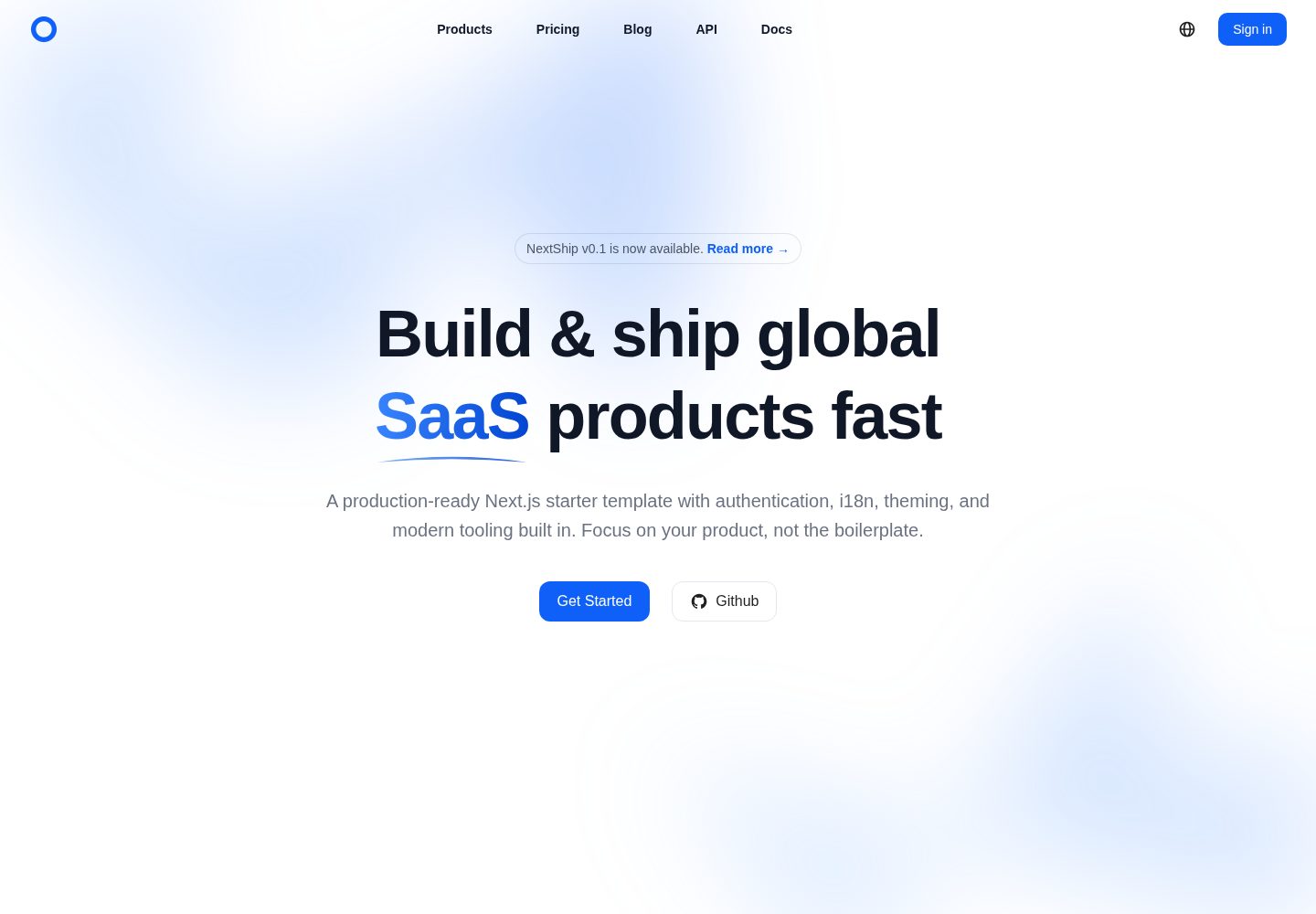
Based on the Next.js App Router, with routes divided into a protected admin area and a public marketing area
Next.jsReactAdmin dashboardSaaSStarter
nextship — Next.js Admin dashboard Template
By shulkme
NextShip is a SaaS and internationalization product starter template built on the Next.js App Router, with Ant Design components, Tailwind CSS, next-intl multilingual support, theme switching, and a modular API layer, under the MIT license.
Explore the design
Compare the page layouts and mobile experience. Open any screenshot for a closer look.
Desktop homepage1 / 2
Desktop captureTop of page
Actual screenshot captured by the server browser.
All pages & views 2
Screenshots show visual appearance; interactive behavior may differ.
Recorded 2026-10-03View source
What stands out
A quick read of the recorded project description.
Uses the Ant Design component library and Tailwind CSS to build the interface, with light, dark, and system-following themes
Type-safe internationalization through next-intl, with built-in English and Chinese language packs and language-prefixed routes
Provides an Axios-based modular API layer, including token management, interceptors, and error boundaries
TypeScript strict mode, typed environment variables, and integrated ESLint, Prettier, and type-checking scripts
Includes CLAUDE.md and quick-start documentation explaining the project structure and common usage
Template Details
NextShip is a Next.js starter template for SaaS and global products. It uses the App Router to organize routes and divides pages into a protected admin route group and a public marketing route group. The project is written in TypeScript strict mode. The UI layer uses the Ant Design component library and Tailwind CSS utility classes, and theming supports light, dark, and system-following modes.
For internationalization, the template provides type-safe translation through next-intl, with built-in English and Chinese language packs. Routes look like /en/dashboard and /zh/dashboard. Adding a language requires adding translation files under the locales directory. The data layer provides an Axios-based request instance and API modules split by domain (such as auth and user), and includes authentication-related infrastructure such as token management, interceptors, and error boundaries.
Engineering configuration includes ESLint, Prettier, type checking, and Git hooks. Environment variables provide type hints through env.d.ts, and logging is wrapped in lib/logger.ts. The repository also includes documentation such as CLAUDE.md and docs/QUICK_START.md to help AI assistants and developers understand the project structure. The template itself does not include a backend service, database, or payment implementation; those capabilities require integration with external services.
Next.jsReactAdminSaaSStarter
Is it right for your project?
Use Cases
- Building the frontend of a multilingual admin or SaaS product
- Quickly connecting a frontend interface with authentication and error handling to an existing backend API
- Using it as a reference project for learning how to combine the Next.js App Router, Ant Design, and next-intl
- Reusing its theme and layout approach in products that need light/dark theme switching and responsive layouts
Suitable For
- Developers of SaaS or admin projects that need a Chinese-English bilingual interface
- Frontend teams that want to use TypeScript, Ant Design, and Tailwind CSS together
- Projects that need a modular API layer and basic token management infrastructure
- Individuals or teams looking for an MIT-licensed Next.js starter template that can be freely modified
Getting started & customization
Use these recorded setup notes alongside the repository instructions for your chosen version.
- 1
Requires Node.js 18+ or 20+; pnpm 8+ is recommended as the package manager
- 2
After cloning the repository, copy .env.example to .env and fill in environment variables as needed
- 3
Run pnpm install to install dependencies and pnpm dev to start the development server
- 4
When adding environment variables, update .env, .env.example, and the type definitions in env.d.ts together
- 5
The template does not include a backend, database, or payment implementation; external services must be integrated separately
License & source material
Usage conditions & limitations
Free to use · keep license noticeThis listing covers the free version in the public repository under the MIT license; the free scope is the code of that version and does not mean external services or third-party assets are free.
Must comply with when using
- Free use, modification, commercial use, and distribution of this version's code are permitted.
- When distributing copies or substantial portions of the code, retain the original author's copyright notice and the full MIT license notice.
- The code is provided as is; warranties and limitations of liability are governed by the original license and applicable law.
Additional costs & items to verify
- Demo images, fonts, icons, and other third-party assets must be checked against their respective licenses and cannot be judged solely by the code's MIT license.
- External services such as domains, hosting, databases, payments, or AI may incur separate charges.
View Original Text Basis
https://github.com/shulkme/nextship/blob/main/LICENSEhttps://github.com/shulkme/nextship/blob/main/README.mdPermission is hereby granted, free of charge
Original License Text
Compiled by DeepSeek based on repository license and README ·2026-10-03. Results only cover the materials read; dependencies, images, fonts, and subsequent term changes are subject to their respective original texts.
Project checks & description sources
Template Information
- Source platforms
- GitHub
- Documentation and maintenance reference score
- More documented · 88 / 100
- Technologies
- Next.js · React
- Website type
- Admin dashboard · SaaS · Starter
How this score is calculated
Our heuristic uses license records (up to 30), a demo link (12), a preview (10), stars (15), recorded maintenance (15), description completeness (8), feature records (5) and classification data (5). It is not a code, security or performance test, or a Google score. A link does not establish tested functionality.
What to verify for this project
- Repository update recorded
- 2026-05-05
- Screenshot last checked
- 2026-10-03
A demo link is listed. Check it with your own content and viewport sizes; its presence does not confirm that forms, authentication or payments work.
The catalog identifies Next.js as the primary stack. Check the actual dependency manifest and lockfile for versions and hosting requirements. These notes use recorded metadata, not a code audit or a deployment test.
Use a selection guide →How this description was prepared
AI-assisted description based on catalog records and repository material. Repository authors are not automatically the reviewers of this description.
Automatically checked against source and license rules; no manual editorial review.
Inspect the recorded source material
SHA-256: f1364c0e766031ba5ce2622692e8eb205715ebc4f921a8c8136247995790093a
2026-10-03T03:01:04.383Z
Source file / repository<div align="center">
<a href="https://github.com/shulkme/nextship">
<picture>
<img alt="NextShip logo" src="public/images/logo.png" height="256" style="height: 128px">
</picture>
</a>
<h1>NextShip</h1>
<p>🚀 A production-ready Next.js starter template for building SaaS and global products</p>
<a href="https://react.dev/"><img src="https://img.shields.io/badge/-React%2019-0f60f8?style=flat-square&logo=react&logoColor=white&labelColor=black" alt="React"/></a> <a href="https://nextjs.org/"><img src="https://img.shields.io/badge/-Next.js%2016-0f60f8?style=flat-square&logo=nextdotjs&logoColor=white&labelColor=black" alt="Next.js"/></a> <a href="https://ant.design/"><img src="https://img.shields.io/badge/-Ant%20Design%206-0f60f8?labelColor=black&logo=antdesign&logoColor=white&style=flat-square" alt="AntDesign"/></a> <a href="https://www.typescriptlang.org/"><img src="https://img.shields.io/badge/-TypeScript-0f60f8?style=flat-square&logo=typescript&logoColor=white&labelColor=black" alt="Typescript"/></a> <a href="https://tailwindcss.com/"><img src="https://img.shields.io/badge/-Tailwind%20CSS%204-0f60f8?style=flat-square&logo=tailwindcss&logoColor=white&labelColor=black" alt="Tailwindcss"/></a> <img src="https://img.shields.io/badge/License-MIT-0f60f8?style=flat-square" alt="License"/>
<p>
<a href="#features">Features</a> •
<a href="#quick-start">Quick Start</a> •
<a href="#documentation">Documentation</a> •
<a href="#tech-stack">Tech Stack</a> •
<a href="#contributing">Contributing</a>
</p>
</div>
---
## ✨ Features
### 🎨 Modern UI
- **Ant Design 6** - Professional component library with 50+ components
- **Tailwind CSS 4** - Utility-first CSS framework
- **Dark Mode** - System/light/dark theme support with smooth transitions
- **Responsive** - Mobile-first design, works on all devices
### 🌍 Internationalization
- **next-intl** - Type-safe internationalization
- **Multiple Languages** - Built-in support for English and Chinese
- **Easy to Extend** - Add new languages in minutes
- **Route-based** - Clean URLs like `/en/dashboard`, `/zh/dashboard`
### 🔐 Authentication Ready
- **Token Management** - Secure token storage and handling
- **API Integration** - Pre-configured Axios with interceptors
- **Error Handling** - Comprehensive error boundaries and logging
- **SSR Compatible** - Works seamlessly with server-side rendering
### 🏗️ Best Practices
- **TypeScript First** - 100% TypeScript with strict mode
- **Type-Safe Env** - Validated environment variables
- **Modular API Layer** - Organized API calls by domain
- **Error Tracking Ready** - Built-in logger with Sentry support
- **Code Quality** - ESLint, Prettier, and Git hooks configured
### ⚡ Developer Experience
- **Fast Refresh** - Instant feedback during development
- **pnpm** - Fast, disk space efficient package manager
- **Organized Structure** - Clear separation of concerns
- **Helpful Scripts** - Lint, format, type-check, and more
- **AI-Friendly** - Includes `CLAUDE.md` for AI assistants
### 📦 Production Ready
- **Optimized Build** - Automatic code splitting and optimization
- **Error Boundaries** - Graceful error handling at all levels
- **Logging System** - Centralized logging for debugging
- **Environment Config** - Easy configuration for different environments
---
## 🚀 Quick Start
### Prerequisites
- Node.js 18+ or 20+
- pnpm 8+ (recommended) or npm/yarn
### Installation
```bash
# Clone the repository
git clone https://github.com/shulkme/nextship.git
cd nextship
# Copy environment variables
cp .env.example .env
# Install dependencies
pnpm install
# Run development server
pnpm dev
```
Open [http://localhost:3000](http://localhost:3000) to see your app.
### First Steps
1. **Configure Environment**: Edit `.env` file with your settings
2. **Explore the Code**: Check out the [project structure](#project-structure)
3. **Read the Docs**: See [Documentation](#documentation) section
4. **Build Something**: Start by editing `app/[locale]/(web)/page.tsx`
---
## 📖 Documentation
- **[CLAUDE.md](./CLAUDE.md)** - For AI assistants (Claude Code, Cursor, etc.)
- **[Quick Start Guide](./docs/QUICK_START.md)** - Common usage examples
- **[Optimization Summary](./OPTIMIZATION_SUMMARY.md)** - Recent improvements and migration guide
- **[Environment Variables](./.env.example)** - Complete environment configuration guide
---
## 🛠️ Available Scripts
```bash
# Development
pnpm dev # Start development server
pnpm build # Build for production
pnpm start # Start production server
# Code Quality
pnpm lint # Run ESLint
pnpm lint:fix # Fix linting issues
pnpm type-check # TypeScript type checking
pnpm format # Format code with Prettier
pnpm format:check # Check code formatting
# Maintenance
pnpm clean # Clean build artifacts
```
---
## 📂 Tech Stack
### Core
- **[Next.js 16](https://nextjs.org/)** - React framework with App Router
- **[React 19](https://react.dev/)** - UI library
- **[TypeScript](https://www.typescriptlang.org/)** - Type safety
### UI & Styling
- **[Ant Design 6](https://ant.design/)** - Component library
- **[Tailwind CSS 4](https://tailwindcss.com/)** - Utility-first CSS
- **[next-themes](https://github.com/pacocoursey/next-themes)** - Theme management
### State & Data
- **[Axios](https://axios-http.com/)** - HTTP client
- **[ahooks](https://ahooks.js.org/)** - React hooks library
- **[dayjs](https://day.js.org/)** - Date manipulation
### Internationalization
- **[next-intl](https://next-intl-docs.vercel.app/)** - Type-safe i18n
### Developer Tools
- **[ESLint](https://eslint.org/)** - Code linting
- **[Prettier](https://prettier.io/)** - Code formatting
- **[pnpm](https://pnpm.io/)** - Package manager
---
## 📁 Project Structure
```
nextship/
├── app/ # Next.js App Router
│ ├── [locale]/ # Internationalized routes
│ │ ├── (app)/ # Protected admin/dashboard routes
│ │ └── (web)/ # Public marketing routes
│ ├── actions/ # Server actions
│ └── error.tsx # Error handling pages
│
├── apis/ # API layer (modular)
│ ├── auth/ # Authentication APIs
│ ├── user/ # User management APIs
│ ├── request.ts # Axios instance
│ └── types.ts # Common types
│
├── components/ # Reusable components
│ ├── error-boundary.tsx
│ ├── nprogress-bar/
│ └── pager/
│
├── config/ # Configuration
│ └── theme.ts # Ant Design theme
│
├── constants/ # App constants
├── hooks/ # Custom React hooks
├── i18n/ # Internationalization setup
├── icons/ # Custom icons
├── lib/ # Utilities & wrappers
│ └── logger.ts # Centralized logging
│
├── locales/ # Translation files
│ ├── en.json
│ └── zh.json
│
├── providers/ # React Context providers
│ ├── theme.tsx
│ └── language.tsx
│
├── services/ # Business logic
├── types/ # Global TypeScript types
├── utils/ # Utility functions
└── public/ # Static assets
```
For detailed structure explanation, see [CLAUDE.md](./CLAUDE.md).
---
## 🎯 Key Features Explained
### Type-Safe Environment Variables
Environment variables are fully type-safe with IDE autocomplete via `env.d.ts`:
```typescript
// ✅ Type-safe with IDE autocomplete
const apiUrl = process.env.NEXT_PUBLIC_API_BASE_URL || '/';
const timeout = Number(process.env.NEXT_PUBLIC_API_TIMEOUT) || 30000;
const appName = process.env.NEXT_PUBLIC_APP_NAME || 'NextShip';
// All variables are defined in env.d.ts for type safety
// Just add new variables to .env and env.d.ts - no extra boilerplate needed
```
**Adding new environment variables:**
1. Add to `.env` with value
2. Add to `.env.example` with description
3. Add type definition to `env.d.ts`
That's it! IDE will immediately recognize the new variable.
### Modular API Layer
```typescript
import { authApi, userApi } from '@/apis';
// Clean, organized API calls
const response = await authApi.login({ email, password });
const users = await userApi.getUserList({ page: 1, size: 10 });
```
### Theme Management
```typescript
import { useTheme } from '@/providers/theme';
const { mode, setMode, toggleMode } = useTheme();
// Supports: 'light' | 'dark' | 'system'
```
### Internationalization
```typescript
import { useTranslations } from 'next-intl';
const t = useTranslations();
const title = t('app.page.dashboard.title');
```
---
## 🤝 Contributing
We welcome contributions! Here's how you can help:
1. **Fork the repository**
2. **Create a feature branch**: `git checkout -b feature/amazing-feature`
3. **Commit your changes**: `git commit -m 'Add amazing feature'`
4. **Push to the branch**: `git push origin feature/amazing-feature`
5. **Open a Pull Request**
### Development Guidelines
- Follow the existing code style and conventions
- Run `pnpm lint:fix` and `pnpm format` before committing
- Ensure `pnpm type-check` passes
- Add documentation for new features
- For AI assistants: Read [CLAUDE.md](./CLAUDE.md) first
---
## 🐛 Bug Reports
Found a bug? Please [open an issue](https://github.com/shulkme/nextship/issues) with:
- Clear title and description
- Steps to reproduce
- Expected vs actual behavior
- Screenshots if applicable
- Your environment (OS, Node version, etc.)
---
## 💡 Feature Requests
Have an idea? We'd love to hear it! [Open an issue](https://github.com/shulkme/nextship/issues) with:
- Clear description of the feature
- Use cases and benefits
- Any implementation ideas
---
## 🙏 Acknowledgments
This project is built with amazing open-source technologies:
- [Next.js](https://nextjs.org/) - The React Framework
- [Ant Design](https://ant.design/) - Enterprise UI Design Language
- [Tailwind CSS](https://tailwindcss.com/) - Utility-first CSS Framework
- [next-intl](https://next-intl-docs.vercel.app/) - Internationalization
- And many more... see [package.json](./package.json)
---
## 📄 License
This project is licensed under the MIT License - see the [LICENSE](./LICENSE) file for details.
---
## 🌟 Star History
If you find this project useful, please consider giving it a star ⭐️
---
## 📮 Contact
- **GitHub**: [@shulkme](https://github.com/shulkme)
- **Issues**: [GitHub Issues](https://github.com/shulkme/nextship/issues)
---
<div align="center">
<p>Made with ❤️ by the NextShip Team</p>
<p>
<a href="https://github.com/shulkme/nextship">GitHub</a> •
<a href="https://github.com/shulkme/nextship/issues">Issues</a> •
<a href="./CLAUDE.md">AI Guide</a>
</p>
</div>
---
## 🌐 Browser Support
| [](http://godban.github.io/browsers-support-badges/) | [](http://godban.github.io/browsers-support-badges/) | [](http://godban.github.io/browsers-support-badges/) | [](http://godban.github.io/browsers-support-badges/) |
| --- | --- | --- | --- |
| Latest 2 versions | Latest 2 versions | Latest 2 versions | Latest 2 versions |
Explore similar templates
Compare previews and descriptions within the same stack and category.

Next.js SaaS Starter
The official Next.js SaaS starter template, integrating email/password authentication, Stripe Checkout subscriptions, a dashboard with user/team CRUD, basic Owner/Member RBAC, and activity logging.
Next.js · SaaS

Next.js Commerce
Vercel's officially maintained Next.js App Router ecommerce starter with deep Shopify integration, offering a complete product catalog, cart, and checkout flow. Core logic is modular for swapping backends, and community provider versions exist for BigCommerce, Medusa, and Saleor.
Next.js · E-commerce

Next-js-Boilerplate
A developer-first Next.js 16 starter with Tailwind CSS 4 and TypeScript, supporting both App Router and Page Router.
Next.js · Starter

tailwind-nextjs-starter-blog
A Next.js and Tailwind CSS blog starter template using Contentlayer for Markdown/MDX, with built-in SEO, code highlighting, and tags. It targets personal technical blogs and migration from Jekyll/Hugo to React, and supports one-click Vercel deployment.
Next.js · Blog

next-forge
next-forge is a Turborepo-based Next.js template maintained by Vercel, positioned as a starting point for SaaS products.
Next.js · Starter

SaaS-Boilerplate
SaaS-Boilerplate is an open-source SaaS starter template built with Next.js App Router, React 19, TypeScript, Tailwind CSS, and Shadcn UI.
Next.js · SaaS