Uses Vite as the build tool, producing a static site output to the dist directory
ViteHTMLStarter
gh-pages-vite — Vite Starter Template
By snaomix
A static site demo template built with Vite and deployed to GitHub Pages, with a Bootstrap-based interface, GitHub Actions deployment, code linting, and containerized development configuration.
Explore the design
Compare the page layouts and mobile experience. Open any screenshot for a closer look.
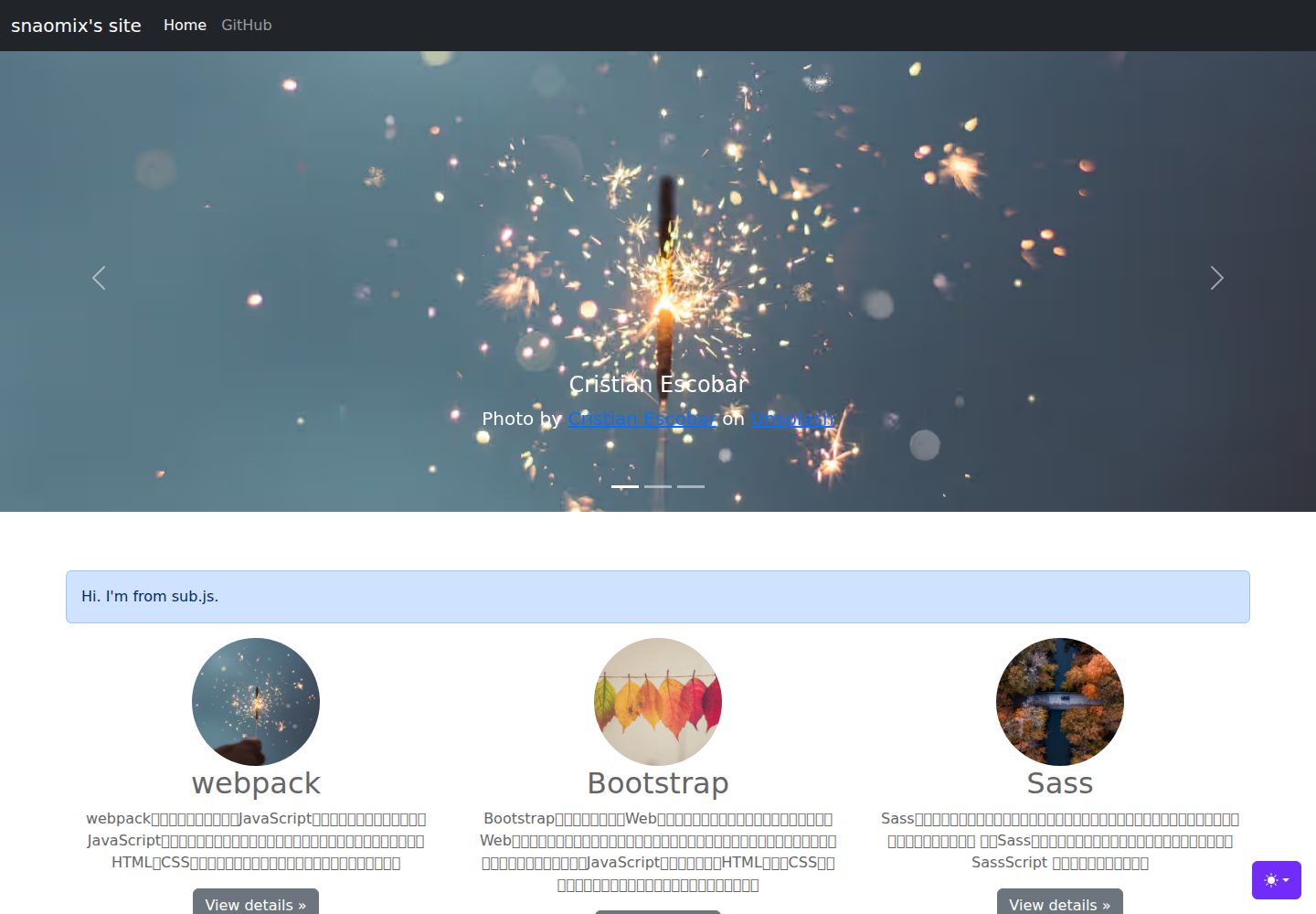
Desktop homepage1 / 2
Desktop captureTop of page
Actual screenshot captured by the server browser.
All pages & views 2
Screenshots show visual appearance; interactive behavior may differ.
Recorded 2026-10-03View source
What stands out
A quick read of the recorded project description.
Provides a GitHub Actions workflow that builds and deploys to GitHub Pages
Page styling is based on Bootstrap v5, with images from unsplash
Integrates Stylelint, Prettier, and ESLint for checking and formatting SCSS, HTML, JS, and JSON
Supports Podman / Docker containerization and VS Code Dev Containers development
Automatically generates an SBOM and build attestation in the workflow
Template Details
This is a static website starter template using Vite as its build tool, aimed at publishing front-end sites to GitHub Pages. The repository notes that it started from the official Vite guide and the "Deploying a Static Site" documentation, uses Bootstrap v5 for page styling, and sources images from unsplash.
The template includes a GitHub Actions workflow to build and deploy to GitHub Pages, while also generating an SBOM and build attestation. On the development side, Stylelint, Prettier, and ESLint are configured for checking and formatting SCSS, HTML, JS, and JSON, and Podman/Docker containerization and VS Code Dev Containers support are provided.
Limitations to note: the repository states that the Dockerfile and .dockerignore are not intended for development but for building distribution images; if the repository or organization's Actions settings only allow GitHub official Actions, the anchore/sbom-action used in the SBOM step will be blocked and must be explicitly allowed.
ViteHTMLStarter
Is it right for your project?
Use Cases
- You need a static site starter project that can be published directly to GitHub Pages
- You want to reference configuration patterns for Vite static site deployment and GitHub Actions workflows
- You want CSS/HTML/JS linting and formatting scripts included from the start of the project
- Your team uses containers or VS Code Dev Containers for a consistent development environment
Suitable For
- Front-end developers familiar with Node.js and npm scripts
- Individuals or small teams who need to host static pages on GitHub Pages
- Projects that want to quickly build page appearance with Bootstrap
- Developers willing to use containers or Dev Containers
Getting started & customization
Use these recorded setup notes alongside the repository instructions for your chosen version.
- 1
Local development requires Node.js installed first, then run npm install to install dependencies
- 2
Start the development server with npm run dev, which listens on localhost:5173 by default
- 3
Build with npm run build, output goes to the dist directory, and preview with npm run preview
- 4
When developing with containers, Podman or Docker must be installed and running, and in VS Code run Dev Containers: Reopen in Container
- 5
Before deployment, set Source to GitHub Actions in the repository Settings > Pages, then manually run the Deploy GitHub Pages workflow
License & source material
Usage conditions & limitations
Free to use · keep license noticeThis entry covers the free version under the ISC license in the public repository; the free scope is the code of that version and does not mean external services or third-party assets are free.
Must comply with when using
- Free use, copying, modification, and distribution for any purpose, including commercial use, are permitted.
- All copies must retain the original copyright notice and license notice.
- The code is provided as is; warranties and limitations of liability are governed by the original license and applicable law.
Additional costs & items to verify
- The repository explicitly states that the Dockerfile and .dockerignore are not for development but for building distribution images; using them as a development environment configuration is misuse.
- If the repository or organization's Actions settings only allow GitHub official Actions, the anchore/sbom-action used in the SBOM step will be blocked and cause workflow errors; it must be explicitly allowed in settings to run normally.
- With a GitHub Free account, the repository must be public to configure GitHub Pages deployment as described.
- Demo images, fonts, icons, and other third-party assets must be checked against their respective licenses and cannot be judged solely by the code's ISC license.
- External services such as domains, hosting, databases, payments, or AI may incur additional charges.
View Original Text Basis
for any purpose with or without fee is hereby granted
Original License Text
Dockerfile、.dockerignoreは開発用ではありません
Original README
リポジトリまたは組織のActions設定で **「Allow actions created by GitHub(GitHub公式アクションのみ許可)」** という制限を有効にしている場合、SBOM生成に使用している **Anchore社のSyft([anchore/sbom-action])** がブロックされ、ワークフローがエラーになります。
Original README
https://github.com/snaomix/gh-pages-vite/blob/main/LICENSEhttps://github.com/snaomix/gh-pages-vite/blob/main/README.mdGitHub Freeの場合、パブリックリポジトリに設定しておく
Original README
Compiled by DeepSeek based on repository license and README ·2026-10-03. Results only cover the materials read; dependencies, images, fonts, and subsequent term changes are subject to their respective original texts.
Project checks & description sources
Template Information
- Source platforms
- GitHub
- Documentation and maintenance reference score
- More documented · 77 / 100
- Technologies
- Vite · HTML
- Website type
- Starter
How this score is calculated
Our heuristic uses license records (up to 30), a demo link (12), a preview (10), stars (15), recorded maintenance (15), description completeness (8), feature records (5) and classification data (5). It is not a code, security or performance test, or a Google score. A link does not establish tested functionality.
What to verify for this project
- Repository update recorded
- 2026-10-03
- Screenshot last checked
- 2026-10-03
A demo link is listed. Check it with your own content and viewport sizes; its presence does not confirm that forms, authentication or payments work.
The catalog identifies Vite as the primary stack. Check the actual dependency manifest and lockfile for versions and hosting requirements. These notes use recorded metadata, not a code audit or a deployment test.
Use a selection guide →How this description was prepared
AI-assisted description based on catalog records and repository material. Repository authors are not automatically the reviewers of this description.
Automatically checked against source and license rules; no manual editorial review.
Inspect the recorded source material
SHA-256: 662db1c4169113ff19c50d60e7b29f7e1b472eed695fc391f6b7d06d99f05332
2026-10-03T02:45:17.828Z
Source file / repository# gh-pages-vite [](../../actions/workflows/build.yml) Viteを使って[GitHub Pages]へウェブサイトをデプロイするちょっとしたデモ。 Viteの[ガイド]、[静的サイトのデプロイ]ページにしたがってスタートします。 デザインは[Bootstrap] v5、画像は[unsplash]のものを使用します。 ## note: * Vite v8以降を使用しています * Node.js v24以降(see [Node.js release schedule]) * [GitHub Actions]を使用してデプロイ * [Stylelint]、[Prettier]、[ESLint]を使用 * コンテナ化対応([Podman] / Docker ・`node:24-slim` ベース) * VS Code「[Dev Containers]」対応 ## how to start はじめにソースコードをclone: ```bash git clone [email protected]:snaomix/gh-pages-vite.git ``` ディレクトリ移動: ```bash cd gh-pages-vite ``` ## how to setup ### コンテナ開発する場合 #### 前提条件 - **コンテナ実行環境([Podman] または Docker)がインストールされ、起動していること** - VS Code、VS Codeの拡張機能: [Dev Containers]をインストール&有効化 1. VS Code を開きます。 2. コマンドパレット(`Cmd + Shift + P`、Windowsは `Ctrl + Shift + P`)を開き、`Dev Containers: Reopen in Container` を選択します。 #### 注意点 - Dockerfile、.dockerignoreは開発用ではありません ### ホストPC(ローカル環境)で開発する場合 #### 前提条件 - Node.jsがインストール済み 1. nodeパッケージをインストール ```bash npm install ``` ## scripts ### 開発 開発サーバーを起動(localhost:5173) ```bash npm run dev ``` ネットワーク接続可能な開発サーバーを起動 ```bash npm run dev:host ``` ### ビルド 本番用にビルド(dist ディレクトリに出力) ```bash npm run build ``` ビルド結果をプレビュー ```bash npm run preview ``` ビルド結果をプレビュー(ネットワーク経由) ```bash npm run preview:host ``` ### リント・フォーマット Sass(SCSS)をチェックする([Stylelint]) ```bash npm run lint:css ``` Sass(SCSS)のフォーマットチェック([Prettier]) ```bash npm run check:css ``` Sass(SCSS)を自動修正([Stylelint]) :warning: ファイルが上書きされます ```bash npm run fix:css ``` HTMLをチェックする([ESLint]) ```bash npm run lint:html ``` JSをチェックする([ESLint]) ```bash npm run lint:js ``` JS, JSONのフォーマットチェック([Prettier]) ```bash npm run check:js ``` JSを自動修正([ESLint]) :warning: ファイルが上書きされます ```bash npm run fix:js ``` Sass(SCSS)を整形する([Prettier]) :warning: ファイルが上書きされます ```bash npm run format:css ``` JS, JSONを整形する([Prettier]) :warning: ファイルが上書きされます ```bash npm run format ``` ### Dockerfile・.dockerignore について :warning: 開発時には使用しません - [Dockerfile](/Dockerfile): 配布用イメージの作成 - [.dockerignore](/.dockerignore): イメージビルド時に、ローカルの不要なファイル(node_modules等)をコンテナ内にコピーさせないための除外リスト 1. コンテナイメージのビルド([podman]利用時の手順) ```bash podman build -t gh-pages-vite-image . ``` 2. コンテナ環境で開発サーバ起動 - VS Codeを開いた状態で、キーボードの `Cmd + Shift + B`(Windowsは `Ctrl + Shift + B`) ## setting GitHub Actions & run workflow 1. GitHub Freeの場合、パブリックリポジトリに設定しておく 1. Settings > Pages > Build and deploymentのSourceを「GitHub Actions」を選択 1. Actions > Deploy GitHub Pages > Run workflow > 「Run workflow」を選択 ## ⚙️ CI/CD とセキュリティ(GitHub Actions)について **SBOM(ソフトウェア部品構成表)の自動生成**と**ビルド証明(Attestation)の作成**を自動で行っています。 > [!IMPORTANT] > リポジトリまたは組織のActions設定で **「Allow actions created by GitHub(GitHub公式アクションのみ許可)」** という制限を有効にしている場合、SBOM生成に使用している **Anchore社のSyft([anchore/sbom-action])** がブロックされ、ワークフローがエラーになります。 > その場合は、以下の手順でこのアクションを個別に許可してください。 <details> <summary><b>🛠️ ワークフローを実行するためのGitHub Actions設定手順(クリックで開く)</b></summary> 1. リポジトリの Settings > Actions > General を開きます。 2. **「Allow actions created by GitHub」** にチェックが入っていることを確認します。 3. その下にあるテキストエリア(Allow or block specified actions and reusable workflows)に、以下の2行を改行して入力します。 ```text anchore/sbom-action@* anchore/sbom-action/download-syft@* ``` </details> [GitHub Pages]: https://docs.github.com/ja/pages [GitHub Actions]: https://docs.github.com/ja/actions [ガイド]: https://ja.vite.dev/guide/ [静的サイトのデプロイ]: https://ja.vite.dev/guide/static-deploy.html [Bootstrap]: https://getbootstrap.com/ [unsplash]: https://unsplash.com/ [Stylelint]: https://stylelint.io/ [Prettier]: https://prettier.io/ [ESLint]: https://eslint.org/ [Node.js release schedule]: https://github.com/nodejs/release#release-schedule [anchore/sbom-action]: https://github.com/anchore/sbom-action [Podman]: https://podman.io/ [Dev Containers]: https://marketplace.visualstudio.com/items?itemName=ms-vscode-remote.remote-containers ## more info * [GitHub Pagesのドキュメンテーション](https://docs.github.com/ja/pages) … docs.github.com * [GitHub Pages examples](https://github.com/collections/github-pages-examples) … github.com * [GitHub Actionsのドキュメント](https://docs.github.com/ja/actions) … docs.github.com
Explore similar templates
Compare previews and descriptions within the same stack and category.

react-starter-kit
A full-stack SaaS monorepo starter built on Vite and React, with Bun, TypeScript, tRPC, Drizzle ORM, Better Auth, Stripe, and Cloudflare Workers. It includes email OTP, passkey, Google OAuth, organizations, subscription billing, Drizzle migrations, seed scripts, and Terraform infrastructure.
Vite · SaaS

cove
Cove is a minimal TanStack Start starter template maintained by mugnavo, integrating React, TanStack Router/Query, Tailwind CSS, shadcn/ui, Drizzle ORM with PostgreSQL, Better Auth, Vite Plus, and Nitro.
Vite · SaaS

vite-react-boilerplate
A production-ready Vite + React starter template with TypeScript, Tailwind CSS, TanStack Router/Query/Table, Storybook, React Hook Form + Zod, Vitest and Playwright testing, plus Husky/Commitizen/Commitlint commit conventions.
Vite · Starter

react-vite-admin
A backend management starter built on Vite and React, integrating Recoil, React Query, TypeScript, and Axios, with Ant Design-style interface screenshots. Suitable as a starting point for management-side projects, licensed under MIT, with Chinese documentation and common scripts.
Vite · Admin dashboard

typescript-react_best_practices-vite_template
A Vite + React + TypeScript starter template by CodelyTV, preconfigured with Jest and React Testing Library unit tests, Cypress end-to-end tests, ESLint and Prettier using Codely's shared configuration, GitHub Actions workflows, a Makefile, and Sass.
Vite · Starter

cloudflare-starter-kit
A Cloudflare Workers project scaffolding template maintained by kriasoft, using Vite and TypeScript, with three built-in workspaces: api, app, and edge, and preconfigured local testing, multiple environments, and a GitHub Actions deployment workflow.
Vite · Starter