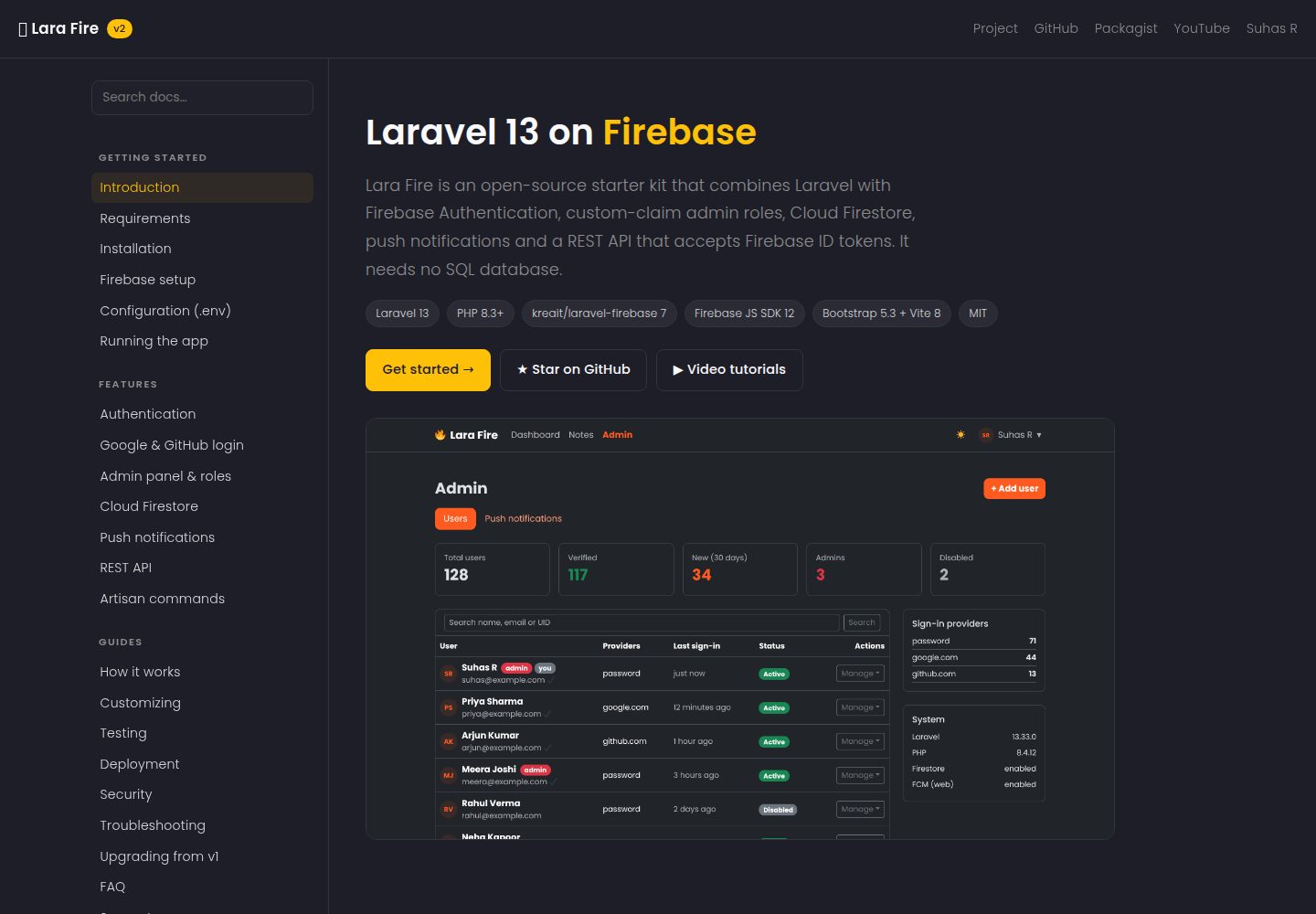
Three sign-in methods: email/password, Google, and GitHub, including email verification and password reset
LaravelAdmin dashboardStarter
Lara-Fire — Laravel Admin dashboard Template
By suhasrkms
A Laravel-based Firebase authentication starter that integrates email/password, Google and GitHub sign-in, email verification, an admin panel, a Cloud Firestore notes module, FCM push notifications, and a REST API, with no SQL database required.
Explore the design
Compare the page layouts and mobile experience. Open any screenshot for a closer look.
Desktop homepage1 / 3
Desktop captureTop of page
Actual screenshot captured by the server browser.
All pages & views 3
Screenshots show visual appearance; interactive behavior may differ.
Recorded 2026-10-01View source
What stands out
A quick read of the recorded project description.
Admin panel based on custom claims, allowing user search, granting or revoking admin rights, and enabling or disabling accounts
Cloud Firestore Notes module with per-user CRUD via the REST API, requiring no gRPC extension
FCM push notifications, with per-browser opt-in for users and broadcast or targeted sending for administrators
/api/v1 REST API authenticated using a Firebase ID token as a Bearer token
Bootstrap 5.3 interface with dark mode support, using Vite to build frontend assets
Template Details
Lara-Fire is a Laravel starter project that uses Firebase as the authentication and data backend, so no self-hosted SQL database is needed. It provides email/password registration and login, Google and GitHub third-party sign-in, email verification, and password reset flows. The admin panel controls permissions through Firebase custom claims, and supports searching users, viewing statistics, granting or revoking admin rights, enabling or disabling accounts, and sending reset links.
The data layer implements a Notes module using the Cloud Firestore REST API, with per-user CRUD operations that do not depend on the gRPC extension and can run directly on Windows. Push notifications are implemented through FCM; users can opt in per device in the browser, and administrators can broadcast to all users or send messages to a single user. The project also provides a REST API under /api/v1, accessed using a Firebase ID token as a Bearer token.
The interface is built on Bootstrap 5.3 with dark mode support, and uses Vite for frontend asset building. The repository includes documentation on installation, Firebase configuration, the API, testing, and deployment, along with links to video tutorials. The project is released under the MIT license, allowing free use, modification, commercial use, and distribution of this version of the code, but the quotas and charges of external services such as Firebase must be verified independently.
LaravelAdmin panelStarter
Is it right for your project?
Use Cases
- Rapidly building a Laravel application prototype with third-party sign-in and email verification
- Projects that want Firebase to handle authentication and data storage and avoid maintaining a SQL database
- Operational scenarios that need an admin backend to manage user status, roles, and push notifications
- Providing a REST API backend based on Firebase ID tokens for mobile or frontend clients
Suitable For
- Developers familiar with Laravel and Firebase console configuration
- Teams that need a starting template for Firebase authentication and a Firestore data layer
- Projects that want to use and modify the code under the MIT license
Getting started & customization
Use these recorded setup notes alongside the repository instructions for your chosen version.
- 1
Create the project with composer create-project suhasrkms/lara-fire my-app, then run npm install && npm run build
- 2
Generate a service account private key in the Firebase console and save it as storage/app/firebase/service-account.json
- 3
Fill the Firebase Web configuration into the FIREBASE_WEB_* keys in .env, and enable the required sign-in methods in Authentication
- 4
Run php artisan larafire:about to check the configuration, and use php artisan larafire:make-admin to grant admin rights
- 5
Enabling FCM push requires generating a Web Push certificate and setting FIREBASE_WEB_VAPID_KEY; using Firestore requires creating a database in the console
License & source material
Usage conditions & limitations
Free to use · keep license noticeThis entry covers the free version in the public repository under the MIT license; the free scope is this version of the code and does not mean that external services or third-party assets are free.
Must comply with when using
- Free use, modification, commercial use, and distribution of this version of the code are permitted.
- When distributing copies or substantial portions of the code, retain the original author's copyright notice and the full MIT license notice.
- The code is provided as is; warranties and limitations of liability are governed by the original license and applicable law.
Additional costs & items to verify
- Before use, you must create a project in the Firebase console and generate a service account private key, saving it as storage/app/firebase/service-account.json, otherwise the application cannot run.
- You need to obtain the Web configuration from the Firebase console and fill it into the FIREBASE_WEB_* keys in .env; this is an external service configuration requirement.
- You need to manually enable email/password and Google and GitHub sign-in methods in Firebase Authentication, and add authorized domains.
- FCM push is an optional feature; enabling it requires generating a Web Push certificate and setting FIREBASE_WEB_VAPID_KEY.
- The Cloud Firestore notes module requires creating a Firestore database in the Firebase console first, otherwise it cannot be used.
- Video tutorials are hosted on an external YouTube channel, and access may be subject to network and regional restrictions.
- The README mentions Firebase integration; before enabling related dynamic features, you must configure them yourself and verify Firebase quotas and charges.
- Demo images, fonts, icons, and other third-party assets must be checked against their respective licenses and cannot be judged solely by the code's MIT license.
- External services such as domains, hosting, databases, payments, or AI may incur additional charges.
View Original Text Basis
Permission is hereby granted, free of charge
Original License Text
open Firebase console → Project settings → Service accounts → *Generate new private key*
Original README
copy the values into the `FIREBASE_WEB_*` keys in `.env`
Original README
enable *Email/Password* plus *Google* and/or *GitHub*
Original README
Generate a key pair under Project settings → Cloud Messaging → *Web Push certificates* and set `FIREBASE_WEB_VAPID_KEY`
Original README
Create the database in Firebase console → **Firestore Database** → *Create database*
Original README
https://github.com/suhasrkms/Lara-Fire/blob/master/LICENSE.mdhttps://github.com/suhasrkms/Lara-Fire/blob/master/README.mdWalkthroughs for this project are on [Seven Stac](https://www.youtube.com/@sevenstac)
Original README
Compiled by DeepSeek based on repository license and README ·2026-10-01. Results only cover the materials read; dependencies, images, fonts, and subsequent term changes are subject to their respective original texts.
Project checks & description sources
Template Information
- Source platforms
- GitHub
- Documentation and maintenance reference score
- More documented · 88 / 100
- Technologies
- Laravel
- Website type
- Admin dashboard · Starter
How this score is calculated
Our heuristic uses license records (up to 30), a demo link (12), a preview (10), stars (15), recorded maintenance (15), description completeness (8), feature records (5) and classification data (5). It is not a code, security or performance test, or a Google score. A link does not establish tested functionality.
What to verify for this project
- Repository update recorded
- 2026-09-28
- Screenshot last checked
- 2026-10-01
A demo link is listed. Check it with your own content and viewport sizes; its presence does not confirm that forms, authentication or payments work.
The catalog identifies Laravel as the primary stack. Check the actual dependency manifest and lockfile for versions and hosting requirements. These notes use recorded metadata, not a code audit or a deployment test.
Use a selection guide →How this description was prepared
AI-assisted description based on catalog records and repository material. Repository authors are not automatically the reviewers of this description.
Automatically checked against source and license rules; no manual editorial review.
Inspect the recorded source material
SHA-256: 485e522efce5cea03222aa033b198bb6711b86b8b1e9352f0a7df22ccb3488f2
2026-10-01T02:26:26.731Z
Source file / repository<p align="center"><img src="https://img.shields.io/badge/Laravel-13-FF2D20?logo=laravel&logoColor=white" alt="Laravel 13"> <img src="https://img.shields.io/badge/Firebase-Auth%20%C2%B7%20Firestore%20%C2%B7%20FCM-FFCA28?logo=firebase&logoColor=black" alt="Firebase"> <img src="https://img.shields.io/badge/PHP-8.3%2B-777BB4?logo=php&logoColor=white" alt="PHP 8.3+"></p> # 🔥 Lara Fire [](https://packagist.org/packages/suhasrkms/lara-fire) [](https://packagist.org/packages/suhasrkms/lara-fire) [](https://github.com/suhasrkms/Lara-Fire/actions/workflows/tests.yml) [](LICENSE.md) [](https://suhasrkms.github.io/lara-fire-docs.html) **[📖 Documentation](https://suhasrkms.github.io/lara-fire-docs.html)** · [Installation](https://suhasrkms.github.io/lara-fire-docs.html#installation) · [Firebase setup](https://suhasrkms.github.io/lara-fire-docs.html#firebase-setup) · [REST API](https://suhasrkms.github.io/lara-fire-docs.html#api) · [Troubleshooting](https://suhasrkms.github.io/lara-fire-docs.html#troubleshooting) · [▶ Videos](https://www.youtube.com/@sevenstac) **A Laravel 13 + Firebase starter kit.** Firebase Authentication, an admin panel driven by custom claims, Cloud Firestore CRUD, push notifications and a REST API that accepts Firebase ID tokens. No SQL database is needed. | | Feature | |---|---| | 🔐 | Email/password, **Google** and **GitHub** sign-in, email verification, password reset | | 🛡️ | **Admin panel**: search, stats, grant/revoke admin, enable/disable users, send reset links | | 🗂️ | **Cloud Firestore** Notes module: per-user CRUD over REST, with no gRPC needed | | 🔔 | **FCM push**: users opt in per browser, and admins broadcast or target one user | | 🔌 | **REST API** `/api/v1` authenticated with `Authorization: Bearer <Firebase ID token>` | | 🌙 | Bootstrap 5.3 UI with dark mode, built with Vite 8 |  <p align="center"><img src=".github/screenshots/login.png" width="32%" alt="Login"> <img src=".github/screenshots/dashboard.png" width="32%" alt="Dashboard"> <img src=".github/screenshots/notes.png" width="32%" alt="Firestore notes"></p> ## 📖 Documentation The full docs are at **[suhasrkms.github.io/lara-fire-docs.html](https://suhasrkms.github.io/lara-fire-docs.html)**. | Getting started | Features | Guides | |---|---|---| | [Requirements](https://suhasrkms.github.io/lara-fire-docs.html#requirements) | [Authentication](https://suhasrkms.github.io/lara-fire-docs.html#authentication) | [How it works](https://suhasrkms.github.io/lara-fire-docs.html#architecture) | | [Installation](https://suhasrkms.github.io/lara-fire-docs.html#installation) | [Google & GitHub login](https://suhasrkms.github.io/lara-fire-docs.html#social-login) | [Customizing](https://suhasrkms.github.io/lara-fire-docs.html#customizing) | | [Firebase setup](https://suhasrkms.github.io/lara-fire-docs.html#firebase-setup) | [Admin panel & roles](https://suhasrkms.github.io/lara-fire-docs.html#admin) | [Testing](https://suhasrkms.github.io/lara-fire-docs.html#testing) | | [Configuration (.env)](https://suhasrkms.github.io/lara-fire-docs.html#configuration) | [Cloud Firestore](https://suhasrkms.github.io/lara-fire-docs.html#firestore) | [Deployment](https://suhasrkms.github.io/lara-fire-docs.html#deployment) | | [Running the app](https://suhasrkms.github.io/lara-fire-docs.html#running) | [Push notifications](https://suhasrkms.github.io/lara-fire-docs.html#push) | [Troubleshooting](https://suhasrkms.github.io/lara-fire-docs.html#troubleshooting) | | [Upgrading from v1](https://suhasrkms.github.io/lara-fire-docs.html#upgrading) | [REST API](https://suhasrkms.github.io/lara-fire-docs.html#api) | [FAQ](https://suhasrkms.github.io/lara-fire-docs.html#faq) | ## Quick start ```bash composer create-project suhasrkms/lara-fire my-app cd my-app npm install && npm run build ``` 1. **Service account:** open Firebase console → Project settings → Service accounts → *Generate new private key*. Save the file as `storage/app/firebase/service-account.json`. It is git-ignored. 2. **Web config:** under Project settings → General → Your apps → Web, copy the values into the `FIREBASE_WEB_*` keys in `.env`. 3. **Sign-in methods:** under Authentication → Sign-in method, enable *Email/Password* plus *Google* and/or *GitHub*. Add your domain under *Authorized domains*. 4. Run it: ```bash php artisan serve # or: composer dev (server + logs + vite) php artisan larafire:about # checks your setup ``` 5. Register an account, then give yourself admin rights from the terminal: ```bash php artisan larafire:make-admin [email protected] ``` ## Optional features ### Push notifications (FCM) Generate a key pair under Project settings → Cloud Messaging → *Web Push certificates* and set `FIREBASE_WEB_VAPID_KEY`. Users click **Enable on this device** on the dashboard. Admins send messages from **Admin → Push notifications**. The app uses topics (`larafire-all`, `larafire-user-<uid>`), so tokens don't need to be stored. ### Cloud Firestore Notes use Firestore's REST API with your service account. You don't need the `grpc` extension or any extra package, and it works on Windows as-is. Create the database in Firebase console → **Firestore Database** → *Create database*. Notes are stored in `notes/{id}` as `{ uid, title, body, created_at, updated_at }`. Suggested security rules if you also read Firestore from clients: ``` match /notes/{id} { allow read, write: if request.auth != null && request.auth.uid == resource.data.uid; } ``` ## REST API Get an ID token on the client (`await auth.currentUser.getIdToken()`) and send it as a bearer token: ```bash curl http://localhost:8000/api/v1/me -H "Authorization: Bearer $ID_TOKEN" ``` | Method | Endpoint | Auth | |---|---|---| | GET | `/api/v1/me` | ID token | | GET / POST | `/api/v1/notes` | ID token | | GET / PUT / DELETE | `/api/v1/notes/{id}` | ID token | ## Commands | Command | What it does | |---|---| | `larafire:make-admin {email} [--revoke]` | Grant or revoke the `admin` custom claim | | `larafire:about` | Show setup status and next steps | ## Upgrading from v1 v2 is a rewrite on Laravel 13. Your Firebase users and claims carry over unchanged. - Move your key to `storage/app/firebase/service-account.json` and update `FIREBASE_CREDENTIALS`. - The `/home/iamadmin` route has been **removed** because any user could promote themselves. Use `php artisan larafire:make-admin`. - See [CHANGELOG.md](CHANGELOG.md) for everything else. ## Testing ```bash composer test # Firebase is mocked, so no credentials are needed ``` ## 📺 Video tutorials Walkthroughs for this project are on [Seven Stac](https://www.youtube.com/@sevenstac). ## Contributing Issues and PRs are welcome. Please run `composer lint` and `composer test` before opening a PR. ## License MIT © [Suhas R](https://suhasrkms.github.io) --- <p align="center">Made with ❤️ by <a href="https://github.com/suhasrkms">suhasrkms</a></p>
Explore similar templates
Compare previews and descriptions within the same stack and category.

sage
Sage is a WordPress starter theme maintained by Roots, using Laravel Blade components and templates, Vite builds, Tailwind CSS, and built-in block editor support.
Laravel · Starter

wave
Wave is an open-source SaaS starter kit built on Laravel and released under the MIT license.
Laravel · SaaS

coreui-free-laravel-admin-template
A free MIT-licensed Laravel admin template using CoreUI Bootstrap styles, with a sample login account and management examples for users, menus, roles, media, BREAD, and email templates.
Laravel · Admin dashboard

sneat-bootstrap-html-laravel-admin-template-free
Sneat Free is a Laravel admin template with a Bootstrap 5 frontend, MIT-licensed, offering a dashboard, multiple layouts, authentication pages, forms, and tables.
Laravel · Admin dashboard

filament-starter
A Laravel TALL stack starter template maintained by Log1x, with a preconfigured Filament admin panel and plugins including Curator, Gravatar, Exceptions, Jobs Monitor, Breezy, Peek, and Logger.
Laravel · Starter

electrik
Electrik is a Laravel SaaS starter kit installed as a Composer package, with authentication, teams, Stripe subscription billing, and the Slate 3 interface under the Electrik\ namespace rather than copied into App\.
Laravel · SaaS