邮箱/密码、Google 和 GitHub 三种登录方式,含邮箱验证与密码重置
Laravel后台启动器
Lara-Fire — Laravel 后台模板
作者 suhasrkms
基于 Laravel 的 Firebase 认证启动器,集成邮箱/密码、Google 与 GitHub 登录、邮箱验证、管理员面板、Cloud Firestore 笔记模块、FCM 推送和 REST API,无需 SQL 数据库。
看看你的网站会是什么样
浏览真实页面截图,比较内容排版与手机效果。点击下方缩略图切换,放大查看整页细节。
全部页面与视图 3
截图用于了解视觉与布局,交互效果请以实际项目为准。
采集于 2026-10-01查看来源
值得关注的模板亮点
从已有项目资料中,快速了解它的特点。
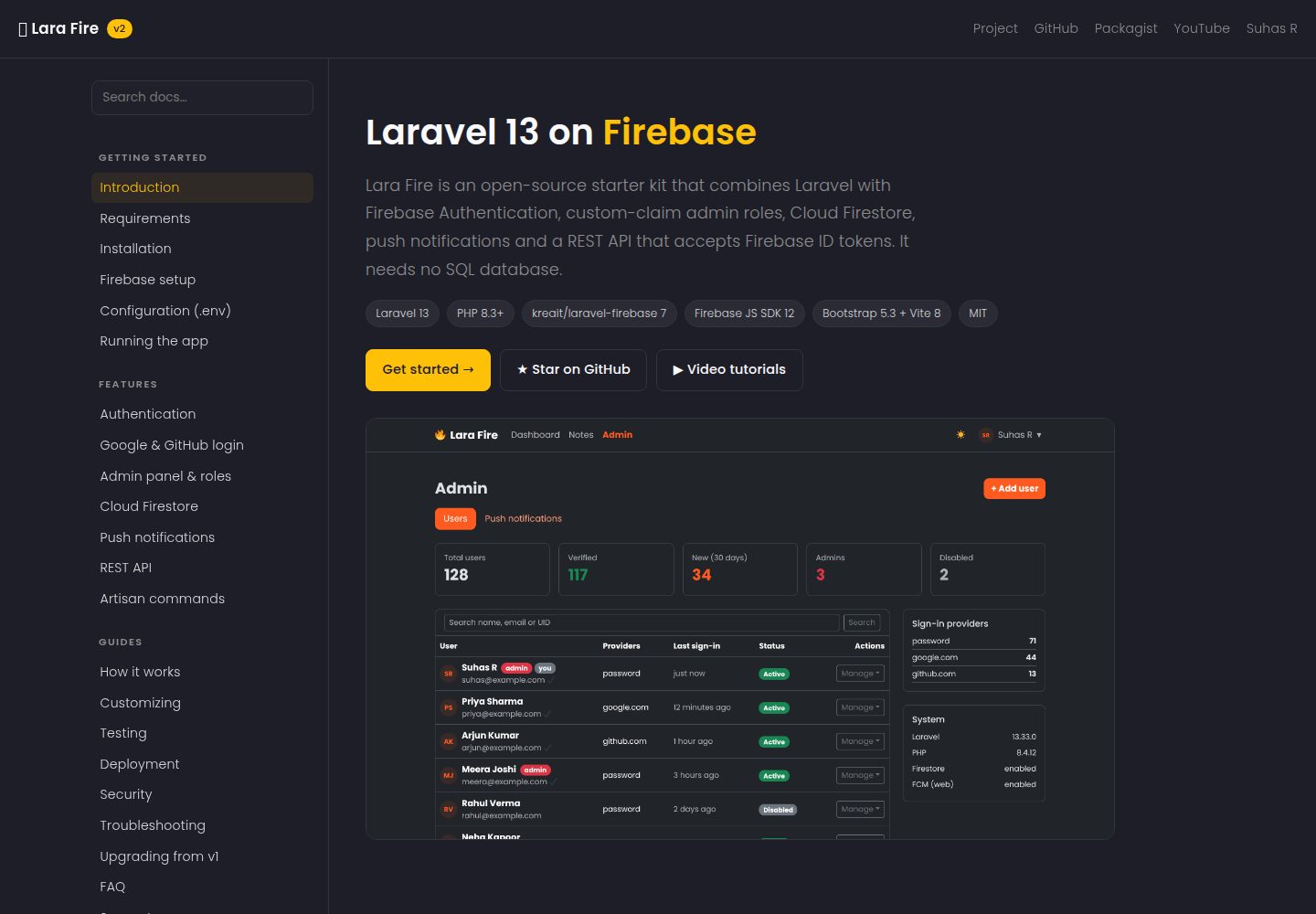
基于自定义声明的管理员面板,可搜索用户、授予或撤销管理员、启用或禁用账号
Cloud Firestore Notes 模块,通过 REST API 按用户进行增删改查,无需 gRPC 扩展
FCM 推送通知,用户按浏览器选择开启,管理员可广播或定向发送
/api/v1 REST API 使用 Firebase ID token 作为 Bearer 令牌认证
Bootstrap 5.3 界面支持深色模式,使用 Vite 构建前端资源
模板详细介绍
Lara-Fire 是一个 Laravel 启动器项目,把 Firebase 作为认证与数据后端,因此不需要自建 SQL 数据库。它提供邮箱/密码注册登录、Google 和 GitHub 第三方登录、邮箱验证与密码重置流程。管理员面板基于 Firebase 自定义声明(custom claims)控制权限,支持搜索用户、查看统计、授予或撤销管理员、启用或禁用账号以及发送重置链接。
数据层使用 Cloud Firestore 的 REST API 实现 Notes 模块,按用户维度进行增删改查,不依赖 gRPC 扩展,在 Windows 上也可直接运行。推送通知通过 FCM 实现,用户可在浏览器端按设备选择开启,管理员可向全部用户广播或定向单个用户发送消息。项目还提供 /api/v1 下的 REST API,使用 Firebase ID token 作为 Bearer 令牌访问。
界面基于 Bootstrap 5.3 构建并支持深色模式,使用 Vite 进行前端资源构建。仓库包含安装、Firebase 配置、API、测试与部署等文档,并附有视频教程链接。项目采用 MIT 许可发布,允许免费使用、修改、商用和分发该版本代码,但 Firebase 等外部服务的额度与收费需自行核对。
Laravel后台启动器
适合你的项目吗?
适用场景
- 需要快速搭建带第三方登录与邮箱验证的 Laravel 应用原型
- 希望用 Firebase 承担认证与数据存储、避免维护 SQL 数据库的项目
- 需要管理员后台来管理用户状态、角色与推送通知的运营场景
- 为移动端或前端提供基于 Firebase ID token 的 REST API 后端
适合人群
- 熟悉 Laravel 与 Firebase 控制台配置的开发者
- 需要 Firebase 认证与 Firestore 数据层起步模板的团队
- 希望以 MIT 许可使用并自行修改代码的项目
上手与定制指南
结合仓库当前版本的说明,按下面的资料检查内容、配置与运行要求。
- 1
通过 composer create-project suhasrkms/lara-fire my-app 创建项目,并执行 npm install && npm run build
- 2
在 Firebase 控制台生成服务账号私钥,保存为 storage/app/firebase/service-account.json
- 3
将 Firebase Web 配置填入 .env 的 FIREBASE_WEB_* 键,并在 Authentication 中启用所需登录方式
- 4
运行 php artisan larafire:about 检查配置,使用 php artisan larafire:make-admin 授予管理员权限
- 5
启用 FCM 推送需生成 Web Push 证书并设置 FIREBASE_WEB_VAPID_KEY;使用 Firestore 需在控制台创建数据库
授权与来源资料
使用条件与限制
免费使用 · 保留许可声明本次收录的是公开仓库中采用 MIT 许可的免费版本;免费范围为该版本代码,不代表外部服务或第三方素材免费。
使用时需要遵守
- 允许免费使用、修改、商用和分发该版本代码。
- 分发代码副本或实质性部分时,保留原作者版权声明和完整 MIT 许可声明。
- 代码按现状提供;担保与责任限制以原许可证及适用法律为准。
额外费用与待核对事项
- 使用前必须在 Firebase 控制台创建项目并生成服务账号私钥,保存为 storage/app/firebase/service-account.json,否则应用无法运行。
- 需在 Firebase 控制台获取 Web 配置并填入 .env 的 FIREBASE_WEB_* 键,属于外部服务配置要求。
- 需在 Firebase Authentication 中手动启用邮箱/密码及 Google、GitHub 登录方式,并添加授权域名。
- FCM 推送为可选功能,启用时需生成 Web Push 证书并设置 FIREBASE_WEB_VAPID_KEY。
- Cloud Firestore 笔记模块需先在 Firebase 控制台创建 Firestore 数据库,否则无法使用。
- 视频教程托管在外部 YouTube 频道,访问可能受网络与地区限制。
- README 提及 Firebase 集成;启用相关动态功能前需自行配置,并核对 Firebase 的额度与收费。
- 演示图片、字体、图标及其他第三方素材需按各自许可核对,不能仅凭代码的 MIT 许可判断。
- 域名、托管、数据库、支付或 AI 等外部服务可能另外收费。
查看原文依据
Permission is hereby granted, free of charge
许可证原文
open Firebase console → Project settings → Service accounts → *Generate new private key*
README 原文
copy the values into the `FIREBASE_WEB_*` keys in `.env`
README 原文
enable *Email/Password* plus *Google* and/or *GitHub*
README 原文
Generate a key pair under Project settings → Cloud Messaging → *Web Push certificates* and set `FIREBASE_WEB_VAPID_KEY`
README 原文
Create the database in Firebase console → **Firestore Database** → *Create database*
README 原文
https://github.com/suhasrkms/Lara-Fire/blob/master/LICENSE.mdhttps://github.com/suhasrkms/Lara-Fire/blob/master/README.mdWalkthroughs for this project are on [Seven Stac](https://www.youtube.com/@sevenstac)
README 原文
DeepSeek 根据仓库许可证和 README 整理 ·2026-10-01。结果仅覆盖已读取资料,依赖、图片、字体及后续条款变更以各自原文为准。
项目核对记录与介绍依据
模板资料
- 来源平台
- GitHub
- 资料与维护参考分
- 资料较完整 · 88 / 100
- 技术栈
- Laravel
- 网站类型
- 后台 · 启动器
这个分数如何计算
本站按许可资料(最高30分)、演示链接(12分)、预览图(10分)、Star数(15分)、记录的维护时间(15分)、描述完整度(8分)、功能记录(5分)和分类资料(5分)计算。它不是代码、安全或性能测试,也不是 Google 评分;有链接不代表已实测可用。
这个项目需要核对什么
- 记录的仓库更新时间
- 2026-09-28
- 截图检查日期
- 2026-10-01
已收录演示链接。请用你的内容与屏幕尺寸检查;有演示不代表表单、认证或支付已经可用。
目录记录的主要技术栈是 Laravel。请通过依赖清单和锁文件核对实际版本与托管要求。这些说明基于收录资料,不代表代码审计或部署实测。
查看具体选型方法 →介绍的制作与核对状态
介绍由 AI 辅助整理目录与仓库资料。仓库作者不等于这篇介绍的审核者。
已完成服务器许可规则与 AI 来源核对;未经过人工编辑审核。
查看当时使用的来源资料
SHA-256: 485e522efce5cea03222aa033b198bb6711b86b8b1e9352f0a7df22ccb3488f2
2026-10-01T02:26:26.731Z
来源文件 / 仓库<p align="center"><img src="https://img.shields.io/badge/Laravel-13-FF2D20?logo=laravel&logoColor=white" alt="Laravel 13"> <img src="https://img.shields.io/badge/Firebase-Auth%20%C2%B7%20Firestore%20%C2%B7%20FCM-FFCA28?logo=firebase&logoColor=black" alt="Firebase"> <img src="https://img.shields.io/badge/PHP-8.3%2B-777BB4?logo=php&logoColor=white" alt="PHP 8.3+"></p> # 🔥 Lara Fire [](https://packagist.org/packages/suhasrkms/lara-fire) [](https://packagist.org/packages/suhasrkms/lara-fire) [](https://github.com/suhasrkms/Lara-Fire/actions/workflows/tests.yml) [](LICENSE.md) [](https://suhasrkms.github.io/lara-fire-docs.html) **[📖 Documentation](https://suhasrkms.github.io/lara-fire-docs.html)** · [Installation](https://suhasrkms.github.io/lara-fire-docs.html#installation) · [Firebase setup](https://suhasrkms.github.io/lara-fire-docs.html#firebase-setup) · [REST API](https://suhasrkms.github.io/lara-fire-docs.html#api) · [Troubleshooting](https://suhasrkms.github.io/lara-fire-docs.html#troubleshooting) · [▶ Videos](https://www.youtube.com/@sevenstac) **A Laravel 13 + Firebase starter kit.** Firebase Authentication, an admin panel driven by custom claims, Cloud Firestore CRUD, push notifications and a REST API that accepts Firebase ID tokens. No SQL database is needed. | | Feature | |---|---| | 🔐 | Email/password, **Google** and **GitHub** sign-in, email verification, password reset | | 🛡️ | **Admin panel**: search, stats, grant/revoke admin, enable/disable users, send reset links | | 🗂️ | **Cloud Firestore** Notes module: per-user CRUD over REST, with no gRPC needed | | 🔔 | **FCM push**: users opt in per browser, and admins broadcast or target one user | | 🔌 | **REST API** `/api/v1` authenticated with `Authorization: Bearer <Firebase ID token>` | | 🌙 | Bootstrap 5.3 UI with dark mode, built with Vite 8 |  <p align="center"><img src=".github/screenshots/login.png" width="32%" alt="Login"> <img src=".github/screenshots/dashboard.png" width="32%" alt="Dashboard"> <img src=".github/screenshots/notes.png" width="32%" alt="Firestore notes"></p> ## 📖 Documentation The full docs are at **[suhasrkms.github.io/lara-fire-docs.html](https://suhasrkms.github.io/lara-fire-docs.html)**. | Getting started | Features | Guides | |---|---|---| | [Requirements](https://suhasrkms.github.io/lara-fire-docs.html#requirements) | [Authentication](https://suhasrkms.github.io/lara-fire-docs.html#authentication) | [How it works](https://suhasrkms.github.io/lara-fire-docs.html#architecture) | | [Installation](https://suhasrkms.github.io/lara-fire-docs.html#installation) | [Google & GitHub login](https://suhasrkms.github.io/lara-fire-docs.html#social-login) | [Customizing](https://suhasrkms.github.io/lara-fire-docs.html#customizing) | | [Firebase setup](https://suhasrkms.github.io/lara-fire-docs.html#firebase-setup) | [Admin panel & roles](https://suhasrkms.github.io/lara-fire-docs.html#admin) | [Testing](https://suhasrkms.github.io/lara-fire-docs.html#testing) | | [Configuration (.env)](https://suhasrkms.github.io/lara-fire-docs.html#configuration) | [Cloud Firestore](https://suhasrkms.github.io/lara-fire-docs.html#firestore) | [Deployment](https://suhasrkms.github.io/lara-fire-docs.html#deployment) | | [Running the app](https://suhasrkms.github.io/lara-fire-docs.html#running) | [Push notifications](https://suhasrkms.github.io/lara-fire-docs.html#push) | [Troubleshooting](https://suhasrkms.github.io/lara-fire-docs.html#troubleshooting) | | [Upgrading from v1](https://suhasrkms.github.io/lara-fire-docs.html#upgrading) | [REST API](https://suhasrkms.github.io/lara-fire-docs.html#api) | [FAQ](https://suhasrkms.github.io/lara-fire-docs.html#faq) | ## Quick start ```bash composer create-project suhasrkms/lara-fire my-app cd my-app npm install && npm run build ``` 1. **Service account:** open Firebase console → Project settings → Service accounts → *Generate new private key*. Save the file as `storage/app/firebase/service-account.json`. It is git-ignored. 2. **Web config:** under Project settings → General → Your apps → Web, copy the values into the `FIREBASE_WEB_*` keys in `.env`. 3. **Sign-in methods:** under Authentication → Sign-in method, enable *Email/Password* plus *Google* and/or *GitHub*. Add your domain under *Authorized domains*. 4. Run it: ```bash php artisan serve # or: composer dev (server + logs + vite) php artisan larafire:about # checks your setup ``` 5. Register an account, then give yourself admin rights from the terminal: ```bash php artisan larafire:make-admin [email protected] ``` ## Optional features ### Push notifications (FCM) Generate a key pair under Project settings → Cloud Messaging → *Web Push certificates* and set `FIREBASE_WEB_VAPID_KEY`. Users click **Enable on this device** on the dashboard. Admins send messages from **Admin → Push notifications**. The app uses topics (`larafire-all`, `larafire-user-<uid>`), so tokens don't need to be stored. ### Cloud Firestore Notes use Firestore's REST API with your service account. You don't need the `grpc` extension or any extra package, and it works on Windows as-is. Create the database in Firebase console → **Firestore Database** → *Create database*. Notes are stored in `notes/{id}` as `{ uid, title, body, created_at, updated_at }`. Suggested security rules if you also read Firestore from clients: ``` match /notes/{id} { allow read, write: if request.auth != null && request.auth.uid == resource.data.uid; } ``` ## REST API Get an ID token on the client (`await auth.currentUser.getIdToken()`) and send it as a bearer token: ```bash curl http://localhost:8000/api/v1/me -H "Authorization: Bearer $ID_TOKEN" ``` | Method | Endpoint | Auth | |---|---|---| | GET | `/api/v1/me` | ID token | | GET / POST | `/api/v1/notes` | ID token | | GET / PUT / DELETE | `/api/v1/notes/{id}` | ID token | ## Commands | Command | What it does | |---|---| | `larafire:make-admin {email} [--revoke]` | Grant or revoke the `admin` custom claim | | `larafire:about` | Show setup status and next steps | ## Upgrading from v1 v2 is a rewrite on Laravel 13. Your Firebase users and claims carry over unchanged. - Move your key to `storage/app/firebase/service-account.json` and update `FIREBASE_CREDENTIALS`. - The `/home/iamadmin` route has been **removed** because any user could promote themselves. Use `php artisan larafire:make-admin`. - See [CHANGELOG.md](CHANGELOG.md) for everything else. ## Testing ```bash composer test # Firebase is mocked, so no credentials are needed ``` ## 📺 Video tutorials Walkthroughs for this project are on [Seven Stac](https://www.youtube.com/@sevenstac). ## Contributing Issues and PRs are welcome. Please run `composer lint` and `composer test` before opening a PR. ## License MIT © [Suhas R](https://suhasrkms.github.io) --- <p align="center">Made with ❤️ by <a href="https://github.com/suhasrkms">suhasrkms</a></p>
看看同类模板
对比同技术栈与用途的模板,找到更适合的视觉与内容结构。

sage
WordPress starter theme with Laravel Blade components and templates, Tailwind CSS, and block editor support
Laravel · 启动器

wave
Wave - The Software as a Service Starter Kit, designed to help you build the SAAS of your dreams 🚀 💰
Laravel · SaaS

coreui-free-laravel-admin-template
CoreUI Free Laravel Bootstrap Admin Template
Laravel · 后台

sneat-bootstrap-html-laravel-admin-template-free
Most Powerful & Comprehensive Free Bootstrap 5 HTML Laravel Admin Dashboard Template built for developers!
Laravel · 后台

filament-starter
A beautiful starting point for your next TALL stack project using Filament. ⚡
Laravel · 启动器

electrik
Laravel SaaS starter kit: auth, teams, Stripe billing, and Slate 3 — Composer package for Laravel 12
Laravel · SaaS