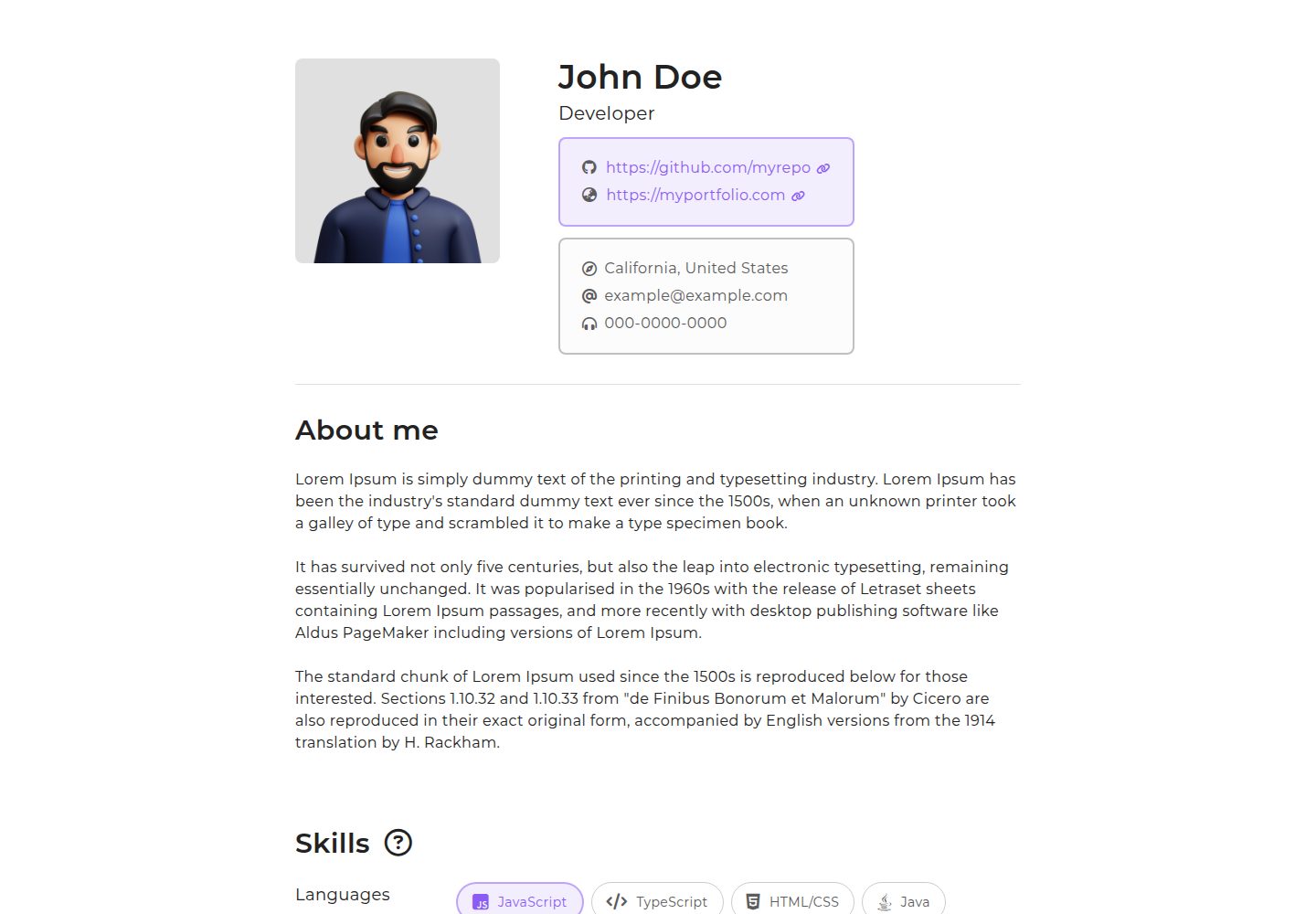
Static single-page resume template based on Next.js and TypeScript
Next.jsReactPortfolio
nexume — Next.js Portfolio Template
By taedonn
nexume is a static resume template based on Next.js and TypeScript. It generates a single-page resume project via the create-nexume-app scaffold and supports exporting static files for deployment.
Explore the design
Compare the page layouts and mobile experience. Open any screenshot for a closer look.
Desktop homepage1 / 2
Desktop captureTop of page
Actual screenshot captured by the server browser.
All pages & views 2
Screenshots show visual appearance; interactive behavior may differ.
Recorded 2026-10-13View source
What stands out
A quick read of the recorded project description.
Project generated via the create-nexume-app scaffold with the command npx create-nexume-app <my-app>
Requires Node.js 18 or higher; the README provides three upgrade methods: Homebrew, nvm, and sudo n
Supports static export with build command npm run build or next build, and output directory out
Root-level nexume.config.ts allows configuration of title, description, icon, images, URL, content width, and theme color
Template Details
nexume is a simple static resume template written with Next.js and TypeScript. The README positions it as a single-page resume template. Installation involves globally installing create-nexume-app, then running npx create-nexume-app <my-app> to generate a folder containing the basic template; afterward, the global package can be uninstalled.
The project requires Node.js 18 or higher. The README provides commands to upgrade or switch Node versions via Homebrew, nvm, or sudo n. For deployment, the README states that most hosting platforms can set the build command to npm run build or next build, with the output directory set to out; if using Vercel, no additional configuration is needed as Vercel automatically detects the output directory.
The template uses a fixed directory structure: public holds public images such as favicon.ico and profile_img.png, app holds tsx files such as page.tsx and layout.tsx, and out holds exported static assets (HTML, JS, CSS). The root-level nexume.config.ts provides configuration options including title, description, icon, images, url, profileImg, width, and color, used to adjust the page title, metadata, icons, image paths, public address, maximum content width, and theme color. The README does not provide information on resume content fields, multi-page routing, forms, or backend integration.
Next.jsPortfolio
Is it right for your project?
Use Cases
- Creating a single-page online resume and deploying it to a static hosting platform
- Using Next.js and TypeScript as the technical foundation for a resume page
- Exporting the resume as static HTML/CSS/JS files for hosting
- Quickly adjusting the resume page's title, metadata, and theme color via a configuration file
Suitable For
- Developers familiar with Node.js and npm command line
- Users who want to build a static resume page using Next.js and TypeScript
- Users who need to deploy the resume to a platform supporting static file hosting
- Users who accept the fixed directory structure and configuration approach described in the README
Getting started & customization
Use these recorded setup notes alongside the repository instructions for your chosen version.
- 1
Node.js 18 or higher must be installed first; check with node -v
- 2
Install the scaffold globally: npm i -g create-nexume-app
- 3
Run npx create-nexume-app <my-app> to generate the project folder
- 4
Build command is npm run build or next build, with output directory out
- 5
When deploying with Vercel, no output directory configuration is needed; Vercel automatically detects it
License & source material
Usage conditions & limitations
Free to use · keep license noticeThis entry covers the free version under the MIT license from the public repository; the free scope applies to that version's code and does not imply that external services or third-party assets are free.
Must comply with when using
- Free use, modification, commercial use, and distribution of that version's code are permitted.
- When distributing copies or substantial portions of the code, retain the original author's copyright notice and the full MIT license notice.
- The code is provided as-is; warranties and limitations of liability are governed by the original license and applicable law.
Additional costs & items to verify
- Demo images, fonts, icons, and other third-party assets must be checked against their respective licenses; they cannot be assumed to be covered by the code's MIT license.
- External services such as domains, hosting, databases, payments, or AI may incur additional charges.
- Before use, ensure Node.js 18 or higher is installed locally; otherwise the template cannot run.
- The create-nexume-app scaffold package must be installed globally first to generate the project template.
- The project is generated via the command npx create-nexume-app <my-app>; this scaffold must be used rather than cloning directly.
- When deploying, the build command must be set to npm run build or next build.
- When deploying, the output directory must be set to out.
- The project requires following a fixed directory structure; the folder layout cannot be adjusted arbitrarily.
View Original Text Basis
Permission is hereby granted, free of charge
Original License Text
Make sure `node.js` version over 18 is installed on your machine.
Original README
npm i -g create-nexume-app
Original README
npx create-nexume-app <my-app>
Original README
- Build command: `npm run build` or `next build`
Original README
- Output folder: `out`
Original README
https://github.com/taedonn/nexume/blob/main/LICENSEhttps://github.com/taedonn/nexume/blob/main/README.md`nexume` requires a precise folder structure:
Original README
Compiled by DeepSeek based on repository license and README ·2026-10-13. Results only cover the materials read; dependencies, images, fonts, and subsequent term changes are subject to their respective original texts.
Project checks & description sources
Template Information
- Source platforms
- GitHub
- Documentation and maintenance reference score
- Partly documented · 65 / 100
- Technologies
- Next.js · React
- Website type
- Portfolio
How this score is calculated
Our heuristic uses license records (up to 30), a demo link (12), a preview (10), stars (15), recorded maintenance (15), description completeness (8), feature records (5) and classification data (5). It is not a code, security or performance test, or a Google score. A link does not establish tested functionality.
What to verify for this project
- Repository update recorded
- 2024-04-05
- Screenshot last checked
- 2026-10-13
A demo link is listed. Check it with your own content and viewport sizes; its presence does not confirm that forms, authentication or payments work.
The catalog identifies Next.js as the primary stack. Check the actual dependency manifest and lockfile for versions and hosting requirements. These notes use recorded metadata, not a code audit or a deployment test.
Use a selection guide →How this description was prepared
AI-assisted description based on catalog records and repository material. Repository authors are not automatically the reviewers of this description.
Review declaration: codex-user-requested-batch-review-20261015 · 2026-10-15
Inspect the recorded source material
SHA-256: 8155485a28ead14fcfda52b91849e3301878dad2e4733ff9ef2dfd1e5c96e668
2026-10-13T17:58:30.389Z
Source file / repository# Nexume


`nexume` is a simple and static resume template using [Next.js](https://github.com/vercel/next.js) and [TypeScript](https://github.com/microsoft/TypeScript).
- [Nexume](#nexume)
- [Getting started](#getting-started)
- [Before installing](#before-installing)
- [Deploying your app](#deploying-your-app)
- [Folder structure](#folder-structure)
- [`public`](#public)
- [`app`](#app)
- [`out`](#out)
- [Config](#config)
- [Options](#options)
- [License](#license)
-----
## Getting started
`nexume` can be installed by running the following commands.
First, install `create-nexume-app` globally.
```bash
npm i -g create-nexume-app
```
Then, run following `npx` command which will generate a folder containg basic nexume template.
```bash
npx create-nexume-app <my-app>
```
> You can then remove globally installed package by running `npm uninstall -g create-nexume-app`.
-----
## Before installing
Make sure `node.js` version over 18 is installed on your machine.
```bash
node -v
```
> if node version is below 18, you can run one of the following commands to upgrade or change node version.
`Homebrew`
```bash
# Install node version using homebrew.
brew install node@18
# Unlink previously used node version.
brew unlink node
# Link newly installed node version.
brew link node@18
```
`nvm`
```bash
# Install node version using nvm.
nvm install v18.12.0
# Choose newly installed node version.
nvm use v18.12.0
```
`sudo`
```bash
# Install node version using sudo.
sudo n 18.12.0
# Choose newly installed node version on drop-down menu.
sudo n
```
-----
## Deploying your app
Most hosting platforms allow you to define `build` command and `output` folder:
- Build command: `npm run build` or `next build`
- Output folder: `out`
> If you are using [Vercel](https://vercel.com), you don't need to configure any options since vercel will automatically detect output directory.
-----
## Folder structure
`nexume` requires a precise folder structure:
- `public`: Contains all publicly accessible images (`favicon.ico`, `profile_img.png`)
- `app`: Contains all tsx files (`page.tsx`, `layout.tsx`)
- `out`: Contains all static assets (`html`, `js`, `css`)
> See complete documentation at [Next.js project structure](https://nextjs.org/docs/getting-started/project-structure).
### `public`
Next.js serve static assets inside a folder called `public` in the root directory.
Files inside `public` can be referenced starting from the base url(/).
For example, if you want to reference `/public/profile_img.png` in your code,
you can do so by writing `/profile_img.png` as path.
### `app`
Next.js introduced `app router` in version 13, which argues to offer improved route handling.
It will be unnecessary to get into details of `app routing` in this doc, since `nexume` only offers single page resume template.
> You can explore more about `app routing` at [App Router | Next.js](https://nextjs.org/docs/app/building-your-application/routing#advanced-routing-patterns)
### `out`
Next.js allow you to export static files by breaking a strict SPA into individual HTML files.
This allows you to deploy this project on any hosting platform that serve static HTML/CSS/JS files.
Broken down static assets are all stored inside `out` folder in the root directory.
-----
## Config
Some configurable options are stored inside `nexume.config.ts` in the root directory.
This config file is made to offer easier customization of some basic layout of the template.
### Options
| name | type | default | description |
|:----------- |:-------:|:------------------------------- |:--------------------------------------------- |
| title | string | John Doe's resume | Title of the page. |
| description | string | John Doe's resume using nexume. | Description metadata of the page. |
| icon | string | /favicon.ico | Icon file path. |
| images | string | /og_img.png | Meta img path. |
| url | string | https://localhost:3000 | Public url. |
| profileImg | string | /profile_img.png | Profile image file path. |
| width | integer | 794 | Maximum width of the content. |
| color | string | #845CF5 | Hex color code used as the basic theme color. |
-----
## License
MIT License © 2023-PRESENT, Nexume
Explore similar templates
Compare previews and descriptions within the same stack and category.

react-resume-template
A personal resume website template for software developers, built with Next.js, React, and TypeScript and styled with Tailwind CSS. Site content is driven by a single data file at /src/data/data.tsx, with types in dataDef.ts and images in src/images/.
Next.js · Portfolio

nxt-lnk
nxt-lnk is a Next.js-based bio link page template that manages personal information and links via BioData.js and LinksData.js, positioned as a self-hosted alternative to Linktree. It groups links by type, supports enabling/disabling individual links, and offers hexagonal or oval avatars.
Next.js · Portfolio

sylph
Sylph is a minimal portfolio and blog template built on Next.js, supporting MDX/Markdown writing, light/dark themes, and automatic OG image generation. It includes sitemap, robots.txt, metadata, and syntax highlighting, with automatic blog timestamps.
Next.js · Portfolio

sleek-portfolio
A modern, responsive portfolio template built with Next.js 15, TypeScript, Tailwind CSS, and Shadcn UI. It includes an MDX blog, project showcase, work experience timeline, and a contact form that receives messages via Telegram Bot.
Next.js · Portfolio

research-website-template
A React + Next.js template for research personal websites, aimed at PhD students and researchers. It centralizes publications, projects, and other content in src/data as arrays of objects, with optional fields automatically generating UI components.
Next.js · Portfolio

shadcn-portfolio
A developer portfolio template built with Next.js 15, shadcn/ui, Tailwind CSS, and Framer Motion, featuring an MDX blog, light and dark modes, responsive design, and SEO meta tags.
Next.js · Portfolio