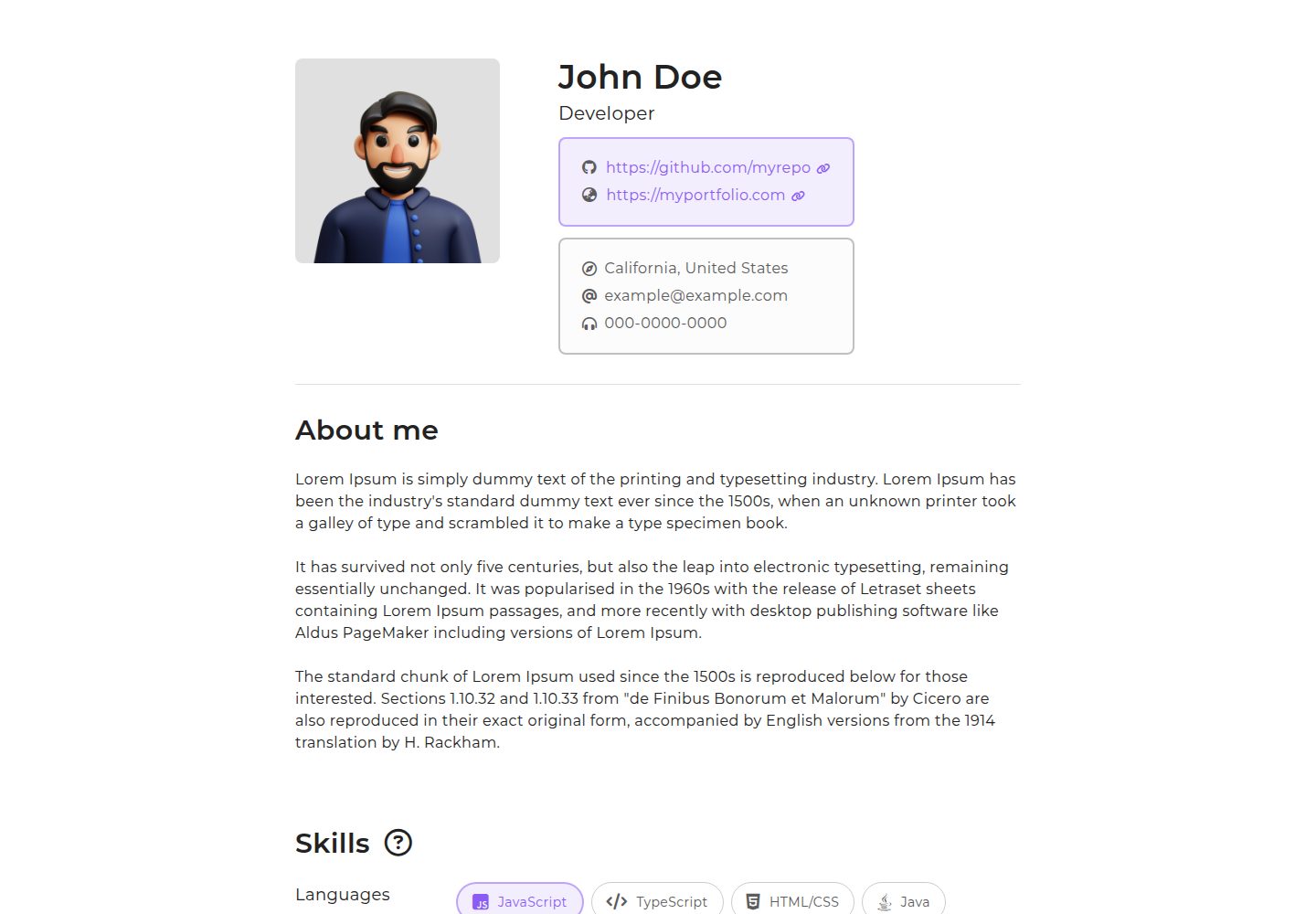
基于 Next.js 与 TypeScript 的静态单页简历模板
Next.jsReact作品集
nexume — Next.js 作品集模板
作者 taedonn
nexume 是一个基于 Next.js 与 TypeScript 的静态简历模板,通过 create-nexume-app 脚手架生成单页简历项目,并支持导出静态文件部署。
看看你的网站会是什么样
浏览真实页面截图,比较内容排版与手机效果。点击下方缩略图切换,放大查看整页细节。
全部页面与视图 2
截图用于了解视觉与布局,交互效果请以实际项目为准。
采集于 2026-10-13查看来源
值得关注的模板亮点
从已有项目资料中,快速了解它的特点。
通过 create-nexume-app 脚手架生成项目,命令为 npx create-nexume-app <my-app>
要求 Node.js 18 及以上版本,README 提供 Homebrew、nvm、sudo n 三种升级方式
支持静态导出,构建命令为 npm run build 或 next build,输出目录为 out
根目录 nexume.config.ts 可配置标题、描述、图标、图片、URL、内容宽度和主题色
模板详细介绍
nexume 是一个使用 Next.js 和 TypeScript 编写的简单静态简历模板,README 将其定位为单页简历模板。安装方式为全局安装 create-nexume-app,再运行 npx create-nexume-app <my-app> 生成包含基础模板的文件夹,之后可卸载全局包。
项目要求 Node.js 18 及以上版本,README 给出了通过 Homebrew、nvm 或 sudo n 升级或切换 Node 版本的命令。部署方面,README 说明多数托管平台可设置构建命令 npm run build 或 next build,输出目录为 out;若使用 Vercel 则无需额外配置,Vercel 会自动识别输出目录。
模板采用固定目录结构:public 存放 favicon.ico、profile_img.png 等公开图片,app 存放 page.tsx、layout.tsx 等 tsx 文件,out 存放导出的 html、js、css 静态资源。根目录的 nexume.config.ts 提供 title、description、icon、images、url、profileImg、width、color 等配置项,用于调整页面标题、元数据、图标、图片路径、公开地址、内容最大宽度和主题色。README 未提供简历内容字段、多页面路由、表单或后端集成等说明。
Next.js作品集
适合你的项目吗?
适用场景
- 个人制作单页在线简历并部署到静态托管平台
- 使用 Next.js 与 TypeScript 作为简历页面的技术基础
- 需要将简历导出为静态 HTML/CSS/JS 文件进行托管
- 通过配置文件快速调整简历页面的标题、元数据和主题色
适合人群
- 熟悉 Node.js 与 npm 命令行的开发者
- 希望使用 Next.js 和 TypeScript 构建静态简历页面的用户
- 需要将简历部署到支持静态文件托管平台的用户
- 接受 README 所述固定目录结构与配置方式的用户
上手与定制指南
结合仓库当前版本的说明,按下面的资料检查内容、配置与运行要求。
- 1
需先安装 Node.js 18 或更高版本,可用 node -v 检查
- 2
全局安装脚手架:npm i -g create-nexume-app
- 3
运行 npx create-nexume-app <my-app> 生成项目文件夹
- 4
构建命令为 npm run build 或 next build,输出目录为 out
- 5
使用 Vercel 部署时无需配置输出目录,Vercel 会自动识别
授权与来源资料
使用条件与限制
免费使用 · 保留许可声明本次收录的是公开仓库中采用 MIT 许可的免费版本;免费范围为该版本代码,不代表外部服务或第三方素材免费。
使用时需要遵守
- 允许免费使用、修改、商用和分发该版本代码。
- 分发代码副本或实质性部分时,保留原作者版权声明和完整 MIT 许可声明。
- 代码按现状提供;担保与责任限制以原许可证及适用法律为准。
额外费用与待核对事项
- 演示图片、字体、图标及其他第三方素材需按各自许可核对,不能仅凭代码的 MIT 许可判断。
- 域名、托管、数据库、支付或 AI 等外部服务可能另外收费。
- 使用前需确保本机安装 Node.js 18 或更高版本,否则无法运行该模板。
- 需先全局安装 create-nexume-app 脚手架包,才能生成项目模板。
- 项目通过 npx create-nexume-app <my-app> 命令生成,需使用该脚手架而非直接克隆使用。
- 部署时需将构建命令设置为 npm run build 或 next build。
- 部署时需将输出目录设置为 out。
- 项目要求遵循固定的目录结构,不能随意调整文件夹布局。
查看原文依据
Permission is hereby granted, free of charge
许可证原文
Make sure `node.js` version over 18 is installed on your machine.
README 原文
npm i -g create-nexume-app
README 原文
npx create-nexume-app <my-app>
README 原文
- Build command: `npm run build` or `next build`
README 原文
- Output folder: `out`
README 原文
https://github.com/taedonn/nexume/blob/main/LICENSEhttps://github.com/taedonn/nexume/blob/main/README.md`nexume` requires a precise folder structure:
README 原文
DeepSeek 根据仓库许可证和 README 整理 ·2026-10-13。结果仅覆盖已读取资料,依赖、图片、字体及后续条款变更以各自原文为准。
项目核对记录与介绍依据
模板资料
- 来源平台
- GitHub
- 资料与维护参考分
- 资料一般 · 65 / 100
- 技术栈
- Next.js · React
- 网站类型
- 作品集
这个分数如何计算
本站按许可资料(最高30分)、演示链接(12分)、预览图(10分)、Star数(15分)、记录的维护时间(15分)、描述完整度(8分)、功能记录(5分)和分类资料(5分)计算。它不是代码、安全或性能测试,也不是 Google 评分;有链接不代表已实测可用。
这个项目需要核对什么
- 记录的仓库更新时间
- 2024-04-05
- 截图检查日期
- 2026-10-13
已收录演示链接。请用你的内容与屏幕尺寸检查;有演示不代表表单、认证或支付已经可用。
目录记录的主要技术栈是 Next.js。请通过依赖清单和锁文件核对实际版本与托管要求。这些说明基于收录资料,不代表代码审计或部署实测。
查看具体选型方法 →介绍的制作与核对状态
介绍由 AI 辅助整理目录与仓库资料。仓库作者不等于这篇介绍的审核者。
审核声明: codex-user-requested-batch-review-20261015 · 2026-10-15
查看当时使用的来源资料
SHA-256: 8155485a28ead14fcfda52b91849e3301878dad2e4733ff9ef2dfd1e5c96e668
2026-10-13T17:58:30.389Z
来源文件 / 仓库# Nexume


`nexume` is a simple and static resume template using [Next.js](https://github.com/vercel/next.js) and [TypeScript](https://github.com/microsoft/TypeScript).
- [Nexume](#nexume)
- [Getting started](#getting-started)
- [Before installing](#before-installing)
- [Deploying your app](#deploying-your-app)
- [Folder structure](#folder-structure)
- [`public`](#public)
- [`app`](#app)
- [`out`](#out)
- [Config](#config)
- [Options](#options)
- [License](#license)
-----
## Getting started
`nexume` can be installed by running the following commands.
First, install `create-nexume-app` globally.
```bash
npm i -g create-nexume-app
```
Then, run following `npx` command which will generate a folder containg basic nexume template.
```bash
npx create-nexume-app <my-app>
```
> You can then remove globally installed package by running `npm uninstall -g create-nexume-app`.
-----
## Before installing
Make sure `node.js` version over 18 is installed on your machine.
```bash
node -v
```
> if node version is below 18, you can run one of the following commands to upgrade or change node version.
`Homebrew`
```bash
# Install node version using homebrew.
brew install node@18
# Unlink previously used node version.
brew unlink node
# Link newly installed node version.
brew link node@18
```
`nvm`
```bash
# Install node version using nvm.
nvm install v18.12.0
# Choose newly installed node version.
nvm use v18.12.0
```
`sudo`
```bash
# Install node version using sudo.
sudo n 18.12.0
# Choose newly installed node version on drop-down menu.
sudo n
```
-----
## Deploying your app
Most hosting platforms allow you to define `build` command and `output` folder:
- Build command: `npm run build` or `next build`
- Output folder: `out`
> If you are using [Vercel](https://vercel.com), you don't need to configure any options since vercel will automatically detect output directory.
-----
## Folder structure
`nexume` requires a precise folder structure:
- `public`: Contains all publicly accessible images (`favicon.ico`, `profile_img.png`)
- `app`: Contains all tsx files (`page.tsx`, `layout.tsx`)
- `out`: Contains all static assets (`html`, `js`, `css`)
> See complete documentation at [Next.js project structure](https://nextjs.org/docs/getting-started/project-structure).
### `public`
Next.js serve static assets inside a folder called `public` in the root directory.
Files inside `public` can be referenced starting from the base url(/).
For example, if you want to reference `/public/profile_img.png` in your code,
you can do so by writing `/profile_img.png` as path.
### `app`
Next.js introduced `app router` in version 13, which argues to offer improved route handling.
It will be unnecessary to get into details of `app routing` in this doc, since `nexume` only offers single page resume template.
> You can explore more about `app routing` at [App Router | Next.js](https://nextjs.org/docs/app/building-your-application/routing#advanced-routing-patterns)
### `out`
Next.js allow you to export static files by breaking a strict SPA into individual HTML files.
This allows you to deploy this project on any hosting platform that serve static HTML/CSS/JS files.
Broken down static assets are all stored inside `out` folder in the root directory.
-----
## Config
Some configurable options are stored inside `nexume.config.ts` in the root directory.
This config file is made to offer easier customization of some basic layout of the template.
### Options
| name | type | default | description |
|:----------- |:-------:|:------------------------------- |:--------------------------------------------- |
| title | string | John Doe's resume | Title of the page. |
| description | string | John Doe's resume using nexume. | Description metadata of the page. |
| icon | string | /favicon.ico | Icon file path. |
| images | string | /og_img.png | Meta img path. |
| url | string | https://localhost:3000 | Public url. |
| profileImg | string | /profile_img.png | Profile image file path. |
| width | integer | 794 | Maximum width of the content. |
| color | string | #845CF5 | Hex color code used as the basic theme color. |
-----
## License
MIT License © 2023-PRESENT, Nexume
看看同类模板
对比同技术栈与用途的模板,找到更适合的视觉与内容结构。

react-resume-template
A personal resume website template built with React.js, Typescript, Next.js, and styled with Tailwind css
Next.js · 作品集

nxt-lnk
Custom bio links for creatives who love coding. A perfect custom alternative for linktree, bio and other short…
Next.js · 作品集

sylph
A minimal portfolio template.
Next.js · 作品集

sleek-portfolio
sleek-portfolio 是一个面向开发者个人品牌展示的现代作品集模板,基于 Next.js 15、TypeScript、Tailwind CSS 和 Shadcn UI 构建。
Next.js · 作品集

research-website-template
React + Next.js template for research websites (for PhD students, researchers, etc)
Next.js · 作品集

shadcn-portfolio
shadcn-portfolio 是一个面向开发者的作品集模板,技术栈为 Next.js 15、shadcn/ui、Tailwind CSS 和 Framer Motion。
Next.js · 作品集