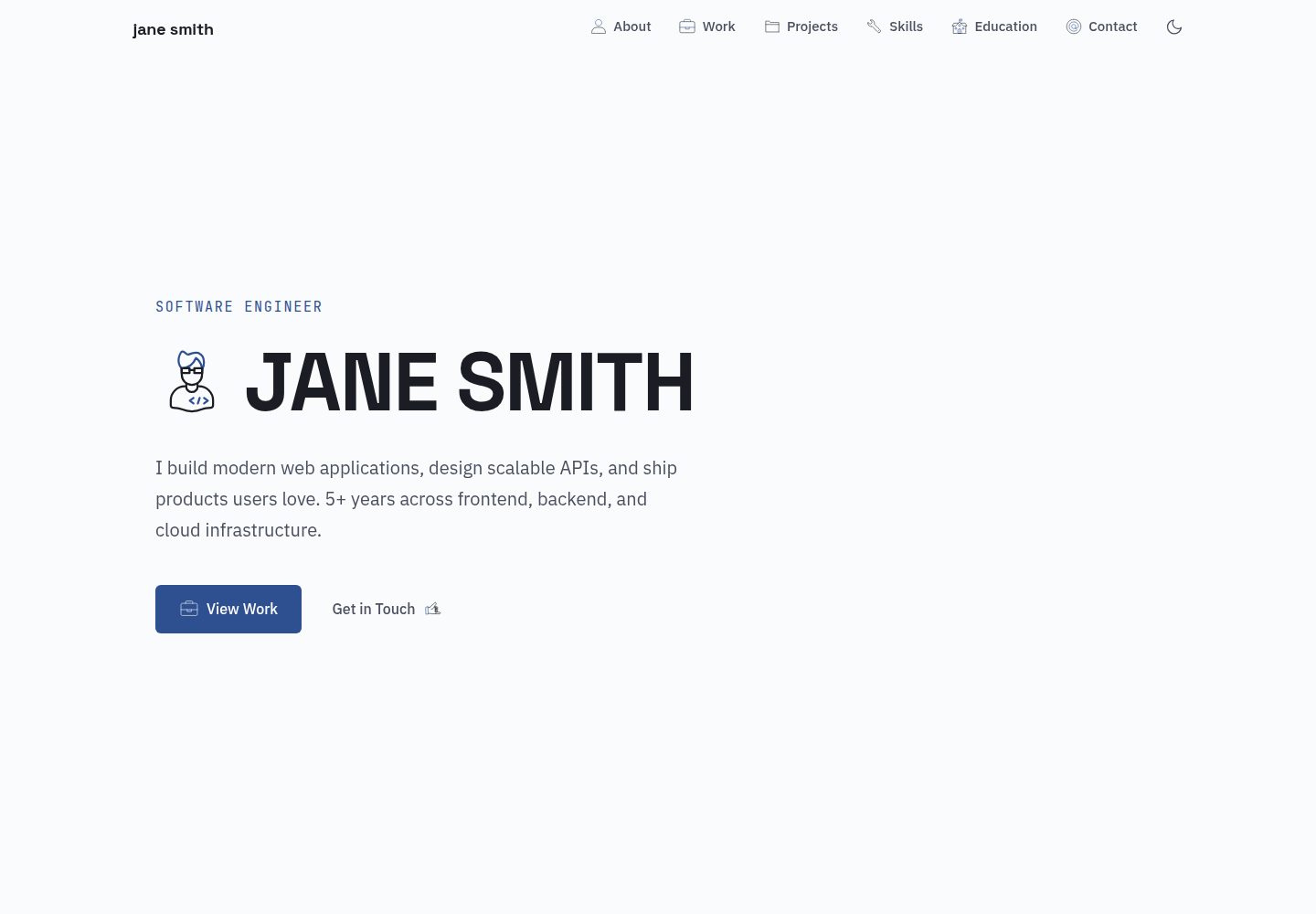
Content is driven by YAML files under src/data/, with no CMS, Markdown, or database required
AstroPortfolio
astro-monograph — Astro Portfolio Template
By theserverlessdev
Astro Monograph is an Astro-based single-page portfolio theme where all copy and entries are driven by YAML files under src/data/, suitable for publishing a resume-style personal portfolio as a static site.
Explore the design
Compare the page layouts and mobile experience. Open any screenshot for a closer look.
Desktop homepage1 / 2
Desktop captureTop of page
Actual screenshot captured by the server browser.
All pages & views 2
Screenshots show visual appearance; interactive behavior may differ.
Recorded 2026-10-02View source
What stands out
A quick read of the recorded project description.
Single-page structure with sections for hero, about, experience, projects, skills, education, and contact
Light and dark color schemes; first visit follows system preference, and the navigation bar allows manual switching and remembers the choice
Colors are centrally defined as CSS custom properties; changing the variables recolors the whole site
Icons use Lord Icon, referenced by hash in YAML
Includes a GitHub Pages deployment workflow; Vercel, Netlify, and Cloudflare Pages can automatically detect it
Template Details
Astro Monograph is a single-page theme for personal portfolios, built with Astro. Its content does not rely on a CMS, Markdown, or a database; instead, it is centralized in YAML files under the src/data/ directory. The repository README lists eight data files that control site information, the hero section, about, work experience, projects, skills, education, and contact details. Replacing these files completes content customization.
The theme generates pages as a static site by default and includes light and dark color schemes. On first visit it follows the system preference; the navigation bar provides manual switching and saves the choice in localStorage. Colors are centrally defined via CSS custom properties in src/styles/global.css, so changing the variables recolors the whole site. Icons use Lord Icon and are referenced by hash in YAML; fonts are loaded from Google Fonts: Space Grotesk, JetBrains Mono, and IBM Plex Sans.
Regarding usage limitations, the repository is under the MIT license, and the free scope covers only this version's code; third-party assets such as demo images, fonts, and icons must be checked separately under their respective licenses. Before deployment, set site in astro.config.mjs; if deploying to a GitHub Pages subpath, also set base. The repository includes a GitHub Pages workflow, and Vercel, Netlify, and Cloudflare Pages can automatically detect Astro projects. The Astro and Tailwind version numbers mentioned in the README were not verified against the dependency list and are not detailed here.
AstroPortfolio
Is it right for your project?
Use Cases
- Creating a resume-style single-page portfolio to present experience, projects, and skills in one place
- Static sites where content is maintained in YAML and no CMS or database is desired
- Personal homepages that need light/dark mode switching and scroll reveal effects
- Static sites deployed to GitHub Pages, Vercel, Netlify, or Cloudflare Pages
Suitable For
- Developers with front-end basics who can edit YAML and CSS variables
- Independent developers or designers who need to quickly build a single-page personal portfolio
- Users who prefer statically generated sites with no backend dependency
Getting started & customization
Use these recorded setup notes alongside the repository instructions for your chosen version.
- 1
After cloning the repository, run npm install and npm run dev to start local development
- 2
Edit the YAML files under src/data/ to replace placeholder content
- 3
Before deployment, set site in astro.config.mjs; when deploying to a subpath, set base
- 4
Replace public/favicon.svg and set ogImage and themeColor in site.yaml
- 5
Third-party assets such as demo images, fonts, and icons must be checked separately under their respective licenses
License & source material
Usage conditions & limitations
Free to use · keep license noticeThis entry covers the free version under the MIT license in the public repository; the free scope applies to this version's code and does not mean external services or third-party assets are free.
Must comply with when using
- Free use, modification, commercial use, and distribution of this version's code are permitted.
- When distributing copies or substantial portions of the code, retain the original author's copyright notice and the full MIT license notice.
- The code is provided as is; warranties and limitations of liability are governed by the original license and applicable law.
Additional costs & items to verify
- Icons depend on the third-party service Lord Icon; icon hashes must be obtained from lordicon.com. The licensing and free scope of that service and its icon assets must be checked independently and are not covered by the MIT code license.
- Fonts are loaded externally from Google Fonts, which are third-party resources; their licensing and availability must be checked separately and are not granted along with the MIT code license.
- Adding icons requires visiting lordicon.com and referencing its CDN, which is an external service dependency and may be subject to that site's terms and icon licensing.
- Demo images, fonts, icons, and other third-party assets must be checked under their respective licenses; they cannot be judged solely by the code's MIT license.
- External services such as domains, hosting, databases, payments, or AI may incur additional charges.
View Original Text Basis
Permission is hereby granted, free of charge
Original License Text
Icons use [Lord Icon](https://lordicon.com/) with morph animation triggers. Each is referenced by a hash in the YAML files.
Original README
Three font families loaded from Google Fonts (configured in `BaseLayout.astro`)
Original README
https://github.com/theserverlessdev/astro-monograph/blob/main/LICENSEhttps://github.com/theserverlessdev/astro-monograph/blob/main/README.mdBrowse [lordicon.com/icons](https://lordicon.com/icons) to find new ones — grab the hash from the CDN URL.
Original README
Compiled by DeepSeek based on repository license and README ·2026-10-02. Results only cover the materials read; dependencies, images, fonts, and subsequent term changes are subject to their respective original texts.
Project checks & description sources
Template Information
- Source platforms
- GitHub
- Documentation and maintenance reference score
- More documented · 83 / 100
- Technologies
- Astro
- Website type
- Portfolio
How this score is calculated
Our heuristic uses license records (up to 30), a demo link (12), a preview (10), stars (15), recorded maintenance (15), description completeness (8), feature records (5) and classification data (5). It is not a code, security or performance test, or a Google score. A link does not establish tested functionality.
What to verify for this project
- Repository update recorded
- 2026-03-30
- Screenshot last checked
- 2026-10-02
A demo link is listed. Check it with your own content and viewport sizes; its presence does not confirm that forms, authentication or payments work.
The catalog identifies Astro as the primary stack. Check the actual dependency manifest and lockfile for versions and hosting requirements. These notes use recorded metadata, not a code audit or a deployment test.
Use a selection guide →How this description was prepared
AI-assisted description based on catalog records and repository material. Repository authors are not automatically the reviewers of this description.
Automatically checked against source and license rules; no manual editorial review.
Inspect the recorded source material
SHA-256: abb72fee20a709e77b9611243bcdda94b1588aca13b84c6008eebad6165fd3a5
2026-10-02T20:57:28.433Z
Source file / repository# Astro Monograph
A clean, minimal, single-page portfolio theme for [Astro](https://astro.build). All content is driven by YAML files — edit your data, deploy, done.
**[Live Demo](https://monograph.theserverless.dev)**
  
## Features
- **YAML-driven content** — no CMS, no markdown, no database
- **Astro v6** — static site generation, zero client JS by default
- **Tailwind CSS v4** — utility-first styling with a custom design system
- **Lord Icon animations** — animated icons with morph triggers and scroll-reveal
- **Light & dark mode** — follows system preference by default, with a manual toggle; fully customizable color palettes for both modes
- **Scroll-triggered reveals** — smooth fade-in animations as you scroll
- **Mobile responsive** — looks great on all screen sizes
- **Accessible** — semantic HTML, keyboard navigation, `prefers-reduced-motion` support
- **SEO optimized** — JSON-LD structured data, Open Graph, Twitter cards, sitemap, canonical URLs, meta generator tag
- **One-command deploy** — GitHub Pages workflow included; works with Vercel/Netlify out of the box
## Quick Start
```bash
git clone https://github.com/theserverlessdev/astro-monograph.git my-portfolio
cd my-portfolio
npm install
npm run dev
```
Open `src/data/` and replace the placeholder content with your own.
## Content Structure
All text content lives in YAML files under `src/data/`:
| File | What it controls |
|------|-----------------|
| `site.yaml` | Site title, description, name, email, social links, nav items, OG image, theme color |
| `hero.yaml` | Hero section — subtitle, name, description, CTAs |
| `about.yaml` | About section — bio paragraphs, stat cards |
| `experience.yaml` | Work timeline — companies, roles, dates, tech stacks |
| `projects.yaml` | Project cards — with status filtering and expand/collapse |
| `skills.yaml` | Categorized skill tags |
| `education.yaml` | Degree, institution, highlights |
| `contact.yaml` | Contact CTA text, email icon, footer attribution |
## Customization
### Dark Mode
The theme supports light mode, dark mode, and system preference (the default). On first visit the site follows the user's OS setting. A toggle in the navbar lets visitors switch manually — their choice is saved in `localStorage`.
### Colors
Every color used in the theme is defined as a CSS custom property in `src/styles/global.css`. The `@theme` block sets the light-mode palette, and the `.dark` block overrides it for dark mode. To change the look of either mode, update these variables:
```css
/* Light mode (default) */
@theme {
--color-ink: #1A1D23; /* primary text */
--color-ink-secondary: #4A5060; /* secondary text */
--color-ink-tertiary: #8890A0; /* muted text */
--color-ink-on-dark: #FFFFFF; /* text on accent backgrounds */
--color-ink-on-dark-secondary: rgba(255, 255, 255, 0.75);
--color-surface: #FAFBFC; /* page background */
--color-surface-raised: #FFFFFF; /* cards */
--color-surface-sunken: #F3F4F6; /* alternate section background */
--color-surface-alt: #F0F2F5; /* misc surfaces */
--color-accent: #2E5090; /* main accent */
--color-accent-light: #3A6BC5; /* hover state */
--color-accent-dark: #103877; /* dark variant */
--color-accent-wash: #EBF0F9; /* light tint for tags/badges */
--color-border: #E2E5EB; /* default borders */
--color-border-strong: #C8CDD6; /* emphasized borders */
--color-accent-green: #2D8A56; /* status: live/active */
--color-accent-amber: #C4820E; /* status: in-progress */
}
/* Dark mode */
.dark {
--color-ink: #D8DBE5;
--color-ink-secondary: #939BB0;
--color-ink-tertiary: #5C6478;
--color-ink-on-dark: #FFFFFF;
--color-ink-on-dark-secondary: rgba(255, 255, 255, 0.75);
--color-surface: #101218;
--color-surface-raised: #181B24;
--color-surface-sunken: #0C0E13;
--color-surface-alt: #14171F;
--color-accent: #7BA4E0;
--color-accent-light: #9BBAEA;
--color-accent-dark: #5A86C8;
--color-accent-wash: rgba(123, 164, 224, 0.1);
--color-border: #242836;
--color-border-strong: #343848;
--color-accent-green: #5EC992;
--color-accent-amber: #E8A838;
}
```
All components reference these variables — changing them recolors the entire site for the corresponding mode. Lord Icon colors are also synced automatically.
### Fonts
Three font families loaded from Google Fonts (configured in `BaseLayout.astro`):
- **Space Grotesk** — display/headings
- **JetBrains Mono** — monospace/code/labels
- **IBM Plex Sans** — body text
### Icons
Icons use [Lord Icon](https://lordicon.com/) with morph animation triggers. Each is referenced by a hash in the YAML files. Browse [lordicon.com/icons](https://lordicon.com/icons) to find new ones — grab the hash from the CDN URL.
### SEO
- Set `site` in `astro.config.mjs` to your domain for canonical URLs and sitemap
- Set `ogImage` in `site.yaml` to the path of your Open Graph image (e.g. `/og.png`)
- Set `themeColor` in `site.yaml` for the browser theme color
- JSON-LD structured data is auto-generated from your YAML content
### Favicon
Replace `public/favicon.svg` with your own.
## Project Structure
```
src/
├── components/ # Navbar, Hero, About, Experience, Projects,
│ # Skills, Education, Contact, Footer
├── data/ # YAML content files (edit these!)
├── layouts/ # BaseLayout with SEO head, scroll reveal, icon system
├── lib/ # Shared data loader and helpers
├── pages/ # index.astro — composes all components
└── styles/ # global.css (Tailwind theme, animations)
public/
├── favicon.svg
└── robots.txt
```
## Deployment
Update `astro.config.mjs` before deploying:
```js
export default defineConfig({
site: 'https://yourdomain.com', // your domain
// base: '/repo-name', // add this if deploying to a subpath (e.g. GitHub Pages without custom domain)
});
```
### GitHub Pages
The included `.github/workflows/deploy.yml` deploys on push to `main`.
Enable GitHub Pages: Settings → Pages → Source: GitHub Actions.
If you're not using a custom domain, set `base: '/your-repo-name'` in `astro.config.mjs`.
### Vercel / Netlify / Cloudflare Pages
Connect your repo — all auto-detect Astro projects. No configuration needed.
### Custom Domain
Set `site` to your domain and remove `base` (or set it to `'/'`).
## License
MIT — see [LICENSE](LICENSE).
## Credits
Built with [Astro](https://astro.build), styled with [Tailwind CSS](https://tailwindcss.com), icons by [Lord Icon](https://lordicon.com).
Created by [Ankur Singh](https://anks.in).
Explore similar templates
Compare previews and descriptions within the same stack and category.

astro-theme-cactus
Astro Cactus is an Astro-based blog and portfolio theme that uses Markdown/MDX content collections to manage posts, notes, and tags, with frontmatter type-checked by a schema.
Astro · Portfolio

astrofy
Astrofy is a free and open-source personal portfolio website template built with Astro and TailwindCSS, with built-in blog, CV timeline, project showcase, store, and RSS feed modules.
Astro · Portfolio

astro-nano
Astro Nano is a static, minimalist portfolio and blog template built with Astro, Tailwind, and TypeScript without frontend frameworks. It includes light/dark themes, animated UI, automatic sitemap and RSS feed generation, and Markdown/MDX support with component imports.
Astro · Portfolio

astro-erudite
astro-erudite is an opinionated, unstyled static blog template built with Astro and native CSS, with no UI or CSS framework and minimal dependencies.
Astro · Portfolio

astro-sphere
Astro Sphere is a static, minimalist portfolio and blog theme maintained by markhorn-dev, built mainly with Astro, Tailwind, and TypeScript, with a small amount of SolidJS for stateful components.
Astro · Portfolio

astro-micro
Astro Micro is a framework-free blog and portfolio theme for Astro, forked from Astro Nano. It adds Pagefind search and Giscus comments while retaining type safety, sitemap, RSS, Markdown and MDX support, and TailwindCSS with system, light, and dark themes.
Astro · Portfolio