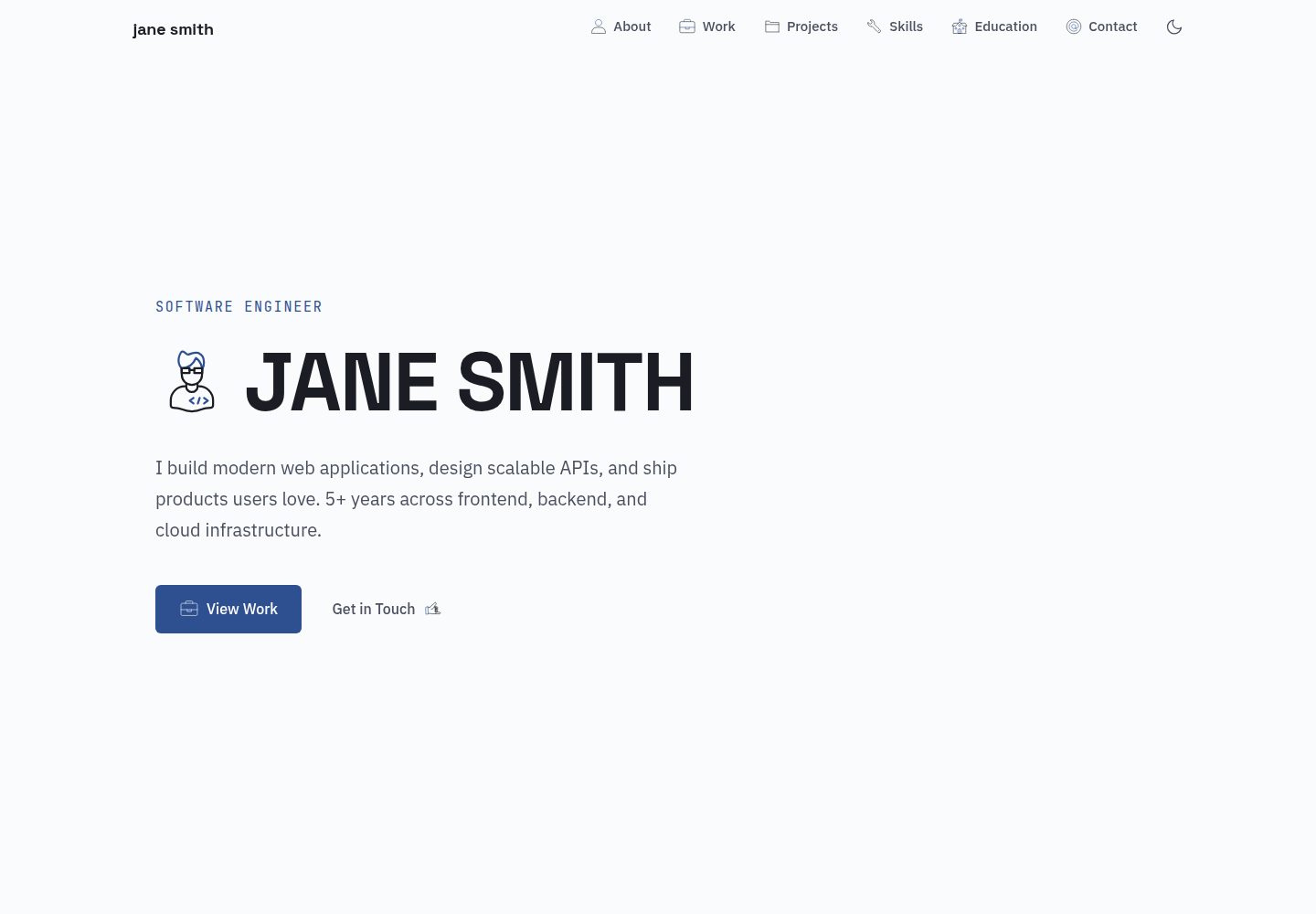
内容由 src/data/ 下的 YAML 文件驱动,无需 CMS、Markdown 或数据库
Astro作品集
astro-monograph — Astro 作品集模板
作者 theserverlessdev
Astro Monograph 是一个基于 Astro 的单页作品集主题,全部文案与条目由 src/data/ 下的 YAML 文件驱动,适合用静态站点方式发布个人简历式作品集。
看看你的网站会是什么样
浏览真实页面截图,比较内容排版与手机效果。点击下方缩略图切换,放大查看整页细节。
全部页面与视图 2
截图用于了解视觉与布局,交互效果请以实际项目为准。
采集于 2026-10-02查看来源
值得关注的模板亮点
从已有项目资料中,快速了解它的特点。
单页结构,包含首屏、关于、经历、项目、技能、教育、联系等区块
浅色与深色两套配色,首次访问跟随系统偏好,导航栏可手动切换并记住选择
颜色以 CSS 自定义属性集中定义,改变量即可整体换色
图标使用 Lord Icon,通过 YAML 中的哈希引用
内置 GitHub Pages 部署工作流,Vercel、Netlify、Cloudflare Pages 可自动识别
模板详细介绍
Astro Monograph 是一个面向个人作品集的单页主题,使用 Astro 构建,内容不依赖 CMS、Markdown 或数据库,而是集中放在 src/data/ 目录下的 YAML 文件中。仓库 README 列出了八个数据文件,分别控制站点信息、首屏、关于、工作经历、项目、技能、教育背景和联系方式,替换这些文件即可完成内容定制。
主题默认按静态站点方式生成页面,并包含浅色与深色两套配色,首次访问跟随系统偏好,导航栏提供手动切换并将选择保存在 localStorage。颜色通过 src/styles/global.css 中的 CSS 自定义属性集中定义,修改变量即可整体换色。图标使用 Lord Icon,并在 YAML 中通过哈希引用;字体从 Google Fonts 加载 Space Grotesk、JetBrains Mono 和 IBM Plex Sans。
使用限制方面,仓库采用 MIT 许可,免费范围仅覆盖该版本代码;演示图片、字体、图标等第三方素材需要按各自许可单独核对。部署前需要在 astro.config.mjs 中设置 site,若部署到 GitHub Pages 子路径还需设置 base;仓库自带 GitHub Pages 工作流,Vercel、Netlify、Cloudflare Pages 可自动识别 Astro 项目。README 中提到的 Astro 与 Tailwind 版本号未在依赖清单中核对,此处不展开。
Astro作品集
适合你的项目吗?
适用场景
- 制作个人简历式单页作品集,集中展示经历、项目与技能
- 希望用 YAML 维护内容、不想引入 CMS 或数据库的静态站点
- 需要浅色/深色模式切换与滚动显现效果的个人主页
- 部署到 GitHub Pages、Vercel、Netlify 或 Cloudflare Pages 的静态站点
适合人群
- 有前端基础、能编辑 YAML 与 CSS 变量的开发者
- 需要快速搭建个人作品集单页的独立开发者或设计师
- 偏好静态生成、无后端依赖的站点方案的使用者
上手与定制指南
结合仓库当前版本的说明,按下面的资料检查内容、配置与运行要求。
- 1
克隆仓库后执行 npm install 与 npm run dev 启动本地开发
- 2
编辑 src/data/ 下的 YAML 文件替换占位内容
- 3
部署前在 astro.config.mjs 中设置 site;部署到子路径时设置 base
- 4
替换 public/favicon.svg,并在 site.yaml 中设置 ogImage 与 themeColor
- 5
演示图片、字体、图标等第三方素材需按各自许可单独核对
授权与来源资料
使用条件与限制
免费使用 · 保留许可声明本次收录的是公开仓库中采用 MIT 许可的免费版本;免费范围为该版本代码,不代表外部服务或第三方素材免费。
使用时需要遵守
- 允许免费使用、修改、商用和分发该版本代码。
- 分发代码副本或实质性部分时,保留原作者版权声明和完整 MIT 许可声明。
- 代码按现状提供;担保与责任限制以原许可证及适用法律为准。
额外费用与待核对事项
- 图标依赖第三方服务 Lord Icon,需从 lordicon.com 获取图标哈希;该服务及其图标素材的许可与免费范围需自行核对,不属于 MIT 代码许可覆盖范围。
- 字体从 Google Fonts 外部加载,属于第三方资源,其许可与可用性需单独核对,不随 MIT 代码许可一并授予。
- 新增图标需访问 lordicon.com 并引用其 CDN,属于外部服务依赖,可能受该站点条款与图标许可限制。
- 演示图片、字体、图标及其他第三方素材需按各自许可核对,不能仅凭代码的 MIT 许可判断。
- 域名、托管、数据库、支付或 AI 等外部服务可能另外收费。
查看原文依据
Permission is hereby granted, free of charge
许可证原文
Icons use [Lord Icon](https://lordicon.com/) with morph animation triggers. Each is referenced by a hash in the YAML files.
README 原文
Three font families loaded from Google Fonts (configured in `BaseLayout.astro`)
README 原文
https://github.com/theserverlessdev/astro-monograph/blob/main/LICENSEhttps://github.com/theserverlessdev/astro-monograph/blob/main/README.mdBrowse [lordicon.com/icons](https://lordicon.com/icons) to find new ones — grab the hash from the CDN URL.
README 原文
DeepSeek 根据仓库许可证和 README 整理 ·2026-10-02。结果仅覆盖已读取资料,依赖、图片、字体及后续条款变更以各自原文为准。
项目核对记录与介绍依据
模板资料
- 来源平台
- GitHub
- 资料与维护参考分
- 资料较完整 · 83 / 100
- 技术栈
- Astro
- 网站类型
- 作品集
这个分数如何计算
本站按许可资料(最高30分)、演示链接(12分)、预览图(10分)、Star数(15分)、记录的维护时间(15分)、描述完整度(8分)、功能记录(5分)和分类资料(5分)计算。它不是代码、安全或性能测试,也不是 Google 评分;有链接不代表已实测可用。
这个项目需要核对什么
- 记录的仓库更新时间
- 2026-03-30
- 截图检查日期
- 2026-10-02
已收录演示链接。请用你的内容与屏幕尺寸检查;有演示不代表表单、认证或支付已经可用。
目录记录的主要技术栈是 Astro。请通过依赖清单和锁文件核对实际版本与托管要求。这些说明基于收录资料,不代表代码审计或部署实测。
查看具体选型方法 →介绍的制作与核对状态
介绍由 AI 辅助整理目录与仓库资料。仓库作者不等于这篇介绍的审核者。
已完成服务器许可规则与 AI 来源核对;未经过人工编辑审核。
查看当时使用的来源资料
SHA-256: abb72fee20a709e77b9611243bcdda94b1588aca13b84c6008eebad6165fd3a5
2026-10-02T20:57:28.433Z
来源文件 / 仓库# Astro Monograph
A clean, minimal, single-page portfolio theme for [Astro](https://astro.build). All content is driven by YAML files — edit your data, deploy, done.
**[Live Demo](https://monograph.theserverless.dev)**
  
## Features
- **YAML-driven content** — no CMS, no markdown, no database
- **Astro v6** — static site generation, zero client JS by default
- **Tailwind CSS v4** — utility-first styling with a custom design system
- **Lord Icon animations** — animated icons with morph triggers and scroll-reveal
- **Light & dark mode** — follows system preference by default, with a manual toggle; fully customizable color palettes for both modes
- **Scroll-triggered reveals** — smooth fade-in animations as you scroll
- **Mobile responsive** — looks great on all screen sizes
- **Accessible** — semantic HTML, keyboard navigation, `prefers-reduced-motion` support
- **SEO optimized** — JSON-LD structured data, Open Graph, Twitter cards, sitemap, canonical URLs, meta generator tag
- **One-command deploy** — GitHub Pages workflow included; works with Vercel/Netlify out of the box
## Quick Start
```bash
git clone https://github.com/theserverlessdev/astro-monograph.git my-portfolio
cd my-portfolio
npm install
npm run dev
```
Open `src/data/` and replace the placeholder content with your own.
## Content Structure
All text content lives in YAML files under `src/data/`:
| File | What it controls |
|------|-----------------|
| `site.yaml` | Site title, description, name, email, social links, nav items, OG image, theme color |
| `hero.yaml` | Hero section — subtitle, name, description, CTAs |
| `about.yaml` | About section — bio paragraphs, stat cards |
| `experience.yaml` | Work timeline — companies, roles, dates, tech stacks |
| `projects.yaml` | Project cards — with status filtering and expand/collapse |
| `skills.yaml` | Categorized skill tags |
| `education.yaml` | Degree, institution, highlights |
| `contact.yaml` | Contact CTA text, email icon, footer attribution |
## Customization
### Dark Mode
The theme supports light mode, dark mode, and system preference (the default). On first visit the site follows the user's OS setting. A toggle in the navbar lets visitors switch manually — their choice is saved in `localStorage`.
### Colors
Every color used in the theme is defined as a CSS custom property in `src/styles/global.css`. The `@theme` block sets the light-mode palette, and the `.dark` block overrides it for dark mode. To change the look of either mode, update these variables:
```css
/* Light mode (default) */
@theme {
--color-ink: #1A1D23; /* primary text */
--color-ink-secondary: #4A5060; /* secondary text */
--color-ink-tertiary: #8890A0; /* muted text */
--color-ink-on-dark: #FFFFFF; /* text on accent backgrounds */
--color-ink-on-dark-secondary: rgba(255, 255, 255, 0.75);
--color-surface: #FAFBFC; /* page background */
--color-surface-raised: #FFFFFF; /* cards */
--color-surface-sunken: #F3F4F6; /* alternate section background */
--color-surface-alt: #F0F2F5; /* misc surfaces */
--color-accent: #2E5090; /* main accent */
--color-accent-light: #3A6BC5; /* hover state */
--color-accent-dark: #103877; /* dark variant */
--color-accent-wash: #EBF0F9; /* light tint for tags/badges */
--color-border: #E2E5EB; /* default borders */
--color-border-strong: #C8CDD6; /* emphasized borders */
--color-accent-green: #2D8A56; /* status: live/active */
--color-accent-amber: #C4820E; /* status: in-progress */
}
/* Dark mode */
.dark {
--color-ink: #D8DBE5;
--color-ink-secondary: #939BB0;
--color-ink-tertiary: #5C6478;
--color-ink-on-dark: #FFFFFF;
--color-ink-on-dark-secondary: rgba(255, 255, 255, 0.75);
--color-surface: #101218;
--color-surface-raised: #181B24;
--color-surface-sunken: #0C0E13;
--color-surface-alt: #14171F;
--color-accent: #7BA4E0;
--color-accent-light: #9BBAEA;
--color-accent-dark: #5A86C8;
--color-accent-wash: rgba(123, 164, 224, 0.1);
--color-border: #242836;
--color-border-strong: #343848;
--color-accent-green: #5EC992;
--color-accent-amber: #E8A838;
}
```
All components reference these variables — changing them recolors the entire site for the corresponding mode. Lord Icon colors are also synced automatically.
### Fonts
Three font families loaded from Google Fonts (configured in `BaseLayout.astro`):
- **Space Grotesk** — display/headings
- **JetBrains Mono** — monospace/code/labels
- **IBM Plex Sans** — body text
### Icons
Icons use [Lord Icon](https://lordicon.com/) with morph animation triggers. Each is referenced by a hash in the YAML files. Browse [lordicon.com/icons](https://lordicon.com/icons) to find new ones — grab the hash from the CDN URL.
### SEO
- Set `site` in `astro.config.mjs` to your domain for canonical URLs and sitemap
- Set `ogImage` in `site.yaml` to the path of your Open Graph image (e.g. `/og.png`)
- Set `themeColor` in `site.yaml` for the browser theme color
- JSON-LD structured data is auto-generated from your YAML content
### Favicon
Replace `public/favicon.svg` with your own.
## Project Structure
```
src/
├── components/ # Navbar, Hero, About, Experience, Projects,
│ # Skills, Education, Contact, Footer
├── data/ # YAML content files (edit these!)
├── layouts/ # BaseLayout with SEO head, scroll reveal, icon system
├── lib/ # Shared data loader and helpers
├── pages/ # index.astro — composes all components
└── styles/ # global.css (Tailwind theme, animations)
public/
├── favicon.svg
└── robots.txt
```
## Deployment
Update `astro.config.mjs` before deploying:
```js
export default defineConfig({
site: 'https://yourdomain.com', // your domain
// base: '/repo-name', // add this if deploying to a subpath (e.g. GitHub Pages without custom domain)
});
```
### GitHub Pages
The included `.github/workflows/deploy.yml` deploys on push to `main`.
Enable GitHub Pages: Settings → Pages → Source: GitHub Actions.
If you're not using a custom domain, set `base: '/your-repo-name'` in `astro.config.mjs`.
### Vercel / Netlify / Cloudflare Pages
Connect your repo — all auto-detect Astro projects. No configuration needed.
### Custom Domain
Set `site` to your domain and remove `base` (or set it to `'/'`).
## License
MIT — see [LICENSE](LICENSE).
## Credits
Built with [Astro](https://astro.build), styled with [Tailwind CSS](https://tailwindcss.com), icons by [Lord Icon](https://lordicon.com).
Created by [Ankur Singh](https://anks.in).
看看同类模板
对比同技术栈与用途的模板,找到更适合的视觉与内容结构。

astro-theme-cactus
A simple Astro theme. Use it to create your blog or website.
Astro · 作品集

astrofy
Astrofy is a free and open-source template for your Personal Portfolio Website built with Astro and TailwindCS…
Astro · 作品集

astro-nano
Astro Nano is a static, minimalist, lightweight, lightning fast portfolio and blog.
Astro · 作品集

astro-erudite
An opinionated, unstyled static blogging template built with Astro and native CSS.
Astro · 作品集

astro-sphere
Astro Sphere is a static, minimalist, lightweight, lightning fast portfolio and blog.
Astro · 作品集

astro-micro
Blog theme for Astro with search and comments built-in. Zero frameworks.
Astro · 作品集