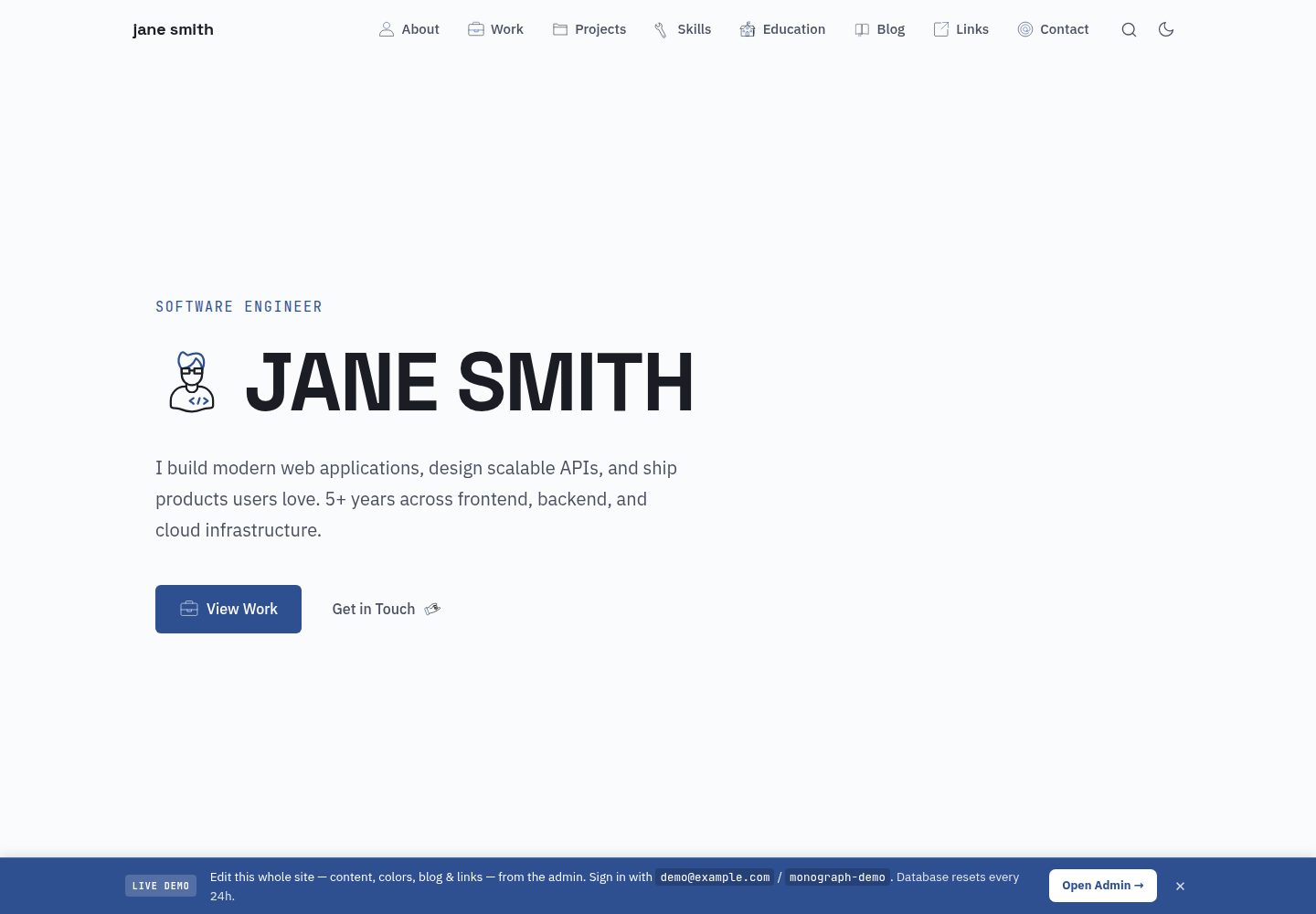
Built-in /admin backend for editing sections, color schemes, fonts, blog posts, and links in the browser without code changes or redeployment
AstroPortfolio
astro-monograph-teenybase — Astro Portfolio Template
By theserverlessdev
A single-page portfolio theme built on Astro SSR and teenybase, with a built-in /admin backend for editing sections, color schemes, fonts, Markdown blog posts, and a link stream in the browser. Content is stored in Cloudflare D1, with no code changes or redeployment required.
Explore the design
Compare the page layouts and mobile experience. Open any screenshot for a closer look.
Desktop homepage1 / 3
Desktop captureTop of page
Actual screenshot captured by the server browser.
All pages & views 3
Screenshots show visual appearance; interactive behavior may differ.
Recorded 2026-10-13View source
What stands out
A quick read of the recorded project description.
Astro SSR reads published content directly from Cloudflare D1 at render time without additional HTTP requests
teenybase provides a REST API, JWT authentication with row-level rules, and R2 file uploads, mounted under /api/* on the same Worker
src/data/*.yaml serves as both seed and fallback content, so it can render even before the database is initialized
Includes project detail pages, a printable /cv resume, a Markdown blog, a link stream, and edge-generated Open Graph cards
Outputs RSS, links.xml, sitemap.xml, llms.txt, and robots.txt
Template Details
This is the dynamic CMS version of the Astro Monograph theme. Pages are rendered by Astro SSR, which reads published content directly from Cloudflare D1 at render time without additional HTTP requests; teenybase provides a REST API, JWT authentication with row-level rules, R2 file uploads, and an admin interface, mounted under the /api/* path of the same Worker. The src/data/*.yaml files in the repository serve as both initial seed and fallback content, so a fresh clone can render correctly even before the database is initialized. Changes made in /admin are first saved as drafts, can be previewed, and are then published; publishing copies draft to published. The site includes homepage sections (Hero, About, Experience, Projects, Skills, Education, Contact, etc.), /projects/<slug> project detail pages (each project can optionally have a Markdown description), a printable /cv resume, a Markdown blog, a link stream, and Open Graph cards generated at the edge via satori and resvg (/og/*.png). It also outputs RSS, links XML, a sitemap, llms.txt, and robots.txt.
Running it requires a Cloudflare account and Node 18+. npm run setup creates D1 and R2, runs migrations, sets secrets, deploys, creates an admin user, and writes seed content; the script is repeatable. You can also specify a custom domain or admin credentials via environment variables. Local development uses npm run dev with a configured .dev.vars. Pushes to the default branch can be built and deployed automatically via Cloudflare Workers Builds, without GitHub Actions.
Limitations and notes: content depends on Cloudflare D1/R2 and the teenybase backend, making this a platform-bound solution; the public demo is on the demo branch, which has a banner, public credentials, and a database that resets daily, while the main branch is the clean template. The code is MIT licensed, but third-party assets such as demo images, fonts, and icons require separate license verification, and external services such as domains, hosting, and databases may incur costs.
AstroPortfolio
Is it right for your project?
Use Cases
- Building a single-page personal portfolio and wanting to keep updating content, color schemes, and fonts from a browser-based backend
- Publishing Markdown blog posts and maintaining a link stream
- Providing each project with a detail page that includes a Markdown description, and generating a printable resume page
- Running the site and content backend together as a single Worker on Cloudflare Workers
Suitable For
- Individual developers who have a Cloudflare account and are willing to use D1 and R2
- Astro users who need a CMS backend but do not want to redeploy for every content change
- Personal site authors who want their portfolio, blog, link stream, and resume to share the same content
Getting started & customization
Use these recorded setup notes alongside the repository instructions for your chosen version.
- 1
Requires a Cloudflare account and Node 18+; first run npm install and npx wrangler login
- 2
Running npm run setup creates D1 and R2, runs migrations, sets secrets, deploys, creates an admin, and writes seed content; the script is repeatable
- 3
Default admin credentials can be overridden via ADMIN_EMAIL and ADMIN_PASSWORD, and a custom domain can be specified via DOMAIN
- 4
For local development, copy blog-backend/.dev.vars.example to .dev.vars and edit it, then run npm run dev
- 5
After modifying YAML, run npm run seed:content to write the content again; add -- --force to overwrite existing sections
License & source material
Usage conditions & limitations
Free to use · keep license noticeThis entry covers the free version in the public repository under the MIT license; the free scope is the code of that version and does not mean external services or third-party assets are free.
Must comply with when using
- You may use, modify, commercialize, and distribute the code of this version for free.
- When distributing copies or substantial portions of the code, retain the original author's copyright notice and the full MIT license notice.
- The code is provided as is; warranties and limitations of liability are governed by the original license and applicable law.
Additional costs & items to verify
- Demo images, fonts, icons, and other third-party assets must be checked under their respective licenses and cannot be judged solely by the code's MIT license.
- External services such as domains, hosting, databases, payments, or AI may incur separate charges.
- Use requires registering a Cloudflare account (free) and a Node 18 or higher environment.
- A custom domain must be a zone already hosted under that Cloudflare account; otherwise this configuration cannot be used.
- The public demo is on the demo branch, which has a banner, public credentials, and a database that resets daily; only the main branch is the clean template, and the demo branch should not be used for a production site.
- Automatic deployment relies on Cloudflare Workers Builds, not GitHub Actions; a one-time connection setup must be completed in the Cloudflare dashboard.
- Icons come from the third-party Lord Icon service; their license and usage conditions must be checked separately and are not granted together with this project's MIT code license.
View Original Text Basis
Permission is hereby granted, free of charge
Original License Text
You need a (free) Cloudflare account and Node 18+
Original README
**Custom domain** (must be a zone on your Cloudflare account):
Original README
The public demo (banner, exposed credentials, daily database reset) lives on the > [`demo` branch](https://github.com/theserverlessdev/astro-monograph-teenybase/tree/demo); > `main` is the clean template.
Original README
Pushes to the default branch auto-build and deploy via **Cloudflare Workers Builds** (no GitHub Actions).
Original README
https://github.com/theserverlessdev/astro-monograph-teenybase/blob/main/LICENSEhttps://github.com/theserverlessdev/astro-monograph-teenybase/blob/main/README.mdicons by [Lord Icon](https://lordicon.com)
Original README
Compiled by DeepSeek based on repository license and README ·2026-10-13. Results only cover the materials read; dependencies, images, fonts, and subsequent term changes are subject to their respective original texts.
Project checks & description sources
Template Information
- Source platforms
- GitHub
- Documentation and maintenance reference score
- More documented · 80 / 100
- Technologies
- Astro
- Website type
- Portfolio
How this score is calculated
Our heuristic uses license records (up to 30), a demo link (12), a preview (10), stars (15), recorded maintenance (15), description completeness (8), feature records (5) and classification data (5). It is not a code, security or performance test, or a Google score. A link does not establish tested functionality.
What to verify for this project
- Repository update recorded
- 2026-06-14
- Screenshot last checked
- 2026-10-13
A demo link is listed. Check it with your own content and viewport sizes; its presence does not confirm that forms, authentication or payments work.
The catalog identifies Astro as the primary stack. Check the actual dependency manifest and lockfile for versions and hosting requirements. These notes use recorded metadata, not a code audit or a deployment test.
Use a selection guide →How this description was prepared
AI-assisted description based on catalog records and repository material. Repository authors are not automatically the reviewers of this description.
Review declaration: [email protected] · 2026-10-13
Inspect the recorded source material
SHA-256: 5450b06be28672ca25f2da115007743efca4564acbb2077e3ec79e88579be5eb
2026-10-13T00:15:13.431Z
Source file / repository# Astro Monograph — teenybase edition A single-page Astro portfolio that is **fully self-editable**: every section, the colors, the fonts, a Markdown **blog**, and a **links feed** are managed from a built-in `/admin`, with no code changes and no redeploys. Astro SSR and a [teenybase](https://teenybase.com) backend run inside **one Cloudflare Worker**, sharing a single D1 database and R2 bucket. **[Live demo → astro-monograph-teenybase.theserverless.dev](https://astro-monograph-teenybase.theserverless.dev)** — sign in to the admin and edit content, colors, fonts, blog posts and links live. > This is the dynamic, CMS-backed evolution of the static > [Astro Monograph](https://github.com/theserverlessdev/astro-monograph) theme. > See the [meta blog post on the live demo](https://astro-monograph-teenybase.theserverless.dev/blog/using-the-cms) > for a tour of the CMS and how the single-Worker architecture fits together. > > The public demo (banner, exposed credentials, daily database reset) lives on the > [`demo` branch](https://github.com/theserverlessdev/astro-monograph-teenybase/tree/demo); > `main` is the clean template. ## How it works - **Astro SSR** renders the site and reads the *published* content for each section straight from **Cloudflare D1** during render (no HTTP round-trip). - **teenybase** provides the REST API, JWT auth with row-level rules, R2 file uploads, and the admin — mounted at `/api/*` inside the same Worker (`src/server/teeny.ts`, `src/pages/api/[...path].ts`). - The committed `src/data/*.yaml` is both the **seed** and the **fallback**, so a fresh clone always renders even before the database is seeded (`src/lib/content.ts`). - Edits in `/admin` save as **drafts**; you **Preview**, then **Publish** (publish copies `draft` → `published`). - **Project detail pages** at `/projects/<slug>` (optional Markdown write-up per project), a print-ready **`/cv`** résumé generated from the same content, and **edge-generated Open Graph cards** for every page (`/og/*.png`, via satori + resvg) so shared links look like the site. ``` src/ ├── components/ # Hero, About, Experience, Projects, Skills, Education, │ # Contact, Footer, BlogTeaser, LinksTeaser, CustomSections ├── data/ # YAML seed + fallback content (edit or seed into D1) ├── layouts/ # BaseLayout (SEO/theme), PageLayout (sub-page chrome) ├── lib/ # data loader, content (D1↔YAML), blog, links, rss, slug, og, admin SPA ├── pages/ # index, blog/, links, cv, projects/[slug], admin/, │ # api/[...path], og/[...path], rss.xml, links.xml, │ # sitemap.xml, llms.txt, robots.txt ├── server/ # teeny.ts (mounts teenybase inside the Worker) └── styles/ # global.css (Tailwind theme + animations) blog-backend/ # teenybase config + generated D1 migrations + seed scripts scripts/ # setup.mjs, seed-content.mjs ``` ## Run it yourself You need a (free) Cloudflare account and Node 18+. ```bash git clone https://github.com/theserverlessdev/astro-monograph-teenybase cd astro-monograph-teenybase npm install npx wrangler login # Provisions D1 + R2, applies migrations, sets secrets, deploys, creates your # admin user, and seeds content. Prints your live URL + credentials. npm run setup ``` `npm run setup` (see `scripts/setup.mjs`) is idempotent and prints your admin login at the end (override with `[email protected] ADMIN_PASSWORD=…`). **Custom domain** (must be a zone on your Cloudflare account): ```bash DOMAIN=yourdomain.com npm run setup ``` To re-seed content from YAML after editing it: `npm run seed:content` (add `-- --force` to overwrite existing sections). ### Local development ```bash npm install cp blog-backend/.dev.vars.example .dev.vars # then edit npm run dev ``` ## Continuous deployment Pushes to the default branch auto-build and deploy via **Cloudflare Workers Builds** (no GitHub Actions). See [`blog-backend/CI-CD.md`](blog-backend/CI-CD.md) for the one-time dashboard connection steps. ## License MIT — see [LICENSE](LICENSE). Built with [Astro](https://astro.build), [Tailwind CSS](https://tailwindcss.com), [teenybase](https://teenybase.com), and icons by [Lord Icon](https://lordicon.com).
Explore similar templates
Compare previews and descriptions within the same stack and category.

astrofy
Astrofy is a free and open-source personal portfolio website template built with Astro and TailwindCSS, with built-in blog, CV timeline, project showcase, store, and RSS feed modules.
Astro · Portfolio

astro-nano
Astro Nano is a static, minimalist portfolio and blog template built with Astro, Tailwind, and TypeScript without frontend frameworks. It includes light/dark themes, animated UI, automatic sitemap and RSS feed generation, and Markdown/MDX support with component imports.
Astro · Portfolio

astro-erudite
astro-erudite is an opinionated, unstyled static blog template built with Astro and native CSS, with no UI or CSS framework and minimal dependencies.
Astro · Portfolio

astro-sphere
Astro Sphere is a static, minimalist portfolio and blog theme maintained by markhorn-dev, built mainly with Astro, Tailwind, and TypeScript, with a small amount of SolidJS for stateful components.
Astro · Portfolio

astro-micro
Astro Micro is a framework-free blog and portfolio theme for Astro, forked from Astro Nano. It adds Pagefind search and Giscus comments while retaining type safety, sitemap, RSS, Markdown and MDX support, and TailwindCSS with system, light, and dark themes.
Astro · Portfolio
astro-aria
astro-aria is an Astro-based personal blog and portfolio template maintained by miantiao-me, ported from static-templates/aria.
Astro · Portfolio