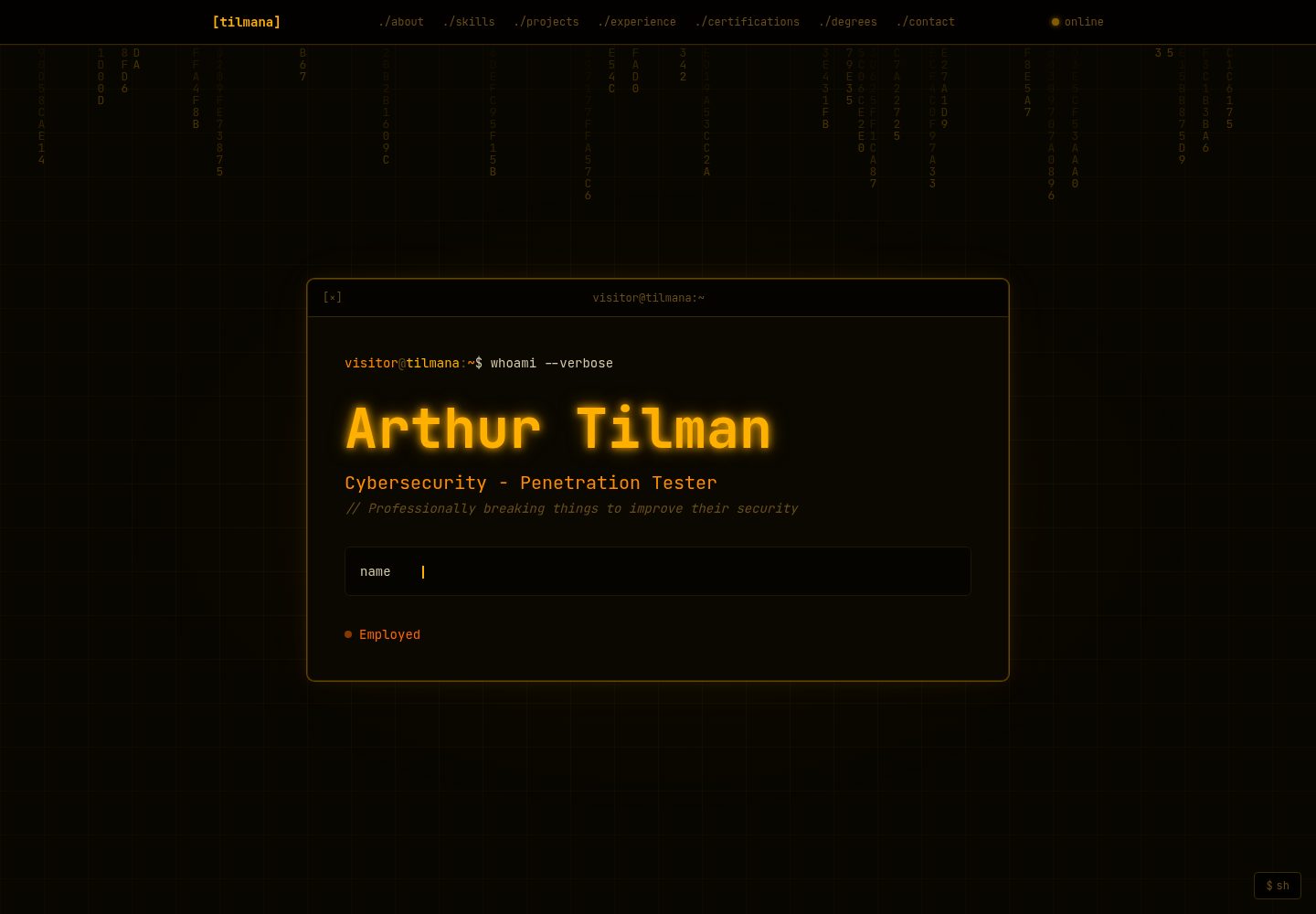
Terminal window aesthetic: title bar, prompt lines, and monospace font throughout the interface
Next.jsReactPortfolio
portfolio (tilmana) — Next.js Portfolio Template
By tilmana
A terminal-style developer portfolio template built with Next.js and Tailwind CSS, with all content configured in lib/config.ts.
Explore the design
Compare the page layouts and mobile experience. Open any screenshot for a closer look.
Desktop homepage1 / 2
Desktop captureTop of page
Actual screenshot captured by the server browser.
All pages & views 2
Screenshots show visual appearance; interactive behavior may differ.
Recorded 2026-10-14View source
What stands out
A quick read of the recorded project description.
All visible content, links, and toggles are configured in a single file, lib/config.ts
Supports runtime theme switching with four built-in color presets: green, amber, cyan, and red
Feature flags can individually toggle visual effects such as the cursor, decryption animation, hex rain, and scanlines
Sections can be hidden via configuration, with navigation and section numbering automatically reordered
Experience entries support a confidentiality mode, replacing sensitive content with ciphertext animation and redaction bars
Template Details
This template is a terminal-themed personal portfolio website built on the Next.js App Router and Tailwind CSS, using Framer Motion for animations and loading the JetBrains Mono font via next/font. The README states it is designed for security engineers, penetration testers, or developers who want their portfolio to present a command-line interface style.
All visible copy, links, and toggles are centralized in lib/config.ts, which the README calls the only file that needs editing. The template includes seven sections: About, Skills, Projects, Experience, Certifications, Degrees, and Contact. Each section can be hidden individually via the sections flags in the configuration; when hidden, navigation and section numbering adjust automatically.
For visuals and interaction, the README lists features such as terminal window styling, typewriter animations, scroll-triggered decryption animations, a custom neon crosshair cursor, scanline effects, a hexadecimal character rain background, SSH logout/reconnect animations, clickable project and degree card modals, a confidentiality mode for experience entries, a runtime theme switcher, an sh panel, and build-time generated Open Graph images. These effects can each be toggled individually via feature flags.
Configuration options cover personal information, Meta/SEO, links, content arrays, themes, feature flags, hex rain parameters, UI strings, section visibility, and navigation labels. Themes offer four presets: green, amber, cyan, and red, and custom palettes can be extended in the THEMES object.
For deployment, the README recommends Vercel: push the repository to GitHub, import and deploy at vercel.com/new, with no environment variables required. After deployment, update siteUrl to generate correct Open Graph tags. The project uses the MIT license. The README does not provide information on browser compatibility, accessibility, performance metrics, or production readiness.
Next.jsPortfolio
Is it right for your project?
Use Cases
- Security engineers or penetration testers building a personal portfolio website
- Developers who want their portfolio to present a command-line interface style
- Users who need to quickly clone and deploy a personal portfolio template
- Users who want to manage all displayed content through a single configuration file
Suitable For
- Front-end developers with a foundation in Next.js and Tailwind CSS
- Security practitioners who need a terminal-themed personal portfolio
- Users who want to customize their portfolio through a configuration file rather than modifying components
Getting started & customization
Use these recorded setup notes alongside the repository instructions for your chosen version.
- 1
After cloning the repository, run npm install and npm run dev to preview at http://localhost:3000
- 2
Edit lib/config.ts and search for EDIT: comments to locate each field
- 3
Vercel is recommended for deployment: push the repository to GitHub, import and deploy at vercel.com/new, with no environment variables required
- 4
After deployment, update siteUrl in the config to ensure Open Graph tags are correct
- 5
The confidentiality flag for experience entries only strips data on the front end as a display protection; the README explicitly states this is not a security measure and that real employer names or sensitive information should not be placed in it
License & source material
Usage conditions & limitations
Free to use · keep license noticeThis entry covers the free version in the public repository under the MIT license; the free scope is the code of this version and does not mean external services or third-party assets are free.
Must comply with when using
- Free use, modification, commercial use, and distribution of this version's code are permitted.
- When distributing copies or substantial portions of the code, retain the original author's copyright notice and the full MIT license notice.
- The code is provided as is; warranties and limitations of liability are governed by the original license and applicable law.
Additional costs & items to verify
- Demo images, fonts, icons, and other third-party assets must be checked against their respective licenses and cannot be judged solely by the code's MIT license.
- External services such as domains, hosting, databases, payments, or AI may incur additional charges.
- Confidentiality mode only strips data on the front end as a display protection and is not a security measure; real employer names or sensitive information should not be placed in the configuration file.
- Deploying to Vercel requires no environment variables, but the repository must be pushed to GitHub and imported at vercel.com/new.
View Original Text Basis
Permission is hereby granted, free of charge
Original License Text
> The frontend strips confidential data as a display safeguard, but this is not a security measure. Do not put real employer names or sensitive details in this file.
Original README
https://github.com/tilmana/portfolio/blob/master/LICENSEhttps://github.com/tilmana/portfolio/blob/master/README.md3. Deploy — no environment variables needed
Original README
Compiled by DeepSeek based on repository license and README ·2026-10-14. Results only cover the materials read; dependencies, images, fonts, and subsequent term changes are subject to their respective original texts.
Project checks & description sources
Template Information
- Source platforms
- GitHub
- Documentation and maintenance reference score
- More documented · 80 / 100
- Technologies
- Next.js · React
- Website type
- Portfolio
How this score is calculated
Our heuristic uses license records (up to 30), a demo link (12), a preview (10), stars (15), recorded maintenance (15), description completeness (8), feature records (5) and classification data (5). It is not a code, security or performance test, or a Google score. A link does not establish tested functionality.
What to verify for this project
- Repository update recorded
- 2026-04-22
- Screenshot last checked
- 2026-10-14
A demo link is listed. Check it with your own content and viewport sizes; its presence does not confirm that forms, authentication or payments work.
The catalog identifies Next.js as the primary stack. Check the actual dependency manifest and lockfile for versions and hosting requirements. These notes use recorded metadata, not a code audit or a deployment test.
Use a selection guide →How this description was prepared
AI-assisted description based on catalog records and repository material. Repository authors are not automatically the reviewers of this description.
Review declaration: codex-user-requested-batch-review-20261017 · 2026-10-16
Inspect the recorded source material
SHA-256: 9b213aaa7868d6089eb7c8198b8bfdb9b9d8bde4f1242f9458fbb2efe5215645
2026-10-14T18:48:53.438Z
Source file / repository# Arthur Tilman - Cybersecurity Engineer - Portfolio
My custom-made portfolio made with sharing in mind, so it's been templated for ease of cloning and deployment for others!
Overview: A terminal-themed developer portfolio built with Next.js and Tailwind CSS. Designed for security engineers, pentesters, and anyone who wants their portfolio to look inspired by the CLI.
**One file to edit. Deploy in minutes. MIT License for anyone's use.**
🔗 **[Portfolio](https://tilmana.dev)**
---
## Features
- Terminal window aesthetic throughout — title bars, prompt lines, monospace font
- Typewriter animation in the hero
- Scroll-triggered decrypt animation on section labels and terminal titles
- Custom neon crosshair cursor
- Glowing scan line effect on each section as it enters view
- Falling hex rain background in the hero (fully configurable)
- SSH logout / reconnect animation when clicking the status indicator
- Clickable project and degree cards with detail modals
- Confidential mode for experience entries (cipher animation + redaction bars)
- Dynamic section numbering (disabling a section resequences the numbers)
- Runtime theme switcher — 4 built-in color presets, easily extended
- All visual effects individually toggleable via feature flags
- `sh` panel — floating dev console to toggle features and switch themes live (`[esc]` to close)
- Any section can be hidden from both the page and nav with a single flag
- Staggered scroll-triggered section animations
- Pulsing glow outline on interactive cards (projects, degrees, experience)
- Open Graph image generated at build time using your theme palette
- Copy-to-clipboard on email links in the contact section
- Custom terminal-themed 404 page
## Sections
- **About** — bio paragraphs, location, email, and social links
- **Skills** — tag badge grid grouped by category
- **Projects** — clickable cards with modal (supports image/video media)
- **Experience** — git log style with expand/accordion mode; confidential flag
- **Certifications** — card grid with in-progress support
- **Degrees** — clickable cards with detail modal
- **Contact** — full link list with icons
## Getting started
```bash
git clone https://github.com/tilmana/portfolio
cd portfolio
npm install
npm run dev
```
Open [http://localhost:3000](http://localhost:3000) to preview.
## Configuration
**`lib/config.ts` is the only file you need to edit.** Every visible string, link, and toggle lives there. Search for `EDIT:` comments to find each field.
### Personal
| Field | Description |
|-------|-------------|
| `name` | Your full name — shown in the hero and footer |
| `initials` | 1–2 characters shown in the browser tab favicon. Leave `""` for the default `>_` symbol |
| `handle` | Short username — used in terminal prompts (`visitor@handle:~`) |
| `title` | Job title shown in the hero and page `<title>` |
| `tagline` | One-line tagline shown under the title |
| `location` | City, State / Country |
| `email` | Contact email — shown in About and Contact sections |
| `status` | `"open"` · `"employed"` · `"freelance"` — sets the nav status badge color and label |
| `heroCommand` | Command shown in the hero terminal prompt line |
| `typewriterLines` | Array of strings typed out one-by-one in the hero block |
| `expandExperience` | `true` — all jobs start expanded. `false` — accordion mode (one open at a time) |
### Meta / SEO
| Field | Description |
|-------|-------------|
| `siteUrl` | Your deployed URL — used for Open Graph tags. Update after deploying. |
| `domain` | Your domain — shown in the SSH logout/reconnect animation |
| `metaDescription` | Short description used in `<meta>` and Open Graph tags |
### Links
Add any key to `config.links` and it renders automatically in About and Contact. Set a value to `""` to hide it.
Built-in icons: `github`, `linkedin`, `twitter`, `blog`, `ctftime`, `tryhackme`, `resume`, `email`. Any other key falls back to a generic arrow icon using the key name as the label.
### Content
Each content array (`about`, `skills`, `experience`, `projects`, `certifications`, `degrees`) is self-documenting in the config file. Add or remove entries freely — the UI adapts.
**Experience — confidential flag:**
```ts
{
title: "Senior Engineer",
company: "Acme Corp", // never shown if confidential: true
confidential: true,
bullets: [...], // replaced with redaction bars if confidential: true
}
```
> The frontend strips confidential data as a display safeguard, but this is not a security measure. Do not put real employer names or sensitive details in this file.
**Projects — severity badge:**
```ts
severity: "critical" | "high" | "medium" | "low" | null
```
**Projects / Degrees — media and long description:**
Clicking a card opens a modal. Set `longDescription` for expanded detail. For projects, set `media` to an image or video URL (`.mp4`/`.webm` auto-detected), or leave it `""` to hide the media area entirely.
### Theme
Pick a color preset with a single string:
```ts
theme: "green" // "green" | "amber" | "cyan" | "red"
```
All nine color values (primary, accent, dim, edge, surface, base, content, warn, danger) cascade through the entire UI. To create a custom palette, add an entry to the `THEMES` object at the top of `config.ts`:
```ts
export const THEMES = {
// ...built-ins...
myTheme: {
primary: "#ff00ff",
accent: "#00ffff",
// ...
},
}
```
Then set `theme: "myTheme"`. The favicon updates automatically too.
### Feature flags
```ts
features: {
customCursor: true, // neon crosshair cursor
decryptAnimation: true, // scramble-in animation on scroll
hexRain: true, // falling hex characters in hero background
scanLine: true, // glowing scan line on section enter
sshLogout: true, // SSH logout animation on status click
navAnimation: true, // cd ./section command flash when navigating
glowOnInteractive: true, // pulsing glow outline on clickable cards
}
```
All flags are also toggleable at runtime via the `sh` panel (bottom-right corner).
### Hex rain
```ts
hexRain: {
opacity: 0.30, // overall canvas visibility (0–1)
fadeRate: 0.18, // trail length — lower = longer trails
charAlpha: 0.85, // brightness of each character (0–1)
fontSize: 13, // size in px — also controls column density
},
```
### UI strings
All visible copy outside of your personal content lives in `config.ui`. Useful for non-English sites or tweaking the terminal flavor:
```ts
ui: {
online: "online",
clickToExpand: "→ click to expand",
inProgress: "in progress",
experienceHint: "// click a commit to expand details",
classifiedBadge: "CLASSIFIED",
classifiedBanner: "TOP SECRET // ORCON",
contactFooter: "// All systems nominal. Awaiting your transmission.",
scrollHint: "scroll to explore ↓",
sshWelcome: "Welcome to PortfolioOS v1.0.0",
sshReconnect: "to reconnect",
}
```
### Section visibility
```ts
sections: {
about: true,
skills: true,
projects: true,
experience: true,
certifications: true,
degrees: true,
contact: true,
}
```
Setting any to `false` removes it from both the page and the nav. Section numbers resequence automatically.
### Nav labels
```ts
navLabels: {
about: "./about",
skills: "./skills",
projects: "./projects",
experience: "./experience",
certifications: "./certifications",
degrees: "./degrees",
contact: "./contact",
}
```
Customize the text for each nav link freely.
## Deployment
The fastest path is [Vercel](https://vercel.com):
1. Push the repo to GitHub
2. Import it at vercel.com/new
3. Deploy — no environment variables needed
Update `siteUrl` in config to your deployed URL for correct Open Graph tags.
## Stack
- [Next.js](https://nextjs.org) — App Router, statically generated
- [Tailwind CSS v4](https://tailwindcss.com)
- [Framer Motion](https://www.framer.com/motion/)
- [JetBrains Mono](https://www.jetbrains.com/lp/mono/) via `next/font`
## License
MIT — see [LICENSE](LICENSE).
Explore similar templates
Compare previews and descriptions within the same stack and category.

react-resume-template
A personal resume website template for software developers, built with Next.js, React, and TypeScript and styled with Tailwind CSS. Site content is driven by a single data file at /src/data/data.tsx, with types in dataDef.ts and images in src/images/.
Next.js · Portfolio

nxt-lnk
nxt-lnk is a Next.js-based bio link page template that manages personal information and links via BioData.js and LinksData.js, positioned as a self-hosted alternative to Linktree. It groups links by type, supports enabling/disabling individual links, and offers hexagonal or oval avatars.
Next.js · Portfolio

sylph
Sylph is a minimal portfolio and blog template built on Next.js, supporting MDX/Markdown writing, light/dark themes, and automatic OG image generation. It includes sitemap, robots.txt, metadata, and syntax highlighting, with automatic blog timestamps.
Next.js · Portfolio

sleek-portfolio
A modern, responsive portfolio template built with Next.js 15, TypeScript, Tailwind CSS, and Shadcn UI. It includes an MDX blog, project showcase, work experience timeline, and a contact form that receives messages via Telegram Bot.
Next.js · Portfolio

research-website-template
A React + Next.js template for research personal websites, aimed at PhD students and researchers. It centralizes publications, projects, and other content in src/data as arrays of objects, with optional fields automatically generating UI components.
Next.js · Portfolio

shadcn-portfolio
A developer portfolio template built with Next.js 15, shadcn/ui, Tailwind CSS, and Framer Motion, featuring an MDX blog, light and dark modes, responsive design, and SEO meta tags.
Next.js · Portfolio