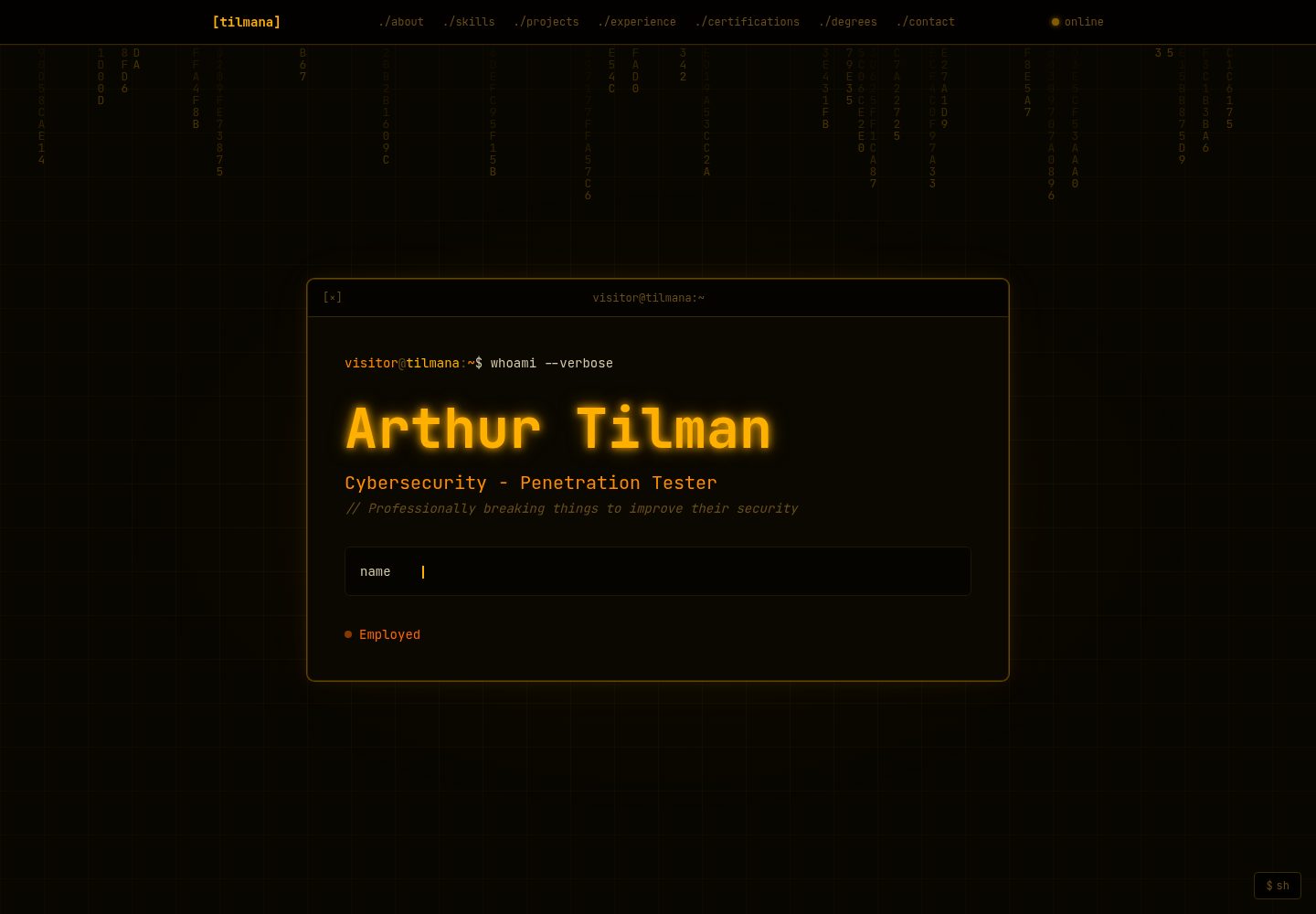
终端窗口美学:标题栏、提示行和等宽字体贯穿整个界面
Next.jsReact作品集
portfolio (tilmana) — Next.js 作品集模板
作者 tilmana
一个终端风格的开发者作品集模板,使用 Next.js 和 Tailwind CSS 构建,所有内容集中在 lib/config.ts 中配置。
看看你的网站会是什么样
浏览真实页面截图,比较内容排版与手机效果。点击下方缩略图切换,放大查看整页细节。
全部页面与视图 2
截图用于了解视觉与布局,交互效果请以实际项目为准。
采集于 2026-10-14查看来源
值得关注的模板亮点
从已有项目资料中,快速了解它的特点。
所有可见内容、链接和开关集中在 lib/config.ts 一个文件中配置
支持运行时主题切换,内置 green、amber、cyan、red 四种配色预设
功能标志可单独开关光标、解密动画、十六进制雨、扫描线等视觉效果
区块可通过配置隐藏,导航和区块编号自动重新排序
经历条目支持保密模式,用密文动画和遮蔽条替代敏感内容
模板详细介绍
该模板是一个终端主题的个人作品集网站,基于 Next.js App Router 和 Tailwind CSS 构建,使用 Framer Motion 实现动画,并通过 next/font 加载 JetBrains Mono 字体。README 说明其设计面向安全工程师、渗透测试人员或希望作品集呈现命令行界面风格的开发者。
所有可见文案、链接和开关都集中在 lib/config.ts 中,README 称其为唯一需要编辑的文件。模板包含 About、Skills、Projects、Experience、Certifications、Degrees、Contact 七个区块,每个区块可通过配置中的 sections 标志单独隐藏,隐藏后导航和区块编号会自动调整。
视觉与交互方面,README 列出了终端窗口样式、打字机动画、滚动触发的解密动画、自定义霓虹十字准星光标、扫描线效果、十六进制字符雨背景、SSH 登出/重连动画、可点击的项目与学位卡片弹窗、经历条目的保密模式、运行时主题切换器、sh 面板以及构建时生成的 Open Graph 图片等功能。这些效果均可通过功能标志单独开关。
配置项涵盖个人信息、Meta/SEO、链接、内容数组、主题、功能标志、十六进制雨参数、UI 字符串、区块可见性和导航标签。主题提供 green、amber、cyan、red 四种预设,也可在 THEMES 对象中扩展自定义调色板。
部署方面,README 推荐使用 Vercel:推送仓库到 GitHub,在 vercel.com/new 导入并部署,无需环境变量。部署后需更新 siteUrl 以生成正确的 Open Graph 标签。项目采用 MIT 许可证。README 未提供关于浏览器兼容性、可访问性、性能指标或生产环境就绪程度的说明。
Next.js作品集
适合你的项目吗?
适用场景
- 安全工程师或渗透测试人员搭建个人作品集网站
- 希望作品集呈现命令行界面风格的开发者
- 需要快速克隆并部署个人作品集模板的用户
- 想要通过单一配置文件管理所有展示内容的用户
适合人群
- 具备 Next.js 和 Tailwind CSS 基础的前端开发者
- 需要终端主题个人作品集的安全从业者
- 希望通过配置文件而非修改组件来定制作品集的用户
上手与定制指南
结合仓库当前版本的说明,按下面的资料检查内容、配置与运行要求。
- 1
克隆仓库后运行 npm install 和 npm run dev,在 http://localhost:3000 预览
- 2
编辑 lib/config.ts,搜索 EDIT: 注释定位每个字段
- 3
部署推荐使用 Vercel:推送仓库到 GitHub,在 vercel.com/new 导入并部署,无需环境变量
- 4
部署后更新 config 中的 siteUrl 以确保 Open Graph 标签正确
- 5
经历条目的保密标志仅在前端剥离数据作为展示保护,README 明确说明这不是安全措施,不应放入真实雇主名称或敏感信息
授权与来源资料
使用条件与限制
免费使用 · 保留许可声明本次收录的是公开仓库中采用 MIT 许可的免费版本;免费范围为该版本代码,不代表外部服务或第三方素材免费。
使用时需要遵守
- 允许免费使用、修改、商用和分发该版本代码。
- 分发代码副本或实质性部分时,保留原作者版权声明和完整 MIT 许可声明。
- 代码按现状提供;担保与责任限制以原许可证及适用法律为准。
额外费用与待核对事项
- 演示图片、字体、图标及其他第三方素材需按各自许可核对,不能仅凭代码的 MIT 许可判断。
- 域名、托管、数据库、支付或 AI 等外部服务可能另外收费。
- 保密模式仅在前端剥离数据作为展示保护,并非安全措施;不应在配置文件中放入真实雇主名称或敏感信息。
- 部署到 Vercel 无需环境变量,但需将仓库推送至 GitHub 并在 vercel.com/new 导入。
查看原文依据
Permission is hereby granted, free of charge
许可证原文
> The frontend strips confidential data as a display safeguard, but this is not a security measure. Do not put real employer names or sensitive details in this file.
README 原文
https://github.com/tilmana/portfolio/blob/master/LICENSEhttps://github.com/tilmana/portfolio/blob/master/README.md3. Deploy — no environment variables needed
README 原文
DeepSeek 根据仓库许可证和 README 整理 ·2026-10-14。结果仅覆盖已读取资料,依赖、图片、字体及后续条款变更以各自原文为准。
项目核对记录与介绍依据
模板资料
- 来源平台
- GitHub
- 资料与维护参考分
- 资料较完整 · 80 / 100
- 技术栈
- Next.js · React
- 网站类型
- 作品集
这个分数如何计算
本站按许可资料(最高30分)、演示链接(12分)、预览图(10分)、Star数(15分)、记录的维护时间(15分)、描述完整度(8分)、功能记录(5分)和分类资料(5分)计算。它不是代码、安全或性能测试,也不是 Google 评分;有链接不代表已实测可用。
这个项目需要核对什么
- 记录的仓库更新时间
- 2026-04-22
- 截图检查日期
- 2026-10-14
已收录演示链接。请用你的内容与屏幕尺寸检查;有演示不代表表单、认证或支付已经可用。
目录记录的主要技术栈是 Next.js。请通过依赖清单和锁文件核对实际版本与托管要求。这些说明基于收录资料,不代表代码审计或部署实测。
查看具体选型方法 →介绍的制作与核对状态
介绍由 AI 辅助整理目录与仓库资料。仓库作者不等于这篇介绍的审核者。
审核声明: codex-user-requested-batch-review-20261017 · 2026-10-16
查看当时使用的来源资料
SHA-256: 9b213aaa7868d6089eb7c8198b8bfdb9b9d8bde4f1242f9458fbb2efe5215645
2026-10-14T18:48:53.438Z
来源文件 / 仓库# Arthur Tilman - Cybersecurity Engineer - Portfolio
My custom-made portfolio made with sharing in mind, so it's been templated for ease of cloning and deployment for others!
Overview: A terminal-themed developer portfolio built with Next.js and Tailwind CSS. Designed for security engineers, pentesters, and anyone who wants their portfolio to look inspired by the CLI.
**One file to edit. Deploy in minutes. MIT License for anyone's use.**
🔗 **[Portfolio](https://tilmana.dev)**
---
## Features
- Terminal window aesthetic throughout — title bars, prompt lines, monospace font
- Typewriter animation in the hero
- Scroll-triggered decrypt animation on section labels and terminal titles
- Custom neon crosshair cursor
- Glowing scan line effect on each section as it enters view
- Falling hex rain background in the hero (fully configurable)
- SSH logout / reconnect animation when clicking the status indicator
- Clickable project and degree cards with detail modals
- Confidential mode for experience entries (cipher animation + redaction bars)
- Dynamic section numbering (disabling a section resequences the numbers)
- Runtime theme switcher — 4 built-in color presets, easily extended
- All visual effects individually toggleable via feature flags
- `sh` panel — floating dev console to toggle features and switch themes live (`[esc]` to close)
- Any section can be hidden from both the page and nav with a single flag
- Staggered scroll-triggered section animations
- Pulsing glow outline on interactive cards (projects, degrees, experience)
- Open Graph image generated at build time using your theme palette
- Copy-to-clipboard on email links in the contact section
- Custom terminal-themed 404 page
## Sections
- **About** — bio paragraphs, location, email, and social links
- **Skills** — tag badge grid grouped by category
- **Projects** — clickable cards with modal (supports image/video media)
- **Experience** — git log style with expand/accordion mode; confidential flag
- **Certifications** — card grid with in-progress support
- **Degrees** — clickable cards with detail modal
- **Contact** — full link list with icons
## Getting started
```bash
git clone https://github.com/tilmana/portfolio
cd portfolio
npm install
npm run dev
```
Open [http://localhost:3000](http://localhost:3000) to preview.
## Configuration
**`lib/config.ts` is the only file you need to edit.** Every visible string, link, and toggle lives there. Search for `EDIT:` comments to find each field.
### Personal
| Field | Description |
|-------|-------------|
| `name` | Your full name — shown in the hero and footer |
| `initials` | 1–2 characters shown in the browser tab favicon. Leave `""` for the default `>_` symbol |
| `handle` | Short username — used in terminal prompts (`visitor@handle:~`) |
| `title` | Job title shown in the hero and page `<title>` |
| `tagline` | One-line tagline shown under the title |
| `location` | City, State / Country |
| `email` | Contact email — shown in About and Contact sections |
| `status` | `"open"` · `"employed"` · `"freelance"` — sets the nav status badge color and label |
| `heroCommand` | Command shown in the hero terminal prompt line |
| `typewriterLines` | Array of strings typed out one-by-one in the hero block |
| `expandExperience` | `true` — all jobs start expanded. `false` — accordion mode (one open at a time) |
### Meta / SEO
| Field | Description |
|-------|-------------|
| `siteUrl` | Your deployed URL — used for Open Graph tags. Update after deploying. |
| `domain` | Your domain — shown in the SSH logout/reconnect animation |
| `metaDescription` | Short description used in `<meta>` and Open Graph tags |
### Links
Add any key to `config.links` and it renders automatically in About and Contact. Set a value to `""` to hide it.
Built-in icons: `github`, `linkedin`, `twitter`, `blog`, `ctftime`, `tryhackme`, `resume`, `email`. Any other key falls back to a generic arrow icon using the key name as the label.
### Content
Each content array (`about`, `skills`, `experience`, `projects`, `certifications`, `degrees`) is self-documenting in the config file. Add or remove entries freely — the UI adapts.
**Experience — confidential flag:**
```ts
{
title: "Senior Engineer",
company: "Acme Corp", // never shown if confidential: true
confidential: true,
bullets: [...], // replaced with redaction bars if confidential: true
}
```
> The frontend strips confidential data as a display safeguard, but this is not a security measure. Do not put real employer names or sensitive details in this file.
**Projects — severity badge:**
```ts
severity: "critical" | "high" | "medium" | "low" | null
```
**Projects / Degrees — media and long description:**
Clicking a card opens a modal. Set `longDescription` for expanded detail. For projects, set `media` to an image or video URL (`.mp4`/`.webm` auto-detected), or leave it `""` to hide the media area entirely.
### Theme
Pick a color preset with a single string:
```ts
theme: "green" // "green" | "amber" | "cyan" | "red"
```
All nine color values (primary, accent, dim, edge, surface, base, content, warn, danger) cascade through the entire UI. To create a custom palette, add an entry to the `THEMES` object at the top of `config.ts`:
```ts
export const THEMES = {
// ...built-ins...
myTheme: {
primary: "#ff00ff",
accent: "#00ffff",
// ...
},
}
```
Then set `theme: "myTheme"`. The favicon updates automatically too.
### Feature flags
```ts
features: {
customCursor: true, // neon crosshair cursor
decryptAnimation: true, // scramble-in animation on scroll
hexRain: true, // falling hex characters in hero background
scanLine: true, // glowing scan line on section enter
sshLogout: true, // SSH logout animation on status click
navAnimation: true, // cd ./section command flash when navigating
glowOnInteractive: true, // pulsing glow outline on clickable cards
}
```
All flags are also toggleable at runtime via the `sh` panel (bottom-right corner).
### Hex rain
```ts
hexRain: {
opacity: 0.30, // overall canvas visibility (0–1)
fadeRate: 0.18, // trail length — lower = longer trails
charAlpha: 0.85, // brightness of each character (0–1)
fontSize: 13, // size in px — also controls column density
},
```
### UI strings
All visible copy outside of your personal content lives in `config.ui`. Useful for non-English sites or tweaking the terminal flavor:
```ts
ui: {
online: "online",
clickToExpand: "→ click to expand",
inProgress: "in progress",
experienceHint: "// click a commit to expand details",
classifiedBadge: "CLASSIFIED",
classifiedBanner: "TOP SECRET // ORCON",
contactFooter: "// All systems nominal. Awaiting your transmission.",
scrollHint: "scroll to explore ↓",
sshWelcome: "Welcome to PortfolioOS v1.0.0",
sshReconnect: "to reconnect",
}
```
### Section visibility
```ts
sections: {
about: true,
skills: true,
projects: true,
experience: true,
certifications: true,
degrees: true,
contact: true,
}
```
Setting any to `false` removes it from both the page and the nav. Section numbers resequence automatically.
### Nav labels
```ts
navLabels: {
about: "./about",
skills: "./skills",
projects: "./projects",
experience: "./experience",
certifications: "./certifications",
degrees: "./degrees",
contact: "./contact",
}
```
Customize the text for each nav link freely.
## Deployment
The fastest path is [Vercel](https://vercel.com):
1. Push the repo to GitHub
2. Import it at vercel.com/new
3. Deploy — no environment variables needed
Update `siteUrl` in config to your deployed URL for correct Open Graph tags.
## Stack
- [Next.js](https://nextjs.org) — App Router, statically generated
- [Tailwind CSS v4](https://tailwindcss.com)
- [Framer Motion](https://www.framer.com/motion/)
- [JetBrains Mono](https://www.jetbrains.com/lp/mono/) via `next/font`
## License
MIT — see [LICENSE](LICENSE).
看看同类模板
对比同技术栈与用途的模板,找到更适合的视觉与内容结构。

react-resume-template
A personal resume website template built with React.js, Typescript, Next.js, and styled with Tailwind css
Next.js · 作品集

nxt-lnk
Custom bio links for creatives who love coding. A perfect custom alternative for linktree, bio and other short…
Next.js · 作品集

sylph
A minimal portfolio template.
Next.js · 作品集

sleek-portfolio
sleek-portfolio 是一个面向开发者个人品牌展示的现代作品集模板,基于 Next.js 15、TypeScript、Tailwind CSS 和 Shadcn UI 构建。
Next.js · 作品集

research-website-template
React + Next.js template for research websites (for PhD students, researchers, etc)
Next.js · 作品集

shadcn-portfolio
shadcn-portfolio 是一个面向开发者的作品集模板,技术栈为 Next.js 15、shadcn/ui、Tailwind CSS 和 Framer Motion。
Next.js · 作品集