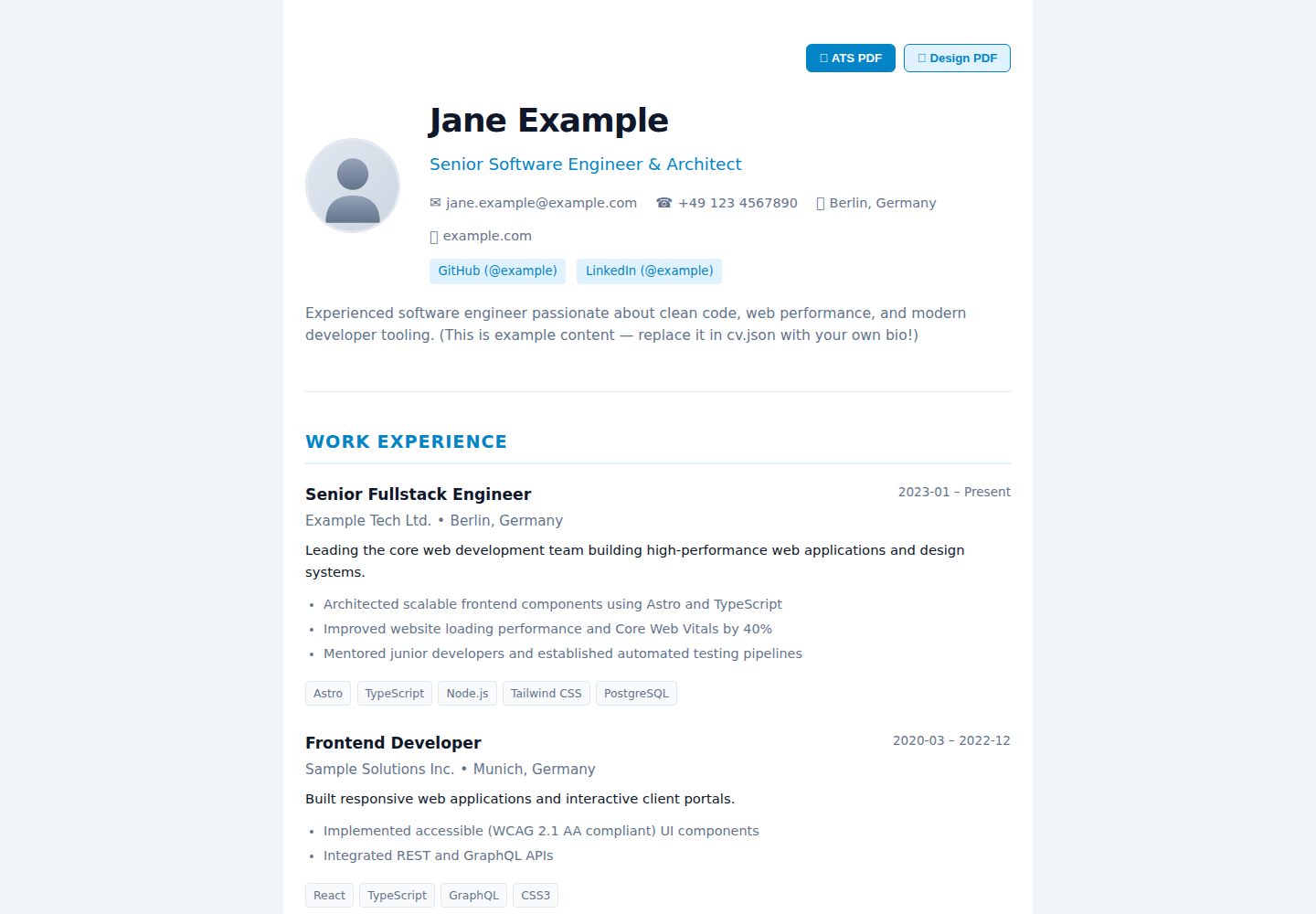
Root-level cv.json and dotcv.config.json manage CV data and site settings
AstroPortfolio
dotcv — Astro Portfolio Template
By tjaugust01
dotcv is an Astro-based CV and portfolio site template that manages CV data and theme configuration through root-level JSON files, and supports exporting both ATS and design PDFs.
Explore the design
Compare the page layouts and mobile experience. Open any screenshot for a closer look.
Desktop homepage1 / 2
Desktop captureTop of page
Actual screenshot captured by the server browser.
All pages & views 2
Screenshots show visual appearance; interactive behavior may differ.
Recorded 2026-10-02View source
What stands out
A quick read of the recorded project description.
Dual PDF export: /print/ats for ATS parsing, /print/design matching the web theme
Three built-in themes—classic, sidebar, and timeline—with /preview/<theme> previews
Built-in en and de multilingual support, including OpenGraph, Twitter Card, and Schema.org Person structured data
Uses Zod to validate configuration and CV data, with themes and parsers organized by directory
Statically generated and deployable to GitHub Pages, Cloudflare Pages, Vercel, Netlify, or a self-hosted static server
Template Details
dotcv is a static CV and portfolio platform template built with Astro, inspired by readcv. It places CV content and site settings in cv.json and dotcv.config.json at the project root, using JSON configuration to drive page rendering and PDF export. The template includes three built-in themes—classic, sidebar, and timeline—which can be switched in the configuration, and it also provides /preview/<theme> routes for previewing each theme online.
For output, dotcv offers dual PDF export: /print/ats generates a single-column, standardized ATS CV intended for parsing by recruiting systems such as Workday and Greenhouse; /print/design generates a PDF visually consistent with the current web theme, for interviews or portfolio presentation. The site itself is statically generated and can be deployed to GitHub Pages, Cloudflare Pages, Vercel, Netlify, or any static server.
The template also includes i18n multilingual support (built-in en and de), OpenGraph and Twitter Card metadata, Schema.org Person structured data, and Zod-based validation for configuration and CV data. The project structure organizes themes, PDF components, parsers, and i18n translations into separate directories, making them easy to replace or extend. Note that CV data fields, theme names, and PDF options are subject to the configuration items listed in the README; before use, verify the actual schema and example files in the repository.
AstroPortfolio
Is it right for your project?
Use Cases
- Maintain a personal CV with JSON and generate an online CV page
- Export a single-column ATS CV PDF when applying to recruiting systems
- Export a design PDF matching the web theme for interviews or portfolio presentation
- Switch between classic, sidebar, and timeline themes or extend custom layouts based on the theme directory
- Deploy to static hosting platforms such as GitHub Pages as a personal homepage
Suitable For
- Developers or designers who need to maintain both an online CV and a printable PDF
- Users who prefer managing CV content with JSON files rather than a backend system
- Job seekers who need an ATS-friendly CV format
- Teams or individuals who want to deploy a personal portfolio or CV page as an Astro static site
Getting started & customization
Use these recorded setup notes alongside the repository instructions for your chosen version.
- 1
After cloning the repository, run npm install and copy cv.example.json to cv.json to fill in personal data
- 2
Set theme, locale, and PDF-related options in dotcv.config.json
- 3
Use npm run dev for local development and npm run build to build static files, with output in the dist directory
- 4
Before deployment, configure site in astro.config.mjs to the actual domain
- 5
Third-party assets such as demo images, fonts, and icons must be checked separately under their respective licenses
License & source material
Usage conditions & limitations
Free to use · keep license noticeThis entry covers the free version under the MIT license in the public repository; the free scope is the code of that version and does not mean external services or third-party assets are free.
Must comply with when using
- The code of this version may be used, modified, used commercially, and distributed for free.
- When distributing copies or substantial portions of the code, retain the original author's copyright notice and the full MIT license notice.
- The code is provided as is; warranties and limitations of liability are governed by the original license and applicable law.
Additional costs & items to verify
- Demo images, fonts, icons, and other third-party assets must be checked under their respective licenses and cannot be judged solely by the code's MIT license.
- External services such as domains, hosting, databases, payments, or AI may incur separate charges.
View Original Text Basis
https://github.com/tjaugust01/dotcv/blob/main/LICENSEhttps://github.com/tjaugust01/dotcv/blob/main/README.mdPermission is hereby granted, free of charge
Original License Text
Compiled by DeepSeek based on repository license and README ·2026-10-02. Results only cover the materials read; dependencies, images, fonts, and subsequent term changes are subject to their respective original texts.
Project checks & description sources
Template Information
- Source platforms
- Astro Themes
- Documentation and maintenance reference score
- More documented · 83 / 100
- Technologies
- Astro
- Website type
- Portfolio
How this score is calculated
Our heuristic uses license records (up to 30), a demo link (12), a preview (10), stars (15), recorded maintenance (15), description completeness (8), feature records (5) and classification data (5). It is not a code, security or performance test, or a Google score. A link does not establish tested functionality.
What to verify for this project
- Repository update recorded
- 2026-08-27
- Screenshot last checked
- 2026-10-02
A demo link is listed. Check it with your own content and viewport sizes; its presence does not confirm that forms, authentication or payments work.
The catalog identifies Astro as the primary stack. Check the actual dependency manifest and lockfile for versions and hosting requirements. These notes use recorded metadata, not a code audit or a deployment test.
Use a selection guide →How this description was prepared
AI-assisted description based on catalog records and repository material. Repository authors are not automatically the reviewers of this description.
Automatically checked against source and license rules; no manual editorial review.
Inspect the recorded source material
SHA-256: ff5c1f058b18fa0a993c895a7efa120f7a38c78ffe84cdd6ed841bab39f87067
2026-10-02T15:30:52.524Z
Source file / repository# dotcv
> A modern, minimalist, and ATS-friendly CV and portfolio platform inspired by *readcv*, built with [Astro](https://astro.build).
[**Live Demo ↗**](https://tjaugust01.github.io/dotcv/) · [Features](#features) · [Themes](#available-themes) · [Quick Start](#quick-start) · [Documentation](#configuration-reference)
Manage your resume data and preferences in simple root configuration files and get an elegant online presence alongside a machine-readable, printable PDF resume.
[](https://tjaugust01.github.io/dotcv/)
---
## Features
- **Root-Level Configuration:** Maintain your resume data (`cv.json`) and settings (`dotcv.config.json`) directly in the project root.
- **Dual PDF Export:**
- **ATS Resume:** A standardized, single-column vector layout optimized for Applicant Tracking Systems (Workday, Greenhouse, etc.) with precise print pagination.
- **Design PDF:** A styled PDF matching the visual layout of your chosen web theme for personal presentations.
- **Pluggable Theme System:** Switch between pre-built themes (`classic`, `sidebar`, `timeline`) or create custom layouts.
- **Internationalization (i18n):** Built-in multi-language support (e.g., English, German).
- **SEO & Social Sharing:**
- OpenGraph and Twitter Card metadata for rich previews on LinkedIn, X, and other platforms.
- Structured data with Schema.org (`Person`) JSON-LD.
- Dynamic keyword and canonical URL generation.
- **Static & Fast:** 100% Static Site Generation (SSG) with zero runtime dependencies. Deployable on GitHub Pages, Cloudflare Pages, Vercel, Netlify, or any static web server.
---
## Available Themes
`dotcv` includes three themes out of the box. You can configure the active theme in `dotcv.config.json` or preview each theme live via the links below:
### 1. Classic Theme (`classic`)
An elegant, centered single-column layout with clean typography and subtle accents. Suitable for any industry.
[**View Classic Demo ↗**](https://tjaugust01.github.io/dotcv/) *(Local: `http://localhost:4321/preview/classic`)*

---
### 2. Sidebar Theme (`sidebar`)
A modern two-column layout featuring a sticky profile sidebar on the left and chronological career milestones on the right.
[**View Sidebar Demo ↗**](https://tjaugust01.github.io/dotcv/preview/sidebar) *(Local: `http://localhost:4321/preview/sidebar`)*

---
### 3. Timeline Theme (`timeline`)
A timeline layout designed for engineers and creatives, complete with a dark mode toggle, hero profile header, and tagged cards.
[**View Timeline Demo ↗**](https://tjaugust01.github.io/dotcv/preview/timeline) *(Local: `http://localhost:4321/preview/timeline`)*

---
## Dual PDF Export
`dotcv` provides two distinct PDF formats:

1. **ATS Resume (`/print/ats`):**
- Strict single-column layout, standard typography, and clean text flow.
- Ensures optimal parsing rates across automated HR and recruiting software.
2. **Design PDF (`/print/design`):**
- Visually styled to match your chosen web theme.
- Ideal for direct recruiter contact, interviews, or portfolio presentations.
---
## Quick Start
### 1. Clone the repository & install dependencies
```bash
git clone https://github.com/your-username/dotcv.git
cd dotcv
npm install
```
### 2. Add your CV data
Create your personal `cv.json` (or use `cv.example.json` as a starting point):
```bash
cp cv.example.json cv.json
```
### 3. Start the local development server
```bash
npm run dev
```
Open [http://localhost:4321](http://localhost:4321) in your browser.
---
## Configuration Reference
### 1. `dotcv.config.json` (Settings)
This file controls the theme, localization, and PDF export behaviors:
```json
{
"theme": "classic",
"locale": "en",
"pdf": {
"theme": "classic",
"format": "a4",
"showAtsButton": true,
"showDesignButton": true,
"filename": "CV_{name}.pdf"
}
}
```
#### Available Options
| Option | Type | Default | Description |
| :--- | :--- | :--- | :--- |
| **`theme`** | `string` | `"classic"` | Active web theme (`classic`, `sidebar`, `timeline`). |
| **`locale`** | `string` | `"en"` | Language code for UI strings and date formatting (`en`, `de`). |
| **`pdf.theme`** | `string` *(optional)* | `theme` | Theme override for the Design PDF export (e.g., use `classic` for PDF while keeping `timeline` on web). |
| **`pdf.format`** | `"a4" \| "letter"` *(optional)* | `"a4"` | Page size for print and PDF generation (`"a4"` or `"letter"`). |
| **`pdf.showAtsButton`** | `boolean` *(optional)* | `true` | Toggles the visibility of the ATS PDF download button on the website. |
| **`pdf.showDesignButton`** | `boolean` *(optional)* | `true` | Toggles the visibility of the Design PDF download button on the website. |
| **`pdf.filename`** | `string` *(optional)* | `"{name} — CV"` | Default filename suggested in browser save dialogs. Supports `{name}` and `{title}` placeholders. |
---
### 2. `cv.json` (Resume Data)
The `cv.json` file contains all structured profile information:
```json
{
"profile": {
"name": "Jane Example",
"title": "Senior Software Engineer & Architect",
"email": "[email protected]",
"phone": "+1 234 567 8900",
"location": "San Francisco, CA",
"website": "https://example.com",
"avatar": "/avatar.svg",
"bio": "Brief overview about your professional background and core strengths.",
"socials": [
{
"plattform": "GitHub",
"url": "https://github.com/example",
"username": "example"
}
]
},
"experience": [
{
"company": "Tech Company",
"role": "Senior Engineer",
"location": "San Francisco, CA",
"startDate": "2022-01",
"endDate": null,
"current": true,
"description": "Core responsibilities and team leadership.",
"highlights": [
"Architected scalable frontend components using Astro and TypeScript",
"Improved website loading performance and Core Web Vitals by 40%"
],
"technologies": ["TypeScript", "Astro", "React", "Node.js"]
}
],
"education": [
{
"institution": "University of Technology",
"degree": "Master of Science",
"fieldOfStudy": "Computer Science",
"startDate": "2018-10",
"endDate": "2020-09",
"location": "San Francisco, CA",
"highlights": ["Focus on distributed systems and web performance"]
}
],
"skills": [
{
"category": "Frontend",
"skills": ["Astro", "TypeScript", "React", "Tailwind CSS"]
}
],
"projects": [
{
"title": "Open Source Project",
"description": "Project overview and key features.",
"url": "https://github.com/example/project",
"technologies": ["Astro", "TypeScript"]
}
],
"certifications": [
{
"title": "Cloud Architect Certificate",
"issuer": "Cloud Provider",
"date": "2023-05",
"url": "https://example.com/cert"
}
],
"languages": [
{
"language": "English",
"fluency": "Native"
},
{
"language": "German",
"fluency": "Professional working proficiency"
}
]
}
```
---
## Project Structure
```
dotcv/
├── cv.json # Personal CV data (or cv.yaml / cv.xml)
├── cv.example.json # Template with placeholder data
├── dotcv.config.json # Settings (Theme, locale, PDF options)
├── public/ # Static assets (Avatar, Favicon, Fonts)
├── src/
│ ├── components/
│ │ └── pdf/
│ │ └── AtsResume.astro # Standardized ATS-optimized PDF layout
│ ├── lib/
│ │ ├── configSchema.ts # Zod validation schema for config
│ │ ├── cvSchema.ts # Zod validation schema for CV data
│ │ ├── i18n/ # Translations (en, de, ...)
│ │ └── parser/ # Format-agnostic loaders & parsers
│ ├── pages/
│ │ ├── index.astro # Public CV website
│ │ ├── preview/
│ │ │ └── [theme].astro # Live preview routes for each theme (/preview/<theme>)
│ │ ├── print/
│ │ │ ├── ats.astro # Route for ATS PDF (/print/ats)
│ │ │ └── design.astro # Route for Design PDF (/print/design)
│ │ └── print.astro # Default print fallback route
│ └── themes/
│ ├── classic/ # Classic Theme (index.astro & pdf.astro)
│ ├── sidebar/ # Sidebar Theme (index.astro & pdf.astro)
│ ├── timeline/ # Timeline Theme (index.astro & pdf.astro)
│ └── registry.ts # Theme registry
├── astro.config.mjs
└── package.json
```
---
## Deployment
Since `dotcv` generates static HTML, CSS, and JS, it can be hosted on any static hosting provider or web server:
### 1. Configure site URL (`astro.config.mjs`)
```js
import { defineConfig } from 'astro/config';
export default defineConfig({
site: 'https://your-domain.com',
});
```
### 2. Choose your hosting provider
- **Vercel / Netlify / Cloudflare Pages:**
- Build Command: `npm run build`
- Output Directory: `dist`
- **GitHub Pages:**
- Deploy using the standard [Astro GitHub Pages Action](https://docs.astro.build/en/guides/deploy/github/).
- **Self-hosted (Nginx / Caddy / Docker):**
- Serve the generated static files from the `dist/` directory.
---
## Available Scripts
| Command | Action |
| :--- | :--- |
| `npm run dev` | Starts the Astro development server with hot module reloading |
| `npm run build` | Builds the production-ready static website to the `dist/` folder |
| `npm run preview` | Starts a local preview server for the built `dist/` directory |
| `npm run screenshots` | Automatically captures all theme previews and PDF comparison graphics in `docs/images/` |
---
## License
MIT License – Free for personal and commercial use.
Explore similar templates
Compare previews and descriptions within the same stack and category.

astro-theme-cactus
Astro Cactus is an Astro-based blog and portfolio theme that uses Markdown/MDX content collections to manage posts, notes, and tags, with frontmatter type-checked by a schema.
Astro · Portfolio

astrofy
Astrofy is a free and open-source personal portfolio website template built with Astro and TailwindCSS, with built-in blog, CV timeline, project showcase, store, and RSS feed modules.
Astro · Portfolio

astro-nano
Astro Nano is a static, minimalist portfolio and blog template built with Astro, Tailwind, and TypeScript without frontend frameworks. It includes light/dark themes, animated UI, automatic sitemap and RSS feed generation, and Markdown/MDX support with component imports.
Astro · Portfolio

astro-erudite
astro-erudite is an opinionated, unstyled static blog template built with Astro and native CSS, with no UI or CSS framework and minimal dependencies.
Astro · Portfolio

astro-sphere
Astro Sphere is a static, minimalist portfolio and blog theme maintained by markhorn-dev, built mainly with Astro, Tailwind, and TypeScript, with a small amount of SolidJS for stateful components.
Astro · Portfolio

astro-micro
Astro Micro is a framework-free blog and portfolio theme for Astro, forked from Astro Nano. It adds Pagefind search and Giscus comments while retaining type safety, sitemap, RSS, Markdown and MDX support, and TailwindCSS with system, light, and dark themes.
Astro · Portfolio