根目录 cv.json 与 dotcv.config.json 管理简历数据和站点设置
Astro作品集
dotcv — Astro 作品集模板
作者 tjaugust01
dotcv 是一个基于 Astro 的简历与作品集站点模板,通过根目录 JSON 文件管理简历数据与主题配置,并支持导出 ATS 与设计两种 PDF。
看看你的网站会是什么样
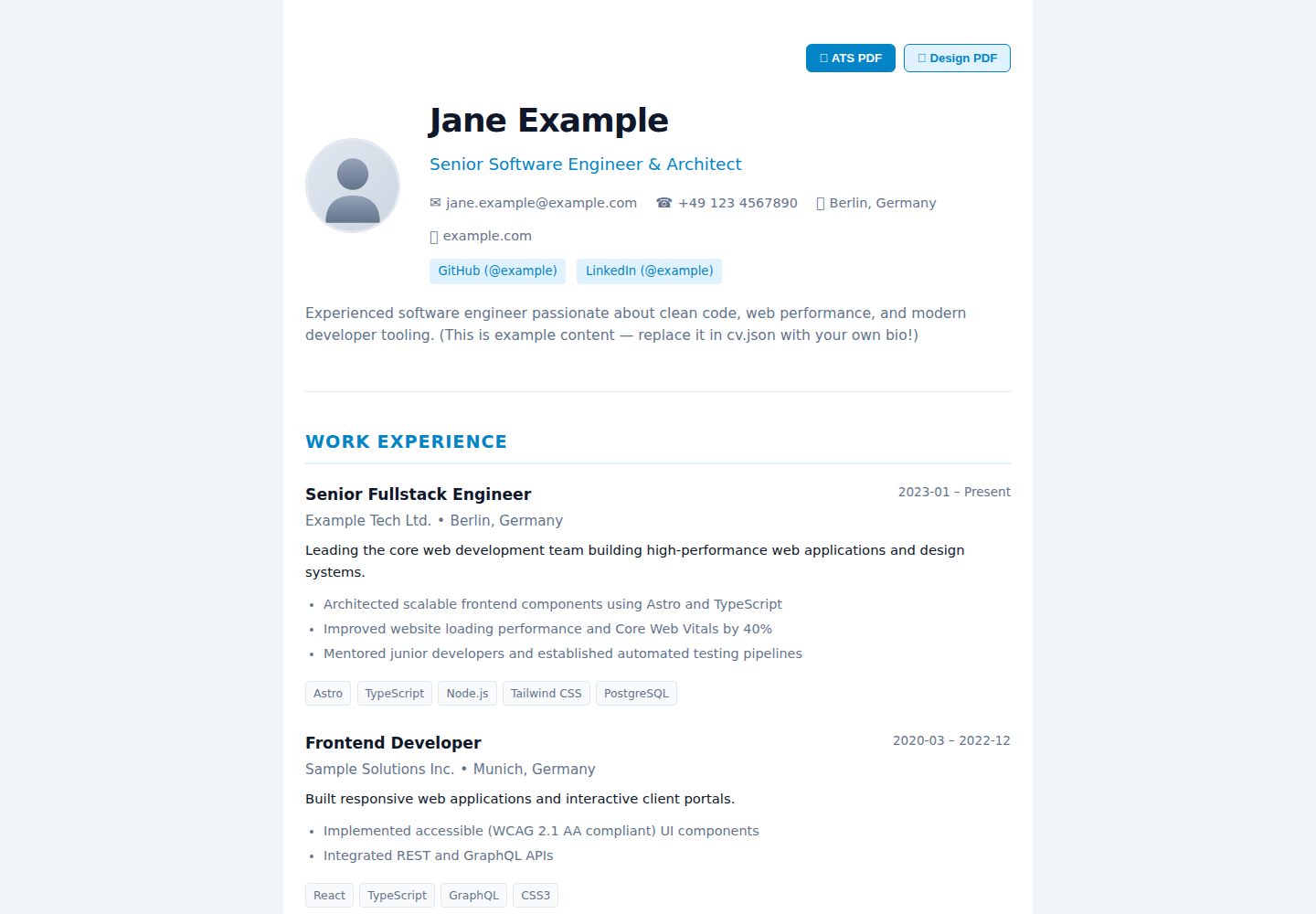
浏览真实页面截图,比较内容排版与手机效果。点击下方缩略图切换,放大查看整页细节。
全部页面与视图 2
截图用于了解视觉与布局,交互效果请以实际项目为准。
采集于 2026-10-02查看来源
值得关注的模板亮点
从已有项目资料中,快速了解它的特点。
双 PDF 导出:/print/ats 面向 ATS 解析,/print/design 匹配网页主题
内置 classic、sidebar、timeline 三套主题,支持 /preview/<theme> 预览
内置 en、de 多语言支持,包含 OpenGraph、Twitter Card 与 Schema.org Person 结构化数据
使用 Zod 对配置和简历数据进行校验,主题与解析器按目录组织
静态生成,可部署到 GitHub Pages、Cloudflare Pages、Vercel、Netlify 或自托管静态服务器
模板详细介绍
dotcv 是一个使用 Astro 构建的静态简历与作品集平台模板,灵感来自 readcv。它把简历内容与站点设置分别放在项目根目录的 cv.json 和 dotcv.config.json 中,通过 JSON 配置驱动页面渲染与 PDF 导出。模板内置 classic、sidebar、timeline 三套主题,可在配置中切换,也提供 /preview/<theme> 路由用于在线预览各主题效果。
在输出方面,dotcv 提供双 PDF 导出:/print/ats 生成单栏、标准化排版的 ATS 简历,面向 Workday、Greenhouse 等招聘系统解析;/print/design 生成与当前网页主题视觉一致的 PDF,用于面试或作品展示。站点本身为静态生成,可部署到 GitHub Pages、Cloudflare Pages、Vercel、Netlify 或任意静态服务器。
模板还包含 i18n 多语言支持(内置 en、de)、OpenGraph 与 Twitter Card 元数据、Schema.org Person 结构化数据,以及基于 Zod 的配置与简历数据校验。项目结构把主题、PDF 组件、解析器和 i18n 翻译分目录组织,方便替换或扩展。需要注意的是,简历数据字段、主题名称和 PDF 选项均以 README 中列出的配置项为准,使用前应核对实际仓库中的 schema 与示例文件。
Astro作品集
适合你的项目吗?
适用场景
- 用 JSON 维护个人简历并生成在线简历页面
- 向招聘系统投递时导出单栏 ATS 简历 PDF
- 面试或作品展示时导出与网页主题一致的设计版 PDF
- 在 classic、sidebar、timeline 主题间切换或基于主题目录扩展自定义布局
- 部署到 GitHub Pages 等静态托管平台作为个人主页
适合人群
- 需要同时维护在线简历与可打印 PDF 的开发者或设计师
- 偏好用 JSON 文件而非后台系统管理简历内容的用户
- 需要 ATS 友好简历格式的求职者
- 希望以 Astro 静态站点方式部署个人作品集或简历页的团队或个人
上手与定制指南
结合仓库当前版本的说明,按下面的资料检查内容、配置与运行要求。
- 1
克隆仓库后执行 npm install,并将 cv.example.json 复制为 cv.json 填入个人数据
- 2
在 dotcv.config.json 中设置 theme、locale 以及 pdf 相关选项
- 3
本地开发使用 npm run dev,构建静态文件使用 npm run build,输出目录为 dist
- 4
部署前在 astro.config.mjs 中配置 site 为实际域名
- 5
演示图片、字体、图标等第三方素材需按各自许可单独核对
授权与来源资料
使用条件与限制
免费使用 · 保留许可声明本次收录的是公开仓库中采用 MIT 许可的免费版本;免费范围为该版本代码,不代表外部服务或第三方素材免费。
使用时需要遵守
- 允许免费使用、修改、商用和分发该版本代码。
- 分发代码副本或实质性部分时,保留原作者版权声明和完整 MIT 许可声明。
- 代码按现状提供;担保与责任限制以原许可证及适用法律为准。
额外费用与待核对事项
- 演示图片、字体、图标及其他第三方素材需按各自许可核对,不能仅凭代码的 MIT 许可判断。
- 域名、托管、数据库、支付或 AI 等外部服务可能另外收费。
查看原文依据
https://github.com/tjaugust01/dotcv/blob/main/LICENSEhttps://github.com/tjaugust01/dotcv/blob/main/README.mdPermission is hereby granted, free of charge
许可证原文
DeepSeek 根据仓库许可证和 README 整理 ·2026-10-02。结果仅覆盖已读取资料,依赖、图片、字体及后续条款变更以各自原文为准。
项目核对记录与介绍依据
模板资料
- 来源平台
- Astro Themes
- 资料与维护参考分
- 资料较完整 · 83 / 100
- 技术栈
- Astro
- 网站类型
- 作品集
这个分数如何计算
本站按许可资料(最高30分)、演示链接(12分)、预览图(10分)、Star数(15分)、记录的维护时间(15分)、描述完整度(8分)、功能记录(5分)和分类资料(5分)计算。它不是代码、安全或性能测试,也不是 Google 评分;有链接不代表已实测可用。
这个项目需要核对什么
- 记录的仓库更新时间
- 2026-08-27
- 截图检查日期
- 2026-10-02
已收录演示链接。请用你的内容与屏幕尺寸检查;有演示不代表表单、认证或支付已经可用。
目录记录的主要技术栈是 Astro。请通过依赖清单和锁文件核对实际版本与托管要求。这些说明基于收录资料,不代表代码审计或部署实测。
查看具体选型方法 →介绍的制作与核对状态
介绍由 AI 辅助整理目录与仓库资料。仓库作者不等于这篇介绍的审核者。
已完成服务器许可规则与 AI 来源核对;未经过人工编辑审核。
查看当时使用的来源资料
SHA-256: ff5c1f058b18fa0a993c895a7efa120f7a38c78ffe84cdd6ed841bab39f87067
2026-10-02T15:30:52.524Z
来源文件 / 仓库# dotcv
> A modern, minimalist, and ATS-friendly CV and portfolio platform inspired by *readcv*, built with [Astro](https://astro.build).
[**Live Demo ↗**](https://tjaugust01.github.io/dotcv/) · [Features](#features) · [Themes](#available-themes) · [Quick Start](#quick-start) · [Documentation](#configuration-reference)
Manage your resume data and preferences in simple root configuration files and get an elegant online presence alongside a machine-readable, printable PDF resume.
[](https://tjaugust01.github.io/dotcv/)
---
## Features
- **Root-Level Configuration:** Maintain your resume data (`cv.json`) and settings (`dotcv.config.json`) directly in the project root.
- **Dual PDF Export:**
- **ATS Resume:** A standardized, single-column vector layout optimized for Applicant Tracking Systems (Workday, Greenhouse, etc.) with precise print pagination.
- **Design PDF:** A styled PDF matching the visual layout of your chosen web theme for personal presentations.
- **Pluggable Theme System:** Switch between pre-built themes (`classic`, `sidebar`, `timeline`) or create custom layouts.
- **Internationalization (i18n):** Built-in multi-language support (e.g., English, German).
- **SEO & Social Sharing:**
- OpenGraph and Twitter Card metadata for rich previews on LinkedIn, X, and other platforms.
- Structured data with Schema.org (`Person`) JSON-LD.
- Dynamic keyword and canonical URL generation.
- **Static & Fast:** 100% Static Site Generation (SSG) with zero runtime dependencies. Deployable on GitHub Pages, Cloudflare Pages, Vercel, Netlify, or any static web server.
---
## Available Themes
`dotcv` includes three themes out of the box. You can configure the active theme in `dotcv.config.json` or preview each theme live via the links below:
### 1. Classic Theme (`classic`)
An elegant, centered single-column layout with clean typography and subtle accents. Suitable for any industry.
[**View Classic Demo ↗**](https://tjaugust01.github.io/dotcv/) *(Local: `http://localhost:4321/preview/classic`)*

---
### 2. Sidebar Theme (`sidebar`)
A modern two-column layout featuring a sticky profile sidebar on the left and chronological career milestones on the right.
[**View Sidebar Demo ↗**](https://tjaugust01.github.io/dotcv/preview/sidebar) *(Local: `http://localhost:4321/preview/sidebar`)*

---
### 3. Timeline Theme (`timeline`)
A timeline layout designed for engineers and creatives, complete with a dark mode toggle, hero profile header, and tagged cards.
[**View Timeline Demo ↗**](https://tjaugust01.github.io/dotcv/preview/timeline) *(Local: `http://localhost:4321/preview/timeline`)*

---
## Dual PDF Export
`dotcv` provides two distinct PDF formats:

1. **ATS Resume (`/print/ats`):**
- Strict single-column layout, standard typography, and clean text flow.
- Ensures optimal parsing rates across automated HR and recruiting software.
2. **Design PDF (`/print/design`):**
- Visually styled to match your chosen web theme.
- Ideal for direct recruiter contact, interviews, or portfolio presentations.
---
## Quick Start
### 1. Clone the repository & install dependencies
```bash
git clone https://github.com/your-username/dotcv.git
cd dotcv
npm install
```
### 2. Add your CV data
Create your personal `cv.json` (or use `cv.example.json` as a starting point):
```bash
cp cv.example.json cv.json
```
### 3. Start the local development server
```bash
npm run dev
```
Open [http://localhost:4321](http://localhost:4321) in your browser.
---
## Configuration Reference
### 1. `dotcv.config.json` (Settings)
This file controls the theme, localization, and PDF export behaviors:
```json
{
"theme": "classic",
"locale": "en",
"pdf": {
"theme": "classic",
"format": "a4",
"showAtsButton": true,
"showDesignButton": true,
"filename": "CV_{name}.pdf"
}
}
```
#### Available Options
| Option | Type | Default | Description |
| :--- | :--- | :--- | :--- |
| **`theme`** | `string` | `"classic"` | Active web theme (`classic`, `sidebar`, `timeline`). |
| **`locale`** | `string` | `"en"` | Language code for UI strings and date formatting (`en`, `de`). |
| **`pdf.theme`** | `string` *(optional)* | `theme` | Theme override for the Design PDF export (e.g., use `classic` for PDF while keeping `timeline` on web). |
| **`pdf.format`** | `"a4" \| "letter"` *(optional)* | `"a4"` | Page size for print and PDF generation (`"a4"` or `"letter"`). |
| **`pdf.showAtsButton`** | `boolean` *(optional)* | `true` | Toggles the visibility of the ATS PDF download button on the website. |
| **`pdf.showDesignButton`** | `boolean` *(optional)* | `true` | Toggles the visibility of the Design PDF download button on the website. |
| **`pdf.filename`** | `string` *(optional)* | `"{name} — CV"` | Default filename suggested in browser save dialogs. Supports `{name}` and `{title}` placeholders. |
---
### 2. `cv.json` (Resume Data)
The `cv.json` file contains all structured profile information:
```json
{
"profile": {
"name": "Jane Example",
"title": "Senior Software Engineer & Architect",
"email": "[email protected]",
"phone": "+1 234 567 8900",
"location": "San Francisco, CA",
"website": "https://example.com",
"avatar": "/avatar.svg",
"bio": "Brief overview about your professional background and core strengths.",
"socials": [
{
"plattform": "GitHub",
"url": "https://github.com/example",
"username": "example"
}
]
},
"experience": [
{
"company": "Tech Company",
"role": "Senior Engineer",
"location": "San Francisco, CA",
"startDate": "2022-01",
"endDate": null,
"current": true,
"description": "Core responsibilities and team leadership.",
"highlights": [
"Architected scalable frontend components using Astro and TypeScript",
"Improved website loading performance and Core Web Vitals by 40%"
],
"technologies": ["TypeScript", "Astro", "React", "Node.js"]
}
],
"education": [
{
"institution": "University of Technology",
"degree": "Master of Science",
"fieldOfStudy": "Computer Science",
"startDate": "2018-10",
"endDate": "2020-09",
"location": "San Francisco, CA",
"highlights": ["Focus on distributed systems and web performance"]
}
],
"skills": [
{
"category": "Frontend",
"skills": ["Astro", "TypeScript", "React", "Tailwind CSS"]
}
],
"projects": [
{
"title": "Open Source Project",
"description": "Project overview and key features.",
"url": "https://github.com/example/project",
"technologies": ["Astro", "TypeScript"]
}
],
"certifications": [
{
"title": "Cloud Architect Certificate",
"issuer": "Cloud Provider",
"date": "2023-05",
"url": "https://example.com/cert"
}
],
"languages": [
{
"language": "English",
"fluency": "Native"
},
{
"language": "German",
"fluency": "Professional working proficiency"
}
]
}
```
---
## Project Structure
```
dotcv/
├── cv.json # Personal CV data (or cv.yaml / cv.xml)
├── cv.example.json # Template with placeholder data
├── dotcv.config.json # Settings (Theme, locale, PDF options)
├── public/ # Static assets (Avatar, Favicon, Fonts)
├── src/
│ ├── components/
│ │ └── pdf/
│ │ └── AtsResume.astro # Standardized ATS-optimized PDF layout
│ ├── lib/
│ │ ├── configSchema.ts # Zod validation schema for config
│ │ ├── cvSchema.ts # Zod validation schema for CV data
│ │ ├── i18n/ # Translations (en, de, ...)
│ │ └── parser/ # Format-agnostic loaders & parsers
│ ├── pages/
│ │ ├── index.astro # Public CV website
│ │ ├── preview/
│ │ │ └── [theme].astro # Live preview routes for each theme (/preview/<theme>)
│ │ ├── print/
│ │ │ ├── ats.astro # Route for ATS PDF (/print/ats)
│ │ │ └── design.astro # Route for Design PDF (/print/design)
│ │ └── print.astro # Default print fallback route
│ └── themes/
│ ├── classic/ # Classic Theme (index.astro & pdf.astro)
│ ├── sidebar/ # Sidebar Theme (index.astro & pdf.astro)
│ ├── timeline/ # Timeline Theme (index.astro & pdf.astro)
│ └── registry.ts # Theme registry
├── astro.config.mjs
└── package.json
```
---
## Deployment
Since `dotcv` generates static HTML, CSS, and JS, it can be hosted on any static hosting provider or web server:
### 1. Configure site URL (`astro.config.mjs`)
```js
import { defineConfig } from 'astro/config';
export default defineConfig({
site: 'https://your-domain.com',
});
```
### 2. Choose your hosting provider
- **Vercel / Netlify / Cloudflare Pages:**
- Build Command: `npm run build`
- Output Directory: `dist`
- **GitHub Pages:**
- Deploy using the standard [Astro GitHub Pages Action](https://docs.astro.build/en/guides/deploy/github/).
- **Self-hosted (Nginx / Caddy / Docker):**
- Serve the generated static files from the `dist/` directory.
---
## Available Scripts
| Command | Action |
| :--- | :--- |
| `npm run dev` | Starts the Astro development server with hot module reloading |
| `npm run build` | Builds the production-ready static website to the `dist/` folder |
| `npm run preview` | Starts a local preview server for the built `dist/` directory |
| `npm run screenshots` | Automatically captures all theme previews and PDF comparison graphics in `docs/images/` |
---
## License
MIT License – Free for personal and commercial use.
看看同类模板
对比同技术栈与用途的模板,找到更适合的视觉与内容结构。

astro-theme-cactus
A simple Astro theme. Use it to create your blog or website.
Astro · 作品集

astrofy
Astrofy is a free and open-source template for your Personal Portfolio Website built with Astro and TailwindCS…
Astro · 作品集

astro-nano
Astro Nano is a static, minimalist, lightweight, lightning fast portfolio and blog.
Astro · 作品集

astro-erudite
An opinionated, unstyled static blogging template built with Astro and native CSS.
Astro · 作品集

astro-sphere
Astro Sphere is a static, minimalist, lightweight, lightning fast portfolio and blog.
Astro · 作品集

astro-micro
Blog theme for Astro with search and comments built-in. Zero frameworks.
Astro · 作品集