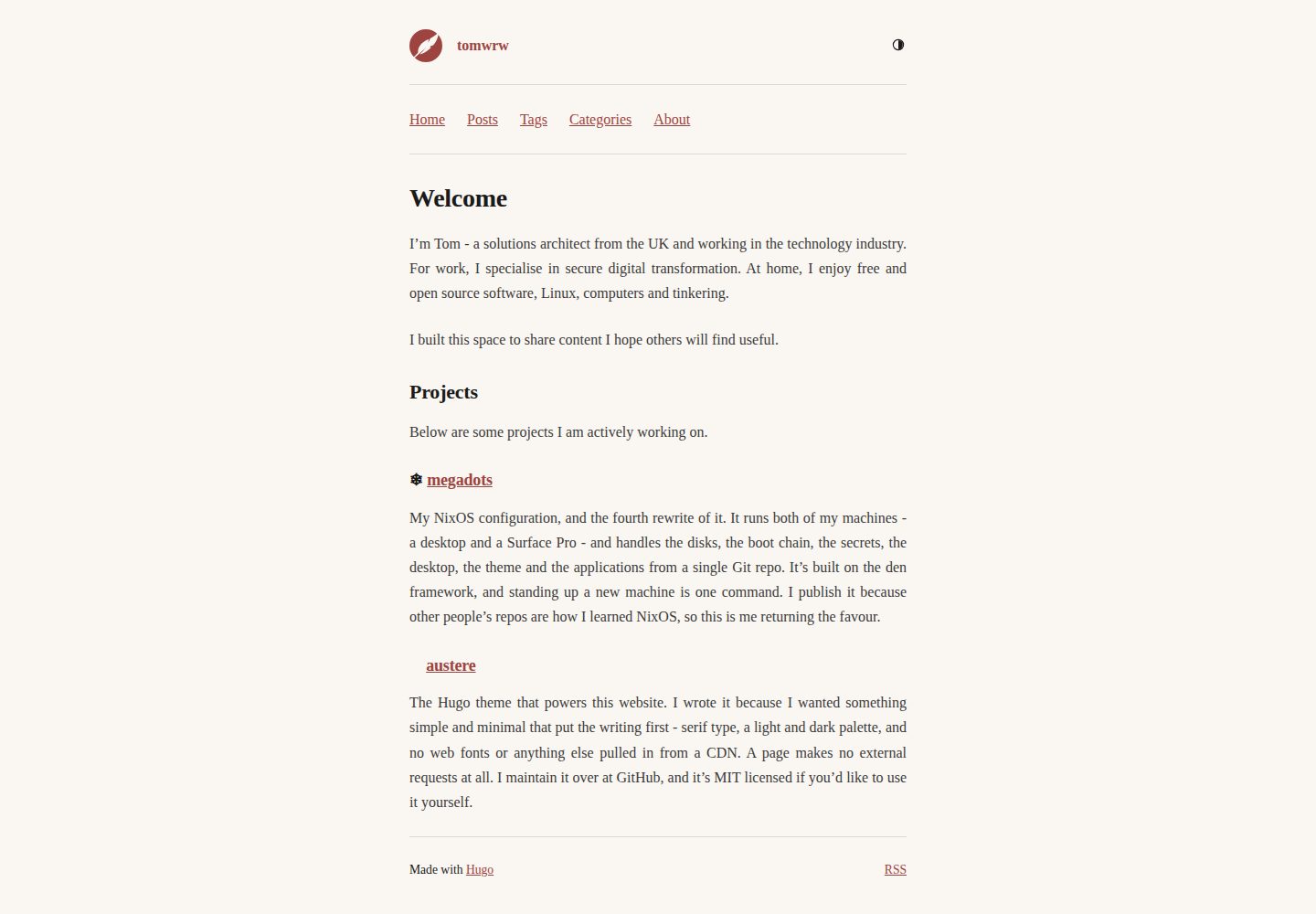
Pages do not load external stylesheets, web fonts, or CDN resources; CSS is inline and icons are inline SVG, so an article produces only one request
HugoStarter
austere-theme-hugo — Hugo Starter Template
By tomwrw
austere is a minimal Hugo theme for users who focus on writing, using serif fonts and a light/dark color scheme, with inline CSS and inline SVG icons; pages load without external stylesheets, web fonts, or CDNs.
Explore the design
Compare the page layouts and mobile experience. Open any screenshot for a closer look.
Desktop homepage1 / 3
Desktop captureTop of page
Actual screenshot captured by the server browser.
All pages & views 3
Screenshots show visual appearance; interactive behavior may differ.
Recorded 2026-10-02View source
What stands out
A quick read of the recorded project description.
Serif fonts and a light/dark color scheme; the palette is defined as CSS custom properties and can be overridden via custom.css in the site
The color scheme cycles among system, light, and dark; the choice is stored in localStorage and applied before first paint, with no flicker
Pages without a date keep an undated header and are grouped into an Undated section on the list page, whose position can be adjusted via a parameter
The bottom of a page automatically lists all taxonomies used by that page, without the theme needing to know taxonomy names
Images in a page bundle generate srcset at configured widths; clicking the largest image opens it in a lightbox; SVG, GIF, static/, and external images are not processed
Template Details
austere is a minimal Hugo theme designed for "people who mainly write." It uses serif fonts and a set of light and dark color schemes, with little decoration beyond that. Pages do not load external stylesheets, web fonts, or CDN resources: CSS is inlined in the page, icons are inline SVG, so an article produces only one request. The theme is a Hugo port of the author's earlier austere theme for Zola, with design inspiration from jimmyff's Zap.
For content organization, posts go under content/posts/, while other pages can be placed anywhere under content/; pages with a date show a date header, pages without a date keep an undated header and are grouped into an Undated section at the end of the list page, which can be moved to the top of the list via undatedPosition = "above". Sections are not hardcoded; content/writing/ and content/posts/ behave the same. At the bottom of a page, all taxonomies used by that page are listed, so tags, categories, and any other taxonomies you declare in [taxonomies] are displayed automatically, and the theme does not need to know their names.
For images, place images in the same page bundle as the article and reference them with ordinary Markdown syntax. The theme generates scaled versions for each width in params.images.sizes and outputs them as srcset; clicking the largest image opens it in a lightbox (mouse interaction only, and reading is unaffected without this feature). SVG, GIF, files in static/, and images from external domains are not processed.
Configuration options are all optional, and the theme makes no requirements about markup, outputs, or taxonomies configuration. Navigation uses Hugo's regular menus; when no menu is configured, the theme outputs no navigation at all. Analytics scripts are rendered only in production builds, supporting Umami and Google Analytics.
The theme requires Hugo 0.146 or newer; the extended version is needed only if WebP is kept as an image format. The palette is stored as custom properties in assets/css/main.css and can be overridden by adding assets/css/custom.css in the site, which the theme appends. The color scheme cycles among system, light, and dark; the choice is saved in localStorage and applied before first paint, so there is no flicker; when no choice is stored, it follows prefers-color-scheme and responds to reader changes. Body text is justified by default and can be changed to left-aligned with one line in custom.css. Templates can be overridden by placing files at the same paths in the site's layouts/.
The development environment requires Nix, or you can use just Hugo; commands such as just serve, just check, and just links are provided. exampleSite/ is a working site that can be copied. The theme is MIT licensed.
HugoStarter
Is it right for your project?
Use Cases
- A personal blog focused on text writing that wants a clean page with few load requests
- A writing site that needs light and dark color schemes and follows the system theme
- A content site using Hugo menus, taxonomies, and page bundles to organize articles and images
- A site that wants to adjust the color scheme or body text alignment with a small amount of CSS overrides
- A site that needs to integrate Umami or Google Analytics in production builds
Suitable For
- Hugo users who focus on writing and prefer minimal typography
- Sites that accept serif fonts and justified body text by default
- Projects using Hugo 0.146 or newer
- Developers willing to make small adjustments via custom CSS and template overrides
Getting started & customization
Use these recorded setup notes alongside the repository instructions for your chosen version.
- 1
In the Hugo project root, run git submodule add https://github.com/tomwrw/austere-theme-hugo themes/austere and set theme = "austere" in hugo.toml
- 2
When cloning the site elsewhere, use git clone --recurse-submodules; in CI, actions/checkout needs submodules: recursive
- 3
Requires Hugo 0.146 or newer; the extended version is needed only if WebP is kept as an image format
- 4
Theme parameters are all optional; refer to the working site in exampleSite/ for configuration
- 5
The development environment requires Nix, or you can use just Hugo; commands such as just serve, just check, and just links are available
License & source material
Usage conditions & limitations
Free to use · keep license noticeThis entry covers the free version in the public repository under the MIT license; the free scope is the code of that version and does not mean external services or third-party assets are free.
Must comply with when using
- You may use, modify, commercially use, and distribute the code of this version for free.
- When distributing copies or substantial portions of the code, retain the original author's copyright notice and the full MIT license notice.
- The code is provided as is; warranties and limitations of liability are governed by the original license and applicable law.
Additional costs & items to verify
- Using this theme requires Hugo 0.146 or newer; the Hugo extended version is needed only if WebP is kept as an image format.
- The development environment requires Nix, or you can use just Hugo instead.
- Umami analytics is optional and requires you to provide configuration such as websiteId; Google Analytics is integrated via Hugo's services.googleAnalytics settings.
- Demo images, fonts, icons, and other third-party assets must be checked against their respective licenses and cannot be judged solely by the code's MIT license.
- External services such as domains, hosting, databases, payments, or AI may incur separate charges.
View Original Text Basis
Permission is hereby granted, free of charge
Original License Text
Requires Hugo 0.146 or newer. The extended edition is needed only if you keep WebP as the image format
Original README
Requires [Nix](https://nixos.org), or just Hugo if you'd rather.
Original README
https://github.com/tomwrw/austere-theme-hugo/blob/main/LICENSEhttps://github.com/tomwrw/austere-theme-hugo/blob/main/README.md[params.umami] # optional analytics
Original README
Compiled by DeepSeek based on repository license and README ·2026-10-02. Results only cover the materials read; dependencies, images, fonts, and subsequent term changes are subject to their respective original texts.
Project checks & description sources
Template Information
- Source platforms
- Hugo Themes
- Documentation and maintenance reference score
- More documented · 83 / 100
- Technologies
- Hugo
- Website type
- Starter
How this score is calculated
Our heuristic uses license records (up to 30), a demo link (12), a preview (10), stars (15), recorded maintenance (15), description completeness (8), feature records (5) and classification data (5). It is not a code, security or performance test, or a Google score. A link does not establish tested functionality.
What to verify for this project
- Repository update recorded
- 2026-09-09
- Screenshot last checked
- 2026-10-02
A demo link is listed. Check it with your own content and viewport sizes; its presence does not confirm that forms, authentication or payments work.
The catalog identifies Hugo as the primary stack. Check the actual dependency manifest and lockfile for versions and hosting requirements. These notes use recorded metadata, not a code audit or a deployment test.
Use a selection guide →How this description was prepared
AI-assisted description based on catalog records and repository material. Repository authors are not automatically the reviewers of this description.
Automatically checked against source and license rules; no manual editorial review.
Inspect the recorded source material
SHA-256: cf2b8e54fda879f1c5e214bf849780264f55032b39f3b8f09acf4b2bf03c25af
2026-10-02T19:37:40.688Z
Source file / repository<p align="center">
<img src="images/logo.svg" alt="austere" width="160">
</p>
<h1 align="center">austere</h1>
<p align="center">A minimal Hugo theme for people who mostly write.</p>
---
Serif type, a light and dark palette, and not much else. A page loads no stylesheet, no web font and nothing from a CDN: the CSS is inlined and the icons are inline SVG, so a post is one request.
It's a port of [austere for Zola](https://github.com/tomwrw/austere-theme-zola), which in turn owes its design to [Zap](https://github.com/jimmyff/zola-zap) by [jimmyff](https://github.com/jimmyff). I wrote the original Zola theme, but I am now using Hugo and wanted to bring my theme with me.
Requires Hugo 0.146 or newer. The extended edition is needed only if you keep WebP as the image format; see `params.images` below.
## Install
From the root of your Hugo project, run:
```bash
git submodule add https://github.com/tomwrw/austere-theme-hugo themes/austere
```
Then, in your `hugo.toml`:
```toml
theme = "austere"
```
The theme sets no requirements on your `markup`, `outputs` or `taxonomies` configuration, and every parameter below is optional.
Remember `git clone --recurse-submodules` when you clone your site elsewhere, and `submodules: recursive` on `actions/checkout` in CI.
## Configuration
```toml
[params]
description = "Notes on things" # meta description, feed subtitle
author = "Your Name"
keywords = "writing, hugo"
strapline = "and other distractions" # sits after the site title
footerText = "© 2026" # HTML allowed
favicon = "/favicon.ico"
profilePicture = "/images/me.png" # home page only
siteIcon = "quill" # "quill", a path to your own, or ""
undatedPosition = "below" # where undated pages sit in a list
[params.images] # responsive images
sizes = [512, 1024, 2048] # srcset widths
defaultSize = 1024 # width of the src fallback
quality = 80
format = "webp" # webp | jpeg | png | original
[params.umami] # optional analytics
websiteId = ""
src = "https://cloud.umami.is/script.js"
domains = ""
# Google Analytics goes through Hugo's own setting:
[services.googleAnalytics]
ID = "G-XXXXXXXXXX"
[menus]
[[menus.main]]
name = "Posts"
pageRef = "/posts"
weight = 10
```
Analytics only render in production builds. The navigation is Hugo's normal menu; with no menu configured the theme leaves it out entirely.
`exampleSite/` is a working site you can copy from.
## Writing
Nothing special is needed. Posts go in `content/posts/`, other pages anywhere in `content/`, and any page with a `date` gets a dated header. Sections are not hard-coded, so `content/writing/` behaves the same as `content/posts/`.
Pages are footed with every taxonomy they use, so tags, categories and anything else you declare in `[taxonomies]` all show up without the theme needing to know their names.
A page with no `date` keeps its dateless header and collects in an **Undated** block at the end of list pages, rather than sorting itself to the year one. Set `undatedPosition = "above"` to put that block first.
Keep a post's images beside it in a page bundle and write them the ordinary way:
```
content/posts/a-walk/
├── index.md
└── hill.jpg
```
```markdown

```
Images are resized to each width in `params.images.sizes` and served as a `srcset`, with the largest opening in a lightbox on click — a mouse affordance only, so nothing is lost without it. SVG, GIF, files in `static/` and images on other domains are left alone.
Set `description` in a page's front matter when you want to control the social preview text. Without one, Hugo falls back to the page summary, which on a long home page is possibly more than you want.
## Colours and type
The palette lives in `assets/css/main.css` as custom properties. To change any of it, add `assets/css/custom.css` to your own site - the theme appends it, so you only need the lines you're overriding:
```css
:root { --accent: #2f6f4f }
:root[data-theme="dark"] { --accent: #7fd1a8 }
```
The tokens are `--bg`, `--text`, `--heading`, `--muted`, `--quote`, `--accent`,
`--accent-hover`, `--code-bg`, `--border`, plus `--c-*` for the syntax highlighting. Run `hugo gen chromastyles --style=<name>` to see the colours from any other Chroma palette.
No fonts are downloaded. `--font-serif` asks for Source Serif, then Charter, Sitka and Georgia, then Noto Serif and the other serifs usually found on Linux.
The named Linux families matter: a desktop is free to alias the generic `serif` to whatever it likes, including a sans face, and several do.
The colour scheme cycles system, light, dark. The choice is kept in `localStorage` and applied before the first paint, so there's no flash. With nothing stored the page follows `prefers-color-scheme` and reacts if the reader changes it.
Body text is justified. If you'd rather it weren't, that's one line in `custom.css`:
```css
p { text-align: left }
```
## Overriding templates
A file at the same path in your site's `layouts/` wins over the theme's, so to change the footer, add your own `layouts/_partials/footer.html`. The templates worth knowing about:
```
layouts/
baseof.html
home.html
page.html
section.html
taxonomy.html
term.html
404.html
alias.html
_partials/
head.html
header.html
footer.html
image.html
pagination.html
entry-list.html
undated.html
_markup/
render-image.html
render-link.html
render-codeblock.html
```
The code block hook calls Chroma with `noClasses: false` regardless of your site config, which is what lets the syntax palette follow the colour scheme without you having to configure
anything.
## Development
Requires [Nix](https://nixos.org), or just Hugo if you'd rather.
```bash
nix develop # or direnv allow
just serve # example site on :1313
just check # build with warnings treated as errors
just links # link check
just --list
```
Without Nix:
```bash
hugo server --source exampleSite --themesDir ../.. --theme austere-theme-hugo
```
## Credits
- [Zap](https://github.com/jimmyff/zola-zap) by [jimmyff](https://github.com/jimmyff), for the original design inspiration.
MIT, see [LICENSE](LICENSE).
Explore similar templates
Compare previews and descriptions within the same stack and category.

hugo-xmin
hugo-xmin is an extremely minimal Hugo theme written by Yihui Xie for template beginners. HTML and CSS total about 140 lines, with no external dependencies, and it uses the MIT license.
Hugo · Starter

hugo-theme-gallery
A Hugo Extended photo gallery theme that organizes images with Page Bundles, automatically generating album lists and gallery pages with a Justified layout and PhotoSwipe lightbox.
Hugo · Starter

reveal-hugo
reveal-hugo is a Hugo theme that converts Markdown content into Reveal.js-based HTML presentations. It supports slide separation with `---`, shortcodes for fragments, slides, sections, notes, Markdown, and MathJax, and organizes content as root or section presentations with order controlled by weight.
Hugo · Starter

anatole
Anatole is a minimalistic two-column Hugo theme ported from farbox-theme-Anatole, featuring dark mode, multilingual and RTL support, and optional portfolio, comments, analytics, KaTeX, and Mermaid integrations. It suits personal blogs, portfolios, or documentation sites built with Hugo.
Hugo · Starter

hugo-theme-diary
A Hugo diary-style theme ported from the Hexo theme Journal, with a grid homepage for essays and daily notes. It supports six languages, dark mode, table-of-contents scroll positioning, reading time, code highlighting, and configurable sidebar, fonts, and colors.
Hugo · Starter

risotto
risotto is a minimalist, responsive Hugo theme inspired by terminal ricing aesthetics. It uses semantic HTML and pure CSS with no JavaScript, and its layout relies on CSS Grid for native responsiveness without manual breakpoints.
Hugo · Starter