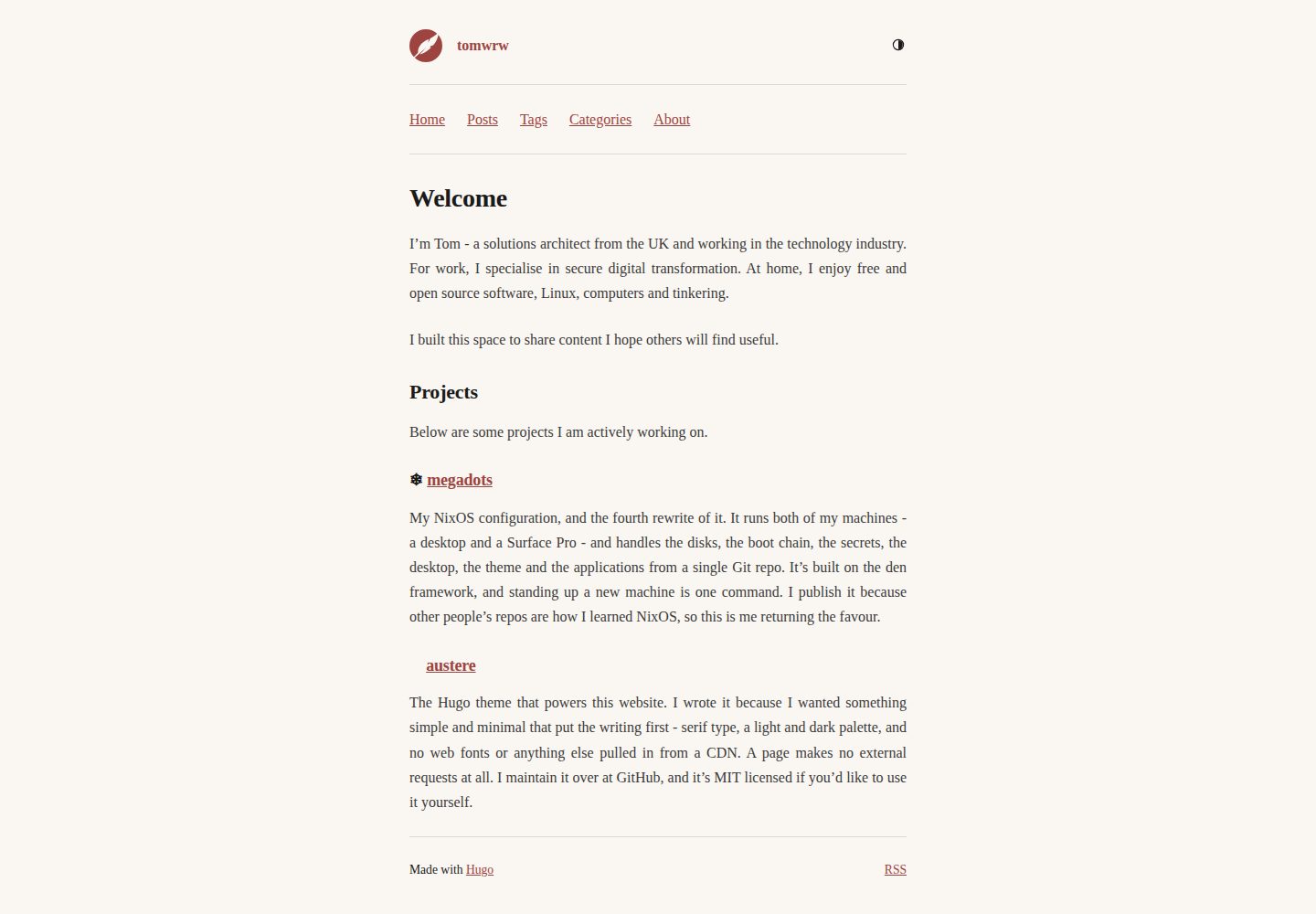
页面不加载外部样式表、Web 字体或 CDN 资源,CSS 内联、图标为内联 SVG,一篇文章只产生一次请求
Hugo启动器
austere-theme-hugo — Hugo 启动器模板
作者 tomwrw
austere 是一个面向以写作为主的用户的极简 Hugo 主题,采用衬线字体与明暗双色方案,CSS 内联、图标为内联 SVG,页面加载不依赖外部样式表、Web 字体或 CDN。
看看你的网站会是什么样
浏览真实页面截图,比较内容排版与手机效果。点击下方缩略图切换,放大查看整页细节。
全部页面与视图 3
截图用于了解视觉与布局,交互效果请以实际项目为准。
采集于 2026-10-02查看来源
值得关注的模板亮点
从已有项目资料中,快速了解它的特点。
衬线字体与明暗双色方案,调色板以 CSS 自定义属性定义,可通过站点中的 custom.css 覆盖
颜色方案在系统、浅色、深色间循环,选择存入 localStorage 并在首次绘制前应用,无闪烁
无 date 的页面保留无日期页眉并集中到列表页的 Undated 区块,位置可通过参数调整
页面底部自动列出该页使用的所有分类法,无需主题知道分类法名称
页面包中的图片按配置宽度生成 srcset,点击最大图在灯箱中打开;SVG、GIF、static/ 与外部图片不处理
模板详细介绍
austere 是一个为「主要写东西的人」设计的极简 Hugo 主题。它使用衬线字体和一套明暗两套配色,除此之外没有太多装饰。页面不加载外部样式表、Web 字体或 CDN 资源:CSS 内联在页面中,图标是内联 SVG,因此一篇文章只产生一次请求。主题是作者此前为 Zola 编写的 austere 主题的 Hugo 移植版,设计灵感来自 jimmyff 的 Zap。
内容组织上,文章放在 content/posts/ 下,其他页面可放在 content/ 任意位置;带 date 的页面会显示日期页眉,没有 date 的页面保留无日期页眉,并集中到列表页末尾的 Undated 区块,可通过 undatedPosition = "above" 调整到列表顶部。章节不是硬编码的,content/writing/ 与 content/posts/ 行为一致。页面底部会列出该页使用的所有分类法,因此 tags、categories 以及你在 [taxonomies] 中声明的其他分类法都会自动显示,主题无需知道它们的名称。
图片方面,把图片与文章放在同一个页面包中,用普通 Markdown 语法引用即可。主题会按 params.images.sizes 中的每个宽度生成缩放版本并以 srcset 输出,点击最大图会在灯箱中打开(仅鼠标交互,没有该功能也不影响阅读)。SVG、GIF、static/ 中的文件以及外部域名图片不做处理。
配置项均为可选,主题不对 markup、outputs 或 taxonomies 配置提出要求。导航使用 Hugo 常规菜单,未配置菜单时主题完全不输出导航。分析脚本只在生产构建中渲染,支持 Umami 与 Google Analytics。
主题要求 Hugo 0.146 或更新版本;仅当保留 WebP 作为图片格式时才需要 extended 版本。调色板以自定义属性形式存放在 assets/css/main.css,可通过在站点中添加 assets/css/custom.css 覆盖,主题会将其追加。颜色方案在系统、浅色、深色之间循环,选择保存在 localStorage 并在首次绘制前应用,因此没有闪烁;未存储选择时跟随 prefers-color-scheme 并响应读者更改。正文字体默认两端对齐,可在 custom.css 中用一行改为左对齐。模板可通过在站点 layouts/ 中放置同路径文件覆盖。
开发环境需要 Nix,也可以只用 Hugo;提供 just serve、just check、just links 等命令。exampleSite/ 是一个可复制的工作站点。主题采用 MIT 许可。
Hugo启动器
适合你的项目吗?
适用场景
- 以文字写作为主的个人博客,希望页面简洁、加载请求少
- 需要明暗两种配色并跟随系统主题的写作站点
- 使用 Hugo 菜单、分类法和页面包组织文章与图片的内容站点
- 希望用少量 CSS 覆盖调整配色或正文对齐方式的站点
- 需要在生产构建中接入 Umami 或 Google Analytics 的站点
适合人群
- 以写作为主、偏好极简排版的 Hugo 用户
- 接受衬线字体与默认两端对齐正文的站点
- 使用 Hugo 0.146 或更新版本的项目
- 愿意通过自定义 CSS 和模板覆盖做少量调整的开发者
上手与定制指南
结合仓库当前版本的说明,按下面的资料检查内容、配置与运行要求。
- 1
在 Hugo 项目根目录执行 git submodule add https://github.com/tomwrw/austere-theme-hugo themes/austere,并在 hugo.toml 中设置 theme = "austere"
- 2
在其他位置克隆站点时使用 git clone --recurse-submodules,CI 中 actions/checkout 需设置 submodules: recursive
- 3
要求 Hugo 0.146 或更新版本;仅当保留 WebP 作为图片格式时才需要 extended 版本
- 4
主题参数均为可选,可参考 exampleSite/ 中的工作站点进行配置
- 5
开发环境需要 Nix,也可以只用 Hugo;可用 just serve、just check、just links 等命令
授权与来源资料
使用条件与限制
免费使用 · 保留许可声明本次收录的是公开仓库中采用 MIT 许可的免费版本;免费范围为该版本代码,不代表外部服务或第三方素材免费。
使用时需要遵守
- 允许免费使用、修改、商用和分发该版本代码。
- 分发代码副本或实质性部分时,保留原作者版权声明和完整 MIT 许可声明。
- 代码按现状提供;担保与责任限制以原许可证及适用法律为准。
额外费用与待核对事项
- 使用该主题需 Hugo 0.146 或更新版本;仅当保留 WebP 作为图片格式时才需要 Hugo extended 版本。
- 开发环境需要 Nix,也可以只用 Hugo 替代。
- Umami 分析为可选功能,需自行提供 websiteId 等配置;Google Analytics 通过 Hugo 的 services.googleAnalytics 设置接入。
- 演示图片、字体、图标及其他第三方素材需按各自许可核对,不能仅凭代码的 MIT 许可判断。
- 域名、托管、数据库、支付或 AI 等外部服务可能另外收费。
查看原文依据
Permission is hereby granted, free of charge
许可证原文
Requires Hugo 0.146 or newer. The extended edition is needed only if you keep WebP as the image format
README 原文
Requires [Nix](https://nixos.org), or just Hugo if you'd rather.
README 原文
https://github.com/tomwrw/austere-theme-hugo/blob/main/LICENSEhttps://github.com/tomwrw/austere-theme-hugo/blob/main/README.md[params.umami] # optional analytics
README 原文
DeepSeek 根据仓库许可证和 README 整理 ·2026-10-02。结果仅覆盖已读取资料,依赖、图片、字体及后续条款变更以各自原文为准。
项目核对记录与介绍依据
模板资料
- 来源平台
- Hugo Themes
- 资料与维护参考分
- 资料较完整 · 83 / 100
- 技术栈
- Hugo
- 网站类型
- 启动器
这个分数如何计算
本站按许可资料(最高30分)、演示链接(12分)、预览图(10分)、Star数(15分)、记录的维护时间(15分)、描述完整度(8分)、功能记录(5分)和分类资料(5分)计算。它不是代码、安全或性能测试,也不是 Google 评分;有链接不代表已实测可用。
这个项目需要核对什么
- 记录的仓库更新时间
- 2026-09-09
- 截图检查日期
- 2026-10-02
已收录演示链接。请用你的内容与屏幕尺寸检查;有演示不代表表单、认证或支付已经可用。
目录记录的主要技术栈是 Hugo。请通过依赖清单和锁文件核对实际版本与托管要求。这些说明基于收录资料,不代表代码审计或部署实测。
查看具体选型方法 →介绍的制作与核对状态
介绍由 AI 辅助整理目录与仓库资料。仓库作者不等于这篇介绍的审核者。
已完成服务器许可规则与 AI 来源核对;未经过人工编辑审核。
查看当时使用的来源资料
SHA-256: cf2b8e54fda879f1c5e214bf849780264f55032b39f3b8f09acf4b2bf03c25af
2026-10-02T19:37:40.688Z
来源文件 / 仓库<p align="center">
<img src="images/logo.svg" alt="austere" width="160">
</p>
<h1 align="center">austere</h1>
<p align="center">A minimal Hugo theme for people who mostly write.</p>
---
Serif type, a light and dark palette, and not much else. A page loads no stylesheet, no web font and nothing from a CDN: the CSS is inlined and the icons are inline SVG, so a post is one request.
It's a port of [austere for Zola](https://github.com/tomwrw/austere-theme-zola), which in turn owes its design to [Zap](https://github.com/jimmyff/zola-zap) by [jimmyff](https://github.com/jimmyff). I wrote the original Zola theme, but I am now using Hugo and wanted to bring my theme with me.
Requires Hugo 0.146 or newer. The extended edition is needed only if you keep WebP as the image format; see `params.images` below.
## Install
From the root of your Hugo project, run:
```bash
git submodule add https://github.com/tomwrw/austere-theme-hugo themes/austere
```
Then, in your `hugo.toml`:
```toml
theme = "austere"
```
The theme sets no requirements on your `markup`, `outputs` or `taxonomies` configuration, and every parameter below is optional.
Remember `git clone --recurse-submodules` when you clone your site elsewhere, and `submodules: recursive` on `actions/checkout` in CI.
## Configuration
```toml
[params]
description = "Notes on things" # meta description, feed subtitle
author = "Your Name"
keywords = "writing, hugo"
strapline = "and other distractions" # sits after the site title
footerText = "© 2026" # HTML allowed
favicon = "/favicon.ico"
profilePicture = "/images/me.png" # home page only
siteIcon = "quill" # "quill", a path to your own, or ""
undatedPosition = "below" # where undated pages sit in a list
[params.images] # responsive images
sizes = [512, 1024, 2048] # srcset widths
defaultSize = 1024 # width of the src fallback
quality = 80
format = "webp" # webp | jpeg | png | original
[params.umami] # optional analytics
websiteId = ""
src = "https://cloud.umami.is/script.js"
domains = ""
# Google Analytics goes through Hugo's own setting:
[services.googleAnalytics]
ID = "G-XXXXXXXXXX"
[menus]
[[menus.main]]
name = "Posts"
pageRef = "/posts"
weight = 10
```
Analytics only render in production builds. The navigation is Hugo's normal menu; with no menu configured the theme leaves it out entirely.
`exampleSite/` is a working site you can copy from.
## Writing
Nothing special is needed. Posts go in `content/posts/`, other pages anywhere in `content/`, and any page with a `date` gets a dated header. Sections are not hard-coded, so `content/writing/` behaves the same as `content/posts/`.
Pages are footed with every taxonomy they use, so tags, categories and anything else you declare in `[taxonomies]` all show up without the theme needing to know their names.
A page with no `date` keeps its dateless header and collects in an **Undated** block at the end of list pages, rather than sorting itself to the year one. Set `undatedPosition = "above"` to put that block first.
Keep a post's images beside it in a page bundle and write them the ordinary way:
```
content/posts/a-walk/
├── index.md
└── hill.jpg
```
```markdown

```
Images are resized to each width in `params.images.sizes` and served as a `srcset`, with the largest opening in a lightbox on click — a mouse affordance only, so nothing is lost without it. SVG, GIF, files in `static/` and images on other domains are left alone.
Set `description` in a page's front matter when you want to control the social preview text. Without one, Hugo falls back to the page summary, which on a long home page is possibly more than you want.
## Colours and type
The palette lives in `assets/css/main.css` as custom properties. To change any of it, add `assets/css/custom.css` to your own site - the theme appends it, so you only need the lines you're overriding:
```css
:root { --accent: #2f6f4f }
:root[data-theme="dark"] { --accent: #7fd1a8 }
```
The tokens are `--bg`, `--text`, `--heading`, `--muted`, `--quote`, `--accent`,
`--accent-hover`, `--code-bg`, `--border`, plus `--c-*` for the syntax highlighting. Run `hugo gen chromastyles --style=<name>` to see the colours from any other Chroma palette.
No fonts are downloaded. `--font-serif` asks for Source Serif, then Charter, Sitka and Georgia, then Noto Serif and the other serifs usually found on Linux.
The named Linux families matter: a desktop is free to alias the generic `serif` to whatever it likes, including a sans face, and several do.
The colour scheme cycles system, light, dark. The choice is kept in `localStorage` and applied before the first paint, so there's no flash. With nothing stored the page follows `prefers-color-scheme` and reacts if the reader changes it.
Body text is justified. If you'd rather it weren't, that's one line in `custom.css`:
```css
p { text-align: left }
```
## Overriding templates
A file at the same path in your site's `layouts/` wins over the theme's, so to change the footer, add your own `layouts/_partials/footer.html`. The templates worth knowing about:
```
layouts/
baseof.html
home.html
page.html
section.html
taxonomy.html
term.html
404.html
alias.html
_partials/
head.html
header.html
footer.html
image.html
pagination.html
entry-list.html
undated.html
_markup/
render-image.html
render-link.html
render-codeblock.html
```
The code block hook calls Chroma with `noClasses: false` regardless of your site config, which is what lets the syntax palette follow the colour scheme without you having to configure
anything.
## Development
Requires [Nix](https://nixos.org), or just Hugo if you'd rather.
```bash
nix develop # or direnv allow
just serve # example site on :1313
just check # build with warnings treated as errors
just links # link check
just --list
```
Without Nix:
```bash
hugo server --source exampleSite --themesDir ../.. --theme austere-theme-hugo
```
## Credits
- [Zap](https://github.com/jimmyff/zola-zap) by [jimmyff](https://github.com/jimmyff), for the original design inspiration.
MIT, see [LICENSE](LICENSE).
看看同类模板
对比同技术栈与用途的模板,找到更适合的视觉与内容结构。

hugo-xmin
eXtremely Minimal Hugo theme: about 140 lines of code in total, including HTML and CSS (with no dependencies)
Hugo · 启动器

hugo-theme-gallery
Gallery Theme for Hugo
Hugo · 启动器

reveal-hugo
📽️ Create rich HTML-based presentations with Hugo and Reveal.js
Hugo · 启动器

anatole
Anatole is a minimalistic two-column theme for Hugo.
Hugo · 启动器

hugo-theme-diary
Moments piled up. A Hugo theme ported from SumiMakito/hexo-theme-Journal.
Hugo · 启动器

risotto
A minimalist, responsive hugo theme inspired by terminal ricing aesthetics.
Hugo · 启动器