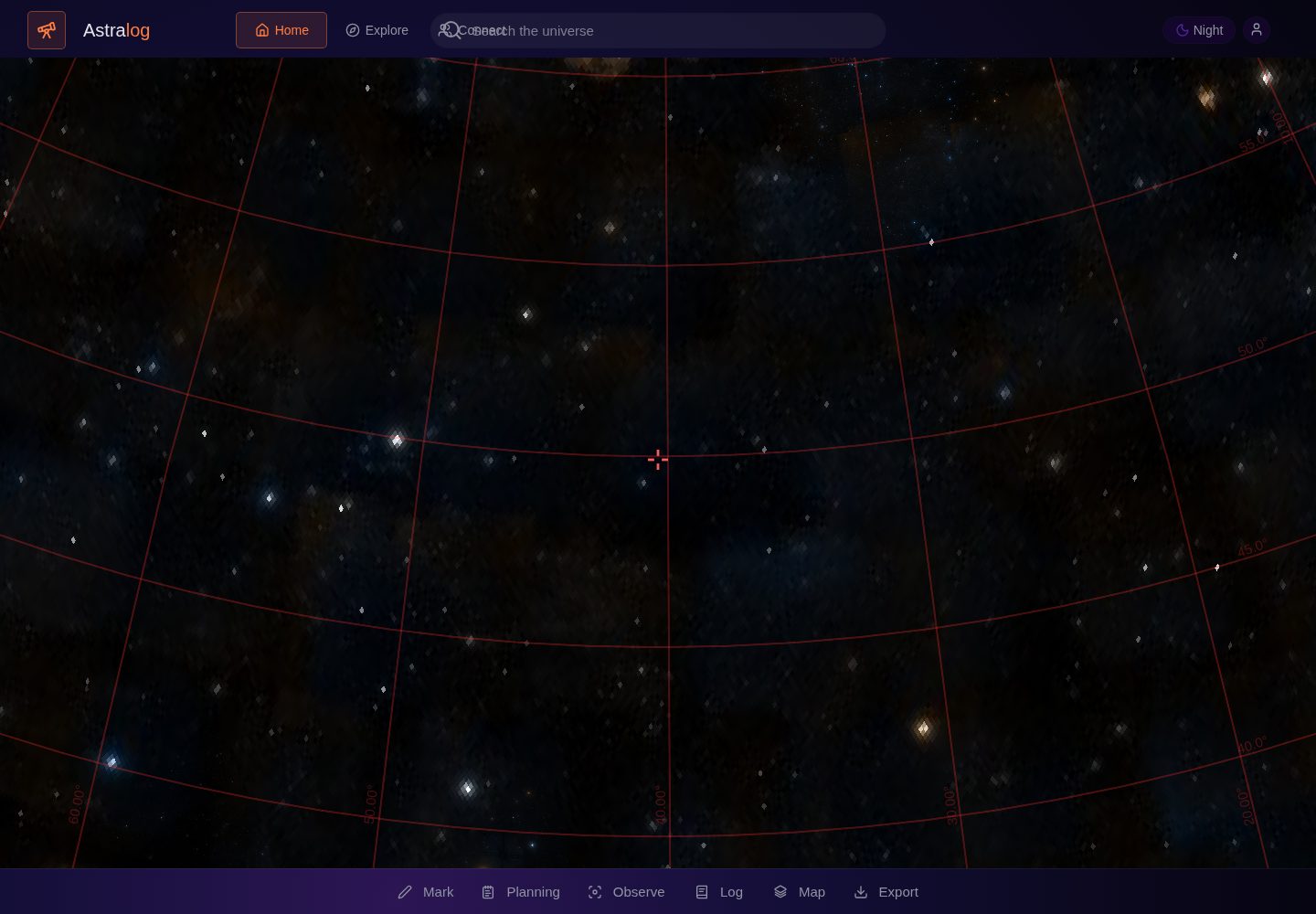
Calculates field of view from focal length and sensor size, estimates target projection size using the major axis, minor axis and position angle from the SIMBAD catalog, and updates the field overlay as the camera rotates
AstroPortfolio
LightFromAfar — Astro Portfolio Template
By ugurrehimov-create
LightFromAfar is a single-page web app for astrophotography planning and logging, offering device-aware framing and exposure suggestions, Alpaca device control, session logs and a local gallery.
Explore the design
Compare the page layouts and mobile experience. Open any screenshot for a closer look.
Desktop homepage1 / 2
Desktop captureTop of page
Actual screenshot captured by the server browser.
All pages & views 2
Screenshots show visual appearance; interactive behavior may differ.
Recorded 2026-10-19View source
What stands out
A quick read of the recorded project description.
Gives exposure suggestions by mounting type: a rough NPF-rule estimate for tripods, star trackers and equatorial mounts treated as tracking setups, and a warning for alt-azimuth mounts that field rotation may limit long exposures
Session Log supports searching, editing and deleting sessions, records seeing, transparency, cloud cover and guiding RMS, and can export CSV/JSON and import JSON backups
The Observe workspace controls mounts, cameras, focusers, filter wheels and rotators via Alpaca when devices are available, and supports local capture sequence building and exposure execution
The local Gallery supports photo import, metadata, tags, processing/capture notes, favorites, edit and delete, and JSON export, and can publish to the local Explore workspace
The map bottom bar offers sky survey selections such as DSS2, Pan-STARRS, 2MASS and AllWISE, using Aladin Lite survey IDs
Template Details
LightFromAfar is a browser-based astrophotography workbench whose core features, per the README, center on imaging planning, device control and record-keeping. For framing, it calculates field of view from focal length and sensor size, estimates the target's projected size on the frame using the major axis, minor axis and position angle from the SIMBAD catalog, and updates the field overlay as the camera rotates; when the catalog lacks a position angle, it performs only a conservative major-axis check. Exposure suggestions distinguish mounting types such as tripod, star tracker and alt-azimuth mount, providing a rough NPF-rule estimate for tripods and warning that field rotation on alt-azimuth mounts may limit long exposures.
The app includes a Session Log that supports searching, editing and deleting sessions, records seeing, transparency, cloud cover and guiding RMS, and supports CSV/JSON export and JSON import merge. Since v25, an Observe workspace has been added to control mounts, cameras, focusers, filter wheels and rotators via Alpaca when devices are available, and to build local capture sequences and execute camera exposures. v27 adds a local Gallery supporting photo import, metadata, tags, processing/capture notes, favorites, edit and delete, and JSON export; content published to Explore is shown only in the local workspace, and cross-user publishing still requires a backend service.
Data is stored in browser local storage, and JSON export/import is a manual backup rather than cloud sync. The Service Worker is available only on supported HTTP/HTTPS origins, and external sky/catalog services are not fully offline-capable. The README states that verification is primarily source-level checking and does not claim that all interactive testing was completed in real browsers or on hardware.
AstroPortfolio
Is it right for your project?
Use Cases
- Planning a target's framing on the sensor before an astrophotography session and adjusting composition as the camera rotates
- Getting initial exposure-time references for different mounting types such as equatorial mounts, star trackers or tripods
- Recording seeing, transparency, cloud cover and guiding RMS for each imaging session and exporting a backup
- Building capture sequences and executing camera exposures in an environment with compatible Alpaca devices
- Organizing astrophotography photos locally, adding tags and notes, and exporting gallery data
Suitable For
- Astrophotography enthusiasts who need to plan framing and exposure with device parameters
- Users with Alpaca-compatible devices who want to control mounts, cameras and other hardware in the browser
- Users who prefer to keep session logs and galleries in local storage without relying on cloud sync
Getting started & customization
Use these recorded setup notes alongside the repository instructions for your chosen version.
- 1
The README does not provide specific installation or deployment steps; it only states that the Service Worker must run on a supported HTTP/HTTPS origin
- 2
Hardware control in the Observe workspace requires assigned and available Alpaca devices; the README does not provide device configuration details
- 3
Data is stored in browser local storage; JSON export/import is a manual backup, not cloud sync
- 4
External sky/catalog services are not fully offline-capable, which limits offline use
- 5
README verification is primarily source-level checking and does not claim that all interactive testing was completed in real browsers or on hardware
License & source material
Usage conditions & limitations
Free to use · keep license noticeThis listing covers the free version under the MIT license in the public repository; the free scope is that version's code and does not mean external services or third-party assets are free.
Must comply with when using
- The code of this version may be used, modified, used commercially and distributed free of charge.
- When distributing copies or substantial portions of the code, retain the original author's copyright notice and the full MIT license notice.
- The code is provided as-is; warranties and liability limitations are governed by the original license and applicable law.
Additional costs & items to verify
- Demo images, fonts, icons and other third-party assets must be checked against their respective licenses and cannot be judged solely by the code's MIT license.
- External services such as domains, hosting, databases, payments or AI may incur separate charges.
- Settings, tags and sessions are stored only in the browser local storage of that device; JSON export/import is a manual backup, not cloud sync. The Service Worker is available only on supported HTTP/HTTPS origins, and external sky/catalog services are not fully offline-capable.
- Alpaca mount, camera, focuser, filter wheel and rotator control in the Observe workspace works only when devices are assigned and available, and requires a compatible Alpaca hardware environment.
- Simulated hardware is not shown as connected; device capabilities and status are presented through explicit messages.
- Guider camera assignment is optional; Alpaca camera data itself does not provide guiding RMS, and guiding status is infrastructure only.
- Gallery content published to Explore is shown only in the local workspace; true cross-user publishing still requires a future backend/account service.
- The gallery is local; images are scaled and compressed into browser storage and are not a cloud backup.
- The README does not claim that all browser interactions were tested live in this environment.
- No claim is made that testing was completed on real camera/focuser/filter wheel/rotator hardware; a compatible Alpaca device is required.
- No claim is made that live hardware/browser interaction testing was completed outside a compatible Alpaca environment.
- Verification covers only source JavaScript syntax, duplicate IDs and ZIP integrity, and does not claim live browser/hardware testing.
- Catalog dimensions may miss faint outer structures; fit estimates are planning aids only and do not guarantee the final imaging composition.
- Star trackers and equatorial mounts are treated as tracking setups; the actual exposure limit still depends on polar alignment, guiding and mount performance.
- Although alt-azimuth mounts are treated as trackable, the app explicitly warns that field rotation may limit longer exposures.
View Original Text Basis
Permission is hereby granted, free of charge
Original License Text
Settings, marks, and sessions remain in browser local storage on that device. JSON export/import is a manual backup, not cloud sync. The service worker is available only when served from a supported HTTP/HTTPS origin. External sky/catalogue services are not made fully offline by this version.
Original README
- Added Observe workspace for real Alpaca mount/camera/focuser/filter-wheel/rotator control when assigned and available.
Original README
- Added explicit device capability/status messaging; no simulated hardware is shown as connected.
Original README
- Added optional guide-camera assignment and a guiding-status foundation; AstraLog explicitly reports that Alpaca camera data alone does not provide guiding RMS.
Original README
- Published Gallery items are shown in the local Explore workspace; real cross-user publishing still requires the future backend/account service.
Original README
- Images are resized/compressed for browser storage. This is a local gallery, not cloud backup.
Original README
No claim is made that every browser interaction was tested live in this environment.
Original README
Validation note: source-level checks cover syntax, duplicate IDs and archive integrity. Real camera/focuser/filter/rotator hardware testing is not claimed without compatible Alpaca devices.
Original README
Validation: JavaScript syntax check, duplicate HTML ID check, required-handler/static-reference checks, and ZIP integrity. Live hardware/browser interaction is not claimed without a compatible Alpaca setup.
Original README
- Validation: source JavaScript syntax, duplicate IDs, and ZIP integrity checked; no live browser/hardware test claimed.
Original README
- The text notes that catalogue sizes can omit faint outer structures; the fit estimate is a planning aid, not a guarantee of the final image composition.
Original README
- Star trackers and equatorial mounts are treated as tracking setups; actual limits still depend on alignment, guiding, and mount performance.
Original README
https://github.com/ugurrehimov-create/LightFromAfar/blob/main/LICENSEhttps://github.com/ugurrehimov-create/LightFromAfar/blob/main/README.md- Alt-azimuth mounts are treated as tracking-capable, but the app explicitly warns that field rotation may limit longer exposures.
Original README
Compiled by DeepSeek based on repository license and README ·2026-10-19. Results only cover the materials read; dependencies, images, fonts, and subsequent term changes are subject to their respective original texts.
Project checks & description sources
Template Information
- Source platforms
- GitHub
- Documentation and maintenance reference score
- More documented · 80 / 100
- Technologies
- Astro
- Website type
- Portfolio
How this score is calculated
Our heuristic uses license records (up to 30), a demo link (12), a preview (10), stars (15), recorded maintenance (15), description completeness (8), feature records (5) and classification data (5). It is not a code, security or performance test, or a Google score. A link does not establish tested functionality.
What to verify for this project
- Repository update recorded
- 2026-10-18
- Screenshot last checked
- 2026-10-19
A demo link is listed. Check it with your own content and viewport sizes; its presence does not confirm that forms, authentication or payments work.
The catalog identifies Astro as the primary stack. Check the actual dependency manifest and lockfile for versions and hosting requirements. These notes use recorded metadata, not a code audit or a deployment test.
Use a selection guide →How this description was prepared
AI-assisted description based on catalog records and repository material. Repository authors are not automatically the reviewers of this description.
Review declaration: codex-user-requested-batch-review-20261021 · 2026-10-21
Inspect the recorded source material
SHA-256: 411aad7f6038fe56f016ddb8b129604f8adac2d8283053cbe8be4b60c88088f5
2026-10-19T02:01:42.423Z
Source file / repository# VesperNode v27 — Equipment-Aware Framing This version builds on v21's Session Log improvements and improves how the saved imaging setup informs framing and exposure guidance. ## Equipment-aware framing - Uses focal length and sensor width/height to calculate the actual angular field of view, plus focal ratio and image scale when the relevant values are supplied. - The target details view uses SIMBAD's catalogued major axis, minor axis, and position angle (when available) to estimate the target's projected size at the selected camera rotation. - Framing advice checks both frame dimensions and uses a 10% margin when the catalogued position angle is available. When it is not available, it reports a conservative major-axis check instead of pretending to know the orientation. - Changing camera rotation updates the framing estimate, and the FOV overlay uses that rotation. The overlay requires focal length and both sensor dimensions. - The text notes that catalogue sizes can omit faint outer structures; the fit estimate is a planning aid, not a guarantee of the final image composition. ## Mount-aware exposure advice - Tripod-only setups can receive a rough NPF-rule untracked exposure estimate when focal length, aperture, and pixel size are provided. - Star trackers and equatorial mounts are treated as tracking setups; actual limits still depend on alignment, guiding, and mount performance. - Alt-azimuth mounts are treated as tracking-capable, but the app explicitly warns that field rotation may limit longer exposures. ## Session Log (from v21) - Search, edit, and delete saved sessions. - Record seeing, transparency, cloud cover, and guiding RMS. - Export CSV and JSON backups; import JSON backups with record validation and ID-based merging. ## Data and offline note Settings, marks, and sessions remain in browser local storage on that device. JSON export/import is a manual backup, not cloud sync. The service worker is available only when served from a supported HTTP/HTTPS origin. External sky/catalogue services are not made fully offline by this version. ## Validation performed - JavaScript syntax check (`node --check` on extracted inline script). - Duplicate HTML ID check. - ZIP archive integrity test. - Static checks for mount-aware guidance, camera-rotation refresh, and SIMBAD size/position-angle fields. No claim is made that every browser interaction was tested live in this environment. ## v25 — Imaging control foundation - Added Observe workspace for real Alpaca mount/camera/focuser/filter-wheel/rotator control when assigned and available. - Added persistent local capture-sequence builder and camera exposure execution. - Added explicit device capability/status messaging; no simulated hardware is shown as connected. - Redesigned Tonight's imaging session marked-target cards so content uses the full card width instead of inheriting the generic event two-column layout. - Fixed Marks panel action layout so Details and Go to belong to each mark instead of appearing as detached controls. - Camera rotation state remains persisted per target. - Service worker cache bumped to v25. Validation note: source-level checks cover syntax, duplicate IDs and archive integrity. Real camera/focuser/filter/rotator hardware testing is not claimed without compatible Alpaca devices. ## v26 — Bug fixes, Planning/Log workflow, and capture foundations - Moved Tonight's Imaging Session into Session Log so marked targets and planned events are together with one-click Log session actions. - Planning events added to the plan now appear in the Log as separate planned items, with Log session and Remove actions. - Fixed the Mark → imaging workflow persistence bug and kept target camera rotation persisted per mark ID/coordinates. - Clicking empty map space now closes an open mark popup; mark hit tolerance was increased for easier selection. - Deleting a marked target now clears its FOV overlay and closes stale target state. - Bottom-bar controls are centered; sidebar controls are slightly larger; Observe uses a matching line icon. - Map bottom-bar control now returns to the map/Home workspace instead of silently cycling survey names. - Observe mount Abort Slew now checks whether the mount is actually slewing before sending the command. - Added optional guide-camera assignment and a guiding-status foundation; AstraLog explicitly reports that Alpaca camera data alone does not provide guiding RMS. - Added persistent last-capture summary after a completed capture sequence and a one-click Log capture action. - Capture summary carries target, frame count, integration time, completion time, and active optical train into Session Log. - Service worker cache bumped to v26. Validation: JavaScript syntax check, duplicate HTML ID check, required-handler/static-reference checks, and ZIP integrity. Live hardware/browser interaction is not claimed without a compatible Alpaca setup. ## v27 — Map Surveys, Community Layout, and Gallery Foundation - Map bottom-bar control now opens an explicit sky-survey chooser instead of cycling surveys invisibly. - Added DSS2 color/red/blue, Pan-STARRS color, 2MASS, and AllWISE survey choices using Aladin Lite survey IDs. - Explore and Connect hide the bottom bar and use the full available vertical workspace. - Sidebar active-state highlighting now applies to working Settings, Gallery, Marks, HZ Calculator, and About windows. - Replaced the Observe bottom-bar icon with Lucide Focus for consistency with the existing icon family. - Added local Gallery with photo import, metadata, tags, processing/capture notes, favorites, delete/edit, local JSON export, and Post to Explore. - Published Gallery items are shown in the local Explore workspace; real cross-user publishing still requires the future backend/account service. - Images are resized/compressed for browser storage. This is a local gallery, not cloud backup. - Validation: source JavaScript syntax, duplicate IDs, and ZIP integrity checked; no live browser/hardware test claimed.
Explore similar templates
Compare previews and descriptions within the same stack and category.

astrofy
Astrofy is a free and open-source personal portfolio website template built with Astro and TailwindCSS, with built-in blog, CV timeline, project showcase, store, and RSS feed modules.
Astro · Portfolio

astro-nano
Astro Nano is a static, minimalist portfolio and blog template built with Astro, Tailwind, and TypeScript without frontend frameworks. It includes light/dark themes, animated UI, automatic sitemap and RSS feed generation, and Markdown/MDX support with component imports.
Astro · Portfolio

astro-erudite
astro-erudite is an opinionated, unstyled static blog template built with Astro and native CSS, with no UI or CSS framework and minimal dependencies.
Astro · Portfolio

astro-sphere
Astro Sphere is a static, minimalist portfolio and blog theme maintained by markhorn-dev, built mainly with Astro, Tailwind, and TypeScript, with a small amount of SolidJS for stateful components.
Astro · Portfolio

astro-micro
Astro Micro is a framework-free blog and portfolio theme for Astro, forked from Astro Nano. It adds Pagefind search and Giscus comments while retaining type safety, sitemap, RSS, Markdown and MDX support, and TailwindCSS with system, light, and dark themes.
Astro · Portfolio
astro-aria
astro-aria is an Astro-based personal blog and portfolio template maintained by miantiao-me, ported from static-templates/aria.
Astro · Portfolio