Uses only the Nord color palette, with color roles defined centrally in src/styles/global.css and components referencing only roles
AstroPortfolio
Nord-Portfolio-Astro-Theme — Astro Portfolio Template
By VarunAyyappan
An Astro-based developer portfolio starter template that uses only the Nord color palette, with content driven by Markdown and YAML files and built as a static site.
Explore the design
Compare the page layouts and mobile experience. Open any screenshot for a closer look.
Desktop homepage1 / 3
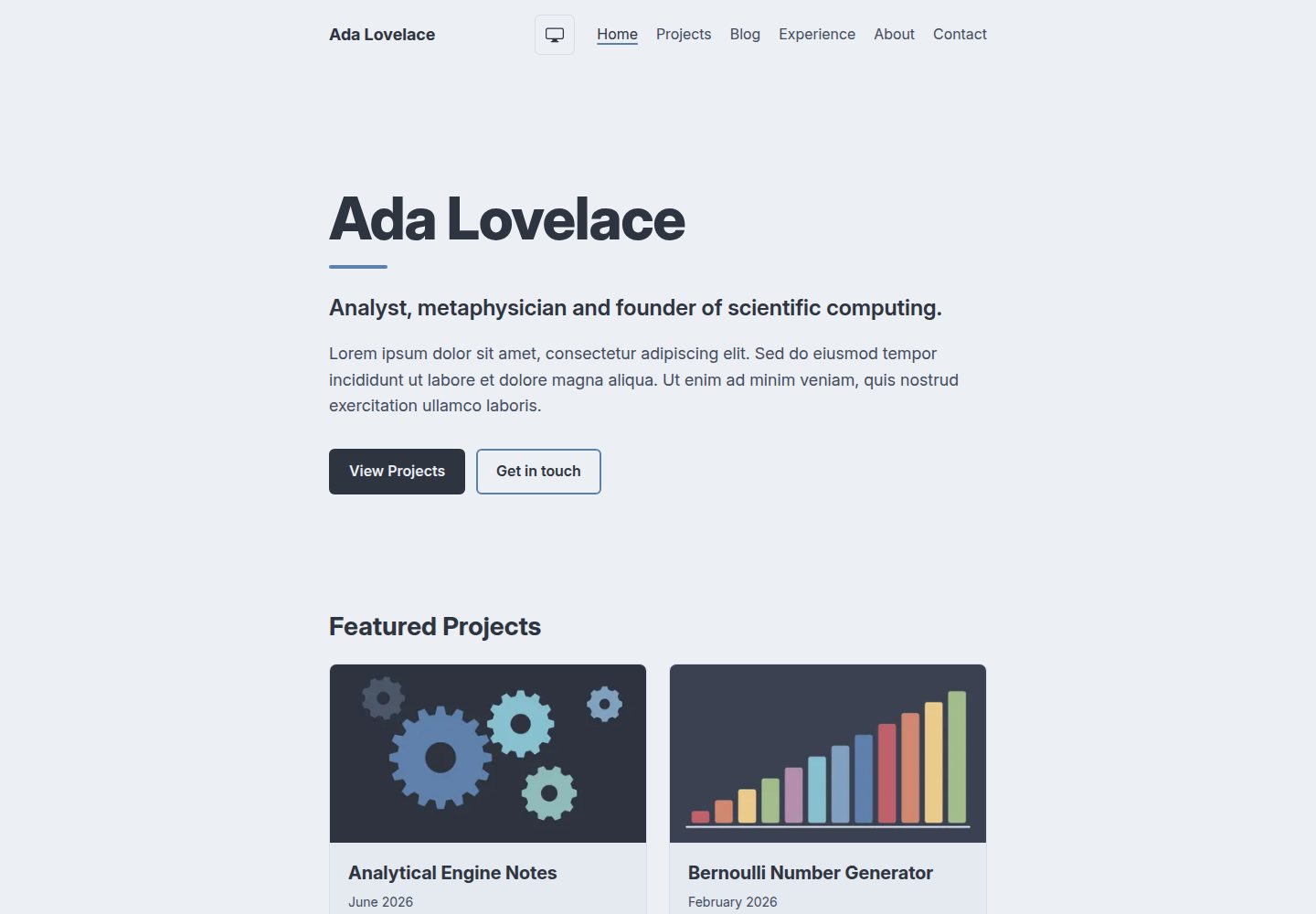
Desktop captureTop of page
Actual screenshot captured by the server browser.
All pages & views 3
Screenshots show visual appearance; interactive behavior may differ.
Recorded 2026-10-06View source
What stands out
A quick read of the recorded project description.
Content is separated from code: projects, articles, experience, education, and about each live in Markdown or YAML files under src/content/
Draft support: set draft: true on an article or project, and the draft appears only on the development server, excluded from builds, lists, tag pages, RSS, and the sitemap
Builds to pure static files deployable to any static host; includes GitHub Pages deployment and CI workflows
Browser tests scan every page for contrast in both light and dark modes to catch changes that break WCAG AA contrast
Fonts are downloaded from Fontsource at build time and self-hosted; icons are inline SVG components
Template Details
Nord-Portfolio-Astro-Theme is a portfolio starter template for software developers, built with Astro and using only the Nord color palette. The template comes with placeholder content featuring Ada Lovelace as an example; you replace it by editing a site configuration file and Markdown and YAML files, without touching component code. Projects, articles, experience, education, and the about page each live in their own directory under src/content/, while name, tagline, bio, skills, social links, and navigation are centralized in src/site.config.ts. The filenames of projects and articles become their URLs; images are placed next to Markdown files and referenced with relative paths, and are optimized at build time. Articles and projects use plain Markdown rather than MDX, and code blocks are highlighted with the Nord palette by default. The build output is pure static files under dist/, deployable to any static host; before deploying, you must correctly set url and base in the site configuration, otherwise links, styles, and images will break. The template uses aube as its package manager and pins Node 24 and aube in mise.toml, and CI installs accordingly; if you switch to npm, pnpm, Yarn, or Bun, you must update the lockfile, mise configuration, and CI install steps together. The repository includes GitHub Actions workflows that deploy on pushes to main and run Biome, type checking, two test suites, and a build on pull requests.
AstroPortfolio
Is it right for your project?
Use Cases
- Building a personal portfolio site for a software developer to showcase projects, articles, experience, and education
- Wanting to manage content with Markdown and YAML and replace placeholder content without writing component code
- Needing to deploy to GitHub Pages or another static host and wanting ready-made CI and deployment workflows
- Preferring the Nord palette, light and dark color modes, and WCAG AA contrast constraints for the site
Suitable For
- Developers familiar with Astro or willing to edit Markdown, YAML, and site configuration files according to the documentation
- Personal sites that need a static portfolio and do not rely on a database or server-side rendering
- Users who accept aube as the default package manager or are willing to switch to npm, pnpm, Yarn, or Bun according to the documentation
- Users who need a Node 22.12 or higher runtime environment
Getting started & customization
Use these recorded setup notes alongside the repository instructions for your chosen version.
- 1
Can be scaffolded with npm create astro@latest -- --template VarunAyyappan/Nord-Portfolio-Astro-Theme, requiring Node 22.12 or higher
- 2
If using mise and aube, create with --no-install, then run mise install, aube install, and aube run dev
- 3
Before deploying, set url and base in the site configuration: for GitHub Pages user sites base is /, for project sites it is /repository-name, and for custom domains base is /
- 4
In the GitHub repository, select GitHub Actions under Settings → Pages → Source to enable the deployment workflow
- 5
When replacing placeholder content, follow the README steps to fill in the site configuration, replace files in each content directory and under public/, and delete AGENTS.md, CLAUDE.md, and docs/agents/ intended for theme development
License & source material
Usage conditions & limitations
Free to use · keep license noticeThis entry covers the free version under the MIT license in the public repository; the free scope is the code of that version and does not mean external services or third-party assets are free.
Must comply with when using
- You may use, modify, commercialize, and distribute the code of this version for free.
- When distributing copies or substantial portions of the code, retain the original author's copyright notice and the full MIT license notice.
- The code is provided as is; warranties and limitations of liability are governed by the original license and applicable law.
Additional costs & items to verify
- Demo images, fonts, icons, and other third-party assets must be checked against their respective licenses and cannot be judged solely by the code's MIT license.
- External services such as domains, hosting, databases, payments, or AI may incur separate charges.
- Runtime requirement: using this template requires Node 22.12 or higher; lower versions cannot build properly.
- The default package manager is aube, and Node 24 and aube are pinned in mise.toml; CI installs accordingly, and not following this configuration may cause CI failures.
- If not using mise, you must switch to another package manager before pushing, otherwise CI will fail at the aube install step.
- CI installs with aube ci; if aube-lock.yaml and package.json are inconsistent, installation fails.
- Hosting platforms such as Netlify, Vercel, and Cloudflare Pages do not install aube, so you must switch package managers before deploying.
- The base in the site configuration must match the deployment address; incorrect settings will break all links, styles, and images.
- The template includes demo project site settings; url and base must be changed before deploying.
- Deploying with GitHub Pages requires changing the Pages source to GitHub Actions in the repository settings, otherwise the deployment workflow will not take effect.
- Before running browser end-to-end tests, run playwright install chromium once to install the browser.
- The test suite uses the placeholder content as fixtures; after replacing content, some tests must be updated or removed accordingly, otherwise tests may fail.
- When replacing placeholder content, delete AGENTS.md, CLAUDE.md, and the docs/agents/ directory intended for theme development.
View Original Text Basis
Permission is hereby granted, free of charge
Original License Text
You need Node 22.12 or later.
Original README
The theme uses [aube](https://github.com/jdx/aube) as its package manager, and pins Node 24 and aube for [mise](https://mise.jdx.dev) in `mise.toml`, which is how CI installs them too.
Original README
**Without mise**, [switch to another package manager](#using-a-different-package-manager) before you push, or CI fails on its aube install step.
Original README
CI installs with `aube ci`, which fails if `aube-lock.yaml` doesn't match `package.json`.
Original README
These hosts don't install aube, so switch package managers first.
Original README
A wrong `base` breaks every link, style and image.
Original README
The theme ships with the demo's project site settings, so change both before you deploy.
Original README
To turn it on, set **Settings → Pages → Source** to **GitHub Actions** in your repo.
Original README
Run `aube exec playwright install chromium` once first.
Original README
The test suites use the filler content as their fixture, and some tests check for things your content may not have, such as a draft Post and Project, more Posts than fit on one Blog page, or a Project with a cover. Update or delete those tests as your content replaces the filler.
Original README
https://github.com/VarunAyyappan/Nord-Portfolio-Astro-Theme/blob/main/LICENSEhttps://github.com/VarunAyyappan/Nord-Portfolio-Astro-Theme/blob/main/README.mdDelete `AGENTS.md`, `CLAUDE.md` and `docs/agents/`.
Original README
Compiled by DeepSeek based on repository license and README ·2026-10-06. Results only cover the materials read; dependencies, images, fonts, and subsequent term changes are subject to their respective original texts.
Project checks & description sources
Template Information
- Source platforms
- GitHub
- Documentation and maintenance reference score
- More documented · 80 / 100
- Technologies
- Astro
- Website type
- Portfolio
How this score is calculated
Our heuristic uses license records (up to 30), a demo link (12), a preview (10), stars (15), recorded maintenance (15), description completeness (8), feature records (5) and classification data (5). It is not a code, security or performance test, or a Google score. A link does not establish tested functionality.
What to verify for this project
- Repository update recorded
- 2026-10-06
- Screenshot last checked
- 2026-10-06
A demo link is listed. Check it with your own content and viewport sizes; its presence does not confirm that forms, authentication or payments work.
The catalog identifies Astro as the primary stack. Check the actual dependency manifest and lockfile for versions and hosting requirements. These notes use recorded metadata, not a code audit or a deployment test.
Use a selection guide →How this description was prepared
AI-assisted description based on catalog records and repository material. Repository authors are not automatically the reviewers of this description.
Review declaration: [email protected] · 2026-10-06
Inspect the recorded source material
SHA-256: a26db058e5cbc77d1ab936825736c2418f2e193ae8a5ea7a9a27b2acf33a207f
2026-10-06T10:23:52.279Z
Source file / repository# Nord Portfolio Astro Theme A starter template for a software developer's portfolio, built with [Astro](https://astro.build) and styled only with the [Nord](https://www.nordtheme.com) color palette. It builds to plain static files, sends Visitors almost no JavaScript, and meets WCAG AA contrast in both dark and light Color modes. **[See the live demo](https://varunayyappan.github.io/Nord-Portfolio-Astro-Theme/)** It ships with filler content written as Ada Lovelace. You replace it by editing one Site config file and a folder of Markdown and YAML files, without touching component code. You own your copy outright: there is no upgrade path, so change anything you like. ## Getting started ```sh npm create astro@latest -- --template VarunAyyappan/Nord-Portfolio-Astro-Theme ``` You need Node 22.12 or later. The theme uses [aube](https://github.com/jdx/aube) as its package manager, and pins Node 24 and aube for [mise](https://mise.jdx.dev) in `mise.toml`, which is how CI installs them too. **With mise and aube**, scaffold with `--no-install` instead, since `create astro` installs with npm even when run through aube, which writes an npm lockfile: ```sh aube create astro@latest --template VarunAyyappan/Nord-Portfolio-Astro-Theme --no-install cd your-portfolio mise install aube install aube run dev ``` **Without mise**, [switch to another package manager](#using-a-different-package-manager) before you push, or CI fails on its aube install step. ## Content | Content | Where it lives | | --- | --- | | Projects | `src/content/projects/*.md` | | Posts | `src/content/posts/*.md` | | Experience entries | `src/content/experience/*.yaml` | | Education entries | `src/content/education/*.yaml` | | About | `src/content/about/about.md` | | Name, tagline, intro, Skills, social links and navigation | `src/site.config.ts` | | Résumé, share image and favicon | `public/resume.pdf`, `public/share.png`, `public/favicon.svg` | Every field is documented where it's defined: content fields in [`src/content.config.ts`](src/content.config.ts) and Site config fields in [`src/site.config.ts`](src/site.config.ts). Each field shows whether it's optional and its default, with a comment on any field whose name doesn't explain itself. A field that doesn't match fails the build with an error naming the file, so the easiest way to add an entry is to copy a filler file and edit it. A Project or Post's file name is its URL, e.g. `notes-on-note-g.md` is served at `/blog/notes-on-note-g/`. Images go beside the Markdown file and are linked relatively, e.g. `./covers/my-project.png`, so they're optimized at build time. Posts and Projects are plain Markdown, not MDX, and code blocks are highlighted in Nord colors with no setup. In Site config, `resume` is optional: leave it out and Experience shows no download link. `shareImage` is the image link previews show, 1200 × 630 pixels; a Project with a cover uses its cover instead. ### Drafts Set `draft: true` on a Post or Project to work on it privately. Drafts show in the dev server and are left out of every build: their pages, lists, Tag pages, the RSS feed and the sitemap. ### Replacing the filler content 1. Fill in `src/site.config.ts`. 2. Replace the files in each `src/content/` folder, including the filler images. 3. Replace the files in `public/`, or remove `resume` from Site config. 4. Rewrite this README for your own portfolio. 5. Delete `AGENTS.md`, `CLAUDE.md` and `docs/agents/`. They set up coding agents for developing the theme itself, so replace them with your own if you use an agent to help fill in your site. The test suites use the filler content as their fixture, and some tests check for things your content may not have, such as a draft Post and Project, more Posts than fit on one Blog page, or a Project with a cover. Update or delete those tests as your content replaces the filler. ## Deploying The build is plain static files in `dist/`, so it can go on any static host. Set `url` and `base` in Site config to match where it's served. A wrong `base` breaks every link, style and image. | Where you deploy | `url` | `base` | | --- | --- | --- | | GitHub Pages user site (a repo named `<user>.github.io`) | `"https://your_username.github.io"` | `"/"` | | GitHub Pages project site (any other repo name, e.g. `portfolio`) | `"https://your_username.github.io"` | `"/portfolio"` | | Custom domain | `"https://www.example.com"` | `"/"` | | Another static host | The address it gives you, e.g. `"https://portfolio.netlify.app"` | `"/"` | The theme ships with the demo's project site settings, so change both before you deploy. ### GitHub Pages `.github/workflows/deploy.yml` deploys the site on every push to `main`. To turn it on, set **Settings → Pages → Source** to **GitHub Actions** in your repo. `.github/workflows/ci.yml` checks every pull request with Biome, type checking, both test suites and a build. For a custom domain, enter it under **Settings → Pages → Custom domain**, follow GitHub's instructions for your DNS records, then turn on **Enforce HTTPS**. You don't need a `CNAME` file, since the site deploys from a workflow. ### Other static hosts On Netlify, Vercel, Cloudflare Pages and similar hosts, use `npm run build` (or your package manager's equivalent) as the build command, `dist` as the output directory, and Node 22.12 or later. These hosts don't install aube, so switch package managers first. ## Using a different package manager CI installs with `aube ci`, which fails if `aube-lock.yaml` doesn't match `package.json`. To use npm, pnpm, Yarn or Bun instead, change three places: 1. **The lockfile:** delete `aube-lock.yaml`, install with your package manager, and commit the lockfile it writes. 2. **The mise config:** remove the `aube` line from `mise.toml`. npm comes with Node; for another package manager, add it in its place (e.g. `pnpm = "10"`). 3. **The CI install step:** in `.github/workflows/ci.yml` and `deploy.yml`, replace `aube ci`, and also every other `aube` command: | aube | npm | pnpm | Yarn | Bun | | --- | --- | --- | --- | --- | | `aube ci` | `npm ci` | `pnpm install --frozen-lockfile` | `yarn install --immutable` | `bun install --frozen-lockfile` | | `aube run <script>` | `npm run <script>` | `pnpm run <script>` | `yarn run <script>` | `bun run <script>` | | `aube exec <binary>` | `npx <binary>` | `pnpm exec <binary>` | `yarn exec <binary>` | `bunx <binary>` | ## Customizing ### Colors The Nord colors and the color roles built from them (background, surface, text, muted text, accent and border) are defined once at the top of [`src/styles/global.css`](src/styles/global.css). Components only use the roles, so you change the look there. Each role is `light-dark(<light mode>, <dark mode>)`, and the Visitor's Color mode setting picks which half applies. The roles follow pairing rules that keep all text at WCAG AA contrast: - **Dark mode:** Polar Night (nord0–nord3) backgrounds, Snow Storm (nord4–nord6) text, and Frost (nord7–nord10) and Aurora (nord11–nord15) accents. - **Light mode:** Snow Storm backgrounds and Polar Night text. Frost and Aurora are only used for non-text elements, because every one of them falls below AA contrast on nord6. That's why links are text-colored with an accent underline. - **nord3 is never used for text,** because it's only 1.7:1 on nord0. The browser tests scan every page for contrast in both Color modes, so `aube run test:e2e` catches a change that breaks these rules. Code blocks stay dark in both Color modes (see `src/shiki/nord-theme.ts`). ### Fonts The `fonts` list in `astro.config.ts` sets Inter for text and JetBrains Mono for code. They're downloaded from [Fontsource](https://fontsource.org) at build time and served from your own site. To swap one, change its `name` to any Fontsource family and adjust `weights` and `styles`. Keep `cssVariable` as it is. ### Icons Icons are plain inline SVG components in `src/components/icons/`. To add one, copy an existing icon, such as `GitHub.astro`, and paste in your SVG's `viewBox` and paths. Keep `width="1em"`, `height="1em"` and `fill="currentColor"` so it sizes and colors itself like the surrounding text. A link holding only an icon needs an `aria-label`. ## Commands With another package manager, use its equivalent, e.g. `npm run dev`. | Command | What it does | | --- | --- | | `aube run dev` | Starts the dev server, with drafts. | | `aube run build` | Builds the site to `dist/`. | | `aube run preview` | Serves the build locally. | | `aube run check` | Type checks the site and content. | | `aube run lint` / `aube run format` | Lints / formats with Biome. `aube exec biome ci` checks both, as CI does. | | `aube run test` | Builds the site and runs the build-output tests (Vitest). | | `aube run test:e2e` | Builds the site and runs the browser tests (Playwright), including an accessibility scan. Run `aube exec playwright install chromium` once first. |
Explore similar templates
Compare previews and descriptions within the same stack and category.

astro-theme-cactus
Astro Cactus is an Astro-based blog and portfolio theme that uses Markdown/MDX content collections to manage posts, notes, and tags, with frontmatter type-checked by a schema.
Astro · Portfolio

astrofy
Astrofy is a free and open-source personal portfolio website template built with Astro and TailwindCSS, with built-in blog, CV timeline, project showcase, store, and RSS feed modules.
Astro · Portfolio

astro-nano
Astro Nano is a static, minimalist portfolio and blog template built with Astro, Tailwind, and TypeScript without frontend frameworks. It includes light/dark themes, animated UI, automatic sitemap and RSS feed generation, and Markdown/MDX support with component imports.
Astro · Portfolio

astro-erudite
astro-erudite is an opinionated, unstyled static blog template built with Astro and native CSS, with no UI or CSS framework and minimal dependencies.
Astro · Portfolio

astro-sphere
Astro Sphere is a static, minimalist portfolio and blog theme maintained by markhorn-dev, built mainly with Astro, Tailwind, and TypeScript, with a small amount of SolidJS for stateful components.
Astro · Portfolio

astro-micro
Astro Micro is a framework-free blog and portfolio theme for Astro, forked from Astro Nano. It adds Pagefind search and Giscus comments while retaining type safety, sitemap, RSS, Markdown and MDX support, and TailwindCSS with system, light, and dark themes.
Astro · Portfolio