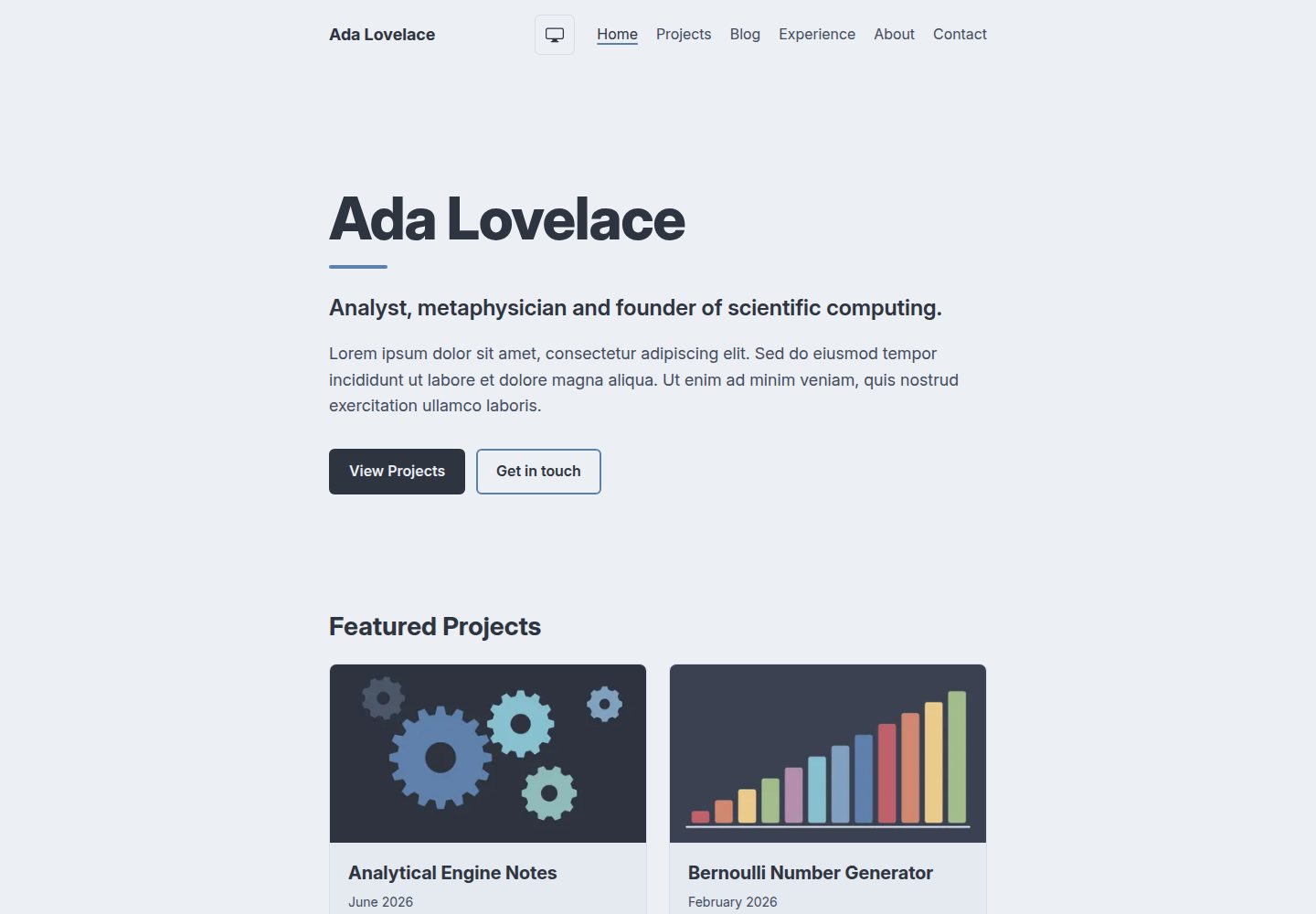
仅使用 Nord 配色,颜色角色集中定义在 src/styles/global.css,组件只引用角色
Astro作品集
Nord-Portfolio-Astro-Theme — Astro 作品集模板
作者 VarunAyyappan
基于 Astro 的开发者作品集起始模板,仅使用 Nord 配色,内容由 Markdown 与 YAML 文件驱动,构建为静态站点。
看看你的网站会是什么样
浏览真实页面截图,比较内容排版与手机效果。点击下方缩略图切换,放大查看整页细节。
全部页面与视图 3
截图用于了解视觉与布局,交互效果请以实际项目为准。
采集于 2026-10-06查看来源
值得关注的模板亮点
从已有项目资料中,快速了解它的特点。
内容与代码分离:项目、文章、经历、教育、关于分别放在 src/content/ 下的 Markdown 或 YAML 文件中
支持草稿:在文章或项目上设置 draft: true,草稿只在开发服务器显示,不进入构建、列表、标签页、RSS 和站点地图
构建为纯静态文件,可部署到任意静态托管;附带 GitHub Pages 部署与 CI 工作流
浏览器测试会扫描每个页面在明暗两种模式下的对比度,用于发现破坏 WCAG AA 对比度的改动
字体在构建时从 Fontsource 下载并自托管,图标为内联 SVG 组件
模板详细介绍
Nord-Portfolio-Astro-Theme 是一个面向软件开发者的作品集起始模板,使用 Astro 构建,并只采用 Nord 配色方案。模板自带以 Ada Lovelace 为示例的填充内容,你通过编辑一个站点配置文件以及 Markdown、YAML 文件来替换,无需改动组件代码。项目、文章、经历、教育、关于页面分别放在 src/content/ 下的对应目录,姓名、标语、简介、技能、社交链接和导航集中在 src/site.config.ts。项目与文章的文件名即 URL,图片放在 Markdown 文件旁并以相对路径引用,构建时会被优化。文章和项目使用纯 Markdown 而非 MDX,代码块默认以 Nord 配色高亮。构建产物是 dist/ 下的纯静态文件,可部署到任意静态托管;部署前需正确设置站点配置中的 url 和 base,否则链接、样式和图片会出错。模板使用 aube 作为包管理器,并在 mise.toml 中固定 Node 24 和 aube,CI 也据此安装;若改用 npm、pnpm、Yarn 或 Bun,需要同步修改锁文件、mise 配置和 CI 安装步骤。仓库附带 GitHub Actions 工作流,推送到 main 时部署,PR 时运行 Biome、类型检查、两套测试和构建。
Astro作品集
适合你的项目吗?
适用场景
- 为软件开发者搭建个人作品集网站,展示项目、文章、经历与教育背景
- 希望用 Markdown 和 YAML 管理内容、不写组件代码即可替换示例内容
- 需要部署到 GitHub Pages 或其他静态托管,并希望有现成的 CI 与部署工作流
- 偏好 Nord 配色、明暗两种颜色模式以及 WCAG AA 对比度约束的站点
适合人群
- 熟悉 Astro 或愿意按文档编辑 Markdown、YAML 与站点配置文件的开发者
- 需要静态作品集、不依赖数据库或服务端渲染的个人站点
- 能接受以 aube 为默认包管理器,或愿意按文档切换到 npm、pnpm、Yarn、Bun 的用户
- 需要 Node 22.12 或更高版本运行环境的使用者
上手与定制指南
结合仓库当前版本的说明,按下面的资料检查内容、配置与运行要求。
- 1
可用 npm create astro@latest -- --template VarunAyyappan/Nord-Portfolio-Astro-Theme 脚手架创建,要求 Node 22.12 或更高版本
- 2
若使用 mise 和 aube,请加 --no-install 创建,再执行 mise install、aube install 和 aube run dev
- 3
部署前在站点配置中设置 url 和 base:GitHub Pages 用户站点 base 为 /,项目站点为 /仓库名,自定义域名 base 为 /
- 4
在 GitHub 仓库的 Settings → Pages → Source 中选择 GitHub Actions 以启用部署工作流
- 5
替换填充内容时,按 README 步骤填写站点配置、替换各内容目录与 public/ 下的文件,并删除面向主题开发的 AGENTS.md、CLAUDE.md 和 docs/agents/
授权与来源资料
使用条件与限制
免费使用 · 保留许可声明本次收录的是公开仓库中采用 MIT 许可的免费版本;免费范围为该版本代码,不代表外部服务或第三方素材免费。
使用时需要遵守
- 允许免费使用、修改、商用和分发该版本代码。
- 分发代码副本或实质性部分时,保留原作者版权声明和完整 MIT 许可声明。
- 代码按现状提供;担保与责任限制以原许可证及适用法律为准。
额外费用与待核对事项
- 演示图片、字体、图标及其他第三方素材需按各自许可核对,不能仅凭代码的 MIT 许可判断。
- 域名、托管、数据库、支付或 AI 等外部服务可能另外收费。
- 运行环境要求:使用该模板需要 Node 22.12 或更高版本,低于此版本无法正常构建。
- 默认包管理器为 aube,并在 mise.toml 中固定 Node 24 与 aube;CI 也按此安装,不按此配置可能导致 CI 失败。
- 若不使用 mise,必须在推送前切换到其他包管理器,否则 CI 会在 aube 安装步骤失败。
- CI 使用 aube ci 安装,若 aube-lock.yaml 与 package.json 不一致则安装失败。
- Netlify、Vercel、Cloudflare Pages 等托管平台不安装 aube,部署前需先切换包管理器。
- 站点配置中的 base 必须与部署地址匹配,设置错误会导致所有链接、样式和图片失效。
- 模板自带演示用的项目站点设置,部署前必须修改 url 和 base。
- 使用 GitHub Pages 部署需在仓库设置中将 Pages 来源改为 GitHub Actions,否则部署工作流不会生效。
- 运行浏览器端到端测试前,需先执行一次 playwright install chromium 安装浏览器。
- 测试套件以填充内容为夹具,替换内容后需相应更新或删除部分测试,否则测试可能失败。
- 替换填充内容时需删除面向主题开发的 AGENTS.md、CLAUDE.md 和 docs/agents/ 目录。
查看原文依据
Permission is hereby granted, free of charge
许可证原文
You need Node 22.12 or later.
README 原文
The theme uses [aube](https://github.com/jdx/aube) as its package manager, and pins Node 24 and aube for [mise](https://mise.jdx.dev) in `mise.toml`, which is how CI installs them too.
README 原文
**Without mise**, [switch to another package manager](#using-a-different-package-manager) before you push, or CI fails on its aube install step.
README 原文
CI installs with `aube ci`, which fails if `aube-lock.yaml` doesn't match `package.json`.
README 原文
These hosts don't install aube, so switch package managers first.
README 原文
A wrong `base` breaks every link, style and image.
README 原文
The theme ships with the demo's project site settings, so change both before you deploy.
README 原文
To turn it on, set **Settings → Pages → Source** to **GitHub Actions** in your repo.
README 原文
Run `aube exec playwright install chromium` once first.
README 原文
The test suites use the filler content as their fixture, and some tests check for things your content may not have, such as a draft Post and Project, more Posts than fit on one Blog page, or a Project with a cover. Update or delete those tests as your content replaces the filler.
README 原文
https://github.com/VarunAyyappan/Nord-Portfolio-Astro-Theme/blob/main/LICENSEhttps://github.com/VarunAyyappan/Nord-Portfolio-Astro-Theme/blob/main/README.mdDelete `AGENTS.md`, `CLAUDE.md` and `docs/agents/`.
README 原文
DeepSeek 根据仓库许可证和 README 整理 ·2026-10-06。结果仅覆盖已读取资料,依赖、图片、字体及后续条款变更以各自原文为准。
项目核对记录与介绍依据
模板资料
- 来源平台
- GitHub
- 资料与维护参考分
- 资料较完整 · 80 / 100
- 技术栈
- Astro
- 网站类型
- 作品集
这个分数如何计算
本站按许可资料(最高30分)、演示链接(12分)、预览图(10分)、Star数(15分)、记录的维护时间(15分)、描述完整度(8分)、功能记录(5分)和分类资料(5分)计算。它不是代码、安全或性能测试,也不是 Google 评分;有链接不代表已实测可用。
这个项目需要核对什么
- 记录的仓库更新时间
- 2026-10-06
- 截图检查日期
- 2026-10-06
已收录演示链接。请用你的内容与屏幕尺寸检查;有演示不代表表单、认证或支付已经可用。
目录记录的主要技术栈是 Astro。请通过依赖清单和锁文件核对实际版本与托管要求。这些说明基于收录资料,不代表代码审计或部署实测。
查看具体选型方法 →介绍的制作与核对状态
介绍由 AI 辅助整理目录与仓库资料。仓库作者不等于这篇介绍的审核者。
审核声明: [email protected] · 2026-10-06
查看当时使用的来源资料
SHA-256: a26db058e5cbc77d1ab936825736c2418f2e193ae8a5ea7a9a27b2acf33a207f
2026-10-06T10:23:52.279Z
来源文件 / 仓库# Nord Portfolio Astro Theme A starter template for a software developer's portfolio, built with [Astro](https://astro.build) and styled only with the [Nord](https://www.nordtheme.com) color palette. It builds to plain static files, sends Visitors almost no JavaScript, and meets WCAG AA contrast in both dark and light Color modes. **[See the live demo](https://varunayyappan.github.io/Nord-Portfolio-Astro-Theme/)** It ships with filler content written as Ada Lovelace. You replace it by editing one Site config file and a folder of Markdown and YAML files, without touching component code. You own your copy outright: there is no upgrade path, so change anything you like. ## Getting started ```sh npm create astro@latest -- --template VarunAyyappan/Nord-Portfolio-Astro-Theme ``` You need Node 22.12 or later. The theme uses [aube](https://github.com/jdx/aube) as its package manager, and pins Node 24 and aube for [mise](https://mise.jdx.dev) in `mise.toml`, which is how CI installs them too. **With mise and aube**, scaffold with `--no-install` instead, since `create astro` installs with npm even when run through aube, which writes an npm lockfile: ```sh aube create astro@latest --template VarunAyyappan/Nord-Portfolio-Astro-Theme --no-install cd your-portfolio mise install aube install aube run dev ``` **Without mise**, [switch to another package manager](#using-a-different-package-manager) before you push, or CI fails on its aube install step. ## Content | Content | Where it lives | | --- | --- | | Projects | `src/content/projects/*.md` | | Posts | `src/content/posts/*.md` | | Experience entries | `src/content/experience/*.yaml` | | Education entries | `src/content/education/*.yaml` | | About | `src/content/about/about.md` | | Name, tagline, intro, Skills, social links and navigation | `src/site.config.ts` | | Résumé, share image and favicon | `public/resume.pdf`, `public/share.png`, `public/favicon.svg` | Every field is documented where it's defined: content fields in [`src/content.config.ts`](src/content.config.ts) and Site config fields in [`src/site.config.ts`](src/site.config.ts). Each field shows whether it's optional and its default, with a comment on any field whose name doesn't explain itself. A field that doesn't match fails the build with an error naming the file, so the easiest way to add an entry is to copy a filler file and edit it. A Project or Post's file name is its URL, e.g. `notes-on-note-g.md` is served at `/blog/notes-on-note-g/`. Images go beside the Markdown file and are linked relatively, e.g. `./covers/my-project.png`, so they're optimized at build time. Posts and Projects are plain Markdown, not MDX, and code blocks are highlighted in Nord colors with no setup. In Site config, `resume` is optional: leave it out and Experience shows no download link. `shareImage` is the image link previews show, 1200 × 630 pixels; a Project with a cover uses its cover instead. ### Drafts Set `draft: true` on a Post or Project to work on it privately. Drafts show in the dev server and are left out of every build: their pages, lists, Tag pages, the RSS feed and the sitemap. ### Replacing the filler content 1. Fill in `src/site.config.ts`. 2. Replace the files in each `src/content/` folder, including the filler images. 3. Replace the files in `public/`, or remove `resume` from Site config. 4. Rewrite this README for your own portfolio. 5. Delete `AGENTS.md`, `CLAUDE.md` and `docs/agents/`. They set up coding agents for developing the theme itself, so replace them with your own if you use an agent to help fill in your site. The test suites use the filler content as their fixture, and some tests check for things your content may not have, such as a draft Post and Project, more Posts than fit on one Blog page, or a Project with a cover. Update or delete those tests as your content replaces the filler. ## Deploying The build is plain static files in `dist/`, so it can go on any static host. Set `url` and `base` in Site config to match where it's served. A wrong `base` breaks every link, style and image. | Where you deploy | `url` | `base` | | --- | --- | --- | | GitHub Pages user site (a repo named `<user>.github.io`) | `"https://your_username.github.io"` | `"/"` | | GitHub Pages project site (any other repo name, e.g. `portfolio`) | `"https://your_username.github.io"` | `"/portfolio"` | | Custom domain | `"https://www.example.com"` | `"/"` | | Another static host | The address it gives you, e.g. `"https://portfolio.netlify.app"` | `"/"` | The theme ships with the demo's project site settings, so change both before you deploy. ### GitHub Pages `.github/workflows/deploy.yml` deploys the site on every push to `main`. To turn it on, set **Settings → Pages → Source** to **GitHub Actions** in your repo. `.github/workflows/ci.yml` checks every pull request with Biome, type checking, both test suites and a build. For a custom domain, enter it under **Settings → Pages → Custom domain**, follow GitHub's instructions for your DNS records, then turn on **Enforce HTTPS**. You don't need a `CNAME` file, since the site deploys from a workflow. ### Other static hosts On Netlify, Vercel, Cloudflare Pages and similar hosts, use `npm run build` (or your package manager's equivalent) as the build command, `dist` as the output directory, and Node 22.12 or later. These hosts don't install aube, so switch package managers first. ## Using a different package manager CI installs with `aube ci`, which fails if `aube-lock.yaml` doesn't match `package.json`. To use npm, pnpm, Yarn or Bun instead, change three places: 1. **The lockfile:** delete `aube-lock.yaml`, install with your package manager, and commit the lockfile it writes. 2. **The mise config:** remove the `aube` line from `mise.toml`. npm comes with Node; for another package manager, add it in its place (e.g. `pnpm = "10"`). 3. **The CI install step:** in `.github/workflows/ci.yml` and `deploy.yml`, replace `aube ci`, and also every other `aube` command: | aube | npm | pnpm | Yarn | Bun | | --- | --- | --- | --- | --- | | `aube ci` | `npm ci` | `pnpm install --frozen-lockfile` | `yarn install --immutable` | `bun install --frozen-lockfile` | | `aube run <script>` | `npm run <script>` | `pnpm run <script>` | `yarn run <script>` | `bun run <script>` | | `aube exec <binary>` | `npx <binary>` | `pnpm exec <binary>` | `yarn exec <binary>` | `bunx <binary>` | ## Customizing ### Colors The Nord colors and the color roles built from them (background, surface, text, muted text, accent and border) are defined once at the top of [`src/styles/global.css`](src/styles/global.css). Components only use the roles, so you change the look there. Each role is `light-dark(<light mode>, <dark mode>)`, and the Visitor's Color mode setting picks which half applies. The roles follow pairing rules that keep all text at WCAG AA contrast: - **Dark mode:** Polar Night (nord0–nord3) backgrounds, Snow Storm (nord4–nord6) text, and Frost (nord7–nord10) and Aurora (nord11–nord15) accents. - **Light mode:** Snow Storm backgrounds and Polar Night text. Frost and Aurora are only used for non-text elements, because every one of them falls below AA contrast on nord6. That's why links are text-colored with an accent underline. - **nord3 is never used for text,** because it's only 1.7:1 on nord0. The browser tests scan every page for contrast in both Color modes, so `aube run test:e2e` catches a change that breaks these rules. Code blocks stay dark in both Color modes (see `src/shiki/nord-theme.ts`). ### Fonts The `fonts` list in `astro.config.ts` sets Inter for text and JetBrains Mono for code. They're downloaded from [Fontsource](https://fontsource.org) at build time and served from your own site. To swap one, change its `name` to any Fontsource family and adjust `weights` and `styles`. Keep `cssVariable` as it is. ### Icons Icons are plain inline SVG components in `src/components/icons/`. To add one, copy an existing icon, such as `GitHub.astro`, and paste in your SVG's `viewBox` and paths. Keep `width="1em"`, `height="1em"` and `fill="currentColor"` so it sizes and colors itself like the surrounding text. A link holding only an icon needs an `aria-label`. ## Commands With another package manager, use its equivalent, e.g. `npm run dev`. | Command | What it does | | --- | --- | | `aube run dev` | Starts the dev server, with drafts. | | `aube run build` | Builds the site to `dist/`. | | `aube run preview` | Serves the build locally. | | `aube run check` | Type checks the site and content. | | `aube run lint` / `aube run format` | Lints / formats with Biome. `aube exec biome ci` checks both, as CI does. | | `aube run test` | Builds the site and runs the build-output tests (Vitest). | | `aube run test:e2e` | Builds the site and runs the browser tests (Playwright), including an accessibility scan. Run `aube exec playwright install chromium` once first. |
看看同类模板
对比同技术栈与用途的模板,找到更适合的视觉与内容结构。

astro-theme-cactus
A simple Astro theme. Use it to create your blog or website.
Astro · 作品集

astrofy
Astrofy is a free and open-source template for your Personal Portfolio Website built with Astro and TailwindCS…
Astro · 作品集

astro-nano
Astro Nano is a static, minimalist, lightweight, lightning fast portfolio and blog.
Astro · 作品集

astro-erudite
An opinionated, unstyled static blogging template built with Astro and native CSS.
Astro · 作品集

astro-sphere
Astro Sphere is a static, minimalist, lightweight, lightning fast portfolio and blog.
Astro · 作品集

astro-micro
Blog theme for Astro with search and comments built-in. Zero frameworks.
Astro · 作品集