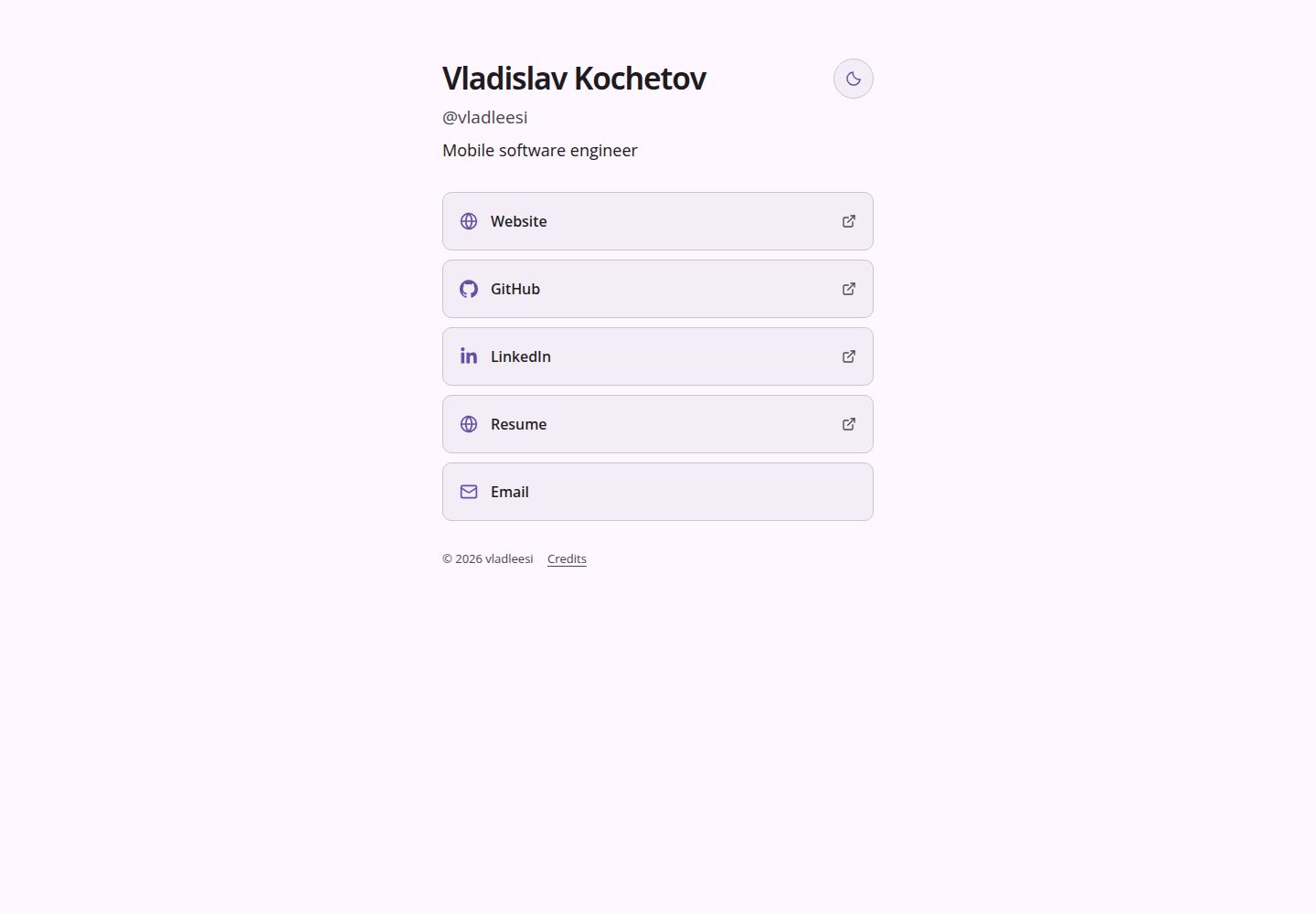
All content is driven by a single config.yaml; link names and order are rendered exactly as configured.
AstroPortfolioTool Site
links — Astro Portfolio Template
By vladleesi
A static link aggregation page built with Astro, configured via config.yaml for profile and link list, with multiple built-in themes and light/dark mode, self-hostable or deployable to GitHub Pages.
Explore the design
Compare the page layouts and mobile experience. Open any screenshot for a closer look.
Desktop homepage1 / 2
Desktop captureTop of page
Actual screenshot captured by the server browser.
All pages & views 2
Screenshots show visual appearance; interactive behavior may differ.
Recorded 2026-10-05View source
What stands out
A quick read of the recorded project description.
Six built-in themes: default, material, monokai, paper, arctic, and ember, all supporting light and dark appearances.
Icons are automatically matched from a local set based on hostname, can be overridden with the icon field, or display the domain using hostname.
The build automatically generates YAML validation, favicon, 1200×630 share image, SEO metadata, robots.txt, and sitemap.
Supports automatic deployment to GitHub Pages and self-hosting on any static server, with no external service requests during build.
Links and appearance remain functional without JavaScript, and animations respect the system's reduced motion preference.
Template Details
This is a minimal link aggregation page template built with Astro, where all content is driven by a config.yaml file in the root directory. In that file, you can set the username, optional full name and title, public site URL, theme, and an ordered list of links; link names and order are rendered exactly as configured. Links support http(s), mailto:, and tel: targets. Icons are automatically matched from a local icon set based on the hostname, with unknown sites falling back to a generic website icon. You can also manually override with the icon field, or display the domain name using hostname: true.
The template includes six built-in themes: default, material, monokai, paper, arctic, and ember. Each theme includes color schemes and fonts, all using local fonts and supporting both light and dark appearances. site.mode can specify the initial appearance as light or dark; if left empty or omitted, it follows the system. A sun/moon button on the page allows instant switching and saves the choice in the current browser; a visitor's saved choice takes precedence over the configured value. Without JavaScript, links and the configured or system appearance remain functional, and the toggle button stays hidden. On mouse devices, hovering over links triggers a slight bounce and icon wiggle, with animations respecting the system's reduced motion preference.
The build outputs a complete static site under dist/. The build process automatically performs YAML validation, generates a favicon initial, a 1200×630 share image, SEO metadata, robots.txt, and sitemap, and does not make requests to linked sites, icon APIs, or font services. The template includes a GitHub Actions workflow to deploy dist/ to GitHub Pages; you can also self-host the contents of dist/ on any static web server. Node.js is only required during the build. The repository also includes scripts for version validation, configuration tests, theme tests, build verification, and optional browser checks. The browser checks cover all themes, system appearance, small screens, keyboard access, reduced motion, custom fonts, base paths, and running without JavaScript.
AstroPortfolioTool Site
Is it right for your project?
Use Cases
- Personal homepage or social profile page to centrally display entries such as website, GitHub, email, and phone.
- Build a lightweight external link navigation page for a project or product.
- Host a personal link page for free on GitHub Pages, with automatic deployment on pushes to the main branch.
- Self-host the link page on your own static server by uploading the build output directly.
Suitable For
- Individuals who want to maintain a link list with a single YAML file and avoid introducing a database or backend.
- Presentation pages that need multiple themes and light/dark mode, and want visitor choices to be remembered.
- Developers who prefer static output and can self-host or deploy to GitHub Pages.
- Scenarios requiring no-JavaScript fallback and reduced motion support.
Getting started & customization
Use these recorded setup notes alongside the repository instructions for your chosen version.
- 1
Requires Node.js 24 or 22.18+, and npm 9.6.5+; install dependencies with npm ci, and use npm run dev for local development.
- 2
Edit config.yaml to configure profile, site, and links; username is required and without @, and site.url must include the subpath if any.
- 3
Build with npm run build; output is in dist/. Preview locally with npm run preview.
- 4
When deploying to GitHub Pages, set site.url to https://username.github.io/repository/ and select GitHub Actions under repository Settings → Pages → Source.
- 5
All values in config.yaml are public build inputs; do not put secrets in it. Before publishing a fork, replace the example name, username, email, links, and site URL.
License & source material
Usage conditions & limitations
Free to use · keep license noticeThis entry covers the free version under the MIT license in the public repository; the free scope is the code of that version and does not imply that external services or third-party assets are free.
Must comply with when using
- You are allowed to use, modify, commercialize, and distribute the code of this version for free.
- When distributing copies or substantial portions of the code, retain the original author's copyright notice and the full MIT license notice.
- The code is provided as is; warranties and limitations of liability are governed by the original license and applicable law.
Additional costs & items to verify
- Demo images, fonts, icons, and other third-party assets must be checked against their respective licenses; they cannot be judged solely by the code's MIT license.
- External services such as domains, hosting, databases, payments, or AI may incur additional charges.
- The profile committed in the repository is a public example; before publishing a fork, you must replace the name, username, email, links, and site URL, otherwise the example author's personal information will be exposed.
- All values in config.yaml become public build inputs; storing any secrets or sensitive information in it is prohibited.
- Icons and fonts follow their respective upstream licenses; when using or redistributing them, you must comply with the third-party license terms listed in THIRD_PARTY_NOTICES.md.
- Before hosting a fork, you should modify config.yaml and rebuild; do not publish directly using the example configuration.
View Original Text Basis
Permission is hereby granted, free of charge
Original License Text
The committed profile is a public example. Replace the name, username, email, links, and site URL with your own before publishing a fork.
Original README
All values in `config.yaml` are public build inputs; do not put secrets there.
Original README
icons and fonts retain their upstream licenses, listed in [THIRD_PARTY_NOTICES.md](THIRD_PARTY_NOTICES.md).
Original README
https://github.com/vladleesi/links/blob/main/LICENSEhttps://github.com/vladleesi/links/blob/main/README.mdForks should change `config.yaml` and rebuild before hosting.
Original README
Compiled by DeepSeek based on repository license and README ·2026-10-05. Results only cover the materials read; dependencies, images, fonts, and subsequent term changes are subject to their respective original texts.
Project checks & description sources
Template Information
- Source platforms
- GitHub
- Documentation and maintenance reference score
- More documented · 85 / 100
- Technologies
- Astro
- Website type
- Portfolio · Tool Site
How this score is calculated
Our heuristic uses license records (up to 30), a demo link (12), a preview (10), stars (15), recorded maintenance (15), description completeness (8), feature records (5) and classification data (5). It is not a code, security or performance test, or a Google score. A link does not establish tested functionality.
What to verify for this project
- Repository update recorded
- 2026-10-05
- Screenshot last checked
- 2026-10-05
A demo link is listed. Check it with your own content and viewport sizes; its presence does not confirm that forms, authentication or payments work.
The catalog identifies Astro as the primary stack. Check the actual dependency manifest and lockfile for versions and hosting requirements. These notes use recorded metadata, not a code audit or a deployment test.
Use a selection guide →How this description was prepared
AI-assisted description based on catalog records and repository material. Repository authors are not automatically the reviewers of this description.
Review declaration: [email protected] · 2026-10-05
Inspect the recorded source material
SHA-256: 331863f085a66ed900fa7344624c4e0db3c8dbc08fc2e0054f5baf43201624d2
2026-10-05T03:26:44.078Z
Source file / repository# Link site
A minimal, YAML-driven static links page. Fork it, edit one file, and build.
## Quick start
Use Node.js 24 (or 22.18+) and npm 9.6.5+.
```sh
npm ci
npm run dev
```
## Configuration
Edit `config.yaml`. Your link names and their order are used exactly as configured.
```yaml
profile:
fullName: Vladislav Kochetov # optional; an empty value is fine
username: vladleesi # required; enter without @
title: Mobile software engineer # optional; shown below username; an empty value is fine
site:
url: https://vladleesi.dev/links # public site URL; include a base path if needed
theme: default # optional; default, material, monokai, paper, arctic, ember, or a custom theme
mode: # optional; light or dark; empty or omitted follows the system
links: # displayed in this order; use [] for no links
- name: Website # required; link label
url: https://vladleesi.dev # required; http(s), mailto:, or tel: destination
icon: website # optional; override the detected icon
hostname: false # optional; set true to show the domain
- name: GitHub
url: https://github.com/vladleesi
```
Icons are detected from the hostname using the local collection in `src/assets/icons/`. Unknown sites use the website icon. Optional link fields: `icon: website` to override detection, and `hostname: true` to show a small hostname. HTTP(S), email (`mailto:`), and phone (`tel:`) links are supported.
## Themes
Choose `default`, `material`, `monokai`, `paper`, `arctic`, or `ember` in YAML:
| Theme | Palette and typography |
| --- | --- |
| `default` | Neutral gray with Manrope |
| `material` | Soft purple with Open Sans |
| `monokai` | Olive and green with system fonts |
| `paper` | Warm cream and beige, Source Sans 3 body text and Lora headings |
| `arctic` | Cool Nordic blues with IBM Plex Sans |
| `ember` | Terracotta and orange with Manrope |
All themes support light and dark appearances and use local fonts. Set `site.mode` to `light` or `dark` to choose the initial appearance regardless of the system setting; leave it empty or omit it to follow the system. The sun/moon button remains available, switches appearance immediately, and saves your choice in this browser. A saved visitor choice takes precedence over the configured mode. Without JavaScript, links and the configured or system appearance still work; the switch stays hidden.
Link hover adds a small bounce and icon wiggle on devices with a mouse. Animations respect the system’s reduced-motion preference.
Add one file under `src/themes/` and select its filename in YAML. Copy an existing theme to start; themes contain colors and fonts only. Local custom fonts go under `public/fonts/` and are declared in `fonts.faces`. Optional `fonts.preview` names a local TTF/OTF font for the generated sharing image. The image uses the theme’s light palette; the favicon supports both appearances.
## Build
```sh
npm run build
npm run preview
```
The complete static site is in `dist/`. YAML validation, favicon initials, the 1200×630 sharing image, SEO metadata, robots.txt, and sitemap are generated automatically. Builds make no requests to linked sites, icon APIs, or font services.
## GitHub Pages
1. Fork the repository and edit `config.yaml`.
2. Set `site.url` to `https://username.github.io/repository/` (or your custom domain).
3. Set **Settings → Pages → Source → GitHub Actions**.
4. Push to `main`; the included workflow builds and deploys `dist/`.
The URL’s pathname automatically sets the asset base path. For a custom domain, configure it in GitHub Pages settings and update the YAML URL.
## Self-hosting
Set `site.url` to your public URL, including any subpath, run `npm run build`, and serve the contents of `dist/` with a static web server. Node.js is needed only for building. After changing `config.yaml`, rebuild and upload the updated files.
## Checks
```sh
npm run verify:version
npm run test:version
npm run check
npm run test:config
npm run test:themes
npm run build
npm run verify
npm run test:browser
```
Browser checks use installed Chrome, build fixture configurations, and restore your YAML afterward. Results go to ignored `artifacts/verification/`. They cover all themes, system appearance, small screens, keyboard access, reduced motion, custom fonts, base paths, and no-JavaScript operation. SVG/font licenses are stored beside their local assets.
Pull requests and pushes to `main` run type, configuration, build, and static-output checks. The Pages workflow runs the same checks before deployment. Browser checks are optional and start a temporary local server.
## Releases
Versions use `MAJOR.MINOR.PATCH`. Increase major for breaking changes, minor for compatible features, and patch for compatible fixes. `package.json` and both version fields in `package-lock.json` must agree.
For a subsequent release, choose one of these commands; it updates the package files without committing or tagging:
```sh
npm run version:patch
# or npm run version:minor / npm run version:major
```
The first release uses the existing `1.0.0`; skip the bump for that release. After reviewing changes and obtaining approval to commit, push, and publish:
1. Add a dated `## MAJOR.MINOR.PATCH - YYYY-MM-DD` entry to `CHANGELOG.md` with features, fixes, breaking changes, and migration steps when needed, then run the checks above. Version validation also requires release notes for the current version.
2. Commit the reviewed changes to `main`, for example `chore(release): prepare v1.0.0`, and push `main`.
3. CI checks the push, builds and verifies the site, then calls the release workflow only after the check job succeeds. Pull requests cannot publish releases.
The workflow reads the package version, automatically creates its `vMAJOR.MINOR.PATCH` tag at the exact checked commit, and publishes a GitHub release with that version's changelog notes and the checked build's ZIP (for example, `link-site-v1.0.0.zip`). No manual tag or release command is needed. If the version already has a published release, publication is skipped; bump the version for the next release. An unfinished draft or a conflicting tag fails visibly and needs review.
The ZIP contains the built site, its configured profile/base URL, and license notices; source archives are available through GitHub. Forks should change `config.yaml` and rebuild before hosting. Releases do not publish to npm or enable GitHub Pages.
Release publication uses the workflow's built-in GitHub token; no personal access token is required. A push to `main` with an unpublished version can publish a release automatically, so obtain release approval before that push. Leave published tags unchanged and release fixes under a new version.
## Contributing and license
See [CONTRIBUTING.md](CONTRIBUTING.md) for development and validation steps. Project code is licensed under [MIT](LICENSE); icons and fonts retain their upstream licenses, listed in [THIRD_PARTY_NOTICES.md](THIRD_PARTY_NOTICES.md). The site includes a Credits link to the generated license notices.
The committed profile is a public example. Replace the name, username, email, links, and site URL with your own before publishing a fork. All values in `config.yaml` are public build inputs; do not put secrets there. `private: true` in `package.json` prevents accidental npm publishing and does not restrict reuse under MIT.
Explore similar templates
Compare previews and descriptions within the same stack and category.

astrowind
AstroWind is a free, open-source Astro starter theme using Astro and Tailwind CSS, released under the MIT license.
Astro · Blog

astro-paper
AstroPaper is a minimal, responsive, accessible, and SEO-friendly Astro blog theme. Articles are stored as Markdown/MDX in src/content/posts/, with subdirectories affecting URLs.
Astro · Blog

astro-theme-cactus
Astro Cactus is an Astro-based blog and portfolio theme that uses Markdown/MDX content collections to manage posts, notes, and tags, with frontmatter type-checked by a schema.
Astro · Portfolio

astrofy
Astrofy is a free and open-source personal portfolio website template built with Astro and TailwindCSS, with built-in blog, CV timeline, project showcase, store, and RSS feed modules.
Astro · Portfolio

astro-nano
Astro Nano is a static, minimalist portfolio and blog template built with Astro, Tailwind, and TypeScript without frontend frameworks. It includes light/dark themes, animated UI, automatic sitemap and RSS feed generation, and Markdown/MDX support with component imports.
Astro · Portfolio

astro-erudite
astro-erudite is an opinionated, unstyled static blog template built with Astro and native CSS, with no UI or CSS framework and minimal dependencies.
Astro · Portfolio