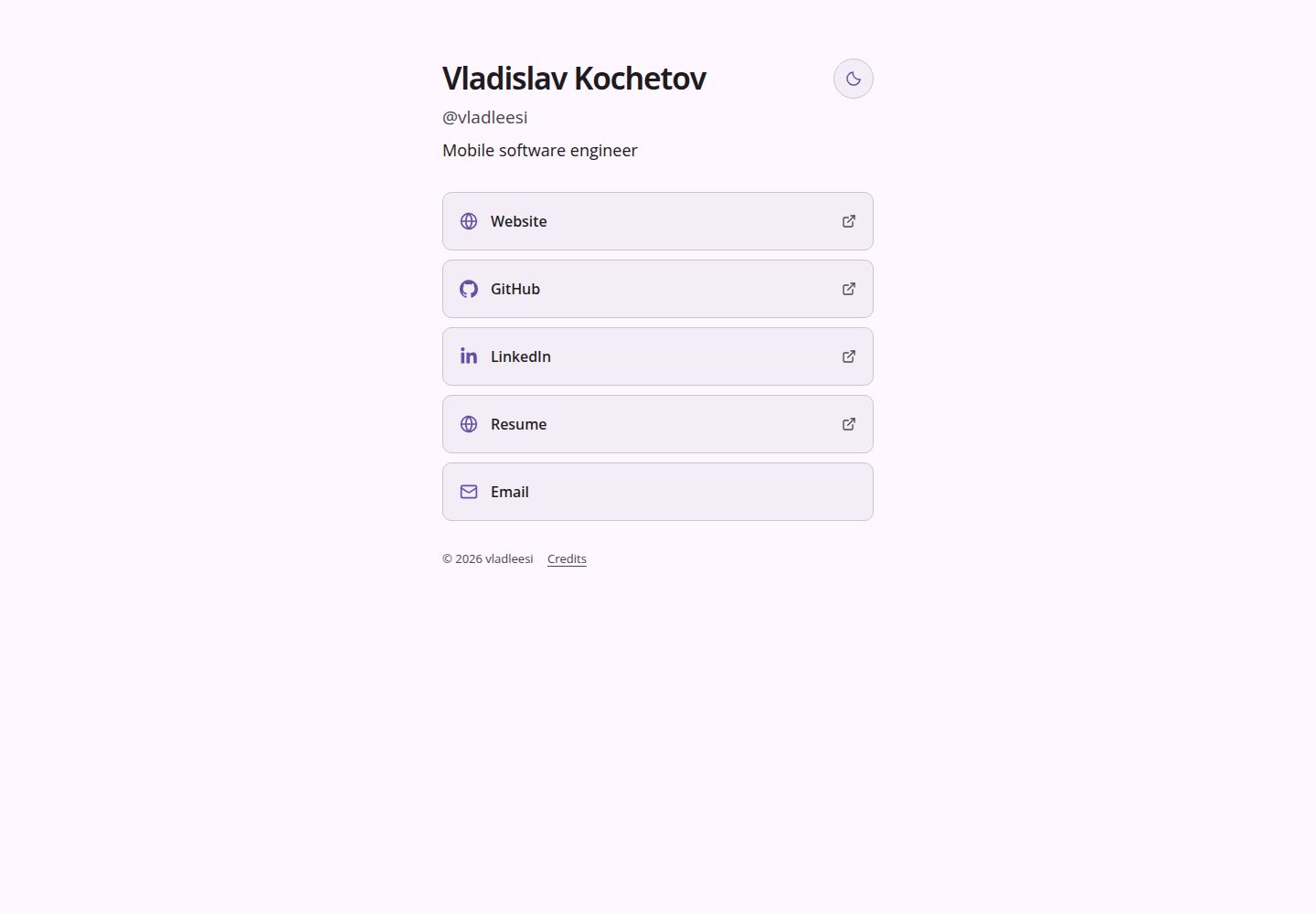
所有内容由单个 config.yaml 驱动,链接名称与顺序按配置原样呈现
Astro作品集工具站
links — Astro 作品集模板
作者 vladleesi
基于 Astro 的静态链接聚合页,通过 config.yaml 配置个人资料与链接列表,内置多套主题与明暗模式,可自托管或部署到 GitHub Pages。
看看你的网站会是什么样
浏览真实页面截图,比较内容排版与手机效果。点击下方缩略图切换,放大查看整页细节。
全部页面与视图 2
截图用于了解视觉与布局,交互效果请以实际项目为准。
采集于 2026-10-05查看来源
值得关注的模板亮点
从已有项目资料中,快速了解它的特点。
内置 default、material、monokai、paper、arctic、ember 六套主题,均支持明暗外观
图标按主机名从本地集合自动匹配,可用 icon 字段覆盖,或用 hostname 显示域名
构建自动生成 YAML 校验、favicon、1200×630 分享图、SEO 元数据、robots.txt 与 sitemap
支持 GitHub Pages 自动部署与任意静态服务器自托管,构建时不请求外部服务
无 JavaScript 时链接与外观仍可用,动画遵循系统的减少动态效果偏好
模板详细介绍
这是一个用 Astro 构建的极简链接聚合页模板,所有内容由根目录下的 config.yaml 驱动。你可以在该文件中设置用户名、可选的全名与头衔、站点公开 URL、主题以及按顺序显示的链接列表;链接名称与顺序完全按配置呈现。链接支持 http(s)、mailto: 和 tel: 目标,图标根据主机名从本地图标集合中自动匹配,未知站点回退为通用网站图标,也可用 icon 字段手动覆盖,或用 hostname: true 显示域名。
模板内置 default、material、monokai、paper、arctic、ember 六套主题,每套主题包含配色与字体,均使用本地字体并支持明暗两种外观。site.mode 可指定初始外观为 light 或 dark,留空或省略则跟随系统;页面上的太阳/月亮按钮可即时切换并将选择保存在当前浏览器中,已保存的访客选择优先于配置值。在没有 JavaScript 的情况下,链接与配置或系统外观仍然可用,切换按钮保持隐藏。鼠标设备上链接悬停会触发轻微弹跳与图标摆动,动画遵循系统的减少动态效果偏好。
构建输出为 dist/ 下的完整静态站点,构建过程会自动完成 YAML 校验、favicon 首字母、1200×630 分享图、SEO 元数据、robots.txt 与 sitemap 生成,且不会向被链接站点、图标 API 或字体服务发起请求。模板附带 GitHub Actions 工作流,可将 dist/ 部署到 GitHub Pages;也可将 dist/ 内容交给任意静态 Web 服务器自托管,Node.js 仅在构建时需要。仓库还包含版本校验、配置测试、主题测试、构建验证和可选的浏览器检查等脚本,浏览器检查覆盖全部主题、系统外观、小屏幕、键盘访问、减少动态效果、自定义字体、基础路径和无 JavaScript 运行等场景。
Astro作品集工具站
适合你的项目吗?
适用场景
- 个人主页或社交资料页,集中展示网站、GitHub、邮箱、电话等入口
- 为项目或产品搭建一个轻量的外链导航页
- 在 GitHub Pages 上免费托管个人链接页,并随 main 分支推送自动部署
- 在自有静态服务器上自托管链接页,构建产物直接上传即可
适合人群
- 希望用一份 YAML 文件维护链接列表、不想引入数据库或后端的个人用户
- 需要多主题与明暗模式、并希望访客选择被记住的展示型页面
- 偏好静态输出、可自行托管或部署到 GitHub Pages 的开发者
- 需要无 JavaScript 降级与减少动态效果支持的场景
上手与定制指南
结合仓库当前版本的说明,按下面的资料检查内容、配置与运行要求。
- 1
需要 Node.js 24 或 22.18+,以及 npm 9.6.5+;安装依赖使用 npm ci,本地开发使用 npm run dev
- 2
编辑 config.yaml 配置 profile、site 与 links;username 为必填且不带 @,site.url 需包含子路径(如有)
- 3
构建使用 npm run build,产物在 dist/;本地预览使用 npm run preview
- 4
部署到 GitHub Pages 时,将 site.url 设为 https://username.github.io/repository/,并在仓库 Settings → Pages → Source 选择 GitHub Actions
- 5
config.yaml 中所有值都是公开的构建输入,不要放入密钥;发布 fork 前替换示例中的姓名、用户名、邮箱、链接与站点 URL
授权与来源资料
使用条件与限制
免费使用 · 保留许可声明本次收录的是公开仓库中采用 MIT 许可的免费版本;免费范围为该版本代码,不代表外部服务或第三方素材免费。
使用时需要遵守
- 允许免费使用、修改、商用和分发该版本代码。
- 分发代码副本或实质性部分时,保留原作者版权声明和完整 MIT 许可声明。
- 代码按现状提供;担保与责任限制以原许可证及适用法律为准。
额外费用与待核对事项
- 演示图片、字体、图标及其他第三方素材需按各自许可核对,不能仅凭代码的 MIT 许可判断。
- 域名、托管、数据库、支付或 AI 等外部服务可能另外收费。
- 仓库中提交的 profile 是公开示例,发布 fork 前必须替换姓名、用户名、邮箱、链接与站点 URL,否则会暴露示例作者的个人信息。
- config.yaml 中所有值都会作为公开构建输入,禁止在其中存放任何密钥或敏感信息。
- 图标与字体沿用各自上游许可证,使用或再分发时需遵守 THIRD_PARTY_NOTICES.md 中列出的第三方许可条款。
- 托管 fork 前应先修改 config.yaml 并重新构建,不能直接使用示例配置发布。
查看原文依据
Permission is hereby granted, free of charge
许可证原文
The committed profile is a public example. Replace the name, username, email, links, and site URL with your own before publishing a fork.
README 原文
All values in `config.yaml` are public build inputs; do not put secrets there.
README 原文
icons and fonts retain their upstream licenses, listed in [THIRD_PARTY_NOTICES.md](THIRD_PARTY_NOTICES.md).
README 原文
https://github.com/vladleesi/links/blob/main/LICENSEhttps://github.com/vladleesi/links/blob/main/README.mdForks should change `config.yaml` and rebuild before hosting.
README 原文
DeepSeek 根据仓库许可证和 README 整理 ·2026-10-05。结果仅覆盖已读取资料,依赖、图片、字体及后续条款变更以各自原文为准。
项目核对记录与介绍依据
模板资料
- 来源平台
- GitHub
- 资料与维护参考分
- 资料较完整 · 85 / 100
- 技术栈
- Astro
- 网站类型
- 作品集 · 工具站
这个分数如何计算
本站按许可资料(最高30分)、演示链接(12分)、预览图(10分)、Star数(15分)、记录的维护时间(15分)、描述完整度(8分)、功能记录(5分)和分类资料(5分)计算。它不是代码、安全或性能测试,也不是 Google 评分;有链接不代表已实测可用。
这个项目需要核对什么
- 记录的仓库更新时间
- 2026-10-05
- 截图检查日期
- 2026-10-05
已收录演示链接。请用你的内容与屏幕尺寸检查;有演示不代表表单、认证或支付已经可用。
目录记录的主要技术栈是 Astro。请通过依赖清单和锁文件核对实际版本与托管要求。这些说明基于收录资料,不代表代码审计或部署实测。
查看具体选型方法 →介绍的制作与核对状态
介绍由 AI 辅助整理目录与仓库资料。仓库作者不等于这篇介绍的审核者。
审核声明: [email protected] · 2026-10-05
查看当时使用的来源资料
SHA-256: 331863f085a66ed900fa7344624c4e0db3c8dbc08fc2e0054f5baf43201624d2
2026-10-05T03:26:44.078Z
来源文件 / 仓库# Link site
A minimal, YAML-driven static links page. Fork it, edit one file, and build.
## Quick start
Use Node.js 24 (or 22.18+) and npm 9.6.5+.
```sh
npm ci
npm run dev
```
## Configuration
Edit `config.yaml`. Your link names and their order are used exactly as configured.
```yaml
profile:
fullName: Vladislav Kochetov # optional; an empty value is fine
username: vladleesi # required; enter without @
title: Mobile software engineer # optional; shown below username; an empty value is fine
site:
url: https://vladleesi.dev/links # public site URL; include a base path if needed
theme: default # optional; default, material, monokai, paper, arctic, ember, or a custom theme
mode: # optional; light or dark; empty or omitted follows the system
links: # displayed in this order; use [] for no links
- name: Website # required; link label
url: https://vladleesi.dev # required; http(s), mailto:, or tel: destination
icon: website # optional; override the detected icon
hostname: false # optional; set true to show the domain
- name: GitHub
url: https://github.com/vladleesi
```
Icons are detected from the hostname using the local collection in `src/assets/icons/`. Unknown sites use the website icon. Optional link fields: `icon: website` to override detection, and `hostname: true` to show a small hostname. HTTP(S), email (`mailto:`), and phone (`tel:`) links are supported.
## Themes
Choose `default`, `material`, `monokai`, `paper`, `arctic`, or `ember` in YAML:
| Theme | Palette and typography |
| --- | --- |
| `default` | Neutral gray with Manrope |
| `material` | Soft purple with Open Sans |
| `monokai` | Olive and green with system fonts |
| `paper` | Warm cream and beige, Source Sans 3 body text and Lora headings |
| `arctic` | Cool Nordic blues with IBM Plex Sans |
| `ember` | Terracotta and orange with Manrope |
All themes support light and dark appearances and use local fonts. Set `site.mode` to `light` or `dark` to choose the initial appearance regardless of the system setting; leave it empty or omit it to follow the system. The sun/moon button remains available, switches appearance immediately, and saves your choice in this browser. A saved visitor choice takes precedence over the configured mode. Without JavaScript, links and the configured or system appearance still work; the switch stays hidden.
Link hover adds a small bounce and icon wiggle on devices with a mouse. Animations respect the system’s reduced-motion preference.
Add one file under `src/themes/` and select its filename in YAML. Copy an existing theme to start; themes contain colors and fonts only. Local custom fonts go under `public/fonts/` and are declared in `fonts.faces`. Optional `fonts.preview` names a local TTF/OTF font for the generated sharing image. The image uses the theme’s light palette; the favicon supports both appearances.
## Build
```sh
npm run build
npm run preview
```
The complete static site is in `dist/`. YAML validation, favicon initials, the 1200×630 sharing image, SEO metadata, robots.txt, and sitemap are generated automatically. Builds make no requests to linked sites, icon APIs, or font services.
## GitHub Pages
1. Fork the repository and edit `config.yaml`.
2. Set `site.url` to `https://username.github.io/repository/` (or your custom domain).
3. Set **Settings → Pages → Source → GitHub Actions**.
4. Push to `main`; the included workflow builds and deploys `dist/`.
The URL’s pathname automatically sets the asset base path. For a custom domain, configure it in GitHub Pages settings and update the YAML URL.
## Self-hosting
Set `site.url` to your public URL, including any subpath, run `npm run build`, and serve the contents of `dist/` with a static web server. Node.js is needed only for building. After changing `config.yaml`, rebuild and upload the updated files.
## Checks
```sh
npm run verify:version
npm run test:version
npm run check
npm run test:config
npm run test:themes
npm run build
npm run verify
npm run test:browser
```
Browser checks use installed Chrome, build fixture configurations, and restore your YAML afterward. Results go to ignored `artifacts/verification/`. They cover all themes, system appearance, small screens, keyboard access, reduced motion, custom fonts, base paths, and no-JavaScript operation. SVG/font licenses are stored beside their local assets.
Pull requests and pushes to `main` run type, configuration, build, and static-output checks. The Pages workflow runs the same checks before deployment. Browser checks are optional and start a temporary local server.
## Releases
Versions use `MAJOR.MINOR.PATCH`. Increase major for breaking changes, minor for compatible features, and patch for compatible fixes. `package.json` and both version fields in `package-lock.json` must agree.
For a subsequent release, choose one of these commands; it updates the package files without committing or tagging:
```sh
npm run version:patch
# or npm run version:minor / npm run version:major
```
The first release uses the existing `1.0.0`; skip the bump for that release. After reviewing changes and obtaining approval to commit, push, and publish:
1. Add a dated `## MAJOR.MINOR.PATCH - YYYY-MM-DD` entry to `CHANGELOG.md` with features, fixes, breaking changes, and migration steps when needed, then run the checks above. Version validation also requires release notes for the current version.
2. Commit the reviewed changes to `main`, for example `chore(release): prepare v1.0.0`, and push `main`.
3. CI checks the push, builds and verifies the site, then calls the release workflow only after the check job succeeds. Pull requests cannot publish releases.
The workflow reads the package version, automatically creates its `vMAJOR.MINOR.PATCH` tag at the exact checked commit, and publishes a GitHub release with that version's changelog notes and the checked build's ZIP (for example, `link-site-v1.0.0.zip`). No manual tag or release command is needed. If the version already has a published release, publication is skipped; bump the version for the next release. An unfinished draft or a conflicting tag fails visibly and needs review.
The ZIP contains the built site, its configured profile/base URL, and license notices; source archives are available through GitHub. Forks should change `config.yaml` and rebuild before hosting. Releases do not publish to npm or enable GitHub Pages.
Release publication uses the workflow's built-in GitHub token; no personal access token is required. A push to `main` with an unpublished version can publish a release automatically, so obtain release approval before that push. Leave published tags unchanged and release fixes under a new version.
## Contributing and license
See [CONTRIBUTING.md](CONTRIBUTING.md) for development and validation steps. Project code is licensed under [MIT](LICENSE); icons and fonts retain their upstream licenses, listed in [THIRD_PARTY_NOTICES.md](THIRD_PARTY_NOTICES.md). The site includes a Credits link to the generated license notices.
The committed profile is a public example. Replace the name, username, email, links, and site URL with your own before publishing a fork. All values in `config.yaml` are public build inputs; do not put secrets there. `private: true` in `package.json` prevents accidental npm publishing and does not restrict reuse under MIT.
看看同类模板
对比同技术栈与用途的模板,找到更适合的视觉与内容结构。

astrowind
⭕️ AstroWind: A free template using Astro v7 and Tailwind CSS v4. Astro starter theme.
Astro · 博客

astro-paper
A minimal, accessible and SEO-friendly Astro blog theme.
Astro · 博客

astro-theme-cactus
A simple Astro theme. Use it to create your blog or website.
Astro · 作品集

astrofy
Astrofy is a free and open-source template for your Personal Portfolio Website built with Astro and TailwindCS…
Astro · 作品集

astro-nano
Astro Nano is a static, minimalist, lightweight, lightning fast portfolio and blog.
Astro · 作品集

astro-erudite
An opinionated, unstyled static blogging template built with Astro and native CSS.
Astro · 作品集