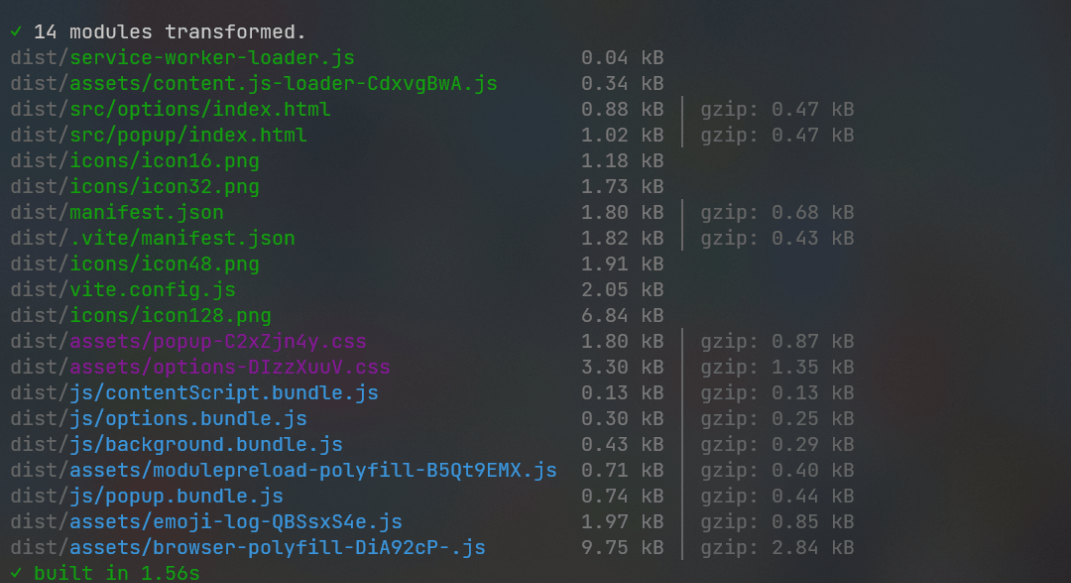
Vite-based development server with HMR hot reload, automatically building on code changes
ViteStarter
VExt — Vite Starter Template
By waahah
VExt is a Vite-based WebExtension starter template for writing code once and building for Chrome, Firefox, Opera, Edge, and other browsers, with scripts for automatic packaging and store publishing.
Explore the design
Compare the page layouts and mobile experience. Open any screenshot for a closer look.
Author preview
Author-provided preview
Preview provided in the project README.
One original preview is available. Open the full image to inspect the design.
Screenshots show visual appearance; interactive behavior may differ.
Recorded 2026-10-03View source
What stands out
A quick read of the recorded project description.
Separate watch, production build, local launch, and ZIP packaging commands for Firefox and Chrome
Browser-specific manifest generation with cross-browser WebExtension API support
Built-in signing and publishing scripts for uploading to the Firefox and Chrome extension stores
Includes GitHub Actions workflows supporting tag-triggered or manually triggered automatic publishing
Frontend-framework agnostic, with SASS styling and ES6 module support
Template Details
VExt is a starter template for WebExtension development, with the core goal of adapting the same extension code to multiple browsers. Built on Vite, it provides a development server and hot reload, and offers separate watch and production build commands for Firefox and Chrome, with build output defaulting to the /dist directory. The template includes browser-specific manifest generation, SASS styling, and ES6 module support, and states that it is frontend-framework agnostic.
For publishing, the project provides ZIP packaging, CRX packaging, and signing/publishing scripts for Firefox and Chrome, with signed .XPI files output to the web-ext-artifacts/ directory. The repository includes GitHub Actions workflows that can build the extension and deploy it to the Chrome Web Store and Mozilla Addons on new tag pushes or manual triggers. Using signing and automatic publishing requires configuring the corresponding store API credentials in package.json or GitHub Actions secrets.
New projects are created via the separate vext-cli tool (create-vext), with prerequisites of Node 18 or higher and npm 9.x or higher. For browser support, the README lists Chrome 79+, Firefox 52+, Opera 36+, Edge 79+, plus the latest versions of Yandex, Brave, and Vivaldi.
ViteStarter template
Is it right for your project?
Use Cases
- Projects that need to build Chrome and Firefox extensions from the same codebase
- Teams that want to develop WebExtensions with Vite hot reload
- Workflows that need to sign extensions and automatically publish them to the Chrome Web Store and Mozilla Addons
- Building and deploying extensions in GitHub Actions on tags or manual triggers
Suitable For
- Developers with WebExtension development experience who are familiar with Node and npm
- Frontend engineers who need a cross-browser extension build and publishing workflow
- Individuals or teams that want to quickly initialize extension projects from a template
Getting started & customization
Use these recorded setup notes alongside the repository instructions for your chosen version.
- 1
Prerequisites: Node >= 18, npm 9.x+.
- 2
Create a new project by installing create-vext globally and running vext create <project-name>, or clone the repository and run npm install.
- 3
Use npm run dev for development, and npm run watch:firefox or npm run watch:chrome for Firefox/Chrome hot-reload builds.
- 4
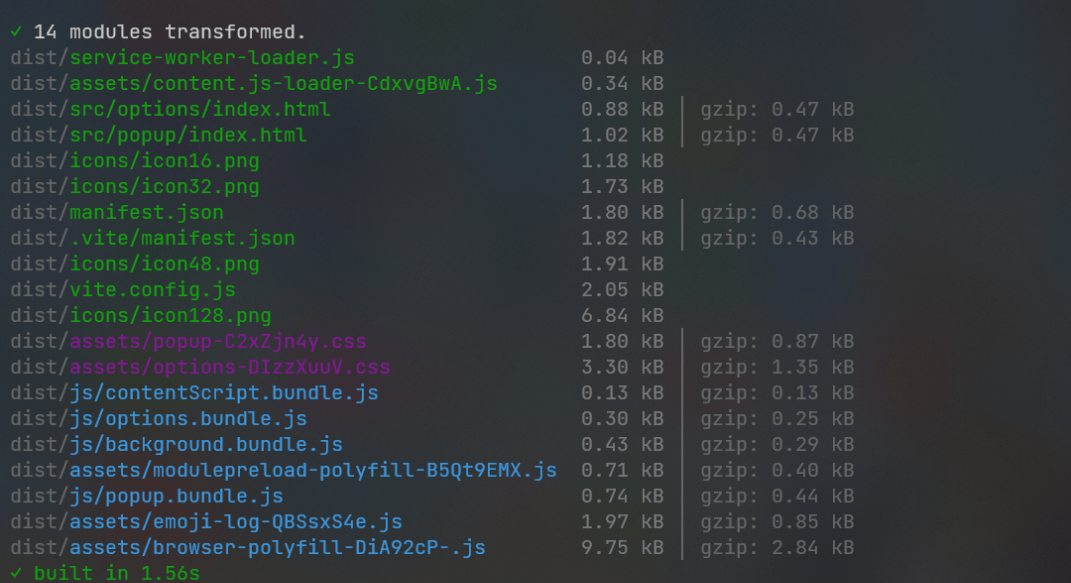
Use npm run build:firefox or npm run build:chrome for production builds; output defaults to the /dist directory.
- 5
Signing and publishing require configuring Firefox JWT issuer/secret or Chrome client id, client secret, refresh token, and extension id in package.json; CI publishing requires configuring the corresponding secrets in GitHub Actions.
License & source material
Usage conditions & limitations
Free to use · keep license noticeThis entry covers the free version in the public repository under the MIT license; the free scope is the code of that version and does not imply that external services or third-party assets are free.
Must comply with when using
- The code of this version may be used, modified, used commercially, and distributed free of charge.
- When distributing copies or substantial portions of the code, retain the original author's copyright notice and the full MIT license notice.
- The code is provided as is; warranties and limitations of liability are governed by the original license and applicable law.
Additional costs & items to verify
- Firefox signing and publishing requires configuring Mozilla API keys such as the JWT issuer and secret; without configuration, that publishing workflow cannot be used.
- Chrome signing and publishing requires configuring Chrome Web Store credentials such as client id, client secret, refresh token, and extension id.
- Automatic publishing to the Chrome Web Store and Mozilla Addons requires configuring the corresponding store secrets in GitHub Actions (CLIENT_ID, CLIENT_SECRET, REFRESH_TOKEN, EXTENSION-ID, WEB_EXT_API_KEY, WEB_EXT_API_SECRET).
- CRX packaging requires configuring the scripts/crx-pack.js script first; otherwise, a .crx extension package cannot be generated.
- Demo images, fonts, icons, and other third-party assets must be checked against their respective licenses and cannot be judged solely by the code's MIT license.
- External services such as domains, hosting, databases, payments, or AI may incur separate charges.
View Original Text Basis
Permission is hereby granted, free of charge
Original License Text
签名发布Firefox扩展(需配置API密钥)
Original README
签名发布Chrome扩展(需配置Web Store凭据)
Original README
可以通过在 GitHub Actions 中添加以下 secrets 来同时自动发布到 Chrome Web Store 和 Mozilla Addons
Original README
https://github.com/waahah/VExt/blob/main/LICENSEhttps://github.com/waahah/VExt/blob/main/README.md生成.crx扩展包(需配置scripts/crx-pack.js)
Original README
Compiled by DeepSeek based on repository license and README ·2026-10-03. Results only cover the materials read; dependencies, images, fonts, and subsequent term changes are subject to their respective original texts.
Project checks & description sources
Template Information
- Source platforms
- GitHub
- Documentation and maintenance reference score
- Partly documented · 69 / 100
- Technologies
- Vite
- Website type
- Starter
How this score is calculated
Our heuristic uses license records (up to 30), a demo link (12), a preview (10), stars (15), recorded maintenance (15), description completeness (8), feature records (5) and classification data (5). It is not a code, security or performance test, or a Google score. A link does not establish tested functionality.
What to verify for this project
- Repository update recorded
- 2025-04-26
- Screenshot last checked
- 2026-10-03
No demo link is recorded. Use the repository instructions to evaluate the project locally; the screenshot alone cannot establish interactive behavior.
The catalog identifies Vite as the primary stack. Check the actual dependency manifest and lockfile for versions and hosting requirements. These notes use recorded metadata, not a code audit or a deployment test.
Use a selection guide →How this description was prepared
AI-assisted description based on catalog records and repository material. Repository authors are not automatically the reviewers of this description.
Review declaration: [email protected] · 2026-10-04
Inspect the recorded source material
SHA-256: 57e09fcdad058d06e22697376ea4f9f4357d159a445240aecdc7e4367be554b0
2026-10-03T18:57:57.596Z
Source file / repository<h1 align="center">🚀 VExt</h1>
<p align="center">🖥构建”一次编写,在任何浏览器上运行“的 Web 扩展启动器🔋</p>
<div align="center">
<a href="https://github.com/waahah/VExt/blob/master/LICENSE">
<img src="https://img.shields.io/github/license/waahah/VExt.svg" alt="LICENSE" />
</a>
<a href="https://github.com/waahah">
<img src="https://img.shields.io/static/v1?label=%20&message=Github&style=flat-square&labelColor=black&color=4258dd&logo=github" alt="github" />
</a>
<a href="README_EN.md">English</a>
<a href="README.md">简体中文</a>
</div>
<h3 align="center">🙋♂️ Made by <a href="https://www.waahah.xyz/about">@waahah</a></h3>
<hr />
### 特性
- ✅ 跨浏览器支持 (Web 扩展 API)
- 🌈 代码更改时自动构建和 HMR 热重载
- 📦 自动打包特定于浏览器的构建文件
- 📄 浏览器定制清单生成
- 🎨 与前端框架无关
- 🤖 自动发布
- ✨ 持续集成
- 🥢 SASS 样式
- 🎯 ES6 模块支持
- 📊 智能重新加载
### 浏览器支持
| [](/) | [](/) | [](/) | [](/) | [](/) | [](/) | [](/) |
| ------------------------------------------------------------ | ------------------------------------------------------------ | ------------------------------------------------------------ | ------------------------------------------------------------ | ------------------------------------------------------------ | ------------------------------------------------------------ | ------------------------------------------------------------ |
| 79 & later ✔ | 52 & later ✔ | 36 & later ✔ | 79 & later ✔ | Latest ✔ | Latest ✔ | Latest ✔ |
### 🚀 快速开始
使用 [vext-cli](https://github.com/waahah/vext-cli) 创建一个新的项目非常简单,只需运行以下命令:
```bash
npm install -g create-vext
# 或者使用 yarn
yarn global add create-vext
# 创建新项目
vext create <project-name>
```
### 📦 前置要求
- `node >= 18`
- `npm 9.x+`
### 🔧 安装依赖
```bash
git clone https://gitee.com/waahah/VExt.git
cd VExt
npm install
```
### 开发模式
```bash
npm run dev # 启动开发服务器(HMR)
npm run watch:firefox # Firefox热更新构建
npm run watch:chrome # Chrome热更新构建
```
### 生产构建
```bash
npm run build:firefox # Firefox生产构建
npm run build:chrome # Chrome生产构建
```
### 本地运行
```bash
npm run start:firefox # 启动Firefox测试实例
npm run start:chrome # 启动Chrome测试实例
```
运行后会启动对应浏览器,并自动加载运行项目。
### 代码质量
```bash
npm run lint # 执行构建并代码校验
```
### 打包ZIP
```bash
npm run pack:firefox # Firefox打包
npm run pack:chrome # Chrome打包
```
打包后的文件会输出到 `web-ext-artifacts/` 目录。
### CRX打包
```bash
npm run pack:crx # 生成.crx扩展包(需配置scripts/crx-pack.js)
```
### 签名发布
```bash
npm run sign:firefox # 签名发布Firefox扩展(需配置API密钥)
npm run sign:chrome # 签名发布Chrome扩展(需配置Web Store凭据)
```
自动上传扩展商店签名并发布,签名后的.XPI文件会输出到 `web-ext-artifacts/` 目录。
### ⚙️ 配置说明
1. 环境模式:更改manifest文件
2. 构建输出:构建产物默认生成至/dist目录
3. 签名配置:需在package.json中配置以下凭证:
```
Firefox: <your-jwt-issuer> 和 <your-jwt-secret>
Chrome:
<your-client-id>
<your-client-secret>
<your-refresh-token>
<your-extension-id>
```
- `firefox`获取API密钥请查看[此指南](https://extensionworkshop.com/documentation/develop/web-ext-command-reference/#web-ext-sign)
- `chrome`获取API密钥请查看[此指南](https://github.com/fregante/chrome-webstore-upload-keys)
### 持续集成
可以通过在 GitHub Actions 中添加以下 secrets 来同时自动发布到 Chrome Web Store 和 Mozilla Addons:
- **CLIENT_ID** 和 **CLIENT_SECRET** 以及来自 Google APIs 的 **REFRESH_TOKEN **和 **EXTENSION-ID**
- **WEB_EXT_API_KEY** 和来自 AMO 的 **WEB_EXT_API_SECRET**
GitHub Actions 工作流将会:
- 构建扩展
- 将扩展部署到两个商店
借助包含的 [GitHub Action](https://github.com/waahah/VExt/actions) 工作流,CI可以:
- 在有新的 tag 提交时触发
- 手动触发,只需点击 Actions 标签页中的 “Run workflow”
> 立即开始构建跨浏览器扩展项目! ✨
### 🧹使用此项目构建的扩展
- [Meow](https://github.com/waahah/Meow)
Explore similar templates
Compare previews and descriptions within the same stack and category.

react-starter-kit
A full-stack SaaS monorepo starter built on Vite and React, with Bun, TypeScript, tRPC, Drizzle ORM, Better Auth, Stripe, and Cloudflare Workers. It includes email OTP, passkey, Google OAuth, organizations, subscription billing, Drizzle migrations, seed scripts, and Terraform infrastructure.
Vite · SaaS

cove
Cove is a minimal TanStack Start starter template maintained by mugnavo, integrating React, TanStack Router/Query, Tailwind CSS, shadcn/ui, Drizzle ORM with PostgreSQL, Better Auth, Vite Plus, and Nitro.
Vite · SaaS

vite-react-boilerplate
A production-ready Vite + React starter template with TypeScript, Tailwind CSS, TanStack Router/Query/Table, Storybook, React Hook Form + Zod, Vitest and Playwright testing, plus Husky/Commitizen/Commitlint commit conventions.
Vite · Starter

react-vite-admin
A backend management starter built on Vite and React, integrating Recoil, React Query, TypeScript, and Axios, with Ant Design-style interface screenshots. Suitable as a starting point for management-side projects, licensed under MIT, with Chinese documentation and common scripts.
Vite · Admin dashboard

typescript-react_best_practices-vite_template
A Vite + React + TypeScript starter template by CodelyTV, preconfigured with Jest and React Testing Library unit tests, Cypress end-to-end tests, ESLint and Prettier using Codely's shared configuration, GitHub Actions workflows, a Makefile, and Sass.
Vite · Starter

cloudflare-starter-kit
A Cloudflare Workers project scaffolding template maintained by kriasoft, using Vite and TypeScript, with three built-in workspaces: api, app, and edge, and preconfigured local testing, multiple environments, and a GitHub Actions deployment workflow.
Vite · Starter