A lightweight Hexo blog theme derived from the AirCloud theme, maintained under the Aerlume name
HexoBlog
hexo-theme-aerlume — Hexo Blog Template
By wu3227834
hexo-theme-aerlume is a lightweight Hexo blog theme derived from AirCloud, emphasizing a quiet reading experience and clear typography, released under the MIT license.
Explore the design
Compare the page layouts and mobile experience. Open any screenshot for a closer look.
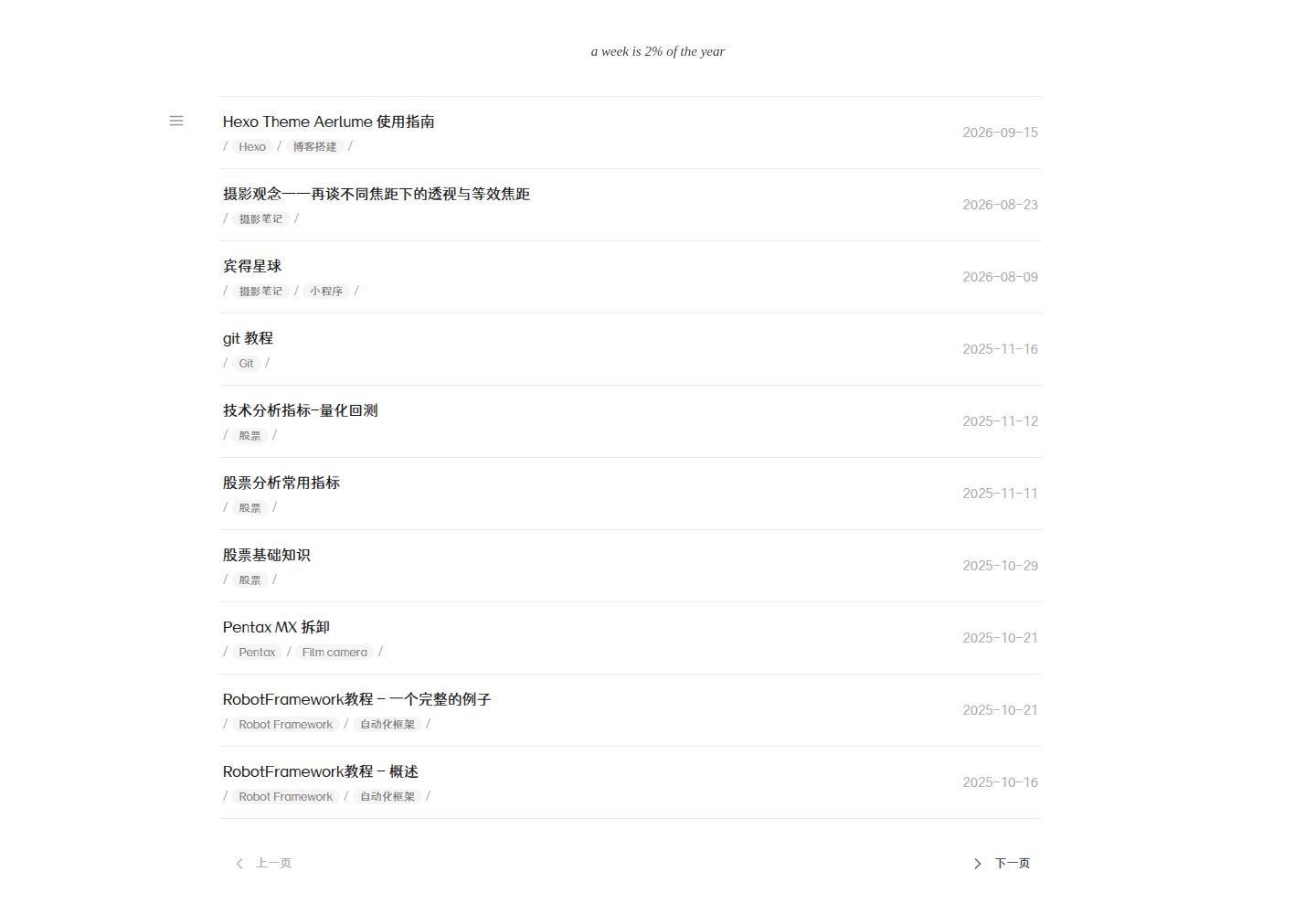
Desktop homepage1 / 3
Desktop captureTop of page
Actual screenshot captured by the server browser.
All pages & views 3
Screenshots show visual appearance; interactive behavior may differ.
Recorded 2026-10-01View source
What stands out
A quick read of the recorded project description.
Focuses on quiet reading, clear typography, and a writing experience with fewer distractions
Supports two installation methods: npm install or cloning from GitHub into the themes directory
Provides a generic and privacy-safe demo/_config.yml as an example of a site root configuration
Configuration is divided into two layers: the site root _config.yml and the theme _config.yml
Released under the MIT license; distribution requires retaining the copyright notice and the complete license text
Template Details
hexo-theme-aerlume is a blog theme for Hexo, positioned as lightweight and focused on the reading experience, emphasizing clear typography and a writing presentation with fewer distractions. It is derived from the original author XiaotaoNie's AirCloud theme, continues to be maintained under the Aerlume name, and is released under the MIT license.
There are two installation methods: install hexo-theme-aerlume via npm, or clone the GitHub repository directly into the themes directory of a Hexo site; the latter requires additionally installing hexo-generator-search to support search. To enable it, set theme to hexo-theme-aerlume in the site root _config.yml, and configure search's path and field.
The repository provides a generic demo/_config.yml as a complete example of a Hexo site root configuration, covering site-level settings such as site title, author, domain, social accounts, comments, analytics, search, pagination, and subscription; it uses placeholders such as example.com and [email protected], and does not contain the maintainer's personal accounts or service identifiers. This file is not a replacement for the theme's own _config.yml. Configuration is divided into two layers: the root _config.yml handles site identity and services, while the _config.yml in the theme directory stores reusable theme defaults (such as local font settings) and should not contain personal account information.
For style development, edit the Less source files under source/_less/, then recompile to source/css/aerlume.css with lessc; the verification process is hexo clean, hexo generate, hexo server. When distributing this project or substantial portions of it, the original copyright notice and the complete MIT license text must be retained. External assets such as fonts, third-party scripts, and icons may be under separate licenses and are not covered by the theme's MIT license.
HexoBlog
Is it right for your project?
Use Cases
- Building a personal blog centered on text reading with Hexo
- Users who want to migrate from the AirCloud theme or find its maintained derivative
- Needing a Hexo site root configuration example without personal account information as a starting point
- Secondary development and compilation of theme styles at the Less level
Suitable For
- Developers who use Hexo and prefer a clean, reading-oriented blog theme
- Theme users who need an MIT-licensed theme that can be freely modified and distributed
- Hexo users who want to refer to a layered configuration structure to manage site and theme settings
Getting started & customization
Use these recorded setup notes alongside the repository instructions for your chosen version.
- 1
Install via npm install hexo-theme-aerlume --save, or clone the repository into the themes directory
- 2
When installing by cloning from GitHub, additionally run npm install hexo-generator-search --save
- 3
Set theme: hexo-theme-aerlume in the site root _config.yml, and configure search's path and field
- 4
You can copy demo/_config.yml as the root configuration and replace the placeholders; for existing sites, it is recommended to merge the relevant sections rather than overwrite everything
- 5
After modifying the Less source files under source/_less/, recompile with npx lessc source/css/aerlume.less source/css/aerlume.css
License & source material
Usage conditions & limitations
Free to use · keep license noticeThis entry covers the free version in the public repository under the MIT license; the free scope is the code of this version and does not mean that external services or third-party assets are free.
Must comply with when using
- Free use, modification, commercial use, and distribution of this version's code are permitted.
- When distributing copies or substantial portions of the code, retain the original author's copyright notice and the complete MIT license notice.
- The code is provided as is; warranties and limitations of liability are governed by the original license and applicable law.
Additional costs & items to verify
- The theme's MIT license does not automatically cover external assets such as fonts, third-party scripts, and icons; these may be under separate licenses, and users must verify their authorization themselves.
- When installing the theme by cloning from GitHub, the hexo-generator-search dependency must be additionally installed to support search functionality.
- When distributing this project or substantial portions of it, the original copyright notice and the complete MIT license text must be retained.
- Demo images, fonts, icons, and other third-party assets must be checked against their respective licenses and cannot be judged solely by the code's MIT license.
- External services such as domains, hosting, databases, payments, or AI may incur separate charges.
View Original Text Basis
Permission is hereby granted, free of charge
Original License Text
Fonts, third-party scripts, icons, and other external assets may have separate licenses and are not automatically covered by this theme's MIT License.
Original README
npm install hexo-generator-search --save
Original README
https://github.com/wu3227834/hexo-theme-aerlume/blob/master/LICENSEhttps://github.com/wu3227834/hexo-theme-aerlume/blob/master/README.mdWhen redistributing this project or substantial portions of it, keep the original copyright notice and the full MIT License text in [`LICENSE`](LICENSE).
Original README
Compiled by DeepSeek based on repository license and README ·2026-10-01. Results only cover the materials read; dependencies, images, fonts, and subsequent term changes are subject to their respective original texts.
Project checks & description sources
Template Information
- Source platforms
- GitHub
- Documentation and maintenance reference score
- Partly documented · 72 / 100
- Technologies
- Hexo
- Website type
- Blog
How this score is calculated
Our heuristic uses license records (up to 30), a demo link (12), a preview (10), stars (15), recorded maintenance (15), description completeness (8), feature records (5) and classification data (5). It is not a code, security or performance test, or a Google score. A link does not establish tested functionality.
What to verify for this project
- Repository update recorded
- 2026-09-14
- Screenshot last checked
- 2026-10-01
A demo link is listed. Check it with your own content and viewport sizes; its presence does not confirm that forms, authentication or payments work.
The catalog identifies Hexo as the primary stack. Check the actual dependency manifest and lockfile for versions and hosting requirements. These notes use recorded metadata, not a code audit or a deployment test.
Use a selection guide →How this description was prepared
AI-assisted description based on catalog records and repository material. Repository authors are not automatically the reviewers of this description.
Automatically checked against source and license rules; no manual editorial review.
Inspect the recorded source material
SHA-256: 94b2244a3ed52a9732d42f694f013b5e232f81e4a9314ae8e1a835f94ce4d983
2026-10-01T03:07:39.982Z
Source file / repository# Hexo Theme Aerlume [简体中文](README.zh-CN.md) A lightweight Hexo theme focused on calm reading, clear typography, and a distraction-free writing experience. This is a maintained derivative of the original AirCloud theme and is released under the MIT License. Original project: [aircloud/hexo-theme-aircloud](https://github.com/aircloud/hexo-theme-aircloud) ## Quick Start Install from npm: ```bash cd your-hexo-site npm install hexo-theme-aerlume --save ``` Or install directly from GitHub: ```bash cd your-hexo-site/themes git clone https://github.com/wu3227834/hexo-theme-aerlume.git hexo-theme-aerlume cd .. npm install hexo-generator-search --save ``` Enable the theme in your Hexo site's root `_config.yml`: ```yaml theme: hexo-theme-aerlume search: path: search.json field: post ``` ## Demo Configuration The repository includes a generic, privacy-safe Hexo root configuration: [Open `demo/_config.yml`](https://github.com/wu3227834/hexo-theme-aerlume/blob/master/demo/_config.yml) This file is a complete example of the **Hexo site's root `_config.yml`**. It shows where users should configure the site title, author, domain, social accounts, comments, analytics, search, pagination, feeds, and other site-level settings. It is not a replacement for the theme's own `_config.yml`. The template uses placeholders such as `example.com` and `[email protected]`, so it does not expose any maintainer's personal accounts or service identifiers. Copy it into a new Hexo site and replace the placeholders: ```bash cp themes/hexo-theme-aerlume/demo/_config.yml _config.yml ``` For an existing site, merge the relevant sections instead of overwriting the whole configuration file. The example site name is `aerlume-journal`. ## Configuration Layers - Root `_config.yml`: site-specific identity and services, including the author, email, domain, social links, Giscus, analytics, and donations. - `themes/hexo-theme-aerlume/_config.yml`: reusable theme defaults, such as local font settings. It should not contain personal account information. See [`README.zh-CN.md`](README.zh-CN.md) for the full configuration reference. ## Development Edit Less sources under `source/_less/` and rebuild the compiled stylesheet: ```bash npx lessc source/css/aerlume.less source/css/aerlume.css ``` Verify the theme in a Hexo site: ```bash hexo clean hexo generate hexo server ``` ## License and Attribution This project is based on XiaotaoNie's AirCloud theme and is maintained under the Aerlume name. When redistributing this project or substantial portions of it, keep the original copyright notice and the full MIT License text in [`LICENSE`](LICENSE). Fonts, third-party scripts, icons, and other external assets may have separate licenses and are not automatically covered by this theme's MIT License.
Explore similar templates
Compare previews and descriptions within the same stack and category.

hexo-theme-matery
hexo-theme-matery is a Material Design, responsive Hexo blog theme with homepage carousel, waterfall post list, timeline archive, word cloud tags, radar chart categories, and an about page.
Hexo · Blog

hexo-theme-cactus
Cactus is a responsive Hexo theme for personal websites and blogs, maintained by probberechts. It offers four color schemes (dark, light, white, classic), configurable navigation, homepage post lists, project lists, social links, and copyright year ranges.
Hexo · Blog

hexo-theme-volantis
Volantis is a blog theme for Hexo, distributed as the npm package hexo-theme-volantis and enabled by setting theme to volantis in the Hexo site's _config.yml. It requires Hexo 7.3+, hexo-cli 4.3+, Node.js 22.x LTS+, and npm 10.x LTS+.
Hexo · Blog

hexo-theme-aurora
Hexo Theme Aurora is a futuristic Hexo blog theme built around aurora gradients and a magazine-style grid layout.
Hexo · Blog

hexo-theme-Claudia
Claudia is a Hexo blog theme focused on a clean look and easy configuration. It automatically follows the device's dark mode and claims a 90+ Lighthouse score.
Hexo · Blog

hexo-theme-A4
hexo-theme-A4 is a minimalist Hexo blog theme that mimics the texture of A4 paper, emphasizing simplicity, small size, and minimal configuration.
Hexo · Blog