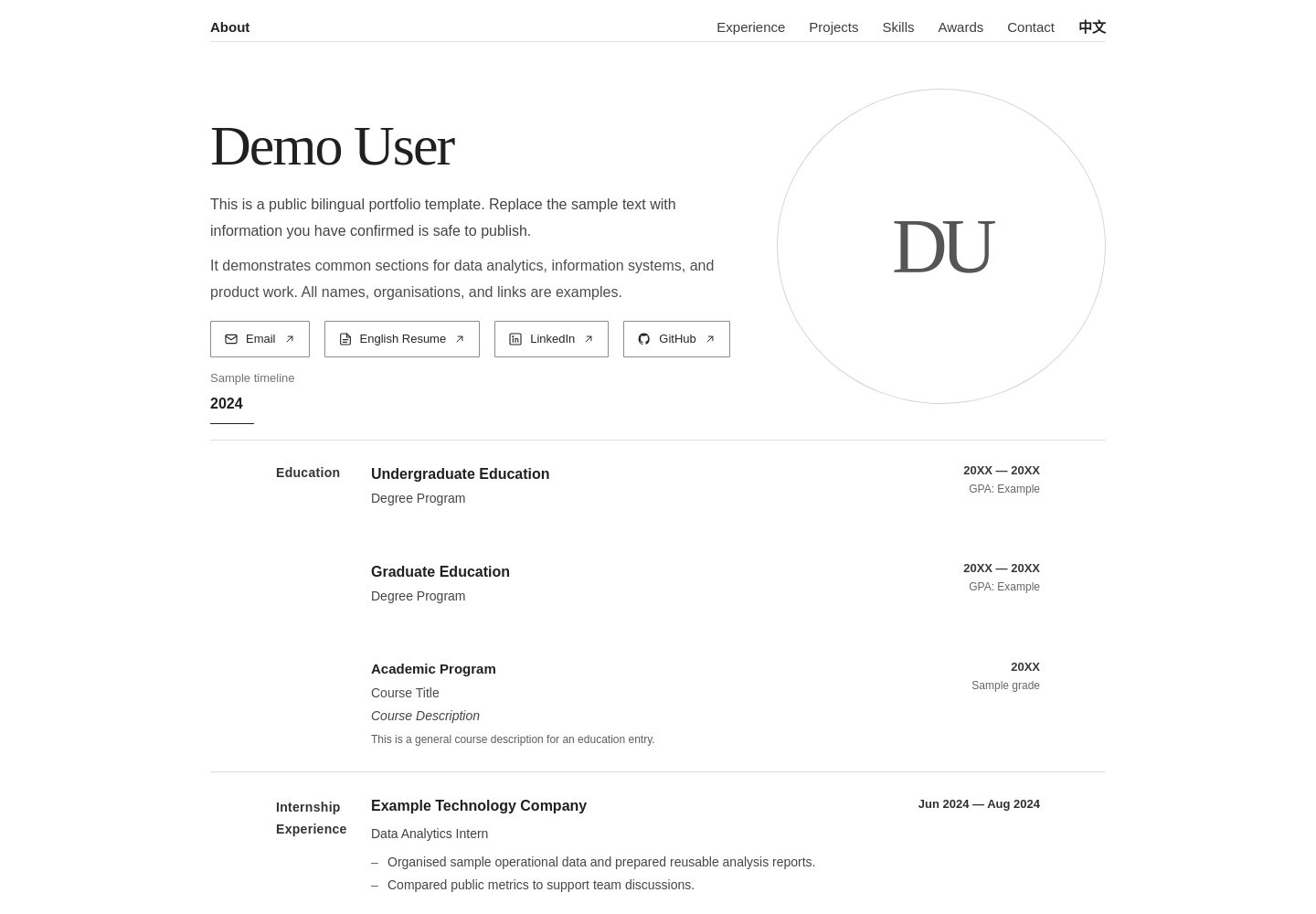
Bilingual Chinese-English interface with automatic initial language selection based on visitor region and manual switching
Next.jsReactPortfolio
personal-website-template — Next.js Portfolio Template
By XiangsongFei
A bilingual Chinese-English personal website template built with Next.js and React for portfolios, online resumes, and professional profiles. It supports automatic initial language selection based on visitor region and can be deployed to Cloudflare Workers.
Explore the design
Compare the page layouts and mobile experience. Open any screenshot for a closer look.
Desktop homepage1 / 2
Desktop captureTop of page
Actual screenshot captured by the server browser.
All pages & views 2
Screenshots show visual appearance; interactive behavior may differ.
Recorded 2026-09-29View source
What stands out
A quick read of the recorded project description.
Manual language preference is retained in sessionStorage for the current browser session
Includes sections for personal introduction, education, work experience, projects, skills, awards, and contact information
Supports separate Chinese and English resume PDFs, with page buttons opening the corresponding file
Responsive layout covers desktop, tablet, and mobile, with styles centralized in app/globals.css
Supports deployment to Cloudflare Workers via vinext, with Cloudflare KV as optional cache
Template Details
This is a bilingual website template for personal portfolios, online resumes, and professional profiles, built with Next.js and React, offering both Chinese and English content. The page includes reusable sections such as personal introduction, education, work experience, project showcases, skills, awards, contact information, and links to Chinese and English resume PDFs. Content is edited centrally in app/page.tsx, while styles and responsive layout are in app/globals.css.
For language handling, when a visitor has not manually selected a language, the template requests /api/locale. The Cloudflare Worker in worker/index.ts determines the language based on request region information: visitors from China see Chinese, others see English, and if region information is unavailable, it falls back to the browser language. After a visitor manually switches language, the preference is stored in sessionStorage and is valid only for the current browser session. Refreshes or in-site navigation will not immediately be overridden by automatic detection, and a new session will re-run region detection.
For deployment, the template supports deployment to Cloudflare Workers via vinext, using wrangler.jsonc to configure the Worker and related resources. Cloudflare KV is optional; when not configured, the build may show warnings related to the VINEXT_KV_CACHE binding, but the build succeeds and falls back to default cache handling without affecting deployment. The resume PDFs and demo content in the repository are fictional examples and must be replaced before use. The code is under the MIT license, but third-party assets such as fonts and icons require separate license verification.
Next.jsReactPortfolio
Is it right for your project?
Use Cases
- Build a personal portfolio website to showcase projects, skills, and work experience
- Create an online resume page with entry points to view or download Chinese and English resume PDFs
- Provide automatic initial language selection for professional profile sites serving Chinese and English visitors
- Deploy a lightweight personal static showcase site on Cloudflare Workers
Suitable For
- Developers or designers who need a bilingual Chinese-English personal homepage
- Individuals who want to quickly build a portfolio and online resume using ready-made sections
- Users planning to deploy a frontend site on Cloudflare Workers
- Users who can directly edit app/page.tsx and app/globals.css to customize content
Getting started & customization
Use these recorded setup notes alongside the repository instructions for your chosen version.
- 1
After cloning the repository, run npm install to install dependencies, then npm run dev to start the local development server
- 2
Replace sample content in app/page.tsx such as name, introduction, education, experience, projects, skills, awards, email, LinkedIn, GitHub, and resume links, and update both Chinese and English copy
- 3
Replace public/resume_zh.pdf and public/resume_en.pdf with files of the same names; the existing resumes in the repository are fictional demo documents
- 4
Before deployment, run npm run build to verify the build, then run npx @vinext/cloudflare deploy; first fill in your own Cloudflare resource and account configuration in wrangler.jsonc
- 5
Before publishing, check the repository to avoid committing sensitive information such as API keys, passwords, .env files, private contact details, and Cloudflare credentials
License & source material
Usage conditions & limitations
Free to use · keep license noticeThis entry covers the free MIT version in the public repository; the free scope applies to that version's code and does not imply that external services or third-party assets are free.
Must comply with when using
- When using, modifying, or distributing the code, retain the original author's copyright notice and the complete MIT license.
- Free use, modification, and commercial use are permitted, as is distribution of the code; distribution must still include the copyright and license notice.
- The code is provided as is, and the author does not promise warranties or accept liability for use.
Additional costs & items to verify
- The resume PDFs included in the repository are fictional demo documents and cannot be used directly as a personal resume; replace them with your own resume files.
- Cloudflare KV is an optional cache and basic functionality does not strictly depend on it; however, if required by the deployment configuration, you must create a KV namespace and fill in its ID yourself.
- Before deployment, you must replace the Cloudflare resource IDs and account-related configuration in wrangler.jsonc with your own values.
- Automatic language detection relies on request region metadata from the Cloudflare Worker and only takes effect when deployed to Cloudflare Workers.
- Updating the GitHub repository will not automatically update the online Worker; unless an automatic deployment process is configured separately, you must redeploy locally.
- Demo images, fonts, icons, and other third-party assets require license verification according to their respective licenses and cannot be judged solely by the code's MIT license.
- External services such as domains, hosting, databases, payments, or AI may incur additional charges.
View Original Text Basis
Permission is hereby granted, free of charge
Original License Text
The resumes included in this repository are fictional demonstration documents. Replace them with your own resume files before using the template as a personal website.
Original README
Cloudflare KV is optional for the basic website functionality unless your deployment configuration specifically requires it.
Original README
Cloudflare resource IDs and account-specific settings should be replaced with your own values before deployment.
Original README
The Worker uses Cloudflare request metadata to determine the visitor's country or region.
Original README
https://github.com/XiangsongFei/personal-website-template/blob/main/LICENSEhttps://github.com/XiangsongFei/personal-website-template/blob/main/README.mdUpdating the GitHub repository does not automatically update the live Cloudflare Worker unless you have separately configured an automatic deployment workflow.
Original README
Based on the full MIT license and the repository README · 2026-09-29. Results only cover the materials read; dependencies, images, fonts, and subsequent term changes are subject to their respective original texts.
Project checks & description sources
Template Information
- Source platforms
- GitHub
- Documentation and maintenance reference score
- More documented · 88 / 100
- Technologies
- Next.js · React
- Website type
- Portfolio
How this score is calculated
Our heuristic uses license records (up to 30), a demo link (12), a preview (10), stars (15), recorded maintenance (15), description completeness (8), feature records (5) and classification data (5). It is not a code, security or performance test, or a Google score. A link does not establish tested functionality.
What to verify for this project
- Repository update recorded
- 2026-09-28
- Screenshot last checked
- 2026-09-29
A demo link is listed. Check it with your own content and viewport sizes; its presence does not confirm that forms, authentication or payments work.
The catalog identifies Next.js as the primary stack. Check the actual dependency manifest and lockfile for versions and hosting requirements. These notes use recorded metadata, not a code audit or a deployment test.
Use a selection guide →How this description was prepared
AI-assisted description based on catalog records and repository material. Repository authors are not automatically the reviewers of this description.
Automatically checked against source and license rules; no manual editorial review.
Inspect the recorded source material
SHA-256: 7427184e81dfb710a527b323c6e47a572f1eb042bb3497483bd9ef5f10b4af07
2026-09-29T01:08:48.803Z
Source file / repository# Personal Website Template English | [简体中文](README.zh-CN.md) A clean, responsive, and bilingual personal website template for building portfolios, online resumes, and professional profile websites. Designed to be easy to customize and deploy, this template provides reusable sections for education, experience, projects, skills, awards, contact information, and resume links without requiring you to build a portfolio website from scratch. > **Live Demo:** [example-cv.com](https://example-cv.com) ## ✨ Features - 🌐 Bilingual interface (English / Chinese) - 🌍 Automatic initial language detection based on visitor region - 🔄 Manual language preference preserved during the current browser session - 📱 Responsive design for desktop, tablet, and mobile - 👤 Personal profile and introduction section - 🎓 Education and experience sections - 🚀 Project showcase - 🛠️ Skills and awards sections - 📄 Separate Chinese and English resume PDF support - 🔗 Email, LinkedIn, and GitHub links - ☁️ Cloudflare Workers deployment support - ⚡ Lightweight and fast frontend experience - 🎨 Easy-to-customize content and styling ## 🛠️ Tech Stack - **Framework:** Next.js / vinext - **Frontend:** React + TypeScript - **Styling:** CSS - **Deployment:** Cloudflare Workers - **Optional Cache:** Cloudflare KV - **Package Manager:** npm ## 📂 Project Structure ```text personal-website-template/ ├── app/ │ ├── globals.css # Global styles and responsive layout │ ├── layout.tsx # Root layout and metadata │ └── page.tsx # Main website content, bilingual logic, and interactions │ ├── public/ │ ├── resume_en.pdf # English resume │ └── resume_zh.pdf # Chinese resume │ ├── worker/ │ └── index.ts # Cloudflare Worker entry and locale API │ ├── wrangler.jsonc # Cloudflare Workers configuration ├── package.json └── README.md ``` ## 🚀 Getting Started ### 1. Clone the repository ```bash git clone https://github.com/XiangsongFei/personal-website-template.git ``` Enter the project directory: ```bash cd personal-website-template ``` ### 2. Install dependencies ```bash npm install ``` ### 3. Start the development server ```bash npm run dev ``` Open the local URL shown in your terminal to preview the website. ## ✏️ Customization Most of the website content can be customized directly in: ```text app/page.tsx ``` You can replace the example content with your own: - Name and introduction - Education - Experience - Projects - Skills - Awards - Email - LinkedIn - GitHub - Resume links - Contact information The template contains both Chinese and English content. When customizing the website, remember to update both language versions where applicable. ### Styling Global styles and responsive behavior are located in: ```text app/globals.css ``` You can customize: - Typography - Spacing - Section layout - Borders and dividers - Navigation - Responsive behavior - Desktop layout - Tablet layout - Mobile layout - Other visual details ## 📄 Resume PDFs The template supports separate Chinese and English resume files. Replace: ```text public/resume_zh.pdf public/resume_en.pdf ``` with your own PDF files while keeping the same filenames. The corresponding resume buttons on the website will automatically open the appropriate PDF. > **Note:** The resumes included in this repository are fictional demonstration documents. Replace them with your own resume files before using the template as a personal website. ## 🔗 Contact & Social Links Update the example contact information in: ```text app/page.tsx ``` Replace the placeholder values with your own: - Email - LinkedIn - GitHub - Resume links - Other profile links if needed Make sure to update both the displayed text and the corresponding URLs. ## 🌐 Bilingual Content The website provides both Chinese and English versions of the main content. When adding or modifying sections, make sure that the corresponding content is updated for both languages so that the language switch remains consistent. The bilingual content and frontend language-switching logic are primarily located in: ```text app/page.tsx ``` ## 🌍 Automatic Locale Detection The website supports automatic initial language selection based on the visitor's region. When no manual language preference has been stored for the current browser session, the frontend requests: ```text /api/locale ``` The locale endpoint is handled by the Cloudflare Worker in: ```text worker/index.ts ``` The Worker uses Cloudflare request metadata to determine the visitor's country or region. The default behavior is: - Visitors detected from China (`CN`) are shown the Chinese version. - Visitors from other regions are shown the English version. - If region information is unavailable, the browser language can be used as a fallback. This allows the public website to provide a more appropriate initial language without requiring the visitor to select one manually. ## 🔄 Language Preference Visitors can manually switch between Chinese and English at any time. After a visitor manually selects a language, the preference is stored using browser: ```text sessionStorage ``` The preference is preserved during the current browser session. This means that refreshing or navigating within the website will not immediately override the visitor's manually selected language with automatic region detection. Because the preference is session-based rather than permanently stored, a new browser session can perform automatic locale detection again. ## 🧭 Navigation and Responsive Behavior The template provides section-based navigation for the main portfolio content. Sections can include: - About - Experience - Projects - Skills - Awards - Contact The layout and navigation behavior are designed to adapt across: - Desktop - Tablet - Mobile Responsive styling is primarily defined in: ```text app/globals.css ``` Navigation, section interaction, language behavior, and related frontend logic are primarily handled in: ```text app/page.tsx ``` If you significantly change section heights, spacing, navigation layout, or responsive breakpoints, review the related navigation and scroll behavior as well. ## ☁️ Deploy to Cloudflare Workers This project supports deployment to Cloudflare Workers through vinext. ### 1. Log in to Cloudflare ```bash npx wrangler login ``` ### 2. Configure Cloudflare Configure your Worker and required Cloudflare resources in: ```text wrangler.jsonc ``` Cloudflare resource IDs and account-specific settings should be replaced with your own values before deployment. If your configuration uses Cloudflare KV, create your own KV namespace and use its namespace ID in your Cloudflare configuration. Cloudflare KV is optional for the basic website functionality unless your deployment configuration specifically requires it. The Worker also provides the locale endpoint used for automatic language detection: ```text /api/locale ``` ### 3. Build the project Before deployment, verify that the project builds successfully: ```bash npm run build ``` A successful build confirms that the current source code can be compiled for deployment. Depending on the vinext configuration, you may see a warning related to the optional `VINEXT_KV_CACHE` binding when no KV namespace is configured. For example: ```text The KV data cache adapter requires a VINEXT_KV_CACHE KV namespace binding. ``` If the build still completes successfully and the application falls back to the default cache handler, the warning does not necessarily prevent deployment. ### 4. Deploy Run: ```bash npx @vinext/cloudflare deploy ``` The project will be built and deployed to Cloudflare Workers. After deployment, Wrangler will provide a `workers.dev` URL that can be used to verify the deployment. ### 5. Add a Custom Domain After confirming that the `workers.dev` deployment works correctly, you can connect your own domain from the Cloudflare dashboard. Go to your Worker and open: ```text Settings → Domains & Routes ``` Then add your custom domain. ## 🔄 Updating Your Deployment After modifying the website, first verify that the project still builds successfully: ```bash npm run build ``` Then deploy the latest version again: ```bash npx @vinext/cloudflare deploy ``` Cloudflare will update the existing Worker deployment with the latest build. If you update files directly through the GitHub website, commit the changes to the appropriate branch. > **Note:** Updating the GitHub repository does not automatically update the live Cloudflare Worker unless you have separately configured an automatic deployment workflow. Without automatic deployment, pull or synchronize the latest repository changes locally and deploy the project again. ## 🔒 Privacy The content included in the live demo and public repository is intended for demonstration purposes. Names, organizations, dates, resumes, projects, links, contact information, and other personal details included in the demo should be treated as fictional or placeholder content. Before publishing your own version, carefully review the repository and avoid committing: - API keys or tokens - Passwords or credentials - `.env` files containing secrets - Private contact information you do not want to publish - Personal documents not intended for public access - Cloudflare authentication credentials - Private API credentials - Account-specific secrets - Other sensitive or personally identifiable information Public portfolio websites and public GitHub repositories are accessible to others and may also be indexed by search engines, so review all content before deployment. ## 🤝 Contributing Contributions, suggestions, and improvements are welcome. To contribute: 1. Fork the repository 2. Create a new branch 3. Make your changes 4. Commit your changes 5. Push the branch to your fork 6. Submit a pull request ## 📜 License This project is licensed under the MIT License. See the [LICENSE](LICENSE) file for details. ## ⭐ Support If you find this template useful, consider giving the repository a star. You are welcome to fork the project and customize it for your own portfolio, resume, or personal website.
Explore similar templates
Compare previews and descriptions within the same stack and category.

react-resume-template
A personal resume website template for software developers, built with Next.js, React, and TypeScript and styled with Tailwind CSS. Site content is driven by a single data file at /src/data/data.tsx, with types in dataDef.ts and images in src/images/.
Next.js · Portfolio

nxt-lnk
nxt-lnk is a Next.js-based bio link page template that manages personal information and links via BioData.js and LinksData.js, positioned as a self-hosted alternative to Linktree. It groups links by type, supports enabling/disabling individual links, and offers hexagonal or oval avatars.
Next.js · Portfolio

sylph
Sylph is a minimal portfolio and blog template built on Next.js, supporting MDX/Markdown writing, light/dark themes, and automatic OG image generation. It includes sitemap, robots.txt, metadata, and syntax highlighting, with automatic blog timestamps.
Next.js · Portfolio

sleek-portfolio
A modern, responsive portfolio template built with Next.js 15, TypeScript, Tailwind CSS, and Shadcn UI. It includes an MDX blog, project showcase, work experience timeline, and a contact form that receives messages via Telegram Bot.
Next.js · Portfolio

research-website-template
A React + Next.js template for research personal websites, aimed at PhD students and researchers. It centralizes publications, projects, and other content in src/data as arrays of objects, with optional fields automatically generating UI components.
Next.js · Portfolio

shadcn-portfolio
A developer portfolio template built with Next.js 15, shadcn/ui, Tailwind CSS, and Framer Motion, featuring an MDX blog, light and dark modes, responsive design, and SEO meta tags.
Next.js · Portfolio