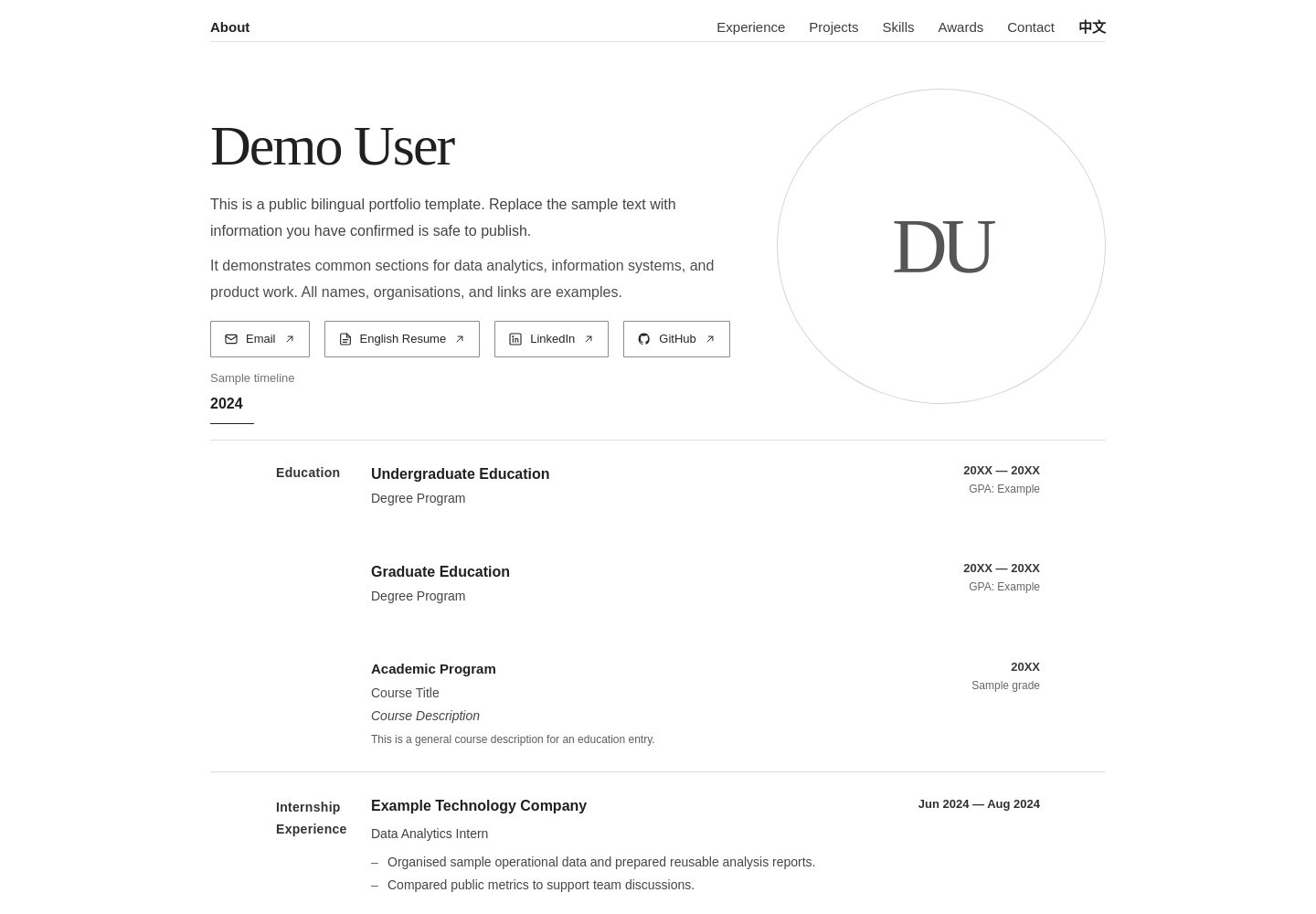
中英双语界面,支持按访客地区自动选择初始语言,并允许手动切换
Next.jsReact作品集
personal-website-template — Next.js 作品集模板
作者 XiangsongFei
基于 Next.js 与 React 的中英双语个人网站模板,用于搭建作品集、在线简历与职业档案页面,支持按访客地区自动选择初始语言,并可部署到 Cloudflare Workers。
看看你的网站会是什么样
浏览真实页面截图,比较内容排版与手机效果。点击下方缩略图切换,放大查看整页细节。
全部页面与视图 2
截图用于了解视觉与布局,交互效果请以实际项目为准。
采集于 2026-09-29查看来源
值得关注的模板亮点
从已有项目资料中,快速了解它的特点。
手动语言偏好通过 sessionStorage 在当前浏览器会话内保留
包含个人简介、教育经历、工作经历、项目、技能、奖项与联系方式等区块
支持分别放置中英文简历 PDF,页面按钮对应打开相应文件
响应式布局覆盖桌面、平板与手机,样式集中在 app/globals.css
支持通过 vinext 部署到 Cloudflare Workers,Cloudflare KV 为可选缓存
模板详细介绍
这是一个面向个人作品集、在线简历和职业档案的双语网站模板,使用 Next.js 与 React 构建,界面提供中英文两套内容。页面包含个人简介、教育经历、工作经历、项目展示、技能、奖项、联系方式以及中英文简历 PDF 链接等可复用区块,内容集中在 app/page.tsx 中修改,样式与响应式布局位于 app/globals.css。
语言方面,模板会在访客未手动选择语言时请求 /api/locale,由 worker/index.ts 中的 Cloudflare Worker 依据请求的地区信息判断:来自中国的访客显示中文,其他地区显示英文,地区信息不可用时回退到浏览器语言。访客手动切换语言后,偏好保存在 sessionStorage,仅在当前浏览器会话内有效,刷新或站内跳转不会立即被自动检测覆盖,新会话会重新执行地区检测。
部署上,模板通过 vinext 支持部署到 Cloudflare Workers,使用 wrangler.jsonc 配置 Worker 与相关资源,Cloudflare KV 为可选项,未配置时构建可能出现 VINEXT_KV_CACHE 绑定相关警告,但构建成功并回退到默认缓存处理时不影响部署。仓库中的简历 PDF 与演示内容均为虚构示例,使用前需替换;代码采用 MIT 许可,但字体、图标等第三方素材需单独核对许可。
Next.jsReact作品集
适合你的项目吗?
适用场景
- 搭建个人作品集网站,集中展示项目、技能与工作经历
- 制作在线简历页面,并提供中英文简历 PDF 下载或查看入口
- 为面向中英文访客的职业档案站点提供自动初始语言选择
- 在 Cloudflare Workers 上部署轻量的个人静态展示站点
适合人群
- 需要中英双语个人主页的开发者或设计师
- 希望以现成区块快速搭建作品集与在线简历的个人
- 计划使用 Cloudflare Workers 部署前端站点的用户
- 能够直接编辑 app/page.tsx 与 app/globals.css 来定制内容的用户
上手与定制指南
结合仓库当前版本的说明,按下面的资料检查内容、配置与运行要求。
- 1
克隆仓库后执行 npm install 安装依赖,再用 npm run dev 启动本地开发服务器
- 2
在 app/page.tsx 中替换姓名、简介、教育、经历、项目、技能、奖项、邮箱、LinkedIn、GitHub 与简历链接等示例内容,并同时更新中英文两套文案
- 3
用同名文件替换 public/resume_zh.pdf 与 public/resume_en.pdf,仓库内现有简历为虚构演示文档
- 4
部署前执行 npm run build 验证构建,再运行 npx @vinext/cloudflare deploy;需先在 wrangler.jsonc 中填入自己的 Cloudflare 资源与账户配置
- 5
发布前检查仓库,避免提交 API 密钥、密码、.env 文件、私有联系方式及 Cloudflare 凭据等敏感信息
授权与来源资料
使用条件与限制
免费使用 · 保留许可声明本次收录的是公开仓库中的免费 MIT 版本;免费范围为该版本代码,不代表外部服务或第三方素材免费。
使用时需要遵守
- 使用、修改或分发代码时,保留原作者版权声明和完整 MIT 许可证。
- 允许免费使用、修改及商用,也允许分发代码;分发时仍需随附版权与许可声明。
- 代码按现状提供,作者不承诺担保或承担使用责任。
额外费用与待核对事项
- 仓库内附带的简历 PDF 为虚构演示文档,不可直接作为个人简历使用,需替换为自己的简历文件。
- Cloudflare KV 为可选缓存,基础功能不强制依赖;但若部署配置要求,则需自行创建 KV 命名空间并填入 ID。
- 部署前必须将 wrangler.jsonc 中的 Cloudflare 资源 ID 与账户相关配置替换为自己的值。
- 自动语言检测依赖 Cloudflare Worker 的请求地区元数据,需部署到 Cloudflare Workers 才能生效。
- 更新 GitHub 仓库不会自动更新线上 Worker,除非另行配置自动部署流程,否则需本地重新部署。
- 演示图片、字体、图标及其他第三方素材需按各自许可核对,不能仅凭代码的 MIT 许可判断。
- 域名、托管、数据库、支付或 AI 等外部服务可能另外收费。
查看原文依据
Permission is hereby granted, free of charge
许可证原文
The resumes included in this repository are fictional demonstration documents. Replace them with your own resume files before using the template as a personal website.
README 原文
Cloudflare KV is optional for the basic website functionality unless your deployment configuration specifically requires it.
README 原文
Cloudflare resource IDs and account-specific settings should be replaced with your own values before deployment.
README 原文
The Worker uses Cloudflare request metadata to determine the visitor's country or region.
README 原文
https://github.com/XiangsongFei/personal-website-template/blob/main/LICENSEhttps://github.com/XiangsongFei/personal-website-template/blob/main/README.mdUpdating the GitHub repository does not automatically update the live Cloudflare Worker unless you have separately configured an automatic deployment workflow.
README 原文
依据完整 MIT 许可证与仓库 README 核对 · 2026-09-29。结果仅覆盖已读取资料,依赖、图片、字体及后续条款变更以各自原文为准。
项目核对记录与介绍依据
模板资料
- 来源平台
- GitHub
- 资料与维护参考分
- 资料较完整 · 88 / 100
- 技术栈
- Next.js · React
- 网站类型
- 作品集
这个分数如何计算
本站按许可资料(最高30分)、演示链接(12分)、预览图(10分)、Star数(15分)、记录的维护时间(15分)、描述完整度(8分)、功能记录(5分)和分类资料(5分)计算。它不是代码、安全或性能测试,也不是 Google 评分;有链接不代表已实测可用。
这个项目需要核对什么
- 记录的仓库更新时间
- 2026-09-28
- 截图检查日期
- 2026-09-29
已收录演示链接。请用你的内容与屏幕尺寸检查;有演示不代表表单、认证或支付已经可用。
目录记录的主要技术栈是 Next.js。请通过依赖清单和锁文件核对实际版本与托管要求。这些说明基于收录资料,不代表代码审计或部署实测。
查看具体选型方法 →介绍的制作与核对状态
介绍由 AI 辅助整理目录与仓库资料。仓库作者不等于这篇介绍的审核者。
已完成服务器许可规则与 AI 来源核对;未经过人工编辑审核。
查看当时使用的来源资料
SHA-256: 7427184e81dfb710a527b323c6e47a572f1eb042bb3497483bd9ef5f10b4af07
2026-09-29T01:08:48.803Z
来源文件 / 仓库# Personal Website Template English | [简体中文](README.zh-CN.md) A clean, responsive, and bilingual personal website template for building portfolios, online resumes, and professional profile websites. Designed to be easy to customize and deploy, this template provides reusable sections for education, experience, projects, skills, awards, contact information, and resume links without requiring you to build a portfolio website from scratch. > **Live Demo:** [example-cv.com](https://example-cv.com) ## ✨ Features - 🌐 Bilingual interface (English / Chinese) - 🌍 Automatic initial language detection based on visitor region - 🔄 Manual language preference preserved during the current browser session - 📱 Responsive design for desktop, tablet, and mobile - 👤 Personal profile and introduction section - 🎓 Education and experience sections - 🚀 Project showcase - 🛠️ Skills and awards sections - 📄 Separate Chinese and English resume PDF support - 🔗 Email, LinkedIn, and GitHub links - ☁️ Cloudflare Workers deployment support - ⚡ Lightweight and fast frontend experience - 🎨 Easy-to-customize content and styling ## 🛠️ Tech Stack - **Framework:** Next.js / vinext - **Frontend:** React + TypeScript - **Styling:** CSS - **Deployment:** Cloudflare Workers - **Optional Cache:** Cloudflare KV - **Package Manager:** npm ## 📂 Project Structure ```text personal-website-template/ ├── app/ │ ├── globals.css # Global styles and responsive layout │ ├── layout.tsx # Root layout and metadata │ └── page.tsx # Main website content, bilingual logic, and interactions │ ├── public/ │ ├── resume_en.pdf # English resume │ └── resume_zh.pdf # Chinese resume │ ├── worker/ │ └── index.ts # Cloudflare Worker entry and locale API │ ├── wrangler.jsonc # Cloudflare Workers configuration ├── package.json └── README.md ``` ## 🚀 Getting Started ### 1. Clone the repository ```bash git clone https://github.com/XiangsongFei/personal-website-template.git ``` Enter the project directory: ```bash cd personal-website-template ``` ### 2. Install dependencies ```bash npm install ``` ### 3. Start the development server ```bash npm run dev ``` Open the local URL shown in your terminal to preview the website. ## ✏️ Customization Most of the website content can be customized directly in: ```text app/page.tsx ``` You can replace the example content with your own: - Name and introduction - Education - Experience - Projects - Skills - Awards - Email - LinkedIn - GitHub - Resume links - Contact information The template contains both Chinese and English content. When customizing the website, remember to update both language versions where applicable. ### Styling Global styles and responsive behavior are located in: ```text app/globals.css ``` You can customize: - Typography - Spacing - Section layout - Borders and dividers - Navigation - Responsive behavior - Desktop layout - Tablet layout - Mobile layout - Other visual details ## 📄 Resume PDFs The template supports separate Chinese and English resume files. Replace: ```text public/resume_zh.pdf public/resume_en.pdf ``` with your own PDF files while keeping the same filenames. The corresponding resume buttons on the website will automatically open the appropriate PDF. > **Note:** The resumes included in this repository are fictional demonstration documents. Replace them with your own resume files before using the template as a personal website. ## 🔗 Contact & Social Links Update the example contact information in: ```text app/page.tsx ``` Replace the placeholder values with your own: - Email - LinkedIn - GitHub - Resume links - Other profile links if needed Make sure to update both the displayed text and the corresponding URLs. ## 🌐 Bilingual Content The website provides both Chinese and English versions of the main content. When adding or modifying sections, make sure that the corresponding content is updated for both languages so that the language switch remains consistent. The bilingual content and frontend language-switching logic are primarily located in: ```text app/page.tsx ``` ## 🌍 Automatic Locale Detection The website supports automatic initial language selection based on the visitor's region. When no manual language preference has been stored for the current browser session, the frontend requests: ```text /api/locale ``` The locale endpoint is handled by the Cloudflare Worker in: ```text worker/index.ts ``` The Worker uses Cloudflare request metadata to determine the visitor's country or region. The default behavior is: - Visitors detected from China (`CN`) are shown the Chinese version. - Visitors from other regions are shown the English version. - If region information is unavailable, the browser language can be used as a fallback. This allows the public website to provide a more appropriate initial language without requiring the visitor to select one manually. ## 🔄 Language Preference Visitors can manually switch between Chinese and English at any time. After a visitor manually selects a language, the preference is stored using browser: ```text sessionStorage ``` The preference is preserved during the current browser session. This means that refreshing or navigating within the website will not immediately override the visitor's manually selected language with automatic region detection. Because the preference is session-based rather than permanently stored, a new browser session can perform automatic locale detection again. ## 🧭 Navigation and Responsive Behavior The template provides section-based navigation for the main portfolio content. Sections can include: - About - Experience - Projects - Skills - Awards - Contact The layout and navigation behavior are designed to adapt across: - Desktop - Tablet - Mobile Responsive styling is primarily defined in: ```text app/globals.css ``` Navigation, section interaction, language behavior, and related frontend logic are primarily handled in: ```text app/page.tsx ``` If you significantly change section heights, spacing, navigation layout, or responsive breakpoints, review the related navigation and scroll behavior as well. ## ☁️ Deploy to Cloudflare Workers This project supports deployment to Cloudflare Workers through vinext. ### 1. Log in to Cloudflare ```bash npx wrangler login ``` ### 2. Configure Cloudflare Configure your Worker and required Cloudflare resources in: ```text wrangler.jsonc ``` Cloudflare resource IDs and account-specific settings should be replaced with your own values before deployment. If your configuration uses Cloudflare KV, create your own KV namespace and use its namespace ID in your Cloudflare configuration. Cloudflare KV is optional for the basic website functionality unless your deployment configuration specifically requires it. The Worker also provides the locale endpoint used for automatic language detection: ```text /api/locale ``` ### 3. Build the project Before deployment, verify that the project builds successfully: ```bash npm run build ``` A successful build confirms that the current source code can be compiled for deployment. Depending on the vinext configuration, you may see a warning related to the optional `VINEXT_KV_CACHE` binding when no KV namespace is configured. For example: ```text The KV data cache adapter requires a VINEXT_KV_CACHE KV namespace binding. ``` If the build still completes successfully and the application falls back to the default cache handler, the warning does not necessarily prevent deployment. ### 4. Deploy Run: ```bash npx @vinext/cloudflare deploy ``` The project will be built and deployed to Cloudflare Workers. After deployment, Wrangler will provide a `workers.dev` URL that can be used to verify the deployment. ### 5. Add a Custom Domain After confirming that the `workers.dev` deployment works correctly, you can connect your own domain from the Cloudflare dashboard. Go to your Worker and open: ```text Settings → Domains & Routes ``` Then add your custom domain. ## 🔄 Updating Your Deployment After modifying the website, first verify that the project still builds successfully: ```bash npm run build ``` Then deploy the latest version again: ```bash npx @vinext/cloudflare deploy ``` Cloudflare will update the existing Worker deployment with the latest build. If you update files directly through the GitHub website, commit the changes to the appropriate branch. > **Note:** Updating the GitHub repository does not automatically update the live Cloudflare Worker unless you have separately configured an automatic deployment workflow. Without automatic deployment, pull or synchronize the latest repository changes locally and deploy the project again. ## 🔒 Privacy The content included in the live demo and public repository is intended for demonstration purposes. Names, organizations, dates, resumes, projects, links, contact information, and other personal details included in the demo should be treated as fictional or placeholder content. Before publishing your own version, carefully review the repository and avoid committing: - API keys or tokens - Passwords or credentials - `.env` files containing secrets - Private contact information you do not want to publish - Personal documents not intended for public access - Cloudflare authentication credentials - Private API credentials - Account-specific secrets - Other sensitive or personally identifiable information Public portfolio websites and public GitHub repositories are accessible to others and may also be indexed by search engines, so review all content before deployment. ## 🤝 Contributing Contributions, suggestions, and improvements are welcome. To contribute: 1. Fork the repository 2. Create a new branch 3. Make your changes 4. Commit your changes 5. Push the branch to your fork 6. Submit a pull request ## 📜 License This project is licensed under the MIT License. See the [LICENSE](LICENSE) file for details. ## ⭐ Support If you find this template useful, consider giving the repository a star. You are welcome to fork the project and customize it for your own portfolio, resume, or personal website.
看看同类模板
对比同技术栈与用途的模板,找到更适合的视觉与内容结构。

react-resume-template
A personal resume website template built with React.js, Typescript, Next.js, and styled with Tailwind css
Next.js · 作品集

nxt-lnk
Custom bio links for creatives who love coding. A perfect custom alternative for linktree, bio and other short…
Next.js · 作品集

sylph
A minimal portfolio template.
Next.js · 作品集

sleek-portfolio
sleek-portfolio 是一个面向开发者个人品牌展示的现代作品集模板,基于 Next.js 15、TypeScript、Tailwind CSS 和 Shadcn UI 构建。
Next.js · 作品集

research-website-template
React + Next.js template for research websites (for PhD students, researchers, etc)
Next.js · 作品集

shadcn-portfolio
shadcn-portfolio 是一个面向开发者的作品集模板,技术栈为 Next.js 15、shadcn/ui、Tailwind CSS 和 Framer Motion。
Next.js · 作品集