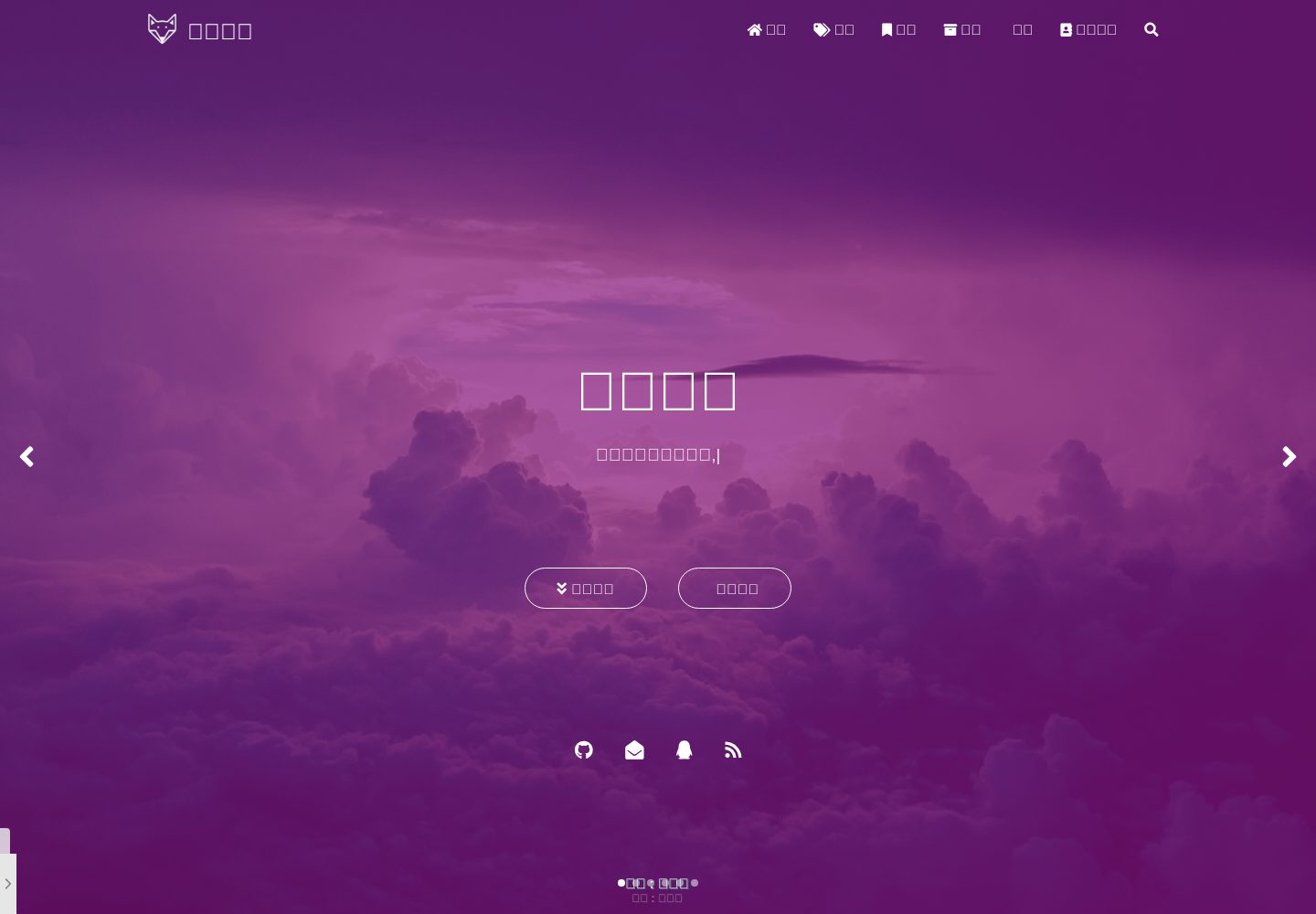
Material Design style and responsive layout for desktop, tablet, and mobile
HexoBlog
hexo-theme — Hexo Blog Template
By xkloveme
A Material Design Hexo blog theme with responsive layouts and page templates for post lists, archives, tag clouds, category radar charts, an about page, and a friends page.
Explore the design
Compare the page layouts and mobile experience. Open any screenshot for a closer look.
Desktop homepage1 / 3
Desktop captureTop of page
Actual screenshot captured by the server browser.
All pages & views 3
Screenshots show visual appearance; interactive behavior may differ.
Recorded 2026-10-02View source
What stands out
A quick read of the recorded project description.
Homepage carousel posts and a banner image that changes daily
Waterfall post list, timeline archive, tag cloud, and category radar chart
About page includes about me, post statistics, projects, skills, gallery, and other modules
Supports pinned posts, rewards, MathJax, TOC, copy copyright append, and reading password verification
Can integrate Gitalk, Gitment, Valine, Disqus comments and Busuanzi, Google Analytics statistics
Template Details
hexo-theme-matery is a Hexo blog theme that uses Material Design and supports responsive layouts for desktop, tablet, and mobile. It provides a homepage carousel with a banner image that changes daily, a waterfall post list, a timeline archive page, a tag cloud page, a category radar chart page, an about page with sections such as about me, post statistics, projects, skills, and gallery, and a friends page with customizable data.
The theme supports pinned posts and rewards, MathJax, a table of contents (TOC), appending copyright information when content is copied, password verification for reading posts, and comment modules such as Gitalk, Gitment, Valine, and Disqus. It also integrates Busuanzi statistics, Google Analytics, and post word counts, and supports homepage music and video playback, emoji, and DaoVoice and Tidio online chat.
Before use, you need an existing Hexo blog, place the theme in the themes directory, and set theme to hexo-theme-matery in the Hexo root _config.yml. Pages such as categories, tags, about, message board, and friends need to be created manually with hexo new page and assigned the corresponding layout. Some features depend on third-party plugins or services; for example, emoji requires hexo-filter-github-emojis, code highlighting uses hexo-prism-plugin, search uses hexo-generator-search, Chinese link to pinyin uses hexo-permalink-pinyin, word count uses hexo-wordcount, and the message board depends on a third-party comment system.
HexoBlog
Is it right for your project?
Use Cases
- Building a personal blog with Hexo and wanting a Material Design visual style
- Blog display requiring a homepage carousel, waterfall post list, and dynamic banner
- Needing distinctive pages such as tag cloud, category radar chart, and timeline archive
- Wanting to centrally display personal information, projects, skills, and gallery on the about page
- Needing post features such as pinned posts, rewards, reading password, or copy copyright notice
Suitable For
- Individual bloggers who already have a Hexo blog and want to change themes
- Writers who prefer Material Design and a responsive reading experience
- Blogs needing a complete page structure including categories, tags, archives, about, and friends
- Users willing to install third-party Hexo plugins according to the documentation to enable extended features
Getting started & customization
Use these recorded setup notes alongside the repository instructions for your chosen version.
- 1
You need an existing Hexo blog, place the theme in the themes directory, and set theme: hexo-theme-matery in the Hexo root _config.yml
- 2
Pages such as categories, tags, about, message board, and friends need to be created with hexo new page and set with the corresponding type and layout in front-matter
- 3
The message board depends on a third-party comment system; it only works after the comment system is enabled
- 4
Features such as emoji, code highlighting, search, Chinese link to pinyin, and word count require installing the corresponding Hexo plugins and modifying _config.yml
- 5
Friends data needs to be created as friends.json under source/_data and filled in according to the example format
License & source material
Usage conditions & limitations
Free to use · keep license noticeThis entry covers the free version in the public repository under the Apache-2.0 license; the free scope is the code of that version and does not mean external services or third-party assets are free.
Must comply with when using
- Free use, modification, commercial use, and distribution are permitted; when distributing, the Apache-2.0 license must be included.
- Modified files must prominently indicate changes and retain relevant copyright, patent, trademark, and attribution notices.
- If the original project includes a NOTICE file, applicable attribution notices in it must be retained when distributing derivative works.
- The license includes an applicable contributor patent grant; initiating patent litigation as described in the license terminates that patent grant, and no trademark use rights are granted.
- The code is provided as is; warranties and limitations of liability are governed by the original license and applicable law.
Additional costs & items to verify
- The message board feature depends on a third-party comment system (such as Gitalk, Gitment, Valine, Disqus); you must enable and configure the comment system yourself for the message board to work.
- Using DaoVoice online chat requires registering an account on its official website and obtaining an app_id, which is an external service dependency.
- Using Tidio online chat requires registering an account on its official website and obtaining a Public Key, which is an external service dependency.
- The emoji feature requires additionally installing the hexo-filter-github-emojis plugin and is not built into the theme.
- Code highlighting depends on the third-party plugin hexo-prism-plugin, which you must install and configure in Hexo yourself.
- The search feature depends on the third-party plugin hexo-generator-search, which you must install and configure yourself.
- Chinese link to pinyin requires additionally installing the hexo-permalink-pinyin plugin.
- Post word count and reading time statistics require additionally installing the hexo-wordcount plugin.
- RSS subscription depends on the third-party plugin hexo-generator-feed, which you must install and configure yourself.
- Using this theme requires an existing Hexo blog environment; you must set up Hexo yourself and place the theme in the themes directory.
- Demo images, fonts, icons, and other third-party assets must be checked against their respective licenses and cannot be judged solely by the code's Apache-2.0 license.
- External services such as domains, hosting, databases, payments, or AI may incur additional charges.
View Original Text Basis
no-charge, royalty-free, irrevocable copyright license
Original License Text
The message board depends on a third-party comment system, please **activate** your comment system to be effective.
Original README
Go to the official website of [DaoVoice](http://www.daovoice.io/), register and get the `app_id`.
Original README
Go to the official website of [Tidio](https://www.tidio.com/), register and get the `Public Key`.
Original README
This theme adds support for the `emoji` emoticon, using the Hexo plugin for [hexo-filter-github-emojis]
Original README
Hexo theme uses Hexo's plugin[hexo-prism-plugin](https://github.com/ele828/hexo-prism-plugin) to show the code highlight instead of its own theme.
Original README
The theme uses the Hexo plugin[hexo-generator-search](https://github.com/wzpan/hexo-generator-search) to search the content
Original README
We can use the [hexo-permalink-pinyin](https://github.com/viko16/hexo-permalink-pinyin) of Hexo plugin to generate permalinks of Chinese Pinyin
Original README
you can install the [hexo-wordcount](https://github.com/willin/hexo-wordcount) plugin.
Original README
The theme uses the Hexo plugin[hexo-generator-feed](https://github.com/hexojs/hexo-generator-feed) to support `RSS` feed
Original README
https://github.com/xkloveme/hexo-theme/blob/master/LICENSEhttps://github.com/xkloveme/hexo-theme/blob/master/README.mdYou should have a [Hexo](https://hexo.io/zh-cn/) blog when you see it here.
Original README
Compiled by DeepSeek based on repository license and README ·2026-10-02. Results only cover the materials read; dependencies, images, fonts, and subsequent term changes are subject to their respective original texts.
Project checks & description sources
Template Information
- Source platforms
- GitHub
- Documentation and maintenance reference score
- Partly documented · 60 / 100
- Technologies
- Hexo
- Website type
- Blog
How this score is calculated
Our heuristic uses license records (up to 30), a demo link (12), a preview (10), stars (15), recorded maintenance (15), description completeness (8), feature records (5) and classification data (5). It is not a code, security or performance test, or a Google score. A link does not establish tested functionality.
What to verify for this project
- Repository update recorded
- 2020-03-14
- Screenshot last checked
- 2026-10-02
A demo link is listed. Check it with your own content and viewport sizes; its presence does not confirm that forms, authentication or payments work.
The catalog identifies Hexo as the primary stack. Check the actual dependency manifest and lockfile for versions and hosting requirements. These notes use recorded metadata, not a code audit or a deployment test.
Use a selection guide →How this description was prepared
AI-assisted description based on catalog records and repository material. Repository authors are not automatically the reviewers of this description.
Automatically checked against source and license rules; no manual editorial review.
Inspect the recorded source material
SHA-256: 9bec681df8424157a10dced175b20fef6d8be350f2e0041d467d5dfdb5cc6696
2026-10-02T15:09:18.758Z
Source file / repository# hexo-theme-matery
[](http://hits.dwyl.io/blinkfox/hexo-theme-matery) [](https://gitter.im/hexo-theme-matery/Lobby?utm_source=badge) [](https://github.com/blinkfox/hexo-theme-matery/issues) [](https://github.com/blinkfox/hexo-theme-matery/blob/master/LICENSE) [](https://codeload.github.com/blinkfox/hexo-theme-matery/zip/master) [](http://hexo.io) [](https://github.com/blinkfox/hexo-theme-matery/network) [](https://github.com/blinkfox/hexo-theme-matery/stargazers)
[🇨🇳中文说明](README_CN.md) | [DEMO](https://blinkfox.github.io/)
> This is a Hexo blog theme with 'Material Design' and responsive design.
## Features
- Simple and beautiful, and post is Beautiful and readable.
- [Material Design](https://material.io/).
- Responsive design,which can be displayed well on desktop, tablet, mobile phone, etc.
- Home page carousel posts and changing 'banner' picture dynamically everday.
- Blog posts list with waterflow(There will be 24 images if the articl dosn't have featured pictures).
- Archive page with timeline.
- Tags page of the **word cloud** and categories page of the **radar chart**
- Rich 'About' page (including about me, posts charts, my projects, my skills, gallery etc.)
- Friendly link page for customizable data
- Support post topping and rewards
- Support `MathJax`
- TOC
- Can be set append the copyright information when copying the content of the post
- Can be set to do password verification when reading a post
- Comment module of [Gitalk](https://gitalk.github.io/), [Gitment](https://imsun.github.io/gitment/), [Valine](https://valine.js.org/) and [Disqus](https://disqus.com/).(Gitalk is recommended)
- Integrated [Busuanzi Statistics](http://busuanzi.ibruce.info/), `Google Analytics` and post word count statistics.
- Support music playback and video playback on the homepage
- Support the `emoji` emoticon and use the `markdown emoji` grammar to directly generate the corresponding emoticon.
- Support [DaoVoice](http://www.daovoice.io/)、[Tidio](https://www.tidio.com/) online chat.
## Contributor
Thanks to these contributors, without whom, hexo-theme-matery won't be this perfect.
- [@HarborZeng](https://github.com/HarborZeng)
- [@shw2018](https://github.com/shw2018)
- [@L1cardo](https://github.com/L1cardo)
- [@Five-great](https://github.com/Five-great)
## Download
You should have a [Hexo](https://hexo.io/zh-cn/) blog when you see it here.If not,try to use the hexo and [Markdown](https://www.appinn.com/markdown/) to write your blog and post.
Click [here](https://codeload.github.com/blinkfox/hexo-theme-matery/zip/master) to download master branch of the last stable version of the code.After decompressing,copy the `hexo-theme-matery` folder
to your `themes` folder of your Hexo.Of course,you can uer `Git clone` to download in your `themes` folder.
```bash
git clone https://github.com/blinkfox/hexo-theme-matery.git
```
## Configuration
### Modify theme
Modify the value of `theme` in `_config.yml` of Hexo's root folder: `theme: hexo-theme-matery`.
#### Suggestions for other changes to the `_config.yml`:
- Please modify the value of `url` of `_config.yml` to your website's main `URL` (eg `http://xxx.github.io`).
- Recommended modify the value of the two 'per_page` to be a multiple of `6`, such as: `12`, `18`, etc. so that the posts list can be displayed well under each screen.
- If you are a Chinese user, it is recommended to change the value of `language` to `zh-CN`.
### new categories page
`categories` page is to show all of categories. If the `source` directory of your blog doesn't have `categories/index.md` file, you need to new one like this:
```bash
hexo new page "categories"
```
to edit your new page files`/source/categories/index.md`, you need somethings as follows:
```yaml
---
title: categories
date: 2018-09-30 17:25:30
type: "categories"
layout: "categories"
---
```
### new tags page
`tags` page is to show all of tags. If the `source` directory of your blog doesn't have `tags/index.md` file,you need to new one like this:
```bash
hexo new page "tags"
```
to edit your new page files`/source/tags/index.md`, you need somethings as follows:
```yaml
---
title: tags
date: 2018-09-10 18:23:38
type: "tags"
layout: "tags"
---
```
### new about page
`about` page is to show my blog and myself information. If the `source` directory of your blog doesn't have `about/index.md` file, you need to new one like this:
```bash
hexo new page "about"
```
to edit your new page files`/source/about/index.md`, you need somethings as follows:
```yaml
---
title: about
date: 2018-09-30 17:25:30
type: "about"
layout: "about"
---
```
### new contact page (Optional)
`contact` page is to show contact information. If the `source` directory of your blog doesn't have `contact/index.md` file, you need to new one like this:
```bash
hexo new page "contact"
```
to edit your new page files`/source/contact/index.md`, you need somethings as follows:
```yaml
---
title: contact
date: 2018-09-30 17:25:30
type: "contact"
layout: "contact"
---
```
> **Note**:The message board depends on a third-party comment system, please **activate** your comment system to be effective. And in the theme `_config.yml` file, the "**menu**" of the `19` to `21` line is configured, and the comment about the message board cloud be canceled.
### new friends link page (Optional)
The `friends` page is a page for displaying **Friendly Links** information. If you don't have a `friends/index.md` file in your blog's `source` directory, then you need to create a new one. The command is as follows:
```bash
hexo new page "friends"
```
Edit the file `/source/friends/index.md` you just created, at least you need the following:
```yaml
---
title: friends
date: 2018-12-12 21:25:30
type: "friends"
layout: "friends"
---
```
Also, create a new `_data` directory in your blog's `source` directory and a new `friends.json` file in the `_data` directory. The contents of the file are as follows:
```json
[{
"avatar": "http://image.luokangyuan.com/1_qq_27922023.jpg",
"name": "MaJang",
"introduction": "I am not a master, just looking for the master's footsteps.",
"url": "http://luokangyuan.com/",
"title": "Read More"
}, {
"avatar": "http://image.luokangyuan.com/4027734.jpeg",
"name": "Blinkfox",
"introduction": "Hello, I'm blinkfox, I like programming.",
"url": "https://blinkfox.github.io/",
"title": "Visit Blog"
}, {
"avatar": "http://image.luokangyuan.com/avatar.jpg",
"name": "ja_rome",
"introduction": "Ordinary steps can also go out of the great journey.",
"url": "https://me.csdn.net/jlh912008548",
"title": "Read More"
}]
```
### Menu navigation configuration
#### Configure the name of the basic menu navigation, path url and icon icon.
1. The menu navigation name can be Chinese or English (eg: `Index` or `Home`)
2. Icon icon can be found in [Font Awesome](https://fontawesome.com/icons)
```yaml
menu:
Index:
url: /
icon: fas fa-home
Tags:
url: /tags
icon: fas fa-tags
Categories:
url: /categories
icon: fas fa-bookmark
Archives:
url: /archives
icon: fas fa-archive
About:
url: /about
icon: fas fa-user-circle
Friends:
url: /friends
icon: fas fa-address-book
```
#### Secondary menu configuration method
If you need a secondary menu, you can do the following on the basis of the original basic menu navigation.
1. Add the `children` keyword to the first level menu that needs to add a secondary menu (eg: add `children` under the `About` menu)
2. Create a secondary menu name, path url and icon icon under `children`.
3. Note that each secondary menu module must be preceded by `-`.
4. Note the indentation format.
```yaml
menu:
Index:
url: /
icon: fas fa-home
Tags:
url: /tags
icon: fas fa-tags
Categories:
url: /categories
icon: fas fa-bookmark
Archives:
url: /archives
icon: fas fa-archive
About:
url: /about
icon: fas fa-user-circle
Friends:
url: /friends
icon: fas fa-address-book
Medias:
icon: fas fa-list
children:
- name: Musics
url: /musics
icon: fas fa-music
- name: Movies
url: /movies
icon: fas fa-film
- name: Books
url: /books
icon: fas fa-book
- name: Galleries
url: /galleries
icon: fas fa-image
```
### Add emoji support (Optional)
This theme adds support for the `emoji` emoticon, using the Hexo plugin for [hexo-filter-github-emojis] (https://npm.taobao.org/package/hexo-filter-github-emojis) to support The generation of the `emoji` expression, the corresponding `markdown emoji` syntax (`::`, for example: `:smile:`) is converted into a `emoji` expression that jumps. The installation command is as follows:
```bash
npm install hexo-filter-github-emojis --save
```
Add configuration of `_config.yml` file in Hexo root folder as follows:
```yaml
githubEmojis:
enable: true
className: github-emoji
inject: true
styles:
customEmojis:
```
Execute `hexo clean && hexo g` to regenerate the blog file, and then you can see the expression you wrote in the `emoji` grammar in the corresponding position in the article.
### Code highlight
Hexo theme uses Hexo's plugin[hexo-prism-plugin](https://github.com/ele828/hexo-prism-plugin) to show the code highlight instead of its own theme.The Installation commands are as follows:
```bash
npm i -S hexo-prism-plugin
```
Then,modify the value of `highlight.enable` to `false` in `_config.yml` file of Hexo root folder,and add the configuration of `prism` plugin as follows:
```yaml
highlight:
enable: false
prism_plugin:
mode: 'preprocess' # realtime/preprocess
theme: 'tomorrow'
line_number: false # default false
custom_css:
```
### Search
The theme uses the Hexo plugin[hexo-generator-search](https://github.com/wzpan/hexo-generator-search) to search the content,and the Installation commands are as follows:
```bash
npm install hexo-generator-search --save
```
Add configuration of `_config.yml` file in Hexo root folder as follows:
```yaml
search:
path: search.xml
field: post
```
### Translate Chinese Link to Pinyin (Optional)
Defualt permalinks of Hexo will include Chinese if your atrticle's title is Chinese.But it's adverse to `SEO`,and `gitment` comments don't suport Chinese Link as well.We can use the [hexo-permalink-pinyin](https://github.com/viko16/hexo-permalink-pinyin) of Hexo plugin to generate permalinks of Chinese Pinyin when generating posts.
Installation commands are as follows:
```bash
npm i hexo-permalink-pinyin --save
```
Add such configurations in `_config.yml` file of Hexo:
```yaml
permalink_pinyin:
enable: true
separator: '-' # default: '-'
```
> **Note*:[hexo-abbrlink](https://github.com/rozbo/hexo-abbrlink) can genarate non-Chinese link in addtion to this plugin.
### Post word count statistics plugin (Optional)
If you want to display the post word count and reading time information in the post detail page, you can install the [hexo-wordcount](https://github.com/willin/hexo-wordcount) plugin.
Installation commands are as follows:
```bash
npm i --save hexo-wordcount
```
Then just activate the following configuration items in the theme `_config.yml` file:
```yaml
wordCount:
enable: false # Set this value to true.
postWordCount: true
min2read: true
totalCount: true
```
### Add RSS feed support (Optional)
The theme uses the Hexo plugin[hexo-generator-feed](https://github.com/hexojs/hexo-generator-feed) to support `RSS` feed , and the Installation commands are as follows:
```bash
npm install hexo-generator-feed --save
```
Add configuration of `_config.yml` file in Hexo root folder as follows:
```yaml
feed:
type: atom
path: atom.xml
limit: 20
hub:
content:
content_limit: 140
content_limit_delim: ' '
order_by: -date
```
Execute `hexo clean && hexo g` to regenerate the blog file, and then you can see the `atom.xml` file in the `public` folder, indicating that you have successfully installed.
### [DaoVoice](http://www.daovoice.io/) online chat (Optional)
Go to the official website of [DaoVoice](http://www.daovoice.io/), register and get the `app_id`. Fill the `app_id` into the the theme `_config.yml` file.
### [Tidio](https://www.tidio.com/) online chat (Optional)
Go to the official website of [Tidio](https://www.tidio.com/), register and get the `Public Key`. Fill the `Public Key` into the the theme `_config.yml` file.
### Modify website footer
Website footer may need to be customized, and it is not convenient to make configuration information, So need to modify and process it by yourself. The changes are in the `/layout/_partial/footer.ejs` file, including the site, the theme used, the amount of traffic and so on.
### Modify social links
In the theme `_config.yml` file, the configurations of `QQ`, `GitHub` and mailbox and more are supported by default. In the `/layout/_partial/social-link.ejs` file of the theme, you can add or modify the social link address as you need. To add a link, please refer to the following code:
```html
<% if (theme.socialLink.github) { %>
<a href="<%= theme.socialLink.github %>" class="tooltipped" target="_blank" data-tooltip="访问我的GitHub" data-position="top" data-delay="50">
<i class="fab fa-github"></i>
</a>
<% } %>
```
You can search social icon such as `fab fa-github` in [Font Awesome](https://fontawesome.com/icons).There are common social icons you can reference:
- Facebook: `fab fa-facebook`
- Twitter: `fab fa-twitter`
- Google-plus: `fab fa-google-plus`
- Linkedin: `fab fa-linkedin`
- Tumblr: `fab fa-tumblr`
- Medium: `fab fa-medium`
- Slack: `fab fa-slack`
- Sina Weibo: `fab fa-weibo`
- Wechat: `fab fa-weixin`
- QQ: `fab fa-qq`
- Zhihu: `fab fa-zhihu`
> **Note**: The version of `Font Awesome` is `5.11.0`.
### Configure music player (optional)
To support music playing, you must activate the file of music playing configuration and music data.
First, create a new `musics.json` file in the `_data` directory (new if you don't have one) of your blog's `source` directory. The contents of the file are as follows:
```json
[{
"name": "五月雨变奏电音",
"artist": "AnimeVibe",
"url": "http://xxx.com/music1.mp3",
"cover": "http://xxx.com/music-cover1.png"
}, {
"name": "Take me hand",
"artist": "DAISHI DANCE,Cecile Corbel",
"url": "/medias/music/music2.mp3",
"cover": "/medias/music/cover2.png"
}, {
"name": "Shape of You",
"artist": "J.Fla",
"url": "http://xxx.com/music3.mp3",
"cover": "http://xxx.com/music-cover3.png"
}]
```
> **Note**: The properties in the above JSON: `name`, `artist`, `url`, `cover` indicate the name of the music, the author, the music file address, and the music cover, respectively.
Then, activate the configuration in the theme's `_config.yml` configuration file:
```yaml
# Whether to display the musics.
music:
enable: true
showTitle: false
title: Listen to music
fixed: false # enable fixed mode
autoplay: false # audio autoplay
theme: '#42b983'
loop: 'all' # player loop play, values: 'all', 'one', 'none'
order: 'list' # player play order, values: 'list', 'random'
preload: 'auto' # values: 'none', 'metadata', 'auto'
volume: 0.7 # default volume, notice that player will remember user setting, default volume will not work after user set volume themselves
listFolded: false # indicate whether list should folded at first
listMaxHeight: # list max height
```
## Post Front-matter
### Detailed Front-matter options
Everything in the Front-matter option is **not required**. But I still recommend at least filling in the values of `title` and `date`.
| Options | Defaults | Description |
| ---------- | --------------------------- | ------------------------------------------------------------ |
| title | Markdown's file title | Post title, it is highly recommended to fill in this option |
| date | Date and time when the file created | Publish time, it is highly recommended to fill in this option, and it is best to ensure that it is globally unique |
| author | `author` in root `_config.yml` | Post author |
| img | a value in `featureImages` | Post feature image,For exampl: `http://xxx.com/xxx.jpg` |
| top | `true` | Recommended post (whether the post is topped), if the `top` value is `true`, it will be recommended as a homepage post. |
| cover | `false` | The `v1.0.2` version is added to indicate whether the post needs to be added to the homepage carousel cover. |
| coverImg | null | The new version of `v1.0.2` indicates that the post needs to display the image path on the cover of the homepage. If not, the default image of the post is used by default. |
| password | null | The post read the password. If you want to set the reading verification password for the article, you can set the value of `password`, which must be encrypted with `SHA256` to prevent others from seeing it. The premise is that the `verifyPassword` option is activated in the theme's `config.yml` |
| toc | `true` | Whether TOC is turned on or not, you can turn off the TOC function for an article. The premise is that the `toc` option is activated in the theme's `config.yml` |
| mathjax | `false` | Whether to enable math formula support, whether this article starts `mathjax`, and you need to open it in the theme `_config.yml` file. |
| summary | null | Post summary, custom post summary content, if the attribute has a value, the post card summary will display the text, otherwise the program will automatically intercept part of the article as a summary |
| categories | null | Article classification, the classification of this topic represents a macroscopically large classification, only one article is recommended for one classification. |
| tags | null | Post label, a post can have multiple labels |
| reprintPolicy | cc_by | Post reprint policy, value could be one of cc_by, cc_by_nd, cc_by_sa, cc_by_nc, cc_by_nc_nd, cc_by_nc_sa, cc0, noreprint and pay |
> **Note**:
> 1. post's featured piature will take remainder if not writing the `img` property,and chose the featured picture of theme to let all of post's picture **have their own characteristics**.
> 2. The value of `date` should try to ensure that each article is unique, because `Gitalk` and `Gitment` recognize `id` in this topic are uniquely identified by the value of `date`.
> 3. If you want to set the ability to read the verification password for the article, you should not only set the value of the password with SHA256 encryption in Front-matter, but also activate the configuration in the theme `_config.yml`.
> 4. you can define reprint policy for a single article in the front-matter of the specific md file using this key: reprintPolicy
The following are examples of the post's `Front-matter`.
### The simplest example
```yaml
---
title: typora-vue-theme Theme introduction
date: 2018-09-07 09:25:00
---
```
### The most comprehensive example
```yaml
---
title: typora-vue-theme Theme introduction
date: 2018-09-07 09:25:00
author: Qi Zhao
img: /source/images/xxx.jpg
top: true
cover: true
coverImg: /images/1.jpg
password: 8d969eef6ecad3c29a3a629280e686cf0c3f5d5a86aff3ca12020c923adc6c92
toc: false
mathjax: false
summary: This is the content of your custom post summary. If there is a value for this attribute, the post card summary will display the text, otherwise the program will automatically intercept part of the post content as a summary.
categories: Markdown
tags:
- Typora
- Markdown
---
```
## Screenshot
### Home


## Custom modification
You can modify some custom modification in `_config.yml` as follows:
- Menu
- My dream
- Home music player and video player configuration
- Whether to display the title of the recommended posts
- `favicon` and `Logo`
- profiles
- TOC
- post rewards
- Append copyright information when copying article content
- MathJax
- Post word count, reading times
- the 'love' effect of clicking on the page
- My Projects
- My Skills
- My Gallery
- Gitalk, Gitment, Valine and Disqus
- [Busuanzi Statistics](http://busuanzi.ibruce.info/) And Google Analytics
- The map of default featured pictures. The theme will take remainde according to `hashcode` of post title if the post dose not set featured piactures.
**I think everyone should have their own style and feature of blog**。if you are not satisfiled with functions and theme color,you can modify by yourself,and more free functions and deatil need to be modified by modify source code when it is hard to be finished in `_config.yml`.
### modeing theme color
Search `.bg-color` to modify background color in `/source/css/matery.css` in theme file:
```css
/* The overall background color, including navigation, mobile navigation, footer, tab, etc.. */
.bg-color {
background-image: linear-gradient(to right, #4cbf30 0%, #0f9d58 100%);
}
@-webkit-keyframes rainbow {
/* Dynamically switch background colors. */
}
@keyframes rainbow {
/* Dynamically switch background colors. */
}
```
### Modify banner picture and post's featured pictures
You can change `banner` pictures in `/source/medias/banner` as you like .Theme code can switch dynamically every day and just need 7 pictures.If you master `JavaScript`,you can change it to your favorite swithing logic,such as Random switching.The code of switching `banner`is in `<script></script>` of `/layout/_partial/bg-cover-content.ejs`file.
```javascript
$('.bg-cover').css('background-image', 'url(/medias/banner/' + new Date().getDay() + '.jpg)');
```
There are 24 featured pictures in `/source/medias/featureimages`,you can add or delete,and modify it in `_config.yml` at the sametime.
## Changelog
- v1.2.0
- Added online chat function of [DaoVoice](http://www.daovoice.io/) and [Tidio](https://www.tidio.com/);
- Added the ability to have two levels of menus;
- Added a subtitle for typing effects;
- Added the ability to preload web content;
- Added the configuration function of the home banner whether to switch daily;
- Added the ability to display ICP filing information, which is not enabled by default;
- Added configuration for Baidu analysis;
- Added language display, one-click copy, display line number and other functions of the code block;
- Added the ability to customize the configuration of the home page car map and recommended articles;
- Added article page to display update date;
- Added an icon for the reload rule;
- Modified the layout and display of the sharing;
- Upgraded and updated versions of some dependent libraries;
- other details to modify and optimize;
- v1.1.0
- Added support for `emoji`;
- Added site run time statistics and configuration;
- Added the function of message board, it is not enabled by default;
- Added `Twitter`, `Facebook`, and `zhihu` social links;
- Updated the version of `Valine` to the latest version;
- modification of other minor details;
- v1.0.4
- Added the ability to customize the reprint rules for each post;
- Fix the problem that the custom summary of the previous page and the next page does not display;
- Fixed the problem that the link of the friends link was misplaced and changed to the layout of the waterfall stream;
- Other minor bugs fixes;
- v1.0.3
- Added `TOC` expansion, shrink button and related configuration, this button is displayed by default;
- v1.0.2
- Upgraded the [Materialize](https://materializecss.com/) framework version to `1.0.0`, refactoring and modifying some files or problems during the upgrade process;
- Added a full-screen carousel effect on the front cover of the home page to set more important posts to the home page carousel;
- Fix the first button on the front page is Chinese;
- Fixed an issue where clicking search input on the iPhone to get focus;
- Fixed an issue where the page was enlarged after the input box on the iPhone got focus;
- Fix some posts or UI display issues;
- v1.0.1
- Adjust the file request path of `css` and `js` in the `_config.yml` of the theme, so that you can quickly configure their own CDN;
- Whether the new code is configurable or not, the default is a line break;
- The `TOC` function is activated by default, and the `Front-matter` configuration option for `TOC` is turned off for a post;
- Fixed an issue where the highlighted directory option was inaccurate when scrolling through the post;
- Remove the search box under `IOS` to automatically get the focus attribute, preventing the view from moving up after automatically getting the focus;
- v1.0.0
- Added all the basic features;
Explore similar templates
Compare previews and descriptions within the same stack and category.

hexo-theme-matery
hexo-theme-matery is a Material Design, responsive Hexo blog theme with homepage carousel, waterfall post list, timeline archive, word cloud tags, radar chart categories, and an about page.
Hexo · Blog

hexo-theme-cactus
Cactus is a responsive Hexo theme for personal websites and blogs, maintained by probberechts. It offers four color schemes (dark, light, white, classic), configurable navigation, homepage post lists, project lists, social links, and copyright year ranges.
Hexo · Blog

hexo-theme-volantis
Volantis is a blog theme for Hexo, distributed as the npm package hexo-theme-volantis and enabled by setting theme to volantis in the Hexo site's _config.yml. It requires Hexo 7.3+, hexo-cli 4.3+, Node.js 22.x LTS+, and npm 10.x LTS+.
Hexo · Blog

hexo-theme-aurora
Hexo Theme Aurora is a futuristic Hexo blog theme built around aurora gradients and a magazine-style grid layout.
Hexo · Blog

hexo-theme-Claudia
Claudia is a Hexo blog theme focused on a clean look and easy configuration. It automatically follows the device's dark mode and claims a 90+ Lighthouse score.
Hexo · Blog

hexo-theme-A4
hexo-theme-A4 is a minimalist Hexo blog theme that mimics the texture of A4 paper, emphasizing simplicity, small size, and minimal configuration.
Hexo · Blog