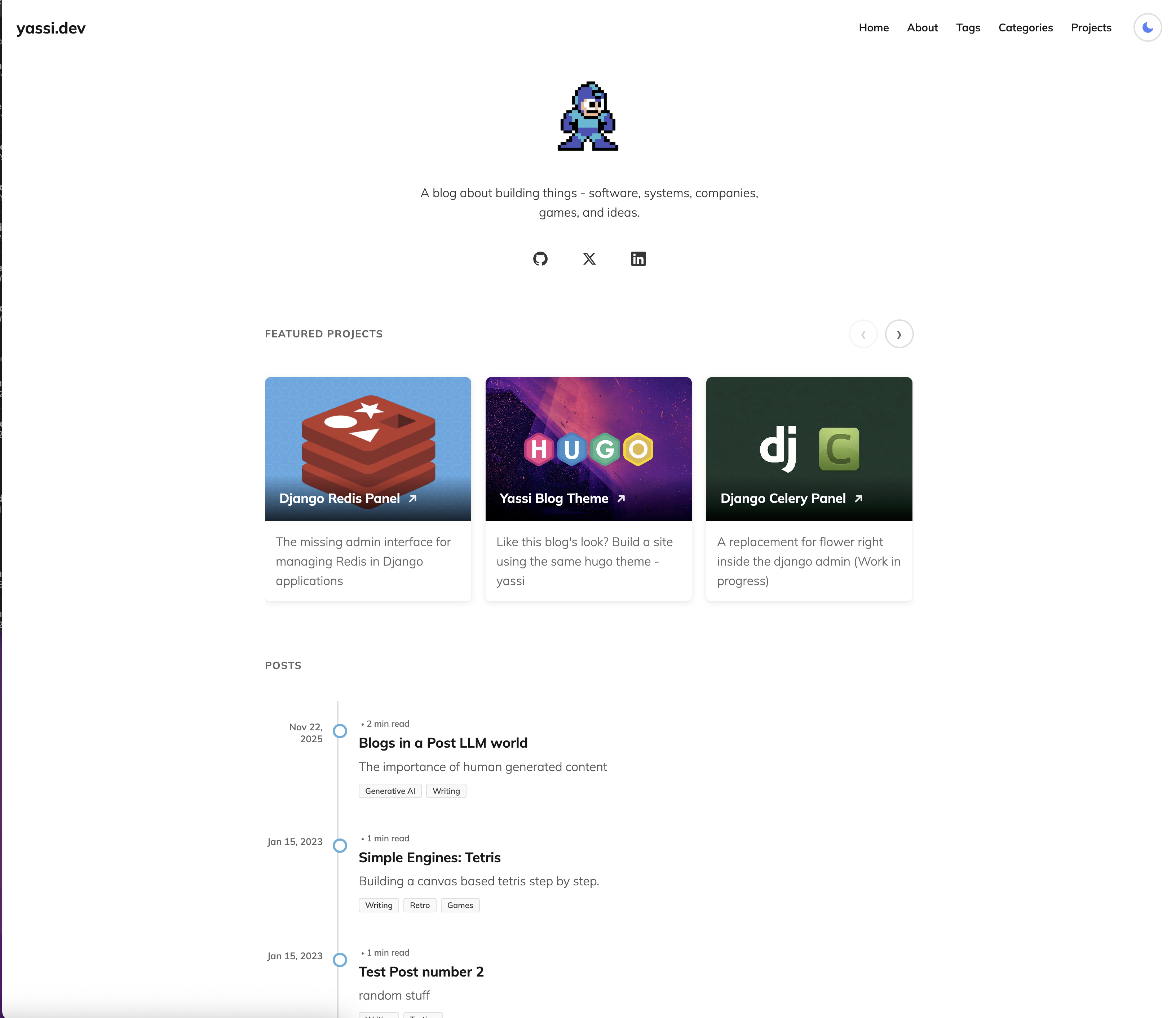
Timeline-style blog layout with dates on the left and category badges shown alongside articles
HugoStarter
hugo-theme-yassi — Hugo Starter Template
By yassi
Yassi is a Hugo theme for personal sites, offering a timeline blog layout, dark mode, project showcases, and optional search and comments.
Explore the design
Compare the page layouts and mobile experience. Open any screenshot for a closer look.
Author preview
Author-provided previewTop of page
Preview provided in the project README.
One original preview is available. Open the full image to inspect the design.
Screenshots show visual appearance; interactive behavior may differ.
Recorded 2026-10-03View source
What stands out
A quick read of the recorded project description.
Light/dark mode toggle with preference saved in localStorage and a transition effect
Project showcases support carousel, full-width carousel, and grid modes
Categories and tags presented as word clouds and badges, with all terms clickable
Optional Fuse.js fuzzy search with keyboard shortcuts and real-time results
Optional Giscus comments based on GitHub Discussions and synced with theme switching
Template Details
Yassi is a Hugo theme used by the author for the personal site yassi.dev and is released under the MIT license. The theme aims for readability and a clean design. The homepage presents articles in a vertical timeline and can optionally mix project entries into the timeline, distinguished by a PROJECT badge. Project showcases support three modes: carousel, full-width carousel, and grid, toggled via useProjectCarousel and projectCarouselFullWidth in hugo.toml. The theme includes a light/dark mode toggle, with the preference saved in localStorage and a transition effect. Categories and tags are displayed as word clouds and badges, and all terms are clickable to their respective pages. The navigation bar provides a search entry. Search uses Fuse.js for client-side fuzzy matching of articles and projects and requires configuring JSON output for the homepage. Comments use Giscus, depend on GitHub Discussions, and can update in sync with the site theme. Social links support GitHub, Twitter/X, Facebook, LinkedIn, Instagram, TikTok, and Snapchat. The theme also includes Google Analytics 4 integration and a robots.txt template. Before use, configure parameters, social links, Giscus, and search output in hugo.toml as described in the README; licenses for third-party assets such as demo images, fonts, and icons must be verified separately.
HugoLauncher
Is it right for your project?
Use Cases
- Building a personal blog that presents articles in a timeline format
- Displaying both articles and projects on the homepage, distinguished by badges
- Sites that need a light/dark mode toggle and remember user preferences
- Static sites that want to provide comments via GitHub Discussions
- Hugo sites that need client-side fuzzy search across articles and project content
Suitable For
- Developers building personal sites with Hugo
- Writers who prefer timeline-style content presentation
- Creators who need a mixed layout for project showcases and blogs
- Users comfortable configuring via hugo.toml
Getting started & customization
Use these recorded setup notes alongside the repository instructions for your chosen version.
- 1
Add the theme to the Hugo site's themes/yassi directory via git submodule and set theme = "yassi" in hugo.toml
- 2
Configure parameters such as accentColor, accentColorDark, useProjectCarousel, and projectCarouselFullWidth under [params] in hugo.toml
- 3
To enable search, configure JSON output for the homepage (outputs.home includes JSON) and set enableSearch = true
- 4
To enable Giscus comments, enable Discussions in the GitHub repository, install the Giscus app, and fill in parameters such as repo, repoId, category, and categoryId
- 5
For Google Analytics 4, enter a measurement ID starting with G- under [services.googleAnalytics]
License & source material
Usage conditions & limitations
Free to use · keep license noticeThis entry covers the free version under the MIT license in the public repository; the free scope is the code of this version and does not imply that external services or third-party assets are free.
Must comply with when using
- Free use, modification, commercial use, and distribution of this version's code are permitted.
- When distributing copies or substantial portions of the code, retain the original author's copyright notice and the full MIT license notice.
- The code is provided as is; warranties and limitations of liability are governed by the original license and applicable law.
Additional costs & items to verify
- The search feature relies on the Fuse.js library distributed with the theme (Apache 2.0 license); this library is not MIT-licensed, and its separate license terms must be followed when used.
- The Google Analytics 4 integration requires providing your own measurement ID starting with G- and is subject to Google's terms of service, constituting an external service dependency.
- The Giscus comment feature requires enabling Discussions in the GitHub repository and installing the Giscus app, depending on a GitHub account and external services.
- The repository address in the installation command is the placeholder yourusername and must be replaced with the actual repository address in practice.
- Demo images, fonts, icons, and other third-party assets must be checked against their respective licenses and cannot be judged solely by the code's MIT license.
- External services such as domains, hosting, databases, payments, or AI may incur additional charges.
View Original Text Basis
Permission is hereby granted, free of charge
Original License Text
The search uses a custom JSON index that includes both posts and projects, powered by the vendored Fuse.js library (Apache 2.0 licensed) for client-side fuzzy searching.
Original README
The theme uses Hugo's internal Google Analytics template, which automatically includes the tracking script in production builds only (not when running `hugo server` locally).
Original README
1. Visit [giscus.app](https://giscus.app/) and follow the setup instructions 2. Enable GitHub Discussions in your repository 3. Install the Giscus app on your repository
Original README
https://github.com/yassi/hugo-theme-yassi/blob/main/LICENSEhttps://github.com/yassi/hugo-theme-yassi/blob/main/README.mdgit submodule add https://github.com/yourusername/yassi.git themes/yassi
Original README
Compiled by DeepSeek based on repository license and README ·2026-10-03. Results only cover the materials read; dependencies, images, fonts, and subsequent term changes are subject to their respective original texts.
Project checks & description sources
Template Information
- Source platforms
- Hugo Themes
- Documentation and maintenance reference score
- More documented · 75 / 100
- Technologies
- Hugo
- Website type
- Starter
How this score is calculated
Our heuristic uses license records (up to 30), a demo link (12), a preview (10), stars (15), recorded maintenance (15), description completeness (8), feature records (5) and classification data (5). It is not a code, security or performance test, or a Google score. A link does not establish tested functionality.
What to verify for this project
- Repository update recorded
- 2026-06-01
- Screenshot last checked
- 2026-10-03
No demo link is recorded. Use the repository instructions to evaluate the project locally; the screenshot alone cannot establish interactive behavior.
The catalog identifies Hugo as the primary stack. Check the actual dependency manifest and lockfile for versions and hosting requirements. These notes use recorded metadata, not a code audit or a deployment test.
Use a selection guide →How this description was prepared
AI-assisted description based on catalog records and repository material. Repository authors are not automatically the reviewers of this description.
Review declaration: [email protected] · 2026-10-04
Inspect the recorded source material
SHA-256: 5c2f2141c3ed73305316ee456e7d658207db6cdec398155646cefe329da0d92e
2026-10-03T23:47:01.554Z
Source file / repository# Yassi Theme
A modern, minimal Hugo theme with a focus on readability and clean design. Features a timeline-style blog layout, dark mode support, and flexible project showcase options.
Example site: [yassi.dev](https://yassi.dev)
## Screenshots
<table>
<tr>
<td width="50%">
<img src="/images/screenshot-light.png" alt="Light Mode Screenshot" />
<p align="center"><b>Light Mode</b></p>
</td>
<td width="50%">
<img src="/images/screenshot-dark.png" alt="Dark Mode Screenshot" />
<p align="center"><b>Dark Mode</b></p>
</td>
</tr>
</table>
## Features
### Dark Mode
- Toggle between light and dark themes
- Persistent user preference (stored in localStorage)
- Smooth transitions between themes
- Colored icons (yellow sun, blue moon)
### Featured Projects
Choose between two display modes for your projects:
**Carousel Mode** (default)
- Horizontal scrolling carousel
- Shows 3 projects at a time on desktop
- Mobile-optimized with touch swipe support
- Navigation buttons
**Full-Width Carousel Mode**
- Carousel breaks out of the content column and spans the full viewport width
- Shows 4 projects at a time on desktop
- Taller card images for a more cinematic feel
- Falls back to touch swipe on mobile
**Grid Mode**
- 3-column grid on desktop
- Responsive layout for all screen sizes
- Clean card-based design
Configure via `hugo.toml`:
```toml
[params]
useProjectCarousel = true # false for grid mode
projectCarouselFullWidth = true # full-viewport-width carousel (requires useProjectCarousel = true)
```
### Timeline Blog Layout
- Vertical timeline with chronological flow
- Interactive dots that highlight on hover
- Dates positioned on the left
- Category badges for each post
- **Optional project integration** - Show selected projects alongside posts with visual distinction
- **Optional timeline starting point** - Add a custom message at the end of your timeline
- Clean, scannable design
- Mobile-responsive with adapted layout
### Taxonomy Features
- **Word Cloud Display** - Tags and categories shown as weighted word clouds
- **Badge-Style Terms** - Categories and tags displayed as colored badges on single posts
- **Category Display** - Post listings show categories with each post
- **Clickable Terms** - All taxonomy terms link to their respective pages
### Social Media Integration
Configurable social media links with icons:
- GitHub
- Twitter/X
- Facebook
- LinkedIn
- Instagram
- TikTok
- Snapchat
Each icon features brand-specific hover colors.
### Typography & Design
- Clean, readable typography based on Mulish font family
- Article typesetting optimized for long-form content
- Responsive images and media
- Syntax highlighting support
- Proper heading hierarchy
### Responsive Design
- Mobile-first approach
- Hamburger menu for mobile navigation
- Adaptive layouts for all screen sizes
- Touch-friendly interface elements
- Optimized for tablets and desktop
### Google Analytics Integration
- Built-in Google Analytics 4 (GA4) support
- Easy configuration with measurement ID
- Uses Hugo's internal analytics template
### robots.txt
- The theme includes [`layouts/robots.txt`](layouts/robots.txt): allows all crawlers (`User-agent: *`) and points to your sitemap via [`Sitemap`](https://gohugo.io/templates/robots/).
- Turn on Hugo’s generator in your site config: `enableRobotsTXT = true`
- Prefer a static file instead? Set `enableRobotsTXT = false` and add `static/robots.txt` yourself (Hugo copies it to the site root).
### Comments with Giscus
- Optional comment system powered by GitHub Discussions
- Lightweight and privacy-friendly
- Dynamically syncs with site's light/dark theme toggle
- Instant theme switching without page reload
- Fully configurable through hugo.toml
- Easy on/off toggle
### Search
- Optional fuzzy search powered by Fuse.js
- Search icon in navbar
- Modal interface with keyboard shortcuts
- Searches posts, projects, and content
- Real-time search results
- Keyboard navigation (/, Cmd/Ctrl+K to open, ESC to close)
### Navigation
- Clean header with brand section
- Responsive navigation menu
- Sticky footer
- Mobile sidebar navigation
- Smooth transitions and hover effects
## Installation
1. Add the theme to your Hugo site:
```bash
cd your-hugo-site
git submodule add https://github.com/yourusername/yassi.git themes/yassi
```
2. Update your `hugo.toml`:
```toml
theme = "yassi"
```
## Configuration
### Basic Configuration
```toml
baseURL = "https://example.com/"
languageCode = "en-us"
title = "Your Site Title"
theme = "yassi"
[services]
[services.googleAnalytics]
ID = "G-XXXXXXXXXX" # Your GA4 measurement ID
[params]
CoverImage = "/images/avatar.svg" # or your own image
CoverImageWidth = 150
# Theme Colors
# Accent color used for site title underline, timeline bullets, and project cards
accentColor = "#47b1db" # Light blue (default)
accentColorDark = "#5fc9f0" # Lighter blue for dark mode
# Project display mode
useProjectCarousel = true # or false for grid
projectCarouselFullWidth = false # true to break carousel out to full viewport width
# Search
enableSearch = true # Enable site search with Fuse.js
# Timeline filter
enableTimelineFilter = false # true to show All / Posts / Projects filter above the timeline
timelineFilterStyle = "pills" # "pills" (default) or "dropdown"
# Timeline Starting Point (optional)
timelineStart = "🚀 And so it begins..."
timelineStartSubText = "Additional context or details..." # optional
timelineStartDate = "Jan 2023" # optional
# Social Media Links
[params.social]
github = "https://github.com/yourusername"
twitter = "https://twitter.com/yourusername"
linkedin = "https://linkedin.com/in/yourusername"
facebook = "https://facebook.com/yourusername"
instagram = "https://instagram.com/yourusername"
tiktok = "https://tiktok.com/@yourusername"
snapchat = "https://snapchat.com/add/yourusername"
# Giscus Comments (optional)
[params.giscus]
enabled = true
repo = "yourusername/your-comments-repo"
repoId = "R_xxxxxxxxxxxxx"
category = "Announcements"
categoryId = "DIC_xxxxxxxxxxxxx"
lightTheme = "light"
darkTheme = "dark"
```
### Project Front Matter
Create projects in `content/projects/`:
```toml
+++
title = "Project Name"
date = 2024-01-01
summary = "Brief description of your project"
main_image = "/images/project-cover.jpg"
categories = ["category1"] # optional
tags = ["tag1", "tag2"] # optional
[params]
project_url = "https://external-project-url.com" # optional, external link
featured = true # Show in featured section on homepage
weight = 1 # Order in featured section (lower = first)
showInPostList = true # Show in timeline lists alongside blog posts
+++
Project content here...
```
**Project Display Options:**
- `featured = true` - Project appears in the featured projects carousel/grid on homepage
- `showInPostList = true` - Project appears in timeline post lists (homepage, category/tag pages) with a "PROJECT" badge to distinguish it from regular posts
- Projects always appear on the `/projects/` page regardless of these settings
### Post Front Matter
Create posts in `content/posts/`:
```toml
+++
title = "Post Title"
date = 2024-01-01
summary = "Post subtitle or summary"
main_image = "/images/post-cover.jpg" # optional
tags = ["tag1", "tag2"]
categories = ["category1"]
+++
Post content here...
```
## Content Organization
```
content/
├── _index.md # Home page content
├── about.md # About page
├── posts/ # Blog posts
│ └── my-post.md
└── projects/ # Projects
└── my-project.md
```
## Customization
### Colors
#### Accent Color (Easiest)
The quickest way to customize the theme color is via `hugo.toml`:
```toml
[params]
accentColor = "#47b1db" # Your brand color
accentColorDark = "#5fc9f0" # Variant for dark mode
```
This controls:
- Site title underline (normal and hover states)
- Default avatar/cover image color
- Post summary left border
- Timeline bullet borders and fill on hover
- Timeline post title hover color
- Category/tag badge hover colors
- Project card backgrounds (when no image)
- Word cloud hover colors
#### Advanced Color Customization
For more control, override CSS variables in your `assets/css/custom.css`:
```css
:root {
--link-color: #47b1db;
--accent-color: #47b1db;
--bg-primary: #ffffff;
--text-primary: #111;
/* ... more variables */
}
```
### Taxonomies
The theme supports Hugo's taxonomy system. Configure in `hugo.toml`:
```toml
[taxonomies]
tag = "tags"
category = "categories"
```
### Search
The theme includes optional fuzzy search powered by Fuse.js:
```toml
[outputs]
home = ["HTML", "RSS", "JSON"] # Required for search
[params]
enableSearch = true
```
**Features:**
- Fuzzy search across all posts and projects
- Search by title (40%), content (30%), summary (20%), and section (10%)
- Modal interface with clean design
- Keyboard shortcuts:
- `/` or `Cmd/Ctrl + K` - Open search
- `ESC` - Close search
- `Arrow keys` - Navigate results
- Real-time results as you type
- Shows color-coded section badges (Posts in blue, Projects in green)
- Mobile responsive
- Up to 10 results displayed
The search uses a custom JSON index that includes both posts and projects, powered by the vendored Fuse.js library (Apache 2.0 licensed) for client-side fuzzy searching.
### Google Analytics
The theme includes built-in Google Analytics 4 support. To enable:
1. Get your GA4 Measurement ID from Google Analytics (starts with `G-`)
2. Add it to your `hugo.toml`:
```toml
[services]
[services.googleAnalytics]
ID = "G-XXXXXXXXXX"
```
The theme uses Hugo's internal Google Analytics template, which automatically includes the tracking script in production builds only (not when running `hugo server` locally).
### Comments with Giscus
The theme supports [Giscus](https://giscus.app/), a comments system powered by GitHub Discussions. Giscus is lightweight, privacy-friendly, and automatically adapts to your site's light/dark theme.
**To enable Giscus comments:**
1. Visit [giscus.app](https://giscus.app/) and follow the setup instructions
2. Enable GitHub Discussions in your repository
3. Install the Giscus app on your repository
4. Configure the values in your `hugo.toml`:
```toml
[params.giscus]
enabled = true
repo = "yourusername/your-comments-repo"
repoId = "R_xxxxxxxxxxxxx"
category = "Announcements"
categoryId = "DIC_xxxxxxxxxxxxx"
mapping = "pathname" # How to map pages to discussions
strict = "0" # Use strict title matching
reactionsEnabled = "1" # Enable reactions for the main post
emitMetadata = "0" # Emit discussion metadata
inputPosition = "top" # Comment box position (top or bottom)
lightTheme = "light" # Theme for light mode
darkTheme = "dark" # Theme for dark mode
lang = "en" # Language
loading = "lazy" # Lazy load comments
```
**Configuration Options:**
- `enabled` - Set to `true` to enable comments, `false` to disable
- `repo` - Your GitHub repository in the format "username/repo"
- `repoId` - Your repository ID (get from giscus.app)
- `category` - The discussion category to use
- `categoryId` - The category ID (get from giscus.app)
- `mapping` - How URLs map to discussions (pathname, URL, title, etc.)
- `lightTheme` - Giscus theme for light mode (default: "light"). See [available themes](https://github.com/giscus/giscus/blob/main/ADVANCED-USAGE.md#data-theme)
- `darkTheme` - Giscus theme for dark mode (default: "dark"). See [available themes](https://github.com/giscus/giscus/blob/main/ADVANCED-USAGE.md#data-theme)
- All other parameters have sensible defaults and are optional
**Dynamic Theme Switching:**
The theme automatically synchronizes giscus comments with your site's light/dark mode toggle. When users switch between light and dark mode, the comments section will update instantly to match. You can customize the giscus themes used for each mode with the `lightTheme` and `darkTheme` parameters.
Comments will appear at the bottom of all individual post and project pages. To disable comments, simply set `enabled = false` or remove the entire `[params.giscus]` section.
## Features in Detail
### Featured Projects
Control which projects appear in the featured section:
1. Set `featured = true` in project front matter
2. Use `weight` parameter to control order (1, 2, 3...)
3. Projects without `featured = true` won't appear in the featured section
4. All projects still appear on the `/projects/` page
### Projects in Timeline Lists
You can optionally display projects alongside blog posts in timeline views:
1. Add `showInPostList = true` to the `[params]` section of a project's front matter
2. The project will appear in:
- Homepage post timeline
- Category pages (for categories assigned to the project)
- Tag pages (for tags assigned to the project)
- RSS feeds
3. Projects are visually distinguished with a "PROJECT" badge
4. Timeline lists are sorted by date with newest items first
This is useful for highlighting major projects as part of your content timeline while keeping them separate from regular blog posts.
### Dark Mode
The theme automatically:
- Detects system preference on first visit
- Saves user's choice to localStorage
- Applies smooth transitions between themes
- Updates all UI elements including code blocks
### Timeline Layout
The timeline automatically:
- Orders posts chronologically
- Shows dates on the left (desktop) or top (mobile)
- Displays interactive dots at each entry
- Truncates summaries to 2 lines
- Shows category badges
### Timeline Starting Point
You can optionally add a custom message at the end of your timeline (the oldest position) to mark the beginning of your blog:
```toml
[params]
timelineStart = "🚀 This is where it all began..."
timelineStartSubText = "Additional context or details..." # optional
timelineStartDate = "Jan 2023" # optional
```
This appears as a non-clickable entry at the end of your timeline with a subtle style. Both text fields support markdown formatting. All parameters are optional - omit `timelineStart` to not show a starting point.
## Browser Support
- Chrome (latest)
- Firefox (latest)
- Safari (latest)
- Edge (latest)
- Mobile browsers (iOS Safari, Chrome Mobile)
## License
MIT License - feel free to use and modify as needed.
## Credits
Built with [Hugo](https://gohugo.io/) - the world's fastest static site generator.
Explore similar templates
Compare previews and descriptions within the same stack and category.

hugo-xmin
hugo-xmin is an extremely minimal Hugo theme written by Yihui Xie for template beginners. HTML and CSS total about 140 lines, with no external dependencies, and it uses the MIT license.
Hugo · Starter

hugo-theme-gallery
A Hugo Extended photo gallery theme that organizes images with Page Bundles, automatically generating album lists and gallery pages with a Justified layout and PhotoSwipe lightbox.
Hugo · Starter

reveal-hugo
reveal-hugo is a Hugo theme that converts Markdown content into Reveal.js-based HTML presentations. It supports slide separation with `---`, shortcodes for fragments, slides, sections, notes, Markdown, and MathJax, and organizes content as root or section presentations with order controlled by weight.
Hugo · Starter

anatole
Anatole is a minimalistic two-column Hugo theme ported from farbox-theme-Anatole, featuring dark mode, multilingual and RTL support, and optional portfolio, comments, analytics, KaTeX, and Mermaid integrations. It suits personal blogs, portfolios, or documentation sites built with Hugo.
Hugo · Starter

hugo-theme-diary
A Hugo diary-style theme ported from the Hexo theme Journal, with a grid homepage for essays and daily notes. It supports six languages, dark mode, table-of-contents scroll positioning, reading time, code highlighting, and configurable sidebar, fonts, and colors.
Hugo · Starter

risotto
risotto is a minimalist, responsive Hugo theme inspired by terminal ricing aesthetics. It uses semantic HTML and pure CSS with no JavaScript, and its layout relies on CSS Grid for native responsiveness without manual breakpoints.
Hugo · Starter