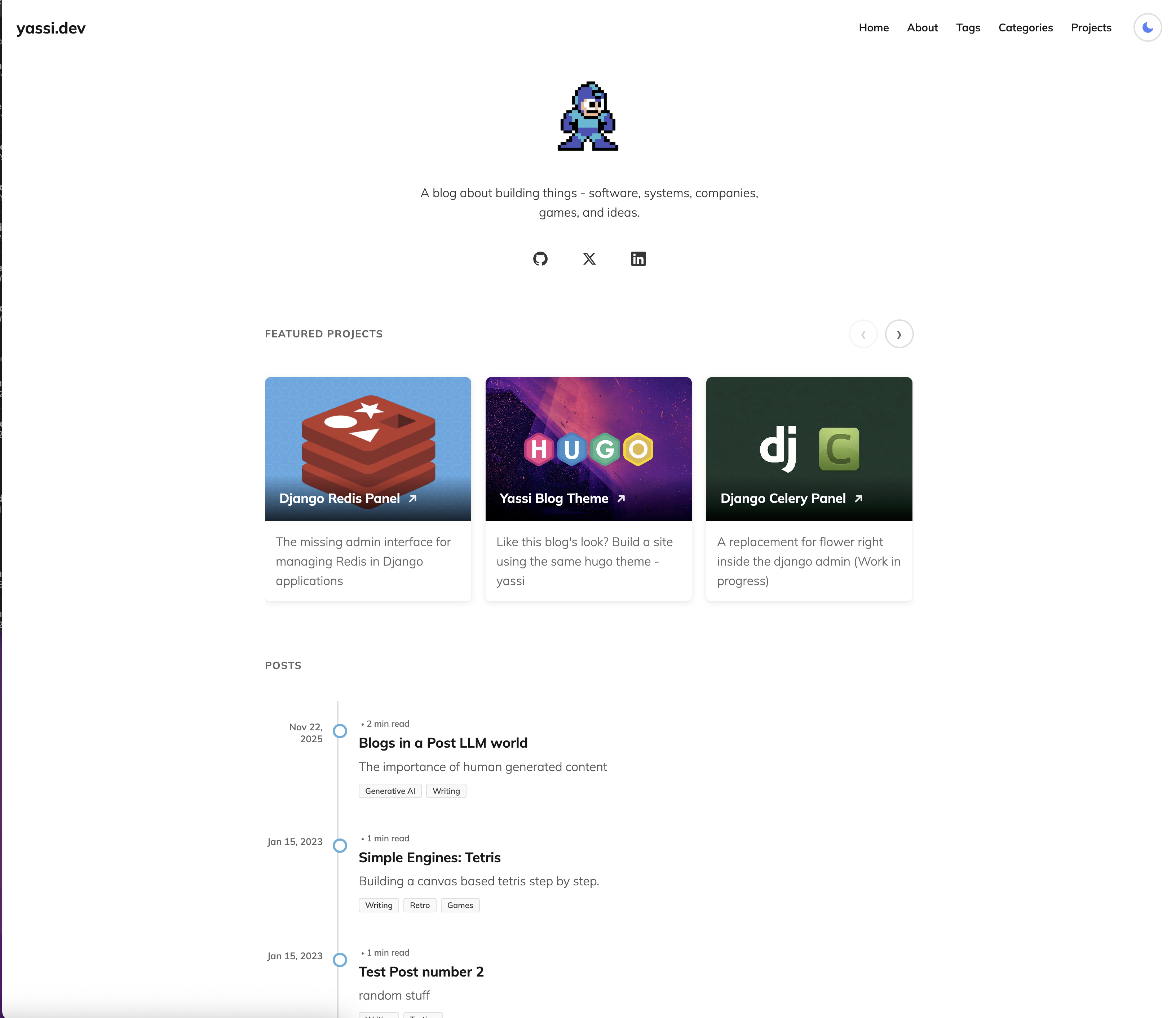
时间线式博客布局,日期在左,分类徽章随文章显示
Hugo启动器
hugo-theme-yassi — Hugo 启动器模板
作者 yassi
Yassi 是一个面向个人站点的 Hugo 主题,提供时间线博客布局、深色模式、项目展示与可选搜索和评论功能。
看看你的网站会是什么样
浏览真实页面截图,比较内容排版与手机效果。点击下方缩略图切换,放大查看整页细节。
目前有 1 张原始预览,可打开完整图片查看设计细节。
截图用于了解视觉与布局,交互效果请以实际项目为准。
采集于 2026-10-03查看来源
值得关注的模板亮点
从已有项目资料中,快速了解它的特点。
浅色/深色模式切换,偏好存入 localStorage 并带过渡效果
项目展示支持轮播、全宽轮播和网格三种模式
分类与标签以词云和徽章呈现,术语均可点击
可选 Fuse.js 模糊搜索,支持键盘快捷键与实时结果
可选 Giscus 评论,基于 GitHub Discussions 并同步主题切换
模板详细介绍
Yassi 是作者用于个人站点 yassi.dev 的 Hugo 主题,采用 MIT 许可发布。主题以可读性和简洁设计为目标,首页使用垂直时间线呈现文章,并可选地将项目条目混入时间线,用 PROJECT 徽章区分。项目展示支持轮播、全宽轮播和网格三种模式,通过 hugo.toml 中的 useProjectCarousel 与 projectCarouselFullWidth 切换。主题内置浅色/深色模式切换,偏好保存在 localStorage,并带过渡效果。分类与标签以词云和徽章形式展示,所有术语可点击进入对应页面。导航栏提供搜索入口,搜索基于 Fuse.js 在客户端对文章和项目做模糊匹配,需要为首页配置 JSON 输出。评论使用 Giscus,依赖 GitHub Discussions,可随站点主题切换同步更新。社交链接支持 GitHub、Twitter/X、Facebook、LinkedIn、Instagram、TikTok 和 Snapchat。主题还包含 Google Analytics 4 集成和 robots.txt 模板。使用前需按 README 配置 hugo.toml 中的参数、社交链接、Giscus 和搜索输出;演示图片、字体和图标等第三方素材的许可需单独核对。
Hugo启动器
适合你的项目吗?
适用场景
- 搭建以时间线形式呈现文章的个人博客
- 在首页同时展示文章和项目,并用徽章区分
- 需要浅色/深色模式切换并记住用户偏好的站点
- 希望通过 GitHub Discussions 提供评论的静态站点
- 需要客户端模糊搜索文章和项目内容的 Hugo 站点
适合人群
- 使用 Hugo 构建个人站点的开发者
- 偏好时间线式内容呈现的写作者
- 需要项目展示与博客混合布局的创作者
- 接受通过 hugo.toml 进行配置的用户
上手与定制指南
结合仓库当前版本的说明,按下面的资料检查内容、配置与运行要求。
- 1
通过 git submodule 将主题添加到 Hugo 站点的 themes/yassi 目录,并在 hugo.toml 中设置 theme = "yassi"
- 2
在 hugo.toml 的 [params] 中配置 accentColor、accentColorDark、useProjectCarousel、projectCarouselFullWidth 等参数
- 3
启用搜索需为首页配置 JSON 输出(outputs.home 包含 JSON)并设置 enableSearch = true
- 4
启用 Giscus 评论需在 GitHub 仓库开启 Discussions、安装 Giscus 应用,并填写 repo、repoId、category、categoryId 等参数
- 5
Google Analytics 4 需在 [services.googleAnalytics] 中填写以 G- 开头的测量 ID
授权与来源资料
使用条件与限制
免费使用 · 保留许可声明本次收录的是公开仓库中采用 MIT 许可的免费版本;免费范围为该版本代码,不代表外部服务或第三方素材免费。
使用时需要遵守
- 允许免费使用、修改、商用和分发该版本代码。
- 分发代码副本或实质性部分时,保留原作者版权声明和完整 MIT 许可声明。
- 代码按现状提供;担保与责任限制以原许可证及适用法律为准。
额外费用与待核对事项
- 搜索功能依赖随主题分发的 Fuse.js 库(Apache 2.0 许可),该库并非 MIT 许可,使用时需遵守其独立许可条款。
- Google Analytics 4 集成需自行提供以 G- 开头的测量 ID,并受 Google 服务条款约束,属于外部服务依赖。
- Giscus 评论功能需在 GitHub 仓库启用 Discussions 并安装 Giscus 应用,依赖 GitHub 账户与外部服务。
- 安装命令中的仓库地址为占位符 yourusername,实际使用时需替换为真实仓库地址。
- 演示图片、字体、图标及其他第三方素材需按各自许可核对,不能仅凭代码的 MIT 许可判断。
- 域名、托管、数据库、支付或 AI 等外部服务可能另外收费。
查看原文依据
Permission is hereby granted, free of charge
许可证原文
The search uses a custom JSON index that includes both posts and projects, powered by the vendored Fuse.js library (Apache 2.0 licensed) for client-side fuzzy searching.
README 原文
The theme uses Hugo's internal Google Analytics template, which automatically includes the tracking script in production builds only (not when running `hugo server` locally).
README 原文
1. Visit [giscus.app](https://giscus.app/) and follow the setup instructions 2. Enable GitHub Discussions in your repository 3. Install the Giscus app on your repository
README 原文
https://github.com/yassi/hugo-theme-yassi/blob/main/LICENSEhttps://github.com/yassi/hugo-theme-yassi/blob/main/README.mdgit submodule add https://github.com/yourusername/yassi.git themes/yassi
README 原文
DeepSeek 根据仓库许可证和 README 整理 ·2026-10-03。结果仅覆盖已读取资料,依赖、图片、字体及后续条款变更以各自原文为准。
项目核对记录与介绍依据
模板资料
- 来源平台
- Hugo Themes
- 资料与维护参考分
- 资料较完整 · 75 / 100
- 技术栈
- Hugo
- 网站类型
- 启动器
这个分数如何计算
本站按许可资料(最高30分)、演示链接(12分)、预览图(10分)、Star数(15分)、记录的维护时间(15分)、描述完整度(8分)、功能记录(5分)和分类资料(5分)计算。它不是代码、安全或性能测试,也不是 Google 评分;有链接不代表已实测可用。
这个项目需要核对什么
- 记录的仓库更新时间
- 2026-06-01
- 截图检查日期
- 2026-10-03
目前没有记录演示链接。请依据仓库说明在本地评估;仅凭截图无法确认交互行为。
目录记录的主要技术栈是 Hugo。请通过依赖清单和锁文件核对实际版本与托管要求。这些说明基于收录资料,不代表代码审计或部署实测。
查看具体选型方法 →介绍的制作与核对状态
介绍由 AI 辅助整理目录与仓库资料。仓库作者不等于这篇介绍的审核者。
审核声明: [email protected] · 2026-10-04
查看当时使用的来源资料
SHA-256: 5c2f2141c3ed73305316ee456e7d658207db6cdec398155646cefe329da0d92e
2026-10-03T23:47:01.554Z
来源文件 / 仓库# Yassi Theme
A modern, minimal Hugo theme with a focus on readability and clean design. Features a timeline-style blog layout, dark mode support, and flexible project showcase options.
Example site: [yassi.dev](https://yassi.dev)
## Screenshots
<table>
<tr>
<td width="50%">
<img src="/images/screenshot-light.png" alt="Light Mode Screenshot" />
<p align="center"><b>Light Mode</b></p>
</td>
<td width="50%">
<img src="/images/screenshot-dark.png" alt="Dark Mode Screenshot" />
<p align="center"><b>Dark Mode</b></p>
</td>
</tr>
</table>
## Features
### Dark Mode
- Toggle between light and dark themes
- Persistent user preference (stored in localStorage)
- Smooth transitions between themes
- Colored icons (yellow sun, blue moon)
### Featured Projects
Choose between two display modes for your projects:
**Carousel Mode** (default)
- Horizontal scrolling carousel
- Shows 3 projects at a time on desktop
- Mobile-optimized with touch swipe support
- Navigation buttons
**Full-Width Carousel Mode**
- Carousel breaks out of the content column and spans the full viewport width
- Shows 4 projects at a time on desktop
- Taller card images for a more cinematic feel
- Falls back to touch swipe on mobile
**Grid Mode**
- 3-column grid on desktop
- Responsive layout for all screen sizes
- Clean card-based design
Configure via `hugo.toml`:
```toml
[params]
useProjectCarousel = true # false for grid mode
projectCarouselFullWidth = true # full-viewport-width carousel (requires useProjectCarousel = true)
```
### Timeline Blog Layout
- Vertical timeline with chronological flow
- Interactive dots that highlight on hover
- Dates positioned on the left
- Category badges for each post
- **Optional project integration** - Show selected projects alongside posts with visual distinction
- **Optional timeline starting point** - Add a custom message at the end of your timeline
- Clean, scannable design
- Mobile-responsive with adapted layout
### Taxonomy Features
- **Word Cloud Display** - Tags and categories shown as weighted word clouds
- **Badge-Style Terms** - Categories and tags displayed as colored badges on single posts
- **Category Display** - Post listings show categories with each post
- **Clickable Terms** - All taxonomy terms link to their respective pages
### Social Media Integration
Configurable social media links with icons:
- GitHub
- Twitter/X
- Facebook
- LinkedIn
- Instagram
- TikTok
- Snapchat
Each icon features brand-specific hover colors.
### Typography & Design
- Clean, readable typography based on Mulish font family
- Article typesetting optimized for long-form content
- Responsive images and media
- Syntax highlighting support
- Proper heading hierarchy
### Responsive Design
- Mobile-first approach
- Hamburger menu for mobile navigation
- Adaptive layouts for all screen sizes
- Touch-friendly interface elements
- Optimized for tablets and desktop
### Google Analytics Integration
- Built-in Google Analytics 4 (GA4) support
- Easy configuration with measurement ID
- Uses Hugo's internal analytics template
### robots.txt
- The theme includes [`layouts/robots.txt`](layouts/robots.txt): allows all crawlers (`User-agent: *`) and points to your sitemap via [`Sitemap`](https://gohugo.io/templates/robots/).
- Turn on Hugo’s generator in your site config: `enableRobotsTXT = true`
- Prefer a static file instead? Set `enableRobotsTXT = false` and add `static/robots.txt` yourself (Hugo copies it to the site root).
### Comments with Giscus
- Optional comment system powered by GitHub Discussions
- Lightweight and privacy-friendly
- Dynamically syncs with site's light/dark theme toggle
- Instant theme switching without page reload
- Fully configurable through hugo.toml
- Easy on/off toggle
### Search
- Optional fuzzy search powered by Fuse.js
- Search icon in navbar
- Modal interface with keyboard shortcuts
- Searches posts, projects, and content
- Real-time search results
- Keyboard navigation (/, Cmd/Ctrl+K to open, ESC to close)
### Navigation
- Clean header with brand section
- Responsive navigation menu
- Sticky footer
- Mobile sidebar navigation
- Smooth transitions and hover effects
## Installation
1. Add the theme to your Hugo site:
```bash
cd your-hugo-site
git submodule add https://github.com/yourusername/yassi.git themes/yassi
```
2. Update your `hugo.toml`:
```toml
theme = "yassi"
```
## Configuration
### Basic Configuration
```toml
baseURL = "https://example.com/"
languageCode = "en-us"
title = "Your Site Title"
theme = "yassi"
[services]
[services.googleAnalytics]
ID = "G-XXXXXXXXXX" # Your GA4 measurement ID
[params]
CoverImage = "/images/avatar.svg" # or your own image
CoverImageWidth = 150
# Theme Colors
# Accent color used for site title underline, timeline bullets, and project cards
accentColor = "#47b1db" # Light blue (default)
accentColorDark = "#5fc9f0" # Lighter blue for dark mode
# Project display mode
useProjectCarousel = true # or false for grid
projectCarouselFullWidth = false # true to break carousel out to full viewport width
# Search
enableSearch = true # Enable site search with Fuse.js
# Timeline filter
enableTimelineFilter = false # true to show All / Posts / Projects filter above the timeline
timelineFilterStyle = "pills" # "pills" (default) or "dropdown"
# Timeline Starting Point (optional)
timelineStart = "🚀 And so it begins..."
timelineStartSubText = "Additional context or details..." # optional
timelineStartDate = "Jan 2023" # optional
# Social Media Links
[params.social]
github = "https://github.com/yourusername"
twitter = "https://twitter.com/yourusername"
linkedin = "https://linkedin.com/in/yourusername"
facebook = "https://facebook.com/yourusername"
instagram = "https://instagram.com/yourusername"
tiktok = "https://tiktok.com/@yourusername"
snapchat = "https://snapchat.com/add/yourusername"
# Giscus Comments (optional)
[params.giscus]
enabled = true
repo = "yourusername/your-comments-repo"
repoId = "R_xxxxxxxxxxxxx"
category = "Announcements"
categoryId = "DIC_xxxxxxxxxxxxx"
lightTheme = "light"
darkTheme = "dark"
```
### Project Front Matter
Create projects in `content/projects/`:
```toml
+++
title = "Project Name"
date = 2024-01-01
summary = "Brief description of your project"
main_image = "/images/project-cover.jpg"
categories = ["category1"] # optional
tags = ["tag1", "tag2"] # optional
[params]
project_url = "https://external-project-url.com" # optional, external link
featured = true # Show in featured section on homepage
weight = 1 # Order in featured section (lower = first)
showInPostList = true # Show in timeline lists alongside blog posts
+++
Project content here...
```
**Project Display Options:**
- `featured = true` - Project appears in the featured projects carousel/grid on homepage
- `showInPostList = true` - Project appears in timeline post lists (homepage, category/tag pages) with a "PROJECT" badge to distinguish it from regular posts
- Projects always appear on the `/projects/` page regardless of these settings
### Post Front Matter
Create posts in `content/posts/`:
```toml
+++
title = "Post Title"
date = 2024-01-01
summary = "Post subtitle or summary"
main_image = "/images/post-cover.jpg" # optional
tags = ["tag1", "tag2"]
categories = ["category1"]
+++
Post content here...
```
## Content Organization
```
content/
├── _index.md # Home page content
├── about.md # About page
├── posts/ # Blog posts
│ └── my-post.md
└── projects/ # Projects
└── my-project.md
```
## Customization
### Colors
#### Accent Color (Easiest)
The quickest way to customize the theme color is via `hugo.toml`:
```toml
[params]
accentColor = "#47b1db" # Your brand color
accentColorDark = "#5fc9f0" # Variant for dark mode
```
This controls:
- Site title underline (normal and hover states)
- Default avatar/cover image color
- Post summary left border
- Timeline bullet borders and fill on hover
- Timeline post title hover color
- Category/tag badge hover colors
- Project card backgrounds (when no image)
- Word cloud hover colors
#### Advanced Color Customization
For more control, override CSS variables in your `assets/css/custom.css`:
```css
:root {
--link-color: #47b1db;
--accent-color: #47b1db;
--bg-primary: #ffffff;
--text-primary: #111;
/* ... more variables */
}
```
### Taxonomies
The theme supports Hugo's taxonomy system. Configure in `hugo.toml`:
```toml
[taxonomies]
tag = "tags"
category = "categories"
```
### Search
The theme includes optional fuzzy search powered by Fuse.js:
```toml
[outputs]
home = ["HTML", "RSS", "JSON"] # Required for search
[params]
enableSearch = true
```
**Features:**
- Fuzzy search across all posts and projects
- Search by title (40%), content (30%), summary (20%), and section (10%)
- Modal interface with clean design
- Keyboard shortcuts:
- `/` or `Cmd/Ctrl + K` - Open search
- `ESC` - Close search
- `Arrow keys` - Navigate results
- Real-time results as you type
- Shows color-coded section badges (Posts in blue, Projects in green)
- Mobile responsive
- Up to 10 results displayed
The search uses a custom JSON index that includes both posts and projects, powered by the vendored Fuse.js library (Apache 2.0 licensed) for client-side fuzzy searching.
### Google Analytics
The theme includes built-in Google Analytics 4 support. To enable:
1. Get your GA4 Measurement ID from Google Analytics (starts with `G-`)
2. Add it to your `hugo.toml`:
```toml
[services]
[services.googleAnalytics]
ID = "G-XXXXXXXXXX"
```
The theme uses Hugo's internal Google Analytics template, which automatically includes the tracking script in production builds only (not when running `hugo server` locally).
### Comments with Giscus
The theme supports [Giscus](https://giscus.app/), a comments system powered by GitHub Discussions. Giscus is lightweight, privacy-friendly, and automatically adapts to your site's light/dark theme.
**To enable Giscus comments:**
1. Visit [giscus.app](https://giscus.app/) and follow the setup instructions
2. Enable GitHub Discussions in your repository
3. Install the Giscus app on your repository
4. Configure the values in your `hugo.toml`:
```toml
[params.giscus]
enabled = true
repo = "yourusername/your-comments-repo"
repoId = "R_xxxxxxxxxxxxx"
category = "Announcements"
categoryId = "DIC_xxxxxxxxxxxxx"
mapping = "pathname" # How to map pages to discussions
strict = "0" # Use strict title matching
reactionsEnabled = "1" # Enable reactions for the main post
emitMetadata = "0" # Emit discussion metadata
inputPosition = "top" # Comment box position (top or bottom)
lightTheme = "light" # Theme for light mode
darkTheme = "dark" # Theme for dark mode
lang = "en" # Language
loading = "lazy" # Lazy load comments
```
**Configuration Options:**
- `enabled` - Set to `true` to enable comments, `false` to disable
- `repo` - Your GitHub repository in the format "username/repo"
- `repoId` - Your repository ID (get from giscus.app)
- `category` - The discussion category to use
- `categoryId` - The category ID (get from giscus.app)
- `mapping` - How URLs map to discussions (pathname, URL, title, etc.)
- `lightTheme` - Giscus theme for light mode (default: "light"). See [available themes](https://github.com/giscus/giscus/blob/main/ADVANCED-USAGE.md#data-theme)
- `darkTheme` - Giscus theme for dark mode (default: "dark"). See [available themes](https://github.com/giscus/giscus/blob/main/ADVANCED-USAGE.md#data-theme)
- All other parameters have sensible defaults and are optional
**Dynamic Theme Switching:**
The theme automatically synchronizes giscus comments with your site's light/dark mode toggle. When users switch between light and dark mode, the comments section will update instantly to match. You can customize the giscus themes used for each mode with the `lightTheme` and `darkTheme` parameters.
Comments will appear at the bottom of all individual post and project pages. To disable comments, simply set `enabled = false` or remove the entire `[params.giscus]` section.
## Features in Detail
### Featured Projects
Control which projects appear in the featured section:
1. Set `featured = true` in project front matter
2. Use `weight` parameter to control order (1, 2, 3...)
3. Projects without `featured = true` won't appear in the featured section
4. All projects still appear on the `/projects/` page
### Projects in Timeline Lists
You can optionally display projects alongside blog posts in timeline views:
1. Add `showInPostList = true` to the `[params]` section of a project's front matter
2. The project will appear in:
- Homepage post timeline
- Category pages (for categories assigned to the project)
- Tag pages (for tags assigned to the project)
- RSS feeds
3. Projects are visually distinguished with a "PROJECT" badge
4. Timeline lists are sorted by date with newest items first
This is useful for highlighting major projects as part of your content timeline while keeping them separate from regular blog posts.
### Dark Mode
The theme automatically:
- Detects system preference on first visit
- Saves user's choice to localStorage
- Applies smooth transitions between themes
- Updates all UI elements including code blocks
### Timeline Layout
The timeline automatically:
- Orders posts chronologically
- Shows dates on the left (desktop) or top (mobile)
- Displays interactive dots at each entry
- Truncates summaries to 2 lines
- Shows category badges
### Timeline Starting Point
You can optionally add a custom message at the end of your timeline (the oldest position) to mark the beginning of your blog:
```toml
[params]
timelineStart = "🚀 This is where it all began..."
timelineStartSubText = "Additional context or details..." # optional
timelineStartDate = "Jan 2023" # optional
```
This appears as a non-clickable entry at the end of your timeline with a subtle style. Both text fields support markdown formatting. All parameters are optional - omit `timelineStart` to not show a starting point.
## Browser Support
- Chrome (latest)
- Firefox (latest)
- Safari (latest)
- Edge (latest)
- Mobile browsers (iOS Safari, Chrome Mobile)
## License
MIT License - feel free to use and modify as needed.
## Credits
Built with [Hugo](https://gohugo.io/) - the world's fastest static site generator.
看看同类模板
对比同技术栈与用途的模板,找到更适合的视觉与内容结构。

hugo-xmin
eXtremely Minimal Hugo theme: about 140 lines of code in total, including HTML and CSS (with no dependencies)
Hugo · 启动器

hugo-theme-gallery
Gallery Theme for Hugo
Hugo · 启动器

reveal-hugo
📽️ Create rich HTML-based presentations with Hugo and Reveal.js
Hugo · 启动器

anatole
Anatole is a minimalistic two-column theme for Hugo.
Hugo · 启动器

hugo-theme-diary
Moments piled up. A Hugo theme ported from SumiMakito/hexo-theme-Journal.
Hugo · 启动器

risotto
A minimalist, responsive hugo theme inspired by terminal ricing aesthetics.
Hugo · 启动器