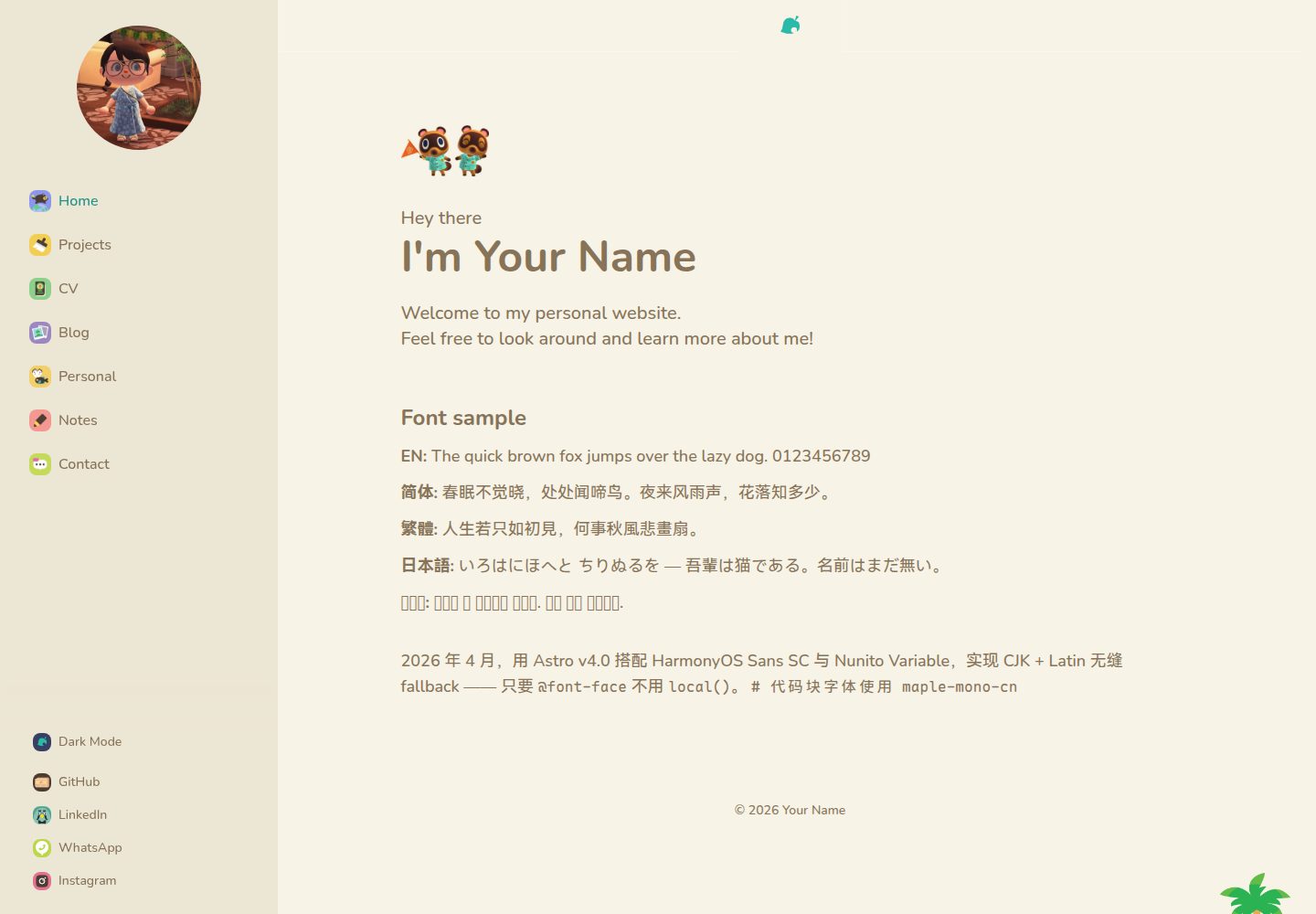
Animal Crossing-style visuals: warm cream palette, rounded shapes, and 3D pressed-feel buttons
AstroPortfolio
ac-site-template — Astro Portfolio Template
By yunxinz
An Animal Crossing-style personal website template built with Astro, TailwindCSS, and DaisyUI, including a NookPhone sidebar, day/night themes, and pages for blog, notes, projects, and CV.
Explore the design
Compare the page layouts and mobile experience. Open any screenshot for a closer look.
Desktop homepage1 / 3
Desktop captureTop of page
Actual screenshot captured by the server browser.
All pages & views 3
Screenshots show visual appearance; interactive behavior may differ.
Recorded 2026-09-30View source
What stands out
A quick read of the recorded project description.
NookPhone-style sidebar icon navigation, fixed on desktop and a drawer on mobile
Light Day and dark Night themes, with the selection persisted via localStorage
Multiple page types including blog, notes, projects, CV, and personal, with content managed as Markdown/MDX
Notes support KaTeX math formulas and code blocks
Includes a GitHub Actions workflow for automatic deployment to GitHub Pages
Template Details
This is a personal website template themed around the visual style of Animal Crossing, built with Astro and styled with TailwindCSS and DaisyUI. The overall palette uses warm cream tones, rounded shapes, and 3D buttons with a pressed feel, while the sidebar mimics the in-game NookPhone icon navigation. The template includes two built-in themes, light (Day) and dark (Night), with the selection saved via localStorage; the top and bottom banners switch with the theme.
For content, the site includes home, projects, CV, personal, blog, and notes pages. Blog, notes, and project content are stored as Markdown or MDX files under src/content/, and notes support KaTeX math formulas and code blocks. The site title, author name, social links, contact email, avatar, and banner images all need to be replaced with your own assets in the corresponding files or the public/ directory.
The layout is responsive: a fixed sidebar on desktop and a drawer-style sidebar on mobile. The repository includes a GitHub Actions workflow that automatically builds and deploys to GitHub Pages when pushed to the main branch, with the base path derived from the repository name; to use a custom domain, add a CNAME in public/ and modify the site field in astro.config.mjs.
Usage limitations: the template code is under the MIT license, so it can be used, modified, commercialized, and distributed for free, but the copyright and license notice must be retained when redistributing; third-party assets such as demo images, fonts, and icons need to be checked separately under their own licenses. For fonts, Latin text uses Nunito Variable and CJK text uses LXGW WenKai, combined through CSS @font-face and unicode-range.
AstroPortfolio
Is it right for your project?
Use Cases
- Building a personal portfolio site with a blog and project showcase
- Creating a personal homepage with a gamified visual style
- Continuously writing notes in Markdown/MDX and publishing technical articles with math formulas
- Deploying a static site to GitHub Pages and binding a custom domain
Suitable For
- Developers who want a complete personal site structure quickly
- Users who like the Animal Crossing art style and are willing to replace the assets
- Front-end developers using the Astro and TailwindCSS stack
- Personal sites that need a combination of blog, notes, projects, and CV pages
Getting started & customization
Use these recorded setup notes alongside the repository instructions for your chosen version.
- 1
Requires Node.js 18+ and pnpm; after cloning the repository, run pnpm install and pnpm dev, with the local address at http://localhost:4321
- 2
Modify the site title, author name, author abbreviation, and site description in src/config.ts
- 3
Replace the avatar at public/profile.webp, as well as the header_banner_light/dark.png and banner_light/dark.png banner images
- 4
Social links are in src/components/SideBarFooter.astro, the contact email is in src/components/SideBarMenu.astro, and sidebar icons are in public/
- 5
Before deployment, change the site in astro.config.mjs to the GitHub Pages address; for a custom domain, add a CNAME in public/
License & source material
Usage conditions & limitations
Free to use · keep license noticeThis entry covers the free version in the public repository under the MIT license; the free scope applies to that version's code and does not mean external services or third-party assets are free.
Must comply with when using
- The code for this version may be used, modified, commercialized, and distributed for free.
- When distributing copies or substantial portions of the code, retain the original author's copyright notice and the full MIT license notice.
- The code is provided as is; warranties and liability limitations are governed by the original license and applicable law.
Additional costs & items to verify
- The NookPhone icons used for the sidebar and theme switching come from okpng's Gumroad page and are third-party assets; their license is independent of the template's MIT code license. If used on a public site, you must confirm and comply with the asset's authorization terms yourself, or replace them with your own icons.
- The template's visual style references Nintendo's Animal Crossing; the related names, characters, and art elements belong to Nintendo. The MIT license covers only this project's code and grants no Nintendo intellectual property rights. When using commercially or deploying publicly, you must assess the trademark and art-style usage risks yourself.
- The Latin font Nunito Variable and the CJK font LXGW WenKai are loaded via @font-face; the font files themselves are subject to their own font licenses (such as SIL OFL), which are unrelated to the template's MIT code license. Check them separately before distribution or commercial use.
- Demo images such as public/profile.webp, banners, and project previews must be replaced with your own assets; the licensing of the demo images in the repository is not stated in the README and should not be assumed to be commercially distributable with the template.
- Social links and the contact email are placeholders and must be replaced with your own accounts; the template itself does not require registering for any external service and does not depend on API keys or paid accounts.
- Demo images, fonts, icons, and other third-party assets must be checked under their respective licenses and cannot be judged solely by the code's MIT license.
- External services such as domains, hosting, databases, payments, or AI may incur additional charges.
View Original Text Basis
Permission is hereby granted, free of charge
Original License Text
[okpng nookphone icons](https://okpng.gumroad.com/) - Icon assets
Original README
[Animal Crossing](https://www.nintendo.com/us/store/products/animal-crossing-new-horizons-switch/) by Nintendo — Visual inspiration
Original README
Fonts are composed via CSS `@font-face` with `unicode-range` in `src/styles/global.css`.
Original README
Replace with your own photo. The sidebar displays this image.
Original README
https://github.com/yunxinz/ac-site-template/blob/main/LICENSEhttps://github.com/yunxinz/ac-site-template/blob/main/README.mdUpdate the `href` attributes for GitHub, LinkedIn, WhatsApp, and Instagram links.
Original README
Compiled by DeepSeek based on repository license and README ·2026-10-01. Results only cover the materials read; dependencies, images, fonts, and subsequent term changes are subject to their respective original texts.
Project checks & description sources
Template Information
- Source platforms
- GitHub
- Documentation and maintenance reference score
- More documented · 87 / 100
- Technologies
- Astro
- Website type
- Portfolio
How this score is calculated
Our heuristic uses license records (up to 30), a demo link (12), a preview (10), stars (15), recorded maintenance (15), description completeness (8), feature records (5) and classification data (5). It is not a code, security or performance test, or a Google score. A link does not establish tested functionality.
What to verify for this project
- Repository update recorded
- 2026-09-30
- Screenshot last checked
- 2026-10-01
A demo link is listed. Check it with your own content and viewport sizes; its presence does not confirm that forms, authentication or payments work.
The catalog identifies Astro as the primary stack. Check the actual dependency manifest and lockfile for versions and hosting requirements. These notes use recorded metadata, not a code audit or a deployment test.
Use a selection guide →How this description was prepared
AI-assisted description based on catalog records and repository material. Repository authors are not automatically the reviewers of this description.
Automatically checked against source and license rules; no manual editorial review.
Inspect the recorded source material
SHA-256: c225bb4a67a1f3ac3d1fb3842f894374e5ff7c14f7bb91984ce4efb404f4589a
2026-10-01T14:29:41.991Z
Source file / repositoryEnglish | [中文](README.zh.md)
# Animal Crossing Personal Site Template
A cozy, Animal Crossing-themed personal website built with **Astro**, **TailwindCSS**, and **DaisyUI**. Features a warm cream palette, NookPhone-style sidebar navigation, light/dark mode, and charming rounded aesthetics.
<p align="center">
<img src="docs/cover.jpg" alt="Animal Crossing Personal Site Template — light and dark mode preview" width="800">
</p>
## Features
- Animal Crossing visual style — warm colors, rounded shapes, 3D press-down buttons
- Light (Day) and Dark (Night) themes with localStorage persistence
- NookPhone-inspired sidebar with icon navigation
- Theme-aware banner images (light/dark variants)
- Blog, Notes, Projects, CV, and Personal pages
- Markdown/MDX content with KaTeX math support
- GitHub Pages deployment workflow included
- Responsive — mobile drawer sidebar, desktop persistent sidebar
## Quick Start
### Prerequisites
- [Node.js](https://nodejs.org/) 18+
- [pnpm](https://pnpm.io/)
### Setup
```bash
# Clone this repo (or use it as a template on GitHub)
git clone https://github.com/yunxinz/ac-site-template.git
cd ac-site-template
# Install dependencies
pnpm install
# Start dev server
pnpm dev
```
Open `http://localhost:4321` in your browser.
## Configuration
### 1. Site info — `src/config.ts`
```ts
export const SITE_TITLE = "Your Name"; // Used in header, sidebar, page titles
export const AUTHOR_NAME = "Your Name"; // Used in footer copyright
export const AUTHOR_INITIAL = "YN"; // Used in page title prefixes
export const SITE_DESCRIPTION = "Your Name's personal website.";
```
### 2. Social links — `src/components/SideBarFooter.astro`
Update the `href` attributes for GitHub, LinkedIn, WhatsApp, and Instagram links.
### 3. Contact email — `src/components/SideBarMenu.astro`
Update the `mailto:` link in the Contact menu item.
### 4. Profile photo — `public/profile.webp`
Replace with your own photo. The sidebar displays this image.
### 5. Banner images
The top and bottom of each page use theme-aware banners. Provide light and dark variants:
- `public/header_banner_light.png` / `public/header_banner_dark.png` — top banner
- `public/banner_light.png` / `public/banner_dark.png` — bottom banner
### 6. Sidebar icons
Sidebar navigation uses square icons from `public/`. Replace them with your own or keep the included set:
| Page | Icon file |
| -------- | ------------------ |
| Home | `nookmiles.png` |
| Projects | `brush.png` |
| CV | `nookwallet.png` |
| Blog | `photos.png` |
| Personal | `nookcritters.png` |
| Notes | `drawing.png` |
| Contact | `messages.png` |
Theme toggle uses `leaf_light.png` / `leaf_dark.png`.
## Content
All content lives in `src/content/` as Markdown or MDX files.
### Blog posts — `src/content/blog/`
```md
---
title: "Your Post Title"
description: "A short description"
pubDate: "Apr 16 2026"
heroImage: "/your-image.webp"
tags: ["tag1", "tag2"]
---
Your content here...
```
### Notes — `src/content/notes/`
Same format as blog posts. Supports KaTeX math:
```md
$$
\int_0^\infty \frac{1}{x^2+1} \, dx = \frac{\pi}{2}
$$
```
And code blocks:
````md
```python
print("hello, world")
```
````
### Projects — `src/content/projects/`
```md
---
title: "Your Project"
description: "Project description"
pubDate: "Apr 16 2026"
heroImage: "/project-preview.webp"
badge: "tag"
github: "https://github.com/yourusername/repo"
liveUrl: "https://yourproject.com"
tags: [tag1, tag2]
---
```
### Pages
Edit these Astro files to customize page content:
| Page | File |
| --------- | ----------------------------- |
| Home | `src/pages/index.astro` |
| Projects | `src/pages/projects.astro` |
| CV/Resume | `src/pages/cv.astro` |
| Personal | `src/pages/personal.astro` |
| Blog | `src/pages/blog/index.astro` |
| Notes | `src/pages/notes/index.astro` |
## Theming
The design uses CSS custom properties defined in `src/styles/global.css`. The two themes are:
| Token | Day (Light) | Night (Dark) |
| ---------- | ----------- | ------------ |
| Background | `#f7f3e7` | `#374063` |
| Text | `#877358` | `#e2d6c8` |
| Primary | `#2abaaa` | `#2abaaa` |
DaisyUI themes are defined in `tailwind.config.cjs` — edit the `nord` (light) and `night` (dark) theme objects.
## Fonts
- **Latin text**: Nunito Variable (rounded, friendly)
- **CJK text**: LXGW WenKai (霞鹜文楷)
Fonts are composed via CSS `@font-face` with `unicode-range` in `src/styles/global.css`.
## Deployment (GitHub Pages)
A GitHub Actions workflow is included at `.github/workflows/deploy.yml`.
1. Push your code to the `main` branch — the workflow builds the site and deploys to GitHub Pages automatically
2. The base path is derived from your repo name automatically, so no `BASE_URL` configuration is needed
3. Update `site` in `astro.config.mjs` to your GitHub Pages URL
For a custom domain, add a `CNAME` file to `public/` and update the `site` field.
## Credits
- [Astro](https://astro.build/) — Static site framework
- [TailwindCSS](https://tailwindcss.com/) + [DaisyUI](https://daisyui.com/) — Styling
- [Animal Crossing](https://www.nintendo.com/us/store/products/animal-crossing-new-horizons-switch/) by Nintendo — Visual inspiration
- [animal-crossing-ui](https://github.com/guokaigdg/animal-crossing-ui) — Design reference
- [okpng nookphone icons](https://okpng.gumroad.com/) - Icon assets
## License
MIT
Explore similar templates
Compare previews and descriptions within the same stack and category.

astro-theme-cactus
Astro Cactus is an Astro-based blog and portfolio theme that uses Markdown/MDX content collections to manage posts, notes, and tags, with frontmatter type-checked by a schema.
Astro · Portfolio

astrofy
Astrofy is a free and open-source personal portfolio website template built with Astro and TailwindCSS, with built-in blog, CV timeline, project showcase, store, and RSS feed modules.
Astro · Portfolio

astro-nano
Astro Nano is a static, minimalist portfolio and blog template built with Astro, Tailwind, and TypeScript without frontend frameworks. It includes light/dark themes, animated UI, automatic sitemap and RSS feed generation, and Markdown/MDX support with component imports.
Astro · Portfolio

astro-erudite
astro-erudite is an opinionated, unstyled static blog template built with Astro and native CSS, with no UI or CSS framework and minimal dependencies.
Astro · Portfolio

astro-sphere
Astro Sphere is a static, minimalist portfolio and blog theme maintained by markhorn-dev, built mainly with Astro, Tailwind, and TypeScript, with a small amount of SolidJS for stateful components.
Astro · Portfolio

astro-micro
Astro Micro is a framework-free blog and portfolio theme for Astro, forked from Astro Nano. It adds Pagefind search and Giscus comments while retaining type safety, sitemap, RSS, Markdown and MDX support, and TailwindCSS with system, light, and dark themes.
Astro · Portfolio