《动物森友会》风格视觉:暖奶油配色、圆角造型与 3D 按下感按钮
Astro作品集
ac-site-template — Astro 作品集模板
作者 yunxinz
基于 Astro、TailwindCSS 与 DaisyUI 的《动物森友会》风格个人网站模板,含 NookPhone 侧边栏、昼夜主题与博客、笔记、项目、CV 等页面。
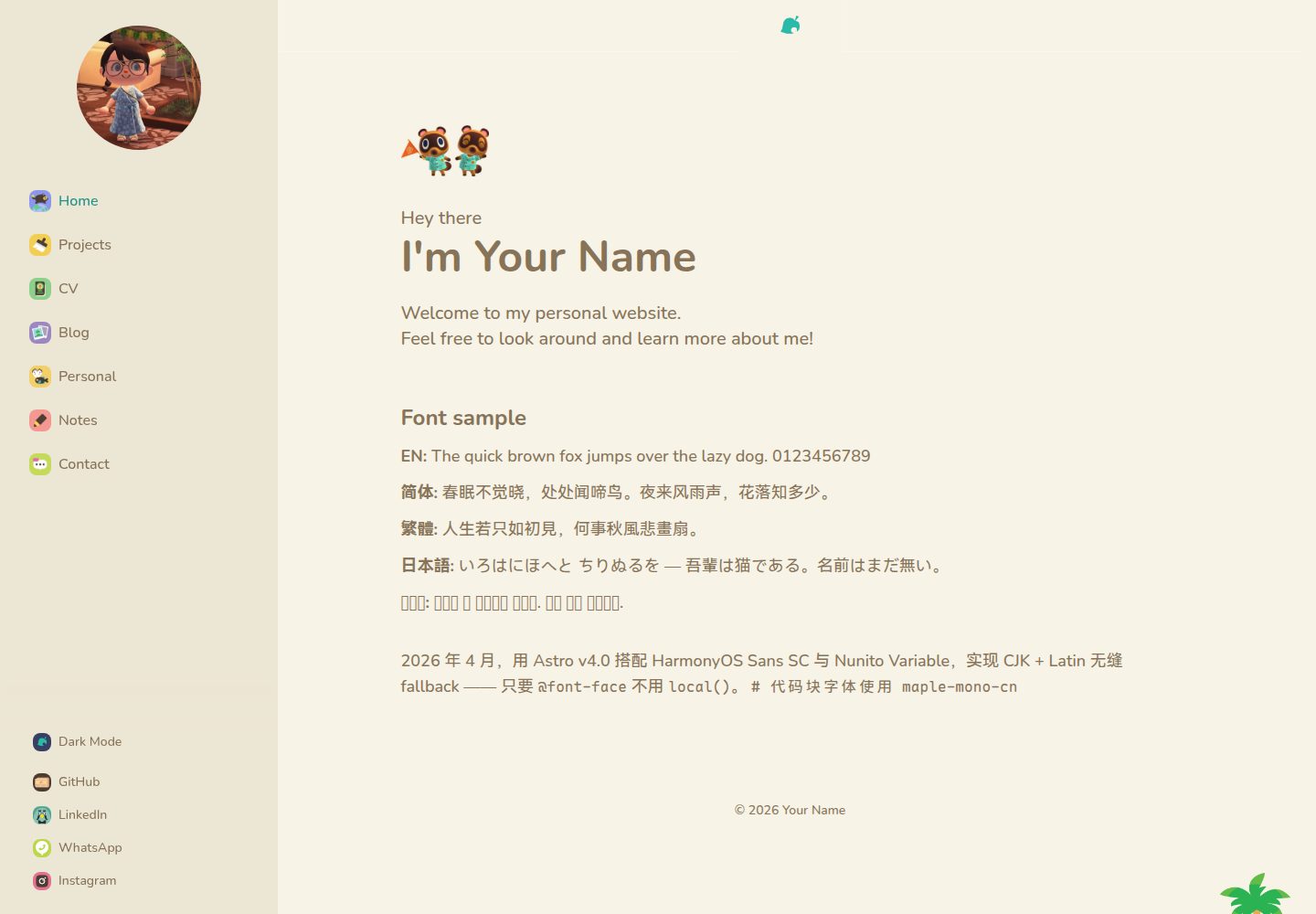
看看你的网站会是什么样
浏览真实页面截图,比较内容排版与手机效果。点击下方缩略图切换,放大查看整页细节。
全部页面与视图 3
截图用于了解视觉与布局,交互效果请以实际项目为准。
采集于 2026-09-30查看来源
值得关注的模板亮点
从已有项目资料中,快速了解它的特点。
NookPhone 式侧边栏图标导航,桌面固定、移动端抽屉
浅色 Day 与深色 Night 双主题,选择通过 localStorage 持久化
博客、笔记、项目、CV、个人等多类页面,内容以 Markdown/MDX 管理
笔记支持 KaTeX 数学公式与代码块
附带 GitHub Actions 工作流,可自动部署到 GitHub Pages
模板详细介绍
这是一个以《动物森友会》视觉风格为主题的个人网站模板,使用 Astro 构建,样式层采用 TailwindCSS 与 DaisyUI。整体配色为暖奶油色调,搭配圆角造型与按下感的 3D 按钮,侧边栏模仿游戏中的 NookPhone 图标导航。模板内置浅色(Day)与深色(Night)两套主题,选择结果通过 localStorage 保存;页面顶部与底部使用随主题切换的横幅图片。
内容方面,站点包含首页、项目、CV、个人、博客与笔记页面,博客、笔记和项目内容以 Markdown 或 MDX 文件放在 src/content/ 下,笔记支持 KaTeX 数学公式与代码块。站点标题、作者名、社交链接、联系邮箱、头像和横幅图片都需要在对应文件或 public/ 目录中替换为自有素材。
布局为响应式:桌面端固定侧边栏,移动端使用抽屉式侧边栏。仓库附带 GitHub Actions 工作流,推送到 main 分支后自动构建并部署到 GitHub Pages,base path 由仓库名推导;使用自定义域名需在 public/ 添加 CNAME 并修改 astro.config.mjs 中的 site 字段。
使用限制:模板代码采用 MIT 许可,可免费使用、修改、商用和分发,但分发时需保留版权与许可声明;演示图片、字体、图标等第三方素材需按各自许可单独核对。字体方面拉丁文使用 Nunito Variable,中日韩文字使用霞鹜文楷(LXGW WenKai),通过 CSS @font-face 与 unicode-range 组合。
Astro作品集
适合你的项目吗?
适用场景
- 搭建带博客与项目展示的个人作品集网站
- 制作具有游戏化视觉风格的个人主页
- 以 Markdown/MDX 持续撰写笔记并发布含数学公式的技术文章
- 部署到 GitHub Pages 并绑定自定义域名的静态站点
适合人群
- 希望快速获得完整个人站点结构的开发者
- 喜欢《动物森友会》美术风格并愿意替换素材的用户
- 使用 Astro 与 TailwindCSS 技术栈的前端开发者
- 需要博客、笔记、项目与 CV 多页面组合的个人站点
上手与定制指南
结合仓库当前版本的说明,按下面的资料检查内容、配置与运行要求。
- 1
需要 Node.js 18+ 与 pnpm,克隆仓库后执行 pnpm install 与 pnpm dev,本地地址为 http://localhost:4321
- 2
在 src/config.ts 修改站点标题、作者名、作者缩写与站点描述
- 3
替换 public/profile.webp 头像,以及 header_banner_light/dark.png 与 banner_light/dark.png 横幅图片
- 4
社交链接在 src/components/SideBarFooter.astro,联系邮箱在 src/components/SideBarMenu.astro,侧边栏图标位于 public/
- 5
部署前将 astro.config.mjs 的 site 改为 GitHub Pages 地址;自定义域名需在 public/ 添加 CNAME
授权与来源资料
使用条件与限制
免费使用 · 保留许可声明本次收录的是公开仓库中采用 MIT 许可的免费版本;免费范围为该版本代码,不代表外部服务或第三方素材免费。
使用时需要遵守
- 允许免费使用、修改、商用和分发该版本代码。
- 分发代码副本或实质性部分时,保留原作者版权声明和完整 MIT 许可声明。
- 代码按现状提供;担保与责任限制以原许可证及适用法律为准。
额外费用与待核对事项
- 侧边栏与主题切换所用的 NookPhone 图标来自 okpng 的 Gumroad 页面,属于第三方素材,其许可与模板的 MIT 代码许可相互独立;若用于公开站点需自行确认并遵守该素材的授权条件,或替换为自有图标。
- 模板的视觉风格参考任天堂《动物森友会》,相关名称、角色与美术元素归任天堂所有;MIT 许可仅覆盖本项目代码,不授予任何任天堂知识产权,商用或公开部署时需自行评估商标与美术风格的使用风险。
- 拉丁字体 Nunito Variable 与中日韩字体霞鹜文楷(LXGW WenKai)通过 @font-face 引入,字体文件本身适用各自的字体许可(如 SIL OFL),与模板的 MIT 代码许可无关,分发或商用前需单独核对。
- public/profile.webp 及横幅、项目预览等演示图片需替换为自有素材;仓库内演示图片的授权未在 README 中说明,不应默认其可随模板一并商用分发。
- 社交链接与联系邮箱为占位内容,需替换为使用者自己的账号;模板本身不要求注册任何外部服务,也不依赖 API 密钥或付费账号。
- 演示图片、字体、图标及其他第三方素材需按各自许可核对,不能仅凭代码的 MIT 许可判断。
- 域名、托管、数据库、支付或 AI 等外部服务可能另外收费。
查看原文依据
Permission is hereby granted, free of charge
许可证原文
[okpng nookphone icons](https://okpng.gumroad.com/) - Icon assets
README 原文
[Animal Crossing](https://www.nintendo.com/us/store/products/animal-crossing-new-horizons-switch/) by Nintendo — Visual inspiration
README 原文
Fonts are composed via CSS `@font-face` with `unicode-range` in `src/styles/global.css`.
README 原文
Replace with your own photo. The sidebar displays this image.
README 原文
https://github.com/yunxinz/ac-site-template/blob/main/LICENSEhttps://github.com/yunxinz/ac-site-template/blob/main/README.mdUpdate the `href` attributes for GitHub, LinkedIn, WhatsApp, and Instagram links.
README 原文
DeepSeek 根据仓库许可证和 README 整理 ·2026-10-01。结果仅覆盖已读取资料,依赖、图片、字体及后续条款变更以各自原文为准。
项目核对记录与介绍依据
模板资料
- 来源平台
- GitHub
- 资料与维护参考分
- 资料较完整 · 87 / 100
- 技术栈
- Astro
- 网站类型
- 作品集
这个分数如何计算
本站按许可资料(最高30分)、演示链接(12分)、预览图(10分)、Star数(15分)、记录的维护时间(15分)、描述完整度(8分)、功能记录(5分)和分类资料(5分)计算。它不是代码、安全或性能测试,也不是 Google 评分;有链接不代表已实测可用。
这个项目需要核对什么
- 记录的仓库更新时间
- 2026-09-30
- 截图检查日期
- 2026-10-01
已收录演示链接。请用你的内容与屏幕尺寸检查;有演示不代表表单、认证或支付已经可用。
目录记录的主要技术栈是 Astro。请通过依赖清单和锁文件核对实际版本与托管要求。这些说明基于收录资料,不代表代码审计或部署实测。
查看具体选型方法 →介绍的制作与核对状态
介绍由 AI 辅助整理目录与仓库资料。仓库作者不等于这篇介绍的审核者。
已完成服务器许可规则与 AI 来源核对;未经过人工编辑审核。
查看当时使用的来源资料
SHA-256: c225bb4a67a1f3ac3d1fb3842f894374e5ff7c14f7bb91984ce4efb404f4589a
2026-10-01T14:29:41.991Z
来源文件 / 仓库English | [中文](README.zh.md)
# Animal Crossing Personal Site Template
A cozy, Animal Crossing-themed personal website built with **Astro**, **TailwindCSS**, and **DaisyUI**. Features a warm cream palette, NookPhone-style sidebar navigation, light/dark mode, and charming rounded aesthetics.
<p align="center">
<img src="docs/cover.jpg" alt="Animal Crossing Personal Site Template — light and dark mode preview" width="800">
</p>
## Features
- Animal Crossing visual style — warm colors, rounded shapes, 3D press-down buttons
- Light (Day) and Dark (Night) themes with localStorage persistence
- NookPhone-inspired sidebar with icon navigation
- Theme-aware banner images (light/dark variants)
- Blog, Notes, Projects, CV, and Personal pages
- Markdown/MDX content with KaTeX math support
- GitHub Pages deployment workflow included
- Responsive — mobile drawer sidebar, desktop persistent sidebar
## Quick Start
### Prerequisites
- [Node.js](https://nodejs.org/) 18+
- [pnpm](https://pnpm.io/)
### Setup
```bash
# Clone this repo (or use it as a template on GitHub)
git clone https://github.com/yunxinz/ac-site-template.git
cd ac-site-template
# Install dependencies
pnpm install
# Start dev server
pnpm dev
```
Open `http://localhost:4321` in your browser.
## Configuration
### 1. Site info — `src/config.ts`
```ts
export const SITE_TITLE = "Your Name"; // Used in header, sidebar, page titles
export const AUTHOR_NAME = "Your Name"; // Used in footer copyright
export const AUTHOR_INITIAL = "YN"; // Used in page title prefixes
export const SITE_DESCRIPTION = "Your Name's personal website.";
```
### 2. Social links — `src/components/SideBarFooter.astro`
Update the `href` attributes for GitHub, LinkedIn, WhatsApp, and Instagram links.
### 3. Contact email — `src/components/SideBarMenu.astro`
Update the `mailto:` link in the Contact menu item.
### 4. Profile photo — `public/profile.webp`
Replace with your own photo. The sidebar displays this image.
### 5. Banner images
The top and bottom of each page use theme-aware banners. Provide light and dark variants:
- `public/header_banner_light.png` / `public/header_banner_dark.png` — top banner
- `public/banner_light.png` / `public/banner_dark.png` — bottom banner
### 6. Sidebar icons
Sidebar navigation uses square icons from `public/`. Replace them with your own or keep the included set:
| Page | Icon file |
| -------- | ------------------ |
| Home | `nookmiles.png` |
| Projects | `brush.png` |
| CV | `nookwallet.png` |
| Blog | `photos.png` |
| Personal | `nookcritters.png` |
| Notes | `drawing.png` |
| Contact | `messages.png` |
Theme toggle uses `leaf_light.png` / `leaf_dark.png`.
## Content
All content lives in `src/content/` as Markdown or MDX files.
### Blog posts — `src/content/blog/`
```md
---
title: "Your Post Title"
description: "A short description"
pubDate: "Apr 16 2026"
heroImage: "/your-image.webp"
tags: ["tag1", "tag2"]
---
Your content here...
```
### Notes — `src/content/notes/`
Same format as blog posts. Supports KaTeX math:
```md
$$
\int_0^\infty \frac{1}{x^2+1} \, dx = \frac{\pi}{2}
$$
```
And code blocks:
````md
```python
print("hello, world")
```
````
### Projects — `src/content/projects/`
```md
---
title: "Your Project"
description: "Project description"
pubDate: "Apr 16 2026"
heroImage: "/project-preview.webp"
badge: "tag"
github: "https://github.com/yourusername/repo"
liveUrl: "https://yourproject.com"
tags: [tag1, tag2]
---
```
### Pages
Edit these Astro files to customize page content:
| Page | File |
| --------- | ----------------------------- |
| Home | `src/pages/index.astro` |
| Projects | `src/pages/projects.astro` |
| CV/Resume | `src/pages/cv.astro` |
| Personal | `src/pages/personal.astro` |
| Blog | `src/pages/blog/index.astro` |
| Notes | `src/pages/notes/index.astro` |
## Theming
The design uses CSS custom properties defined in `src/styles/global.css`. The two themes are:
| Token | Day (Light) | Night (Dark) |
| ---------- | ----------- | ------------ |
| Background | `#f7f3e7` | `#374063` |
| Text | `#877358` | `#e2d6c8` |
| Primary | `#2abaaa` | `#2abaaa` |
DaisyUI themes are defined in `tailwind.config.cjs` — edit the `nord` (light) and `night` (dark) theme objects.
## Fonts
- **Latin text**: Nunito Variable (rounded, friendly)
- **CJK text**: LXGW WenKai (霞鹜文楷)
Fonts are composed via CSS `@font-face` with `unicode-range` in `src/styles/global.css`.
## Deployment (GitHub Pages)
A GitHub Actions workflow is included at `.github/workflows/deploy.yml`.
1. Push your code to the `main` branch — the workflow builds the site and deploys to GitHub Pages automatically
2. The base path is derived from your repo name automatically, so no `BASE_URL` configuration is needed
3. Update `site` in `astro.config.mjs` to your GitHub Pages URL
For a custom domain, add a `CNAME` file to `public/` and update the `site` field.
## Credits
- [Astro](https://astro.build/) — Static site framework
- [TailwindCSS](https://tailwindcss.com/) + [DaisyUI](https://daisyui.com/) — Styling
- [Animal Crossing](https://www.nintendo.com/us/store/products/animal-crossing-new-horizons-switch/) by Nintendo — Visual inspiration
- [animal-crossing-ui](https://github.com/guokaigdg/animal-crossing-ui) — Design reference
- [okpng nookphone icons](https://okpng.gumroad.com/) - Icon assets
## License
MIT
看看同类模板
对比同技术栈与用途的模板,找到更适合的视觉与内容结构。

astro-theme-cactus
A simple Astro theme. Use it to create your blog or website.
Astro · 作品集

astrofy
Astrofy is a free and open-source template for your Personal Portfolio Website built with Astro and TailwindCS…
Astro · 作品集

astro-nano
Astro Nano is a static, minimalist, lightweight, lightning fast portfolio and blog.
Astro · 作品集

astro-erudite
An opinionated, unstyled static blogging template built with Astro and native CSS.
Astro · 作品集

astro-sphere
Astro Sphere is a static, minimalist, lightweight, lightning fast portfolio and blog.
Astro · 作品集

astro-micro
Blog theme for Astro with search and comments built-in. Zero frameworks.
Astro · 作品集