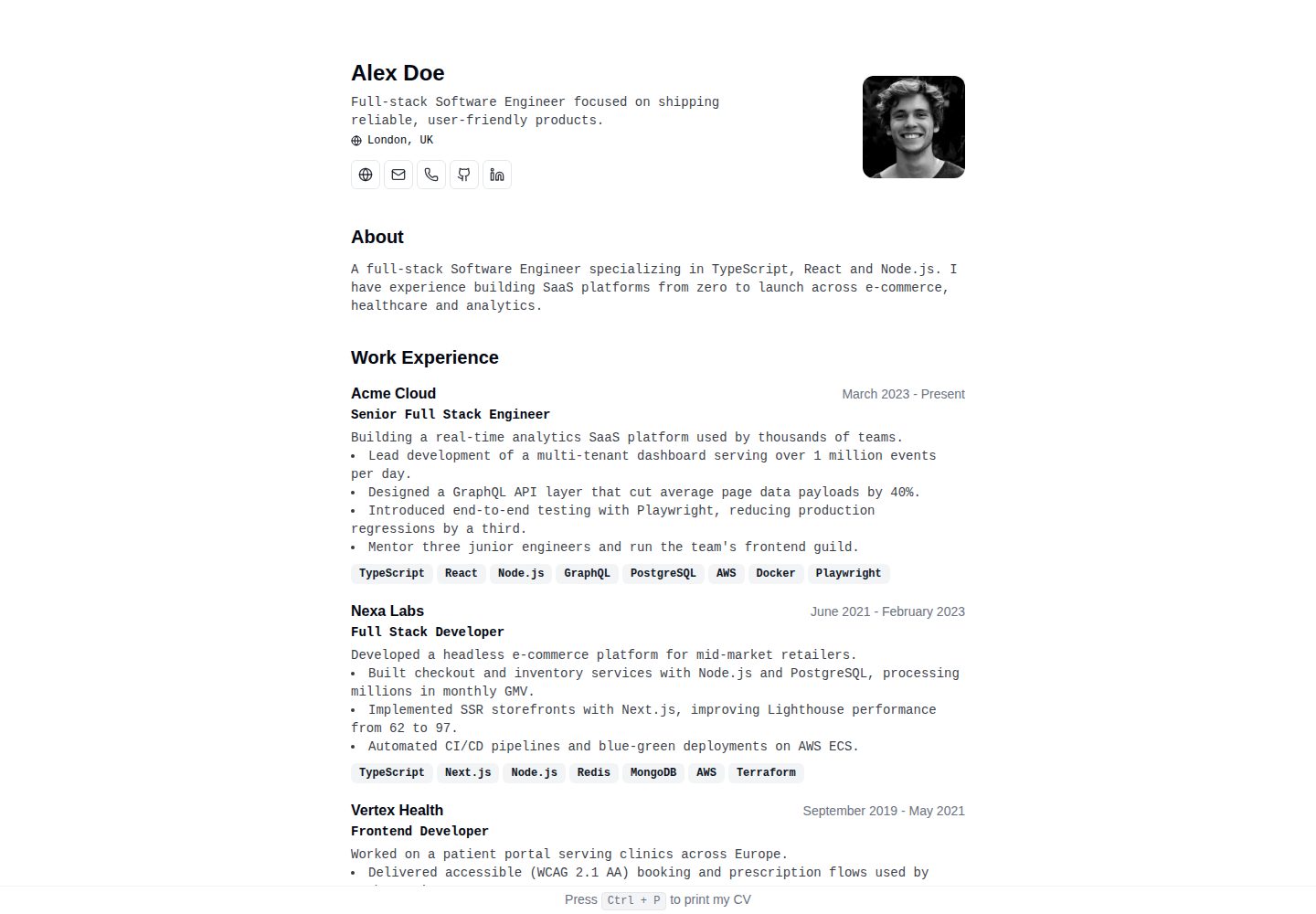
All resume data is maintained in a single typed configuration file at src/data/cv.ts
AstroPortfolio
cv — Astro Portfolio Template
By ZhukDI
A minimalist CV/resume template built with Astro. All content lives in a single typed configuration file, with print-to-PDF export, system dark mode, and no JavaScript sent to the client.
Explore the design
Compare the page layouts and mobile experience. Open any screenshot for a closer look.
Desktop homepage1 / 2
Desktop captureTop of page
Actual screenshot captured by the server browser.
All pages & views 2
Screenshots show visual appearance; interactive behavior may differ.
Recorded 2026-10-05View source
What stands out
A quick read of the recorded project description.
Print-optimized: Ctrl+P outputs a single-column PDF
Dark mode follows the system via prefers-color-scheme, with no script and no flash
By default no JavaScript is sent to the client; pages are statically prerendered HTML
Built-in Open Graph, Twitter cards, JSON-LD Person structured data, sitemap, and canonical links
Two deployment paths: automatic Cloudflare Pages deployment and nginx-based Docker self-hosting
Template Details
This is a minimalist CV/resume template for Astro, with the repository under the MIT license. The template keeps the entire resume dataset in a single typed configuration file at src/data/cv.ts; personal details, work experience, education, and skills are all edited in that one place. Pages are statically generated and by default send no JavaScript to the client. Dark mode follows the system via prefers-color-scheme, requiring no script and producing no flash.
The template includes dedicated print styles: pressing Ctrl+P in the browser outputs a single-column PDF suitable for recruiters to read. The layout is responsive and works on both mobile and desktop. For SEO, it includes Open Graph, Twitter cards, JSON-LD Person structured data, a sitemap, and canonical links. The repository also provides a /demo page rendered from fictional data (via src/data/demo-cv.ts), which can be deleted along with its data file if not needed.
For deployment, the author's site runs on Cloudflare Pages connected to this GitHub repository: pushes to main trigger production builds, and pull requests generate preview builds. The repository also provides a multi-stage Dockerfile that builds with Node and serves the static files from dist/ via nginx, and can be run locally on port 8080 with docker compose. Development requires Node.js 22.12 or later.
AstroPortfolio
Is it right for your project?
Use Cases
- A personal job-seeking resume site that needs both web browsing and a printable PDF
- Developers who want to maintain resume content in a single configuration file and avoid editing it in multiple places
- Resume pages that prefer static generation and do not rely on client-side JavaScript
- Publishing a personal site via Cloudflare Pages or Docker self-hosting
Suitable For
- Developers who need to quickly set up a minimalist personal resume page
- Users familiar with Astro and TypeScript who are willing to edit the configuration file directly
- Job seekers who value print output quality and dark mode experience
- Those who want to self-host or deploy the resume site on a static hosting platform
Getting started & customization
Use these recorded setup notes alongside the repository instructions for your chosen version.
- 1
Requires Node.js 22.12 or later
- 2
You can create a copy via GitHub's Use this template, or manually git clone and run npm install
- 3
Run npm run dev to start the local development server, by default at http://localhost:4321
- 4
Edit src/data/cv.ts to fill in your resume data; if you do not need the example page, you can delete the /demo page and its data file src/data/demo-cv.ts
- 5
npm run screenshots requires running npm run build first and having local Chrome installed
License & source material
Usage conditions & limitations
Free to use · keep license noticeThis entry covers the free version under the MIT license in the public repository; the free scope is the code of that version and does not mean external services or third-party assets are free.
Must comply with when using
- You may use, modify, commercialize, and distribute the code of this version for free.
- When distributing copies or substantial portions of the code, retain the original author's copyright notice and the full MIT license notice.
- The code is provided as is; warranties and limitations of liability are governed by the original license and applicable law.
Additional costs & items to verify
- Demo images, fonts, icons, and other third-party assets must be checked against their respective licenses; the code's MIT license alone cannot be used to judge them.
- External services such as domains, hosting, databases, payments, or AI may incur separate charges.
- Before running npm run screenshots to regenerate promotional screenshots, you must first run npm run build and have Chrome installed locally.
- The author's site uses Cloudflare Pages connected to this GitHub repository; using this deployment method requires a Cloudflare account and the corresponding services.
- The default deployment approach depends on Cloudflare; if you do not want to use Cloudflare, you can switch to the nginx container self-hosting provided by the repository.
- Development and building require Node.js 22.12 or later.
View Original Text Basis
Permission is hereby granted, free of charge
Original License Text
`npm run screenshots` | Regenerate promo screenshots in `screenshots/` (requires a prior `npm run build` and local Chrome)
Original README
The site runs on [Cloudflare Pages](https://pages.cloudflare.com/) and is connected to this GitHub repository:
Original README
If you prefer not to use Cloudflare, the site can be served from an nginx container:
Original README
https://github.com/ZhukDI/cv/blob/main/LICENSEhttps://github.com/ZhukDI/cv/blob/main/README.md- Node.js 22.12+
Original README
Compiled by DeepSeek based on repository license and README ·2026-10-05. Results only cover the materials read; dependencies, images, fonts, and subsequent term changes are subject to their respective original texts.
Project checks & description sources
Template Information
- Source platforms
- Astro Themes
- Documentation and maintenance reference score
- More documented · 79 / 100
- Technologies
- Astro
- Website type
- Portfolio
How this score is calculated
Our heuristic uses license records (up to 30), a demo link (12), a preview (10), stars (15), recorded maintenance (15), description completeness (8), feature records (5) and classification data (5). It is not a code, security or performance test, or a Google score. A link does not establish tested functionality.
What to verify for this project
- Repository update recorded
- 2026-09-30
- Screenshot last checked
- 2026-10-05
A demo link is listed. Check it with your own content and viewport sizes; its presence does not confirm that forms, authentication or payments work.
The catalog identifies Astro as the primary stack. Check the actual dependency manifest and lockfile for versions and hosting requirements. These notes use recorded metadata, not a code audit or a deployment test.
Use a selection guide →How this description was prepared
AI-assisted description based on catalog records and repository material. Repository authors are not automatically the reviewers of this description.
Review declaration: [email protected] · 2026-10-05
Inspect the recorded source material
SHA-256: e4a41c068cf89c2a29ea0df843d6703aa7071a0c71e9a3baee25c287b1dd13ed
2026-10-05T00:45:52.947Z
Source file / repository# CV [](https://astro.build/) [](https://www.typescriptlang.org/) [](https://tailwindcss.com/) [](https://www.docker.com/) [](https://pagespeed.web.dev/) [](https://opensource.org/licenses/MIT) [](https://github.com/ZhukDI/cv/generate) <p align="center"> <img src="screenshots/poster-1-hero.png" alt="Minimalist CV — Astro theme preview" width="820"> </p> A print-ready CV/resume template for Astro. Your whole CV lives in one typed config file, ships zero client-side JavaScript, follows the system dark mode automatically, and turns into a clean recruiter-ready PDF with Ctrl+P. ## Live demo - **Theme demo (fictional data)**: [cv.dzhuk.com/demo](https://cv.dzhuk.com/demo) - **Author's site (real data)**: [cv.dzhuk.com](https://cv.dzhuk.com) ## Features - 📝 **Single Config File** - Update all your cv data in [one place](./src/data/cv.ts) - 🖨️ **Print Optimized** - Specially designed print styles: press `Ctrl + P` for a clean, one-column PDF - 🌓 **Dark Mode** - Follows the system theme (`prefers-color-scheme`) with no JavaScript and no flash - 🎨 **Minimalist Design** - Clean, professional layout focused on content - 📱 **Responsive** - Looks great on all devices, from mobile to desktop - ⚡ **Zero JavaScript** - Ships with no client-side JS for lightning-fast loads - 🚀 **Static Generation** - Pre-rendered HTML for optimal performance - 🎯 **SEO Friendly** - Open Graph, Twitter cards, JSON-LD `Person` schema, sitemap and canonical URLs ## Screenshots | Dark mode | Print to PDF | Responsive | | :---: | :---: | :---: | |  |  |  | ## 🛠️ Tech Stack - **Framework**: [Astro](https://astro.build/) - **Language**: [TypeScript](https://www.typescriptlang.org/) - **Styling**: [Tailwind CSS](https://tailwindcss.com/) ## 🚀 Getting Started ### Prerequisites - Node.js 22.12+ ### Installation The fastest way — click **[Use this template](https://github.com/ZhukDI/cv/generate)** to create your own copy. Or clone manually: 1. **Clone the repository** ```bash git clone https://github.com/ZhukDI/cv.git cd cv ``` 2. **Install dependencies** ```bash npm install ``` 3. **Start the development server** ```bash npm run dev ``` 4. **Open [http://localhost:4321](http://localhost:4321)** in your browser 5. **Customize your CV** Edit the [src/data/cv.ts](./src/data/cv.ts) file to add your personal information, work experience, education, and skills. The [/demo](https://cv.dzhuk.com/demo) page is rendered from [src/data/demo-cv.ts](./src/data/demo-cv.ts) — a fictional dataset kept as a neutral example for the theme listing; delete the page and its data file if you don't need it. ## 🧞 Commands All commands are run from the root of the project, from a terminal: | Command | Action | | :------------------------ | :----------------------------------------------- | | `npm install` | Installs dependencies | | `npm run dev` | Starts local dev server at `localhost:4321` | | `npm run build` | Build your production site to `./dist/` | | `npm run preview` | Preview your build locally, before deploying | | `npm run screenshots` | Regenerate promo screenshots in `screenshots/` (requires a prior `npm run build` and local Chrome) | | `npm run astro ...` | Run CLI commands like `astro add`, `astro check` | | `npm run astro -- --help` | Get help using the Astro CLI | ## ☁️ Deployment ### Cloudflare Pages (production) The site runs on [Cloudflare Pages](https://pages.cloudflare.com/) and is connected to this GitHub repository: - Push or merge to `main` → automatic production build and deploy - Pull requests → automatic preview builds (see the `Cloudflare Pages` check on the PR for the preview URL and logs) ### Docker (self-hosted alternative) If you prefer not to use Cloudflare, the site can be served from an nginx container: ```bash docker build -t zhukdi/dzhuk-cv:latest . docker compose up -d # serves the image on http://localhost:8080 ``` The multi-stage `Dockerfile` builds the site with Node and serves `dist/` via nginx. ## 📚 Documentation - [Useful tools for SEO & performance](./docs/useful-tools.md) - Online tools for checking page speed, meta tags, structured data, and more ## 🤝 Contributing Contributions are welcome! Feel free to: 1. Fork the repository 2. Create your feature branch (`git checkout -b feature/amazing-feature`) 3. Commit your changes (`git commit -m 'Add some amazing feature'`) 4. Push to the branch (`git push origin feature/amazing-feature`) 5. Open a Pull Request ## 📄 License This project is licensed under the MIT License - see the [LICENSE](LICENSE) file for details. ## 🙏 Acknowledgments - Inspired by [BartoszJarocki/cv](https://github.com/BartoszJarocki/cv) - Original Next.js implementation - [Astro](https://astro.build/) for the amazing framework
Explore similar templates
Compare previews and descriptions within the same stack and category.

astro-theme-cactus
Astro Cactus is an Astro-based blog and portfolio theme that uses Markdown/MDX content collections to manage posts, notes, and tags, with frontmatter type-checked by a schema.
Astro · Portfolio

astrofy
Astrofy is a free and open-source personal portfolio website template built with Astro and TailwindCSS, with built-in blog, CV timeline, project showcase, store, and RSS feed modules.
Astro · Portfolio

astro-nano
Astro Nano is a static, minimalist portfolio and blog template built with Astro, Tailwind, and TypeScript without frontend frameworks. It includes light/dark themes, animated UI, automatic sitemap and RSS feed generation, and Markdown/MDX support with component imports.
Astro · Portfolio

astro-erudite
astro-erudite is an opinionated, unstyled static blog template built with Astro and native CSS, with no UI or CSS framework and minimal dependencies.
Astro · Portfolio

astro-sphere
Astro Sphere is a static, minimalist portfolio and blog theme maintained by markhorn-dev, built mainly with Astro, Tailwind, and TypeScript, with a small amount of SolidJS for stateful components.
Astro · Portfolio

astro-micro
Astro Micro is a framework-free blog and portfolio theme for Astro, forked from Astro Nano. It adds Pagefind search and Giscus comments while retaining type safety, sitemap, RSS, Markdown and MDX support, and TailwindCSS with system, light, and dark themes.
Astro · Portfolio