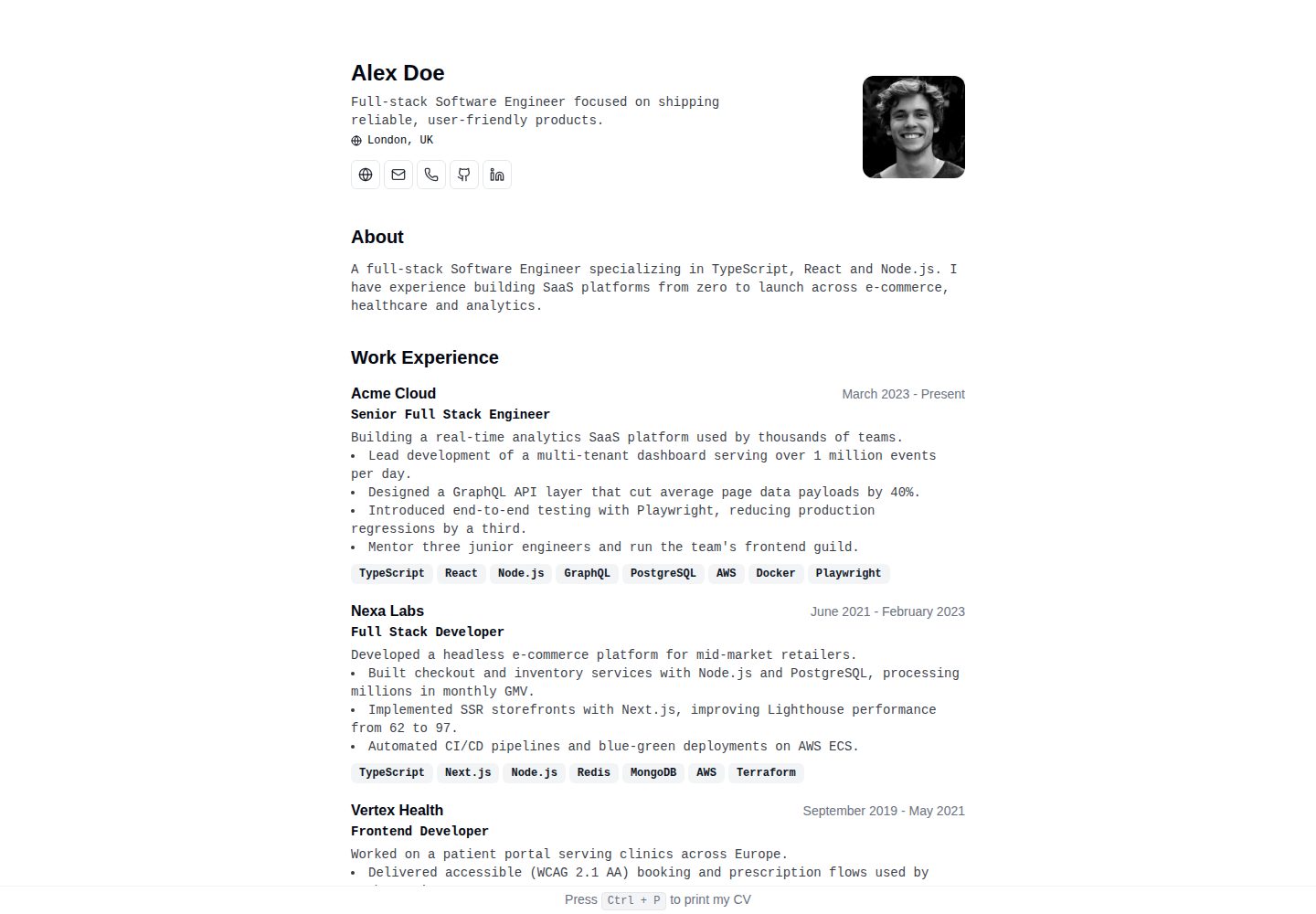
全部简历数据集中在 src/data/cv.ts 一个类型化配置文件中维护
Astro作品集
cv — Astro 作品集模板
作者 ZhukDI
基于 Astro 的极简 CV/简历模板,所有内容集中在一个类型化配置文件里,支持打印导出 PDF、跟随系统深色模式,且不向客户端发送 JavaScript。
看看你的网站会是什么样
浏览真实页面截图,比较内容排版与手机效果。点击下方缩略图切换,放大查看整页细节。
全部页面与视图 2
截图用于了解视觉与布局,交互效果请以实际项目为准。
采集于 2026-10-05查看来源
值得关注的模板亮点
从已有项目资料中,快速了解它的特点。
针对打印优化,按 Ctrl+P 可输出单栏 PDF
通过 prefers-color-scheme 跟随系统深色模式,无脚本、无闪烁
默认不向客户端发送 JavaScript,页面为静态预渲染 HTML
内置 Open Graph、Twitter 卡片、JSON-LD Person 结构化数据、站点地图与规范链接
提供 Cloudflare Pages 自动部署与基于 nginx 的 Docker 自托管两种方式
模板详细介绍
这是一个面向 Astro 的极简 CV/简历模板,仓库采用 MIT 许可。模板把整份简历的数据集中放在 src/data/cv.ts 一个类型化配置文件中,修改个人信息、工作经历、教育背景和技能都在这一处完成。页面为静态生成,默认不向客户端发送 JavaScript,深色模式通过 prefers-color-scheme 跟随系统,无需脚本也不会出现闪烁。
模板针对打印做了专门样式:在浏览器中按 Ctrl+P 可以输出单栏、适合招聘方阅读的 PDF。布局为响应式,移动端与桌面端均可使用。SEO 方面包含 Open Graph、Twitter 卡片、JSON-LD Person 结构化数据、站点地图和规范链接。仓库还提供一个使用虚构数据的 /demo 页面(由 src/data/demo-cv.ts 渲染),不需要时可以连同数据文件一起删除。
部署上,作者站点运行在 Cloudflare Pages 并连接该 GitHub 仓库:推送到 main 触发生产构建,拉取请求生成预览构建。仓库也提供多阶段 Dockerfile,用 Node 构建后由 nginx 提供 dist/ 静态文件,可通过 docker compose 在本地 8080 端口运行。开发需要 Node.js 22.12 及以上版本。
Astro作品集
适合你的项目吗?
适用场景
- 个人求职简历网站,需要同时提供网页浏览和可打印 PDF
- 希望用单个配置文件维护简历内容、避免在多处重复修改的开发者
- 偏好静态生成、不依赖客户端 JavaScript 的简历页面
- 使用 Cloudflare Pages 或 Docker 自托管方式发布个人站点
适合人群
- 需要快速搭建极简个人简历页面的开发者
- 熟悉 Astro 与 TypeScript、愿意直接编辑配置文件的使用者
- 重视打印输出效果与深色模式体验的求职者
- 希望自行托管或使用静态托管平台部署简历站点的人
上手与定制指南
结合仓库当前版本的说明,按下面的资料检查内容、配置与运行要求。
- 1
需要 Node.js 22.12 或更高版本
- 2
可通过 GitHub 的 Use this template 创建副本,或手动 git clone 后执行 npm install
- 3
运行 npm run dev 启动本地开发服务器,默认地址为 http://localhost:4321
- 4
编辑 src/data/cv.ts 填写个人简历数据;如不需要示例页,可删除 /demo 页面及其数据文件 src/data/demo-cv.ts
- 5
npm run screenshots 需要先执行 npm run build 并安装本地 Chrome
授权与来源资料
使用条件与限制
免费使用 · 保留许可声明本次收录的是公开仓库中采用 MIT 许可的免费版本;免费范围为该版本代码,不代表外部服务或第三方素材免费。
使用时需要遵守
- 允许免费使用、修改、商用和分发该版本代码。
- 分发代码副本或实质性部分时,保留原作者版权声明和完整 MIT 许可声明。
- 代码按现状提供;担保与责任限制以原许可证及适用法律为准。
额外费用与待核对事项
- 演示图片、字体、图标及其他第三方素材需按各自许可核对,不能仅凭代码的 MIT 许可判断。
- 域名、托管、数据库、支付或 AI 等外部服务可能另外收费。
- 运行 npm run screenshots 重新生成宣传截图前,必须先执行 npm run build,并在本地安装 Chrome 浏览器。
- 作者站点使用 Cloudflare Pages 并连接该 GitHub 仓库;若采用此部署方式,需要 Cloudflare 账号及相应服务。
- 默认部署方案依赖 Cloudflare;如不想使用 Cloudflare,可改用仓库提供的 nginx 容器自托管。
- 开发与构建需要 Node.js 22.12 或更高版本。
查看原文依据
Permission is hereby granted, free of charge
许可证原文
`npm run screenshots` | Regenerate promo screenshots in `screenshots/` (requires a prior `npm run build` and local Chrome)
README 原文
The site runs on [Cloudflare Pages](https://pages.cloudflare.com/) and is connected to this GitHub repository:
README 原文
If you prefer not to use Cloudflare, the site can be served from an nginx container:
README 原文
https://github.com/ZhukDI/cv/blob/main/LICENSEhttps://github.com/ZhukDI/cv/blob/main/README.md- Node.js 22.12+
README 原文
DeepSeek 根据仓库许可证和 README 整理 ·2026-10-05。结果仅覆盖已读取资料,依赖、图片、字体及后续条款变更以各自原文为准。
项目核对记录与介绍依据
模板资料
- 来源平台
- Astro Themes
- 资料与维护参考分
- 资料较完整 · 79 / 100
- 技术栈
- Astro
- 网站类型
- 作品集
这个分数如何计算
本站按许可资料(最高30分)、演示链接(12分)、预览图(10分)、Star数(15分)、记录的维护时间(15分)、描述完整度(8分)、功能记录(5分)和分类资料(5分)计算。它不是代码、安全或性能测试,也不是 Google 评分;有链接不代表已实测可用。
这个项目需要核对什么
- 记录的仓库更新时间
- 2026-09-30
- 截图检查日期
- 2026-10-05
已收录演示链接。请用你的内容与屏幕尺寸检查;有演示不代表表单、认证或支付已经可用。
目录记录的主要技术栈是 Astro。请通过依赖清单和锁文件核对实际版本与托管要求。这些说明基于收录资料,不代表代码审计或部署实测。
查看具体选型方法 →介绍的制作与核对状态
介绍由 AI 辅助整理目录与仓库资料。仓库作者不等于这篇介绍的审核者。
审核声明: [email protected] · 2026-10-05
查看当时使用的来源资料
SHA-256: e4a41c068cf89c2a29ea0df843d6703aa7071a0c71e9a3baee25c287b1dd13ed
2026-10-05T00:45:52.947Z
来源文件 / 仓库# CV [](https://astro.build/) [](https://www.typescriptlang.org/) [](https://tailwindcss.com/) [](https://www.docker.com/) [](https://pagespeed.web.dev/) [](https://opensource.org/licenses/MIT) [](https://github.com/ZhukDI/cv/generate) <p align="center"> <img src="screenshots/poster-1-hero.png" alt="Minimalist CV — Astro theme preview" width="820"> </p> A print-ready CV/resume template for Astro. Your whole CV lives in one typed config file, ships zero client-side JavaScript, follows the system dark mode automatically, and turns into a clean recruiter-ready PDF with Ctrl+P. ## Live demo - **Theme demo (fictional data)**: [cv.dzhuk.com/demo](https://cv.dzhuk.com/demo) - **Author's site (real data)**: [cv.dzhuk.com](https://cv.dzhuk.com) ## Features - 📝 **Single Config File** - Update all your cv data in [one place](./src/data/cv.ts) - 🖨️ **Print Optimized** - Specially designed print styles: press `Ctrl + P` for a clean, one-column PDF - 🌓 **Dark Mode** - Follows the system theme (`prefers-color-scheme`) with no JavaScript and no flash - 🎨 **Minimalist Design** - Clean, professional layout focused on content - 📱 **Responsive** - Looks great on all devices, from mobile to desktop - ⚡ **Zero JavaScript** - Ships with no client-side JS for lightning-fast loads - 🚀 **Static Generation** - Pre-rendered HTML for optimal performance - 🎯 **SEO Friendly** - Open Graph, Twitter cards, JSON-LD `Person` schema, sitemap and canonical URLs ## Screenshots | Dark mode | Print to PDF | Responsive | | :---: | :---: | :---: | |  |  |  | ## 🛠️ Tech Stack - **Framework**: [Astro](https://astro.build/) - **Language**: [TypeScript](https://www.typescriptlang.org/) - **Styling**: [Tailwind CSS](https://tailwindcss.com/) ## 🚀 Getting Started ### Prerequisites - Node.js 22.12+ ### Installation The fastest way — click **[Use this template](https://github.com/ZhukDI/cv/generate)** to create your own copy. Or clone manually: 1. **Clone the repository** ```bash git clone https://github.com/ZhukDI/cv.git cd cv ``` 2. **Install dependencies** ```bash npm install ``` 3. **Start the development server** ```bash npm run dev ``` 4. **Open [http://localhost:4321](http://localhost:4321)** in your browser 5. **Customize your CV** Edit the [src/data/cv.ts](./src/data/cv.ts) file to add your personal information, work experience, education, and skills. The [/demo](https://cv.dzhuk.com/demo) page is rendered from [src/data/demo-cv.ts](./src/data/demo-cv.ts) — a fictional dataset kept as a neutral example for the theme listing; delete the page and its data file if you don't need it. ## 🧞 Commands All commands are run from the root of the project, from a terminal: | Command | Action | | :------------------------ | :----------------------------------------------- | | `npm install` | Installs dependencies | | `npm run dev` | Starts local dev server at `localhost:4321` | | `npm run build` | Build your production site to `./dist/` | | `npm run preview` | Preview your build locally, before deploying | | `npm run screenshots` | Regenerate promo screenshots in `screenshots/` (requires a prior `npm run build` and local Chrome) | | `npm run astro ...` | Run CLI commands like `astro add`, `astro check` | | `npm run astro -- --help` | Get help using the Astro CLI | ## ☁️ Deployment ### Cloudflare Pages (production) The site runs on [Cloudflare Pages](https://pages.cloudflare.com/) and is connected to this GitHub repository: - Push or merge to `main` → automatic production build and deploy - Pull requests → automatic preview builds (see the `Cloudflare Pages` check on the PR for the preview URL and logs) ### Docker (self-hosted alternative) If you prefer not to use Cloudflare, the site can be served from an nginx container: ```bash docker build -t zhukdi/dzhuk-cv:latest . docker compose up -d # serves the image on http://localhost:8080 ``` The multi-stage `Dockerfile` builds the site with Node and serves `dist/` via nginx. ## 📚 Documentation - [Useful tools for SEO & performance](./docs/useful-tools.md) - Online tools for checking page speed, meta tags, structured data, and more ## 🤝 Contributing Contributions are welcome! Feel free to: 1. Fork the repository 2. Create your feature branch (`git checkout -b feature/amazing-feature`) 3. Commit your changes (`git commit -m 'Add some amazing feature'`) 4. Push to the branch (`git push origin feature/amazing-feature`) 5. Open a Pull Request ## 📄 License This project is licensed under the MIT License - see the [LICENSE](LICENSE) file for details. ## 🙏 Acknowledgments - Inspired by [BartoszJarocki/cv](https://github.com/BartoszJarocki/cv) - Original Next.js implementation - [Astro](https://astro.build/) for the amazing framework
看看同类模板
对比同技术栈与用途的模板,找到更适合的视觉与内容结构。

astro-theme-cactus
A simple Astro theme. Use it to create your blog or website.
Astro · 作品集

astrofy
Astrofy is a free and open-source template for your Personal Portfolio Website built with Astro and TailwindCS…
Astro · 作品集

astro-nano
Astro Nano is a static, minimalist, lightweight, lightning fast portfolio and blog.
Astro · 作品集

astro-erudite
An opinionated, unstyled static blogging template built with Astro and native CSS.
Astro · 作品集

astro-sphere
Astro Sphere is a static, minimalist, lightweight, lightning fast portfolio and blog.
Astro · 作品集

astro-micro
Blog theme for Astro with search and comments built-in. Zero frameworks.
Astro · 作品集