支持 Disqus、Gitalk、Gitment、Hypercomments、UYan、Valine 六种评论系统,可任选其一启用
Hexo博客
hexo-theme-easy — Hexo 博客模板
作者 8090Lambert
hexo-theme-easy 是一个基于 Hexo 的博客主题,参考 aero-dual 并整合了评论、统计与页脚等自定义配置,采用 MIT 许可。
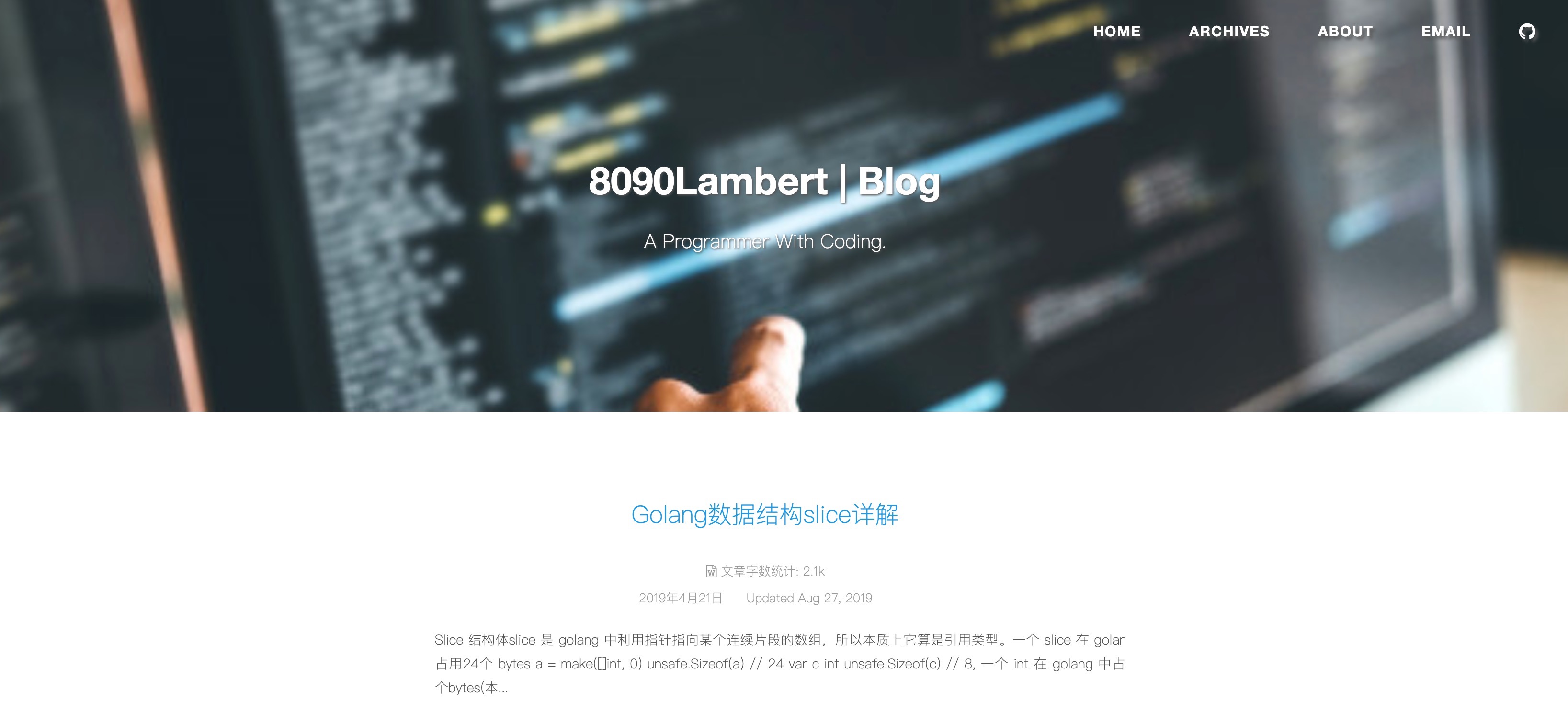
看看你的网站会是什么样
浏览真实页面截图,比较内容排版与手机效果。点击下方缩略图切换,放大查看整页细节。
目前有 1 张原始预览,可打开完整图片查看设计细节。
截图用于了解视觉与布局,交互效果请以实际项目为准。
采集于 2026-10-01查看来源
值得关注的模板亮点
从已有项目资料中,快速了解它的特点。
集成 Google、百度、搜狗与 CNZZ 的统计或站点验证配置
文章页支持封面图,代码块支持语法高亮
菜单项可配置为文本或 Font Awesome 图标
页脚可自定义起始年份、图标与版权信息,PV 统计使用 busuanzi
模板详细介绍
hexo-theme-easy 是面向 Hexo 静态博客的主题,作者在 README 中说明其参考了 aero-dual 主题,并在此基础上整合了其他自定义内容,目标是帮助用户快速搭建博客。主题通过主题目录下的 _config.yml 提供配置项,覆盖菜单、首页封面图、自动摘要、文章元信息、评论、页脚、访问统计与分析等模块。
功能方面,评论系统支持 Disqus、Gitalk、Gitment、Hypercomments、UYan 和 Valine 六种驱动,可从中选择一种启用;统计与分析支持 Google、百度、搜狗和 CNZZ;文章页支持封面图与代码块语法高亮;页脚可自定义起始年份、图标与版权信息;菜单项支持纯文本或 Font Awesome 图标;PV 统计依赖 busuanzi。文章字数与阅读时长显示依赖 hexo-wordcount 插件,需自行安装。
安装方式为将仓库克隆到 Hexo 站点的 themes/easy 目录,并在主配置文件中把 theme 设为 easy。README 提示 Hexo 版本需不低于 3.2。仓库最近更新时间为 2019 年,属于较早的主题项目,使用前建议核对当前 Hexo 版本的兼容情况。
Hexo博客
适合你的项目吗?
适用场景
- 使用 Hexo 搭建个人静态博客并希望快速套用现成主题
- 需要在博客中接入第三方评论系统并自行选择服务商
- 希望为文章配置封面图、代码高亮与阅读统计等基础展示功能
适合人群
- 使用 Hexo 且版本不低于 3.2 的博客作者
- 愿意手动编辑主题 _config.yml 完成配置的用户
- 需要从多种评论与统计服务中自行选择接入方案的人
上手与定制指南
结合仓库当前版本的说明,按下面的资料检查内容、配置与运行要求。
- 1
将仓库克隆到 Hexo 站点的 themes/easy 目录
- 2
在主 hexo 配置文件 _config.yml 中将 theme 设置为 easy
- 3
文章字数与阅读时长显示需先安装 hexo-wordcount 插件
- 4
评论、统计、页脚等选项在主题 _config.yml 中按需开启并填写对应参数
- 5
README 提示 Hexo 版本需不低于 3.2,仓库更新停留在 2019 年,使用前建议确认兼容性
授权与来源资料
使用条件与限制
免费使用 · 保留许可声明本次收录的是公开仓库中采用 MIT 许可的免费版本;免费范围为该版本代码,不代表外部服务或第三方素材免费。
使用时需要遵守
- 允许免费使用、修改、商用和分发该版本代码。
- 分发代码副本或实质性部分时,保留原作者版权声明和完整 MIT 许可声明。
- 代码按现状提供;担保与责任限制以原许可证及适用法律为准。
额外费用与待核对事项
- 文章字数与阅读时长显示依赖 hexo-wordcount 插件,使用前需自行安装该依赖。
- 评论功能需自行选择并配置第三方评论服务(如 Disqus、Gitalk、Valine 等),需提供对应账号、client_id、appId 等凭据。
- 统计与分析功能需填写 Google、百度、搜狗或 CNZZ 等第三方服务的跟踪 ID 或验证码,属于外部服务依赖。
- PV/UV 统计依赖第三方 busuanzi 服务,启用后页面会加载该外部脚本。
- 使用该主题要求 Hexo 版本不低于 3.2。
- 演示图片、字体、图标及其他第三方素材需按各自许可核对,不能仅凭代码的 MIT 许可判断。
- 域名、托管、数据库、支付或 AI 等外部服务可能另外收费。
查看原文依据
Permission is hereby granted, free of charge
许可证原文
Dependent on `hexo-wordcount`,you should install before using
README 原文
# Many Comment Drivers, you can choose one to open it.
README 原文
# Google Analytics Write your tracking id here, or false to disable.s
README 原文
# Show PV/UV of the website/page with busuanzi.
README 原文
https://github.com/8090Lambert/hexo-theme-easy/blob/master/LICENSEhttps://github.com/8090Lambert/hexo-theme-easy/blob/master/README.mdNote: Please let you Hexo version great than or equal to 3.2
README 原文
DeepSeek 根据仓库许可证和 README 整理 ·2026-10-01。结果仅覆盖已读取资料,依赖、图片、字体及后续条款变更以各自原文为准。
项目核对记录与介绍依据
模板资料
- 来源平台
- GitHub
- 资料与维护参考分
- 资料一般 · 60 / 100
- 技术栈
- Hexo
- 网站类型
- 博客
这个分数如何计算
本站按许可资料(最高30分)、演示链接(12分)、预览图(10分)、Star数(15分)、记录的维护时间(15分)、描述完整度(8分)、功能记录(5分)和分类资料(5分)计算。它不是代码、安全或性能测试,也不是 Google 评分;有链接不代表已实测可用。
这个项目需要核对什么
- 记录的仓库更新时间
- 2019-09-20
- 截图检查日期
- 2026-10-01
目前没有记录演示链接。请依据仓库说明在本地评估;仅凭截图无法确认交互行为。
目录记录的主要技术栈是 Hexo。请通过依赖清单和锁文件核对实际版本与托管要求。这些说明基于收录资料,不代表代码审计或部署实测。
查看具体选型方法 →介绍的制作与核对状态
介绍由 AI 辅助整理目录与仓库资料。仓库作者不等于这篇介绍的审核者。
已完成服务器许可规则与 AI 来源核对;未经过人工编辑审核。
查看当时使用的来源资料
SHA-256: 8f2ffb1f1af8b34948eb9ed1feb6db70d574c618a9097f9eb99e090d4b3dc012
2026-10-01T03:41:09.239Z
来源文件 / 仓库<h1 align="center"><a href="https://github.com/8090lambert/hexo-theme-easy">hexo-theme-easy (<a href="https://github.com/8090Lambert/hexo-theme-easy/blob/master/README.zh_CN.md">中文版</a>)</a></h1>
hexo-theme-easy is a high quality elegant [Hexo](http://hexo.io) theme.
This theme reference **[aero-dual](https://github.com/levblanc/hexo-theme-aero-dual)**, then integrated other Customization things. It is make for quickly building you blog.
**Ok,Enjoy yourself** :grinning:
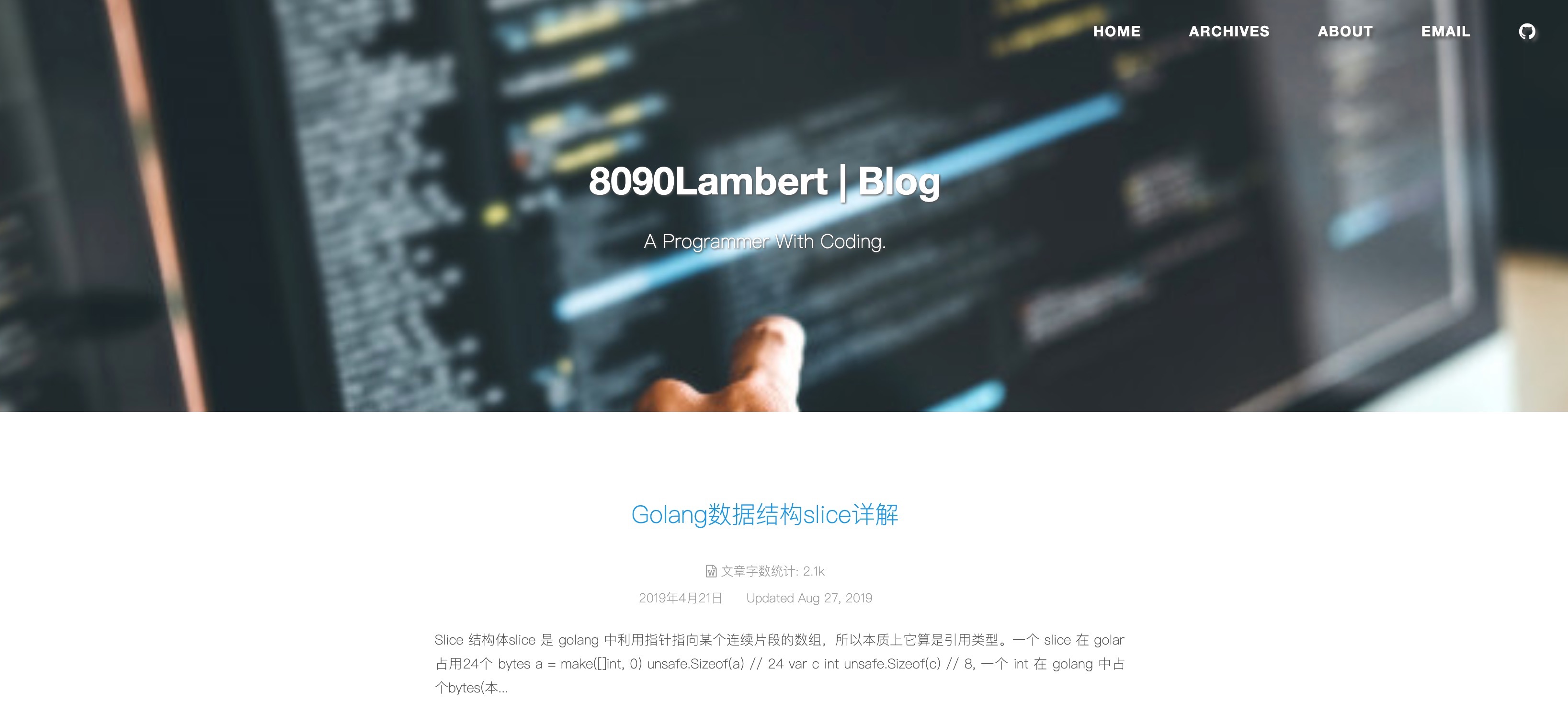
**[Demo here](http://8090lambert.cn)**
## Features
- Comments system
- Disqus
- Gitalk
- Gitment
- Hypercomments
- UYan
- Valine
- Analytics and Statistics
- Google
- Baidu
- Sougou
- CNZZ
- Image cover for post page
- Highlight syntax for code block
- Customization footer for you
- Text and icon for menu
- Pv statistics with busuanzi
## Install
```
$ git clone https://github.com/8090lambert/hexo-theme-easy.git themes/easy
```
> Note: Please let you Hexo version great than or equal to 3.2
## Usage
Set theme in main **hexo config** `_config.yml` file:
```
# Extensions
## Plugins: https://hexo.io/plugins/
## Themes: https://hexo.io/themes/
theme: easy
```
## Preview
You can use command `hexo server` to start a local server see your change.
## Configuration
These configuration options in theme `_config.yml` file,unless special illustration.
### Menu
This menu support `text` or `icon(font-awesome)`, for example:
```
# Header Menu
menu:
Home: /
Archives: /archives
Email: mailto:<[email protected]>
# change github values to your own addresses
Github:
url: https://github.com/8090Lambert
icon: github
```
### Home Cover Image
```
# URL of the Home page image, For example:
# index_cover: /img/default-banner.jpg
# index_cover: http://8090lambert.cn/img/default-banner.jpg
index_cover: /img/default-banner.jpg
```
### Auto excerpt
```
# Use post content to trim portion text.
auto_excerpt:
enable: true
length: 200 # trim length, default 200
```
### Post MetaData
Dependent on `hexo-wordcount`,you should install before using:
`
$ cd hexo_dict && npm install hexo-wordcount --save
`
```
# Post meta display settings
post_meta:
item_text: true
created_at: true
updated_at: true
categories: true
# Post wordcount display settings
# Dependencies: https://github.com/willin/hexo-wordcount
post_wordcount:
item_text: true
wordcount: true
min2read: false
totalcount: false
separated_meta: true
```
### Comments
```
# Many Comment Drivers, you can choose one to open it.
# Write your configure of which platform.
# disqus
disqus_shortname: false
# uyan
uyan_uid: false
# Gitment,https://github.com/imsun/gitment
gitment:
enable: false
owner:
repo:
client_id:
client_secret:
# Gitalk,
gitalk:
enable: false
owner:
repo:
admin:
client_id:
client_secret:
# Valine Comment system. https://valine.js.org
valine:
enable: false
appId: # your leancloud appId
appKey: # your leancloud appKey
notify: false # Mail notify
verify: false # Verify code
avatar: mm # Gravatar style : mm/identicon/monsterid/wavatar/retro/hide
placeholder: Just go go # Comment Box placeholder
guest_info: nick,mail,link # Comment header info
pageSize: 10 # comment list page size
# Hyper Comments support. Write your id here, or false to disable. http://hypercomments.com
hyper_id: false
```
### Custom Footer
```
# Footer setting.
footer:
# Specify the date when the site was setup.
# If not defined, current year will be used.
since: 2016
# Icon between year and copyright info.
icon: heart
# If not defined, will be used `author` from Hexo main config.
copyright: 8090Lambert
# Hexo link (Powered by Hexo).
powered: false
```
### PV Statistics
```
# Show PV/UV of the website/page with busuanzi.
# Get more information on http://ibruce.info/2015/04/04/busuanzi/
busuanzi_count:
# count values only if the other configs are false
enable: true
```
### Analytics
```
# Google Analytics Write your tracking id here, or false to disable.s
google_analytics:
google_site_verification:
# CNZZ
cnzz: false
# BaiDu Analytics
baidu_tongji: false
# Sougou Verification.
sogou_site_verification: false
```
## License
MIT
看看同类模板
对比同技术栈与用途的模板,找到更适合的视觉与内容结构。

hexo-theme-matery
A beautiful hexo blog theme with material design and responsive design.一个基于材料设计和响应式设计而成的全面、美观的Hexo主题。
Hexo · 博客

hexo-theme-cactus
:cactus: A responsive, clean and simple theme for Hexo.
Hexo · 博客

hexo-theme-volantis
A Wonderful Theme for Hexo.
Hexo · 博客

hexo-theme-aurora
Hexo Theme Aurora 是一款以极光色彩和渐变 UI 为核心的 Hexo 博客主题,整体走未来感路线。 它的首页采用杂志式网格布局,文章列表与精选区域层次分明,视觉上更接近个人媒体站点而非传统博客。
Hexo · 博客

hexo-theme-Claudia
Claudia 是一款为 Hexo 设计的博客主题,主打简洁外观与易配置。 它支持自动跟随设备深色模式,并在 README 中宣称拥有 90+ 的 Lighthouse 评分,适合追求轻量与性能的博客作者。
Hexo · 博客

hexo-theme-A4
A hexo theme that looks like an A4 paper.(一个类A4纸张质感的hexo博客主题。 )
Hexo · 博客