使用 Astro 静态生成,内容以 JSON 数据与 MDX 文件维护
Astro作品集
ctros — Astro 作品集模板
作者 aglabsid
Ctros 是一个基于 Astro 的极简个人网站模板,包含博客、项目展示、评论与数据分析等模块,采用 MIT 许可。
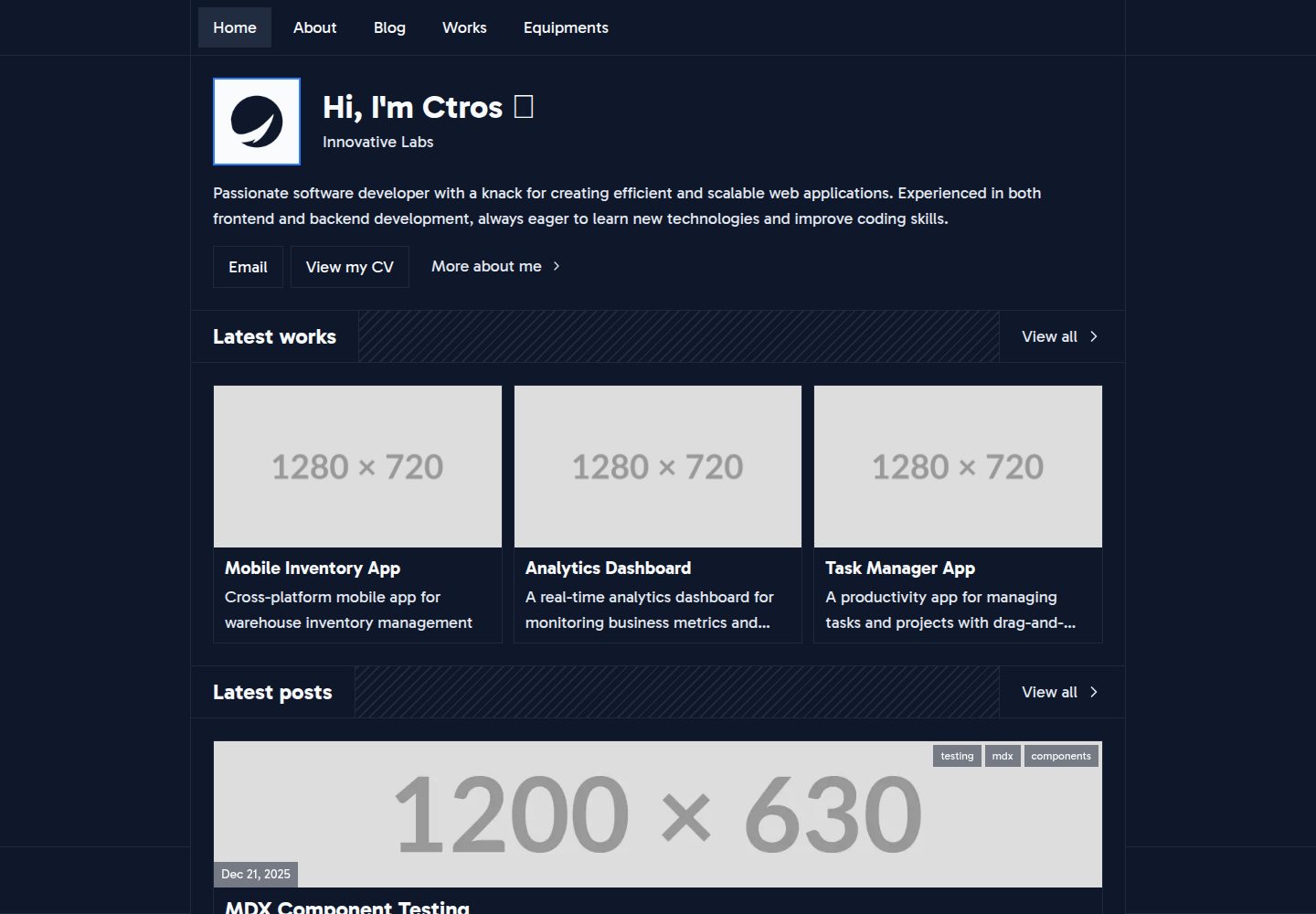
看看你的网站会是什么样
浏览真实页面截图,比较内容排版与手机效果。点击下方缩略图切换,放大查看整页细节。
全部页面与视图 3
截图用于了解视觉与布局,交互效果请以实际项目为准。
采集于 2026-10-05查看来源
值得关注的模板亮点
从已有项目资料中,快速了解它的特点。
内置 Giscus 评论系统,基于 GitHub Discussions
支持 Umami 隐私友好型访问统计
自动生成社交分享用的动态 Open Graph 图片
提供深色主题、响应式布局与 View Transitions 页面过渡
可选 GitHub Action,在新文章推送时向 Discord 发送通知
模板详细介绍
Ctros 是一个用 Astro 构建的极简个人网站模板,适合搭建个人主页、作品集与博客。内容以 JSON 数据与 MDX 文件管理:src/data 下的 about.json、software.json、hardware.json、project-categories.json 用于维护个人信息、常用软件与硬件、项目分类;src/content/post 与 src/content/project 分别存放博客文章和项目条目,每项为一个包含 index.mdx 的文件夹。模板内置 Giscus 评论、Umami 分析、动态 Open Graph 图片、View Transitions、深色主题与响应式布局,并提供可选的 Discord 通知 GitHub Action。使用前需要 Node.js 22+ 与 pnpm(或 npm),复制 .env.example 为 .env 并填写 Giscus 相关变量,Umami 的网站 ID 在 astro.config.mjs 中配置。Discord 通知默认关闭,需在仓库 Secrets 中配置 webhook 并取消工作流中 push 触发块的注释。
Astro作品集
适合你的项目吗?
适用场景
- 搭建个人主页并展示简介、技能、常用软件与硬件信息
- 发布带标签、摘要与缩略图的 MDX 博客文章
- 以分类方式展示个人项目,并附 GitHub 仓库与演示链接
- 为博客文章接入基于 GitHub Discussions 的评论
- 使用 Umami 统计站点访问数据
适合人群
- 希望用 Astro 搭建极简个人网站或作品集的开发者
- 习惯用 MDX 与 JSON 文件管理内容的用户
- 需要评论、访问统计与社交分享图等常见博客功能的个人站点
- 能自行配置 Giscus、Umami 及 GitHub Actions 的使用者
上手与定制指南
结合仓库当前版本的说明,按下面的资料检查内容、配置与运行要求。
- 1
需要 Node.js 22+,推荐使用 pnpm 安装依赖
- 2
复制 .env.example 为 .env,填写 Giscus 的仓库名、仓库 ID、分类名与分类 ID
- 3
Umami 需注册或自托管后获取网站 ID,并在 astro.config.mjs 中配置
- 4
Discord 通知默认关闭,需配置仓库 Secrets 与变量并取消工作流中 push 触发块的注释
- 5
演示图片、字体、图标等第三方素材需按各自许可核对,外部服务可能另外收费
授权与来源资料
使用条件与限制
免费使用 · 保留许可声明本次收录的是公开仓库中采用 MIT 许可的免费版本;免费范围为该版本代码,不代表外部服务或第三方素材免费。
使用时需要遵守
- 允许免费使用、修改、商用和分发该版本代码。
- 分发代码副本或实质性部分时,保留原作者版权声明和完整 MIT 许可声明。
- 代码按现状提供;担保与责任限制以原许可证及适用法律为准。
额外费用与待核对事项
- 演示图片、字体、图标及其他第三方素材需按各自许可核对,不能仅凭代码的 MIT 许可判断。
- 域名、托管、数据库、支付或 AI 等外部服务可能另外收费。
- 使用评论功能需配置 Giscus 环境变量,指向你自己的 GitHub 仓库。
- 访问统计依赖 Umami,需注册托管账号或自行搭建实例。
- Giscus 评论基于 GitHub Discussions,需在仓库中启用该功能。
- 需安装 Giscus GitHub 应用并授权到你的仓库。
- Discord 通知需自行创建 webhook 并配置仓库密钥。
- Discord 通知工作流默认关闭,需手动启用。
- 需取消工作流中 push 触发块的注释才能自动发送通知。
查看原文依据
Permission is hereby granted, free of charge
许可证原文
PUBLIC_GISCUS_REPOSITORY_NAME=your-username/your-repo
README 原文
1. **Create an Umami account**:
README 原文
1. **Enable GitHub Discussions** on your repository:
README 原文
2. **Install the Giscus app**:
README 原文
1. **Create a webhook**: Discord channel → Edit Channel → Integrations → Webhooks → New Webhook, then copy the URL
README 原文
It is disabled by default.
README 原文
https://github.com/aglabsid/ctros/blob/main/LICENSEhttps://github.com/aglabsid/ctros/blob/main/README.md3. **Enable the trigger** by uncommenting the `push` block in the workflow:
README 原文
DeepSeek 根据仓库许可证和 README 整理 ·2026-10-05。结果仅覆盖已读取资料,依赖、图片、字体及后续条款变更以各自原文为准。
项目核对记录与介绍依据
模板资料
- 来源平台
- Astro Themes
- 资料与维护参考分
- 资料较完整 · 83 / 100
- 技术栈
- Astro
- 网站类型
- 作品集
这个分数如何计算
本站按许可资料(最高30分)、演示链接(12分)、预览图(10分)、Star数(15分)、记录的维护时间(15分)、描述完整度(8分)、功能记录(5分)和分类资料(5分)计算。它不是代码、安全或性能测试,也不是 Google 评分;有链接不代表已实测可用。
这个项目需要核对什么
- 记录的仓库更新时间
- 2026-09-28
- 截图检查日期
- 2026-10-05
已收录演示链接。请用你的内容与屏幕尺寸检查;有演示不代表表单、认证或支付已经可用。
目录记录的主要技术栈是 Astro。请通过依赖清单和锁文件核对实际版本与托管要求。这些说明基于收录资料,不代表代码审计或部署实测。
查看具体选型方法 →介绍的制作与核对状态
介绍由 AI 辅助整理目录与仓库资料。仓库作者不等于这篇介绍的审核者。
审核声明: [email protected] · 2026-10-05
查看当时使用的来源资料
SHA-256: 74bbbc41848d9fa0517caf848e19289c5c9bcdc79259665eb08ade1c5717e6ca
2026-10-05T01:18:42.736Z
来源文件 / 仓库# Ctros Minimal personal website template built with [Astro](https://astro.build). ## Features - ⚡ **Fast & Lightweight** - Static site generation with Astro - 🖼️ **Dynamic Open Graph Images** - Auto-generated OG images for social sharing - 📝 **JSON & MDX Content** - Easy content management with JSON data and MDX for blog posts - 💬 **Post Comments** - Integrated commenting system powered by [Giscus](https://giscus.app/) - 🔔 **Discord Notifications** - Optional GitHub Action that announces new posts to Discord - 📊 **Analytics** - Privacy-friendly analytics with [Umami](https://umami.is/) - 🎨 **View Transitions** - Smooth page transitions with shared element animations - 🌙 **Dark Theme** - Beautiful dark mode design - 📱 **Responsive** - Mobile-first responsive layout - 🔍 **SEO Optimized** - Meta tags and structured data support ## Tech Stack - [Astro](https://astro.build) - Static Site Generator - [React](https://react.dev) - UI Components - [Tailwind CSS](https://tailwindcss.com) - Styling - [MDX](https://mdxjs.com) - Content authoring - [Shiki](https://shiki.style) - Syntax highlighting - [Giscus](https://giscus.app) - Comments - [Umami](https://umami.is) - Analytics ## Getting Started ### Prerequisites - Node.js 22+ - pnpm (recommended) or npm ### Installation 1. Clone the repository: ```bash git clone [email protected]:aglabsid/ctros.git cd ctros ``` 2. Install dependencies: ```bash pnpm install ``` 3. Create environment variables: ```bash cp .env.example .env ``` 4. Configure your environment variables (see [Configuration](#configuration)) 5. Start the development server: ```bash pnpm dev ``` ## Configuration ### Environment Variables Create a `.env` file in the root directory with the following variables: ```env # Giscus Configuration PUBLIC_GISCUS_REPOSITORY_NAME=your-username/your-repo PUBLIC_GISCUS_REPOSITORY_ID=your-repo-id PUBLIC_GISCUS_CATEGORY_NAME=Announcements PUBLIC_GISCUS_CATEGORY_ID=your-category-id ``` ### Setting up Umami Analytics [Umami](https://umami.is/) is a simple, fast, privacy-focused analytics alternative to Google Analytics. This project uses [@yeskunall/astro-umami](https://github.com/yeskunall/astro-umami) integration. 1. **Create an Umami account**: - Sign up at [cloud.umami.is](https://cloud.umami.is/) (hosted) or self-host your own instance 2. **Add your website**: - Go to Settings → Websites → Add website - Enter your website name and domain 3. **Get your Website ID**: - Click on your website in the dashboard - Copy the Website ID from the tracking code 4. **Update `astro.config.mjs`**: ```js import yeskunallumami from '@yeskunall/astro-umami' export default defineConfig({ integrations: [ // ...other integrations yeskunallumami({ id: 'your-website-id', hostUrl: 'https://cloud.umami.is', // or your self-hosted URL }), ], }) ``` For more details, see the [Umami documentation](https://umami.is/docs). ### Setting up Giscus [Giscus](https://giscus.app/) is a comments system powered by GitHub Discussions. 1. **Enable GitHub Discussions** on your repository: - Go to your repository → Settings → General - Scroll to "Features" section - Check "Discussions" 2. **Install the Giscus app**: - Visit [github.com/apps/giscus](https://github.com/apps/giscus) - Click "Install" and select your repository 3. **Get your configuration values**: - Go to [giscus.app](https://giscus.app/) - Enter your repository name - Choose your preferred settings - Copy the `data-repo-id` and `data-category-id` values 4. **Update your `.env` file** with the values from step 3 For more details, see the [Giscus documentation](https://giscus.app/). ### Setting up Discord Notifications `.github/workflows/discord-notify.yml` posts a message to Discord whenever a new post is pushed to `main`. It is disabled by default. 1. **Create a webhook**: Discord channel → Edit Channel → Integrations → Webhooks → New Webhook, then copy the URL 2. **Add repository settings** (Settings → Secrets and variables → Actions): - Secret `DISCORD_WEBHOOK_URL` - the webhook URL - Variable `SITE_URL` - your site URL, e.g. `https://example.com` - Variable `DISCORD_ROLE_ID` (optional) - role to mention 3. **Enable the trigger** by uncommenting the `push` block in the workflow: ```yaml on: workflow_dispatch: push: branches: [main] paths: ['src/content/post/**/index.mdx'] ``` ## Project Structure ``` ctros/ ├── public/ # Static assets ├── src/ │ ├── components/ # UI components │ │ └── mdx/ # MDX components │ ├── content/ # Content collections │ │ ├── post/ # Blog posts (MDX) │ │ └── project/ # Projects (MDX) │ ├── data/ # JSON data files │ ├── layouts/ # Page layouts │ ├── lib/ # Utility functions │ ├── pages/ # Page routes │ └── styles/ # Global styles ├── astro.config.mjs # Astro configuration └── package.json ``` ## Content Management ### Blog Posts Create a new folder in `src/content/post/` with an `index.mdx` file: ```mdx --- title: My Post Title thumbnail: ./thumbnail.png thumbnailCredit: Photo by Someone summary: A brief summary of the post tags: - tag1 - tag2 author: Your Name createdAt: 2025-01-01T10:00:00+00:00 updatedAt: 2025-01-01T10:00:00+00:00 --- Your content here... ``` ### Projects Create a new folder in `src/content/project/` with an `index.mdx` file: ```mdx --- title: Project Name thumbnail: ./thumbnail.png description: Project description category: web github: https://github.com/... demo: https://... --- Project details here... ``` ### Site Data Edit the JSON files in `src/data/` to customize: - `about.json` - Personal information (`firstName`, `lastName`, `headline`, `email`, `cv`, bio, skills, social links) - `software.json` - Software/tools you use - `hardware.json` - Hardware/equipment - `project-categories.json` - Project categories ## Commands | Command | Description | | -------------- | ------------------------- | | `pnpm dev` | Start development server | | `pnpm build` | Build for production | | `pnpm preview` | Preview production build | | `pnpm format` | Format code with Prettier | ## License MIT License
看看同类模板
对比同技术栈与用途的模板,找到更适合的视觉与内容结构。

astro-theme-cactus
A simple Astro theme. Use it to create your blog or website.
Astro · 作品集

astrofy
Astrofy is a free and open-source template for your Personal Portfolio Website built with Astro and TailwindCS…
Astro · 作品集

astro-nano
Astro Nano is a static, minimalist, lightweight, lightning fast portfolio and blog.
Astro · 作品集

astro-erudite
An opinionated, unstyled static blogging template built with Astro and native CSS.
Astro · 作品集

astro-sphere
Astro Sphere is a static, minimalist, lightweight, lightning fast portfolio and blog.
Astro · 作品集

astro-micro
Blog theme for Astro with search and comments built-in. Zero frameworks.
Astro · 作品集