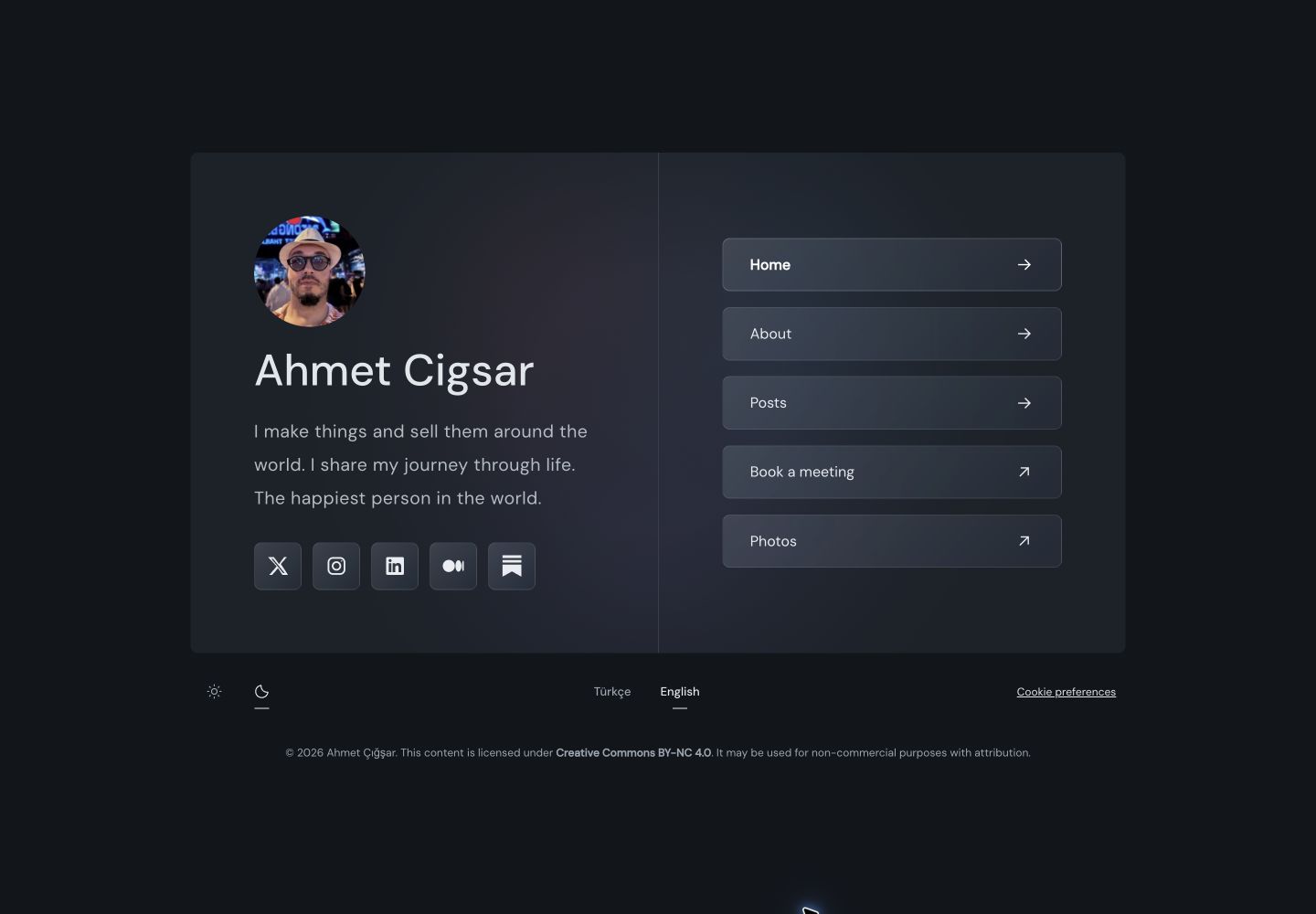
双栏个人资料卡,简介、照片、社交图标与导航由 EmDash CMS 管理
Astro作品集博客
emdash-theme-persona-bio — Astro 作品集模板
作者 ahmetcigsar
面向 EmDash CMS 与 Astro 的个人简介与博客主题,MIT 许可,默认英文并可选土耳其语路由。
看看你的网站会是什么样
浏览真实页面截图,比较内容排版与手机效果。点击下方缩略图切换,放大查看整页细节。
目前有 1 张原始预览,可打开完整图片查看设计细节。
截图用于了解视觉与布局,交互效果请以实际项目为准。
采集于 2026-10-03查看来源
值得关注的模板亮点
从已有项目资料中,快速了解它的特点。
博客归档支持列表与网格视图,含文章页、分类、标签、搜索和 RSS
浅色、深色与跟随系统三种外观模式,导航响应式适配
默认英文,可选在 /tr/ 前缀下提供土耳其语路由
集成 EmDash 的编辑、草稿、发布、SEO 与预览能力
示例内容为原创,不含个人账号、跟踪 ID 或生产凭据
模板详细介绍
Persona Bio 是一个为 EmDash CMS 构建、基于 Astro 的个人简介与博客主题,配置目标为 Cloudflare Workers。它提供双栏个人资料卡,姓名、简介、照片、社交图标和导航均由 CMS 管理;博客部分包含列表与网格两种归档视图、文章页、分类、标签、搜索和 RSS。主题默认使用英文,可在 /tr/ 前缀下提供可选的土耳其语路由,并支持浅色、深色与跟随系统三种外观模式。
该仓库是完整的 Astro 模板,不是可在 EmDash 管理后台直接激活的 ZIP 包。已有 EmDash 站点如需使用,应把布局、组件、样式和路由合并到独立分支,并添加 bio_profiles 集合与所需菜单,而不是替换数据库、内容或部署配置。种子文件不会自动迁移已初始化的数据库。
使用前需注意:本地开发通过本地 Cloudflare 模拟运行,生产部署需要自建 D1 数据库与 R2 存储桶,并在 wrangler.jsonc 中替换占位配置;仓库自带的 GitHub Actions 工作流仅做校验,不执行部署。主题目录条目位于站点本地,该仓库并非 EmDash 公共市场列表。演示截图来自使用该主题的线上站点,展示的是站点自身内容与定制,起始模板只包含通用示例内容。
Astro作品集博客
适合你的项目吗?
适用场景
- 搭建以个人简介为主页、附带博客写作的独立站点
- 在 EmDash CMS 中管理个人资料、导航菜单与文章内容
- 需要英文为主、并可选提供土耳其语界面的站点
- 部署到 Cloudflare Workers,并使用 D1 与 R2 作为数据与存储资源
- 作为新项目模板,通过 GitHub Use this template 或 npm create astro 命令初始化
适合人群
- 使用 EmDash CMS 并希望获得现成个人简介与博客前端的开发者
- 熟悉 Astro 与 pnpm 工作流、能自行完成 Cloudflare 资源配置的团队
- 需要 MIT 许可、可修改并可用于商业项目的主题使用者
- 已有 EmDash 站点、愿意以分支合并方式引入主题的维护者
上手与定制指南
结合仓库当前版本的说明,按下面的资料检查内容、配置与运行要求。
- 1
使用 Node.js 22 与 package.json 中声明的 pnpm 版本,执行 pnpm install 与 pnpm dev。
- 2
访问 http://localhost:4321/_emdash/admin 完成首次设置;空数据库会应用内置种子,可选择是否包含示例内容。
- 3
在 Theme Profiles 中创建 slug 为 personabio 的主页资料;完成初始设置后重启开发服务器,以便 EmDash 依据初始化后的 schema 重新生成集合类型。
- 4
部署前在 Cloudflare 创建自己的 D1 数据库与 R2 存储桶,更新 wrangler.jsonc 中的 Worker 名称、D1 名称与 ID、R2 存储桶名称;仓库中的全零数据库 ID 仅为本地开发占位。
- 5
复制 .env.example 为 .env 并将 SITE_URL 设为公开 HTTPS 源,在构建环境中提供同一变量,然后运行 pnpm deploy 并在生产站点的 /_emdash/admin 完成设置。
授权与来源资料
使用条件与限制
免费使用 · 保留许可声明本次收录的是公开仓库中采用 MIT 许可的免费版本;免费范围为该版本代码,不代表外部服务或第三方素材免费。
使用时需要遵守
- 允许免费使用、修改、商用和分发该版本代码。
- 分发代码副本或实质性部分时,保留原作者版权声明和完整 MIT 许可声明。
- 代码按现状提供;担保与责任限制以原许可证及适用法律为准。
额外费用与待核对事项
- 生产部署需自行在 Cloudflare 创建 D1 数据库与 R2 存储桶,属于外部服务资源要求,非代码许可限制。
- 部署需使用自己的 Cloudflare 账户并通过 Wrangler 认证,涉及外部账户。
- 需配置 SITE_URL 环境变量为公开 HTTPS 源,构建环境也需提供同一变量。
- 该仓库是完整 Astro 模板,不能作为 ZIP 在 EmDash 管理后台直接激活;已有站点需以分支合并方式引入。
- 种子文件不会自动迁移已初始化的数据库,已有站点需手动添加集合与菜单。
- 依赖与字体保留各自许可,需查阅第三方声明文件。
- 演示图片、字体、图标及其他第三方素材需按各自许可核对,不能仅凭代码的 MIT 许可判断。
- 域名、托管、数据库、支付或 AI 等外部服务可能另外收费。
查看原文依据
Permission is hereby granted, free of charge
许可证原文
Create your own D1 database and R2 bucket in Cloudflare.
README 原文
Authenticate Wrangler to your own Cloudflare account and run `pnpm deploy`.
README 原文
Copy `.env.example` to `.env` and set `SITE_URL` to your public HTTPS origin.
README 原文
This is a complete Astro template, not a ZIP that can be activated from the admin panel.
README 原文
Seed files do not automatically migrate initialized databases.
README 原文
https://github.com/ahmetcigsar/emdash-theme-persona-bio/blob/main/LICENSEhttps://github.com/ahmetcigsar/emdash-theme-persona-bio/blob/main/README.mdDependencies and fonts retain their own licenses; see [third-party notices](THIRD_PARTY_NOTICES.md).
README 原文
DeepSeek 根据仓库许可证和 README 整理 ·2026-10-03。结果仅覆盖已读取资料,依赖、图片、字体及后续条款变更以各自原文为准。
项目核对记录与介绍依据
模板资料
- 来源平台
- GitHub
- 资料与维护参考分
- 资料较完整 · 76 / 100
- 技术栈
- Astro
- 网站类型
- 作品集 · 博客
这个分数如何计算
本站按许可资料(最高30分)、演示链接(12分)、预览图(10分)、Star数(15分)、记录的维护时间(15分)、描述完整度(8分)、功能记录(5分)和分类资料(5分)计算。它不是代码、安全或性能测试,也不是 Google 评分;有链接不代表已实测可用。
这个项目需要核对什么
- 记录的仓库更新时间
- 2026-09-21
- 截图检查日期
- 2026-10-03
目前没有记录演示链接。请依据仓库说明在本地评估;仅凭截图无法确认交互行为。
目录记录的主要技术栈是 Astro。请通过依赖清单和锁文件核对实际版本与托管要求。这些说明基于收录资料,不代表代码审计或部署实测。
查看具体选型方法 →介绍的制作与核对状态
介绍由 AI 辅助整理目录与仓库资料。仓库作者不等于这篇介绍的审核者。
已完成服务器许可规则与 AI 来源核对;未经过人工编辑审核。
查看当时使用的来源资料
SHA-256: 9da0d133b3bec1c9d707676421f256f4c10292920bb22753c2e1661d44bda52b
2026-10-03T00:48:08.899Z
来源文件 / 仓库# Persona Bio [](LICENSE) A responsive personal profile and blog theme for [EmDash CMS](https://emdashcms.com/), built with Astro and configured for Cloudflare Workers. [Download ZIP](https://github.com/ahmetcigsar/emdash-theme-persona-bio/archive/refs/heads/main.zip) · [Use this template](https://github.com/new?template_name=emdash-theme-persona-bio&template_owner=ahmetcigsar) · [Theme guide](docs/theme.md) ## Live screenshots English screenshots from [ahmet.bio](https://ahmet.bio/en/), a live site using Persona Bio. These show the site's own content and customization; the starter includes generic sample content. ### Homepage — desktop  ### Posts — desktop  ### Mobile | Homepage | Posts | | --- | --- | |  |  | Captured from the live English pages in dark mode. Screenshots are showcase material; the theme code remains MIT-licensed. See [third-party notices](THIRD_PARTY_NOTICES.md) for screenshot content attribution. ## Features - Two-column profile card with CMS-managed biography, photo, social icons, and navigation - Blog archives with list and grid views, article pages, categories, tags, search, and RSS - Light, dark, and system appearance modes with responsive navigation - English by default; optional Turkish routes under `/tr/` - EmDash editing, drafts, publishing, SEO, and preview integration - Original sample content; no personal accounts, tracking IDs, or production credentials ## Start a new site Use GitHub's **Use this template** button, download the ZIP, or run: ```bash npm create astro@latest -- --template github:ahmetcigsar/emdash-theme-persona-bio ``` Inside your new project, use Node.js 22 and the pnpm version declared in `package.json`: ```bash pnpm install pnpm dev ``` Open `http://localhost:4321/_emdash/admin` and complete first-time setup. Local development uses local Cloudflare emulation; production resource IDs are not required for this step. On an empty database, EmDash applies the bundled seed. Include sample content to get the example profile, About page, and post; without samples, create and publish your own entries. Create the homepage profile with slug `personabio` in **Theme Profiles**. Restart the dev server after completing initial setup so EmDash regenerates collection types from the initialized schema. ```bash pnpm typecheck pnpm build ``` ## Customize - **Theme Profiles:** edit the `personabio` entry's name, biography, and photo. - **Menus:** edit `primary` for navigation and `social` for social links. - **Site settings:** change the site title and tagline. - **Posts / Pages:** replace the sample writing with your own content. - **Styles:** edit `src/styles/personabio.css`, `theme.css`, and `appearance.css`. - **Favicon:** replace `public/favicon.svg`. Documentation and developer-facing descriptions are in English. Turkish interface translations are optional runtime content, separate from documentation. ## Deploy to Cloudflare 1. Create your own D1 database and R2 bucket in Cloudflare. 2. Update `wrangler.jsonc`: set your Worker name, D1 name and ID, and R2 bucket name. The included all-zero database ID is a local-development placeholder. 3. Copy `.env.example` to `.env` and set `SITE_URL` to your public HTTPS origin. Provide the same variable in any build environment. 4. Authenticate Wrangler to your own Cloudflare account and run `pnpm deploy`. 5. Complete setup on the production site's `/_emdash/admin` route. Local development data is not copied into production automatically. The included GitHub Actions workflow only validates the project. It does not deploy anything or require deployment secrets. Cloudflare's Astro adapter configures its image and session bindings during the build; review the generated deployment configuration for your account before deploying. ## Existing EmDash sites This is a complete Astro template, not a ZIP that can be activated from the admin panel. For an existing site, merge the theme's layouts, components, styles, and routes into a separate branch, then add the `bio_profiles` collection and required menus without replacing your database, content, or deployment configuration. Seed files do not automatically migrate initialized databases. The theme catalog entry is local to the site. This repository is not a public EmDash marketplace listing. ## Routes | Page | Route | | --- | --- | | Profile | `/` | | Posts | `/posts` | | Post or page | `/:slug` | | Category / tag | `/category/:slug`, `/tag/:slug` | | Search | `/search` | | RSS | `/rss.xml` | | Static theme demo | `/themes/personabio/demo` | | CMS content preview | `/themes/personabio/preview` | Content routes also support the `/tr/` prefix. Pages take precedence if a post and a page use the same slug. Reserve built-in route names such as `posts`, `search`, `category`, `tag`, and `tr`. ## License Persona Bio is distributed under the [MIT License](LICENSE). You may use, modify, and redistribute the theme, including in commercial projects, under the terms of that license. Retain the copyright and permission notices when distributing copies or substantial portions of the software. The theme is provided without warranty. Bundled sample text and SVG placeholders are covered by the same license. Dependencies and fonts retain their own licenses; see [third-party notices](THIRD_PARTY_NOTICES.md). Content you publish on your own site is not automatically licensed under MIT.
看看同类模板
对比同技术栈与用途的模板,找到更适合的视觉与内容结构。

astrowind
⭕️ AstroWind: A free template using Astro v7 and Tailwind CSS v4. Astro starter theme.
Astro · 博客

astro-paper
A minimal, accessible and SEO-friendly Astro blog theme.
Astro · 博客

fuwari
✨A static blog template built with Astro.
Astro · 博客

Firefly
Firefly 是一款基于 Astro 的静态博客主题,由 CuteLeaf 在 saicaca 的 Fuwari 模板基础上二次开发,主打清新美观的视觉风格。
Astro · 博客

astro-theme-cactus
A simple Astro theme. Use it to create your blog or website.
Astro · 作品集

astrofy
Astrofy is a free and open-source template for your Personal Portfolio Website built with Astro and TailwindCS…
Astro · 作品集