在 Layout.astro 中集中配置标题、描述、关键词、作者等 SEO 元标签
Astro启动器
astro-starter — Astro 启动器模板
作者 alipiry
基于 Astro 的启动器模板,内置 SEO 元标签、OpenGraph 与 Twitter Cards 配置,并集成 ESLint、Prettier、TypeScript、Husky 与 GitHub Actions 等开发工具链。
看看你的网站会是什么样
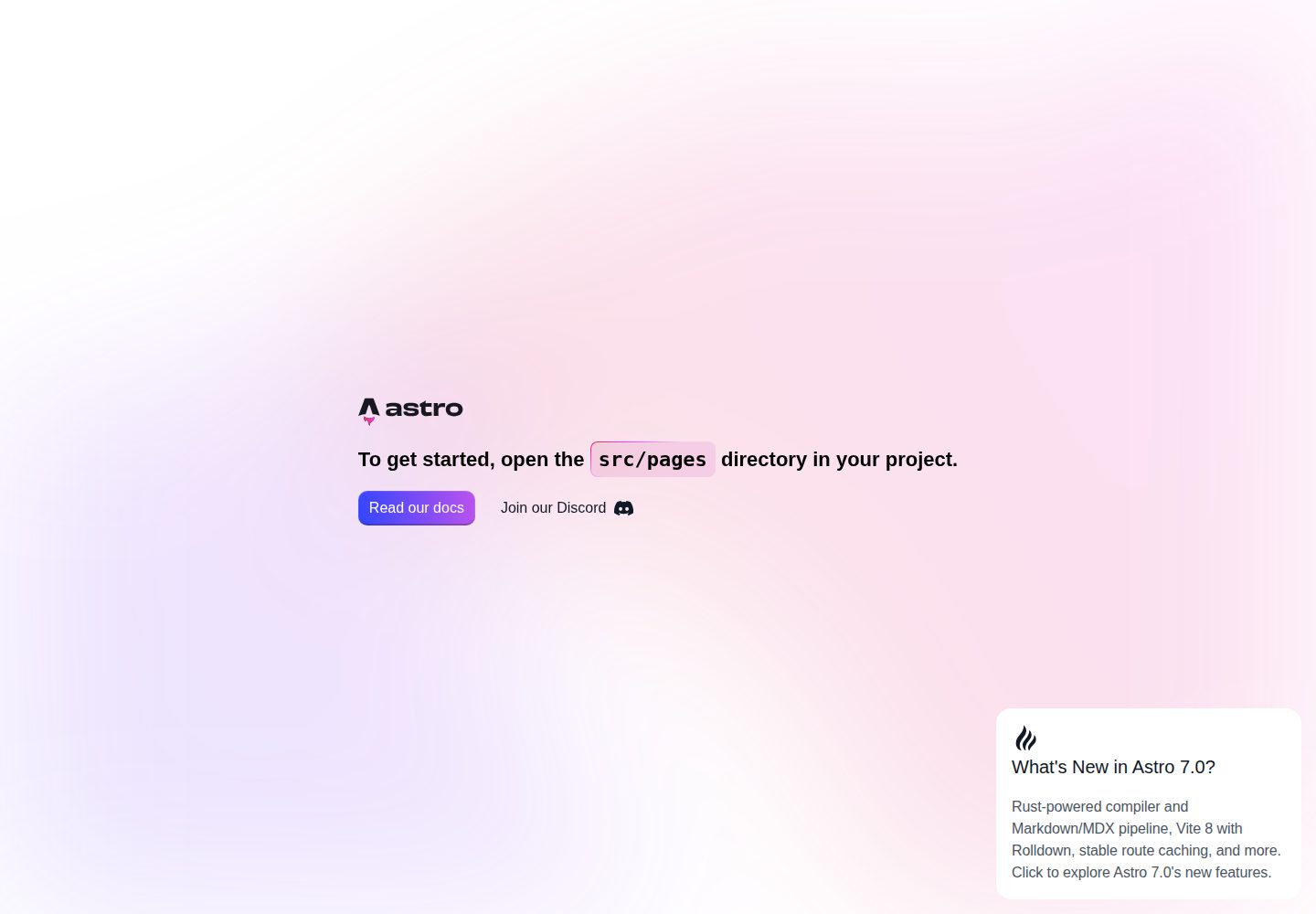
浏览真实页面截图,比较内容排版与手机效果。点击下方缩略图切换,放大查看整页细节。
全部页面与视图 2
截图用于了解视觉与布局,交互效果请以实际项目为准。
采集于 2026-10-02查看来源
值得关注的模板亮点
从已有项目资料中,快速了解它的特点。
内置 OpenGraph 与 Twitter Cards 社交分享元数据,并提供 og.png 分享图
通过 @astrojs/sitemap 与 astro-robots-txt 自动生成 sitemap 与 robots.txt
集成 ESLint、Prettier、TypeScript 及 Astro 对应插件
使用 Husky、lint-staged、commitlint 在提交前执行类型检查、代码修复与格式校验
提供 quality.yml 与 build.yml 两个 GitHub Actions 工作流
模板详细介绍
这是一个面向 Astro 项目的启动器模板,重点在 SEO 与开发流程配置。模板在 Layout.astro 中集中处理标题、描述、关键词、作者等元标签,并配置 OpenGraph 与 Twitter Cards 社交预览,同时通过 @astrojs/sitemap 与 astro-robots-txt 生成 sitemap 和 robots.txt。项目结构按 assets、components、layouts、pages 划分,public 目录提供多平台 favicon 与 og.png 社交分享图。
开发工具方面,模板集成 ESLint(含 Astro 插件)、Prettier(含 Astro 格式化)、TypeScript 类型检查,并通过 Husky、lint-staged、commitlint 在提交前执行类型检查、代码修复与格式校验,提交信息遵循 Conventional Commits。仓库包含 quality.yml 与 build.yml 两个 GitHub Actions 工作流,分别负责代码质量检查与构建验证。
使用限制:模板本身是静态站点启动器,不包含后端、数据库或认证等能力;README 中提到的 Netlify、Cloudflare Workers、GitHub Pages 属于部署选项,需要自行配置。演示图片、字体、图标等第三方素材需按各自许可核对,MIT 许可仅覆盖该版本代码。
Astro启动器
适合你的项目吗?
适用场景
- 需要为 Astro 站点快速配置 SEO 元标签与社交分享预览
- 希望在新项目中直接使用 ESLint、Prettier、TypeScript 与 Git 钩子
- 需要自动生成 sitemap 与 robots.txt 的静态站点
- 希望通过 GitHub Actions 对代码质量与构建进行持续检查
适合人群
- 使用 Astro 构建静态站点的开发者
- 重视 SEO 元数据与社交分享配置的项目
- 希望统一代码检查、格式化与提交规范的团队
- 需要以 pnpm 管理依赖并接入 GitHub Actions 的项目
上手与定制指南
结合仓库当前版本的说明,按下面的资料检查内容、配置与运行要求。
- 1
使用 pnpm install 安装依赖,Git 钩子会通过 prepare 脚本自动安装
- 2
复制 .env.example 为 .env,并设置 SITE_URL 与 APP_ENV
- 3
运行 pnpm dev 启动本地开发服务器,默认地址为 localhost:4321
- 4
按需修改 src/layouts/Layout.astro 中的站点信息与社交账号配置
- 5
替换 public 目录下的 favicon 与 og.png 以匹配实际站点
授权与来源资料
使用条件与限制
免费使用 · 保留许可声明本次收录的是公开仓库中采用 MIT 许可的免费版本;免费范围为该版本代码,不代表外部服务或第三方素材免费。
使用时需要遵守
- 允许免费使用、修改、商用和分发该版本代码。
- 分发代码副本或实质性部分时,保留原作者版权声明和完整 MIT 许可声明。
- 代码按现状提供;担保与责任限制以原许可证及适用法律为准。
额外费用与待核对事项
- 部署到 Netlify 需自行注册账号并连接仓库,属于外部服务,非模板自带能力。
- 使用前需在部署平台配置 SITE_URL 与 APP_ENV 环境变量,否则站点信息可能不正确。
- 需自行创建 .env 文件并填写环境变量,模板不提供默认可用配置。
- 演示图片、字体、图标及其他第三方素材需按各自许可核对,不能仅凭代码的 MIT 许可判断。
- 域名、托管、数据库、支付或 AI 等外部服务可能另外收费。
查看原文依据
Permission is hereby granted, free of charge
许可证原文
Netlify will build directly from source
README 原文
Set `SITE_URL` and `APP_ENV` environment variable in Netlify dashboard
README 原文
https://github.com/alipiry/astro-starter/blob/develop/LICENSEhttps://github.com/alipiry/astro-starter/blob/develop/README.mdcp .env.example .env
README 原文
DeepSeek 根据仓库许可证和 README 整理 ·2026-10-02。结果仅覆盖已读取资料,依赖、图片、字体及后续条款变更以各自原文为准。
项目核对记录与介绍依据
模板资料
- 来源平台
- GitHub
- 资料与维护参考分
- 资料较完整 · 87 / 100
- 技术栈
- Astro
- 网站类型
- 启动器
这个分数如何计算
本站按许可资料(最高30分)、演示链接(12分)、预览图(10分)、Star数(15分)、记录的维护时间(15分)、描述完整度(8分)、功能记录(5分)和分类资料(5分)计算。它不是代码、安全或性能测试,也不是 Google 评分;有链接不代表已实测可用。
这个项目需要核对什么
- 记录的仓库更新时间
- 2026-07-05
- 截图检查日期
- 2026-10-02
已收录演示链接。请用你的内容与屏幕尺寸检查;有演示不代表表单、认证或支付已经可用。
目录记录的主要技术栈是 Astro。请通过依赖清单和锁文件核对实际版本与托管要求。这些说明基于收录资料,不代表代码审计或部署实测。
查看具体选型方法 →介绍的制作与核对状态
介绍由 AI 辅助整理目录与仓库资料。仓库作者不等于这篇介绍的审核者。
已完成服务器许可规则与 AI 来源核对;未经过人工编辑审核。
查看当时使用的来源资料
SHA-256: a5e7e410edffeac6bdd083a03c53c388abfd48b95a2bad875fa805203605bea1
2026-10-02T07:16:16.752Z
来源文件 / 仓库# 🚀 Astro Starter
A modern, SEO-optimized Astro starter template with comprehensive meta tags, social media integration, and essential web development tools.
[](https://app.netlify.com/projects/astro-starter-ap/deploys)
<div align="center">
<h2>Made with ❤ by <a href="https://github.com/alipiry">Ali Piry</a></h2>
</div>
## ✨ Features
- **🎯 SEO Optimized**: Complete OpenGraph, Twitter Cards, and meta tag setup
- **🔍 Search Engine Friendly**: Automated sitemap and robots.txt generation
- **⚡ Modern Tooling**: ESLint, Prettier, and TypeScript configuration
- **🚀 CI/CD Ready**: GitHub Actions workflows for quality checks and builds
- **🎨 Clean Architecture**: Organized component structure with layouts
- **🌐 Social Media Integration**: Twitter and OpenGraph meta tags configured
- **🔧 Git Hooks**: Husky and lint-staged for automated pre-commit quality checks
## 🏗️ Project Structure
```text
/
├── .github/ # GitHub workflows and templates
│ └── workflows/ # CI/CD automation
│ ├── quality.yml # Code quality checks
│ ├── build.yml # Build verification
├── public/ # Static assets
│ ├── favicon.ico # Traditional favicon
│ ├── favicon-16x16.png # Browser favicon (16x16)
│ ├── favicon-32x32.png # Browser favicon (32x32)
│ ├── apple-touch-icon.png # iOS home screen icon
│ ├── android-chrome-*.png # Android icons (192x192, 512x512)
│ ├── og.png # OpenGraph/Twitter image
│ └── favicon.svg # SVG favicon
├── src/
│ ├── assets/ # Build-time assets
│ │ ├── astro.svg
│ │ └── background.svg
│ ├── components/ # Reusable Astro components
│ │ └── Welcome.astro
│ ├── layouts/ # Page layouts
│ │ └── Layout.astro # Main layout with SEO
│ └── pages/ # File-based routing
│ └── index.astro
├── .husky/ # Git hooks (pre-commit, commit-msg)
├── astro.config.mjs # Astro configuration
├── eslint.config.mjs # ESLint configuration
├── tsconfig.json # TypeScript configuration
├── .prettierrc.mjs # Prettier configuration
├── .prettierignore # Prettier ignore patterns
├── lint-staged.config.js # Lint-staged configuration
├── commitlint.config.js # Commit message linting rules
├── pnpm-workspace.yaml # pnpm workspace + dependency overrides
├── .env.example # Environment variables template
└── package.json
```
## 🔧 Tech Stack
- **Framework**: [Astro](https://astro.build/) - Modern static site generator
- **SEO**: [astro-seo](https://github.com/jonasmerlin/astro-seo) - Comprehensive SEO component
- **Integrations**:
- `@astrojs/sitemap` - Automatic sitemap generation
- `astro-robots-txt` - Robots.txt generation
- **Development Tools**:
- ESLint with Astro plugin
- Prettier with Astro formatting
- TypeScript support
- Husky for Git hooks
- lint-staged for pre-commit quality checks
- **Package Manager**: pnpm for fast installations
## 🚀 Quick Start
1. **Clone and install dependencies**
```bash
pnpm install
```
2. **Set up environment variables**
```bash
cp .env.example .env
```
3. **Start development server**
```bash
pnpm dev
```
4. **Open your browser**
Navigate to `http://localhost:4321`
## 📋 Available Commands
| Command | Action |
| :---------------------- | :----------------------------------------------- |
| `pnpm install` | Installs dependencies |
| `pnpm dev` | Starts local dev server at `localhost:4321` |
| `pnpm build` | Build your production site to `./dist/` |
| `pnpm preview` | Preview your build locally, before deploying |
| `pnpm run lint` | Run ESLint to check code quality |
| `pnpm run lint:fix` | Fix ESLint issues automatically |
| `pnpm run format` | Format code with Prettier |
| `pnpm run format:check` | Check if code is properly formatted |
| `pnpm run type-check` | Run Astro's TypeScript checker |
| `pnpm astro ...` | Run CLI commands like `astro add`, `astro check` |
| `pnpm astro -- --help` | Get help using the Astro CLI |
## 🪝 Git Hooks & Pre-commit Checks
This project uses **Husky**, **lint-staged**, and **commitlint** to ensure code quality before commits:
| Hook | Action |
| ------------ | -------------------------------------------------------------------- |
| `pre-commit` | lint-staged (type-check + ESLint `--fix` + Prettier on staged files) |
| `commit-msg` | commitlint |
### Automated Quality Checks
When you commit changes, the following checks run automatically:
- **Type Checking**: Astro's TypeScript checker validates all `.ts`, `.tsx`, and `.astro` files
- **Linting**: ESLint fixes code style issues automatically
- **Formatting**: Prettier formats code according to project standards
### Configuration
The pre-commit hooks are configured in `lint-staged.config.js`:
```javascript
{
"**/*.{ts,tsx,astro}": "pnpm run type-check",
"**/*.astro": ["eslint --fix", "prettier --write"],
"**/*.{ts,tsx,js,jsx}": ["eslint --fix", "prettier --write"],
"**/*.{md,json,yaml,yml,css,scss,sass}": "prettier --write"
}
```
### Setup
Git hooks are automatically installed when you run `pnpm install` via the `prepare` script. If you need to reinstall them manually:
```bash
pnpm run prepare
```
### Commit Message Format
[Conventional Commits](https://www.conventionalcommits.org/) format, enforced by commitlint on `commit-msg`:
```
type(scope): subject
```
Examples:
```
chore(deps): bump astro to v7
fix(seo): correct twitter card image ref
chore(ci): cache pnpm store in build workflow
```
**Scopes** (optional but encouraged): `deps`, `security`, `ci`, `config`, `seo`, `assets`, `root`.
**Types:** `feat`, `fix`, `docs`, `style`, `refactor`, `perf`, `test`, `chore`, `ci`, `build`, `revert`.
Max header length: 100 characters. No trailing period on subject.
## 🔧 Configuration
### Environment Variables
Create a `.env` file in the root directory:
```bash
SITE_URL=https://your-domain.com
APP_ENV=production
```
### SEO Configuration
The `Layout.astro` includes comprehensive SEO setup:
- **Meta Tags**: Title, description, keywords, author
- **OpenGraph**: Complete social media preview setup
- **Twitter Cards**: Large image cards with metadata
- **Favicons**: Full cross-platform icon support
- **Structured Data**: Basic website structured data
### Customization
1. **Update site information** in `src/layouts/Layout.astro`
2. **Modify social media handles** in the Twitter configuration
3. **Replace favicon files** in the `public/` directory
4. **Update the OpenGraph image** (`public/og.png`)
## 📦 Dependencies
### Production
- `astro` - Core framework
- `astro-seo` - SEO component library
- `@astrojs/sitemap` - Sitemap generation
- `astro-robots-txt` - Robots.txt generation
### Development
- `eslint` + `eslint-plugin-astro` - Code linting
- `prettier` + `prettier-plugin-astro` - Code formatting
- `typescript-eslint` - TypeScript linting
- `husky` - Git hooks management
- `lint-staged` - Pre-commit quality checks
- `@commitlint/cli` - Commit message linting
- Various configuration plugins
## 🌐 Deployment
This starter includes automated GitHub Actions workflows for continuous integration and deployment:
### **GitHub Workflows**
The `.github/workflows/` directory contains the following CI/CD pipelines:
- **Code Quality** (`quality.yml`): Automated code quality checks
- Runs on push/PR to main/develop branches
- TypeScript checking with `astro check`
- ESLint code linting
- Prettier formatting validation
- Security audit with `pnpm audit`
- **Build** (`build.yml`): Build verification
- Runs after Code Quality workflow completes successfully
- Uses pnpm to install dependencies and build the project
- Validates that the project compiles correctly
### **Deployment Options**
**Recommended platforms:**
- **Netlify**: Automatic builds from repository with Git integration
- **Cloudflare Workers**: Serverless deployment with global CDN
- **GitHub Pages**: Static site hosting
- **Any static hosting provider**
### **Setup Instructions**
1. **GitHub Actions** run automatically on push/PR:
- Quality checks must pass before builds run
- Failed quality checks prevent unnecessary builds
2. **For Netlify deployment**:
- Connect repository to Netlify
- Set `SITE_URL` and `APP_ENV` environment variable in Netlify dashboard
- Netlify will build directly from source
## 📚 Learn More
- [Astro Documentation](https://docs.astro.build)
- [Astro Discord Community](https://astro.build/chat)
- [SEO Best Practices](https://docs.astro.build/en/guides/content/#seo)
## License
This project is licensed under the MIT License. See the [LICENSE](LICENSE) file for details.
看看同类模板
对比同技术栈与用途的模板,找到更适合的视觉与内容结构。

astrowind
⭕️ AstroWind: A free template using Astro v7 and Tailwind CSS v4. Astro starter theme.
Astro · 博客
accessible-astro-starter
Accessible Astro Starter 是一个以无障碍为核心理念的 Astro 6 启动模板,由 incluud 团队维护。
Astro · 博客

astro-erudite
An opinionated, unstyled static blogging template built with Astro and native CSS.
Astro · 作品集

astro-shopify
astro-shopify 是一个面向开发者的轻量级电商启动模板,用于构建基于 Shopify 的无头店面。
Astro · 电商

brutal
A neobrutalism Astro starter theme
Astro · 启动器

qwind
⭕️ Qwind: A template to make your website using Qwik + Tailwind CSS.
Astro · 工具站